


Let's face it: customers today expect answers instantly. The old nine-to-five support window just doesn’t work anymore. This is where an AI chatbot for a website becomes your secret weapon. It’s a tireless team member, ready to chat with visitors, answer questions, and grab leads around the clock, without you needing to hire more people.
But with a sea of options out there, picking the right one can be a headache. That's why we put this guide together. We’re going to walk through the top 9 AI chatbot platforms for 2026, breaking down their features, who they’re for, and how much they cost, so you can find the perfect match for your business.
What is an AI chatbot for a website?
An AI chatbot for website is a smart program that has human-like conversations with your site's visitors. Think of it less like a clunky phone menu and more like a genuinely helpful store assistant who knows their stuff.
Unlike older, rule-based bots that are stuck on a script, modern AI chatbots are much more clever. They use artificial intelligence to figure out what someone is actually asking, understanding the context and tone of the question.
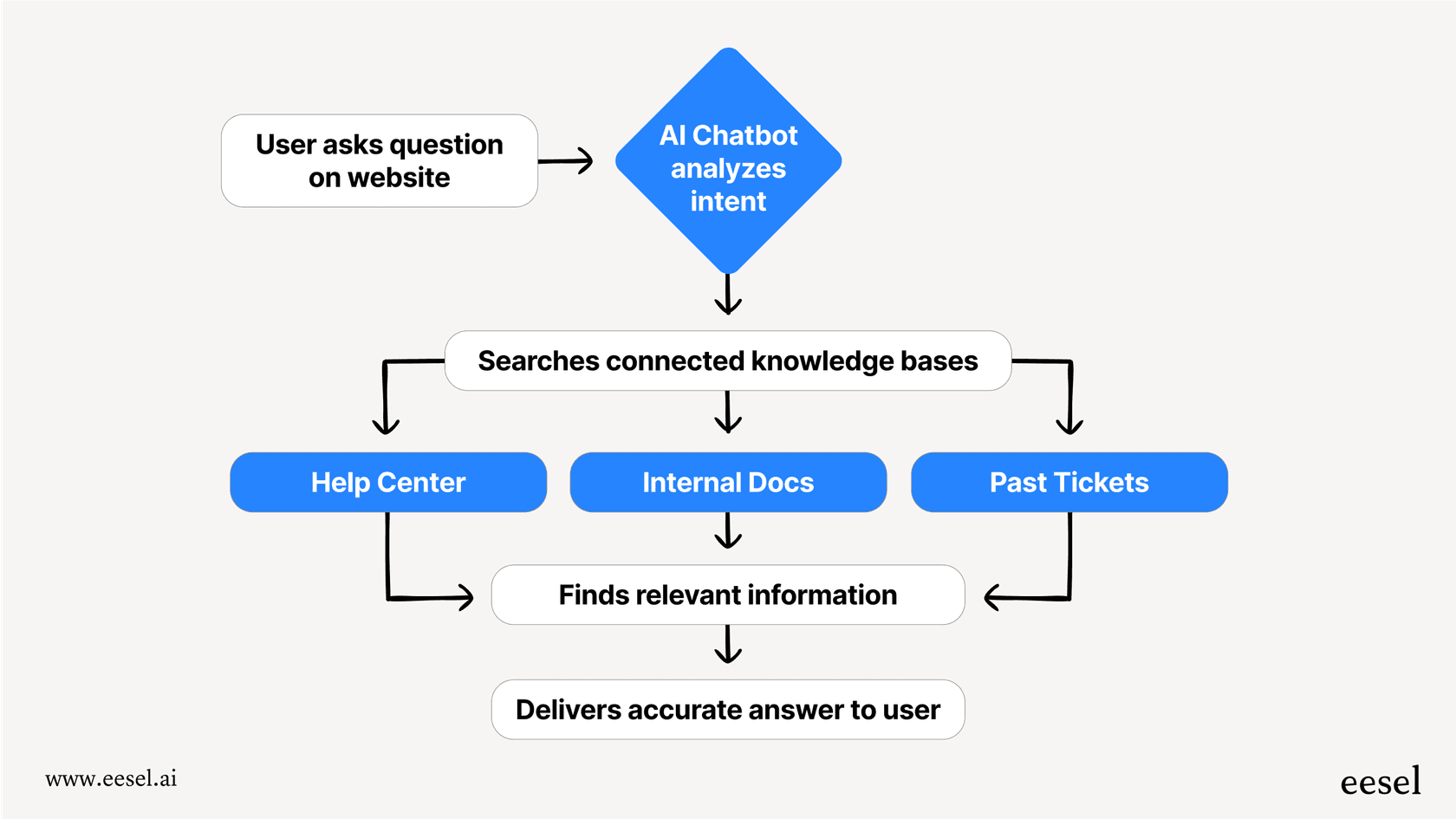
The best part is they don't just spit out pre-written answers. They connect directly to your company's brain your knowledge bases, like help centers, internal documents, and even past support tickets. This allows them to find accurate, relevant answers on the spot, making every conversation genuinely useful.
Key benefits of using an AI chatbot for website
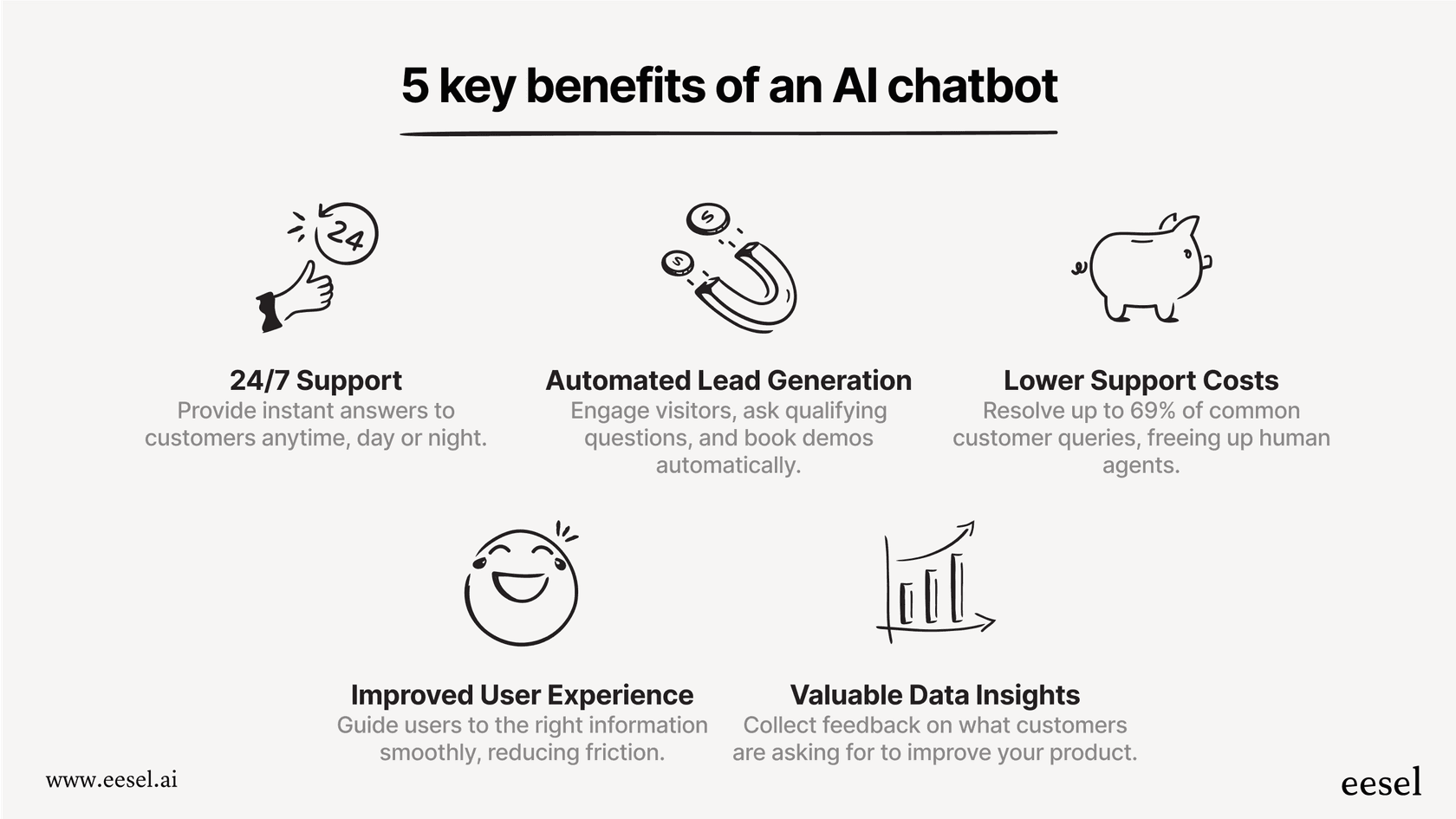
So, what’s in it for you? Adding a chatbot to your website is more than just a cool tech feature. Here are the real benefits you can expect:
- You're always open: Your bot works 24/7. It gives instant support and answers anytime, which is a huge plus for customer happiness, especially if you have customers in different time zones or people browsing late at night.
- Generate more leads, automatically: Instead of waiting for a visitor to fill out a contact form, a chatbot can jump in, ask a few qualifying questions, and even schedule demos or book meetings. It turns casual browsers into real leads.
- Lower your support costs: Chatbots are great at handling the simple, repetitive questions that eat up your support team's time. In fact, research shows a chatbot can resolve 69% of customer chats from start to finish, which frees up your human agents to focus on the tricky issues where they’re truly needed.
- Make your website easier to use: By pointing customers to the right article, product page, or person, chatbots get rid of friction. This smooth experience keeps people on your site and moving in the right direction.
- Get smarter with data: Every chat is a source of valuable information. Your chatbot logs what people are asking, where they're getting stuck, and what they’re interested in. You can use this feedback to make your products, services, and help docs even better.
How we chose the best AI chatbot for website tools
To make sure this list was actually useful, we didn't just pull names out of a hat. We sized up each tool based on a few key things that we know matter to real businesses.
Here's our checklist:
- Plays well with others: How easily does the tool connect to the systems you already rely on? A good chatbot should plug right into your help desk (like Zendesk or Freshdesk), CRM, and e-commerce platforms (like Shopify).
- Actually intelligent: A bot is only as smart as its training data. We looked for tools that can learn from a wide range of your content docs, websites, and especially past support tickets to give answers that are accurate and in context.
- Simple to set up and manage: You shouldn't need a computer science degree to build a chatbot. We prioritized platforms with a straightforward setup, easy-to-use builders, and simple management dashboards that non-technical folks can handle.
- Grows with you: The price needs to be fair and clear. The right tool should scale with your business without costing a fortune.
- Looks and feels like your brand: The bot should feel like a natural part of your team. We looked for tools that let you tweak the bot's personality, match your branding, and set up clear rules for when to hand a conversation over to a human.
Comparison of the top AI chatbot for website platforms
| Platform | Best For | Key Integrations | Pricing Starts At | Free Trial |
|---|---|---|---|---|
| eesel AI | Integrating with existing helpdesks | Zendesk, Freshdesk, Confluence, Shopify | From $299/mo (500 credits) | Yes (100 free credits) |
| ChatBot.com | Building visual conversation flows | LiveChat, Zapier, Messenger | $19/user/mo (annual) | 14 days |
| Denser AI | Source-cited website chatbots and knowledge-base answers | WordPress, Shopify, Slack, Telegram, WhatsApp; Zendesk, Intercom, Freshdesk, HubSpot | Free plan available; paid plans from $39/mo | Yes (free plan, no card required) |
| Nobi | AI sales assistant for ecommerce websites | Shopify, custom product catalogs | From $25/mo | Yes |
| Ada | Large enterprise teams | Salesforce, Zendesk, Oracle | Custom (Contact Sales) | Demo request |
| Botpress | Developers needing custom builds | Slack, Telegram, custom APIs | Free plan available, Paid from $150/mo | Yes (Free plan) |
| Zendesk AI agents | Teams already on Zendesk | Zendesk help center, Google Drive, PDFs | From $55/agent/mo (annual, Suite Team) | 14 days |
| Forethought | Enterprise teams on any helpdesk | Zendesk, Salesforce, ServiceNow, Confluence | Custom (Get a Quote) | Proof of Value |
| Decagon | Enterprise support across chat, voice, and email | Salesforce, Zendesk, Confluence | Custom (Contact Sales) | Demo request |
The 9 best AI chatbot for website tools in 2026
Alright, let's get into the details. Here are our top picks for adding an AI chatbot to your website this year.
1. eesel AI (Best for integrating with existing helpdesks)
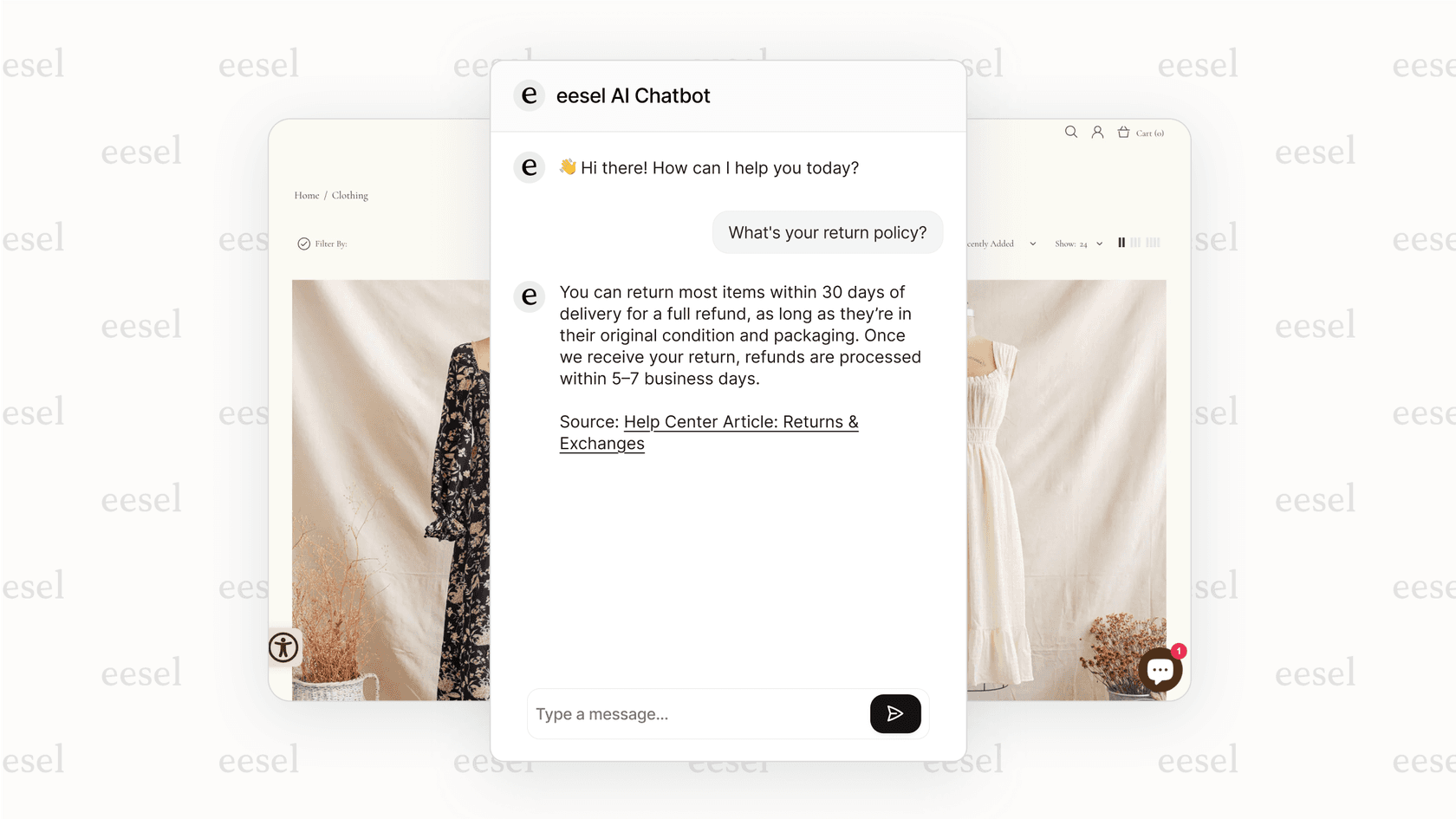
eesel AI is different because it works as a smart layer on top of the tools you already use, instead of making you switch. It connects directly to your help desk (like Zendesk or Gorgias), internal wikis (like Confluence or Google Docs), and other places your information lives. This means you can avoid a messy and expensive migration and get more value out of the knowledge you already have. Its AI Chatbot can be added to any website to answer questions by pulling information from your help center, macros, and even product catalogs from platforms like Shopify.
Pros:
- Learns from your actual business data: It trains on past tickets, internal docs, and macros, leading to incredibly accurate responses that generic bots just can't provide.
- No need to rip and replace: It improves your current help desk and other tools, protecting your investment and letting you skip a painful platform switch.
- Test before you launch: You can run the bot on your past support tickets in a safe "sandbox" mode. This lets you see how well it works and calculate your ROI before it ever talks to a real customer.
Cons:
- It’s built for businesses that already have a help desk and a knowledge base set up, as it needs that content to learn from.
Pricing: One fixed monthly price, from $299/month for 500 credits (1 credit per ticket or chat session, however long), with no per-seat fees. New accounts start with 100 free credits and no card. If you run out, agents pause until credits reset, or you can turn on overage with a monthly cap you set.
2. ChatBot.com (Best for visual workflow building)
ChatBot.com is built specifically for creating chatbots using a drag-and-drop visual builder. It comes with a bunch of pre-made templates for sales, support, and even recruiting, and it works closely with its sister product, LiveChat.
Pros:
- Really good for creating guided conversations, which is useful for structured tasks like lead qualification.
- The templates help you get a bot up and running much faster.
Cons:
- Its AI Agent now answers from a knowledge hub (website scans, uploaded files, articles, KnowledgeBase, Zendesk), but the resolutions are metered: 10 a month on Essential and 200 on Growth, with extras at $0.99 each. On the entry plan that allowance runs out fast if the bot is doing real volume.
Pricing: Starts at $19 per user/month billed annually ($25 monthly), with the Growth plan at $79/month.
3. Denser AI (Best for source-cited website chatbot answers)
Denser AI is an AI support agent with a no-code website chatbot that answers customer questions using a business's website, PDFs, and other documentation. It retrieves relevant information from approved sources and cites the passages behind its answers, helping visitors verify responses rather than relying on manually scripted conversations. Teams can test their chatbot in a dashboard before deploying it through a website snippet or iframe, with React and REST API options also available.
Denser also supports lead capture and knowledge-gap reporting, while its Standard plan adds an integrated helpdesk with ticket management, human escalation, and integrations with platforms such as Zendesk, Intercom, Freshdesk, and HubSpot.
Pros:
- Answers customer questions using website content and documents, with source citations that visitors can verify.
- Offers no-code website deployment, lead capture, and knowledge-gap reporting, with additional helpdesk and human-handoff features available on higher-tier plans.
Cons:
- Businesses with large knowledge bases or higher support volumes may need a higher-tier plan to accommodate their requirements.
Pricing: Denser offers a free plan with no credit card required. Paid plans start at $39/month, while the Standard plan, which includes Helpdesk features and ticket integrations, starts at $119/month. Paid plans offer a seven-day trial that requires a credit card. See Denser AI's pricing page for current plan details.
4. Nobi (Best for ecommerce product discovery)
Nobi is an AI sales associate built specifically for ecommerce websites. Instead of making shoppers dig through filters and search bars, Nobi lets them describe what they’re looking for in plain language and guides them to the right product through natural conversation. It connects directly to your product catalog and learns your inventory, so it can answer questions about fit, materials, sizing, and availability on the spot.
Pros:
- Purpose-built for ecommerce - it understands product intent, not just keywords, which means fewer dead-end searches and more conversions.
- No revenue share or tiered AI feature gating - all customers get the same features regardless of plan size.
Cons:
- It’s focused on product discovery and sales, so it’s not the right pick if your main need is customer support or ticket resolution.
Pricing: Starts at $25/month, which includes 2,500 searches. Usage-based pricing beyond that with no surprise tiers.
5. Ada (Best for enterprise-level automation)
Ada is an enterprise-level chatbot platform built for big companies with complex needs. It offers powerful, highly personalized automation that can manage tricky customer questions across different channels.
Pros:
- Very scalable and customizable with deep integrations, making it a solid choice for large, busy support teams.
Cons:
- There's no self-serve path. Ada's pricing page is a sales-qualification form gated on roughly 300,000 conversations a year, so smaller teams aren't the fit, and rollout is a project rather than a signup.
Pricing: Custom, quoted by Ada's sales team after a consultation. No rates are published.
6. Botpress (Best for developers and custom builds)
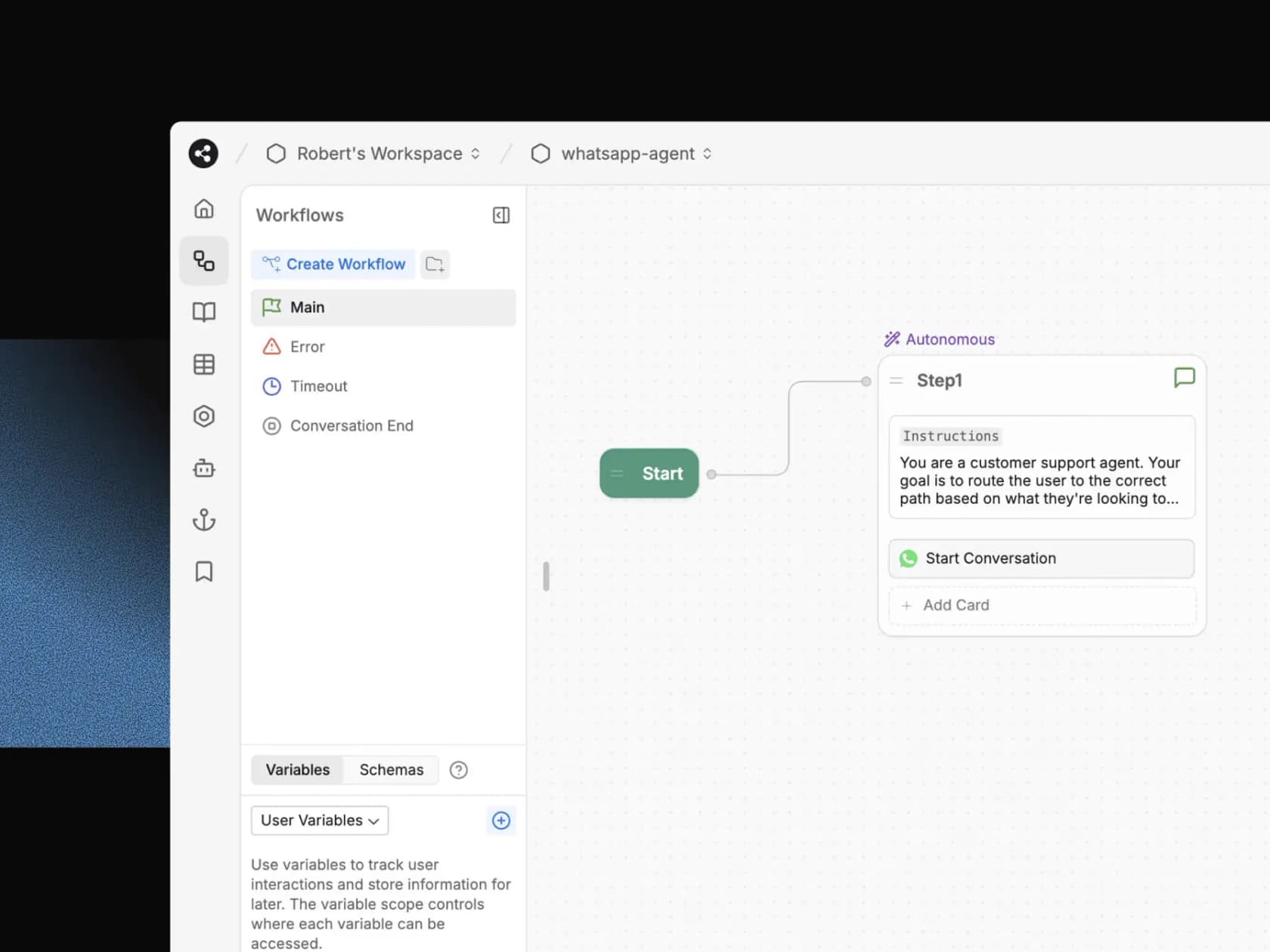
Botpress is a developer-first platform, open-source in its v12 days and now sold as a hosted cloud product, that gives developers deep control over how their AI chatbots are built. It has a visual flow editor but also allows for deep customization with code, giving you the best of both worlds if you have the technical skills.
Pros:
- Extremely flexible. You can choose which AI model to use and have full control over the bot's logic and actions.
Cons:
- It has a much steeper learning curve and requires more technical work to get it running and keep it maintained compared to other no-code platforms.
Pricing: A free plan covers 100 conversations a month with no top-ups. Paid plans start at $150/month for Plus (250 conversations, billed annually), rising to $750/month for Team.
7. Zendesk AI agents (Best for teams already on Zendesk)
Zendesk AI agents are built into the Zendesk Suite and answer customers over web and mobile messaging, email, and voice. They ground answers in your Zendesk help center and in external sources like Google Drive or PDFs, and you describe workflows in natural language instead of building scripted flows.
Pros:
- If your team already works in Zendesk, AI agents come with the Suite plans, so there is no separate tool to connect.
- Usage is measured in automated resolutions, so you pay for requests the AI agent resolved without escalation to a human agent.
Cons:
- Each account gets an allowance of automated resolutions based on its plan, and you buy more past that, so the cost moves with volume. Zendesk's own AI agents run inside Zendesk; for teams on another helpdesk, Zendesk now offers Forethought as a standalone product.
Pricing: Suite Team, the first plan that includes AI agents, starts at $55 per agent/month billed annually, and Suite Professional is $115 per agent/month. Automated resolutions beyond the plan allowance cost extra. There is a 14-day free trial with no credit card.
8. Forethought (Best for enterprise teams on any helpdesk)
Forethought builds AI agents for chat, email, voice, and Slack that sit on top of your existing helpdesk. It lists 70+ integrations, including Zendesk, Salesforce, ServiceNow, Freshworks, and Gorgias, plus knowledge sources like Confluence, Notion, and Guru. Zendesk, which now sells it, describes it as "an independent suite of omnichannel AI tools" for support teams, "even those that don’t use the Zendesk platform."
Pros:
- Works across a long list of helpdesks and knowledge tools, so you can keep your current stack.
- The Enterprise plan adds knowledge gap detection and AI article creation based on real ticket and chat data.
Cons:
- There is no self-serve plan or free trial. Every tier is quote-based, and Forethought runs a Proof of Value on your data instead of a trial. AI agents for chat come on the Team plan, while email, voice, and Slack start at Professional.
Pricing: Quote-only. Forethought's pricing page describes a blend of platform access fees and an outcome-based cost, with no published rates.
9. Decagon (Best for enterprise support across chat, voice, and email)
Decagon is an enterprise AI agent platform that runs chat, voice, and email from one layer. You define agent workflows in natural language as Agent Operating Procedures (AOPs). Its chat product works across web live chat, SMS, and WhatsApp, with a branded chat interface, and its integrations sync knowledge from Confluence and Contentful, connect to Salesforce and Zendesk, and support MCP and custom APIs.
Pros:
- Decagon pitches AOPs as a way to change how the agent behaves without an engineering sprint or a vendor ticket.
- Testing, simulations, and live A/B experiments are built in, so you can check changes before and after they go live.
Cons:
- There's no self-serve signup or published pricing. Access starts with a demo request, and the customers Decagon features are large enterprises, so it's a project rather than a quick install for a small site.
Pricing: Not published. Decagon quotes pricing after a demo.
3 essential setup tips for your AI chatbot for website
Getting your chatbot live is just the beginning. To make it genuinely helpful, keep these three tips in mind.
-
Start with a clear goal: Don't try to make your chatbot do everything at once. Begin with a specific, manageable goal, like answering your top 10 most common questions or capturing leads from your pricing page. A focused bot works better and is easier to manage.
-
Plan for a smooth human handover: No bot can answer every single question, and that's perfectly fine. The trick is to create a clear and easy way to pass the conversation to a human. The chatbot should send the entire chat history over to the agent so the customer doesn't have to repeat themselves.
-
Test and improve with real data: Your chatbot is never really "done." Check your conversation logs and analytics regularly to see where people are getting stuck, what questions your bot can't answer, and which chats are most successful. Use that information to update your knowledge base and tweak your chatbot's responses.
The verdict: Choosing the right AI chatbot for your website
At the end of the day, the right chatbot for you comes down to the tools you already use and what you want to achieve.
If you want a website chatbot that answers from your own content and shows its sources, Denser AI is worth considering. Check which plan includes the human handoff and helpdesk features your team needs.
However, if your team is already working out of a help desk like Zendesk or Freshdesk and has knowledge scattered across tools like Confluence and Google Docs, a layered tool is a much smarter and less disruptive choice.
This is where eesel AI really shines. It's the best option for established support and IT teams who want to add smart, context-aware automation without ripping out the tools they already know and use every day. It makes your current workflow better instead of forcing you into a new one.
Ready to add a smart chatbot that learns from your real business knowledge? Book a demo of eesel AI or start your free trial and see how you can automate your support in minutes, not months.
Frequently asked questions
I'm not very technical, so how difficult is it to get an AI chatbot for website up and running?
Most modern platforms are designed to be user-friendly and don't require deep technical skills. They usually provide a simple code snippet to copy and paste into your site, and many offer direct plugins for popular systems like WordPress or Shopify for a no-code setup.
How do we make sure our AI chatbot for website provides accurate answers instead of just guessing?
You ensure accuracy by training the bot exclusively on your own trusted company knowledge. By connecting it to your help center, internal documents, and past support tickets, the bot learns to answer questions based only on the correct information you've provided.
Our main goal is lead generation, so can an AI chatbot for website actually help with sales?
Absolutely. A chatbot is a powerful tool for lead generation that can proactively engage visitors, ask qualifying questions to identify strong prospects, and even schedule demos directly in the chat, converting passive browsers into active leads.
What happens when the AI chatbot for website can't answer a customer's question?
The best chatbots have a clear escalation plan to pass complex conversations to a human agent. This handover should be seamless, providing the support agent with the full chat history so the customer doesn't have to repeat themselves.
We already use a specific help desk and CRM; will a new AI chatbot for website work with those tools?
Yes, integration is a critical feature for top chatbot tools. Many are built to connect directly with popular CRMs and help desks like Salesforce, Zendesk, and Freshdesk, ensuring the bot fits smoothly into your existing workflow.
For a small business, what is a realistic budget for a good AI chatbot for website?
The cost scales with your needs, making it accessible for any budget. You can start with free or low-cost plans (under $50/month) for basic features, while more advanced tools with deep integrations typically range from $200-$500 per month.