

The three ways to add an AI chatbot to Zoho Desk
Before comparing tools, it helps to see where a bot can actually live. When people say "AI chatbot for Zoho Desk," they usually mean one of three different things, and mixing them up is how teams end up paying for the wrong thing.
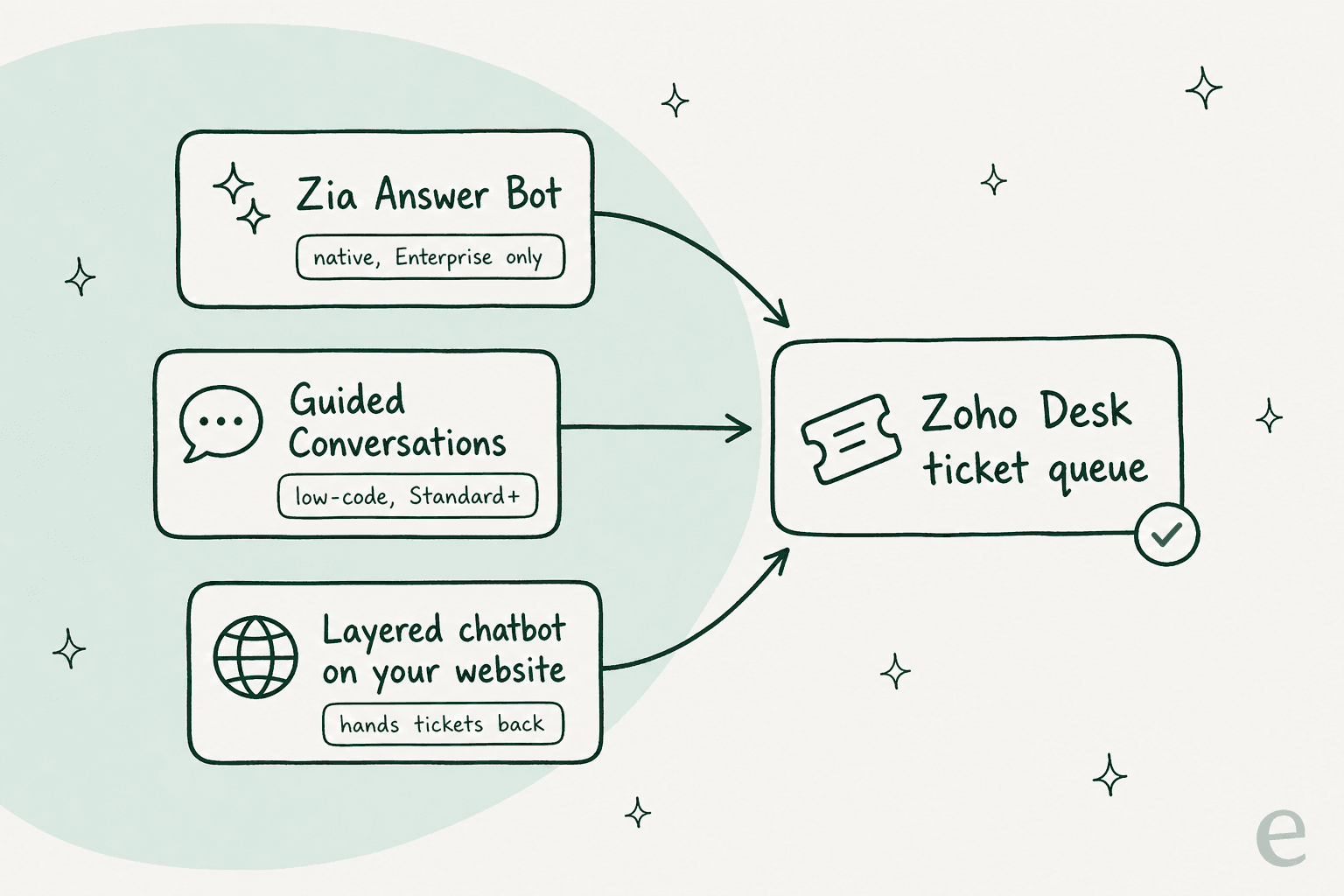
- Native Zia Answer Bot lives inside Zoho Desk itself and answers from your knowledge base. It's the "official" AI chatbot, and the version inside your website widget is Enterprise-only.
- Guided Conversations is a low-code, rules-driven bot with optional AI blocks. You draw the flow; Zia adds context and sentiment where you want it.
- A layered chatbot sits on your website or help center, deflects what it can, and creates a Zoho Desk ticket for anything it can't. It doesn't care which helpdesk you run behind it.
Each of these is a legitimate answer depending on your plan, your budget, and how much scripting you're willing to do. Let's take them one at a time.
Route 1: Zoho's native Zia Answer Bot
Zia is Zoho Desk's built-in AI, and the Answer Bot is its customer-facing chatbot. It surfaces relevant answers to customers (and agents) based on your existing knowledge base articles, and with Zia's generative layer switched on, it returns conversational replies rather than raw article snippets. You can deploy it across your website and messaging channels, and it can draw on your knowledge base, open-domain data, or both.
On paper, this is exactly what most people picture. The problem is where it sits in the plan lineup.
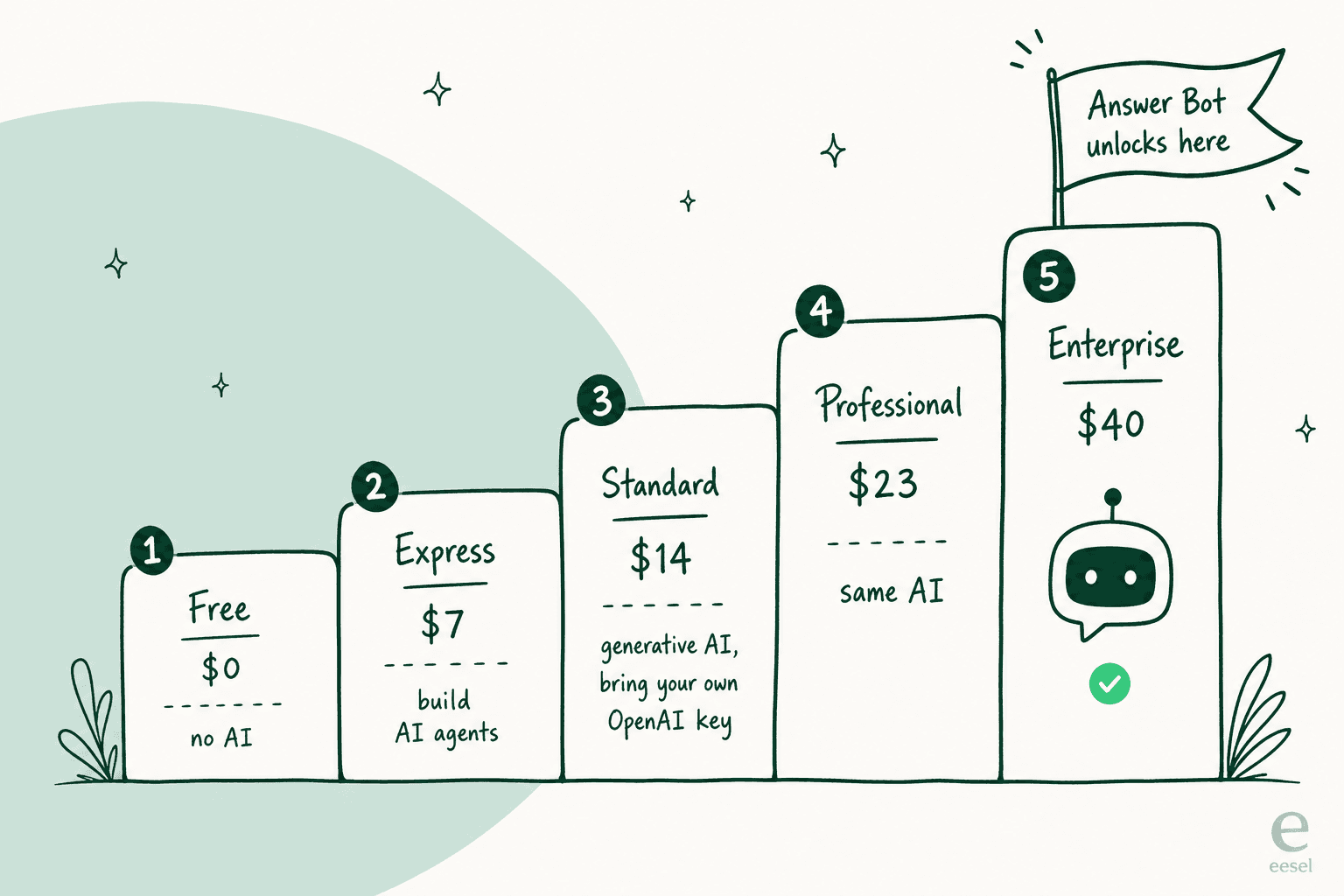
The web-widget version of Answer Bot is Enterprise-only (Answer Bot itself starts at Standard). To get Zoho's native AI chatbot answering customers inside your website widget, you're on the Enterprise plan at $40 per user/month (billed annually). For a five-person team, that's $2,400 a year before you count light-agent add-ons or taxes. One G2 review synthesis put it bluntly: advanced Zia features like Answer Bot and sentiment analysis are "gated behind the Enterprise plan, pricing out the SMB segment that represents Zoho's core market."
My take: if you're already on Enterprise, absolutely turn the Answer Bot on. If you're on Standard or Professional and the only reason you'd upgrade is the website-widget bot, do the math first, because at larger team sizes a layered chatbot can cost less than the per-seat jump. For the full tier-by-tier breakdown, our Zoho Desk pricing guide and Zoho Desk AI pricing explainer lay it all out.
Route 2: Guided Conversations (the low-code bot)
Guided Conversations is Zoho's low-code self-service chatbot. You build the flow visually, and Zia plugs in as "AI blocks" that maintain context, read customer sentiment, and trigger contextual actions inside an otherwise deterministic flow. It's the option for teams that want tight control over exactly what the bot says at each step.
The trade-off is effort. A guided bot only knows the paths you draw for it, so it shines for structured, predictable journeys (order status, returns, "reset my password") and struggles the moment a customer asks something off-script. If your support is mostly a handful of repeatable flows, this is a genuinely good fit and it starts lower down the plan ladder. If your customers ask a wide range of unpredictable questions, you'll spend a lot of time maintaining branches. Our guide to Guided Conversations goes deeper on building them.
Route 3: Bring your own AI (the ChatGPT bolt-on)
Here's the route Zoho itself points you toward for smarter answers: connect your own OpenAI API key. Generative AI (reply suggestions, summaries, content generation) becomes available from the Standard tier ($14/user/month), but only if you supply your own key. Zoho also officially supports a ChatGPT integration as an alternate generative backend.
This is popular enough that it's a recurring theme in the Zoho community. One user described their setup plainly:
"Currently, we are using Zia, along with integrations that can leverage external generative AI models where required (ChatGPT). At this stage Zia alone isn't enough."

That "Zia alone isn't enough" is the tell. Bolting ChatGPT on gets you better phrasing, but you're still stitching together your own answer quality, and a raw OpenAI key doesn't ground answers in your knowledge base or know when to escalate. Some teams go further and wire in n8n or a custom MCP setup, which works but is squarely developer territory.
What Zoho's native AI actually gets wrong
I want to be fair here, because Zia does real things well. Ticket summaries, tone analysis, and auto-tagging are legitimately useful, and Zoho is refreshingly clear about their data policy: they "never use customer data to train" their model. The Zia Agents lineup (Support Specialist, Resolution Expert, and so on) is an ambitious roadmap.
But when it comes to the chatbot answering customers, the user voice is consistent, and it's not glowing:
"Desk will let you create a knowledgebase and has a LLama-based AI. When I last tried it, it did not impress."
"I've started using some of Zia's features. The summary for a ticket is ok but struggles when there is a lot of content, it has a limit on length."
Three themes come up again and again across review sites:
- Answer quality is hit-or-miss. Zia's G2 profile sits at just 4.0/5 from a small review base, and reviewers flag answers that need manual verification.
- Ecosystem lock-in. Zia can't reach into content living in Google Docs, Confluence, or Slack, so if your real knowledge is scattered outside Zoho, the bot can't see it.
- The good stuff is gated. As covered above, the website-widget Answer Bot needs Enterprise, which prices out exactly the small teams who'd benefit most.
None of this makes Zoho Desk a bad helpdesk. It's a genuinely strong, low-cost ticketing system, and users say so. It just means the bot is often the weakest link, which is why the layered route exists.
Which route fits you?
There's no single right answer here. It depends on your plan, your budget, and how much of your knowledge lives inside Zoho versus scattered across other tools. Here's a quick way to narrow it down.
Pick your Zoho Desk chatbot route
If you landed on the layered route, here's what that actually looks like.
Route 3, done properly: a chatbot in front of Zoho Desk
The idea is simple: instead of trying to squeeze AI into Zoho Desk, you put an AI chatbot in front of it. The bot lives on your website, help center, or a shareable link, answers what it can from your knowledge, and quietly opens a Zoho Desk ticket for anything it can't handle. Your agents keep working exactly where they already do.
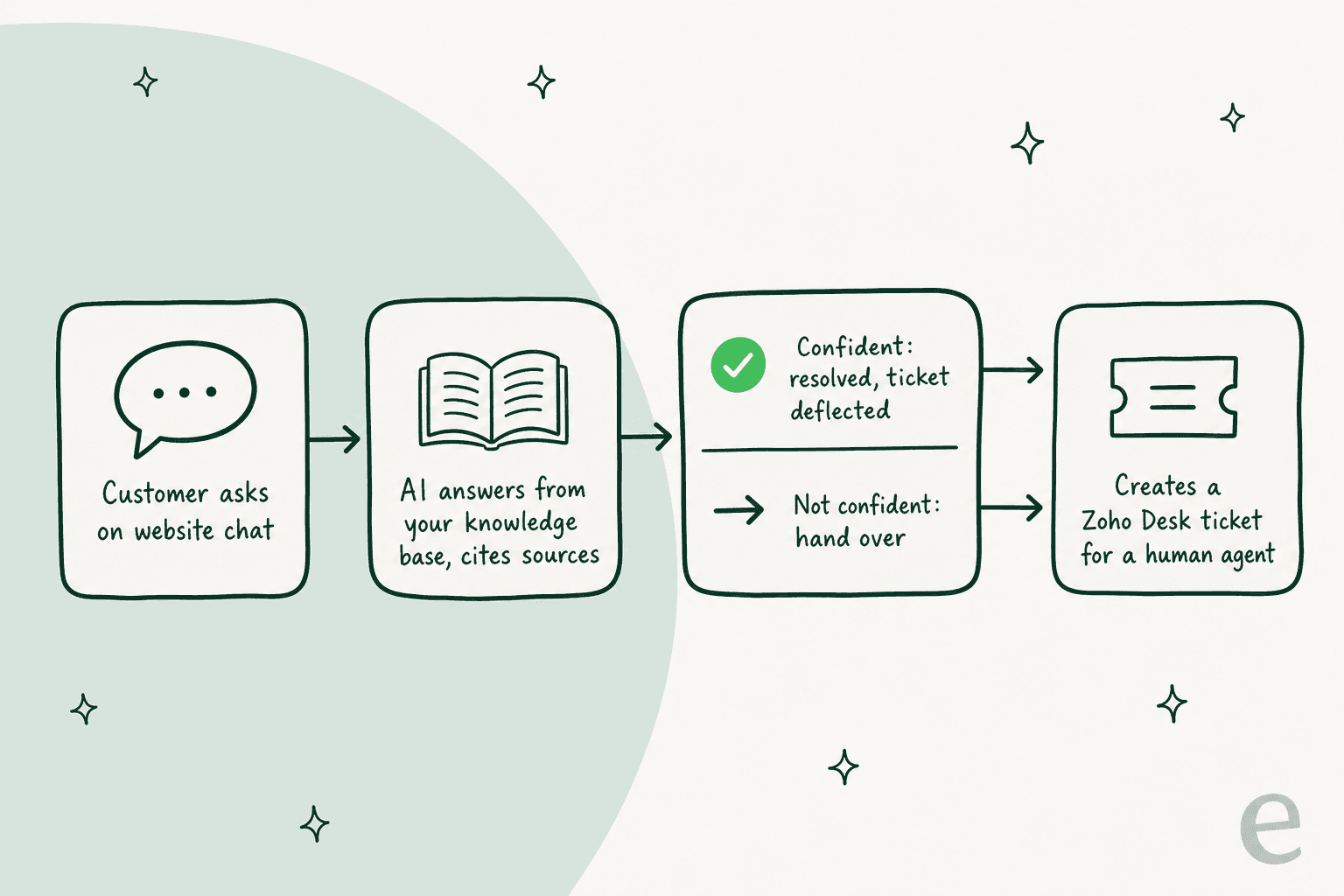
This is the pattern I've watched work over and over. We've spent the last few years putting AI chatbots on live support queues, and the failure mode is always the same: a confident-sounding bot that answers everything, including the things it shouldn't. The fix isn't a smarter model, it's confidence-based routing, where the bot only replies when it's sure and hands the rest to a human.
One real example from our own logs (anonymized): an end-user on an SEO tool's website chat bubble asked two documentation questions, got clean self-serve answers, then typed "Can I talk to a human?" The bot handed over instantly, the moment it was asked. Two tickets deflected, one clean escalation, zero frustration. That's the whole game.
Here's how eesel approaches the layered route specifically:
- It trains on knowledge Zia can't see. Your help center, Google Docs, Confluence, Notion, and your past resolved tickets, all in one knowledge base. That last part matters: it learns from how your team actually solved things, not just the help articles.
- You simulate before you ship. You can run the bot against thousands of your historical tickets to see exactly what it would have answered, find the gaps, and fix them, all before a single customer sees it. This is the step that separates a bot you trust from a bot you cross your fingers on.
- It deflects, then hands off cleanly. Unresolved chats escalate by email, which lands in your Zoho Desk queue as a normal ticket. To your agents, it just looks like a well-summarized ticket appeared.
- One fixed monthly price, no per-seat fee. eesel is from $299/month for 500 credits (1 credit per ticket or chat) with no platform fee, which can be cheaper than the Enterprise per-seat jump for a growing team.
One thing worth knowing: eesel connects to Zoho Desk as a helpdesk integration, like it does for Zendesk or Freshdesk. For this use case I'd run it as the customer-facing layer in front of your Zoho Desk, with handoffs landing in your Zoho Desk queue. For a lot of teams that's actually cleaner, since the bot lives where your customers already are (your site), not buried in a help widget.
How to set up a layered chatbot (the quick version)
If you go the layered route, the setup is genuinely a same-afternoon job:
- Connect your knowledge. Point the bot at your help center URL, and add Google Docs, Confluence, or Notion if that's where your real answers live. It imports and keeps them in sync.
- Simulate on past tickets. Run it against your historical Zoho Desk tickets to see coverage by topic and catch weak spots before go-live.
- Set the escalation rule. Tell it to hand off by email (into Zoho Desk) on low confidence or when a customer asks for a person. Nothing falls through.
- Drop it on your site. Paste one script tag for a chat bubble, embed it inline in a docs page, or just share a public chat link. No code beyond that.
Compare that to standing up a custom OpenAI-plus-n8n pipeline, and you can see why most teams don't build it themselves.
Try eesel for Zoho Desk
If you're on Zoho Desk and want an AI chatbot without jumping to the $40 Enterprise tier just to unlock one, eesel is worth a look. It works like a new hire that plugs into your website in a few minutes, already knows your help center and your past tickets, on one fixed monthly price. You can simulate it on your real ticket history before it ever answers a live customer, so you see the deflection rate before you commit. It's free to try with 100 credits, and there's no per-seat fee to do the math on.
Still weighing the native route? Our best AI for Zoho Desk roundup and Zoho Desk alternatives both go wider if you'd rather compare everything side by side.