

Why do I sort patient messages into lanes before picking a tool?
Most telehealth support teams I talk to start by comparing vendors. I would start with a list of the last 200 patient messages and a pen. The tool matters far less than where you draw the lines, and AI customer service for healthcare starts from the same place.
Here is why I am firm about this. In March 2026 a US physical therapy platform on Zendesk, around 500 tickets a month, stopped a demo on one question: would we sign a BAA? We could not offer one then, and that was the end of it. It is the clearest example I have of a compliance question deciding a deal in the first call, which is why I now ask it first. We have also spent years watching confident-sounding bots give a wrong answer to a customer, which is why every rollout we run is simulated against historical tickets before it goes live. In telehealth the cost of a wrong answer is higher than in most queues, so the sorting has to be stricter.
I treat HIPAA compliance and patient safety as two separate obligations. A message can be perfectly protected and the advice inside it can still be unsafe. So I sort in two passes. First, what does the AI need to see to do this job? Second, what happens if the answer is wrong?
Which patient requests can AI handle, and which can't it?
Three lanes cover almost everything a telehealth inbox sees. Lane one is AI answering on its own, for requests where the worst case is an annoyed patient. Lane two is AI preparing the work and a person sending it (what the industry calls human-in-the-loop), for requests that touch money, coverage or medication paperwork. Lane three is clinical staff only, with the AI limited to acknowledging receipt and passing along a summary.
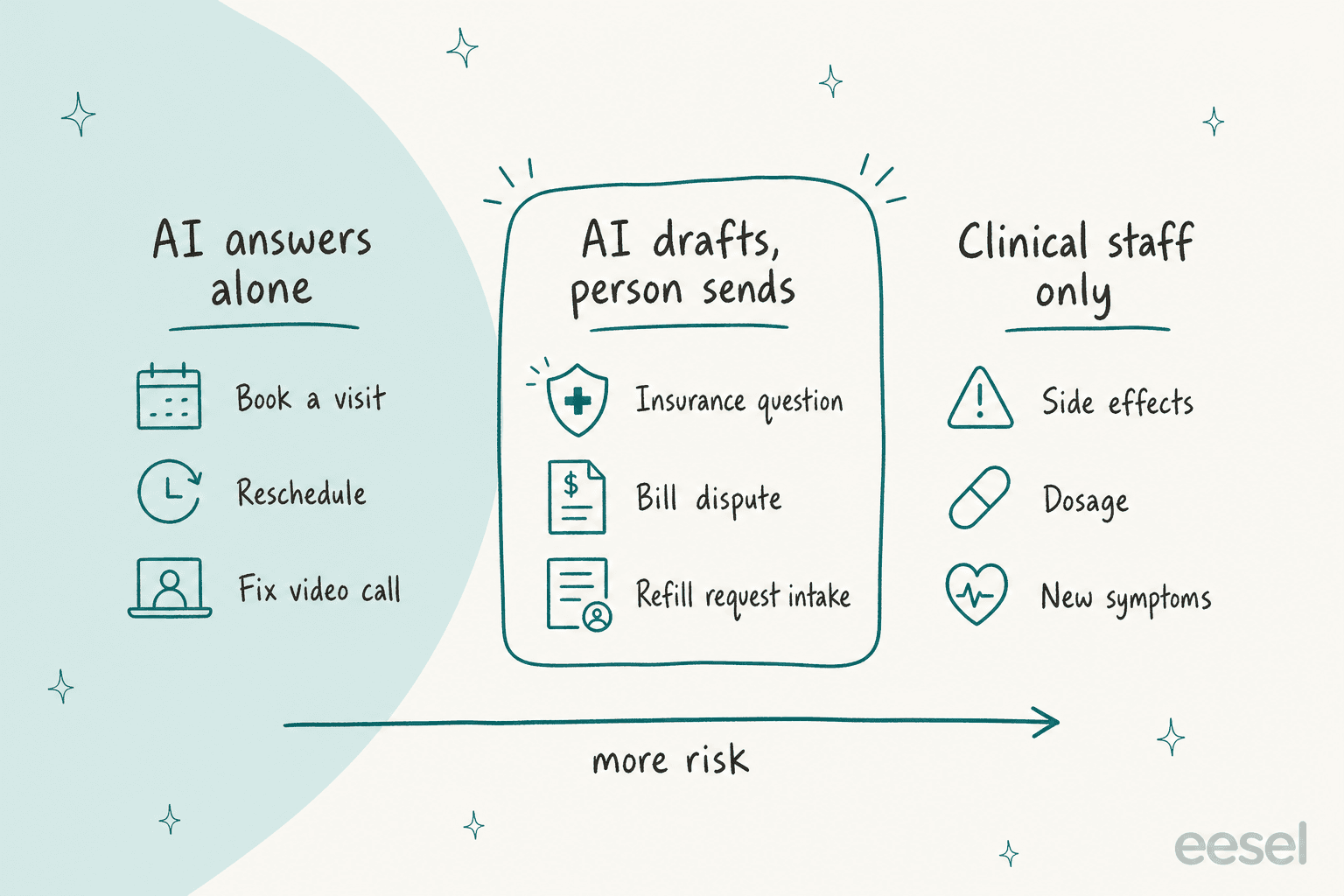
| Patient request | Risk | Lane | What the AI does | Who finishes it |
|---|---|---|---|---|
| Book or reschedule a visit | Low | AI answers alone | Offers open slots, confirms, sends the join link | Nobody, unless no slot fits |
| Can't join the video call | Low | AI answers alone | Walks through browser, camera and bandwidth steps from your help center | Support agent if steps fail |
| Insurance or coverage question | Medium | AI drafts, person sends | Pulls plan facts and drafts a reply | Billing or intake agent |
| Billing dispute or double charge | Medium | AI drafts, person sends | Gathers the charges, drafts the reply | Billing agent approves refunds |
| Refill request | Medium | AI drafts, person sends | Collects drug name, pharmacy and last fill date, routes to the clinical queue | Clinical staff decide, always |
| Side effects, dosage, new symptoms | High | Clinical staff only | Acknowledges, flags urgency, hands over a summary | Nurse or clinician |
The refill row is where I see teams get nervous, and it is the one I would never automate past intake. The AI collects the request and forwards it. It never approves, never suggests a dose and never says "that should be fine." The FDA's clinical decision support guidance sets criteria for decision-support software that falls outside the device definition, and its FAQ says software meant to support time-critical decision making does not meet the definition of non-device CDS. I am a support person, not a lawyer, so I do not try to argue where that line sits for a patient-facing bot. I keep clinical advice out of the AI lane entirely and the question never comes up.
Does the helpdesk or the AI tool need to sign a BAA?
If the tool creates, receives, maintains or transmits patient information for you, yes. The part that surprises people is how far that reaches. HHS's cloud computing guidance says that when a covered entity uses a cloud provider to store or process ePHI, the provider is a business associate, and that this holds "even if the entity cannot actually view the ePHI." Holding only encrypted data, with no key, does not exempt it.
For a support stack that means a chain, not a single contract. The helpdesk holds the tickets. The AI layer reads them. The chat widget on your site captures what patients type before a ticket even exists. HHS also says in a separate FAQ that the rules do not require a provider to hand you its security documentation, but you can ask for it through the BAA or a service agreement. I always ask.
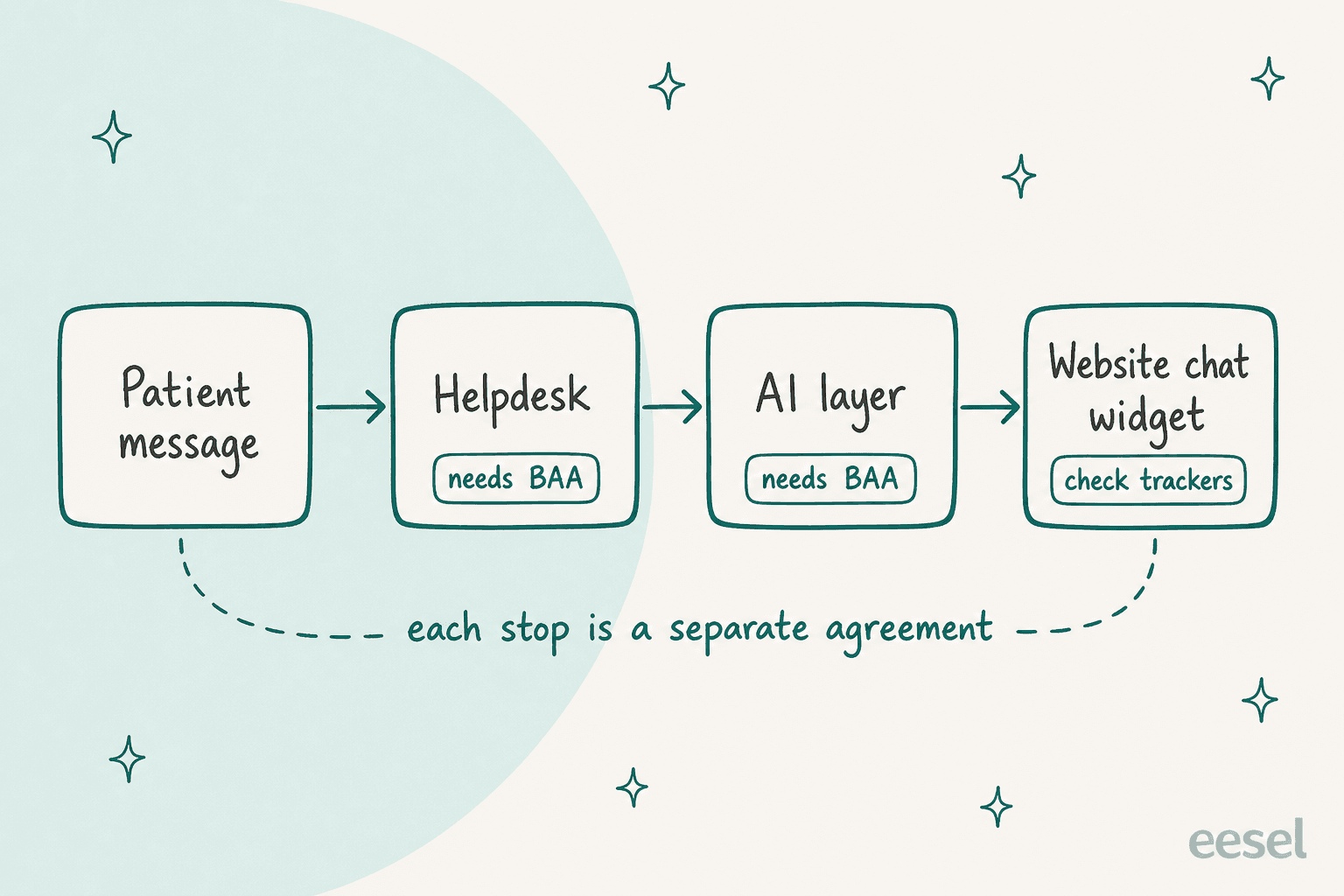
The minimum necessary standard is the other half of the design. HHS says covered entities must take reasonable steps to limit use and disclosure of PHI to the minimum needed for the purpose, and that an entity's policies should identify who needs access and for what. For an AI agent, that is a scoping question: a rescheduling flow needs a name and an appointment slot, not a diagnosis. Give each lane only the fields it needs, and the blast radius of a mistake shrinks with it. If you want the longer version, my guide to HIPAA-compliant AI goes through the architecture.
One more practical point from the community. A commenter on Hacker News described how healthcare organizations actually think about this:
"... there is an extreme abundance of caution in the healthcare industry regarding everything surrounding HIPAA."

That caution is rational, and it is why a vendor that answers "we sign a BAA, here is the plan and here is what it covers" in one email beats one with a better demo.
What do the big helpdesks say about HIPAA and AI?
I only trust a HIPAA claim when it is on the vendor's own page, so here is what the pages say, as of October 2026. Check the live page before you sign anything, because these terms move.
| Helpdesk | Path to a BAA, per the vendor | AI and add-ons | Watch for |
|---|---|---|---|
| Zendesk | Advanced Compliance add-on on Suite Professional, Enterprise or Enterprise Plus, then sign the BAA | AI Agents - Advanced, Contact Center and Forethought AI agents are listed as HIPAA-enabled add-ons | Marketplace apps and third-party services are not covered; Contact Center users also need a BAA with AWS |
| Freshdesk | The plan table ticks Enterprise and Enterprise Omnichannel only | The guide scopes the BAA to Freshdesk, Freshchat, Freshcaller and Omnichannel, and says other products are not covered | Mandatory settings include IP whitelisting and SSO or a strong password policy; default fields cannot be encrypted, so PHI goes in encrypted custom fields |
| Help Scout | HIPAA support is only included in the Pro plan, with a signed BAA | Its MCP page says the BAA does not cover your AI provider | Integrations that could pass PHI back, such as a CRM, need their own BAA |
| eesel | Business Associate Agreements for Enterprise customers, after a review of how you will use eesel with health information | Agents run inside your helpdesk, any action can wait for approval | SOC 2 Type II audit in progress; talk to eesel before connecting any PHI |
Two things stand out. First, the plan you need for a BAA is often not the plan you are on. A team on a lower Zendesk Suite tier or on Freshdesk Pro may find the compliance conversation starts with an upgrade. Second, the AI is often the weak link in the chain, not the helpdesk. Help Scout says it plainly: your agreement with them does not stretch to the AI provider you connect. Zendesk's list is clearer about its own AI add-ons but still excludes third-party apps. If you are comparing the AI side of these tools, my notes on Zendesk AI agents, Freshdesk's AI agent and Help Scout AI cover what each does once the paperwork is done.
Is your website chat widget a HIPAA risk?
It can be, and this is the one I would check first because it is the easiest to get wrong without anyone noticing. HHS's online tracking technologies bulletin says tracking technologies on a user-authenticated page, such as a patient portal or telehealth platform, generally have access to PHI. It also says a tracking technology on an unauthenticated page that lets someone schedule an appointment or use a symptom checker may have access to PHI, for example an email address or the reason a person typed in. Vendors that receive that data are business associates and need a BAA.
One caveat, because the situation moved. In June 2024 a federal court vacated part of that bulletin, the portion about connecting an IP address with a visit to an unauthenticated page about a health condition or provider, and HHS said it was evaluating next steps. The parts about login pages, portals and scheduling tools were not part of that ruling as the page describes it. The FTC and HHS also wrote to about 130 providers in 2023 about pixels and analytics scripts, and the FTC noted that companies not covered by HIPAA still answer for health data leaks, citing its actions against BetterHelp and GoodRx.
My practical rule: before you add an AI chat widget, list every script on the page that hosts it. If an ad pixel sits next to a box where a patient types "I need to renew my anxiety medication," you have a problem no BAA with your helpdesk fixes. Our guide to adding an AI agent to a website covers the install paths, and the chat bubble integration is one of them.
Where is the safety line, and what happens at 2am?
Safety is not a HIPAA feature. A tool can encrypt everything and still tell a patient the wrong thing. So I build three safeguards that have nothing to do with the BAA.
The first is a red-flag check that runs before any lane logic. If the message contains words like chest pain, can't breathe or overdose, the AI stops, tells the patient to contact emergency services, and triggers escalation to a person. The wording of that notice is a clinical decision, so a clinician writes it, not the support team and not the AI.
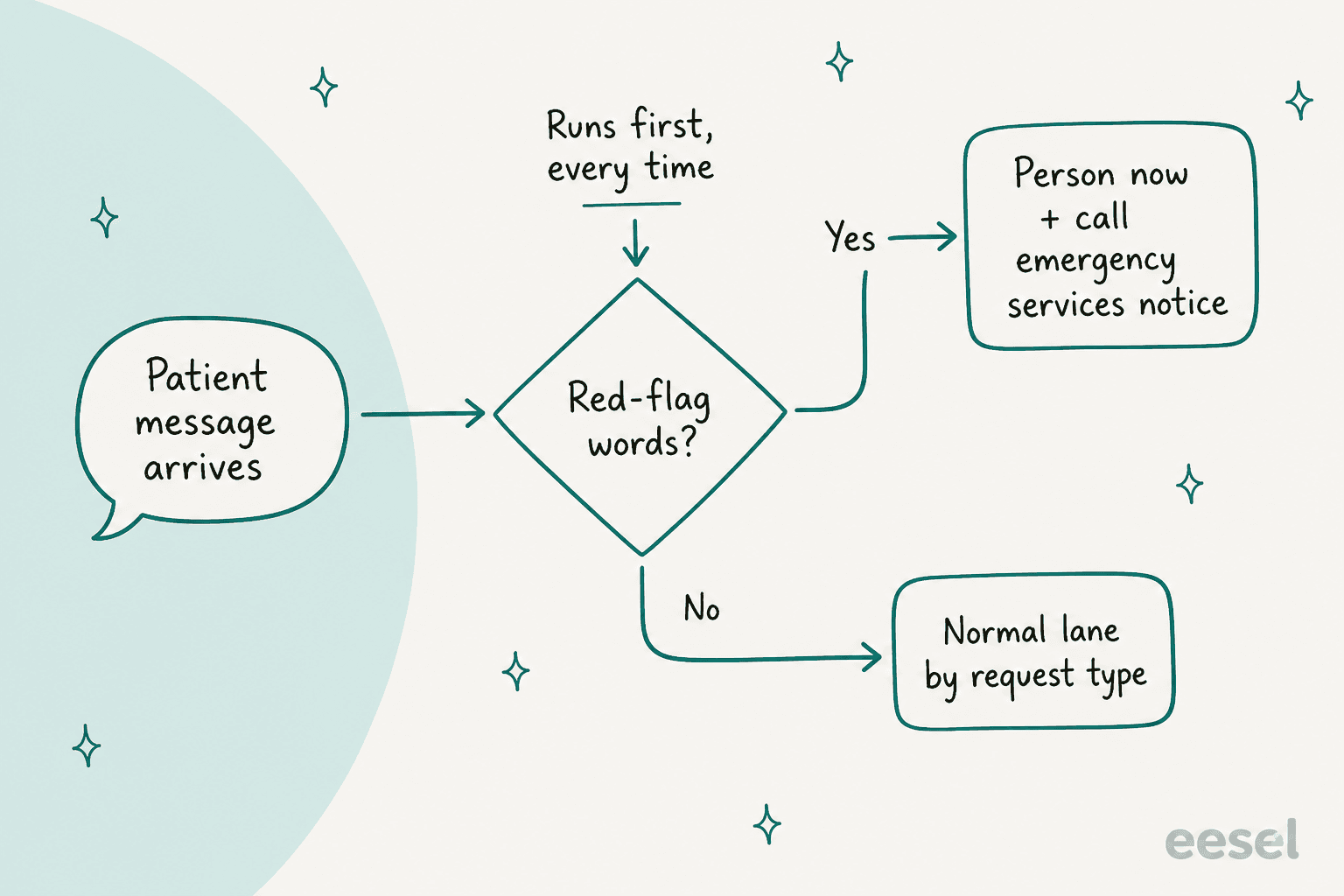
The second is grounding. The agent answers only from your approved help center and policies, and when it cannot find the answer it says so and hands off. If you want the mechanics, my notes on AI hallucination prevention and handoff best practices go through the cases. The third is a clean handoff: the human who picks up the conversation should see the whole thread and a short summary, so the patient never repeats themselves. Repeating a symptom list to a second person is how details get dropped.
After hours is where this gets tested. A patient who messages at 2am cannot wait for a nurse to wake up, and an AI that answers confidently is exactly what you do not want. The after-hours setup I recommend is boring: the AI handles lane-one requests, sends the emergency notice for red flags, and queues everything else with a summary for the morning shift.
Which lane does this patient message belong in?
Here is the lane logic above as something you can click through. Pick a message and it shows where I would route it, what the AI may do, and who finishes the job.
Pick a patient message to see its lane, what the AI is allowed to do, and who finishes it. This is my starting point for a telehealth queue; your clinical lead sets the final rules.
How would I roll it out without a patient-safety incident?
I would start with draft mode, not auto-reply. My AI support pilot guide lays out a four-week plan, and the same shape works here with one change: clinical review gets a seat at week zero.
- Week 0, paperwork and scope. BAA signed with every vendor in the chain, widget scripts audited, red-flag wording approved by a clinician, and the lane table agreed in writing.
- Weeks 1 to 2, draft only. The AI writes replies for lane one and lane two. People send every one. You are measuring edit rate, not deflection.
- Weeks 3 to 4, lane one on its own. Booking, rescheduling and video fixes go out without a person, with the red-flag check on. Test the agent against past tickets first, which is what my scorecard is for.
- Later, widen carefully. Add intake for refills and records requests. Keep lane three human, permanently.
None of the customers whose stories I can link is a telehealth company, so I will be plain about that. They are useful because they show the same pattern in practice. Lesson Pro runs eesel on two Zendesk accounts and it worked about 1,900 tickets in a month, leaving about 1,700 internal notes and drafting about 560 replies for the team to approve before anything reaches a customer. It identifies which brand a ticket belongs to before writing a word, and when it cannot tell, it asks the team rather than guess. Job applications, voicemails and sign-off forms are skipped on purpose. That "skip these categories" list is the same idea as lane three.
Poseidon Animal Health is the closer analogy for health content. The team drafted about 610 conversations in a month and every draft is read before it goes out; serving amounts, auto-ship changes and product choices are checked by someone who knows horses. Swap horses for patients and "someone who knows horses" for a nurse, and that is the model.
What does eesel do for telehealth support?
eesel is an AI teammate that joins your existing helpdesk queue and works from your help center and past tickets. For a telehealth team, the lane model maps directly onto settings: drafts for lane two, approval gates on any action, and instructions that send anything clinical to a person.
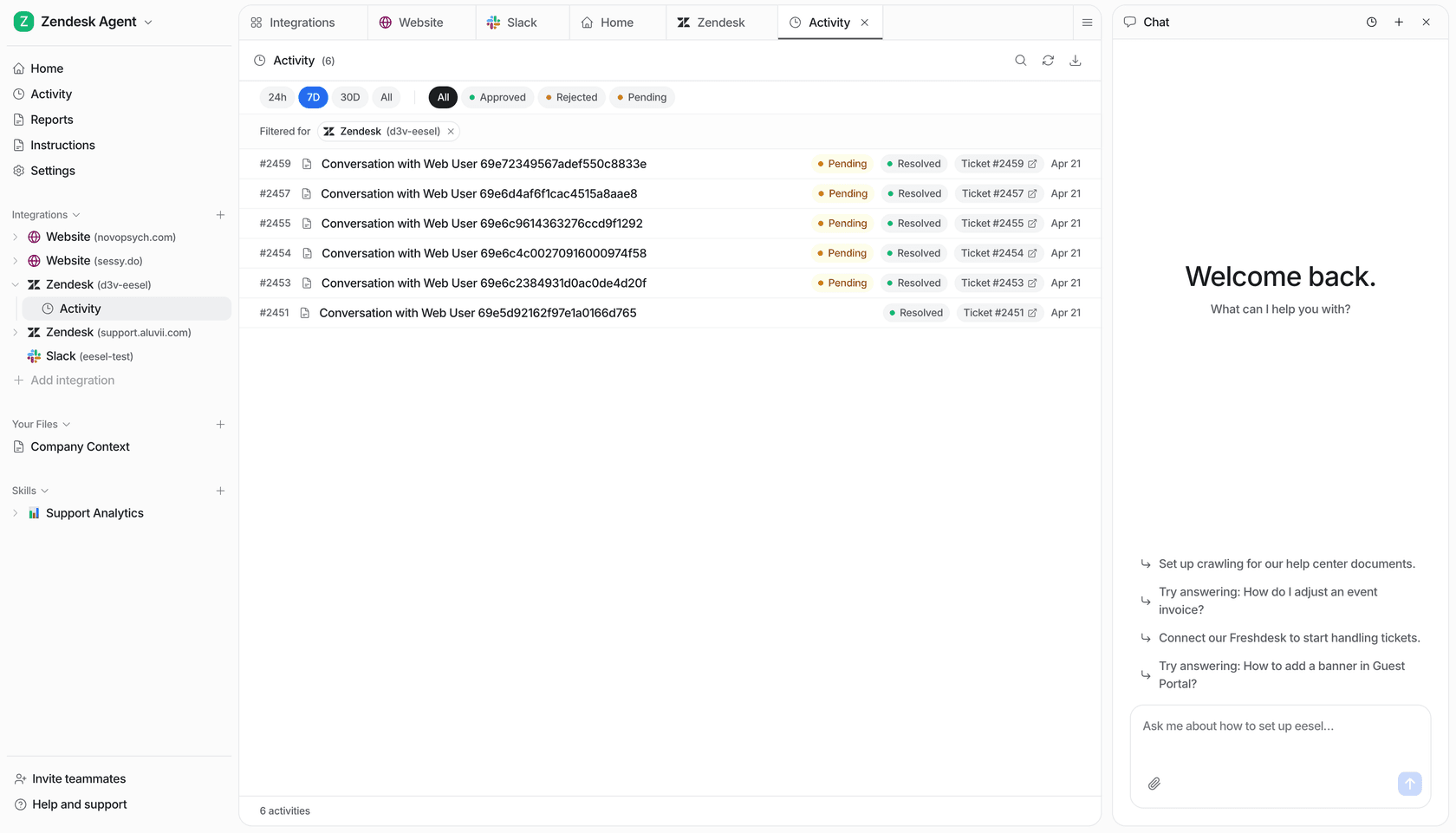
Here is what I can state from eesel's security page and pricing page, as of October 2026:
- HIPAA: Business Associate Agreements for Enterprise customers, after a review of how you will use eesel with health information. The pricing page lists "HIPAA with a signed BAA" under Enterprise only, so it is not part of the self-serve plans.
- SOC 2 Type II: the audit is in progress, with an observation period from 1 October to 31 December 2026 and the report expected in 2027 under NDA.
- Data handling: eesel does not train or fine-tune models on your data, and you can turn on redaction to strip personal details such as emails, phone numbers and card numbers from synced helpdesk tickets before they are stored. Production runs on AWS in the US, and EU data residency is available on Enterprise.
- Control: agents only use the tools you switch on, any action can wait for a person's approval, and every conversation and action is logged in your workspace.
The honest limits: do not connect patient information to a trial workspace, and talk to eesel first so the setup is right. The free plan gives 100 credits to try with test data, and Teammate plans start at $299 a month for 500 credits, where a ticket or a chat is one credit. A telehealth team that needs the BAA is on a custom Enterprise quote. If you run Zendesk, the Zendesk integration is the usual starting point, and eesel also connects to Freshdesk and Help Scout.
Try eesel
If your patient queue is stuck between "automate nothing" and "let a bot answer everything," eesel gives you the middle: an AI helpdesk teammate that drafts booking, billing and intake replies inside the helpdesk you already use, holds any action for a person, and leaves a record of every run. Book a demo and tell us up front that patient information is involved, so we can talk through the Enterprise BAA before anything is connected, or try eesel on test data first.