

Why an AI-readiness audit is not a content cleanup
I build the AI agents at eesel, so I read help centers the way the agent does: as a pile of text that gets cut into pieces and searched by meaning. Zendesk describes the process plainly in its docs. Knowledge content is split into chunks, each chunk is stored with a numerical vector, and the best matching chunks are used to write the reply. The model never reads your help center the way a person does. It reads whatever chunks scored highest for this one question.
That changes what "good content" means. A human skims past the outdated article because they know the newer one exists. A retrieval system has no such judgment, so if both match, both can be used. This is the core of retrieval-augmented generation, and it is why a help center that works fine for people can still produce a wrong AI answer.
I have watched this go wrong on real accounts. A B2B technical support team told me their help center said "we support all models", and their bot had already said yes to a brand that was not in their database. Paying customers also saw bots answer from general knowledge when retrieval found nothing relevant. Both are knowledge problems before they are model problems, and both are cheaper to find before go-live. This post covers the AI-readiness pass. For the general keep, merge or archive cleanup, I wrote a separate support knowledge base audit guide.
The four ways a knowledge base makes an AI answer wrong
Every wrong answer I trace ends at one of four causes. Naming them makes the audit faster, because each one has a different test and a different fix.
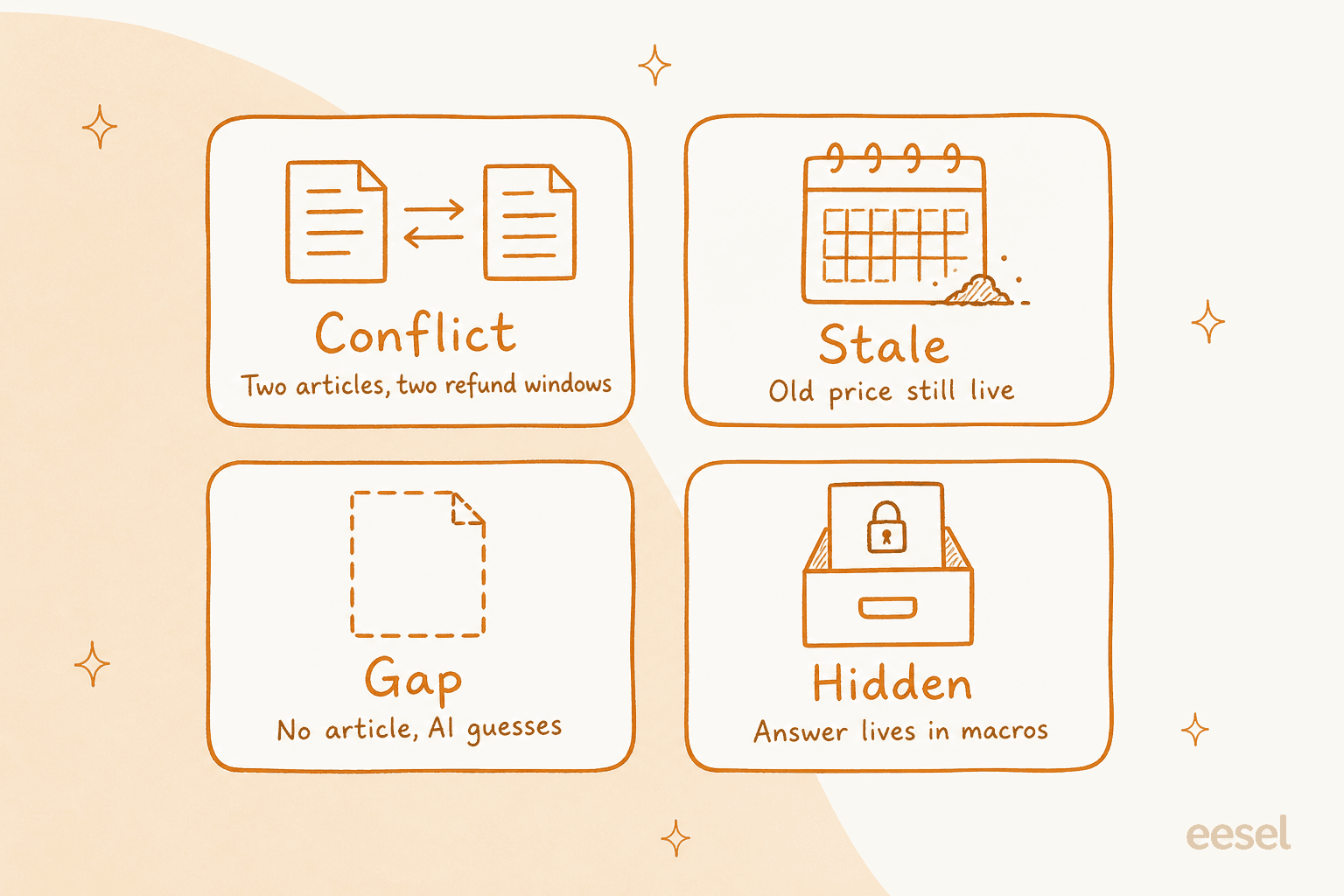
The four failures, in the order I check them: two articles that disagree, a fact that has aged, a topic with no article, and an answer that lives somewhere the AI cannot read.
Conflict. Two articles give different answers. Gorgias uses the example in its own docs: if a help center article says the return window is 30 days and a guidance entry says 14, the agent might not respond the same way every time (Gorgias docs). The AI is not confused. It retrieved both, and nothing told it which wins.
Stale. The article was right once. Prices, plan names, shipping cutoffs and feature names age fastest, and a stale line gets repeated with total confidence. Zendesk's article verification rules exist for this: up to 20 rules that reset articles to unverified on a schedule so an owner has to re-confirm them.
Gap. No article covers the question. A well-behaved agent hands off. A badly configured one fills the silence from general knowledge. Gorgias notes that when a topic is not covered, the agent often hands the conversation over to your team, which is safe but expensive if the topic is high volume.
Hidden. Your team knows the answer, but it lives in macros, an internal wiki, a Loom video or one senior agent's head. I heard this from a DTC brand that wanted to automate about half its email volume while its knowledge sat in SOP tools, untranscribed video and old macros. An AI can only answer from what you connect, and the connected part was the thinnest.
Use the widget below on any article you are unsure about. It tells you what the failure looks like, how to find it, and the rule I apply before go-live.
Which failure is this article?
Pick the failure type to see how to find it and the go-live rule I use.
Click each failure type to see what it looks like, how to find it, and the rule I check before go-live.
Audit in risk order, not alphabetical order
The usual mistake is to audit the whole help center evenly. A wrong answer about store hours and a wrong answer about refunds do not cost the same, so I rank topics on two things: how many tickets they drive, and what a wrong answer costs. I put refunds, returns, cancellations and payments in the top tier.
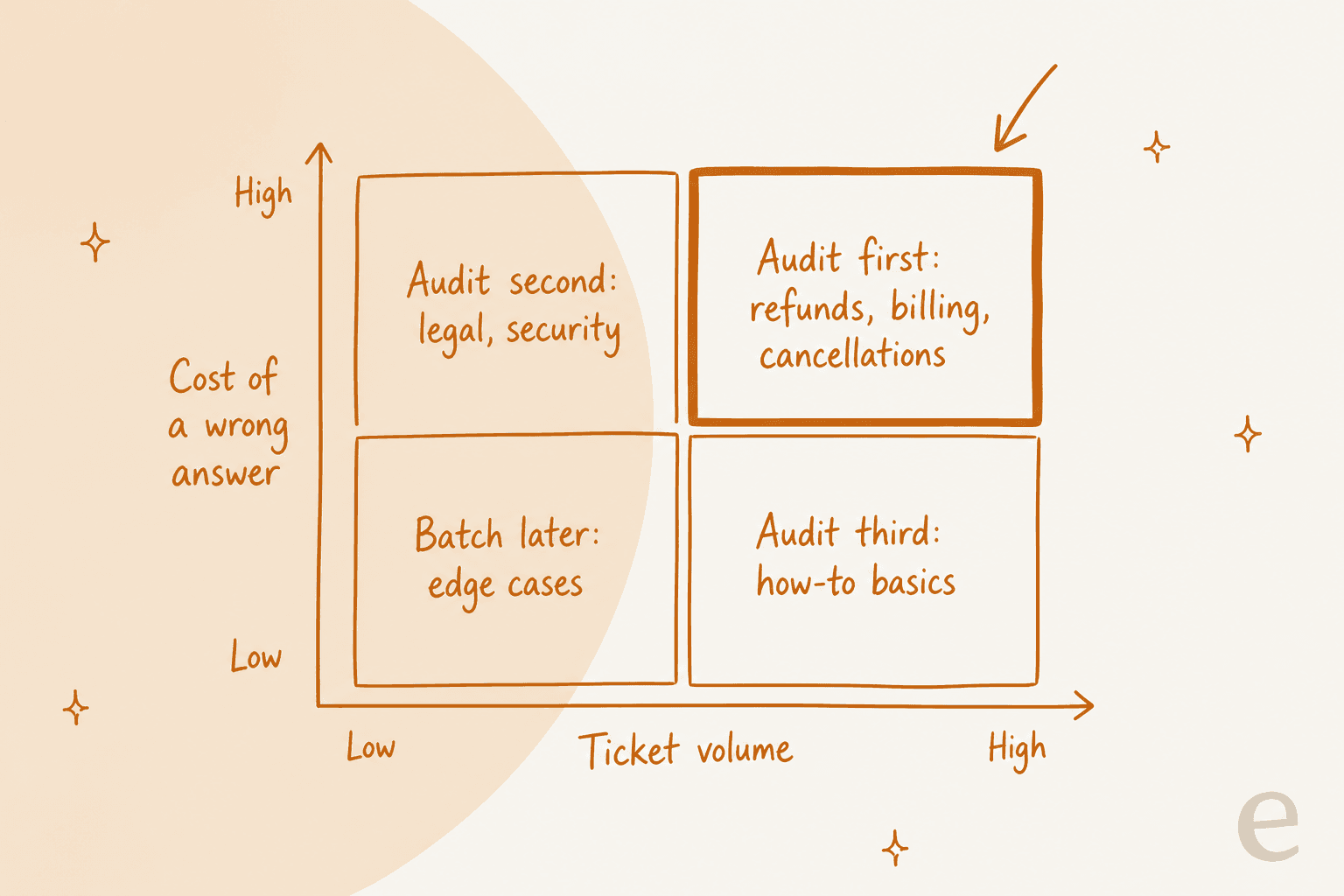
Audit order by cost of a wrong answer and ticket volume: money topics first, legal and security second, how-to basics third, edge cases batched later.
| Tier | Topics | What I check | Typical go-live bar |
|---|---|---|---|
| 1: money | Refunds, returns, cancellations, billing, payment failures | Conflicts, stale numbers, exceptions, who may approve | Zero wrong answers in testing |
| 2: risk | Legal terms, security, privacy, account access | Wording approved by the right owner, clear handoff | Zero wrong answers, escalate when unsure |
| 3: volume | Shipping, subscriptions, how-to basics, troubleshooting | Accuracy, completeness, plain language | Most answers correct, the rest escalate cleanly |
| 4: tail | Edge cases, rare product questions | Batch later, use handoff meanwhile | Handoff is acceptable |
For tier 1, I also read the refund rules the way an agent would. Who may approve an exception, at what amount, and what is the exact wording? My refund approval matrix post lays that out, and the AI for refund requests guide covers what to automate. If a tier 1 answer needs a judgment call, set the topic to hand off rather than answer. Rúngne does exactly this: its team picks the topics the AI answers directly, such as policy and tracking, and keeps cancellations, damaged items and lost parcels with people. Moving a topic across is a list edit, not a project. Their setup is in the Rúngne story.
How each helpdesk's AI reads your knowledge
This is the part most audits skip. Before you fix an article, you need to know whether the AI can see it, and how fresh its copy is. I read each vendor's own docs for this (all pages edited or updated in September and October 2026), and the differences matter.
| Helpdesk AI | What it reads | How fresh | What to check |
|---|---|---|---|
| Zendesk AI agents | Zendesk help centers, web crawler, knowledge connectors (up to 50 external sources) | Help center searched live. External sources as of last sync, usually every 24 hours. Crawler refreshes every 30 minutes, Confluence every 24 hours | Restricted articles reach only authenticated customers. Too many sources can reduce accuracy and add latency |
| Freshdesk Freddy AI Agent | URLs, files, public solution articles, custom Q&As, Google Drive and SharePoint apps | Manual resync, last-synced timestamp. SharePoint changes about every 15 minutes | Public articles only. Gated URLs, private articles and text in images or tables are skipped |
| Gorgias AI Agent | Guidance, help center articles, store website, public URLs, documents | Website and URL re-sync is manual, once every 24 hours | Public pages only. Embedded PDFs, video and images are not extracted. Drafts are not used in live replies |
| Help Scout Scout | Docs site, website pages, PDFs, Word and Excel files, text sources | Docs stay synced. Websites need a manual re-sync | Choose specific pages, not whole sites. Google files must be shared by link |
| HubSpot Customer Agent | HubSpot articles and pages, public URLs (up to 5,000 related), files | HubSpot articles re-sync on edit. Other sources weekly | Private sources are not cited but can still shape answers |
Zendesk. Zendesk's docs say a connected help center is searched at the time of the question, while external sources are as of the last sync, usually every 24 hours. The practical lesson is that an edit in an external wiki is not live for a day, and the web crawler runs far more often than the Confluence connector. Restricted help center articles are used only when the customer is authenticated, and the docs note you cannot test restricted-content answers in the test widget. If your best answers sit behind a login, your launch test will not show you that. More in my Zendesk AI overview.
Freshdesk. The Freddy knowledge guide lists limits worth reading before you connect anything: 10 URLs per agent, up to 3,000 pages per site, 200 files per agent at 35 MB each, and solution articles only when they are visible to all users. Private or restricted articles are excluded. It also offers a useful audit tool: after a conversation, the details panel shows which sources the agent retrieved from. For Confluence, Freshdesk advises a dedicated service account, because if the setup admin loses access, those articles are treated as deleted. See Freddy knowledge sources and the eesel Freshdesk integration.
Gorgias. Gorgias says guidance carries the most weight among its knowledge types, which makes guidance the first place to hunt for conflicts with your help center. Store website and URL syncs are public pages only, do not refresh automatically, and can be re-run once every 24 hours. Snippets pulled from a website cannot be edited, but they can be disabled if they hold outdated content. Its Opportunities feature (beta) surfaces gaps and conflicts from real conversations, a handy shortcut. More in the Gorgias AI Agent 2.0 breakdown.
Help Scout. Scout, the agent that grew out of AI Answers, stays synced with your Docs site at all times, but website sources need a manual re-sync when pricing or a process changes. Help Scout also advises pointing it at the specific pages with your best information rather than an entire site, and says images and video should not carry key steps on their own. Details in AI for Help Scout and the eesel Help Scout integration.
HubSpot. The Customer Agent re-syncs knowledge base articles when they are edited and other sources weekly. The line to read twice is the one on private content: private sources will not be cited, but their content may still appear in responses. That makes "hidden" a subtler risk, because an internal doc you connected for reference can still leak its wording. See HubSpot AI agent for the wider picture.
Check coverage against real tickets
Reading articles tells you if they are right. Tickets tell you if they are the right articles. I pull the last 90 days of tickets and group them by topic, then give each topic one of four marks.
- Covered. An article exists, is current and agrees with what agents actually reply.
- Partial. An article exists but answers a nearby question, or skips the exception agents always mention.
- Conflicting. Two sources disagree, or the article disagrees with what agents send in practice.
- Missing. No article. Agents answer from memory or a macro.
The agent reply is the most useful evidence here. When your best agents consistently add a sentence the article lacks, that sentence is the gap. One support manager I spoke with had a help center written entirely for admins while the tickets came from end users. No article-by-article read catches that. Comparing against tickets does.
Rank the results by volume. Tier 1 topics with a partial or missing mark go to the top of the fix list. For methods, I have written about mapping queries to gaps and the Zendesk knowledge gap analysis workflow, and the wider rollout belongs in my implementation mistakes guide.
Build a test set and set go-live rules
Set the pass bar before you run the test. If you decide it afterward, every result looks acceptable.
Build the set from real questions. Take 50 to 100 real customer messages, weighted toward tier 1 and tier 2, and include some the AI should not answer: a refund outside policy, a legal question, a request that needs an account lookup. For each one, write what a correct answer or correct handoff looks like, and name the source article it should come from.
Score four things per answer. Did it retrieve the right source? Was the answer correct? Was it complete, with exceptions included? Did it escalate when it should have? The last one is the most commonly skipped, and it connects to your escalation rate and containment rate once you are live.
Use the vendor's test tools, within their limits. Help Scout has a Test area, and Gorgias lets you test drafts before publishing. Zendesk's test widget cannot test restricted-content answers.
Replay old tickets if your tool allows it. eesel's Simulation skill pulls old tickets, generates AI replies, compares them against what humans actually sent, scores the match and produces a gap report. It is the closest thing I know to testing on your own data without a customer seeing a wrong answer. My AI support agent testing post goes through a fuller plan.
Go-live rules I recommend. These are my own bars, not a vendor standard, so adjust them to your risk:
- Tier 1 and tier 2 topics: zero wrong answers in the test set, and every unsure case hands off.
- Tier 3: at least nine in ten answers correct, and every miss handed off rather than guessed.
- No open conflicts in tier 1, and every tier 1 article verified in the last 90 days.
- Every high-volume topic either covered or set to escalate.
- A named owner for the weekly review after launch.
The weekly loop after go-live
A launch audit ages as fast as your policies do. For the first month I run the same short loop every week, and after that I keep it monthly plus whenever a policy changes.
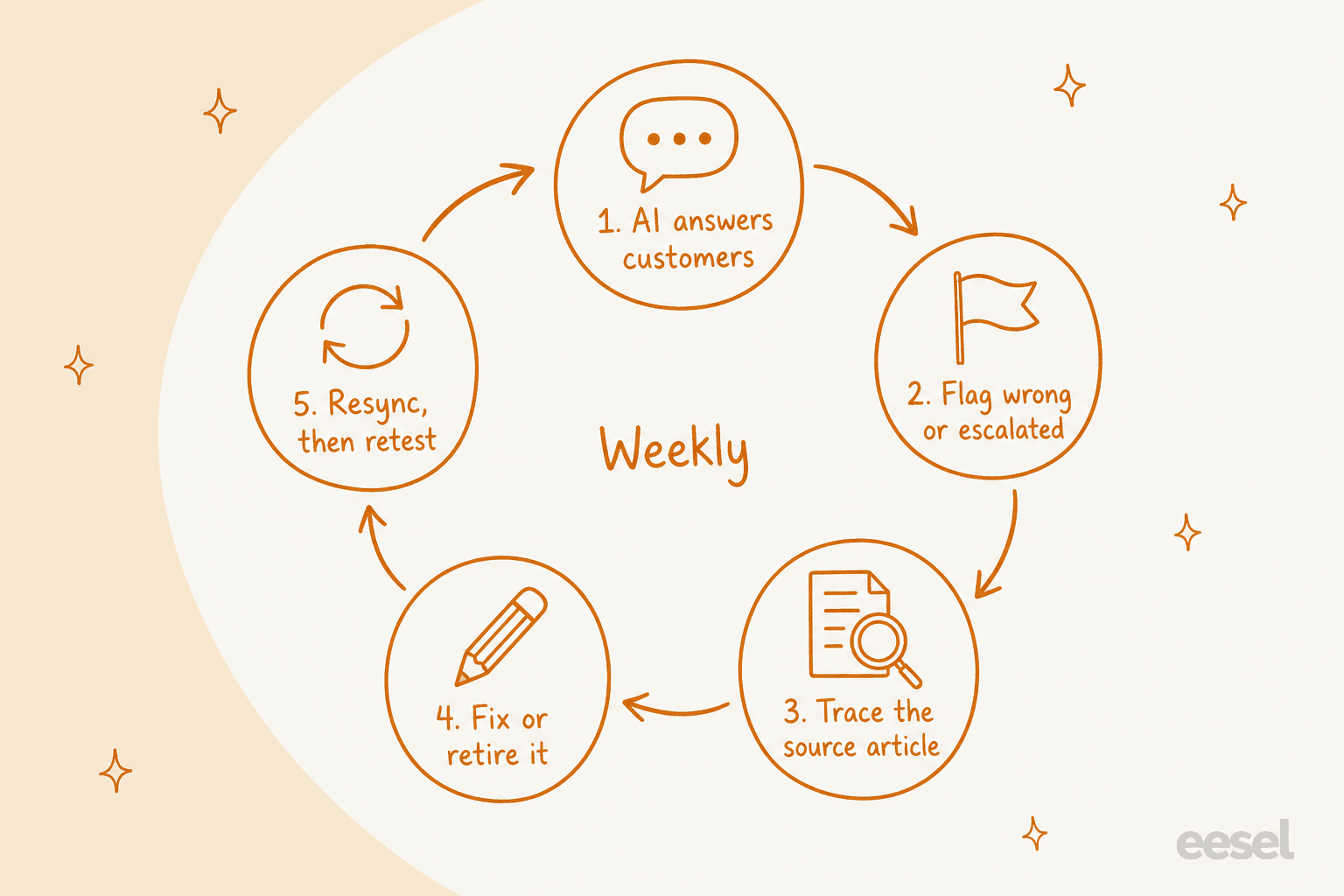
The weekly loop: read what the AI got wrong or escalated, trace it to a source, fix it, resync, then retest.
- Pull the wrong and escalated conversations. In Help Scout, sorting Reports > Scout by resolution surfaces the ones where customers were not helped. In Freshdesk, conversation details show which sources were used.
- Trace each one to a source. Was it a conflict, a stale fact, a gap or a hidden answer? Use the same four labels so the pattern shows up.
- Fix or retire the source. Retire beats patch when two articles overlap.
- Resync. This is the step people forget. A Gorgias website source, a Help Scout website source and a Freshdesk URL all need a manual refresh before the AI sees the edit.
- Retest. Re-run the questions that failed, plus a handful from tier 1.
The metrics worth watching are in my AI customer service metrics guide.
How eesel handles the audit in practice
eesel's AI helpdesk teammate learns from your help center, your past tickets and docs such as Confluence and Google Docs, then works inside your existing helpdesk. Two named customers show what the audit looks like in the field.
- SamCart runs separate eesel agents on Freshdesk email tickets and website chat, both answering from about 280 help center articles. The agents are told to link only public articles, so older internal material can inform an answer without being sent to a seller. When an article describes something that is no longer available, the team adds a correction and the agent stops offering it. That is the stale fix, done without rewriting the whole article.
- Rúngne runs three agents on Gorgias, split by job. One triages and tags, one drafts replies for people to send, and one answers plain policy and tracking questions itself. Cancellations, damage and lost parcels stay with the team. The topic list is the dial.
The pattern is the same: decide which topics the AI may answer, keep money and judgment calls with people, and treat corrections as a habit. My AI support agent training post and the AI knowledge base guide cover the building side.
Try eesel
The audit decides whether your help center is ready. The test decides whether it is ready enough. If you want to run that test on your own tickets, eesel's AI helpdesk teammate connects to Zendesk, Freshdesk, Gorgias, Help Scout or HubSpot, learns from your help center and past tickets, and can be replayed against old conversations before it replies to a customer. Pricing is by plan, and you can see the plans and start free.
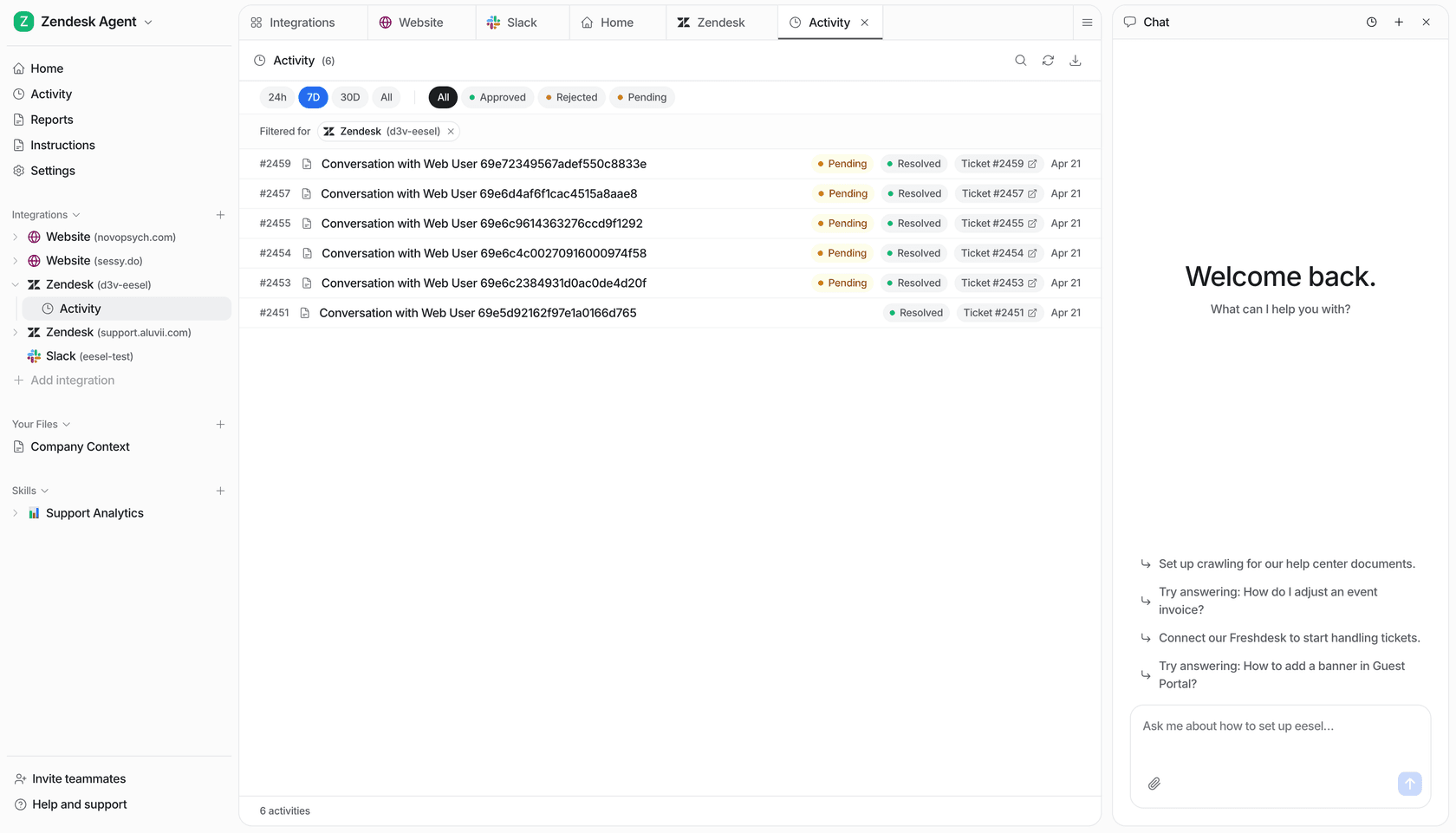
Try eesel free, or book a demo and I will show you how it handles your own tickets.