


AI coding assistants have definitely changed the game for software development. Anysphere’s Cursor editor was a big part of that, giving us a glimpse of what an AI-first coding environment could feel like. But things move fast, and now a lot of engineering teams are starting to look for Anysphere alternatives.
Maybe it’s the constantly shifting pricing models, the need for a tool that fits better into an existing workflow, or the realization that the biggest productivity drains aren't just about writing code. Whatever the reason, the search is on.
Here’s a thought: what if writing code faster isn't the real solution to developer productivity? What if the biggest time sinks are the endless, repetitive questions in Slack, the hunt for that one piece of documentation, and the constant stream of internal support tickets? In this guide, we’ll look at the best Anysphere alternatives that help with coding and tackle the operational clutter that really slows developers down.
What is Anysphere and why are developers seeking alternatives?
Anysphere is the company behind Cursor, which is an AI-native code editor built on top of VS Code. It basically puts large language models right into your workspace, unlocking features like AI-powered refactoring, generating code across multiple files, and chatting with your codebase. It got a lot of attention for being a powerful, self-contained solution. Cursor has also changed hands: Cursor announced on August 14, 2026 that it had been acquired by SpaceX.
Pricing has moved too. As of October 2026, Cursor's pricing runs from a free Hobby plan to Pro at $20/month, Pro+ at $60, Ultra at $200 and Teams at $40/user/month, with usage billed at model API rates once the included amount runs out.
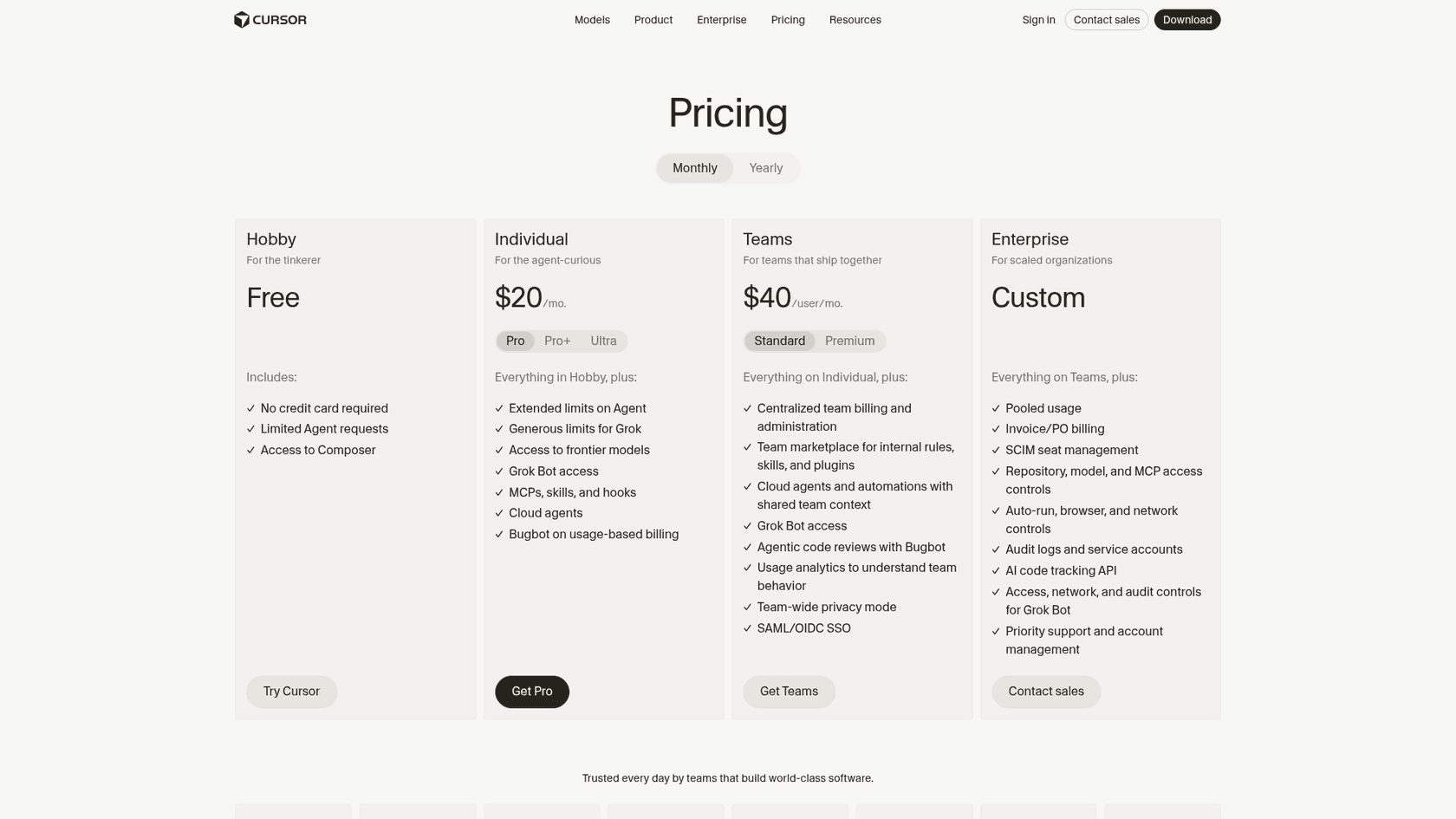
But it hasn't all been smooth sailing. If you browse communities like Reddit, you'll see users venting about frequent and confusing pricing changes, where generous plans suddenly became much more restrictive.

That kind of uncertainty, plus a growing market of specialized tools, has pushed many developers to look for more stable and predictable Anysphere alternatives.
Our criteria for choosing the best Anysphere alternatives
To make this list actually useful, we had to look beyond just code completion. We judged these tools on how they improve the entire engineering workflow, not just one part of it. Here’s what we cared about:
-
Core AI capability: Does the tool actually do its main job well, whether that’s writing code, running tests, or managing knowledge?
-
Workflow integration: Does it slide into the tools your team already uses (VS Code, GitHub, Slack, Jira) without a fuss, or does it try to lock you into its own world?
-
Ease of setup and use: How fast can you get your team up and running? Is there a long sales process, or can you just sign up and go?
-
Team-wide productivity: Does it only help one developer at a time, or does it unblock the whole engineering team and maybe even the support folks?
-
Transparent pricing: Is the pricing clear and predictable? Can you scale up without getting hit with surprise bills?
A quick comparison of the top Anysphere alternatives
| Tool | Primary Use Case | Ideal For | Pricing Model | Standout Feature |
|---|---|---|---|---|
| eesel AI | Internal knowledge & support automation | Reducing developer interruptions | Fixed monthly credit plans (100 free credits) | AI chat in Slack/Teams |
| GitHub Copilot | AI code completion & generation | Teams invested in the GitHub ecosystem | Free, then per user, per month plus AI credits | Deep integration with GitHub repos |
| Tabnine | Enterprise AI code completion | Large teams with strict security needs | Contact sales | Private installation & personalization |
| Replit (Agent) | Collaborative, browser-based coding | Education, prototyping, and remote teams | Free tier, then Core and Pro plans | Zero-setup cloud development |
| Amazon Q Developer | AWS-focused development | Teams building heavily on AWS | Per user, per month | Deep knowledge of AWS services |
| Windsurf (Devin Desktop) | AI-native IDE | Early adopters wanting an AI-first workflow | Free tier, then Pro, Max and Teams | Project-wide context awareness |
| Qodo | AI code review and testing | Teams focused on TDD and code quality | Per user, plus credit packs (14-day trial) | Automated unit test generation |
The 7 best Anysphere alternatives for engineers in 2026
Let's dive into the details. Here’s our breakdown of the best tools to check out if you're thinking of moving on from Anysphere's Cursor.
1. eesel AI
Most of the tools on this list help you write code. eesel AI is different, it helps you eliminate the distractions that pull you out of your code. Senior devs spend a shocking amount of time answering the same questions in Slack or searching through outdated wikis. eesel AI fixes this by becoming an AI support agent for your internal teams.
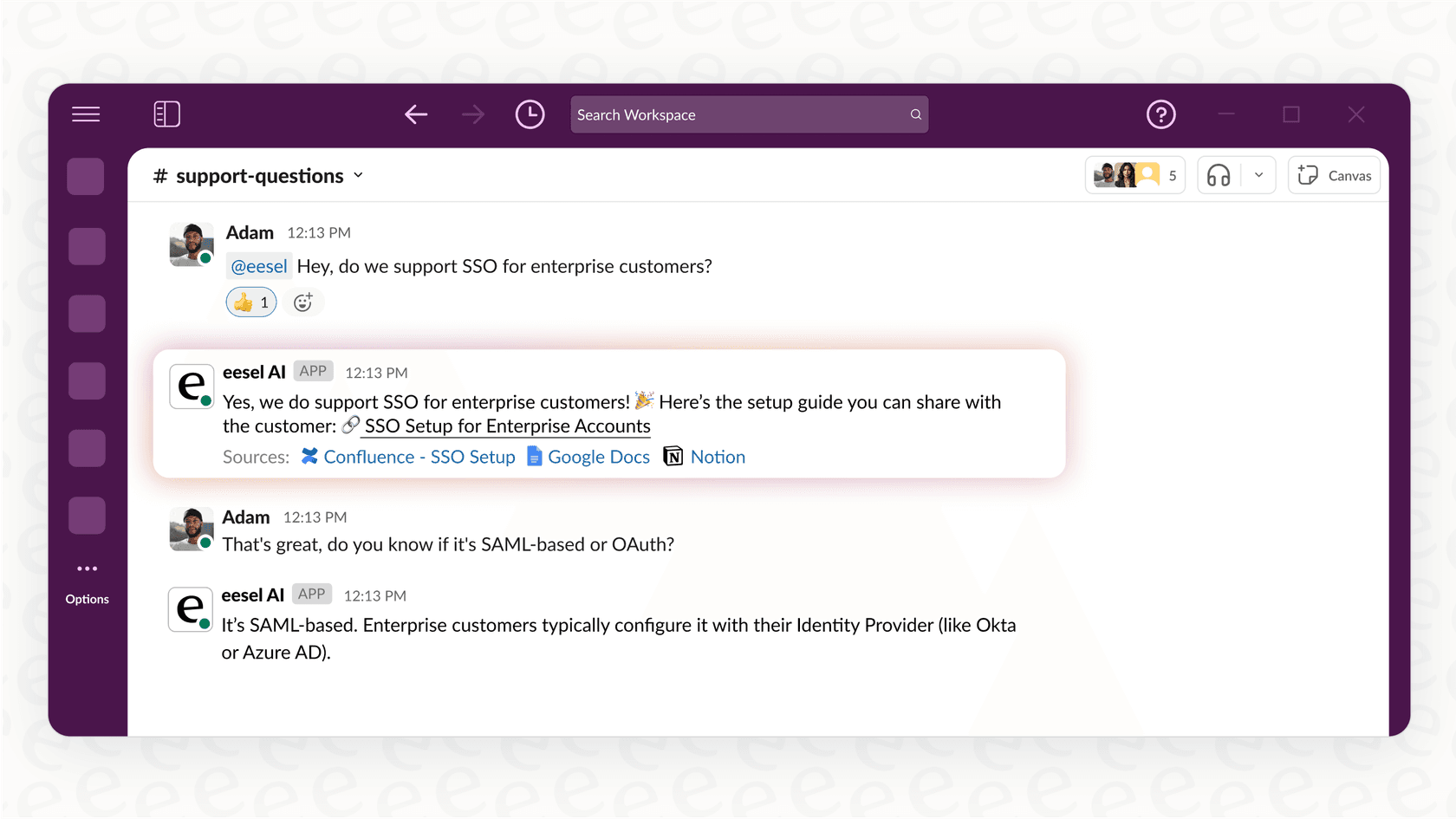
You just connect it to your knowledge sources, like Confluence, Google Docs, and your history in Slack. From then on, it gives instant, correct answers to questions from the product team, support agents, or junior devs, right inside the apps they already use. This lets your most experienced engineers get back to solving hard problems instead of acting as a human help desk.
-
Pros:
- You can get it live in just a few minutes, no sales call required.
- It works directly in Slack and MS Teams, so there’s no new app to learn.
- It pulls knowledge from dozens of sources, not just one help center.
-
Cons:
- It’s not a code editor; its purpose is to automate knowledge and support.
- It’s most valuable for teams that know communication bottlenecks are killing their productivity.
-
Pricing: eesel AI's pricing is one fixed monthly price sized to volume, with no per-seat fee. One credit covers one ticket or chat, and every integration and channel is included, along with the full suite of products (Agent, Copilot, Triage).
- Free plan: 100 credits, no card needed.
- Paid plans: from $299/month for 500 credits, up to $1,899/month for 5,000 credits.
- Above 5,000 credits: talk to the team.
-
Why it's on the list: It's a fresh take on developer productivity that solves the collaboration friction that coding assistants simply can't touch.
2. GitHub Copilot
GitHub Copilot is probably the most direct competitor to Cursor and the natural first stop for anyone looking for Anysphere alternatives. Since it’s made by GitHub, its connection to your repos, pull requests, and issues is unbeatable. It gives you smart, context-aware code suggestions and can help with anything from boilerplate to entire functions. Its agent features are also getting better, letting you ask for complex changes in plain English.
-
Pros:
- Incredible integration with the GitHub ecosystem.
- Works really well across tons of different programming languages.
- It's backed by Microsoft and OpenAI, so you know it’s not going away anytime soon.
-
Cons:
- Not as useful if your team doesn't use GitHub.
- It can sometimes suggest code snippets from its training data that are outdated or insecure.
-
Pricing: GitHub Copilot's pricing is a per-user fee, with monthly GitHub AI Credits on top that chat, agent mode and code review draw from.
- Free: $0/month with 2,000 completions and 50 chat requests per month.
- Pro: $10/month, including $15 in monthly AI credits.
- Pro+: $39/month, with premium models and $70 in credits.
- Max: $100/month, with priority access and $200 in credits.
- Business and Enterprise: $19 and $39 per user per month, which add policy management, IP indemnity and codebase-aware suggestions.
3. Tabnine
For big companies with tight security or compliance rules, Tabnine is a seriously powerful option. Its main selling point is flexibility. Tabnine's docs describe a private installation path, which means your source code never has to leave your control. Tabnine's website now redirects to its parent company Tricentis, so check current availability with the vendor. On top of that, you can train Tabnine on your internal codebases so it learns your team's specific styles and private libraries.
-
Pros:
- Private installation gives you maximum security.
- You can train custom models on your private code.
- It supports a wide range of IDEs.
-
Cons:
- It's more of a lift to set up compared to cloud-only tools.
- The enterprise features don't come cheap.
-
Pricing: Tabnine no longer publishes plan prices. The pricing URL now forwards to Tricentis' contact page, so I'd treat it as a sales conversation.
4. Replit Agent
Replit's AI assistant, which used to go by Ghostwriter, now lives in Replit Agent. It is designed for a completely different workflow. It's an AI coding assistant that lives inside Replit's browser-based IDE. This makes it incredibly easy to start a project, you don't have to install anything locally. It’s perfect for quick prototypes, learning a new language, or collaborating with teammates in real time. Ghostwriter can generate code, explain tricky parts, and help you refactor.
-
Pros:
- Zero local setup. Everything just works in your browser.
- Amazing for real-time pair programming.
- Great for educational use or spinning up a quick project.
-
Cons:
- You obviously need a stable internet connection.
- Probably not the right fit for huge, complex projects that need a local IDE.
-
Pricing: Replit's AI features are part of its core plans.
- Free: Free Mode, with up to 60 projects.
- Core: $20/month, or $18/month billed annually, with $20 toward models.
- Pro: $100/month, or $90/month billed annually, with 10 parallel agents and $100 in credits.
- Enterprise: Custom pricing.
5. Amazon Q Developer
If your team is all-in on AWS, then Amazon Q Developer is an alternative you should look at. It's an AI assistant that has been trained on a massive amount of AWS documentation, best practices, and APIs. It doesn't just help you write code for services like Lambda and S3; it also gives you tips on how to improve performance, cut costs, and fix security issues tied to your AWS setup.
-
Pros:
- It has expert-level knowledge of the entire AWS world.
- It can scan for security issues and suggest optimizations.
- It plugs into popular IDEs and the AWS console itself.
-
Cons:
- It's way less useful for teams that aren't building on AWS.
- It can be more focused on infrastructure code than general application logic.
-
Pricing: Amazon Q Developer keeps it simple with two tiers.
- Free Tier: Includes 50 agentic requests per month.
- Pro Tier: $19/user/month. This unlocks everything, including codebase customization and higher usage limits.
6. Windsurf (Devin Desktop)
Windsurf now belongs to the team behind the Devin AI agent, and the IDE has been renamed Devin Desktop. The windsurf.ai address forwards there, and existing plans and pricing carry over. It is a complete reimagining of the IDE. Instead of bolting AI onto an existing editor, they built it from the start as an AI-native platform. It's particularly good at understanding the context of your entire project, which lets it handle complex, multi-file changes and bug fixes with very little guidance. This is a tool for developers ready to fully commit to an AI-driven workflow.
-
Pros:
- It was designed from the ground up for AI development.
- It's great at keeping context across a whole codebase.
- It's backed by a team on the cutting edge of AI agent research.
-
Cons:
- You have to adopt a whole new IDE and workflow.
- Since it's a newer tool, the community and extension library are smaller.
-
Pricing: Devin's pricing now covers the IDE.
- Free: $0/month.
- Pro: $20/month.
- Max: $200/month.
- Teams: $80/month plus $40 per developer seat.
- Enterprise: Custom pricing.
7. Qodo
Qodo (you might have known it as CodiumAI) comes at the problem from a different angle, and now positions itself around AI code review. Instead of helping you write features, it specializes in writing high-quality tests for them. For teams that do test-driven development (TDD) or just want better test coverage, Qodo is a huge time-saver. It looks at your code, figures out what it does, and generates meaningful unit tests to help you ship more reliable software.
-
Pros:
- It automates the often boring task of writing tests.
- It helps improve your overall code quality and reliability.
- It works as an extension in popular IDEs.
-
Cons:
- It doesn't write general-purpose code for you.
- Its value is really for teams that already have a strong testing culture.
-
Pricing: Qodo starts with a 14-day free trial and no longer lists a free Developer tier.
- Pro Team: $30/month for up to 30 users, plus credit packs at $0.012 per credit.
- Enterprise: Custom pricing for the whole platform.
How to choose the right Anysphere alternatives for your engineering team
So, with all these options, how do you actually pick one? It all comes down to identifying your team's biggest bottleneck.
-
If your bottleneck is writing code faster... then a direct code assistant like GitHub Copilot or Tabnine is probably your best move. They live right in your editor and speed up the moment-to-moment work of coding.
-
If your bottleneck is security and compliance... an enterprise tool like Tabnine is the way to go. It gives you the control needed to use AI without exposing proprietary code.
-
If your bottleneck is developer interruptions... you've found the hidden productivity killer. When your senior engineers are constantly being pulled away to answer questions, the entire team slows down. A tool like eesel AI automates that internal support, giving your developers their focus back. It's a perfect complement to a coding assistant.
Beyond coding: The future of Anysphere alternatives and developer productivity
The growing search for Anysphere alternatives shows that the market for AI developer tools is finally growing up. Writing code is a huge part of a developer's job, but it isn't the only part. Real productivity comes from optimizing the whole system: coding, collaborating, testing, and sharing what you know.
The best AI strategy looks at the complete picture. While a tool like GitHub Copilot might make you a faster typist, a platform like eesel AI makes your entire organization faster by making sure information gets where it needs to go, without derailing your most important work.
Ready to stop answering the same questions over and over? Try eesel AI for free and build an AI assistant on your team's knowledge in minutes.
Frequently asked questions
What are the primary reasons developers are searching for Anysphere alternatives?
Developers are often looking for Anysphere alternatives due to frequently changing pricing models, the desire for tools that integrate better with existing workflows, or a need to address broader productivity challenges beyond just writing code. Many teams seek more predictable and stable solutions.
How should I choose among the various Anysphere alternatives for my engineering team?
To choose the right Anysphere alternatives, identify your team's biggest bottleneck. If it's coding speed, focus on code assistants. If it's security, look for enterprise-grade solutions. If it's developer interruptions and knowledge sharing, consider tools like eesel AI.
Can I combine different Anysphere alternatives to boost my team's efficiency even further?
Absolutely. Many teams find success by combining different Anysphere alternatives. For example, using a code assistant like GitHub Copilot for coding alongside a knowledge automation platform like eesel AI for internal support can significantly enhance overall productivity.
Do all Anysphere alternatives primarily focus on writing code faster?
No, not all Anysphere alternatives solely focus on code generation. While some, like GitHub Copilot, excel at coding assistance, others, such as eesel AI, address productivity by automating knowledge sharing and reducing developer interruptions, optimizing the broader engineering workflow.
Are there any free options or trial periods available for these Anysphere alternatives?
Yes, many of the listed Anysphere alternatives offer free tiers or trial periods. GitHub Copilot, Replit, Amazon Q Developer, and Windsurf (now Devin Desktop) have free tiers, and Qodo offers a 14-day free trial. Tabnine no longer lists public pricing, so you contact sales for a trial.
What specific benefits do Anysphere alternatives offer for large enterprises with strict security requirements?
For large enterprises, Anysphere alternatives like Tabnine offer significant benefits, including private installation options, personalization on your own codebases, and robust security features. This ensures code never leaves your control and adheres to compliance standards.