


What "FAQ automation" actually means
FAQ automation is the part of tier-1 support where a repetitive, well-documented question gets answered end to end without a human touching it: where is my order, how do I reset my password, what's your return policy, how do I cancel. These already have an answer written down somewhere, so an AI knowledge base chatbot that can read your docs and past tickets should handle them on its own. It's the difference between a rule-based chatbot reading a script and a real agent reasoning over your content.
I've spent the last three-plus years at eesel putting AI agents on live support queues, and the pattern is the same almost everywhere: a huge share of the inbox is a tiny set of intents repeated thousands of times. That's not a hard AI problem. That's the layup.
Here's where the roundups usually stop, and where the real work lives. Answering a question once is easy. Keeping that automation right as your product, prices, and policies change is the thing that quietly breaks. FAQ automation is a loop, not a one-time bot setup.
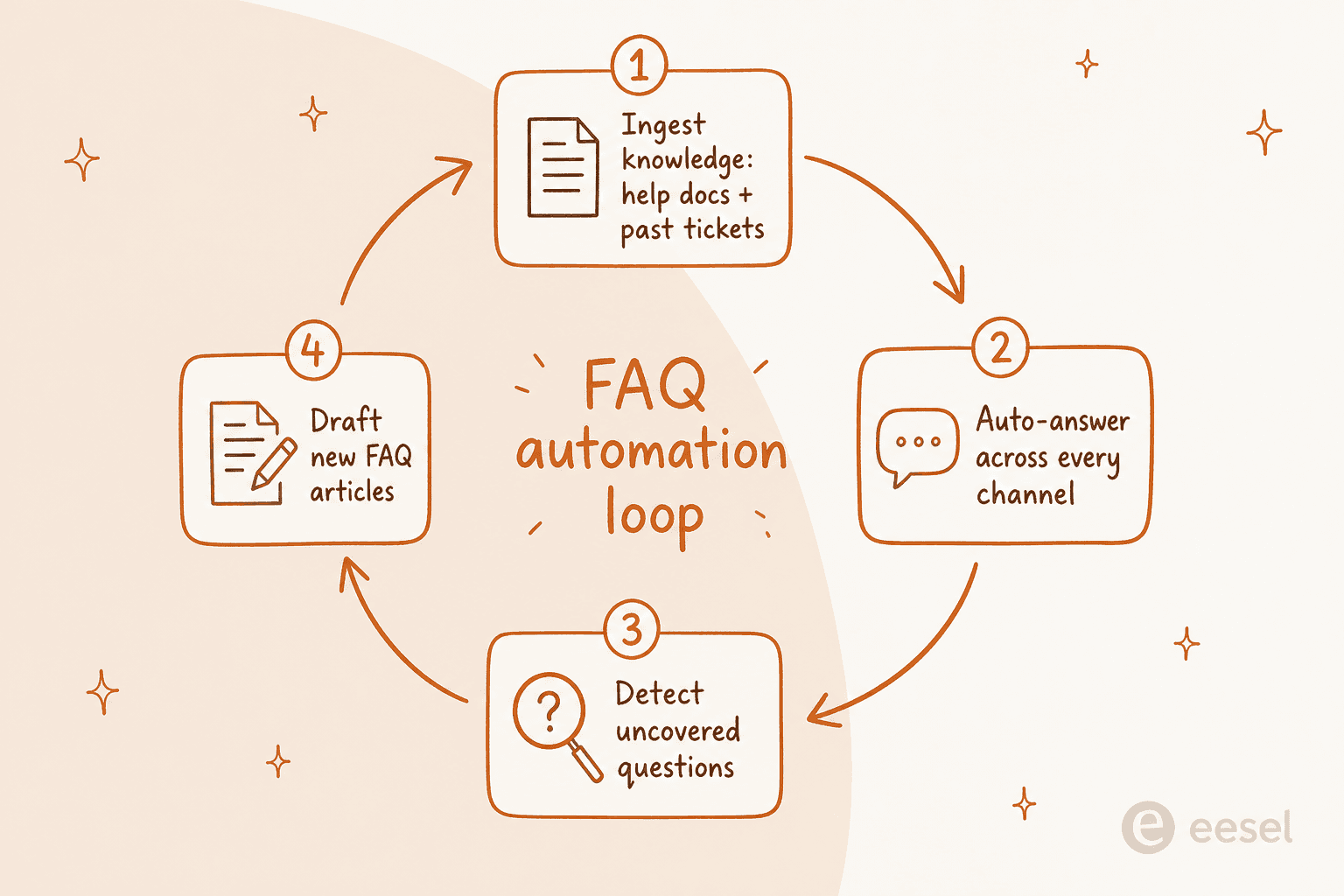
Two failure modes come straight from our own sales calls. One support manager told us their entire knowledge base was written for admins while their tickets came from end-users, a fundamental audience mismatch that produced confusing automated replies no matter how good the model was. Another team watched their bot cheerfully tell customers "yes, we support that" for products it didn't actually cover, because the knowledge base said "we support all models" and the AI took it literally. Both are knowledge problems, not model problems. That's the whole thesis of this post.
How I evaluated each tool
I scored every tool on five things, in roughly this order of importance:
- What it learns from. A help-center chatbot trained only on your articles can answer what's documented. One that also trains on your solved tickets learns how your team actually phrases answers, which is where the real coverage lives.
- Channel coverage. Does the automation run everywhere your customers ask (chat widget, email, Slack, WhatsApp, in-app), or just on the website widget?
- Keeping knowledge fresh. Can it spot the questions it couldn't answer and help you close the gap, or does upkeep fall entirely on you?
- Pricing model and total cost. Per-resolution, per-seat, per-session, or flat per-ticket? The unit matters more than the sticker.
- Setup and time to value. Can you forecast coverage before you commit, or is it a months-long services project?
The single biggest quality lever is criterion one.

A bot that only reads your published articles is capped by how well those articles are written, and (as those two sales-call stories show) most knowledge bases are thinner and more out-of-date than their owners think. A bot that also learns from thousands of resolved tickets picks up the phrasing, the edge cases, and the exceptions your docs never captured.
The best AI for FAQ automation at a glance
| Tool | Best for | Learns from past tickets | Channels | Flags knowledge gaps | Billing unit | Starting price |
|---|---|---|---|---|---|---|
| eesel AI | Flat, predictable cost on real tickets | Yes | Chat, email, Slack, Teams, widget | Yes (auto-drafts articles) | Fixed monthly, 1 credit per ticket | From $299/mo (500 credits) |
| Ada | Enterprise contact centers | Coaching loop | Chat, email, voice, social | Via analytics | Per resolution | ~$30k+/yr (quote) |
| Forethought | Mature mid-market/enterprise | Yes (Discover) | Chat, email, voice, SMS | Yes (Discover) | Platform + outcomes | Quote |
| Zendesk AI | Teams already in Zendesk | Resolution loop | Messaging, email, voice | Content Cues | Per resolution + seat | $55/agent/mo + usage |
| Freshdesk Freddy | SMB/mid-market on Freshdesk | KB-led | Chat, email, widget | Partial | Per session + seat | First 500 sessions included once per account, then $49/100 sessions |
| Gorgias | Shopify ecommerce brands | Ecommerce-trained | Chat, email, social, SMS | Limited | Per resolution + ticket | $0.90 / resolution |
| Help Scout | Small relationship-driven teams | No (KB-only) | Chat, email, widget | No | Per resolution + seat | $0.75 / resolution |
| Tidio (Lyro) | SMB ecommerce, fast setup | Scraping + FAQ | Chat, email, widget | Limited | Three usage meters | $32.50/mo standalone |
1. eesel AI
Best for: teams that want strong FAQ automation on their real tickets, running across every channel, with a flat and predictable bill.
I work on eesel, so weigh the placement accordingly, but I'll argue the case on the same five criteria I used for everyone else. eesel AI is an AI helpdesk agent that plugs into your existing stack (Zendesk, Freshdesk, Gorgias, Front, HubSpot, Slack) and trains on your past tickets, help docs, and macros on day one. Years of history becomes usable knowledge immediately, rather than a blank-slate bot you spend a quarter teaching.

On the three things I said actually matter: it learns from solved tickets, not just articles, so it answers the way your team already does. It runs the same automation across chat, email, Slack, and Microsoft Teams from one knowledge base, so you're not rebuilding the FAQ per channel. And it closes the loop on freshness: theme analysis and automatic article drafting surface the questions the AI couldn't cover and draft the missing knowledge, which is exactly the fix for the admin-versus-end-user gap I mentioned above.
The part I'd point a nervous buyer to first is simulation mode. Before the agent ever touches a live customer, you run it against thousands of your historical tickets and it shows you your real coverage by theme, where the gaps are, and what it would have replied. You're forecasting your own number, not trusting a vendor's headline. Then confidence-based routing handles the rest: it answers what it's sure about and quietly leaves the rest for a human.
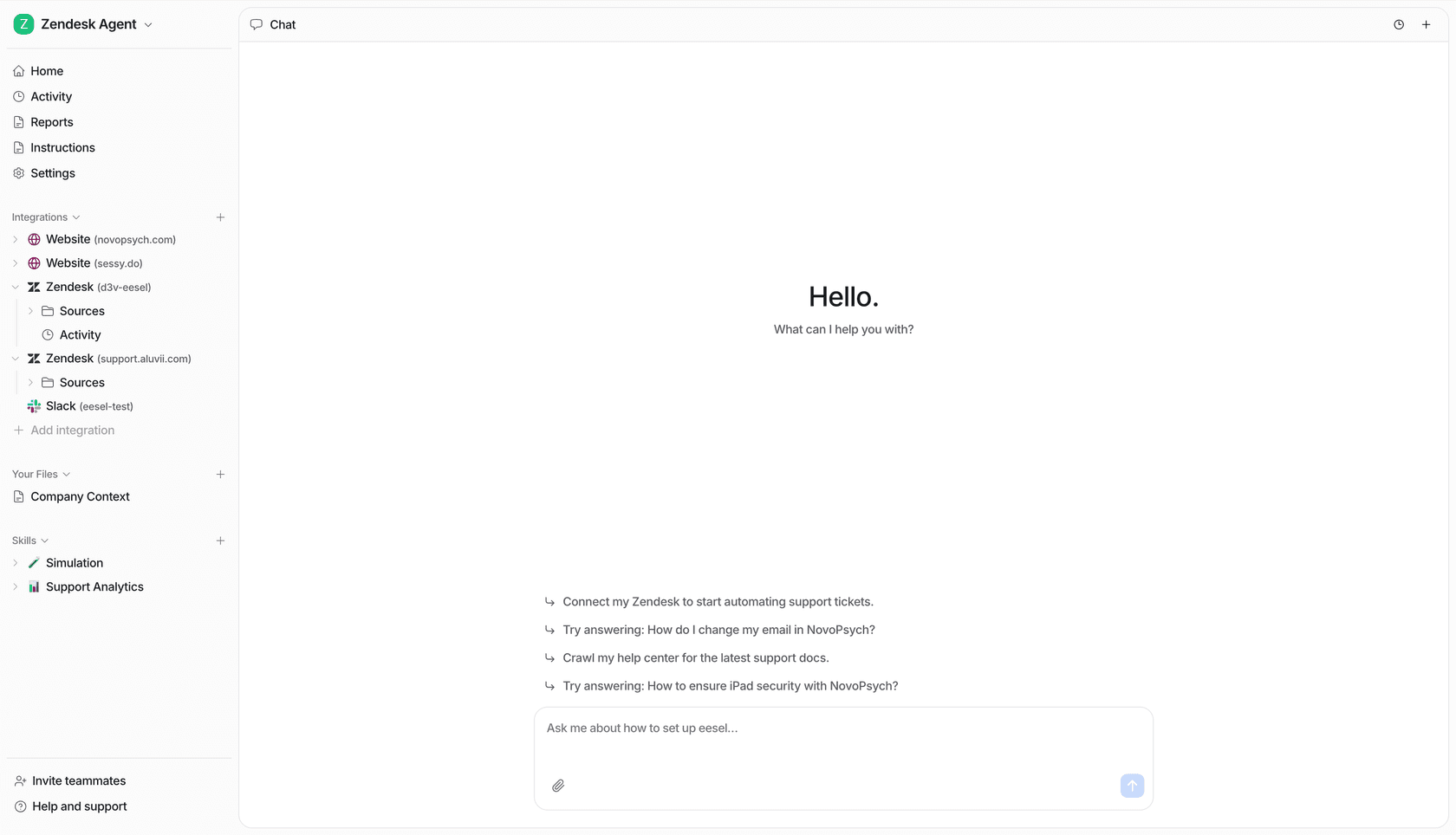
Here's the chat agent resolving a customer question end to end:
Pros:
- Trains on solved tickets, not just help-center articles, so it automates the way your team actually answers.
- Same automation across chat, email, Slack, and Teams from one knowledge base.
- Flags uncovered questions and drafts articles, so knowledge stays current on its own.
- Simulation on past tickets forecasts coverage before launch; from $299/month for 500 credits (1 credit per ticket or chat), no per-seat fee.
Cons:
- SOC 2 is in progress rather than certified, which can stall procurement at security-strict enterprises.
- Newer brand than the incumbents, so fewer third-party review-site ratings to lean on.
- Deep multi-step actions on niche internal systems can need configuration.
Pricing: one fixed monthly price, from $299/month for 500 credits, with no platform or seat fee. 1 credit covers one ticket or chat, however long. A team running 1,000 tickets a month through the AI is on the $499/month plan; route only 200 of them and the $299 plan covers it. SSO from $199/month and priority support from $299/month are optional add-ons. Full detail on the pricing page.
Verdict: if your inbox is mostly repetitive FAQs and you want automation that keeps working as your product changes, this is where I'd start. Gridwise resolved 73% of tier-1 requests in its first month, and Smava runs a fully automated agent on 100,000+ German tickets a month. The flat per-ticket price is also the cleanest defense against the per-resolution creep I'll keep flagging below.
2. Ada
Best for: large consumer brands with enormous conversation volume and the budget for an enterprise platform.
Ada is a standalone "agentic customer experience" platform whose Reasoning Engine orchestrates multiple LLMs to resolve inquiries, grounded in your knowledge sources and run through multi-step Playbooks. On the automation-maintenance side, a coaching loop lets you review past conversations and have the agent apply the notes going forward, and it answers across chat, email, voice, and social from one setup.
The resolution numbers in Ada's case studies are strong: Tilt hit an 84% automated resolution rate on chat. The catch is scale and price. Ada's pricing page is a sales-qualification form gated to teams doing 300,000+ conversations a year, and real-world contracts reportedly start around $30,000/year and climb into six figures.
"Used to work for a company paying ~300k+ for Ada.cx, it's expensive [...] I would stick with Zendesk messaging and answer bot."

That captures the recurring knock: powerful, but priced and scoped for the enterprise top end.
Pros: very high resolution ceiling; strong reasoning on complex multi-step flows; helpdesk-agnostic.
Cons: quote-gated, enterprise-only pricing; setup is a project, not a plug-in; quality depends heavily on knowledge-base hygiene.
Verdict: a genuinely strong pick if you're a large brand with the volume to justify it. For everyone below the enterprise line, it's overkill. Weigh the Ada alternatives before committing.
3. Forethought
Best for: mature mid-market and enterprise orgs that want the AI to help maintain the knowledge, not just read it.
Forethought runs a multi-agent system whose customer-facing agent, Solve, resolves inquiries across chat, email, voice, and SMS using agentic workflows it calls Autoflows, plus Custom Actions to hit your helpdesk and third-party APIs. The reason it lands high on an automation list specifically is Discover: it analyzes historical tickets and your knowledge base to surface gaps and auto-generate articles, which is the freshness half of the loop most tools skip.
The proof is real: Grammarly reached 87% deflection within 10 days with CSAT at 4.2/5. A verified reviewer on AWS Marketplace credited the chat widget with proactively solving over 70% of inbound cases. The recurring complaints are UI latency and a steeper-than-expected learning curve. Notably, Forethought now also powers Zendesk's own AI agents after that partnership.
Pros: strong knowledge-gap analysis via Discover; high resolution ceiling; multi-channel automation.
Cons: quote-only pricing with no free trial; reported slowness and configuration friction.
Verdict: a serious option for larger orgs, especially ones that struggle to keep their knowledge base current. Smaller teams will find the setup heavy. See how it compares against the best Forethought competitor and check Forethought pricing before you book a demo.
4. Zendesk AI
Best for: teams already standardized on Zendesk who want native automation without a separate platform contract.
Zendesk's AI Agents autonomously resolve requests across messaging, email, and voice, grounded in a unified knowledge graph and improved by a "resolution learning loop" where every outcome tunes the next. On the freshness front, Content Cues flags articles that need updating. If you're already in the suite, it's the path of least resistance, and the setup guide is well-trodden.
Vendor case studies are strong, with TeamSystem citing 80% automation. The friction is the bill. AI Agents are charged per Automated Resolution on top of your per-seat plan (which starts at $55/agent/month for the first AI-capable tier), plus $50/agent add-ons. Community math is unforgiving:
"From what I can see in regards to this new 'Automated Resolution' pricing model, we'll be paying about $1.50-$1.20 per resolution."
And effectiveness, as another user put it, "really depends on having a perfectly curated Zendesk knowledge base, which... ours isn't, lol." That's the knowledge problem again. In one of our own sales calls, a US healthcare team running ~500 Zendesk tickets a month told us they'd "kicked the tires in Zendesk AI solutions and found it largely inadequate and overpriced," which is a sentiment I hear more than you'd expect from teams already inside the suite.
Pros: native, no extra integration; mature knowledge graph; strong on well-documented intents.
Cons: layered seat + per-resolution + add-on pricing; quality gated on KB hygiene.
Verdict: the sensible default if you're committed to Zendesk and your knowledge base is clean. If you want past-ticket training and a flatter bill, look at the best AI for Zendesk options that sit on top of it, or read up on Zendesk's AI capabilities first.
5. Freshdesk (Freddy AI)
Best for: SMB and mid-market teams already on Freshdesk who want no-code automation on a budget.
Freddy AI Agent ships with 50+ prebuilt agentic workflows that resolve queries and update records 24/7, built in a no-code studio, with a separate Copilot that assists human agents. The no-code workflow builder is the real draw here: it makes automating a specific FAQ-plus-action (check order status, then answer) something a support lead can set up without engineering. Self-service runs off your knowledge base, and Freshworks reports up to 80% resolutions with Freddy.
A Reddit user summed up the realistic SMB take well:
"Freshdesk Freddy: for early stage teams that want something simple, it covers the basics auto assignment, suggested replies, FAQ deflection. It's reliable and affordable, nothing crazy."
The watch-out is the consumption model: Freddy is a usage add-on where the Email AI Agent includes the first 500 sessions, then $49 per 100 sessions, and a "session" is a 72-hour window that expires each cycle, which makes forecasting awkward.
Pros: affordable entry (a 14-day trial, then a 6-month Free Program for 2 agents); no-code workflow studio; easy if you're already on Freshdesk.
Cons: session-based billing is hard to forecast; quality drops on complex tickets; some features gated to Enterprise.
Verdict: a solid, low-risk choice for Freshdesk teams automating mostly simple FAQs. For anything more nuanced, compare the best AI for Freshdesk and weigh Freddy's pricing carefully.
6. Gorgias
Best for: Shopify and ecommerce brands that want to automate FAQ actions, not just answers.
Gorgias is the ecommerce-native pick. Its AI Agent is pre-trained on a billion-plus ecommerce conversations and automates pre- and post-sale FAQs, handles returns and refunds, edits orders, and recommends products, all natively connected to Shopify with no syncing. That action-taking is what separates it: "where's my order?" isn't just answered, it's looked up and resolved. It routinely handles around 60% of support even for smaller brands.
On when it's worth it, I'll defer to someone who's lived it:
"I've been around ecommerce for 10+ years and this is honestly how I'd choose: 40%+ tickets need Shopify actions, I'd lean Gorgias. Mostly conversational support, Zendesk is fine."
That's the right test. Gorgias bills per resolved conversation ($0.90 annual, $1.00 monthly) on top of ticket-based plans, which can creep to roughly 3x a comparable Zendesk bill at volume.
Pros: unmatched Shopify depth; automates real ecommerce actions, not just answers; quick install.
Cons: ticket-based billing punishes high-volume small teams; little advantage outside ecommerce.
Verdict: if 40%+ of your tickets need Shopify actions, this is the obvious pick. If you're mostly answering conversational FAQs, a flatter-priced agent will cost less. See AI agent options for Gorgias and Gorgias alternatives.
7. Help Scout
Best for: small, relationship-driven teams that want simple, KB-driven FAQ automation.
Help Scout's AI Answers is an autonomous agent that resolves requests from your Docs knowledge base and website, surfaced through the Beacon widget, with a clean "no dead ends" escalation to a human. Help Scout reports its AI agents resolve 73% of interactions on average, which is a strong, honestly-stated number.
Two honest limits, both about the criteria I care most about. First, AI Answers is knowledge-base-only: it can't take actions or learn from your past tickets, so it tops out at documented FAQs and there's no gap-detection loop to keep it fresh. Second, the per-resolution cost stacks on top of seats at $0.75 per resolution, which adds about $750/month at 1,000 resolutions. Help Scout's pricing history has also rattled some customers:
"HelpScout changed back to user-based pricing. Guess too many people cancelled including me... Helpscout lost all trust with this flip-flopping on pricing."
The product itself is well-liked; the pricing whiplash is the sore spot.
Pros: clean, simple UX; honest resolution numbers; clear human handoff.
Cons: KB-only (no past-ticket learning, no actions, no gap detection); per-resolution cost stacks on seats; pricing-model changes hurt trust.
Verdict: a lovely fit for small teams whose FAQs are fully documented and who value simplicity over depth. If you need the AI to learn from tickets or keep its own knowledge current, you'll outgrow it. Weigh the best AI for Help Scout if so.
8. Tidio (Lyro AI)
Best for: SMB ecommerce brands that want fast, low-friction FAQ automation they can install in minutes.
Tidio's Lyro is an AI agent powered by Anthropic's Claude that learns from FAQ uploads, website scraping, and article imports, then answers grounded only in the content you give it, which is why reviewers praise it for staying on-script. Tidio claims a 67% average resolution rate and offers Smart Actions for backend tasks. It can bolt onto an existing helpdesk standalone.
The product is well-rated (4.8/5 on the Shopify App Store across 1,300+ reviews), but the pricing draws consistent fire:
"their pricing is so off and hidden, 'free tier' is just a trap includes most services that are billed separatedly once you want to scale... tidio is a NO-GO for me they need to be more transparent."
Tidio runs three separate usage meters (billable conversations, Lyro AI conversations, and Flows visitors), and the jump from the $49/month Growth tier to the $749/month Plus tier is steep.
Pros: fast setup; Claude-grounded answers that resist hallucination; strong SMB ratings.
Cons: three-axis usage pricing is confusing; advanced routing gated to higher tiers; learns from scraping/FAQ imports, not your past tickets.
Verdict: a good fast-start option for small ecommerce stores, as long as you model the usage meters carefully before scaling. Compare Tidio Lyro alternatives if the pricing structure worries you.
The part that decides whether your automation lasts
After all eight, here's the pattern that actually separates them. The answering is a solved problem: nearly every tool here will resolve a well-documented FAQ. What's hard, and what most roundups never test, is the plumbing around the answer.

Three things protect an automation over time: the AI learns from your solved tickets (not just docs), the same knowledge answers on every channel your customers use (not just the widget), and something keeps the knowledge current instead of letting it drift stale. Miss any one and the automation looks great in the demo and slowly rots in production.
That's also why I keep flagging per-resolution pricing as a quiet tax. When you pay per resolution, a confidently-wrong "resolution" still bills you, and a seasonal spike multiplies your invoice for volume you didn't choose. A fixed monthly plan keeps November's bill identical to March's. If you're building the business case, our breakdown of AI customer support cost savings and the AI vs human agent cost math is a good place to start. And if your only goal is the headline resolution number, our companion guide to the best AI for FAQ deflection ranks these tools on exactly that.
Try eesel for FAQ automation
If your inbox is mostly the same repetitive questions, eesel is built for exactly this job. It connects to your helpdesk in a few minutes, trains on your past tickets and help docs so it answers the way your team already does, and runs the same automation across chat, email, Slack, and Teams from one knowledge base. Its theme analysis flags the questions it couldn't cover and drafts the missing articles, so your FAQ stays current instead of quietly going stale.
Best of all, you can simulate the coverage on your real ticket history before a single customer sees the AI, so you know your number before you commit. Plans start at $299/month for 500 credits (1 credit per ticket or chat), with no per-seat fee, and the free plan gives you 100 credits with no card. You can start for free and run the simulation on your own tickets to see exactly what it would automate.