


It feels like every week there’s a new "AI search" tool promising to change how we find information. But let's be real, most of them are just fancy wrappers for Google, built to search the public web, not to help you get any real work done.
That's where the interesting stuff is happening. We're starting to move beyond basic "AI search engines" and into "AI search assistants", tools that can securely tap into your company's internal knowledge and even take action for you.
So, I decided to cut through the marketing fluff. I spent time with the most popular tools to find the best AI search assistant that a business could actually use to unlock its internal data and automate some of the tedious parts of the job. Here’s what I learned.
What is the best AI search assistant?
First off, let’s clear something up. An AI search assistant isn't the same thing as an AI search engine like Perplexity or Google's AI Overviews.
Here's the simple difference: a standard AI search engine scours the public internet. It’s perfect for asking, "Who won the World Series in 1998?" An AI search assistant connects securely to your internal company stuff, your wikis, documents, old support tickets, and Slack channels, to give you answers that are actually relevant to your business.
The "assistant" part is what really matters. It's not just about finding info. It’s about summarizing it, personalizing it, and using it to do things, like triaging a support ticket, answering a new hire's question in Slack, or drafting a reply to a customer. It’s an active member of your team, not just a search bar you shout into.
My criteria for the best AI search assistant
I wasn't looking for the tool that could best answer "What is the capital of France?" I wanted something that would provide genuine value to a business. I judged them on five straightforward criteria:
-
How painful is the setup? Can you sign up and get going on your own, or are you stuck booking demos and talking to a sales rep for weeks?
-
What knowledge can it access? Does it only look at the web, or can it connect to the apps you use all day, like Slack, Zendesk, Confluence, and Google Docs?
-
Can you control it? Can you tweak its personality and tone? Can you tell it exactly which documents to use for certain questions? And, most importantly, can you tell it what to do?
-
Does it fit into your workflow? Does it live in another browser tab, forcing you to copy-paste all day, or does it work inside the tools you already have? Can it automate tasks like tagging tickets or escalating issues?
-
Is the price a mystery? Is the pricing clear and predictable? Or is it hiding behind a "Contact Sales" button, ready to surprise you with confusing fees that punish you for growing?
The top AI search assistants at a glance
This table gives you a quick look at how the top contenders stack up based on what really matters for a business.
| Tool | Best For | Key Integrations | Customizable Actions | Self-Serve Setup |
|---|---|---|---|---|
| eesel AI | Business workflow automation | Zendesk, Slack, Confluence, GDocs | Yes (API calls, ticket triage) | Yes, live in minutes |
| Glean | Enterprise-wide internal search | 275+ connectors | Search, agents, connector actions | No, demo required |
| GoSearch | Enterprise knowledge search and agents | 100+ apps, including Drive, Confluence, Notion and Slack | Yes (agents and workflows) | Yes for personal plans; Enterprise sales-led |
| Perplexity | Web research for individuals | Web plus app connectors (Slack, Notion) | Computer agent | Yes |
| Google AI Mode | General consumer search | Public web | Not its focus | N/A (built-in) |
| ChatGPT Search | Conversational web search | Web plus connected apps (Drive, Slack) | ChatGPT agent | Yes |
| You.com | Web search API for developers | Public web | API only | Yes (free API tier) |
The 7 best AI search assistants in 2026
After spending some quality time with each tool, here's my detailed breakdown of the best options out there, starting with the one that was the clear winner for business use.
1. eesel AI
eesel AI is less of a search tool and more of a workflow automation platform with a smart assistant at its core. It connects to all your company's scattered knowledge, help desks, wikis, private docs, chat tools, and uses it to not only answer questions but to automate frontline support, draft replies for agents, and handle internal questions right where your team is working.
The thing that put it at the top of this list for me was its ability to unify the internal knowledge sources that really count, like learning from thousands of your past Zendesk tickets to mimic your company’s tone of voice. Most other tools can't touch that kind of specific data. But its biggest advantage is the setup. You can actually be up and running in a few minutes, all by yourself. No mandatory demos, no sales calls. It even has a simulation mode that lets you test how the AI would have handled hundreds of your past tickets, so you can see the potential ROI before you even turn it on for customers.
Pros:
-
Super simple, self-serve setup with one-click integrations that get you going in minutes.
-
It learns from your old support tickets to automatically match your brand's unique voice.
-
You can create custom actions (like API calls, ticket tagging, and triage) for real, hands-off automation.
-
The pricing is one fixed monthly price, with no per-seat fee and no per-resolution charge.
Cons:
-
It’s laser-focused on business use cases (support, IT, internal knowledge), so it's not what you'd use for general web browsing.
-
While the basic setup is a breeze, you might need a little technical know-how to get the most out of the advanced custom API actions.
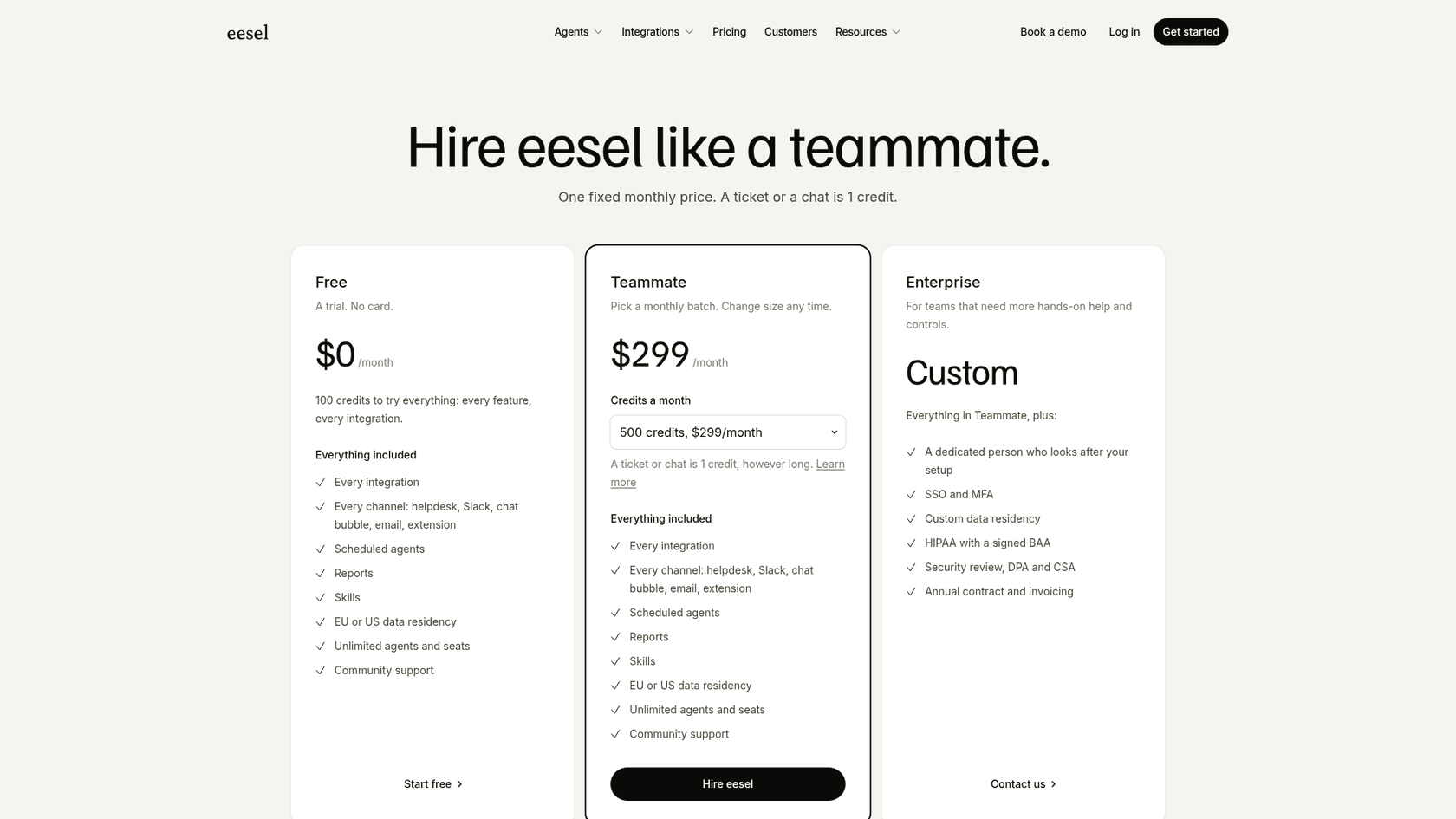
Pricing: The pricing for eesel AI is one fixed monthly price sized to your volume. A ticket or a chat counts as 1 credit, however many replies it takes.
- Free: 100 credits to try every feature and integration, no card needed.
- Teammate: from $299/month for 500 credits, with larger batches such as 1,000 credits for $499/month and 2,500 for $999/month. Every integration, every channel, unlimited agents and seats are included.
- Enterprise: custom pricing, adds a dedicated person for setup, SSO and MFA, and an annual contract.
2. Glean
Think of Glean as the heavy-hitter for huge companies. It’s an AI search platform with an impressive list of 275+ connectors, designed to help employees find information buried anywhere in the organization.
If your only goal is to let people find internal documents, Glean is a solid choice. It's great at indexing a massive number of applications and respects all your existing data permissions, so people only see what they're supposed to. Its core job is search and Q&A, and it also offers agents and connector actions, such as updating a Salesforce record from inside Glean. Those agent features draw on pooled credits rather than being a fixed-price add-on.
Pros:
-
Fantastic at indexing a huge number of enterprise apps.
-
It maintains and respects your existing data permissions and security.
Cons:
-
There's no self-serve sign-up on the site: the main call to action is "Get a demo", so expect a sales process.
-
Agent and automation features are metered through pooled credits, which makes the budget harder to forecast than a flat plan.
-
The pricing isn't public, which is standard for enterprise software but makes it hard to budget without a sales conversation.
Pricing: Glean uses custom pricing. Its Enterprise Flex pricing docs describe per-user seats plus a pooled organization-level allotment of FlexCredits that agents and premium models draw from. The website lists no prices, so you get a number only from sales.

3. GoSearch
GoSearch combines enterprise search with an AI assistant, custom agents and workflows. It connects to 100+ apps, including Google Drive, Confluence, Notion and Slack, and carries over source permissions so employees only see information they can access. Teams can ask questions across company knowledge and use agents in Slack, Teams or the browser.
Pros:
- Brings search and answers from connected company tools into one place.
- Supports custom agents and workflows alongside permission-aware search.
Cons:
- Shared company connectors and enterprise governance features require the Enterprise plan, so a personal trial does not represent the full company rollout.
Pricing: GoSearch offers a free personal plan, with Pro at $20/user/month. Enterprise pricing is available from sales.
4. Perplexity
Perplexity has built a strong reputation as an AI "answer engine," and for good reason. It’s excellent at summarizing information from across the web and shows you exactly where it got its info. If you need to get up to speed on a new topic quickly, it’s one of the best tools around.
I included it here because it's pretty much the gold standard for searching the public web with AI right now. But for a business team, the fit is narrower. It is built around web research for individuals, with connectors as an extra rather than a shared knowledge layer for a support team.
Pros:
-
Amazing at summarizing web content with clear, clickable sources.
-
The conversational style makes it easy to ask follow-up questions and dig deeper.
Cons:
-
Its internal-data reach comes from app connectors. Perplexity's Pro page shows connectors such as Slack and Notion, but a shared company-wide assistant with your Confluence space and ticket history is not what it is built around.
-
Its Computer agent can take actions, but it is a personal research tool, not a teammate that works inside your helpdesk queue.
-
It is an individual-first product, so permissions and rollout across a support team take more work than with a business-first tool.
Pricing: Perplexity has a great free version. The Pro version lets you choose between top models such as Claude Sonnet 5.5 and Gemini 3.8 Flash, and costs $17 a month when billed annually, per Perplexity's Pro page. Max is $167 a month billed annually.

5. Google AI Mode
Google's AI Mode, with its AI Overviews, puts AI-generated summaries right at the top of the search results. The idea is to give you a quick answer so you don't have to click through ten blue links.
Since it’s Google, this is the AI search most people will run into. It's a decent benchmark for what consumer-grade AI search looks like, but it’s built for consumers rather than for business workflows.
Pros:
-
It's built right into the search engine everyone already uses.
-
It pulls from Google's absolutely massive and constantly updated index of the web.
Cons:
-
AI Mode searches the public web, not your company files. Gemini inside Google Workspace is the separate product for Gmail and Docs.
-
Customization and workflow automation aren't what AI Mode is built for.
-
Let’s be honest, those AI Overviews have been known to be inaccurate or just plain weird sometimes.
Pricing: It's free. It’s just part of regular Google Search.
6. ChatGPT Search
The tool that kicked off this whole AI craze, ChatGPT, can now browse the live web. This turns its familiar chat window into a pretty powerful search tool for getting up-to-date information.
Where ChatGPT still shines is in its back-and-forth chat. It's great for brainstorming, asking a string of related questions, and exploring a topic in a more natural way than a typical search engine.
Pros:
-
Very conversational and great for brainstorming or asking follow-up questions.
-
The interface is fast, familiar, and easy to get the hang of.
Cons:
-
Private company knowledge arrives through connected apps such as Google Drive or Slack, which admins manage per workspace, so coverage depends on what your plan connects.
-
Actions are limited to what ChatGPT agent and connected apps support, and it is not wired into a helpdesk queue the way a support-specific tool is.
-
Even with web access, it can still sometimes just make things up (hallucinate).
Pricing: Web search is available on ChatGPT's free plan. Paid plans get you more powerful models and higher limits:
-
Plus: $20/month for individuals.
-
Business: from $20/user/month billed annually ($25 billed monthly) for teams.
-
Enterprise: Custom pricing for large companies.
7. You.com
You.com has changed direction since I first wrote this. Its site now describes it as web search APIs for AI agents and LLMs, so it is a building block for developers rather than a ready-made assistant for a support team. Like the other web-focused tools here, it searches the public internet, not your company's private data.
Pros:
-
Gives developers web and news results as LLM-ready snippets through one API call.
-
Offers 100 free queries a day and $100 in free credit to start.
Cons:
-
Its knowledge comes from the public web, so internal business questions are outside its scope.
-
You need developers to turn the API into an assistant; there's no helpdesk integration out of the box.
Pricing: You.com's pricing page now covers its Web Search API: 100 free queries a day, then $5 per 1,000 calls. I couldn't find the Pro and Max consumer plans I listed in an earlier version on the current page, so check you.com before you budget for it.
How to choose the best AI search assistant for your business
So, how do you pick the right tool? It really boils down to one simple question: where does the information you need actually live?
If your main goal is to research competitors, get the lay of the land on market trends, or learn about public topics, a tool built for the web like Perplexity is a great choice. It's fast, it cites its sources, and it's made to summarize the internet.
| Tool | Entry price (checked Oct 2026) | How you buy |
|---|---|---|
| eesel AI | Free: 100 credits. Teammate from $299/month for 500 credits | Self-serve |
| Glean | Not published | Sales-led, "Get a demo" |
| GoSearch | Free personal plan; Pro $20/user/month; Enterprise custom | Self-serve personal plans; Enterprise sales-led |
| Perplexity | Pro $17/month billed annually | Self-serve |
| Google AI Mode | Free inside Google Search | Built in |
| ChatGPT Search | Free; Plus $20/month; Business from $20/user/month billed annually | Self-serve |
| You.com | Web Search API: 100 free queries a day, then $5 per 1,000 calls | Self-serve (API) |
But if your goal is to cut down on repetitive questions for your support team, get new hires up to speed faster, or automate how tickets are routed, you need an assistant that can securely plug into your internal tools. This is where a solution like eesel AI becomes the obvious choice. It was built from the ground up to turn your company’s private knowledge into an assistant that can actually do work and save your team hours every week. While web search tools find what's out there, eesel AI unlocks what's in here.
It’s time for the best AI search assistant, not just a search engine
The "best AI search assistant" completely depends on what you need it for. For general web questions, tools like Perplexity and ChatGPT are impressive and getting better all the time.
But for businesses trying to solve actual operational headaches, the goal isn't just finding information faster, it's putting that information to work. The real value is in an AI that doesn't just search but assists. One that can handle tasks, fit into your workflows, and speak with your company's voice.
For teams ready to move beyond simple search and into true AI-powered assistance, the choice is pretty clear.
Ready to stop answering the same questions over and over? Get started with eesel AI in minutes and build an AI assistant that actually helps your business run better.
Frequently asked questions
What exactly defines the best AI search assistant for a business compared to a standard AI search engine?
The best AI search assistant for a business securely connects to your internal company data, like wikis, documents, and support tickets, rather than just the public web. It also goes beyond finding information to summarize, personalize, and take action on it, automating tasks for your team.
How can a business ensure that the best AI search assistant they choose can securely access its internal, private knowledge?
When selecting an AI search assistant, ensure it offers secure integrations with your existing internal tools like Slack, Zendesk, Confluence, and Google Docs. It should also respect your company's existing data permissions, ensuring information access is controlled and secure.
What level of setup effort should I expect when implementing the best AI search assistant for my team?
Setup effort varies significantly by tool. Some solutions, like eesel AI, are designed for self-serve setup and can be operational in minutes, while others, particularly large enterprise platforms, typically require a lengthy sales process and more involved implementation.
Beyond just finding information, what practical tasks can the best AI search assistant automate for a business?
A robust AI search assistant can automate numerous tasks, including triaging support tickets, drafting replies to customers, answering common internal questions in chat tools, and even initiating API calls to other systems, freeing up your team's time.
Are there any free or low-cost options to get started with what might be the best AI search assistant for my needs?
Yes, public web-focused AI tools like Perplexity and ChatGPT offer free versions. For business-specific internal assistants, some providers, such as eesel AI, offer self-serve entry-level plans or trials, allowing you to test their capabilities.
If I primarily need a tool for public web research, rather than internal business use, which option would be considered the best AI search assistant in that category?
For public web research, Perplexity is often highlighted as the best AI search assistant. It excels at synthesizing information from across the public internet and providing cited sources, making it ideal for general market research or learning about external topics.