

Cognition AI’s Devin certainly made an entrance, showing up with the title of "first AI software engineer." The demos are wild, showing an AI that can supposedly tackle an entire development project from a single prompt. The hype is definitely there, and so is a public price list now.
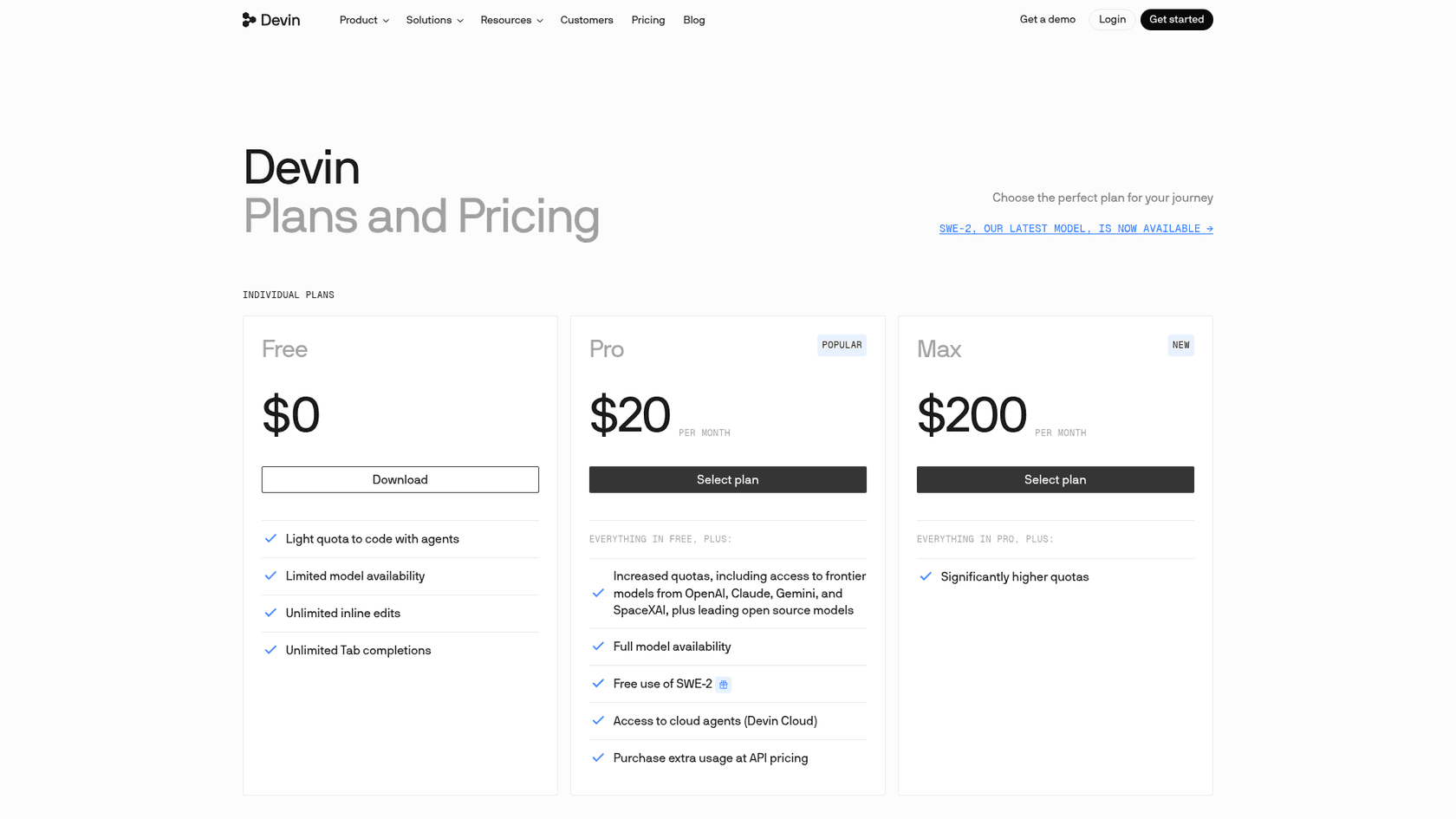
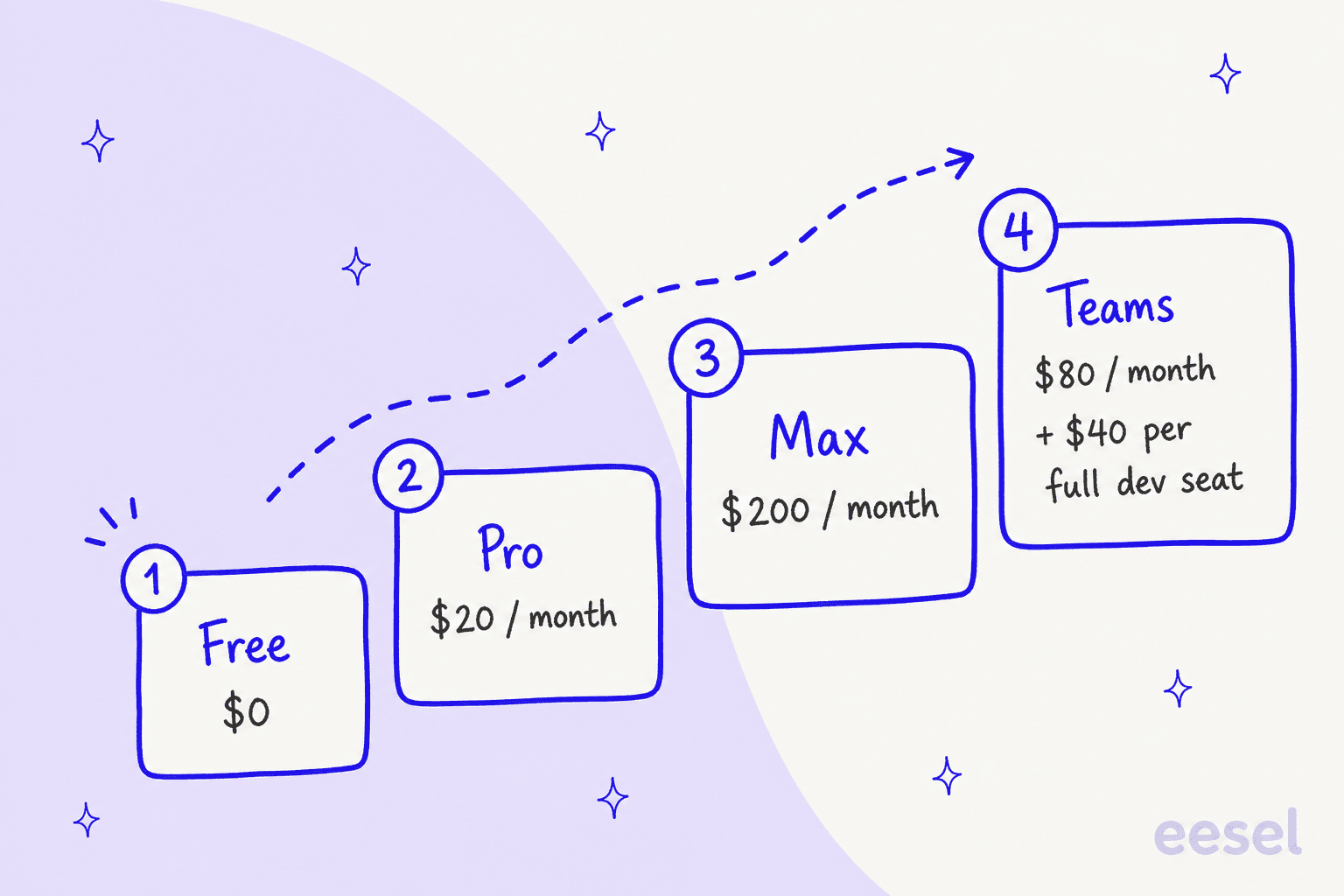
Devin has since moved past its limited preview and now sells public plans: Free at $0, Pro at $20/month, Max at $200/month, and Teams at $80/month plus $40 per full dev seat. Cognition also lists SWE-2, its own model, as free in Devin Desktop and the CLI through October 16, 2026. That raises a bigger conversation: if an AI can be a software engineer, what other jobs can it do?
That's why we're digging into the best Cognition AI alternatives. We aren't just looking for Devin copycats. We're exploring a whole range of AI agents that are solving actual problems today, from open-source coding projects to autonomous agents that can clear out your customer support queue. Let's find the right tool for the job you need done now.
AI software engineers and autonomous agents: The foundation of Cognition AI alternatives
At its heart, an AI software engineer like Devin is a type of autonomous agent. That’s really just a term for an AI that can work on its own. You give it a high-level goal, and it breaks down the steps to get there without you holding its hand.
For an AI software engineer, this means it can:
-
Plan out all the tasks for a project.
-
Write, debug, and test code that's ready to go live.
-
Use the same developer tools a person would, like a terminal or a web browser.
But the real potential here isn't just about writing code. The same technology that powers Devin can be aimed at other complex, repetitive tasks in a business. Think about an AI agent that could act as a frontline support rep, an IT service desk manager, or an internal expert your team can just ask questions. The goal is the same: automate workflows so your team can get back to the more interesting, creative parts of their jobs.
How we picked the best Cognition AI alternatives
To get past the buzzwords, we put this list together based on what teams actually need from a tool. Here’s what we looked for:
-
What's it for? Is the tool designed for general coding, frontend work, or a totally different business area like customer support or IT service management?
-
Can you even get it? Is it an open-source project you can play with, a freemium tool you can try today, or is it locked behind a sales demo and a hefty enterprise contract?
-
How hard is the setup? How quickly can you get it working? We gave extra points to tools that don't need a team of developers and a three-month onboarding project.
-
Is it a specialist? Sometimes a tool that does one thing incredibly well is way more useful than a generalist tool that’s just okay at everything.
A quick comparison of the top Cognition AI alternatives
Here’s a brief look at how the top tools compare.
| Tool | Best For | Key Feature | Pricing Model | Open Source? |
|---|---|---|---|---|
| eesel AI | Customer Support & IT Teams | Autonomous ticket resolution | Fixed monthly plan (credits) | No |
| Devika | Experimenting with AI coding | Open-source & community-driven | Free | Yes |
| OpenDevin | Collaborative AI development | Replicating Devin's workflow | Free | Yes |
| Codeium (now Devin Desktop) | Individual developer productivity | AI-powered code autocompletion | Freemium | No |
| Cursor | AI-native development | AI-integrated code editor | Freemium | No |
| DhiWise (now Rocket) | Prompt-to-app builds | Full-stack app generation from one prompt | Credit-based, free tier | Not listed |
The 6 best Cognition AI alternatives to check out in 2026
While Devin is focused on writing code, there's a whole world of AI agents ready to automate other parts of your business. Here are the top alternatives you can actually start using right now.
1. eesel AI
Devin is built to automate software engineering, but eesel AI is designed to automate customer engineering and support. It's the best pick for teams who want an autonomous agent to handle frontline customer questions, resolve IT tickets, and serve as an internal expert for the whole company.
eesel AI connects directly to the tools you’re already using, like help desks (Zendesk, Freshdesk), chat platforms (Slack, MS Teams), and all your scattered knowledge. It learns from past tickets, help articles, and internal wikis in Confluence or Google Docs to give instant, accurate answers.
What we like:
-
You can go live in minutes. It's genuinely self-serve. You can sign up, connect your help desk, and build your first AI agent without talking to a single salesperson.
-
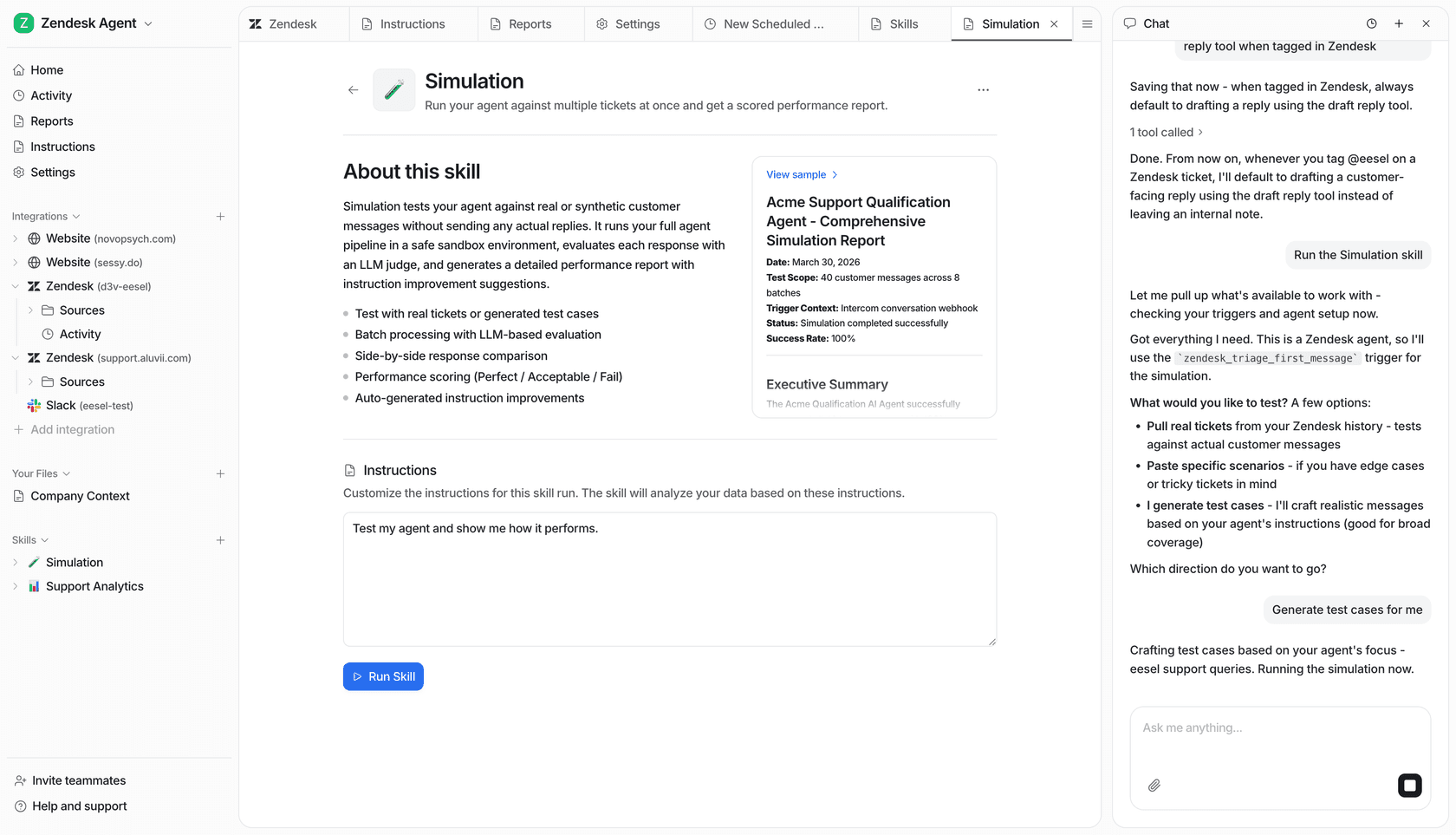
Test it with your own data. The simulation mode is a killer feature. You can run the AI over thousands of your past tickets to see exactly how it would have answered, giving you a real forecast of your automation rate before you let it talk to customers.
-
It unifies all your knowledge. It doesn't just look at your help desk. It can pull answers from messy Google Docs, old Confluence spaces, and recent Slack threads to give a complete picture.
-
No-nonsense pricing. One fixed monthly price sized to your volume, with every integration included and no per-seat fee. One credit covers one ticket or chat, however long it runs, so you know what you'll pay even when things get busy.
What to consider:
- It’s not a software development tool. eesel AI is laser-focused on customer support, ITSM, and internal knowledge management.
Pricing:
eesel AI's pricing is one Teammate plan with every integration, unlimited agents and unlimited seats included.
-
Free plan: 100 credits, no card needed.
-
Paid plans: From $299/month for 500 credits, $499/month for 1,000 credits, up to $1,899/month for 5,000 credits (1 credit = 1 ticket or chat). Pay a year upfront and get two months free.
-
Over your credits: Agents pause until credits reset, or you can turn on overage with a monthly cap you set ($0.80 per extra credit).
2. Devika
If you're hunting for a direct, open-source competitor to Devin, Devika is the one to watch. It was created to be a community-driven AI software engineer that anyone can use, tweak, and contribute to.
Devika is an agentic AI built to take a high-level goal, figure out the steps, research what it needs, and then write the code to make it happen. It's a great project for anyone who wants to get their hands dirty and see how these complex AI agents actually work.
What we like:
-
It's open-source. It’s completely free to use and modify, which is a huge benefit for hobbyists, students, and researchers.
-
It has a large community. The repository has about 19.6k GitHub stars, though its latest commit is from September 2025, so check how current it is before you build on it.
-
It's transparent. You can dig into the code and see exactly how it thinks, which is impossible with closed-source tools like Devin.
What to consider:
-
It's highly experimental. As a new project, it can be buggy and doesn't have the polish of a commercial product.
-
The setup is tricky. You'll need a bit of technical skill to get it installed and running on your own machine.
Pricing:
- Free (open-source).
3. OpenDevin
OpenDevin is another big open-source project trying to replicate the powerful skills Devin showed off. The project has since been renamed OpenHands.
It's less of a single tool and more of a group effort to build, test, and improve autonomous AI agents. The project has a ton of community support and is focused on hitting the same benchmarks as Devin, giving developers a clear and ambitious target to work toward.
What we like:
-
Strong community support. A huge group of developers and researchers are actively working on the project.
-
Clear focus on replication. The goal is straightforward: match Devin's performance on the SWE-Bench benchmark.
-
It's an extensible framework. It’s designed as a foundation that other developers can use to build their own specialized agents.
What to consider:
-
It started as a research project. The open-source edition is aimed at experimentation, and OpenHands also sells an Enterprise plan (SaaS or self-hosted in your VPC, with SAML/SSO) for teams that want support.
-
The open-source edition runs on your machine. Like Devika, it needs some setup, though a hosted OpenHands Cloud now exists too.
Pricing:
- Free (open-source). OpenHands Cloud has a free Individual tier where you bring your own key or use OpenHands models at cost, and Enterprise pricing is custom.
4. Codeium
Maybe you don't need an AI to take over entire projects. If you just want to code faster, Codeium is a fantastic choice. Note that Codeium is no longer an independent tool: codeium.com and Windsurf now redirect to Devin Desktop, which is Cognition's own IDE. It focuses on making individual developers more productive right inside their code editor.
Think of it as GitHub Copilot, but often faster and with a better free tier. Codeium provides snappy AI-powered code autocompletion, an in-editor chat for asking questions, and suggestions that understand the context of your code.
What we like:
-
A free tier. Devin Desktop's Free plan is $0 and includes unlimited inline edits and Tab completions, with a light quota for agents.
-
It's fast. Many users say its autocompletion feels quicker and less intrusive than competitors.
-
Works with tons of IDEs. The original Codeium plugins supported more than 40 IDEs; the current product is Cognition's own IDE.
What to consider:
- The free tier is an assistant, not an agent. The Free plan covers Tab completions and inline edits, while cloud agents (Devin Cloud) start on the Pro plan at $20/month.
Pricing:
- Free ($0), Pro ($20/month), Max ($200/month), and Teams ($80/month plus $40 per full dev seat).
5. Cursor
Cursor takes a different path. Instead of adding AI features to an existing code editor, it built a code editor from the ground up with AI at its center. It’s a version of VS Code, so it feels familiar, but the AI is woven in much more deeply.
With Cursor, you can chat with your entire codebase, asking it to explain tricky functions, hunt for bugs, or refactor code across multiple files. It understands the context of your whole project, not just the single file you have open. This makes it incredibly useful for finding your way around large, unfamiliar codebases.
What we like:
-
Deeply integrated AI. The AI isn't just another feature; it's a core part of the whole editing experience.
-
Codebase-aware chat. Its ability to reason about your entire project is a huge help for complex tasks.
-
Familiar feel. Since it's built on VS Code, the learning curve is pretty flat for most developers.
What to consider:
-
You have to switch editors. To get the full benefit, your team has to be willing to adopt Cursor as their main code editor.
-
You stay in the driver's seat. Cursor now offers cloud agents on Pro and above, but the editor is still where you review and steer the work.
Pricing:
-
Hobby: Free, with limited requests.
-
Pro: $20/month for more requests and unlimited Tab completions.
-
Pro+: $60/month for 3x the usage on all models.
-
Ultra: $200/month for power users.
-
Teams: Starts at $40/user/month and adds centralized billing and admin features.
6. DhiWise
DhiWise started as a specialized AI agent for one of the most tedious parts of development: turning designs into code. It has since rebranded: dhiwise.com now says "DhiWise is now Rocket", and Rocket describes itself as building a full-stack app, backend included, from a single prompt. It's worth a look if your main slowdown is getting from an idea or a mockup to a working app.
What we like:
-
Fast from idea to a live app. Rocket says its deployment pipeline handles code optimization and server configuration for launch.
-
You have full control over the output. You get clean, readable code that you can actually work with, not some black box of generated files.
-
It cuts out repetitive work. It frees up your developers from the mind-numbing task of pixel-pushing so they can focus on logic and features.
What to consider:
-
It's a builder, not a coding teammate. It generates apps from prompts, so it fits new projects better than ongoing work inside an existing codebase.
-
Usage is metered in credits. You buy credits rather than a flat seat, so heavy use can need a bigger plan.
Pricing:
- DhiWise's pricing page now leads to Rocket's pricing, which is credit-based: Free at $0 (20 credits), Pro at $25/month (100 monthly credits), and a $50/month tier (250 credits). Credits don't expire.
How to choose from the best Cognition AI alternatives for your team
With so many different kinds of AI agents out there, the right choice really boils down to the problem you’re trying to solve.
If you want to automate software projects from start to finish, you’re still in the experimental zone. The best thing to do is start with open-source options like Devika or OpenDevin. They'll give you a sense of what's possible (and what isn't) without any cost. Devin itself is no longer waitlisted, so you can also compare it directly against them.
If you're a developer who just wants to speed up your day-to-day coding, a fully autonomous agent is probably overkill. A more practical choice is an AI assistant like Codeium for its excellent autocompletion or Cursor for its deep, codebase-aware editing.
But if your team is drowning in repetitive customer support tickets or IT requests, a coding bot isn't going to help. This is where a specialized business agent is the answer. A platform like eesel AI is built specifically to solve this problem, plugging into your existing workflows to provide immediate help and a clear return.
The future of Cognition AI alternatives: Autonomous vs. practical AI today
Fully autonomous AI software engineers like Devin show an exciting future, but they're still on the horizon. For most of us, the technology is still in the experimental phase.
The good news is that practical, business-focused AI agents are already here and delivering real results. The best "alternative" to Cognition AI isn't always a tool that writes code; it's a tool that solves your most pressing, repetitive, and time-consuming problem. For teams buried in support queues and internal questions, the answer isn't a coding bot, it's a support bot.
Ready to see how an AI agent can change your support workflows? Try eesel AI for free and build your first autonomous support agent in minutes.
Frequently asked questions
What are the main types of Cognition AI alternatives discussed in this blog, and why might I need one?
The blog categorizes alternatives into full AI software engineers (like Devika), AI coding assistants (like Cursor), and specialized autonomous agents for business functions (like eesel AI for support). You might need one to automate tasks, improve developer productivity, or solve specific business problems where Devin is not the right fit.
Are there any open-source Cognition AI alternatives that allow me to experiment with AI software engineering?
Yes, projects like Devika and OpenDevin (now OpenHands) are leading open-source Cognition AI alternatives. They allow developers to explore and contribute to autonomous AI agent development, though they are primarily for experimentation and research.
How do Cognition AI alternatives focused on code assistance, like Codeium or Cursor, compare to fully autonomous agents?
Code assistance tools like Cursor and the free tier of Devin Desktop (formerly Codeium) are AI-powered companions that help developers write code faster and more efficiently within their editors. They don't autonomously plan or execute entire projects, which is the goal of fully autonomous Cognition AI alternatives like Devin or Devika.
Besides software development, are there Cognition AI alternatives that can automate other business processes, such as customer support?
Absolutely. Tools like eesel AI are prime Cognition AI alternatives designed to automate customer support, IT service management, and internal knowledge retrieval. These specialized agents handle repetitive inquiries, freeing up human teams for more complex tasks.
What factors should I consider when selecting the best Cognition AI alternatives for my team?
When choosing Cognition AI alternatives, consider the tool's primary purpose (coding, support, design-to-code), its availability (open-source, freemium, enterprise), ease of setup, and whether a specialist tool would be more beneficial than a generalist. The right choice depends on the specific problem you aim to solve.
Are fully autonomous Cognition AI alternatives like Devin or Devika ready for production use in enterprise environments today?
While highly promising, fully autonomous Cognition AI alternatives are generally still in the experimental or early adoption phase, especially for complex production environments. Devin now sells public plans (Free, Pro at $20/month and Max at $200/month), while open-source options require significant technical setup and are not yet as polished as commercial products.