
Dialpad is a pretty big name in business communications, mainly because of its AI that’s built to understand conversations. The idea is to analyze every chat and call to help you sell better, support customers more effectively, and just get more done. It sounds great on paper, and for some teams, it really is.
But what exactly is Dialpad AI? This post will give you a straight-up look at its features, pricing, and, more importantly, where it falls short. If your support team already runs on a helpdesk like Zendesk or Freshdesk, you need to know if it's the right move before you even think about switching.
While Dialpad bundles everything into one platform, you'll see why a more flexible AI layer that works with the tools you already have, like eesel AI, might be a smarter play.
What is Dialpad AI?
First off, most of Dialpad AI is part of the platform itself. It's the brain that powers Dialpad's entire communications platform, which covers VoIP phone services, video meetings, and messaging. It’s built on natural language processing (NLP) and machine learning, and Dialpad positions it around live transcription, sentiment, coaching, and autonomous AI Agents.
Its main job is to listen, transcribe, and analyze conversations happening on the Dialpad platform as they happen. The call features assume your calls run on Dialpad. The exception is Dialpad AI Agents, a separate product with autonomous voice and digital agents that connect to tools like Zendesk, Salesforce, ServiceNow, and HubSpot.
Key Dialpad AI features for call and contact centers
Dialpad comes with a full set of AI tools to help agents on the phone, give supervisors a complete overview, and automate some of the more tedious tasks. Let's break down the main features.
Dialpad real-time call analysis and transcription
One of Dialpad's most talked-about features is its ability to analyze calls in real time. It gives you a live transcript, so you can literally read along with a conversation. It also uses live sentiment analysis to track the customer's mood (positive, negative, or neutral) and listens for custom keywords you've programmed.
For instance, a manager can watch a dashboard of active calls and immediately see if a conversation is going south. They can then jump in to help or offer advice. For sales and support teams that live on the phone, that's a huge plus.
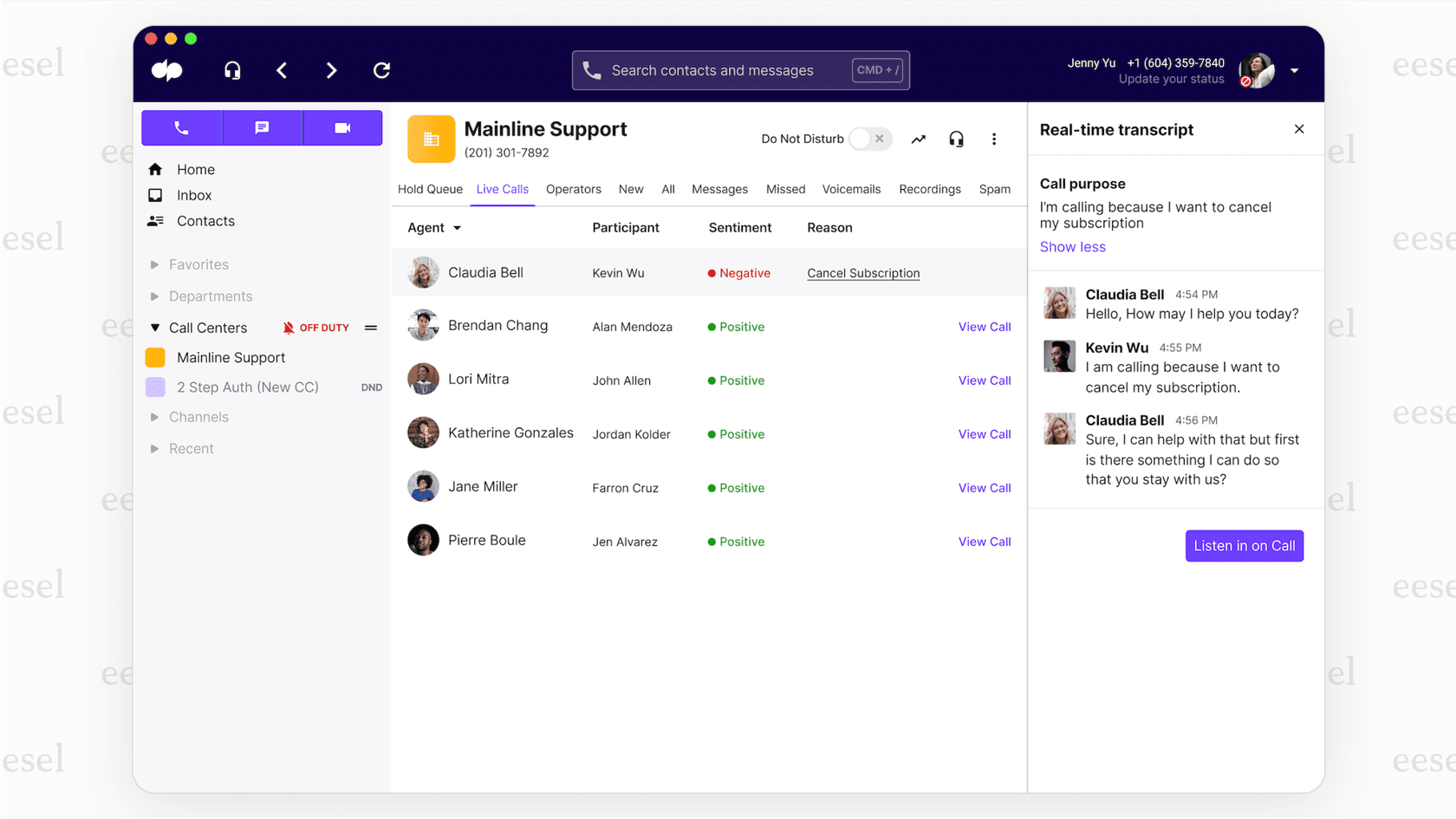
The catch is that this live-call analysis works from what is said on the call. If a customer calls about an issue they just emailed you about, the call tools only see the call. Dialpad AI Agents are the part that can pull from outside sources, including Zendesk, Document360, Box, Guru, and Google Drive.
If your knowledge is spread across more systems, a different approach is an AI layer on top of your helpdesk. A tool that connects with your existing software, like eesel AI, can access your entire knowledge base. It learns from your helpdesk tickets in Zendesk, Gorgias, or Intercom, pulls information from internal wikis like Confluence and Notion, and even scans your Slack history. This gives it far more context for helping a customer, whether they're on the phone, sending an email, or using a chat widget.
Dialpad post-call automation: AI recaps and call summaries
After a call ends, the work isn't done. Agents still have to write notes, log action items, and update the CRM. Dialpad's AI Recaps feature helps by automatically generating a summary of the call, complete with highlights, action items, and a link to the transcript. It's a nice time-saver that cuts down on admin work and lets agents get to the next customer faster.
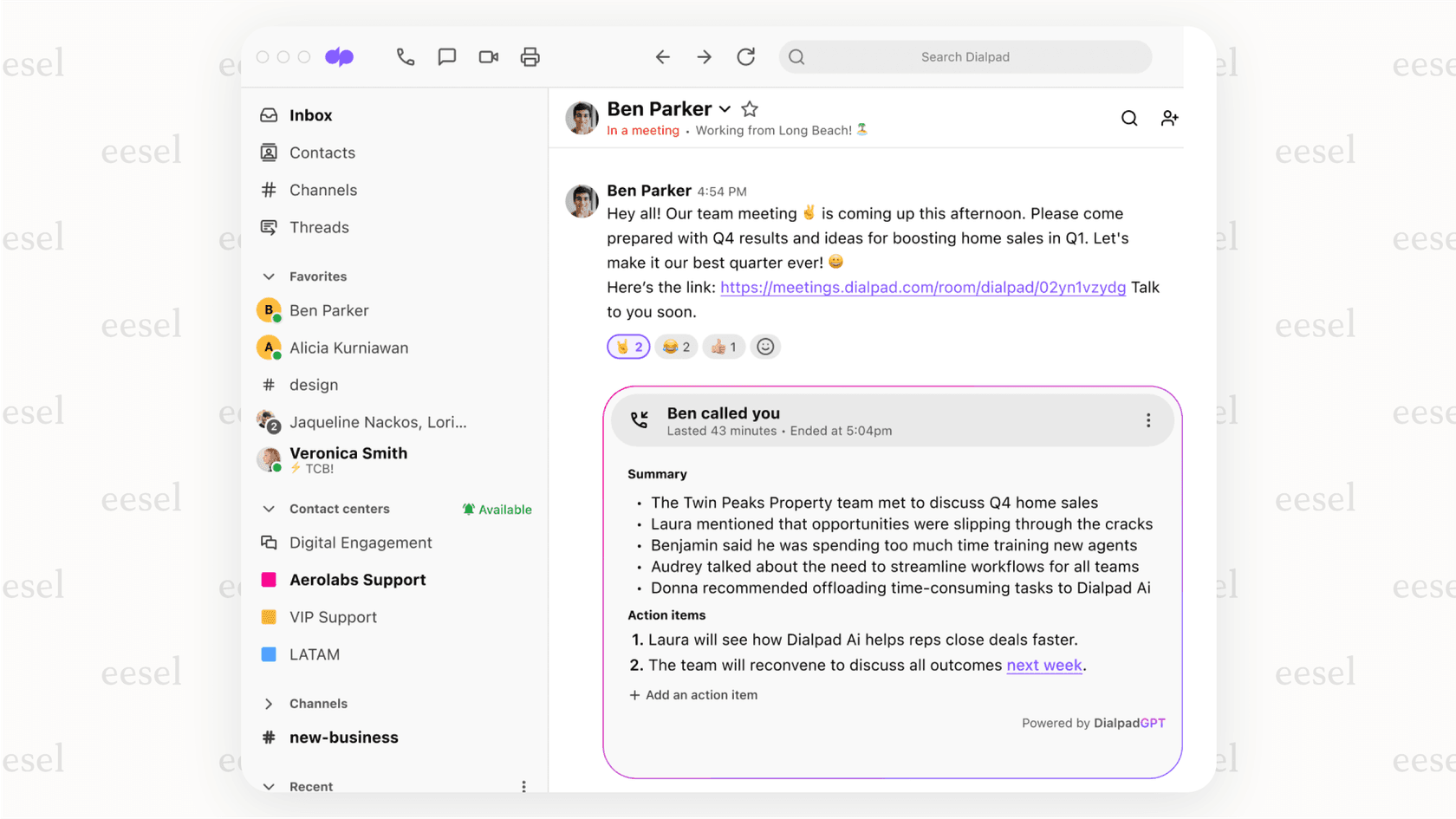
A recap is a record of what happened, and the next step is still up to the agent. Dialpad AI Agents can take actions such as booking or checking order status, and many support teams also want automation inside their helpdesk.
A tool like eesel's triage skill works at the ticket level. It works inside your helpdesk to take action based on the conversation. It can automatically tag a ticket as "Billing" or "Bug Report," send it to the right department, or even close it if the problem is solved. It turns information into action.
Pro Tip: While Dialpad is busy summarizing a call, an integrated AI like eesel AI can kick off an entire workflow. For example, if it sees a customer asking about their order, it can find the info in Shopify and draft a detailed reply with the tracking number before an agent even sees the ticket.
Dialpad agent guidance and quality assurance
Dialpad also has tools to help agents during live calls and make the quality assurance (QA) process a little less painful. These include:
-
Real-Time Assist (RTA) Cards: Now called AI Live Coach Cards. Think of these as digital cheat sheets. If a customer says a specific word like "refund," a pre-written card with talking points or instructions pops up on the agent's screen.
-
AI Playbooks: This feature tracks whether sales reps are sticking to a script (like BANT) by checking if they've asked key questions during a call.
-
QA Scorecards: Instead of having supervisors listen to hours of calls, AI Scorecards can automatically grade conversations based on your criteria, flagging only the ones that need a human review.
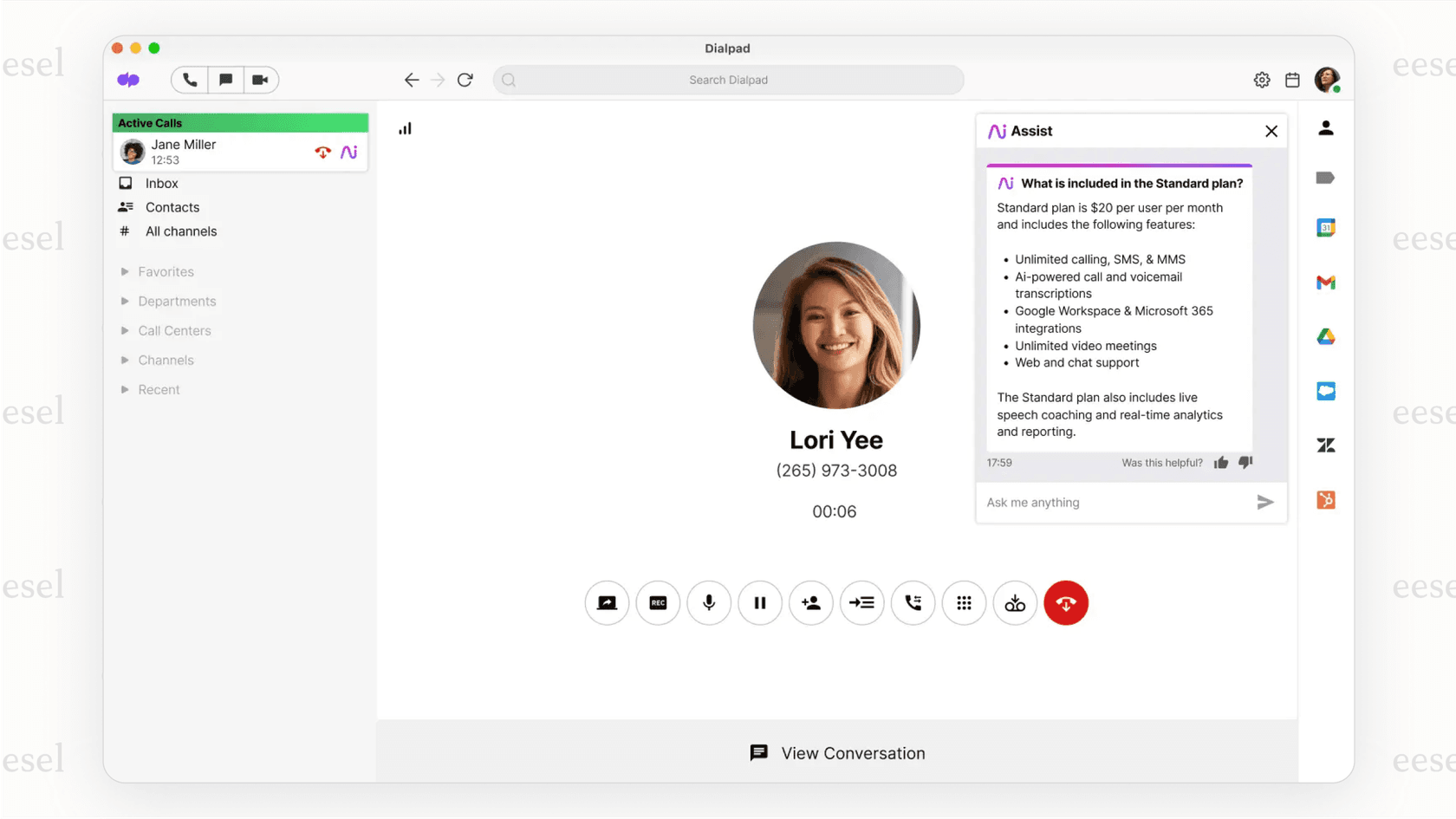
These are great for training new agents and keeping sales calls consistent. They are built around live phone calls, so teams that also handle email, web forms, and chat will want to check how those channels are covered.
Another option is an AI that works where your agents do. For example, eesel's drafting skill sits right inside your helpdesk and drafts full, accurate replies for agents on any channel. It doesn't just offer keyword-based tips; it gives complete answers by learning from every past ticket and all your connected knowledge sources. It’s agent help that's built for today's omnichannel support team, not just a call center.
Dialpad pricing and platform limitations
Dialpad's AI features are spread across its plans and add-ons, and its all-in-one structure comes with trade-offs to think about.
Dialpad’s "all-or-nothing" platform problem
Here’s the main catch with Dialpad: its voice intelligence and AI call center features run on calls handled by Dialpad, so using them usually means moving your business phone system to their service.
That can be a lot of work for companies that have already spent time and money on tools they like. If your support team is happy in Zendesk, your IT team relies on Jira Service Management, and your whole company collaborates in Slack, a migration is a real project with its own cost and downtime.
This is why a flexible AI layer is so appealing. eesel AI is designed to let you bring your own stack. It connects with the tools you already use, adding smart AI features to your existing workflows without making you change your entire setup.
The pricing also shows this difference. Dialpad's pricing is a per-user, per-month fee for Connect, Support, and Sell, so cost grows with team size. AI Agents are billed from a pool of credits, one billable conversation at a time, and Dialpad publishes no rate for them. By comparison, eesel's pricing is a fixed monthly plan sized to volume, from $299 a month for 500 credits (1 credit per ticket or chat), with no per-seat fee and a free plan of 100 credits.
Dialpad vs. eesel AI: a quick comparison
This table sums up the different ways they approach AI.
| Feature | Dialpad | eesel AI |
|---|---|---|
| Model | All-in-one communications platform | Flexible AI layer for your existing tools |
| Primary Focus | Voice intelligence, sales, and VoIP | Helpdesk, ITSM, and knowledge automation |
| Pricing Model | Per user, per month; AI Agents by conversation credits | Fixed monthly credit plan, from $299 for 500 credits |
| Key Training Data | Call transcripts; AI Agents also use Zendesk, Guru, Box, and Drive | Past tickets, helpdesk data, Confluence, GDocs, Slack & 100+ sources |
| Best For | Teams needing a new phone system with built-in AI | Teams wanting to add AI to their current support stack |
| Setup Effort | New phone platform (AI Agents connect to other tools) | Fast, one-click integrations |
Is Dialpad the right AI for your support team?
So, where does that leave us? Dialpad AI is a solid choice for businesses that are mostly focused on voice calls and are already looking for a new, all-in-one communications system. If you're building from the ground up or ready to ditch your old phone system, its real-time analysis and sales coaching tools are pretty impressive.
But for support teams that live in a specialized helpdesk, its call-side AI works best when your calls run on Dialpad. Its AI Agents product is the route for adding AI next to the tools you already use, and it is quote-only.
For those teams, a more flexible, integrated approach usually makes more sense. An AI tool should adapt to your workflow, not make you change it. A solution like eesel AI gives you smarter, context-aware intelligence that works with your existing tools. It learns from your past tickets and connected knowledge sources, automates tasks right where you work, and has a fixed monthly cost. It’s built to make your current setup better, not replace it.
Ready to add AI to your existing helpdesk that actually understands your business? Don't migrate, integrate. See how eesel AI can automate replies, assist agents, and clean up your ticket queue.
You can book a demo or start your free trial today.
Frequently asked questions
Can I add the AI features from Dialpad to my existing phone system or helpdesk?
Partly. Dialpad's call features, like live transcription, sentiment and coaching cards, run on calls that happen in Dialpad. Its separate AI Agents product lists connectors for Zendesk, Salesforce, HubSpot and ServiceNow, so it can sit next to an existing helpdesk.
Is Dialpad a good choice if my team uses more than just phone support, like email and chat?
Dialpad's real-time analysis and coaching are built around live calls. Its AI Agents product covers digital channels such as chat, SMS and email as well, and can draw on knowledge from Zendesk, Document360, Box, Guru and Google Drive.
What kind of data does the AI in Dialpad learn from to provide assistance?
Its call analysis works from live call transcripts and audio. Dialpad AI Agents can also use connected knowledge sources such as Zendesk, Document360, Box, Guru, Google Drive, a web crawler and uploaded files. Dialpad does not list past ticket history as one of those sources.
How does the pricing for Dialpad work, especially for its AI features?
Connect, Support and Sell are priced per user, per month on Dialpad's pricing page, and several AI features, such as AI Live Coach and AI Scorecards, are optional add-ons on the lower Support tiers. AI Agents are priced by conversation through a pool of credits, with no public rate.