


If you're managing a support team, you know the drill. You’re trying to deliver answers that are fast, accurate, and consistent, all while the ticket queue keeps growing. It’s a lot to juggle. This is where AI agent assistance tools promise to help, suggesting replies and putting information right where your agents need it.
Freshworks offers this kind of help with its own AI, Freddy, designed to speed things up within its ecosystem. But is it really the best tool for the job? This guide gives you an honest look at the Freddy AI reply suggester, covering how it works, its features, pricing, and a few crucial limitations you should know about before you commit.
What is the Freddy AI reply suggester?
Freddy AI is the brain built into Freshworks products like Freshdesk and Freshservice. Its main job is to automate simple tasks and give agents a hand. The Freddy AI reply suggester is one of its key features, and its purpose is pretty simple: it reads an incoming customer ticket and automatically drafts a response for the agent.
The idea is to reduce manual typing, improve first response times, and keep answers consistent by drawing from your company's knowledge. It's worth pointing out that Freshworks has a few similarly named features, the Reply Suggester, Solution Article Suggester, and Canned Response Suggester, which can get confusing. I'm going to focus on the main tool that writes draft replies for your agents.
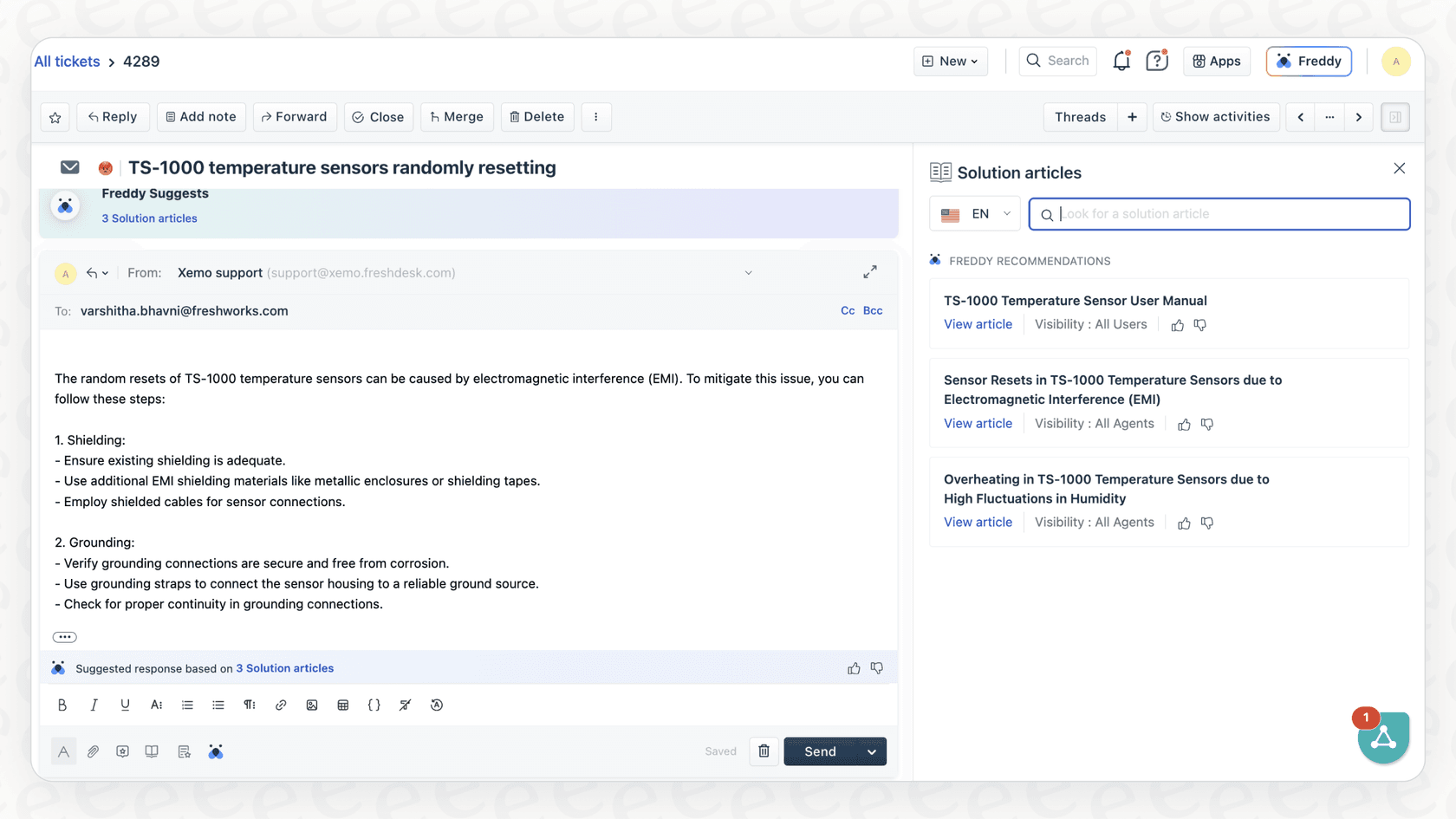
How the Freddy AI reply suggester comes up with reply suggestions
Freddy's ability to suggest replies depends entirely on the information it can find inside the Freshworks platform. Here’s a quick look at how it pieces its suggestions together.
How the Freddy AI reply suggester pulls from your knowledge base
Freddy's primary source of information is your company's Freshdesk knowledge base. When a new ticket arrives, the AI scans the subject and description to find the most relevant bits from your solution articles. It then uses that content to write a draft response. To its credit, Freddy usually shows which articles it used, so agents can quickly verify the information before they hit send.
This sounds good on paper, but it works best when your important knowledge is organized in your Freshdesk knowledge base. Freshworks' reply suggester doc says it sources from public, private, and bot articles. Most companies also keep guides in Confluence, policies in Google Docs, or product details in various internal wikis, and that content only helps the suggester once it is published as a solution article.
The Freddy AI reply suggester learns from canned responses and old tickets
Freddy also tries to learn from your team’s past actions. It can recommend predefined Canned Responses when it detects a common question. It also looks at how similar tickets were solved in the past to suggest troubleshooting steps or answers.
The catch? The Canned Response Suggester needs a ton of data to work well, Freshworks itself recommends at least 2,000 tickets where agents have used them. And more importantly, if you only rely on past tickets and canned replies, you risk getting stuck repeating old, outdated advice. Context that lives in other tools only helps once it is in your knowledge base.
The agent experience with the Freddy AI reply suggester
For an agent, the process is pretty simple. A suggestion pops up as grayed-out "ghost text" in the reply box. They can hit Tab or Enter to accept it, or just start typing their own response to ignore it. There are also buttons to generate a new suggestion or tweak the tone to sound more professional or casual.
Key limitations of the Freddy AI reply suggester
While Freddy can give your agents a starting point, it has some pretty big limitations that can hold your team back. Here are the ones that really stand out.
1. It only works on the first reply
This is a big one. According to Freshworks' own documentation, the main Reply Suggester only generates a suggestion for the first customer reply in a ticket from email or the support portal.
That seriously limits how helpful it can be. Most support conversations aren't a one-and-done deal. They usually involve some back-and-forth as customers give more details and agents need to ask follow-up questions. Freddy is silent after that first message, leaving your agents to handle the tougher parts of the conversation all on their own.
2. Its sources are limited to your knowledge base
We mentioned this before, but it gets its own section. The reply suggester is documented as working from your Freshdesk knowledge base.
So, what happens when a critical product update is posted in Notion or a new how-to guide is in Confluence? The suggester only sees it if it is also a solution article. Agents may get suggestions based on an incomplete set of information and end up having to switch tabs and search through other tools anyway, which cuts into the purpose of having an AI assistant.

__
Freshworks' separate Freddy AI Agent is broader: it can also learn from uploaded files (up to 200), public web links, and custom Q&As. Where eesel AI differs is that it connects your help desk and the other apps your team uses, so Confluence, Google Docs, and Notion are sources without republishing them as articles.
3. Its pricing is complex and punishes growth
Freddy’s pricing is split into two products: Freddy Copilot (for agent-assist features) and Freddy AI Agent (for full automation). The Copilot is around $29-$35 per agent, per month. But if you want the AI to handle tickets on its own, you need the AI Agent, which is priced based on "sessions." Freshdesk's pricing page includes the first 500 sessions on Growth, Pro, and Enterprise, then charges $49 per 100 sessions. For email, a session is a 72-hour window.
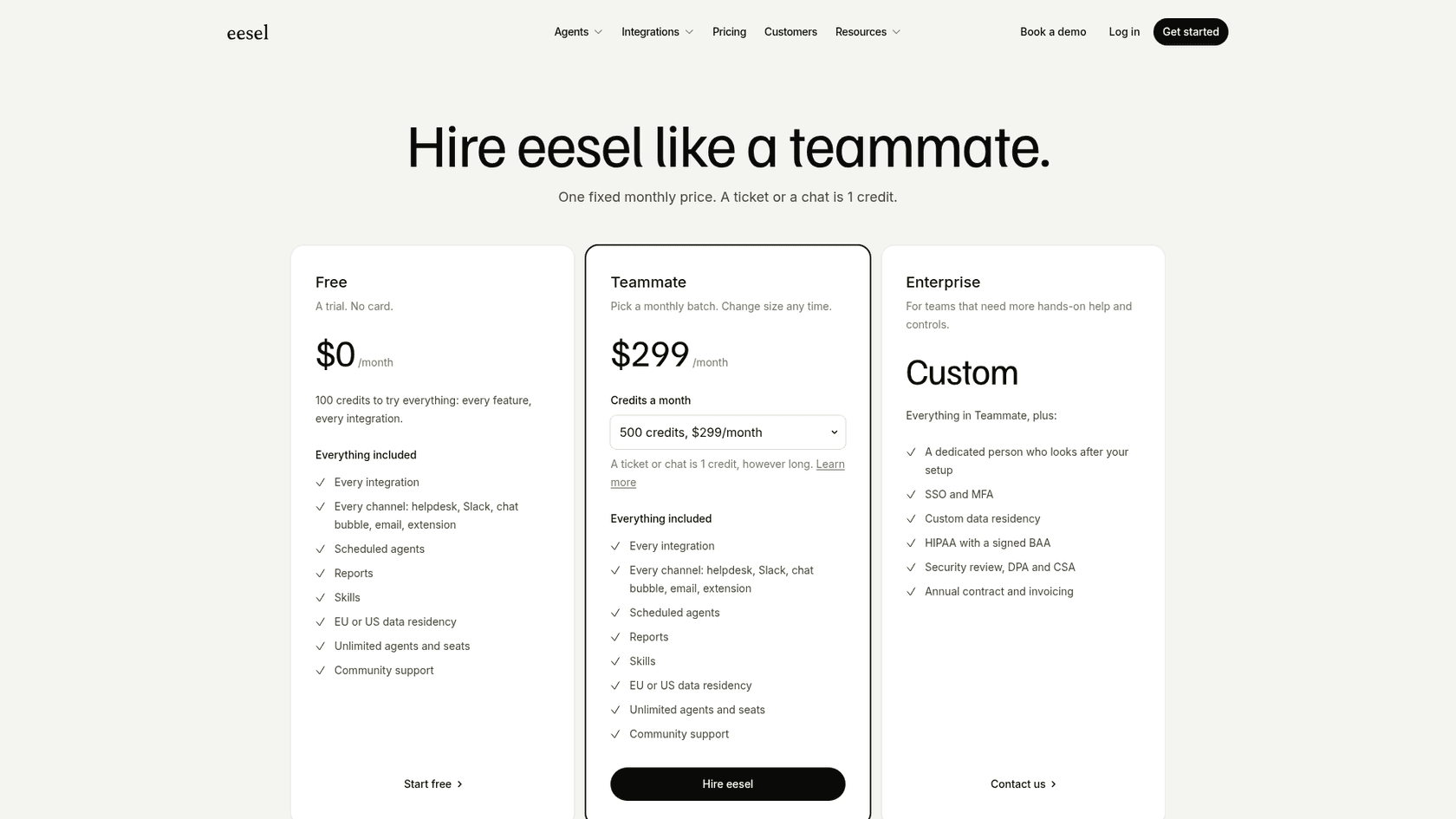
Two meters, per agent and per session, make costs harder to forecast as volume grows, and packs are bought in blocks. eesel AI uses one fixed monthly price instead: from $299/month for 500 credits (a ticket or chat is 1 credit, however long), with no per-seat fee and a free plan of 100 credits.
__
4. Testing tools exist, but not a past-ticket replay
Turning Freddy on is easy, but tweaking it for your specific workflows often means you have to learn their "skills builder," which can get complicated fast.
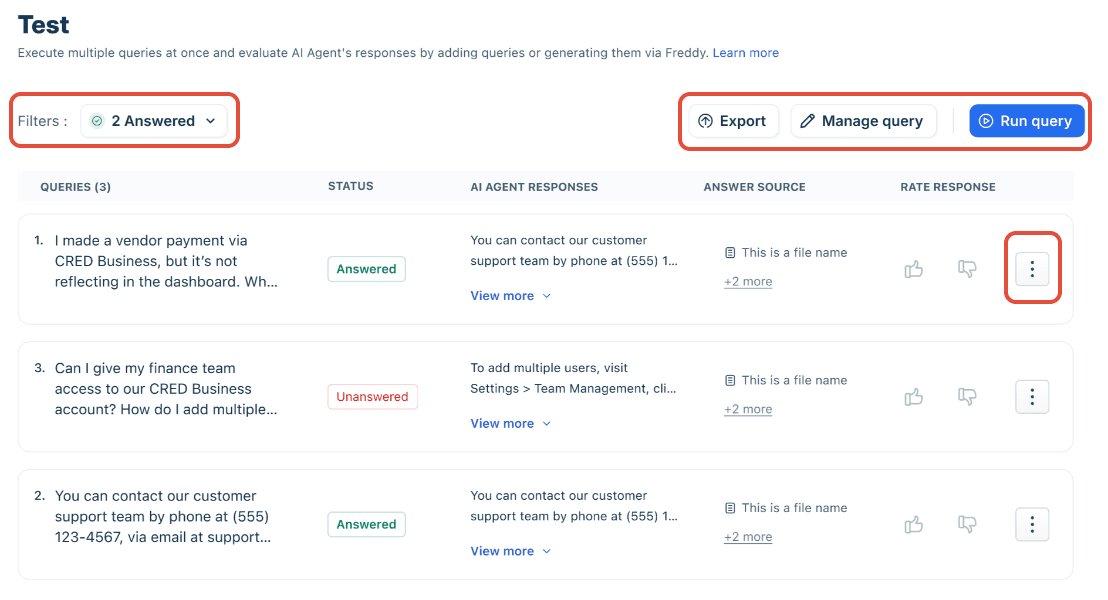
Testing is better than it first looks. The reply suggester only drafts for the agent, and for the AI Agent, Freshdesk's AI Agent Studio has a Test tab where you run a batch of queries and rate each answer. Enterprise also lists a Sandbox. What I did not find is a replay of the setup against your own past tickets. eesel AI has a simulation mode for that: you see how the AI would have responded on your past tickets, with resolution forecasts, before it talks to a customer.
Freddy AI reply suggester pricing explained
To make things a bit clearer, here’s a simple breakdown of how Freddy's pricing works. You're basically paying for two separate things depending on what you want the AI to do.
| Product | Pricing Model | Cost | What's Included |
|---|---|---|---|
| Freddy Copilot | Per Agent / Per Month | ~$29-$35 | AI reply suggestions, summarization, tone enhancement. |
| Freddy AI Agent | Per "Session" Block | First 500 included, then $49 / 100 sessions | Autonomous ticket resolution, custom actions. |
A "session" is all the AI interactions within a 24-hour window for chat, or a 72-hour window for email. This two-product system makes it tough to budget your costs, especially when other solutions bundle everything together without making you choose between agent help and full automation.
The alternative to the Freddy AI reply suggester: A smarter, more connected AI co-pilot
While built-in tools like Freddy are a decent first step, businesses that want to seriously scale their support need something more powerful and flexible. eesel AI is a great alternative because it was designed from the start to solve Freddy’s biggest problems.
Here’s what makes the difference:
-
Bring all your knowledge together: Connect not just Freshdesk, but also Confluence, Google Docs, Notion, and every other integration, all included in the plan.
-
Go live in minutes, not months: eesel AI is totally self-serve. You can connect your help desk, train your AI on all your knowledge, and start running simulations in minutes, no need to talk to a salesperson.
-
Replay on your own tickets: Use simulation mode to see how it performs on your past tickets. When you feel good about it, you can gradually roll out automation with confidence.
-
Clear and predictable pricing: One fixed monthly price from $299/month for 500 credits, with every integration and unlimited seats included.
Final thoughts on the Freddy AI reply suggester
The Freddy AI reply suggester can definitely help agents draft those first responses, but it comes with some serious baggage. Its sources are centred on your Freshdesk knowledge base, its help stops after the first reply, and its pricing runs on two meters.
For teams that need an AI solution that can access all their knowledge, gives them full control over automation, and has one predictable price, a more modern platform is the way to go.
Ready for an AI assistant that actually has the full picture?
Your team deserves an AI co-pilot that works where they work and knows what they know. eesel AI integrates with all your tools to provide accurate, context-aware help through the entire support conversation, not just the first reply.
Try eesel AI for free or book a demo to see it in action.
Frequently asked questions
What does the Freddy AI reply suggester primarily do to assist customer support agents?
The Freddy AI reply suggester automatically drafts responses for incoming customer tickets. Its main goal is to reduce manual typing for agents, improve first response times, and help maintain consistency in answers.
What knowledge sources does the Freddy AI reply suggester use to generate its suggestions?
Freshworks documents the reply suggester as sourcing from your Freshdesk knowledge base, including public, private, and bot articles, and it cites the source articles so agents can check the draft. Canned responses and similar past tickets come from related Freddy suggesters.
How does the Freddy AI reply suggester handle knowledge that isn't stored in Freshworks?
Freshworks describes the reply suggester as drawing on your knowledge base articles. Policies that live in Notion, Confluence, or Google Docs only reach it if they are also published as solution articles. The separate Freddy AI Agent can also learn from uploaded files, public web links, and custom Q&As.
Why is the Freddy AI reply suggester limited in multi-turn customer conversations?
A key limitation is that the Freddy AI reply suggester only generates a suggestion for the *first customer reply* in a ticket. It does not provide ongoing assistance during subsequent replies or the back-and-forth stages typical of most support conversations.
Can you explain the pricing model for the Freddy AI reply suggester features?
Pricing for features related to the Freddy AI reply suggester is split into two products: Freddy Copilot (for agent assistance) is typically charged per agent per month, while Freddy AI Agent (for full automation) is based on "sessions": the first 500 are included on paid plans, then packs cost $49 per 100 sessions.
Are there options to safely test the Freddy AI reply suggester before deploying it live?
The reply suggester shows its draft to the agent as ghost text, so nothing reaches a customer unless the agent accepts it. For the Freddy AI Agent, Freshdesk has a Test tab and a preview, and Enterprise includes a Sandbox. I did not find a way to replay either against your past tickets, which is what eesel's simulation does.