


So, you’re in the Freshworks world, using Freshdesk or Freshservice, and the name Freddy Copilot keeps popping up. It’s Freshworks’ own AI assistant, and the promise is a big one: to help your agents get through tickets faster, automate the boring stuff, and generally make life easier.
But with a new AI tool seemingly launching every week, is the one that's built-in always the best bet? I'm going to take a real, honest look at Freddy Copilot. I'll dig into what it does well, where it kind of stumbles, and how it compares to other options out there. This guide will walk you through its main features, the pricing (because that always matters), and some of the limitations you’ll want to think about before you sign on the dotted line.
What is Freddy Copilot?
At its core, Freddy Copilot is an AI assistant that lives right inside your Freshworks tools. Think of it less as a fully autonomous robot and more as a helpful sidekick for your support agents. Its main purpose is to work alongside your team, giving them the right information and shortcuts to speed up their workflow, not to take over conversations completely.
Freshworks says it helps teams get those first-response and resolution times down. It does this by reading tickets and conversations as they happen, offering help in real time. Have you ever had a super long, complicated ticket? Freddy can summarize it. Need to find the right help article? It suggests one. It can even help draft replies or figure out if a customer is getting frustrated. It’s really built for teams who are already deep in the Freshworks ecosystem and want to add a layer of AI without having to learn a completely new platform.
Key features of Freddy Copilot
Freddy Copilot packs a bunch of tools aimed at helping agents at every step of a support ticket's life. Let’s break down the most useful ones.
AI-powered writing and resolution assistance
These are the features that directly help agents type less and solve more.
-
Reply Suggester & Tone Enhancer: Freddy looks at the ticket and suggests answers from your knowledge base or even from how similar tickets were solved in the past. There’s also a nifty tone enhancer, so if an agent's reply sounds a bit too blunt, they can tweak it to be more empathetic or professional with a click.
-
Ticket Summarization: This one is a lifesaver. When a ticket has been passed around or has a massive wall of text, Freddy can give you the short version. It’s perfect for when a ticket gets escalated and the new agent doesn't have time to read a novel-length history to get up to speed.
-
Help Article Generator: Once a ticket is solved, Freddy can help turn that solution into a draft for a new knowledge base article. This is great for closing knowledge gaps and building out your self-service options without adding a ton of extra work for your team.
-
Real-time Translation: If you have customers around the world, this feature is a big deal. The copilot can translate conversations on the fly, breaking down language barriers and letting your team help anyone, anywhere.
Intelligent ticket management
Beyond just helping with replies, Freddy also helps with the behind-the-scenes work of keeping the support queue organized.
-
Ticket Field Suggester: By reading a new ticket, Freddy can suggest the right category, priority, or other custom fields. This means tickets get routed to the right person or team faster, and agents don’t have to spend as much time on manual sorting. No more playing traffic cop with the inbox.
-
Sentiment Analysis: The AI can tell if a customer is happy, neutral, or getting angry based on their messages. This lets your team spot frustrated customers at a glance, prioritize their tickets, and hopefully jump in before things escalate.
-
Similar Ticket Suggester: Freddy can pull up past tickets that look like the one an agent is working on. This helps them find ready-made solutions and ensures that the whole team is handling common problems in a consistent way.
Understanding Freddy Copilot pricing
Alright, let's talk about the money. How much does Freddy Copilot actually cost? It's important to know that it isn’t automatically included in your Freshworks subscription; it’s a paid add-on.
According to Freshworks' own support docs, here’s the breakdown. Freshdesk's pricing page lists the same $29 per agent per month on annual billing:
| Billing Frequency | USD | EUR | GBP | AUD | INR |
|---|---|---|---|---|---|
| Annual (per month) | $29 | €29 | £23 | $45 | ₹2,399 |
| Monthly | $35 | €35 | £28 | $54 | ₹2,879 |
A few things to keep in mind about this pricing model:
-
It's per agent, per month: The cost scales directly with the number of agents using it. If you have a team of 10 agents who need the copilot, you’re looking at an extra $290 every month if you pay annually.
-
It's for Pro & Enterprise plans only: You need to be on a higher-tier Freshservice or Freshdesk plan (Pro or Enterprise) just to be eligible to buy the add-on.
-
You can be selective: On the plus side, you don’t have to buy a license for your entire team. If only a few agents need it, you can purchase a smaller number of seats, which offers some flexibility.
While this pricing is easy to understand, a per-agent cost can get surprisingly expensive, especially as your team grows. Every time you hire a new support agent, your AI bill goes up too. It can feel like you're being penalized for scaling your team, a common frustration with older software pricing models.
Freddy Copilot limitations to consider before you buy
Freddy Copilot has some solid, native features, but it’s not without its drawbacks. For teams that want more flexibility and control over their tools, these limitations are worth thinking about.
1. Onboarding and setup can be complex
Because Freddy is so tightly woven into the Freshworks platform, getting it set up just right isn't always a simple plug-and-play experience. You might find yourself digging through different settings, reports, and a whole library of support articles to get it running properly. For teams that just want to get started and see value quickly, this learning curve can be a bit of a drag.
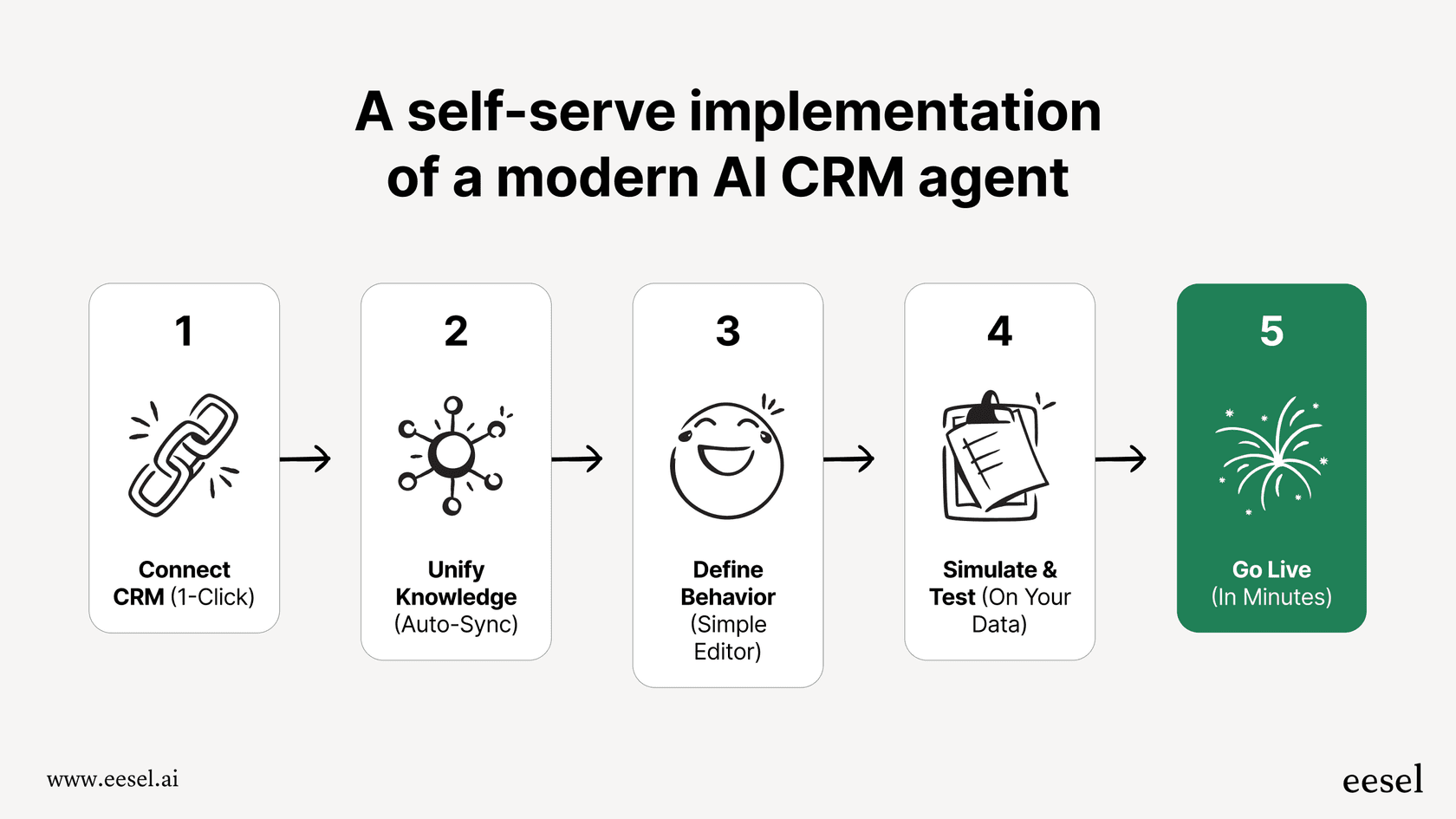
In contrast, more modern tools like eesel AI are built to be incredibly simple to set up. You can connect your Freshdesk account with a single click and be up and running in minutes, not months, without having to sit through mandatory demos.
2. Testing is on live tickets, not past ones
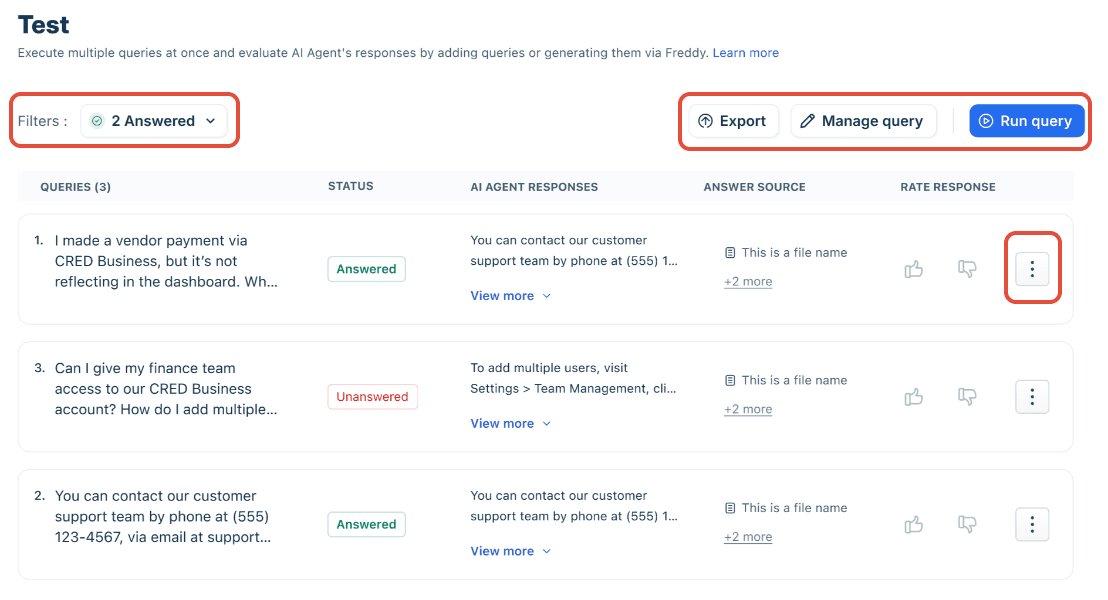
Copilot works on live tickets, but the agent sees each suggestion and decides whether to send it, which keeps the risk low. For automation, Freshdesk's AI Agent Studio has a Test tab for batches of queries, and Enterprise lists a Sandbox. What the docs I read do not describe is a replay against your own past tickets. eesel AI has a simulation mode for that: you run your setup on past tickets, see how it would have answered, and forecast the impact before a customer sees it.
3. Sources centre on Freshworks data
Freddy is at its best when it's using knowledge that already lives inside Freshworks, like your help center articles and past tickets. But let’s be real: your company’s brain isn't just in your help desk. You probably have critical troubleshooting guides in Confluence, important policy documents in Google Docs, or technical specs in Notion. Freshworks' Copilot page describes it drawing on tickets and knowledge base articles, so that material helps once it is published as a solution article.
The Freddy AI Agent is broader and can also learn from uploaded files, public links, and custom Q&As. A tool like eesel AI connects your help desk and your other knowledge sources directly, so the whole company library is available without republishing it.

4. The per-agent pricing model doesn't scale well
We touched on this earlier, but it’s a major point of friction. Paying per agent can get costly fast, and it forces you to have awkward conversations about which agents get access to the fancy AI tools and which don't. It can turn a helpful tool into a resource you have to ration.
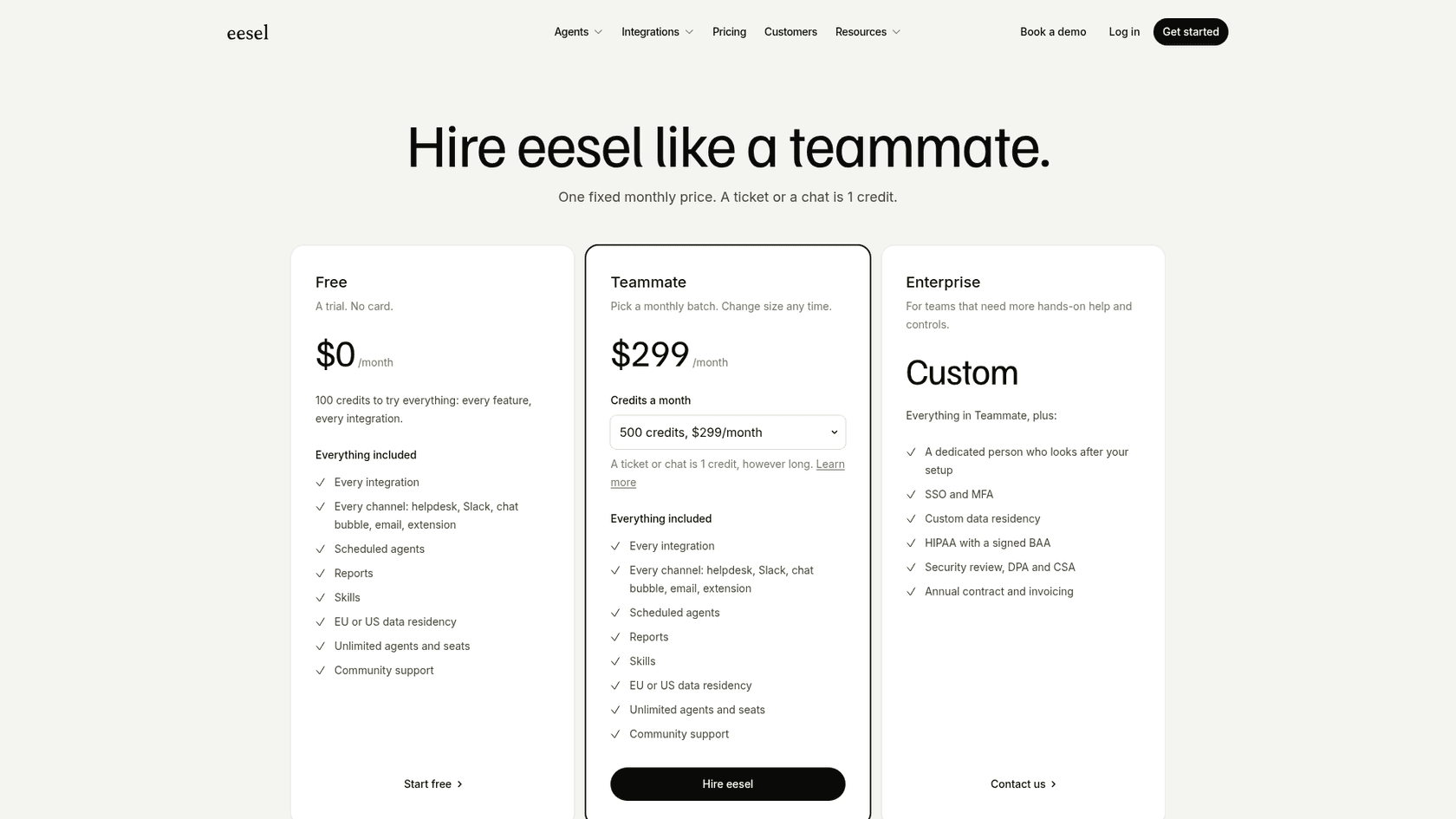
A different approach is one fixed monthly price. eesel AI starts at $299/month for 500 credits (a ticket or chat is 1 credit), with unlimited seats, so hiring a couple more agents for the holiday rush does not change the bill. There is a free plan of 100 credits.
The modern alternative to Freddy Copilot for flexible AI support
For teams that feel boxed in by the limitations of a native tool, a platform-agnostic solution is often the better way to go. A tool like eesel AI is designed to plug into the tools you already use, like Freshdesk, while overcoming the common hurdles of built-in AI.
Here’s a quick side-by-side look:
| Feature | Freddy Copilot | eesel AI |
|---|---|---|
| Setup Time | Can require digging through complex settings and documentation. | Go live in minutes with a one-click, truly self-serve setup. |
| Testing | Agents review each suggestion; AI Agent Test tab; Sandbox on Enterprise. | Simulation on your past tickets before going live. |
| Knowledge Sources | Tickets and knowledge base articles; AI Agent adds files, URLs, Q&As. | Connects every integration, including Confluence, Google Docs, & Notion. |
| Pricing Model | $29 per agent per month, Pro and Enterprise only. | Fixed monthly credits from $299/month, no per-seat fee. |
| Customization | Limited to the features and workflows Freshworks provides. | Full control with a customizable workflow engine, AI personas, and custom actions. |
While Freddy Copilot is a decent assistant for teams who live and breathe Freshworks, eesel AI offers a more powerful, flexible, and user-friendly solution that puts you in the driver's seat.
Is Freddy Copilot right for you?
So, what's the verdict? Freddy Copilot is a perfectly solid choice for teams who are all-in on Freshworks and just need a basic AI assistant to help agents be a bit more efficient. Its seamless integration is a clear plus, and features like summarization and reply suggestions will definitely cut down on some manual work.
However, if your team is looking for speed, flexibility, and deep knowledge integration, you might start to feel its limitations. The lack of a past-ticket replay, the knowledge-base-centred sources, and the per-agent pricing can be roadblocks. For a truly modern AI support solution that you can set up in minutes, test on your own past tickets, and train on all of your company knowledge, you may want to look at a more advanced alternative.
If you're ready to see what a next-generation AI support platform can do for your team, get started with eesel AI for free.
Frequently asked questions
What exactly is Freddy Copilot, and what's its main purpose within Freshworks tools?
Freddy Copilot is Freshworks' AI assistant designed to work alongside support agents within Freshdesk and Freshservice. Its primary goal is to speed up workflows, automate routine tasks, and improve resolution times by providing real-time assistance and information.
Could you detail the key features that Freddy Copilot offers to help agents with writing and ticket resolution?
Key features include Reply Suggester & Tone Enhancer, which helps draft and refine responses, and Ticket Summarization for quick overviews of long conversations. It also assists with Help Article Generation from solved tickets and offers real-time Translation for global customers.
How is Freddy Copilot priced, and what Freshworks plans are required to use it?
Freddy Copilot is a paid add-on, priced per agent per month, with annual billing offering a slight discount. To be eligible to purchase this add-on, your team must be on a Pro or Enterprise plan for Freshdesk or Freshservice.
Does Freddy Copilot have the ability to integrate and use knowledge from sources outside of Freshworks, such as Confluence or Google Docs?
Freshworks describes Freddy Copilot as working from your tickets and knowledge base articles. Content in Confluence, Google Docs, or Notion helps only if it is also published as solution articles. The separate Freddy AI Agent can also learn from uploaded files, public web links, and custom Q&As.
Is there a way to test Freddy Copilot's performance or simulate its responses before rolling it out to live customer interactions?
Copilot suggestions go to the agent, who reviews them before anything is sent, so a live trial carries less risk than an autonomous bot. Freshdesk also has a Test tab for the AI Agent and lists a Sandbox on Enterprise. I did not find a replay of Copilot against your past tickets, which is what eesel's simulation does.
How does the per-agent pricing model for Freddy Copilot affect costs as a support team grows?
The per-agent pricing model means that the cost for Freddy Copilot scales directly with the number of agents using it. As your team expands, your bill rises with it. Freshdesk lets you assign Copilot to any number of agents, and day passes are not offered for it.