


Let's be real: keeping technical documentation in good shape is a grind. It has to be dead-on accurate, a breeze to search, and always up to date. If you drop the ball, both your customers and your own team feel the pain. This is exactly why AI is making its way into documentation tools, offering a way to automate the boring stuff and make information easy to find.
One of the names you'll hear is GitBook AI. It’s designed to help teams write, edit, and search their documentation without leaving the GitBook platform. But is it the magic wand for every documentation problem? This guide gives you the full scoop on GitBook AI in 2026. We'll walk through its features, pricing, and some key limitations you should be aware of. By the end, you'll have a clear idea if it’s the right fit for you, or if you need a tool that sees the bigger picture of your company's knowledge.
What is GitBook AI?
First off, GitBook AI isn't a separate app you have to go out and buy. It’s a set of smart features built directly into the GitBook platform, acting like an intelligent assistant for anyone writing or reading your docs.
It really focuses on two key areas:
- AI Search: It gives your team and customers a way to find information by just asking questions in plain English. No more guessing the right keywords to type into a search bar.
- AI Writing Help: It gives you tools to help draft articles, summarize long pages, and tweak your content, all from inside the GitBook editor.
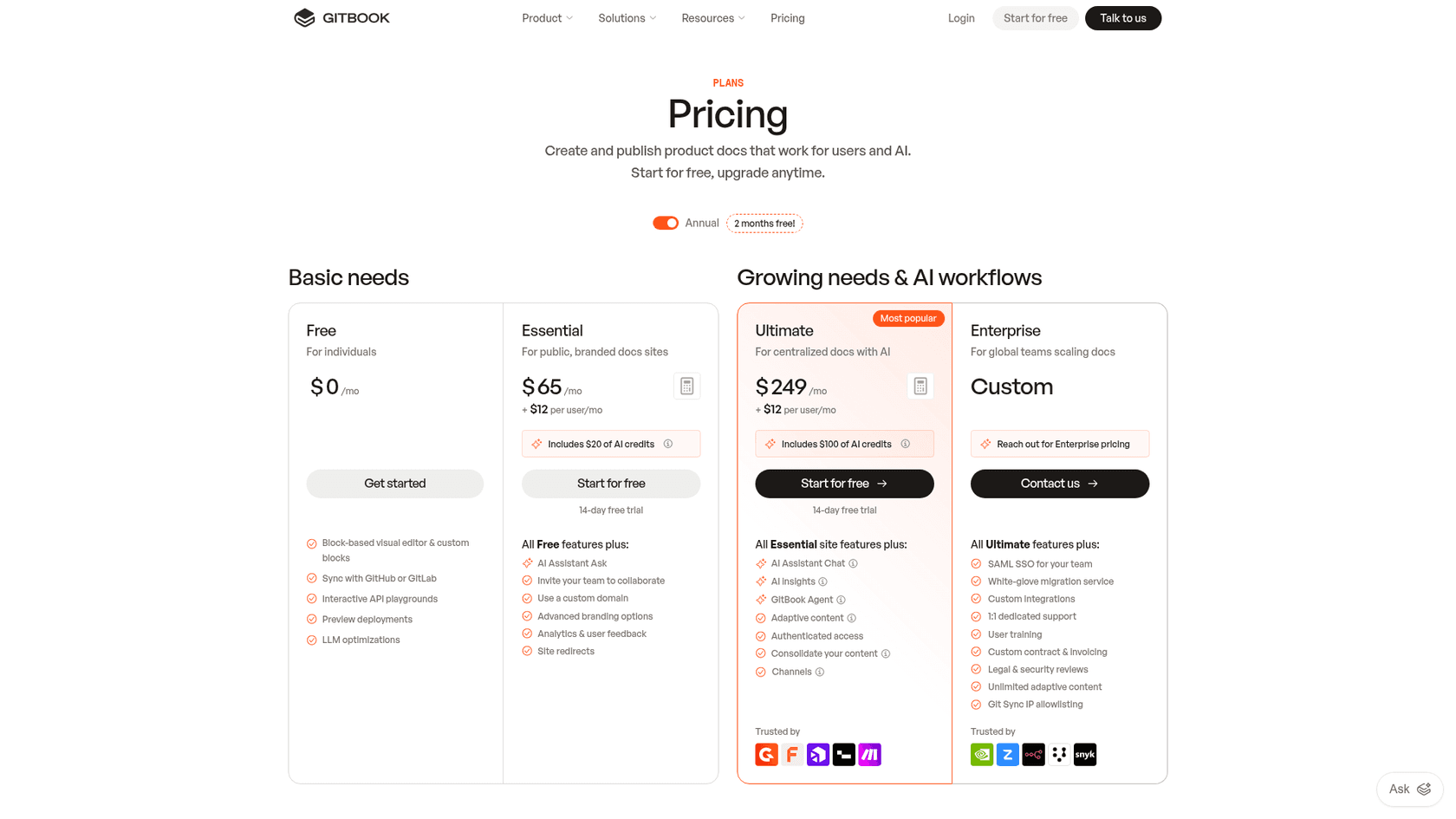
These features are part of the main GitBook experience, but you'll need to be on one of their paid plans (Premium, shown as "Essential" on the pricing page, Ultimate, or Enterprise) to use most of them. It's powered by OpenAI's models, but GitBook makes it clear that your company's data isn't used to train those public models, which is a big relief for anyone concerned about data privacy.
A tour of GitBook AI's core features
GitBook AI splits its talents between making writing faster and making finding information a whole lot simpler. Let's dig into what it actually does.
Finding instant answers with GitBook AI search
We've all been there: staring at a search bar, trying to figure out the exact phrase the author used in a document. GitBook's AI search flips this on its head. You can ask a normal question like, "How do I set up two-factor authentication?" and the AI will look through all your documents to give you a straight, summarized answer.
More importantly, it shows its work. Every answer includes links to the original source pages, so users can click through to get the full story. This works for your internal team searching through private docs and for customers looking at your public help center. It’s a much smoother experience for everyone.
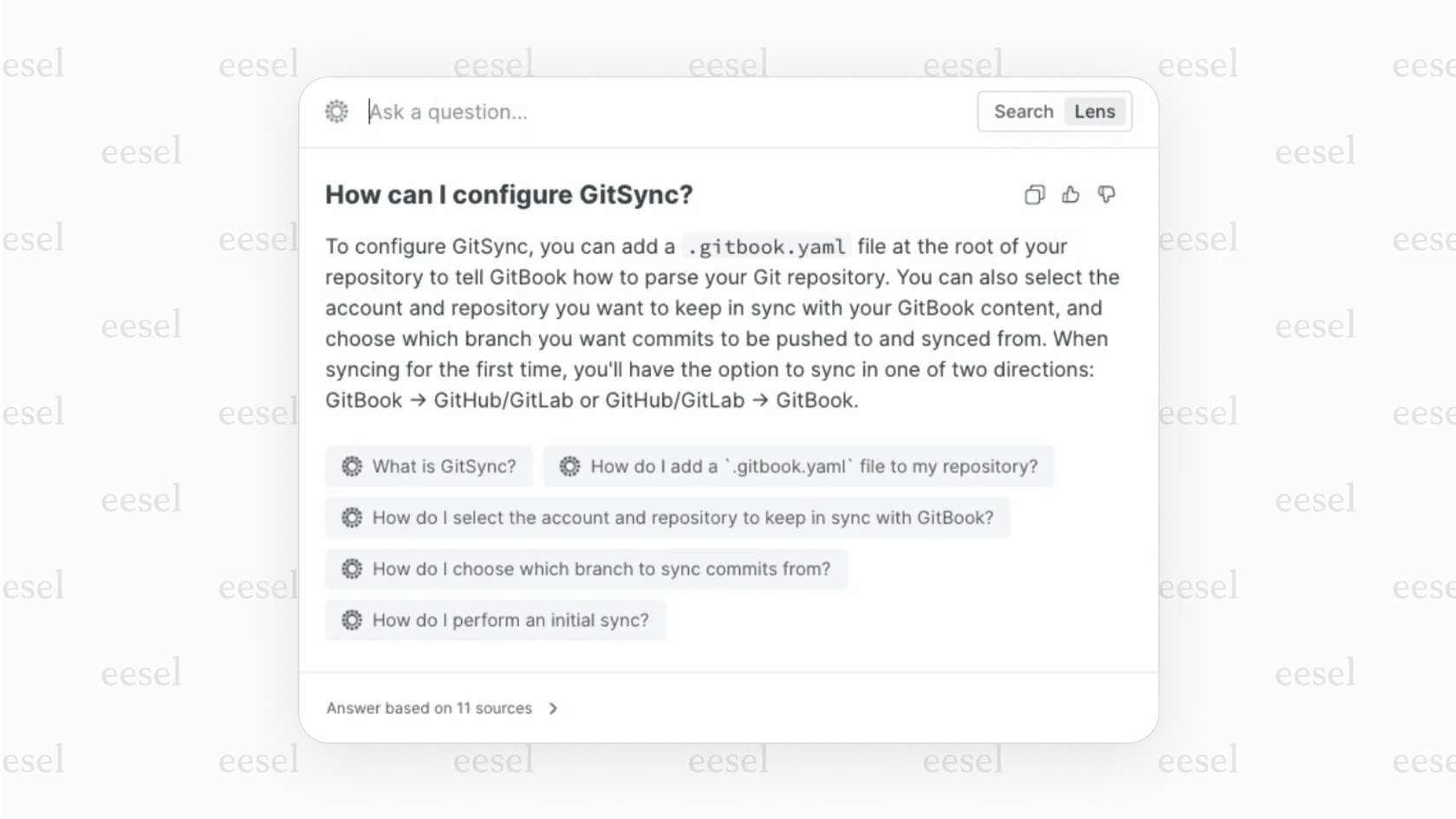
One thing to keep in mind: when you update a document, it can take up to an hour for the AI to learn the new information. For teams that ship updates multiple times a day, this delay is worth noting as answers could be temporarily out of sync.
Getting help with writing and editing using GitBook AI
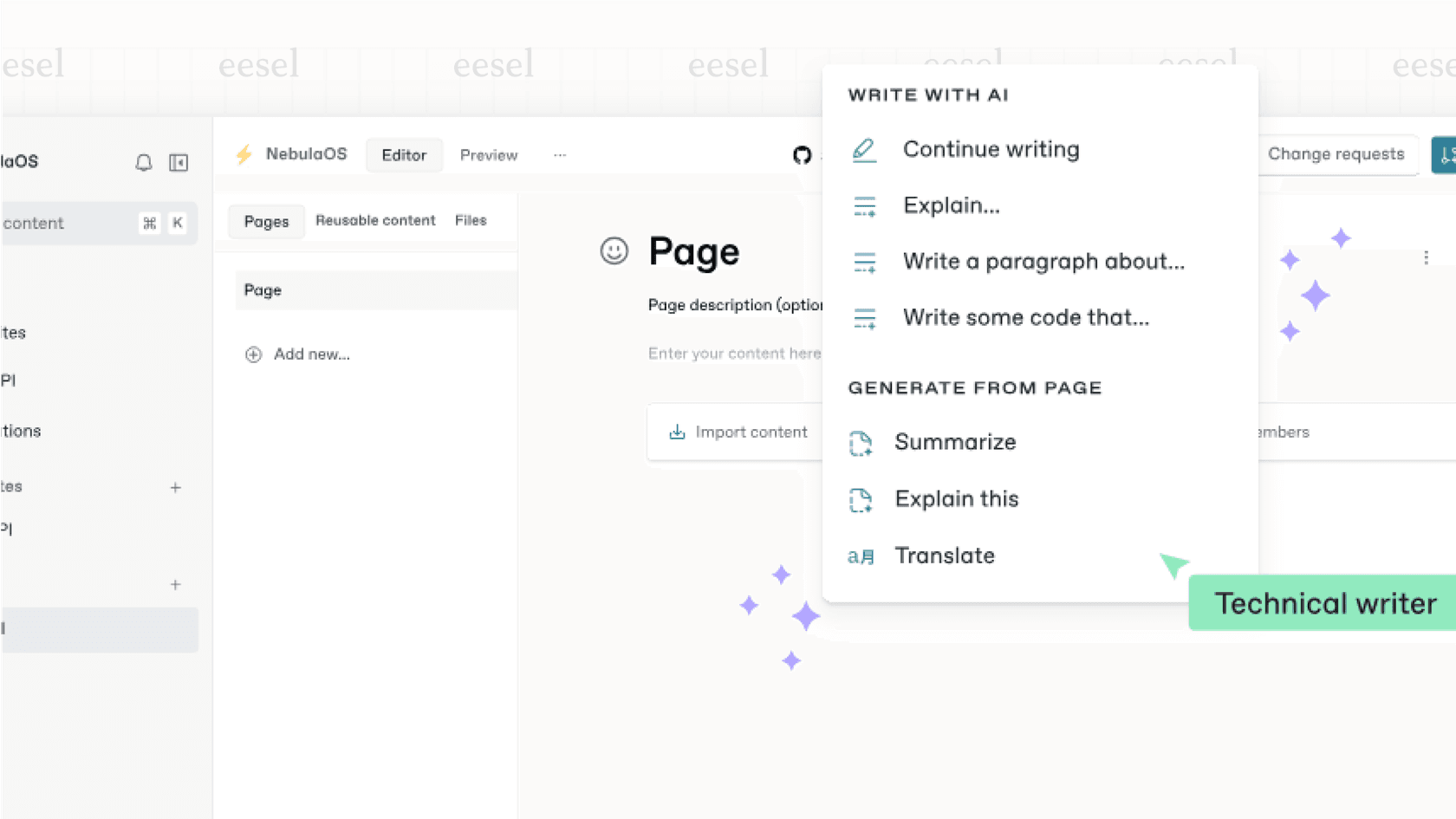
The blank page is every writer's enemy. GitBook AI has a few tricks to help you get started and speed up the rest of the writing grind. When you're in the editor, you can ask the AI to:
- Draft new content: Give it a simple prompt like, "Write an introduction to our API rate limits," and it will spit out a first draft. It won't be perfect, but it's a lot better than starting from scratch.
- Summarize long documents: Have a dense, technical article? The AI can create a quick TL;DR for the top of the page or a more detailed summary for a conclusion.
- Explain tricky concepts: It can rephrase complicated information or define technical terms in simple language. This is great for making your docs useful to everyone, from brand-new hires to people in non-technical roles.
- Translate content: Instantly translate a page into other languages to help out your global users.
These tools won't write flawless documentation for you, but they are a huge help. They handle the initial legwork, freeing you up to focus on making sure the information is accurate and clear.
Connecting with the GitBook AI API and other workflows
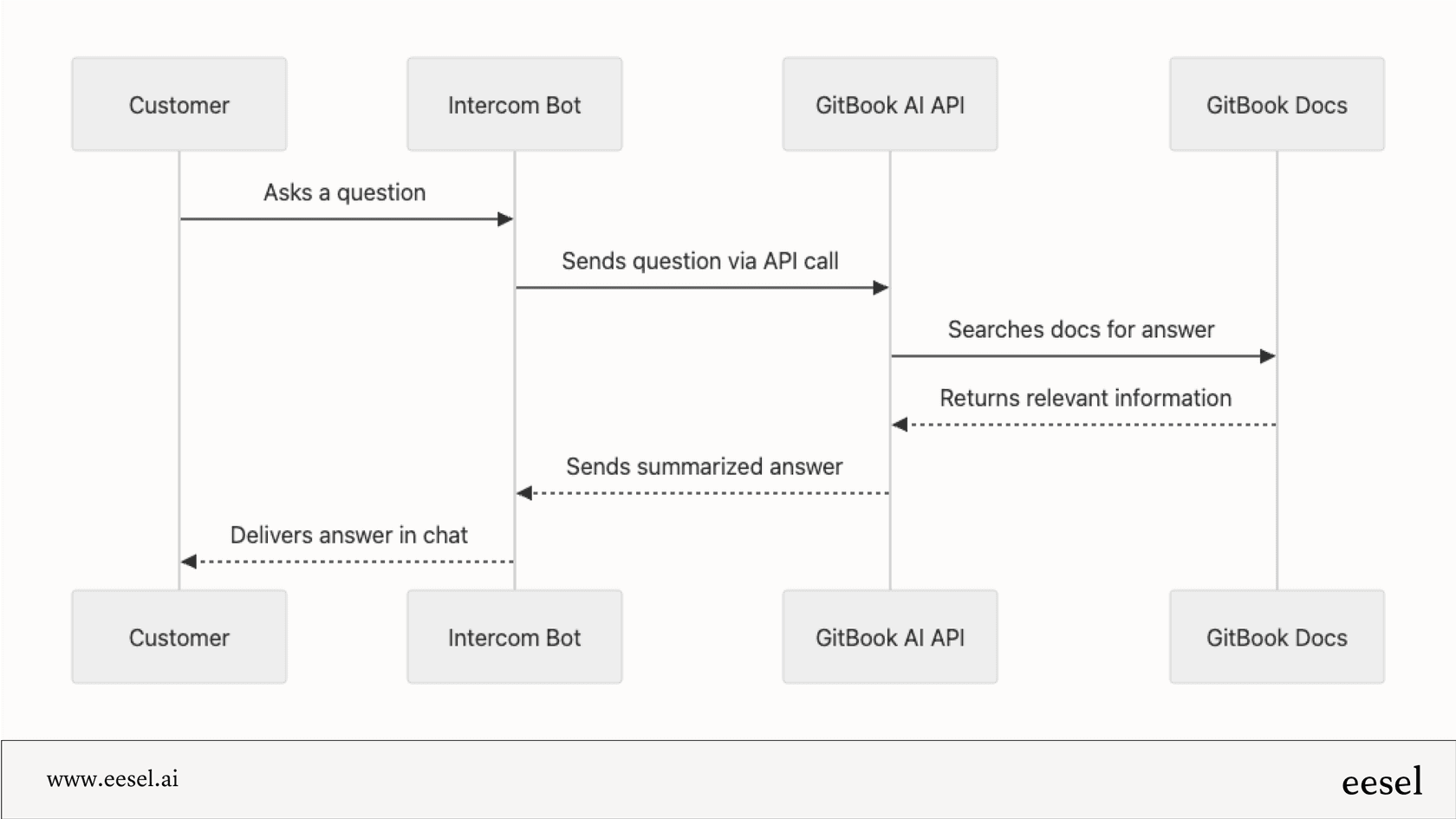
For teams that have developers on hand, GitBook also offers an API that lets you use the AI with code. This opens up some interesting possibilities for custom setups. For example, you could build a bot for your communication platform that pulls answers straight from your GitBook docs, potentially answering a customer question without an agent needing to step in.
Pro Tip: The API is great for fetching information. The AI can answer a question, and anything beyond that, like creating a support ticket, updating a user's account, or escalating an issue, is something you would build around the answer yourself. That's a key difference to remember when you're thinking about real automation versus just finding information.
Pricing and onboarding: What to expect
Getting started with GitBook AI is pretty straightforward, but it's not available on every plan. AI search is a paid feature on the Premium, Ultimate, and Enterprise plans, and the chat-style AI Assistant starts at Ultimate. If you're on the Free plan, you'll have to upgrade, though it does include a small GitBook Agent allowance.
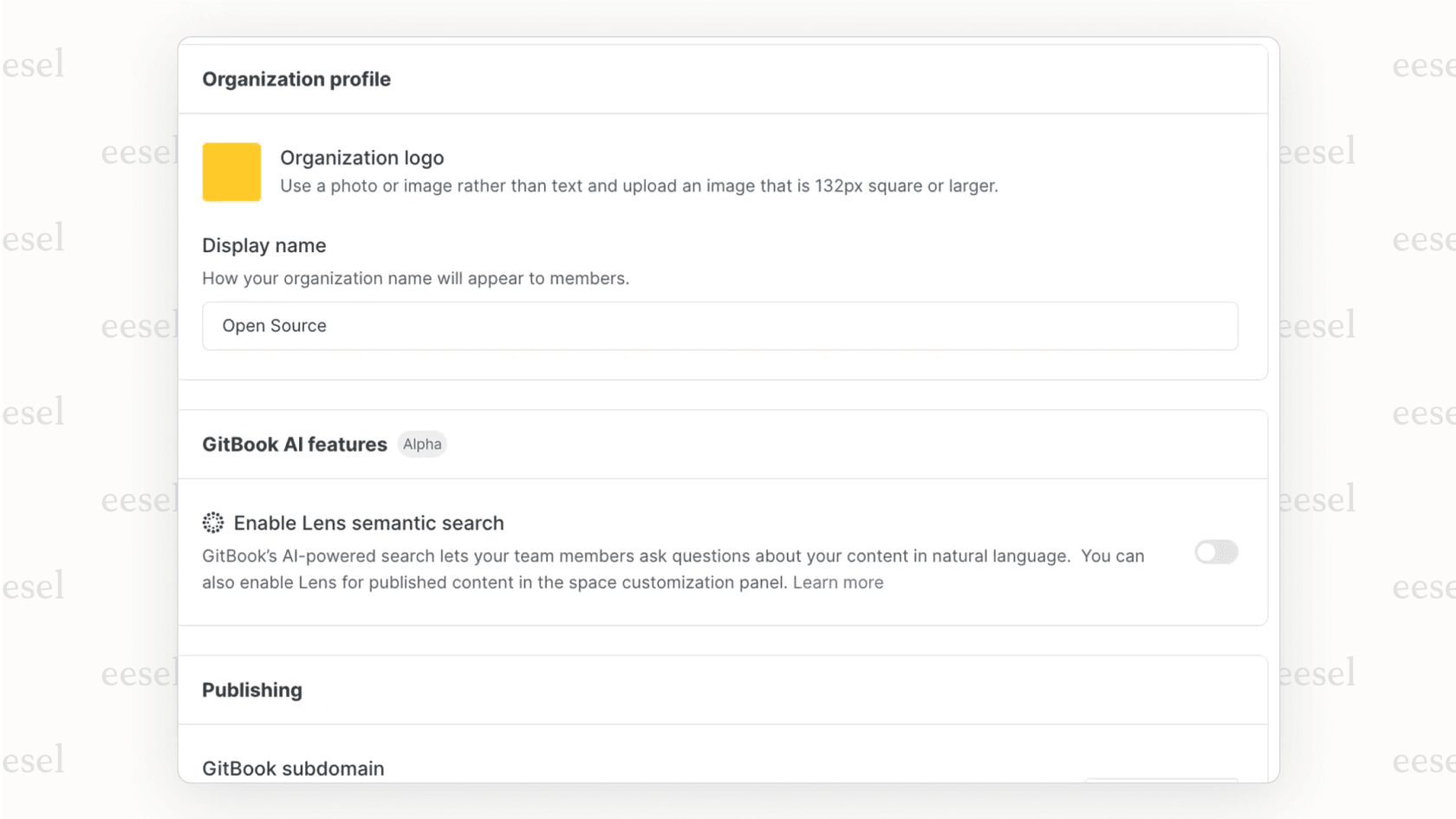
For admins, turning it on is as easy as it gets. It's just a single toggle in your organization's settings. Once you flip that switch, the AI features are ready for your team to use.
Here's a quick look at the pricing, checked against the GitBook pricing page in October 2026:
| Plan | Price | GitBook AI Included? |
|---|---|---|
| Free | $0 | No AI search; GitBook Agent limited to 10 messages per week |
| Premium ("Essential") | $65 per site/mo + $12 per user/mo | AI search (Assistant Ask), writing and editing, GitBook Agent; $20 of AI credits |
| Ultimate | $249 per site/mo + $12 per user/mo | Adds AI Assistant chat, AI Insights, Channels, external sources; $100 of AI credits |
| Enterprise | Custom | Yes |
The Premium plan is a good fit for growing teams who want the AI search and writing assistance for a public docs site. Ultimate is the plan for the reader-facing chat Assistant, and AI answers there draw on credits, at 20 credits per relevant question. Enterprise is geared toward large organizations that need things like single sign-on (SAML SSO), custom agreements, and dedicated support.
Where it falls short for company-wide knowledge
GitBook AI is a solid tool for what it's built for: making the documentation experience inside GitBook better. But that focus is also its biggest limitation. If you're trying to build an AI solution that can manage all your company's knowledge, you'll hit a wall pretty fast.
The problem of a closed system: Knowledge stays trapped
This is the main catch. GitBook AI is built around your GitBook spaces, and the Ultimate plan adds external sources such as GitHub and Slack. But think about where your company's real knowledge lives. It's scattered everywhere. It’s in old support tickets in Zendesk, customer questions in Slack, internal guides in Google Docs, and project specs in Confluence.
The pricing page names GitHub and Slack as examples of connectable sources, and help desk ticket history isn't among those examples. This means its answers lean on the polished, official docs you've already taken the time to write, rather than on the tricky, specific questions your team has probably already answered a dozen times in your help desk.
No automation or action: What the AI can’t do
GitBook AI is a library assistant, not a robotic team member. Its job is to answer questions from your docs and help maintain them. It can tell a user how to reset their password, and the pricing page lists no help desk actions such as tagging the ticket as "Password Reset" and closing it.
For support teams hoping AI can take work off their plate, this is a big gap. An answer from the AI might still force a human to do all the follow-up tasks. It helps the user find an answer on their own, but it doesn't help your team automate tasks. It's an assistant, not an agent.
Still manual: AI doesn’t create the content for you
Even GitBook admits that AI "can’t write your technical documentation or user manual from scratch" because it doesn't understand the specifics of your product. GitBook Agent, which the pricing page describes as writing, editing, and updating your docs, speeds this up, but a person still has to do the heavy lifting of creating and maintaining the core knowledge.
For instance, GitBook Agent works from your docs and connected sources, and noticing that 20 customers have asked about the same undocumented feature in your ticket history isn't a use case its pricing page lists. This is where a different kind of AI becomes much more powerful, one that can learn from messy, real-world data, not just clean documentation.
A better alternative: eesel AI for connected knowledge
The limitations of a single-platform tool like GitBook AI show why a different approach is often needed. Instead of an AI that lives in one app, you need one that works across all of them. This is exactly what we built eesel AI to do.
Rather than being locked into one source, eesel AI connects to all the places your team works. It learns from your help desk, wikis, chat tools, and more to create a single, reliable source of truth. It works with the tools you already use, so you don't have to move all your information into one giant folder.
This diagram shows the difference in a nutshell:
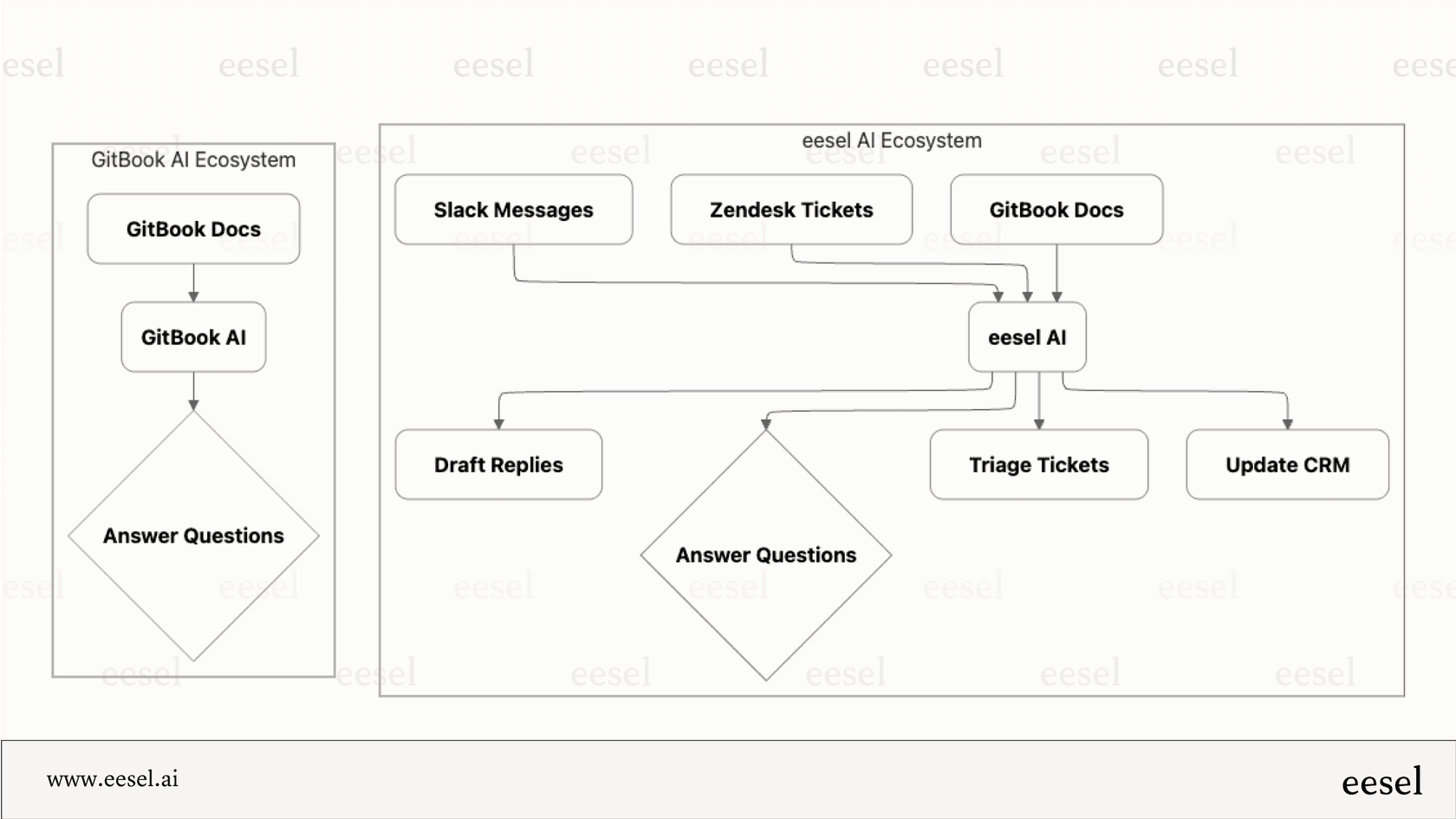
The difference is clear. GitBook AI is a great feature inside a tool, while eesel AI is a platform that works across all your tools.
| Feature | GitBook AI | eesel AI |
|---|---|---|
| Knowledge Sources | GitBook content, plus GitHub and Slack on Ultimate | Connects to 100+ sources (Zendesk, Slack, Google Docs, etc.) |
| Automation | Answers questions, and Agent edits docs; no help desk actions listed | Answers, triages, tags, closes tickets, and uses APIs to act |
| Main Goal | Improve documentation search and writing | Automate frontline support and centralize all company knowledge |
| Setup | Built into GitBook plans | A flexible layer that works with your existing tools |
Picking the right AI for the right job
GitBook AI is a very useful tool for teams that live and breathe in the GitBook ecosystem. It makes writing docs less of a chore and finding information much easier, which is a win for both your writers and your readers.
However, its usefulness is tied to that ecosystem. Its knowledge centers on one place, it doesn't list help desk automation for your other tools, and it still depends on your team to write and curate the source material. If you just want a better search bar for your docs, it’s a great choice.
But if your goal is to build a smarter support system, one that learns from all your company's knowledge, automates work across different apps, and actually frees up your team's time, then a more connected and powerful platform is what you need.
Ready to build an AI that works across all your tools, not just your docs? eesel AI connects to your help desk, wikis, and chat to automate support, draft replies, and provide instant, accurate answers. You can book a demo or get started for free to see how it works.
Frequently asked questions
Is GitBook AI available on all GitBook plans, or is it a paid add-on?
GitBook AI search is included on the Premium (shown as "Essential" on the pricing page), Ultimate, and Enterprise plans, and the chat-style AI Assistant starts at Ultimate. The Free plan has no AI search, only a GitBook Agent allowance of 10 messages per week.
Can GitBook AI search for information in our other tools, like Slack or Google Docs?
Partly. The knowledge used by GitBook AI is centered on the content within your GitBook spaces. On the Ultimate plan, the pricing page says you can connect external sources, naming GitHub and Slack as examples.
Can GitBook AI do more than just search and write, like automate support tickets?
GitBook AI is designed as an information retrieval and writing assistant, not an automation tool. GitBook Agent edits docs, and Channels bring the Assistant into Slack, Linear, and GitHub on Ultimate, but the pricing page lists no actions like creating or closing support tickets.
How difficult is it to get started with GitBook AI for my team?
Getting started is very straightforward for administrators. It can be enabled with a single toggle in your organization's settings, making the AI features immediately available for your team to use.