


GitHub Copilot is shaking up how developers write code, but trying to figure out its pricing plans can feel like untangling a messy legacy system. With GitHub having moved Copilot to usage-based "AI credits," understanding what you’re actually paying for is more important than ever. If you're wondering whether Copilot is worth the investment or just a lot of hype, you've come to the right place.
This guide will walk you through each GitHub Copilot pricing tier, explain what you get (including the sneaky costs), and help you figure out if it's the right move for you or your team. Let's dive in.
What is GitHub Copilot?
Imagine an AI pair programmer that hangs out in your code editor, whether you're using VS Code or a JetBrains IDE. That’s GitHub Copilot. It's way more than a smart autocomplete; it’s an assistant that actually gets the context of what you’re building. As you type, it suggests everything from single lines to entire functions. It can even help you write tests, squash bugs, and pick up a new programming language without constantly switching tabs.
Developed by GitHub and OpenAI, Copilot learned its skills by analyzing a huge amount of public code from GitHub repositories. The whole point is to make developers more productive by getting rid of the repetitive, boilerplate tasks we all hate. Instead of searching Stack Overflow for the fifth time to remember a specific syntax, you can let Copilot suggest the code for you. This frees you up to focus on the hard stuff: solving actual problems and creating great software.
A detailed breakdown of GitHub Copilot pricing plans
GitHub has set up its pricing to work for just about everyone, from solo coders to startups and big companies. The final price tag depends on your team size, the features you need, and how many monthly AI credits your chat, agent and code review usage burns through.
Let's break down the individual plans (Free, Pro, Pro+ and Max) and the Business and Enterprise plans to see what’s what.
Individual plans (Free, Pro, Pro+ and Max)
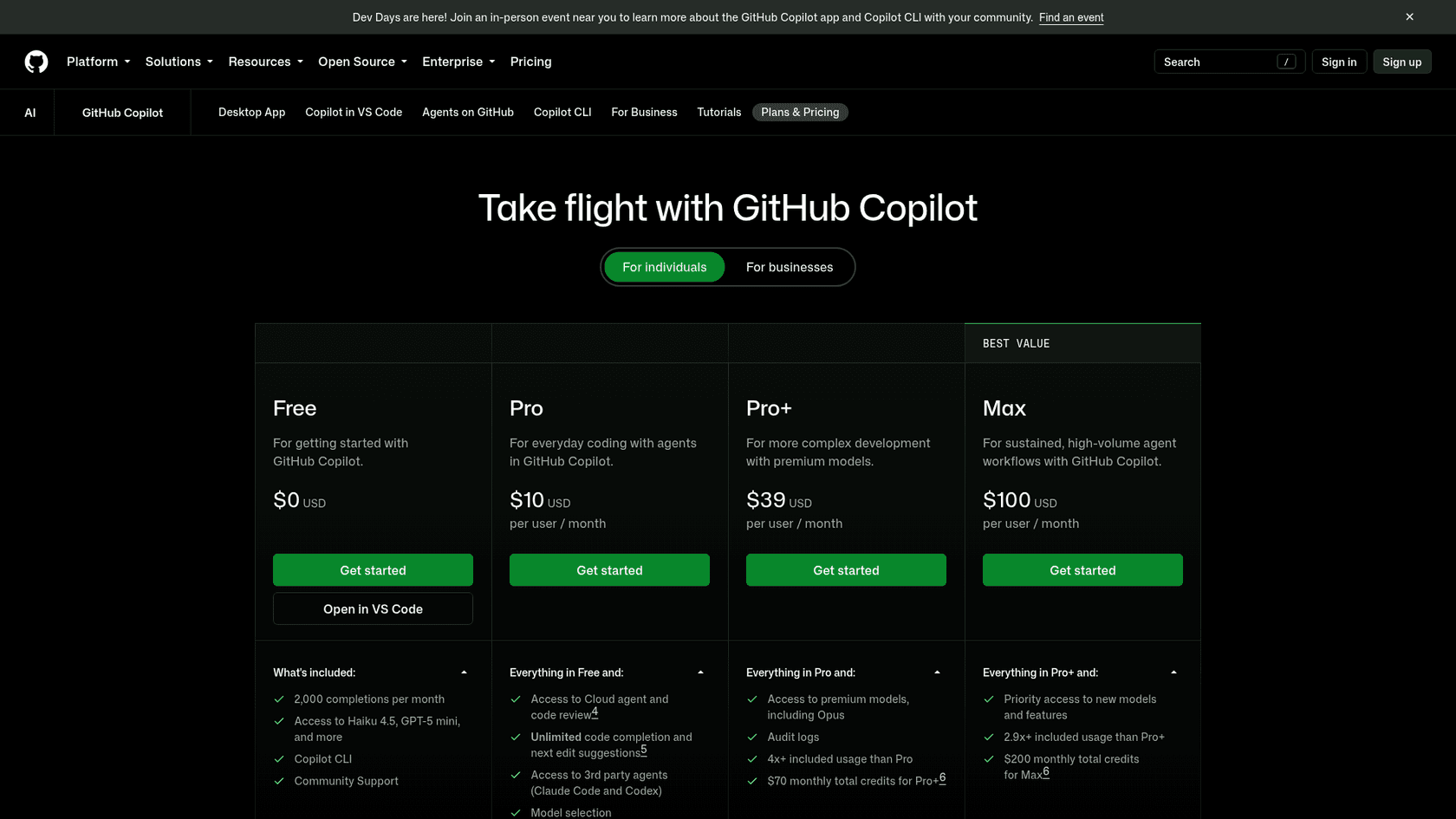
- Cost: Free at $0, Pro at $10, Pro+ at $39 and Max at $100 per user, per month.
- Who it's for: These plans are built for individual developers, freelancers, students, and open-source contributors.
- Key Features: Paid plans include unlimited code completions and next edit suggestions, a monthly pool of AI credits, and work in your favorite IDEs and the command line. Pro adds the cloud agent and code review, Pro+ adds premium models including Opus, and Max adds priority access to new models.
- Free Access: GitHub Copilot is free for verified students (Copilot Student), and verified teachers and maintainers of popular open source projects may be eligible for free Pro access. Copilot Free itself includes 2,000 completions a month.
- Limitations: These plans are for one person, without team management tools. Pro includes 1,500 AI credits a month, which can run down quickly if you lean on agents. We'll get into what that means in a bit.
Business plan
- Cost: $19 per user, per month.
- Who it's for: This tier is aimed at small to mid-sized teams that need better control and collaboration tools.
- Key Features: It comes with chat, agent mode, the cloud agent and code review, plus organization-wide policy management, content exclusion, audit logs, and 1,900 AI credits per user each month pooled across the organization.
- Data Privacy: Content exclusion lets you keep specified files away from Copilot, and Microsoft states that your code snippets and prompts aren't used to train the public AI models.
- Copilot Chat: This plan gives you access to Copilot Chat inside the IDE, which turns your editor into a conversational assistant for debugging, explaining code, and generating tests. Per GitHub's docs, Business is $19 per granted seat per month.
Enterprise plan
- Cost: $39 per granted seat, per month.
- Who it's for: This is the all-in-one plan for large companies with tight security, compliance, and customization needs.
- Key Features: You get everything from the Business plan, plus some seriously powerful extras. GitHub's Copilot FAQ describes it as adding codebase indexing for tailored suggestions on top of Business. It also gives you priority access to premium models.
- Requirement: The only catch is that you need a GitHub Enterprise Cloud subscription to be eligible for this plan.
- Higher Limits: It includes 3,900 AI credits per user per month, double the 1,900 on Business, which is better for power users and larger teams.
GitHub Copilot pricing comparison table
Here’s a simple table to help you compare the plans side-by-side.
| Feature | Pro | Pro+ | Business | Enterprise |
|---|---|---|---|---|
| Price | $10/user/month | $39/user/month | $19/seat/month | $39/seat/month |
| Code completions | Unlimited | Unlimited | Unlimited | Unlimited |
| Monthly AI credits | 1,500 | 7,000 | 1,900 (pooled) | 3,900 (pooled) |
| Cloud agent and code review | Yes | Yes | Yes | Yes |
| Premium models (incl. Opus) | Selection of models | Yes | Yes | Priority access |
| Audit logs | No | Yes | Yes | Yes |
| Organization policy management | No | No | Yes | Yes |
Copilot Max ($100/month, 20,000 AI credits including a 10,000 flex allotment) sits above Pro+ for individuals. Source: GitHub's Copilot plans documentation.
The hidden costs: Understanding features, limits, and AI credits
The monthly price doesn't quite tell the whole story. GitHub now bills Copilot through monthly "GitHub AI Credits," which has made its pricing a bit more complicated. If you're not careful, you could burn through your allowance early or run into extra usage charges.
What are AI credits in GitHub Copilot pricing?
Not all AI models are the same, and GitHub Copilot uses a few different ones to run its features. Code completions and next edit suggestions are not billed in AI credits and stay unlimited on paid plans. Chat, agent mode, code review, the cloud agent and the CLI do consume credits.
Credits are metered by tokens: each token is priced by the model and converted into AI credits, where 1 AI credit equals $0.01. That means heavier models and longer agent sessions use more of your monthly allowance. Pro includes 1,500 credits ($15 worth), Pro+ 7,000 and Max 20,000. Organization credits are pooled, and once the pool runs out, extra usage is charged at $0.01 per credit unless an admin switches paid usage off, in which case usage waits for the next month.
| Plan | Price/month | Base credits | Flex allotment | Total credits |
|---|---|---|---|---|
| Pro | $10 | 1,000 | 500 | 1,500 |
| Pro+ | $39 | 3,900 | 3,100 | 7,000 |
| Max | $100 | 10,000 | 10,000 | 20,000 |
| Business (per seat, pooled) | $19 | n/a | n/a | 1,900 |
| Enterprise (per seat, pooled) | $39 | n/a | n/a | 3,900 |
How Copilot Chat affects GitHub Copilot pricing
Copilot Chat is an interactive AI assistant you can talk to right inside your IDE. It's one of the most useful features you get with a paid plan, and it's where you'll likely spend a lot of your monthly AI credits.
You can use it for things like:
- Explaining code: Just highlight a confusing function and ask, "What is this doing?"
- Generating tests: Tell it to "write unit tests for this function."
- Debugging: Paste an error message and ask for ideas on how to fix it.
- Learning: Ask general programming questions without having to open a browser.
For many teams, Copilot Chat alone is worth the upgrade. It changes Copilot from a tool that just gives you suggestions into a real partner in your workflow.
Is the GitHub Copilot pricing worth it for your team?
So, the big question: does the productivity boost actually justify the cost? Honestly, it depends on who you are and what you do. GitHub Copilot is an amazing tool, but it was designed for one job: helping developers write code.
The clear ROI of GitHub Copilot pricing for development teams
For most software teams, the answer is a definite yes. The time saved from writing boilerplate, looking up docs, and getting junior developers up to speed adds up fast. Reports and developer feedback consistently point to big productivity gains. When Copilot handles the boring stuff, developers can stay focused longer and tackle the creative, complex problems that actually move the needle. In that light, the monthly fee often pays for itself in just a few hours.
Beyond GitHub Copilot pricing: The rise of specialized AI for other teams
This is where you hit Copilot's main limitation: it’s a tool for developers, period. It lives in the IDE and speaks the language of code. It can't answer a customer support ticket, fix an IT problem, or find information in your company's internal documents.
So, how do you give that same AI-powered boost to your customer support or IT teams? That’s where specialized AI platforms like eesel AI come into play.
Think of eesel AI as the "Copilot for your customer-facing teams." While GitHub Copilot is working its magic in the IDE, eesel AI plugs directly into the tools your support and IT teams use every day, like their help desks.
eesel AI delivers a similar promise of speed and automation but is built specifically for support tasks. It learns from your entire knowledge base, including past tickets, internal wikis like Confluence or Google Docs, and your help center. With all that context, it can resolve customer tickets on its own, draft accurate replies for your agents, and answer internal questions in a snap. And unlike some tools that take months to set up, you can get eesel AI running in minutes and even test its performance on your past tickets to see the value before you go all in.
Choosing the right AI copilot for the right job
GitHub Copilot's pricing is pretty clear once you lay it all out. With plans for individuals, teams, and enterprises, you can pick one that fits, with costs running from free to $100 per user each month for individuals, and $19 to $39 per seat for Business and Enterprise. The main thing is to understand what each plan offers and keep an eye on your monthly AI credits to keep your costs in check.
At the end of the day, GitHub Copilot is a fantastic tool for any modern development team. But building a truly efficient company means giving every team the right AI assistant for their work.
If you're a developer, the GitHub Copilot Business plan probably offers the best mix of features and team tools.
If you're looking to give your support and IT teams an AI agent that works with your existing setup, see how eesel AI can automate your frontline support.
Frequently asked questions
Beyond the per-user cost, what's the biggest practical difference in the GitHub Copilot pricing tiers for a small team?
The key difference between the individual plans and Business is team management and credit pooling. Business adds organization-wide policy management and audit logs, and its AI credits are pooled across the organization so heavy users can draw more while lighter users offset them.
Is there any way to try it out before committing to the monthly GitHub Copilot pricing, especially if I'm not a student?
GitHub offers a Copilot Free plan with 2,000 completions a month, so you can test it in your own workflow before paying. Verified students get Copilot Student at no cost, and verified teachers and maintainers of popular open-source projects may be eligible for free Pro access.
How can I avoid unexpected costs or hitting my limits with the new GitHub Copilot pricing and its AI credits?
Code completions and next edit suggestions are unlimited on paid plans, but chat, agent mode, code review and the cloud agent draw on monthly GitHub AI Credits (1 credit is $0.01). For organizations, additional usage beyond the pooled credits is enabled by default and can be capped with budgets, or switched off so usage pauses until the next cycle.
Does the annual discount mentioned in the GitHub Copilot pricing for the Individual plan also apply to the Business or Enterprise tiers?
GitHub's plans documentation lists monthly per-seat prices for Business ($19) and Enterprise ($39), and I could not confirm an annual discount on either. Check your GitHub billing page for annual terms on the individual plans.
At what point should we consider the Enterprise plan, and what are the main drivers that justify the higher GitHub Copilot pricing?
You should consider the Enterprise plan ($39 per granted seat) when your organization uses GitHub Enterprise Cloud and wants a larger monthly pool of AI credits (3,900 per user versus 1,900 on Business) plus priority access to premium models.
For a growing team, how flexible is the GitHub Copilot pricing if we need to add or remove developers frequently?
Business and Enterprise are priced per granted seat per month. GitHub's billing docs say adding licenses mid-cycle grows the shared credit pool immediately, while removing licenses only shrinks it at the start of the next billing cycle.