


Decide what “draft replies” means
Before enabling anything, decide which result you need:
| Goal | What to use | What it does not establish |
|---|---|---|
| Preview an answer from a proposed article | Gorgias Playground with that content draft | A reply draft delivered to a live ticket |
| Let native AI Agent handle customer conversations | Gorgias AI Agent deployment settings | Human approval before every response |
| Prepare a private reply draft for a human | A configured eesel internal-note automation | Permission to send a public reply |
The Gorgias AI Agent overview describes automatic customer conversations. The Playground guide describes previews, including tests of unpublished content. Keep those workflows separate when choosing a rollout.
Prepare the knowledge in Gorgias
The documented knowledge setup requires AI Agent, a connected Shopify store, and an Owner, Admin, or Lead role. Gorgias supports help-center articles, public URLs, documents, guidance, and store website content. It is not restricted to the help center.
For an existing connected help center, open AI Agent > Knowledge and inspect the relevant article. To create a new article, choose Create content > Help center article, write it, publish it when approved, and enable In use by AI Agent. Publishing makes the article available in your help center as well as to the agent. See the content setup guide.
For public URLs, each page is synced individually; subpages are not automatically included. Upload documents separately rather than assuming embedded PDFs on a web page were extracted. Keep personal or sensitive information out of uploaded knowledge.
Make the article answer the decision
For a returns article, I would check the policy before judging the generated wording:
- What starts the return window: order date, delivery date, or another event?
- Which products are excluded, including final-sale or opened items?
- What information must the customer supply?
- When should a human review an exception?
- Is the linked returns portal current and appropriate for this customer?
Use clear headings and customer-language questions. Keep exceptions beside the rule they qualify. Do not delete legitimate escalation instructions simply to make the answer look more automated. A draft that needs human judgment should say so.
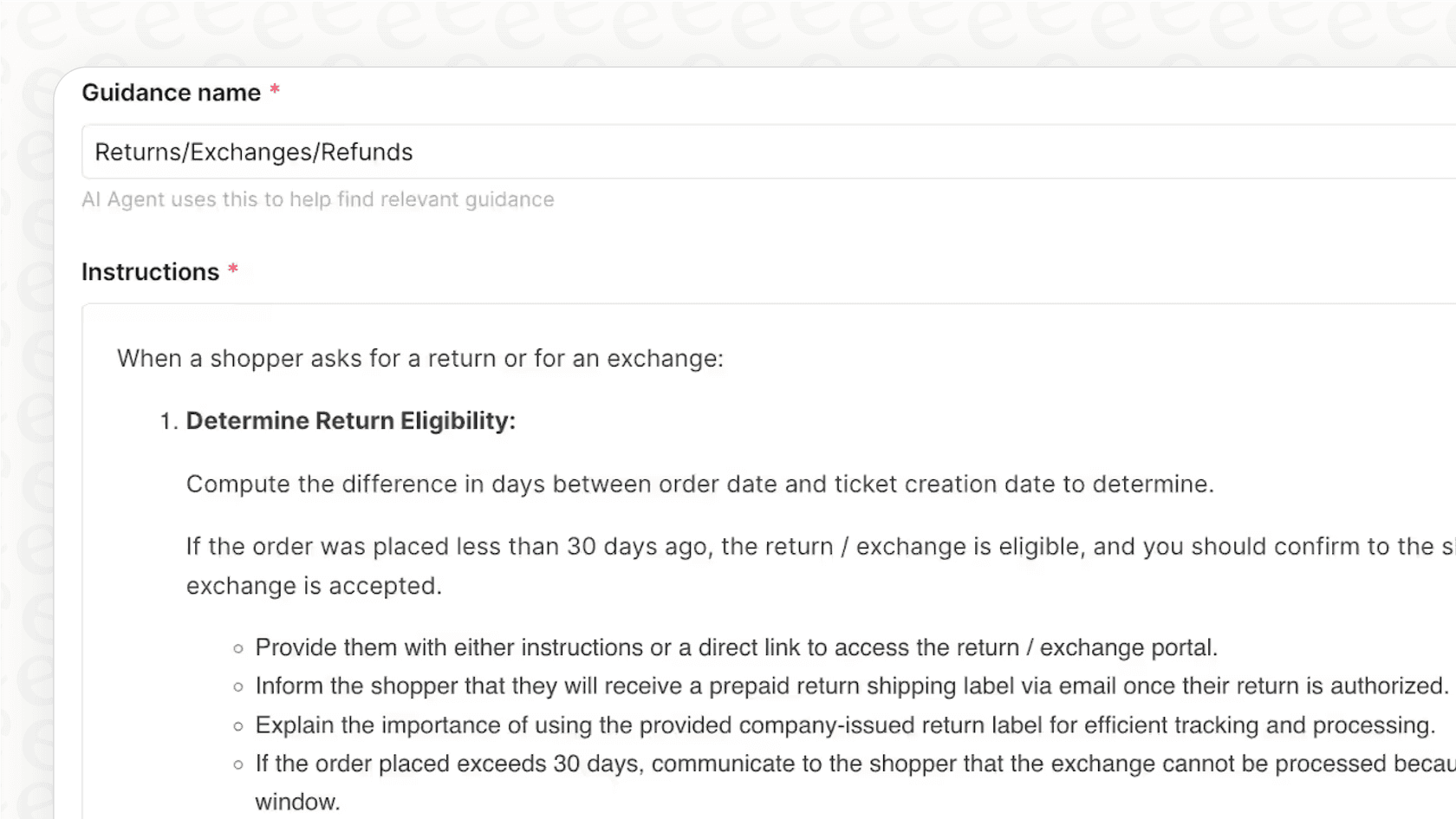
This retained Gorgias interface example shows a 30-day policy, not a recommended policy for your store. Current Gorgias documentation places request-specific procedures in Skills and general reference information in Guidance; use your actual rules and current setup.
Preview changes before publishing
In Gorgias, edits to existing articles or guidance remain drafts until published. The live version stays unchanged. Open the draft, then Playground, and enter a representative question. The test substitutes that draft for its published version while retaining other live settings and enabled knowledge. Only one content draft is tested at a time.
Use an ordinary return question followed by a final-sale exception. Compare the answer with the exact policy text; inspect the displayed reasoning and knowledge references rather than rating only its tone.
Playground conversations do not create tickets or send messages to shoppers. Actions are off by default, but enabling them can affect real customer or order data. Keep them off for a knowledge-only test. These are the boundaries in the preview documentation, not a blanket guarantee that every test configuration is harmless.
Keep published knowledge current
A correct source today can become stale after a policy change. The content management guide lets you filter knowledge by update date and whether AI Agent uses it. Review the relevant source, not just whether an integration is connected.
For synced website or URL content, use the available re-sync control after the source changes. The guide specifies different re-sync intervals for store websites and individual URLs; if the button is disabled, it shows when syncing becomes available. Editing an external page does not itself prove Gorgias has ingested the update.
After publishing a revised article, repeat the ordinary and exception tests. Then review real conversations under the deployment mode you actually selected. Do not treat a passing preview as evidence that human approval is configured for live replies.
Prepare help-center reply drafts through eesel CLI
An eesel teammate can work inside Gorgias while you operate it from a terminal. The eesel CLI gives you access to the same agent, knowledge, and automations as the dashboard. Its JSON output also lets scripts or coding agents such as Claude Code, Cursor, and Codex inspect the setup. The useful outcome here is a supported draft that a person can review, not simply a fluent answer.
Check which source the teammate can read
With Node.js 18.17 or newer, identify the workspace and the agent you want to test:
npx @eesel/cli login
npx @eesel/cli whoami
npx @eesel/cli agents
npx @eesel/cli integrations --agent TEST_AGENT_ID
npx @eesel/cli status --agent TEST_AGENT_ID
npx @eesel/cli instructions --agent TEST_AGENT_ID
npx @eesel/cli automations --agent TEST_AGENT_ID
Replace TEST_AGENT_ID with your selected agent. Existing automations may already be active. Review them and the action permissions in the dashboard before adding a source or sending a test chat.
Eesel's Gorgias connection has two paths. Quick start reads published articles from a public help-center URL, without ticket access. A full connection adds ticket and macro sources, triggers, and actions after authorization. If your aim is just to evaluate answers from articles, do not mistake that source-only check for an integration that can post drafts in Gorgias.
For a full connection:
npx @eesel/cli integrations connect gorgias --agent TEST_AGENT_ID
npx @eesel/cli status --agent TEST_AGENT_ID
A person must open the authorization link; the coding agent should hand it over and wait. After approval, check the Help Center source toggle and document count in Integrations > Gorgias. A connected status without downloaded source content is not enough to evaluate the answer.

The example in eesel’s Gorgias documentation shows separate source counts. Use your own counts and source content when checking readiness.
Test the article, the exception, and the missing fact
Choose one real, approved help-center article, such as your returns policy. Check that its current return window, exclusions, and customer-facing URL are correct. Keep public replies and order-changing actions off for the following fictional test; a prompt alone does not disable tools.
npx @eesel/cli new --name "help-center-draft-review" --agent TEST_AGENT_ID
npx @eesel/cli chat "Fictional test: a shopper asks whether an opened item can be returned. Draft a customer reply from the available returns policy. Identify the source and any missing facts. Do not contact anyone or change records." --agent TEST_AGENT_ID
npx @eesel/cli chat "Now assume the shopper says the item was marked final sale. Revise the draft using the policy. If the policy does not answer that exception, say what a human needs to confirm." --agent TEST_AGENT_ID
The follow-up continues the same conversation. It checks whether the teammate changes its answer when the exception changes, rather than repeating the general return window. Check any cited source yourself: a source name in an answer does not prove that the policy supports every sentence.
| Check | Pass condition | Reason to revise |
|---|---|---|
| Ordinary return | Uses the current policy and relevant eligibility questions | Invented deadline or blanket promise |
| Final-sale exception | Applies the documented exclusion, or identifies a gap | General policy overrides an explicit exception |
| Missing order facts | Asks for the information needed | Claims to have looked up an order in a fictional test |
| Customer-facing draft | Keeps internal commentary out of the proposed reply | Exposes internal notes or unsupported reasoning |
CLI chat is billed work according to the CLI guide. A new conversation does not create a sandbox or remove the agent's permissions. These tests evaluate the supplied scenario; they do not prove that a private note reached Gorgias.
Ask a coding agent to review the evidence
A useful handoff is specific:
Review the selected eesel agent's sources and instructions. Check that the return-policy source is ready. Propose ordinary-return, final-sale, and missing-information test cases. Do not upload files, run chats, change permissions, or create automations until I approve. Report any source or permission detail you cannot verify.
Once you approve the tests, the coding agent can run the CLI commands and collect outputs for comparison. Have a person check policy accuracy and approve any changes to live instructions. Do not let a passing fictional test silently become permission to answer customers.
Verify a private draft inside Gorgias
For a controlled pilot, set Send ticket reply off and Leave internal note to ask first in eesel's action settings. Use an authorized test ticket. The on-demand trigger is an @eesel mention in an internal note, not a public customer reply.
After reviewing existing automations and permissions, ask the teammate to create that workflow:
npx @eesel/cli chat "Create an on-demand Gorgias automation using gorgias_eesel_mentioned. When mentioned on TEST_TICKET_ID, draft a customer reply from the approved help-center policy as a private internal note. Do not send public replies. Leave the note action approval-gated." --agent TEST_AGENT_ID
Replace TEST_TICKET_ID first. That ticket restriction is an instruction, not an access-control boundary; use a separately scoped test setup where stronger isolation is needed. Creating an automation changes the workspace and may enable it immediately. Inspect its trigger and permissions before mentioning @eesel.
Review the held note, approve it only if correct, then open the Gorgias ticket and verify that the note is private and contains the intended draft. Posting the note is itself a write. A human can edit the customer-facing text and send it deliberately; approving an internal note is not the same as approving a public reply.

This documented example illustrates private-note delivery, not the result of the commands above. Its replacement and timing promises still need policy review before a human sends the text.
npx @eesel/cli automations --agent TEST_AGENT_ID
npx @eesel/cli approvals --agent TEST_AGENT_ID
npx @eesel/cli activity --agent TEST_AGENT_ID
Start with a draft someone can verify
Keep source readiness, answer quality, and delivery as separate checks. The article may be connected but stale; the answer may sound right but ignore an exclusion; the note may be approved but still need delivery verification.
Try eesel with your Gorgias helpdesk, and use the CLI to test one policy and one private-note workflow before expanding to more request types.
Frequently asked questions
Does every Gorgias AI Agent reply wait for human approval?
Do not assume that. Native AI Agent handles customer conversations automatically; Playground previews are a separate workflow. Check the AI Agent overview and your deployment settings.
Can I preview replies from an unpublished help-center article?
Yes. Open the draft and launch Playground. It substitutes that draft for the published version while using other live settings and enabled knowledge. See the preview guide.
Is Gorgias AI Agent limited to help-center knowledge?
No. Supported sources also include URLs, documents, guidance, and store website content. Review the supported content and confirm which sources are enabled.
Can a Gorgias Playground test change an order?
Actions are disabled by default. If enabled, they can affect real customer or order data. Keep them off for an article-only test. The Playground documentation explains these limits.
How does eesel CLI help prepare replies in Gorgias?
It operates the same eesel workspace as the dashboard. You or a coding agent can inspect sources, test a policy question, and configure a private-note automation. A full Gorgias connection is needed for ticket actions. See the integration guide.
Does approving an eesel internal note send it to the customer?
No. The Leave internal note action posts privately for your team. Send ticket reply is a separate action; keep it off for the draft-only pilot and have a human edit and send the final reply. See action permissions.
Are eesel CLI draft tests free simulations?
No. The CLI guide treats chat as billed work, and a new conversation does not disable tools or create an isolated workspace. Review permissions before testing. See the CLI reference.