


First, what "adding AI to Freshservice" actually means
I build integrations for a living, so I will say the quiet part out loud: "add AI" is a fuzzy phrase, and Freshworks uses it to cover three different products under the Freddy AI name. Before you touch a setting, it helps to know which one you are actually turning on.
- Freddy AI Agent is the autonomous, employee-facing bot that deflects and resolves requests before a human sees them. This is the Freshservice AI agent most people mean when they say "AI".
- Freddy AI Copilot is agent assist: reply suggestions, ticket summaries, and a writing assistant inside the agent workspace. It helps your team, not your end users.
- Freddy AI Insights is proactive analytics with root-cause analysis for service-desk leaders.
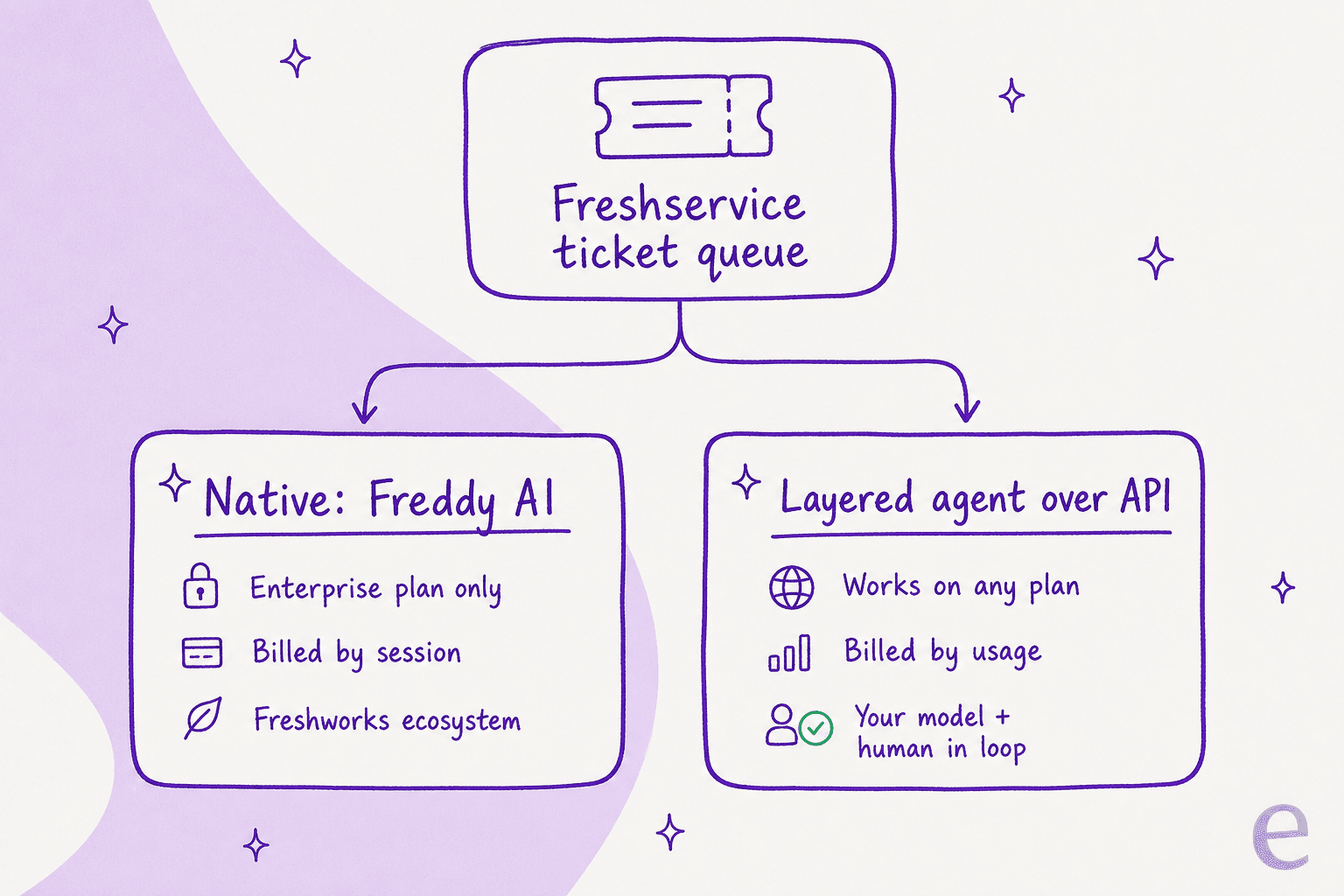
The reason this matters is that they are gated and billed differently, which is where teams get surprised. So the very first decision is not "should I add AI" but "which route fits my plan and my queue". Here is the fork.
Route 1: turn on Freddy AI (the native way)
If you are on Enterprise (or you only want agent-assist Copilot), the native path is genuinely quick. Freshworks positions the new GenAI Freddy AI Agent as "ready to start helping on day one", and the enablement really is a few clicks. Here is what the setup looks like.
Prerequisites to check first
- The autonomous agent needs Enterprise. The Freddy AI Agent overview doc states plainly that it is available with the Enterprise plan. Copilot is a separate per-agent add-on on Pro and Enterprise.
- Slack and Microsoft Teams need ServiceBot installed first. You cannot configure Freddy on those channels until the ServiceBot for that platform is in place. The Support Portal and Email Bot do not need it.
- If you used the legacy Virtual Agent, note it was deprecated on May 21, 2025. Anyone who enabled it before October 18, 2024 had to upgrade to the GenAI version to keep the agent running.
The actual steps
- Go to Admin > Global Settings and search for Freddy. You will land on the Freddy AI panel, with the Freddy card and your ServiceBot channels for Slack and Microsoft Teams.

- Open the Freddy card and use the per-channel toggles to enable Freddy AI Agent where you want it: the Support Portal (self-service for requesters), the Email Bot (auto-replies simple email queries with the right help article), and Slack / Microsoft Teams (first-line support inside chat).

- Point it at your knowledge. Freddy's Enterprise Search can draw on your internal Knowledge Base plus Microsoft SharePoint, Google Drive, and Confluence.
- Watch the article-processing rules while you load content. Freddy reads only the first 50 inline images and first 5 attachments (up to 5 MB each) per solution article, and an article can take anywhere from 1 hour to 24 hours to finish processing. It can interpret images inside articles but cannot read .pdf, .docx, or .xlsx files, so a KB full of attached PDFs will underperform.
That is the whole native setup. It is legitimately simple, and for in-workspace agent assist it is a reasonable place to start.
The limits that catch teams out
Here is where I have to be straight with you, because the setup being easy is not the same as the AI being cheap or effective.
It is gated and billed by session. Freddy AI Agent is Enterprise-only, and each Enterprise license includes 1,200 sessions per year. A session is any interaction a unique user has with the agent inside a 24-hour window. Overage packs exist but the price is quote-only, set through your account manager, and never published. If you want the maths, we broke it down in the Freshservice AI cost guide. Users feel this billing model:
"Freddy AI has the same limitations as every AI tool built by ITSM vendors. It's mainly tight to the Freshworks ecosystem, plus has limited human in the loop validation along with the fact that you don't have the ability to choose which LLMs you want to use. Also, its pricing is tied to the agents not the employees."

The SharePoint permission scope can block your rollout. More than one team on r/Freshservice has held off because the Teams ServiceBot demands very broad access:
"it requires 'Read files in all site collections' on an Application level to function, Which essentially give it the ability to read everything in our company Sharepoint as far as i'm aware."
And the handoff can quietly cost you more than it saves. This is the one I would attach a warning label to. A ~600-person org reported that five months after enabling Freddy, their tier-1 MTTR went up, not down, and duplicate tickets rose about 15%.
"Autoresolve is maybe 25% which is fine i guess. But our MTTR actually went UP. About 20%... Tickets that dont autoresolve are sitting longer. I think what is happening is the handoff cost. Freddy tries, fails, agent picks it up but has to scroll thru the full back-and-forth before they can respond."
That is not an argument against AI. It is an argument against AI that tries to answer everything and hands over a mess when it fails. We have watched this exact failure mode across live rollouts, which is why the design that actually works looks like the right-hand side below.

For the full rundown of where the native layer struggles, we keep a running list in Freshservice AI limitations.
Route 2: layer a dedicated AI agent over the Freshservice API
The second way to add AI is to leave Freshservice exactly as it is and connect a purpose-built AI agent on top, through the Freshservice API. This is the route I would point most teams to, and not because I work on one. It sidesteps every one of the problems above: you keep your current plan, you pick the model, and you keep a human in the loop by default.
Mechanically, a layered agent watches your ticket queue, reads the incoming request, pulls context from your knowledge, and then makes a decision based on how confident it is. That confidence gate is the whole game.

Because it grounds answers in your past tickets as well as your help articles, it starts closer to how your best agent would actually reply, not just what the KB literally says. And because you can run it against historical tickets in a simulation before it ever touches a live one, you see your real deflection number, by ticket type, before you commit. That is the step that keeps you out of the MTTR trap: you find the tickets it should never touch before customers do.
The trade-off is honest: a layered tool is one more system to connect, and you are trusting an API integration rather than a native toggle. But the Freshservice API is well-documented and stable, and the connect step is a one-time job measured in minutes, not a migration.
Native Freddy vs a layered agent, side by side
| Dimension | Freddy AI Agent (native) | Layered agent (e.g. eesel over the API) |
|---|---|---|
| Plan needed | Enterprise only | Any Freshservice plan |
| Billing unit | Sessions (1,200/yr, overage quote-only) | Per AI interaction, no per-agent fee |
| Model choice | Freshworks' model, no choice | Pick the model |
| Human in the loop | Limited | Default: draft-first, then grant autonomy |
| Knowledge sources | KB, SharePoint, Google Drive, Confluence | Above + past tickets + 100+ sources |
| Test before live | No dry-run | Simulate on past tickets first |
| Setup | Admin toggle (fast) | API connect (minutes) |
If you want the wider field beyond these two, our Freshservice alternatives roundup and the ServiceNow comparison cover the neighbours.
So which route should you pick?
Here is the decision boiled down, from someone who has connected a lot of these.
- You are already on Freshservice Enterprise and mostly want agent assist. Turn on Freddy Copilot and the AI Agent. You are paying for it; use it. Keep an eye on the session count and the handoff experience.
- You are on Starter, Growth, or Pro and want real deflection. Do not upgrade to Enterprise just to unlock Freddy. Layer an agent over the API instead; it is almost always cheaper than the plan jump, and you keep control of the model.
- Your queue is mostly repetitive tier-1 (password resets, access requests, status lookups). This is the sweet spot for a confidence-gated layer. One head of IT at a fintech put an AI agent in front of their internal Jira Service Management desk, backed by Confluence and Slack, as the first responder, and moved deflection from 15% toward a 55% target. That is the shape of a real win: a big, boring chunk of the queue handled before a person sees it, not a magic 100%.
Whichever way you go, the ROI only shows up when the AI is confident and honest about what it does not know.
Common mistakes to avoid
- Turning it loose on the whole queue on day one. Start supervised. Let it draft, review the drafts, then grant autonomy on the ticket types it is nailing. This is exactly how you avoid the MTTR regression.
- Feeding it a thin or PDF-heavy knowledge base. Freddy cannot read PDFs, and any AI is only as good as what it can retrieve. Get real, formatted articles in first. Our guide on the internal knowledge base covers what "good" looks like.
- Ignoring the session meter. On native Freddy, 1,200 sessions a year is not a lot for a busy desk. Track the Freddy AI Agent overview report in Analytics so an overage quote does not blindside you.
- Skipping the dry run. If your tool can simulate on past tickets, do it. Going live blind is how you discover the AI's weak spots in front of real users.
Try eesel for your Freshservice queue
If Route 2 sounds right, eesel AI is built for exactly this. It connects to your existing service desk over the API, so there is no Enterprise upgrade and no migration; you keep the Freshservice workflows and ticket history you already have. It trains on your past tickets and help docs on day one, drafts or resolves based on a confidence gate you control, and escalates cleanly with full context so you never recreate the handoff trap above.

The part I would not skip: run the simulation on your own historical tickets first. It shows your real deflection rate by ticket type before a single customer is involved, which is the difference between AI that lifts your numbers and AI that quietly drags them down. It is free to try, with no credit card, so you can see the number for your own queue before deciding anything.