

What "training a chatbot" actually means now
If you last thought about chatbot training in the era of decision trees and hand-tagged intents, forget most of it. None of the vendors I researched for this guide, Zendesk, Gorgias, Freshdesk, or eesel, train a model on your data in any sense a data scientist would recognize. There's no separate training run, no dataset export, no waiting for a job to finish. Every one of them uses retrieval-augmented generation: the agent searches your connected knowledge at the moment it answers, then reasons over what it finds. "Training" means feeding it the right sources, telling it how to behave, and checking its work, closer to onboarding a new hire than fitting a model.
That reframing matters because it changes where your effort should go. You're not tuning hyperparameters; you're curating what the agent can see and writing down what a good answer looks like.
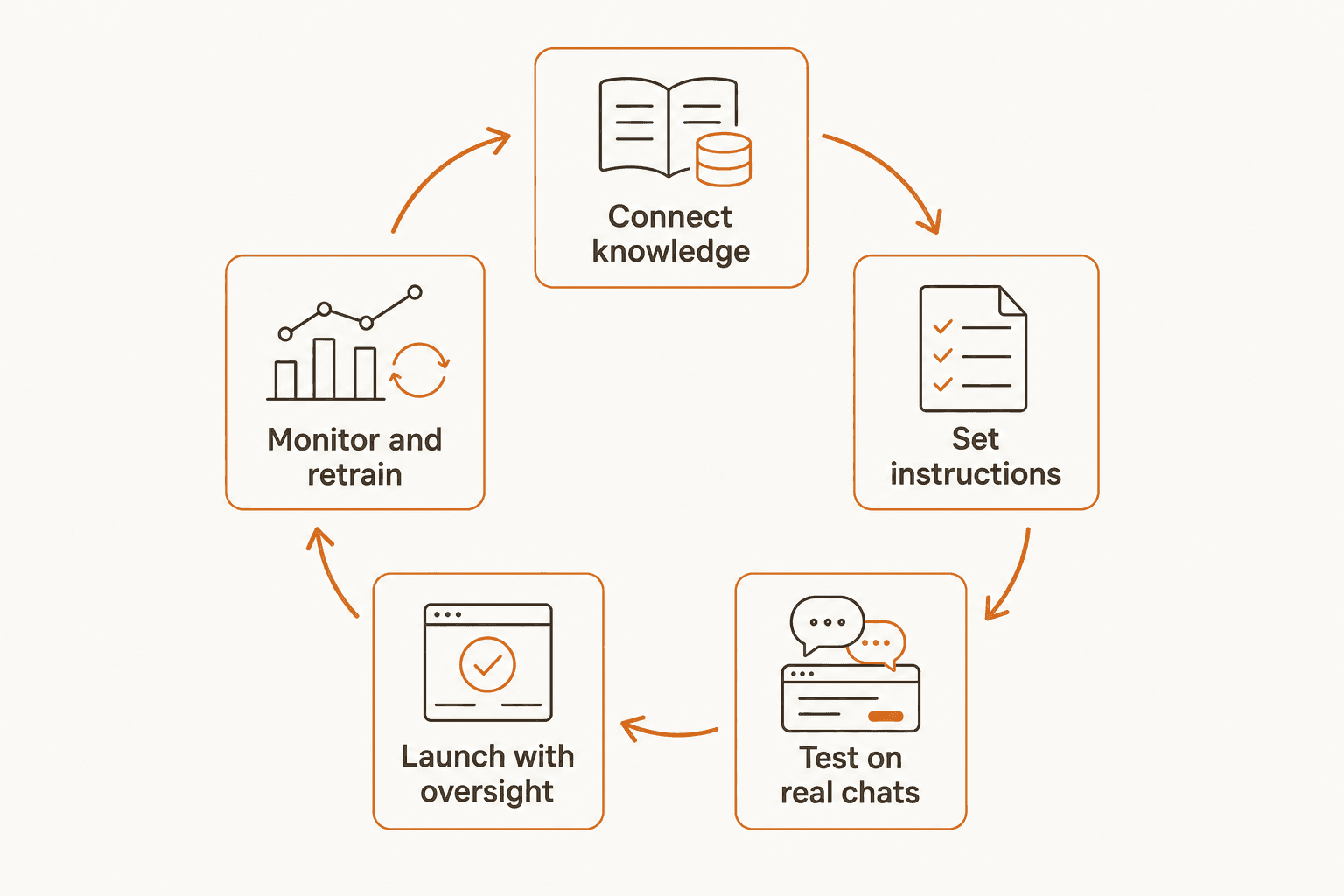
Every vendor I looked at runs this same loop, just with different UI around it. Here's how to work through each stage.
Step 1: Connect the knowledge your agent will actually use
Before an AI agent can answer anything, it needs somewhere to look. Zendesk requires at least one connected knowledge source before generative replies work at all. Freshdesk's AI Agent Studio accepts URLs, uploaded files, solution articles, and custom Q&As. Gorgias trains its AI Agent on your connected Shopify store, Help Center, website, custom guidance documents, and uploaded files.
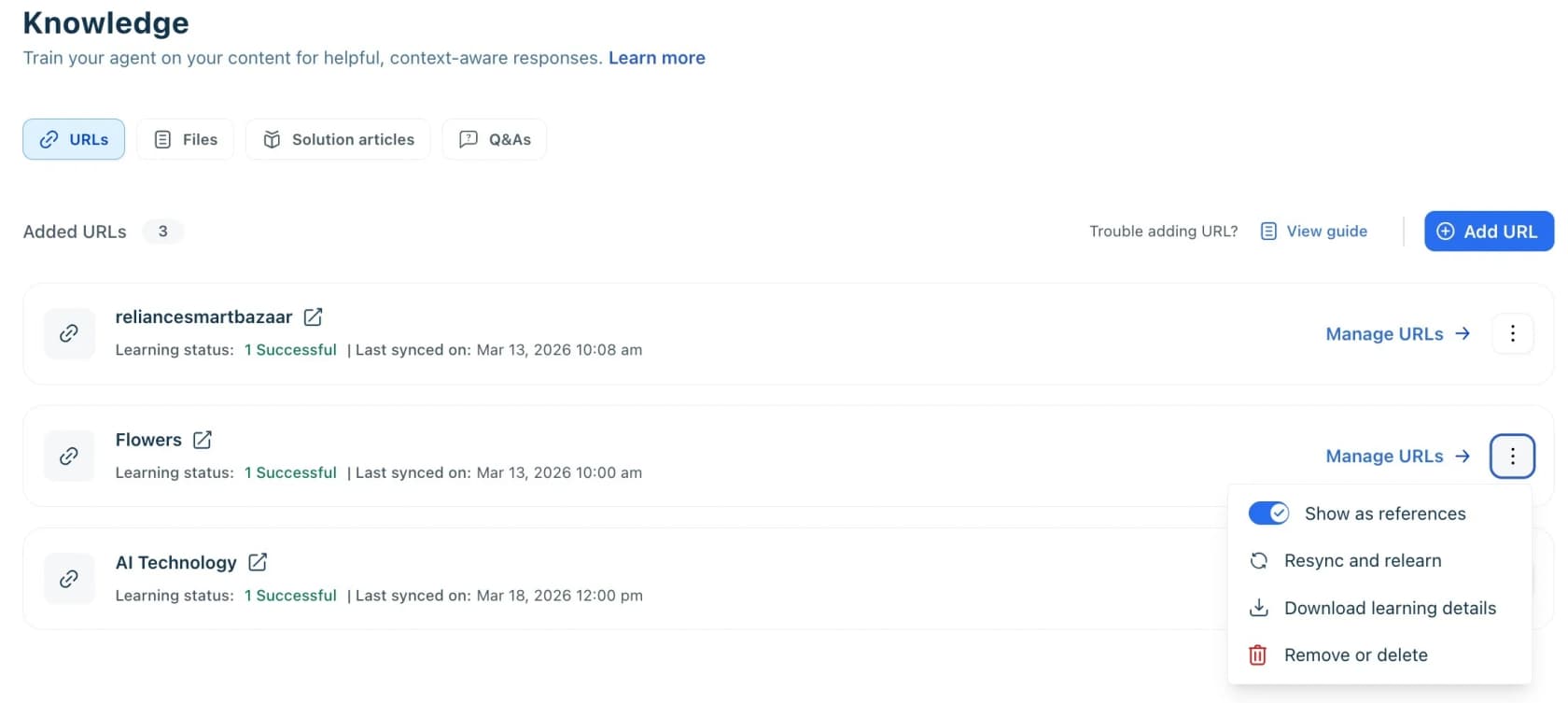
That flexibility hides a real gap between tools, though. Native helpdesk AI agents mostly read from your help center and website, with extras like Zendesk's external connectors, up to 50 sources including Confluence and SharePoint, and Freshdesk's external apps. eesel's own helpdesk agent pitches itself against exactly that limitation: it ingests Zendesk, Freshdesk, Intercom, Gorgias, HubSpot, Help Scout, Salesforce, Confluence, Notion, Slack, Shopify, and direct file uploads, but the source that actually moves the needle is your solved ticket history, not your public docs. It's also eesel's own most consistently requested capability across sales calls: teams want an agent trained on how they've actually answered customers, not how their help center says they should.
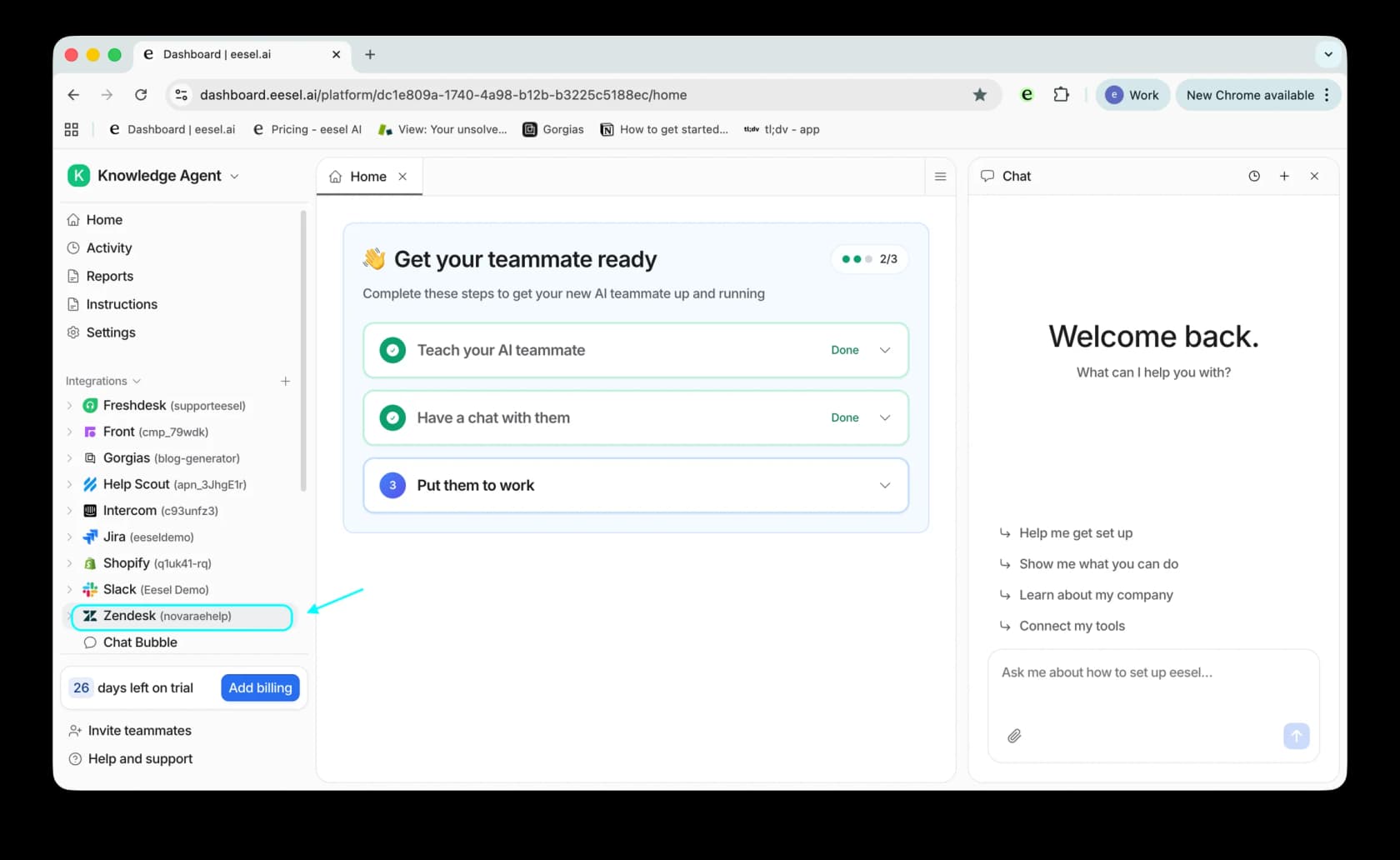
For eesel specifically, connecting one Zendesk or Freshdesk account is literally the first step of setup, and it's enough to complete the "teach them about your company" milestone. A few concrete limits worth knowing before you connect everything at once:
- Freshdesk caps sources per agent: 10 URLs and 200 files per AI Agent, files up to 35MB each, with a URL taking up to 30 minutes to learn.
- Zendesk explicitly warns against over-connecting: adding too many sources "can in some cases lead to reduced accuracy and increased latency," per its own knowledge source docs.
- eesel's file uploads support PDF, DOCX, TXT, MD, CSV, XLSX, and HTML up to 50MB, and multilingual ticket history so a customer writing in German gets answered in German.
One Reddit thread I found while researching this captures the instinct a lot of teams start with: a help desk operator opening 60+-user facilities asked outright whether any tool could train on FAQs and guides to deflect tickets before they became a phone call. The honest answer in 2026 is yes, almost every helpdesk has this now, but connecting sources is the easy 20% of the work. The instructions step below is where the other 80% lives.
Step 2: Write instructions, not intents
The old way of training a chatbot meant hand-tagging hundreds of sample phrases per intent. The 2026 way is closer to writing a job brief. eesel's own docs frame it directly: instructions are "the onboarding document you'd give a new team member," and they should cover four things: identity and role, response style, handling specific situations (billing, bugs, cancellations), and explicit escalation rules, like "never handle refunds over $100 without a manager."

Gorgias splits this the same way: a dedicated tone-of-voice setting separate from handover topics and exclusions. The advice that shows up across every doc I read is the same: be specific rather than vague ("be helpful" isn't an instruction, it's a wish), and don't try to write every edge case upfront. Start simple, and add rules as testing surfaces gaps.
You also don't have to write this cold. eesel's chat sidebar lets you configure instructions conversationally, and it can propose its own instruction updates later based on what you correct, the same human-in-the-loop mechanism that closes the loop in Step 5.
Step 3: Test it against real conversations before it goes anywhere near a customer
This is the step most DIY chatbot attempts skip, and it's the one that separates a working agent from a liability. Gorgias frames its entire lifecycle around it: "Testing isn't a one-time check before going live. Any meaningful change to AI Agent's setup warrants a test before you publish it," per its test-conversation feature, which includes a "Show reasoning" view so you can see exactly why the agent answered the way it did.
eesel calls the same idea Simulation: it pulls your old tickets, generates what the AI would have said, compares that against what your human team actually sent, and scores the accuracy gap. The homepage walks through a real example of what that surfaces: an agent flags that 23 tickets last week asked about pro-rated refunds, but the docs only covered full cancellations. Upload the missing policy, re-run, and refund coverage jumps to 91%, with the agent immediately surfacing the next gap (14 unanswered SSO tickets). That loop, test, find the gap, fix the knowledge, retest, is what "training" mostly is in practice.
Skip this step and you get the exact failure one support manager described in a painful post-mortem: a bot that confidently hallucinated "yes, we support your car model" for a brand that wasn't in the vendor's database, because the underlying knowledge base said "we support all models" a little too broadly. Nothing was technically broken. Nobody checked.
Step 4: Launch with a human safety net
Every vendor I researched gates the first live replies behind some form of confidence check. Gorgias runs each draft through a quality model before sending; if confidence is low, or the topic is on an exclusion list, the ticket hands to a human instead.
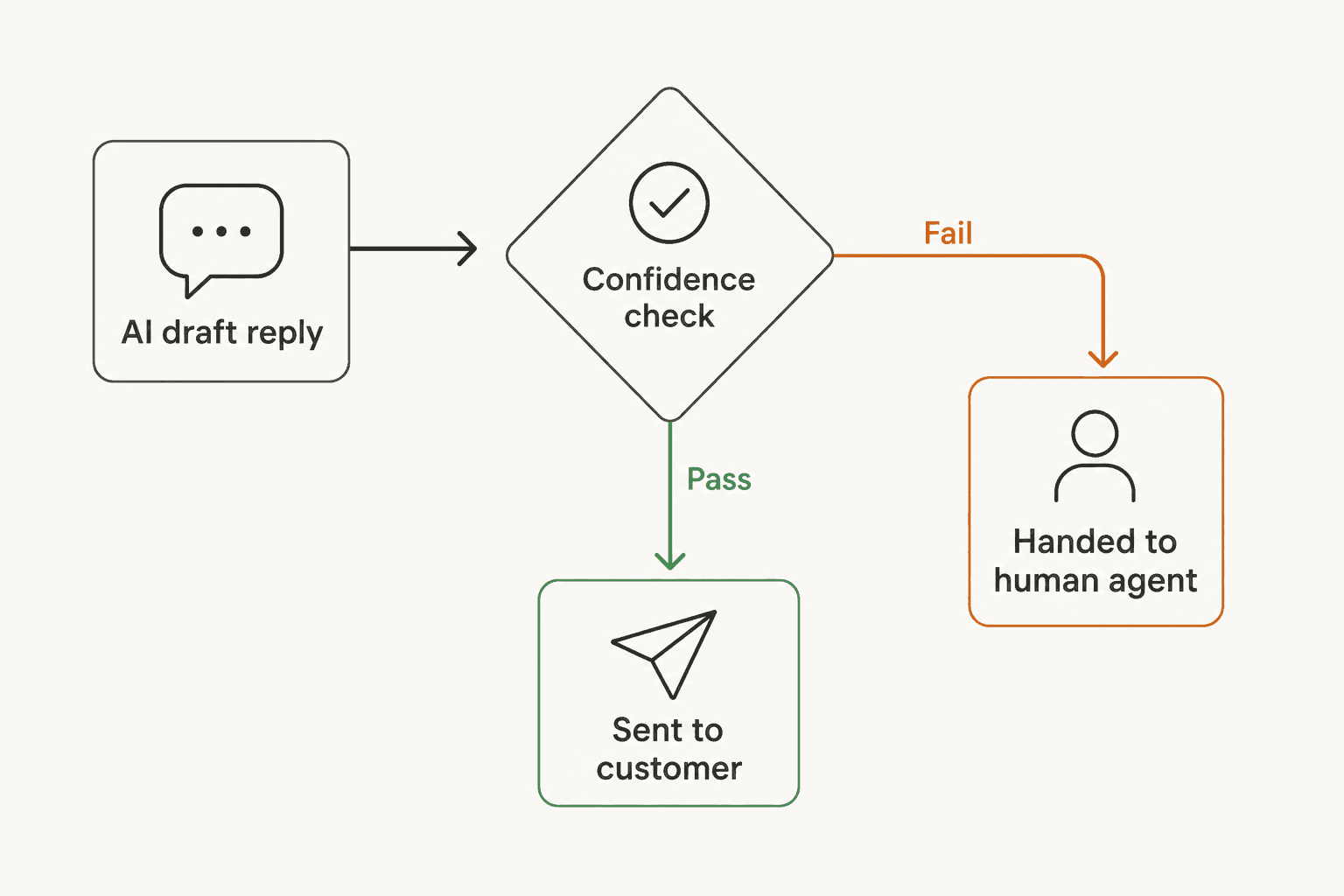
eesel calls this a trust ladder, and it's worth adopting even if you're using a different tool: start by testing in a dashboard with zero customer exposure, move to draft mode where a human approves every reply before it sends, then let the agent handle routine cases solo once you've built a track record (eesel's own benchmark for "ready:" a human approving 94%+ of drafts without edits in a week), while still escalating anything unusual.
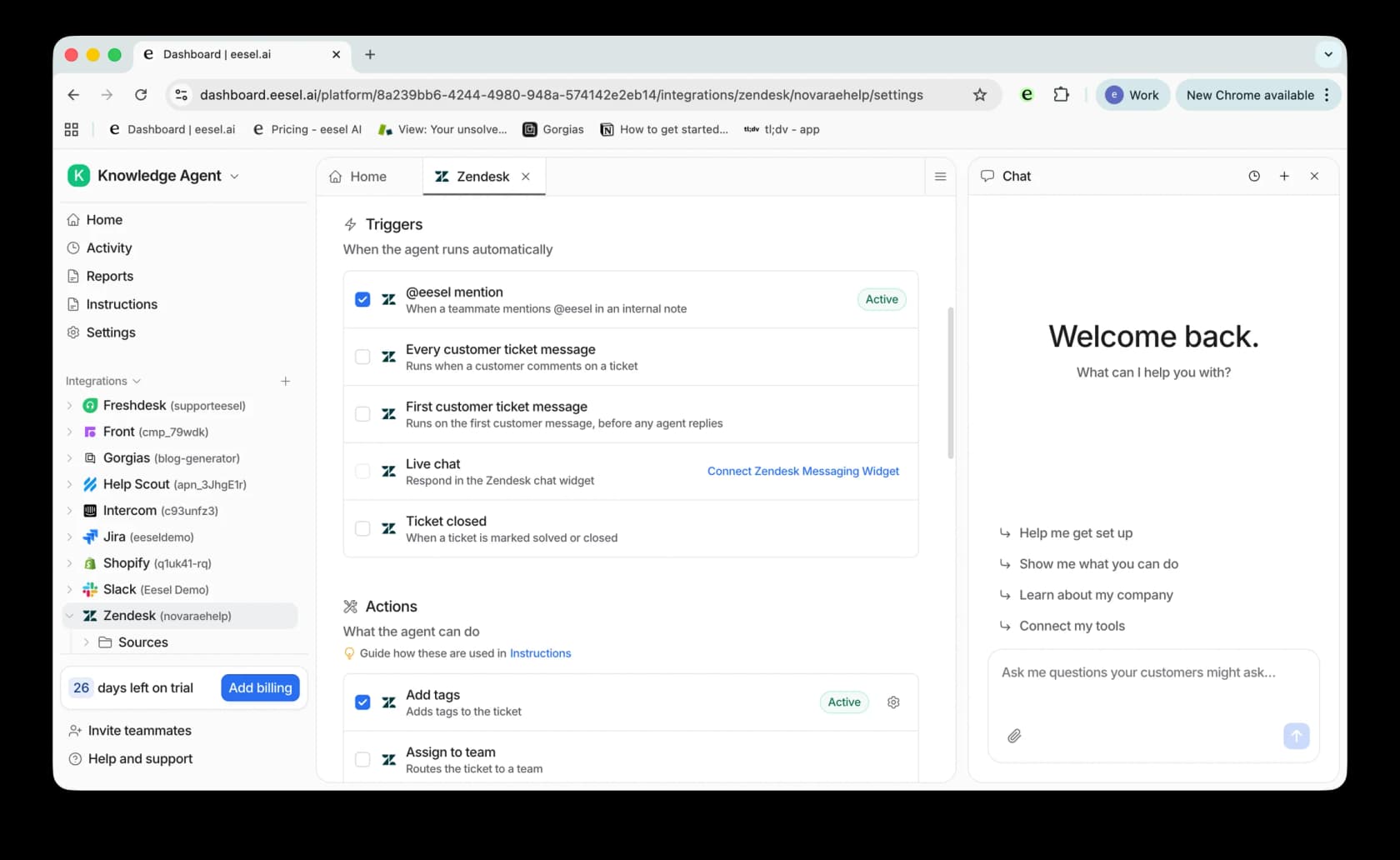
This is also where triggers matter. Connecting an integration doesn't automatically turn the agent loose; you still choose when it fires (a mention, every new ticket, only the first message). Starting with an @-mention trigger, so the agent only runs when a teammate explicitly asks it to, is the lowest-risk way to roll out to a live queue while you're still building trust.
Not every voice I found agrees automation should be the default posture at all. One LinkedIn post I came across during research argued bluntly that "the rush to push customers into chat and automation may save companies money, but it makes service worse," and asked instead for automation of routine requests paired with a fast, painless path to a human when it's actually needed.
"The rush to push customers into chat and automation may save companies money, but it makes service worse."

That's not an argument against training an agent. It's an argument for building the escalation path with the same care you build the automation, which is exactly what the confidence gate above is for.
Step 5: Keep training it after launch, this part never ends
Launch is a checkpoint, not a finish line. Zendesk's own guidance is to mine escalation data for patterns and improve help center content from the questions the agent keeps getting wrong. It also publishes healthy target ranges worth benchmarking yourself against:
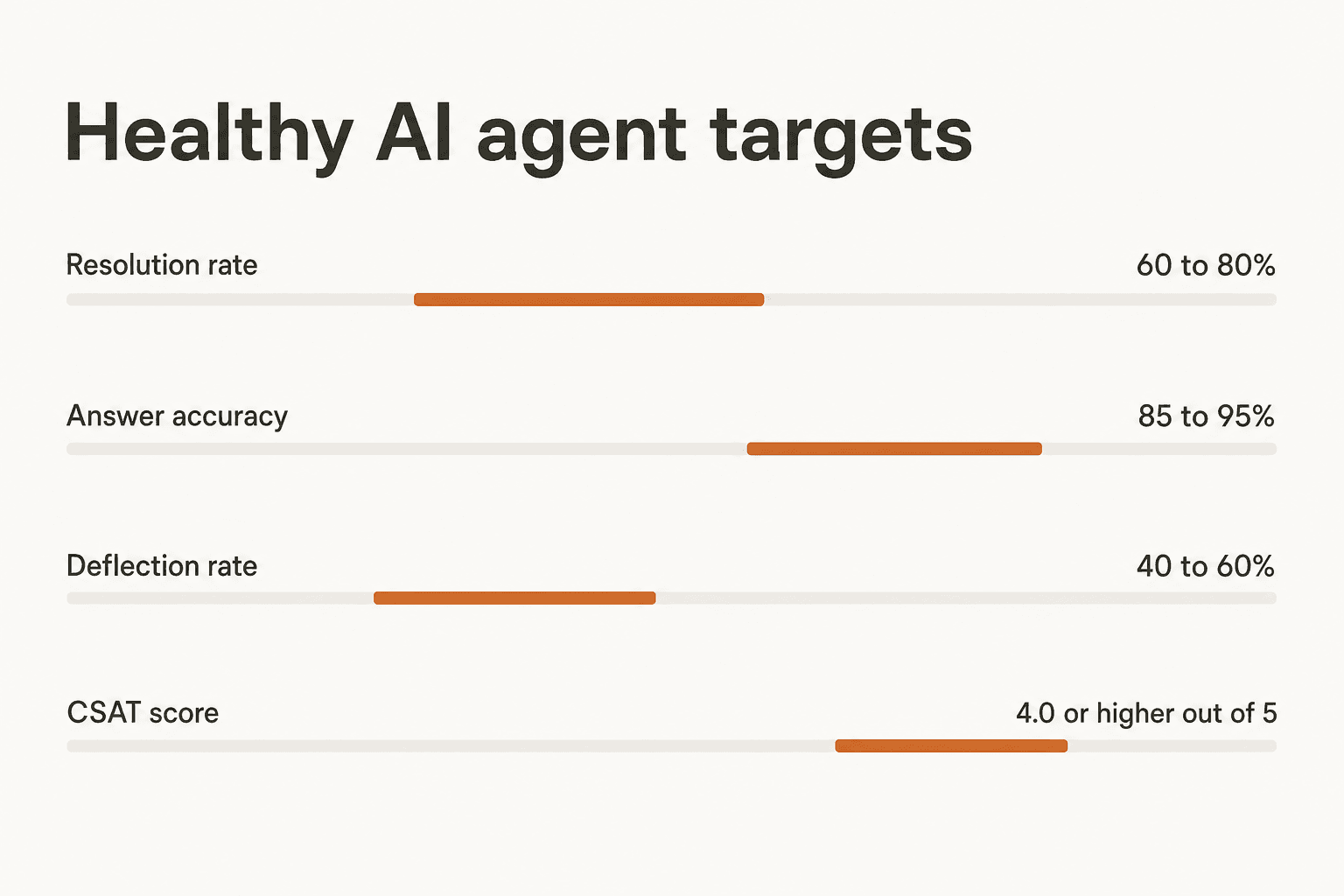
If your numbers sit well outside these ranges, the fix is almost always in Step 1 or Step 2, a missing knowledge source or a vague instruction, not a sign the underlying model needs replacing. eesel automates the correction mechanism itself: every edit you make to a draft either gets saved as a one-off "memory" (for exceptions like "for damage claims under $50, skip the photo request") or proposed as a diff to the instructions document for anything that looks like a general rule, which you accept or reject line by line. That's the same 65%-of-rewrites-are-tone-and-length problem from the TL;DR closing itself, automatically, the more you use it.
Common mistakes that turn training into a mess
A few patterns showed up repeatedly across the reviews and threads I read for this guide, and they're the fastest way to waste the effort you just put into steps 1 through 5:
- Dumping a giant document instead of curated sources. One founder described feeding a 500-page PDF manual full of screenshots into an AI tool and getting confidently wrong answers back, suspecting the model choked on the sheer page and image count. Freshdesk's own advice matches this: keep files focused rather than mixing everything into one document.
- Skipping the fallback for "I don't know." One of the more damaging failures eesel's own support team has had to untangle wasn't a bad answer, it was a bot fabricating an answer when its knowledge base had nothing relevant, rather than saying so. Confidence-based routing (Step 4) exists specifically to catch this before a customer sees it.
- Underestimating scale. A practitioner on r/sysadmin summed up why training gets hard fast: it's manageable until you're dealing with "50k replies easily," at which point untested edge cases compound. Simulation (Step 3) is what makes scale survivable.
- Treating the builder's learning curve as the model's fault. Reviewers of the no-code builder Botpress flagged the interface itself as the hard part, thin documentation, debugging complex flows by trial and error, not the underlying answer quality. Budget setup time accordingly; it's a UI problem to plan for, not a training failure.
How eesel trains a support agent, concretely
I'm an engineer on eesel's team, so I'll be direct about where we sit in all this: eesel doesn't do anything mystical that Zendesk, Freshdesk, or Gorgias don't also do. What we've optimized for is the two things support teams told us mattered most, ingesting more than just your help center (past tickets, Slack, Notion, Confluence, 100+ integrations), and making the test-before-launch step (Simulation) impossible to skip by accident. Setup is genuinely under 5 minutes for the first working draft, and pricing is one fixed monthly price: from $299/month for 500 credits (1 credit per ticket or chat), no seat fees, and a free plan with 100 credits for testing it on your own data.
Try eesel for training an AI agent on your helpdesk
If you're evaluating Zendesk, Freshdesk, or Gorgias's native AI agent against a third-party layer, the deciding factor is usually knowledge depth: native tools read your help center and connected sources, and eesel adds your actual solved tickets across whichever helpdesk you run. Connect one source, chat with it to sanity-check the answers, then run a Simulation against your last 60 days of tickets before you let it near a live queue. If the gap report comes back clean, you're already further along than most teams ever get with a from-scratch chatbot build.
Try eesel free, no credit card, and see what your own ticket history looks like once it's actually searchable.