


If you work in support, you’re probably feeling the squeeze. Ticket queues are getting longer, customers expect answers yesterday, and everyone’s trying to figure out how to handle it all without doubling their team size. It’s no surprise that AI tools are popping up everywhere, especially ones that plug right into helpdesks like Zendesk. One name you might have seen in the Zendesk marketplace is Macha AI.
But what does it actually do? And more importantly, is it the right tool for your team?
This post is a straight-up look at Macha AI, what it offers, how much it costs, and where it has some real limitations. We'll also explore another option, a more flexible, do-it-yourself alternative for teams that want to be in the driver’s seat of their own automation. Macha has changed a lot since its Marketplace-app days, so I rebuilt the facts below from its current pricing page and docs.
What is Macha AI?
First things first, Macha AI started life as a set of separate AI apps inside the Zendesk ecosystem, including an AI Email Writer, AI Ticket Translator, AI Ticket Analyzer, and AI Ticket Procedures. Today its homepage sells something bigger: AI agents that resolve tickets, with one agent per ticket category, working on top of Zendesk, Freshdesk, Gorgias or Front.
The agents read the ticket, act across connected tools such as Shopify and Stripe, and can reply on their own or leave an internal note for a human to approve. It lets you pick the model per agent, and its docs name GPT-5 family models and Claude Sonnet. The agent-assist copilot is still part of the product, as a widget inside Zendesk and a Chrome extension elsewhere.
A breakdown of Macha AI's core features
Macha AI’s feature set grew out of those original apps, and each one still maps to a part of an agent’s day. Let’s take a look at what each one brings to the table.
Email writer and ticket translator
These two apps are all about communication. The AI Email Writer is meant to help agents draft replies without having to type everything from scratch. You feed it a few bullet points, and it generates a full response, supposedly in your brand's voice. The idea is to save agents time on the answers they write over and over again. It now lives in the copilot widget that docks into the Zendesk ticket sidebar.
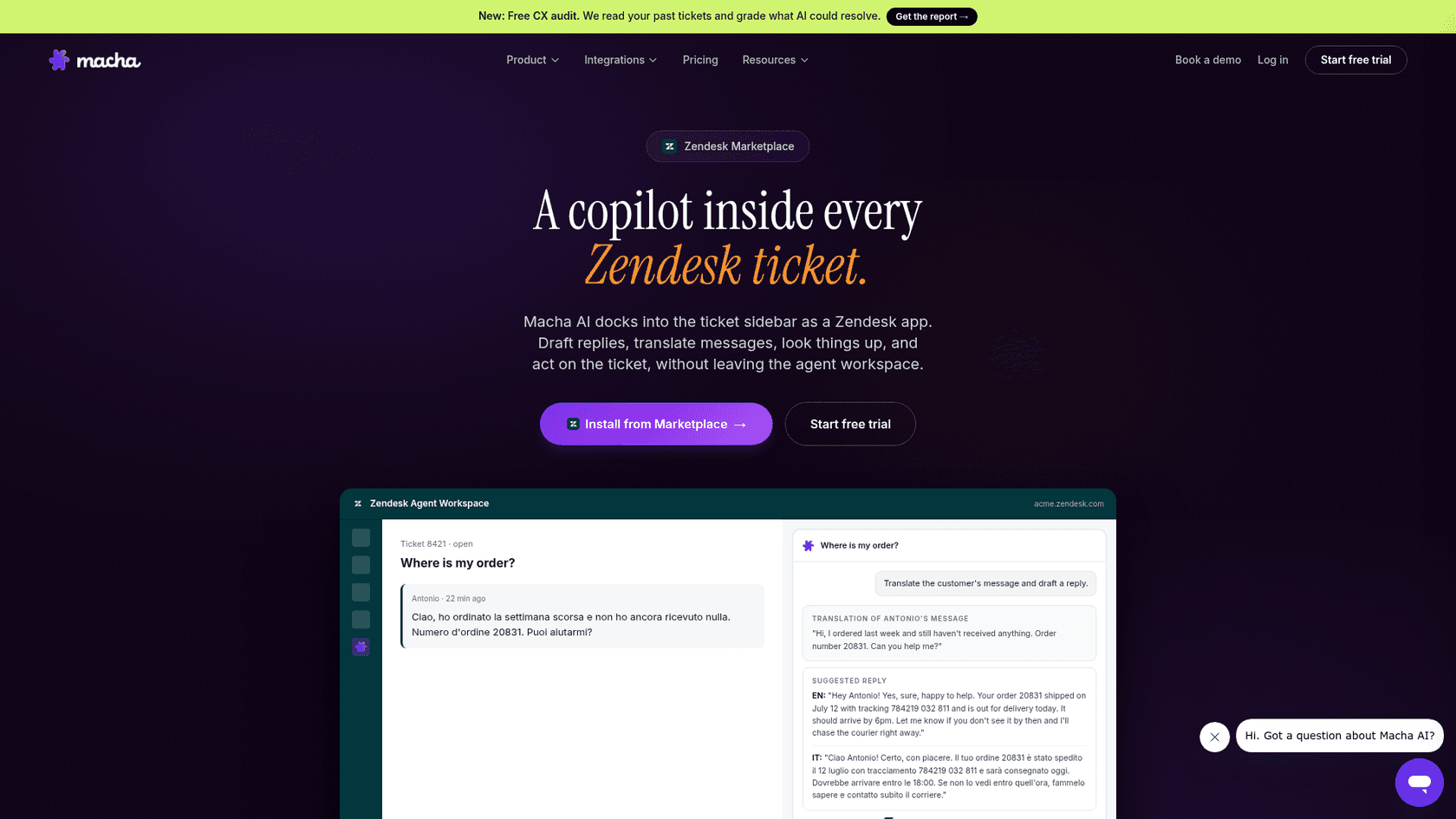
The AI Ticket Translator is for dealing with language barriers. Macha lists multilingual support on every plan, and its homepage says agents reply in the language of the ticket, which is handy for e-commerce companies with customers all over the world. It’s a way to offer multilingual support without hiring a team of translators.
Ticket analyzer and procedures
This duo focuses more on workflow and making sense of tickets. The AI Ticket Analyzer reads incoming tickets and automatically creates summaries, points out key details, and suggests the next step. This helps agents get the gist of an issue quickly without reading through a long email chain.
The AI Ticket Procedures app is like a little guide for agents. It looks at a ticket and tries to match it with the correct standard operating procedure (SOP) from your knowledge base, whether that’s in your help center or another tool like Notion. In the agent product, that same idea is the point: the agent reads the runbook and then carries out the steps.
Pro Tip: Having an AI suggest the right SOP is helpful, for sure. But the real magic happens when an AI can not only find the procedure but actually do it. Macha's agents are built for that, with order lookups, refunds through connected tools and ticket updates, so check the actions available for your helpdesk before you commit.
How does Macha AI compare to a unified platform?
Macha has largely moved past the "bunch of separate apps" shape: the copilot, the agents, Sidekick and evaluation now sit under one dashboard account, and Macha says every plan includes all of them. So the useful comparison today is less about apps versus platform and more about helpdesk coverage, testing and how you buy.
eesel AI takes a similar all-in-one route. Its AI Agent, AI Copilot, and AI Triage work together from the get-go, so you can handle frontline tickets, give agents smart drafts, and route issues with one tool, on the helpdesk you already run.
Understanding Macha AI pricing and setup
Alright, let's talk about the practical stuff: money and setup time. For any new tool, you need to know the sticker price and how much of a headache it will be to get it running.
Macha AI's pricing model explained
Macha AI bills per ticket. Its pricing page starts at $299 a month for 750 tickets, and every plan includes the full platform, so the only thing that changes with price is the number of tickets. A ticket is one whole conversation however many replies it takes, and a live chat costs the same as an email.
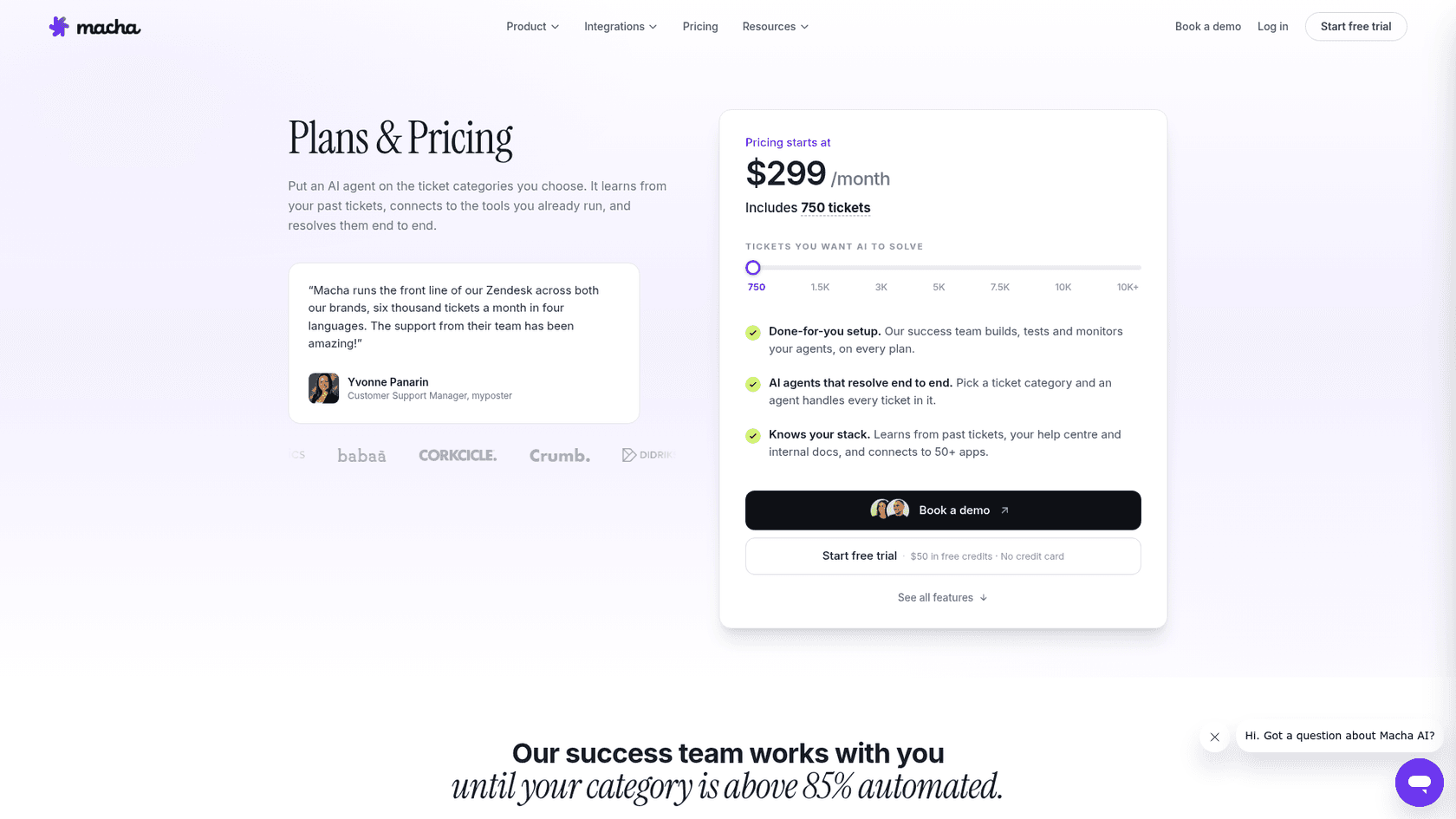
Here is the ladder Macha publishes, with the per-ticket rate it works out to:
| Tickets per month | Price per month | Per ticket |
|---|---|---|
| 750 | $299 | about $0.40 |
| 1,500 | $599 | about $0.40 |
| 3,000 | $1,199 | about $0.40 |
| 5,000 | $1,999 | about $0.40 |
The slider also steps to 7,500 and 10,000 tickets, and above 10,000 Macha quotes a price. A few details matter for budgeting. There are no overage charges, and when the month's tickets run out your agents pause until the billing date, so you size the plan to your real volume. A ticket also caps at 50 messages, and the API for building agents is free. I'd call that predictable rather than cheap: you pay the plan fee in a quiet month, and Macha counts every ticket its agents touch, whether it ends up resolved or just triaged.
The setup process and learning curve
Macha runs setup as a service. Its pricing page says the success team builds, tests and monitors your agents on every plan, and keeps working on a category until it clears 85% automated. You pick the ticket categories, brief the team, and review a daily or weekly update.
You can also start on your own: the free trial is $50 of credits, roughly 125 tickets, with no card and no time limit. I find the split sensible, but it does mean setup involves a scoping conversation with Macha's team rather than a pure self-serve flow. Macha also offers a free CX audit that reads your past tickets and grades what AI could resolve.
The AI itself learns from your past tickets, help center articles, internal docs, and 50+ connected apps, which is a solid starting point for any support AI.
Seeking a simpler, more transparent approach
If you want a second quote to compare, it’s worth checking out other options. For example, eesel AI has fixed monthly plans sized to volume, from $299 a month for 500 credits, where one credit covers one ticket or chat. There is no platform fee and no per-seat fee, so you know what you’re paying each month. At Macha's published rate its 750-ticket plan lands near $0.40 a ticket, while eesel's smaller plans cost more per ticket, so volume and the controls you need decide which one is cheaper for you.
eesel AI is also built to be completely self-serve. You can sign up for 100 free credits, connect your helpdesk, link your knowledge sources, and get your AI running in minutes, all without having to talk to a salesperson. Of course, the team is there to help if you need it, but it’s your choice, not a requirement.
Key limitations of Macha AI and a more flexible alternative
Macha AI is a credible tool, especially for Zendesk teams, but a few limitations might make it a worse fit for teams that run other helpdesks or want to test without risk on any of them. Let’s dig into those gaps and talk about another way to go.
Macha AI platform support and potential vendor lock-in
Macha used to be a Zendesk-only tool, and its Marketplace presence still shows that history. Today its homepage lists four helpdesks: Zendesk, Freshdesk, Gorgias and Front. Zendesk is still the deepest integration, and its docs describe simulations as running over past Zendesk tickets only. If your company moves to a helpdesk outside those four, such as Intercom or Jira Service Management, you’d have to start over with a different tool.
In contrast, eesel AI connects to a wider list of helpdesks and runs the same features on each, giving you the freedom to change your tech stack without being stuck. You build your automation workflows once, and they work wherever you do.
The challenge of testing and gradual rollout with Macha AI
Being able to test an AI before it ever interacts with a customer is a must, and Macha has a real answer here. Its Agent Simulations replay past Zendesk tickets through your agent with write tools stubbed, so replies and status changes never reach a customer, and Macha says simulations are included on every plan. Two limits are worth knowing: read tools still fetch live data at run time, so results are a strong preview rather than an exact replay, and the source is Zendesk tickets only today.
This is where eesel AI's simulation mode is aimed at a wider audience. You can run your AI setup on thousands of your historical tickets in a totally safe environment to see exactly how it would have responded. You get clear, data-driven reports on its resolution rate and can tweak its behavior before it goes live. This lets you roll it out with confidence, starting small by automating just one or two types of tickets and expanding from there as you see it working.
Macha AI: Siloed knowledge vs. a unified knowledge base
For an AI to be truly helpful, it needs to access all the same information your team does. Macha AI can sync your help center, crawl websites, take uploaded files and connect tools like Notion and Google Docs. It scopes each agent to the sources and tools you choose, which is tidy per category but means you decide what each agent can see.
eesel AI was designed from the ground up to bring all your knowledge together in one place, instantly. You can connect it to your helpdesk, internal wikis like Confluence and Google Docs, and even your team's conversations in Slack. The AI learns from everything at once to give complete, accurate answers, whether it’s helping your team internally or resolving customer tickets in Zendesk.
The verdict: Is Macha AI right for you?
So, what's the bottom line? Macha AI is a solid agent platform for teams on Zendesk, and increasingly for Freshdesk, Gorgias and Front. If you want ticket-based pricing near $0.40 a ticket, a success team that builds the agents with you, and a simulation step on your Zendesk history, it’s a fair choice.
However, if your team runs a helpdesk outside Macha's four, or wants to replay its own ticket history on any helpdesk before go-live, it’s worth comparing. If you're looking for an AI platform you can set up yourself in minutes, test with real data, and customize to fit your exact needs, then it’s probably time to look at an alternative like eesel AI.
Ready to take control of your support automation?
Try eesel AI today. You can get it live in minutes with the self-serve platform, see how it would perform on your actual ticket history, and see how one AI workflow covers your helpdesk, knowledge base and Slack. Start for free.
Frequently asked questions
Is Macha AI one single platform, or is it more like a suite of different apps I have to manage?
Macha AI is now one platform with one dashboard account. AI agents that resolve tickets, a copilot for your human agents, an evaluation layer and a build assistant called Sidekick all sit under it, and Macha says every plan includes all of them. The older single-task Zendesk Marketplace apps, like the Email Writer, still exist as listings.
What happens to our setup if we ever decide to switch helpdesks? Will Macha AI work with something other than Zendesk?
Yes. Macha lists Zendesk, Freshdesk, Gorgias and Front on its homepage, and Zendesk is the deepest integration. Its simulation feature, which replays past tickets before go-live, is documented for Zendesk tickets only today, so check that before you pick it for another helpdesk.
How does the pricing for Macha AI scale? I'm worried about our bill changing a lot from month to month.
Macha's pricing is per ticket, not per seat or per resolution. Plans run from $299 a month for 750 tickets up to $1,999 for 5,000, which works out to about $0.40 per ticket at every step, and agents pause rather than bill overage when the tickets run out. That makes the monthly bill predictable, but you pay the plan fee even in a quiet month.
Can my team just sign up and start using Macha AI right away, or is there a long setup process involved?
Both. Macha offers a self-serve free trial with $50 of credits and no card, and its success team also builds, tests and monitors your agents on every plan. Expect a short scoping conversation about which ticket categories to automate first.
Does Macha AI just summarize tickets and suggest replies, or can it actually perform actions like processing a refund for us?
It can do both. Macha's agents can run multi-step actions across your stack, such as looking up an order or a payment, and its copilot widget helps your own agents draft replies and summarize threads. Which mode you use is a setting per agent.