


If you're hunting for a cost-effective help desk, osTicket has probably popped up on your radar. As a popular open-source tool, its biggest draw is the promise of a "free" support platform. But let's be honest, what does "free" really cost when you start adding up the time, maintenance, and your team's sanity? The sticker price (or lack of one) rarely tells the whole story.
This guide will walk you through the complete picture of osTicket pricing in 2026. We'll look at each plan, dig into the hidden costs that come with hosting it yourself, and talk about where the platform shows its age. More importantly, we'll explore how modern AI solutions can work with your existing setup to deliver a much bigger return than a simple ticketing system ever could on its own.
So, what is osTicket?
osTicket is a well-known open-source support ticket system. It’s built to help businesses, especially small to mid-sized ones with some tech folks on hand, get a handle on customer questions. The platform pulls in tickets from channels like email and web forms and organizes them in one place.

Its core job is to cover the basics: creating tickets, sending them to the right people, and keeping a simple knowledge base. While it does the fundamental job of a ticketing system, it was designed long before AI and smart automation became standard. That’s a key thing to remember when you’re weighing its true cost and what it can actually do for your team.
A full breakdown of osTicket pricing plans
osTicket comes in three different flavors, each designed for a different level of technical know-how and support needs. Getting into the details of each one is the only way to figure out what you’ll actually end up spending.
What "free" means for osTicket pricing
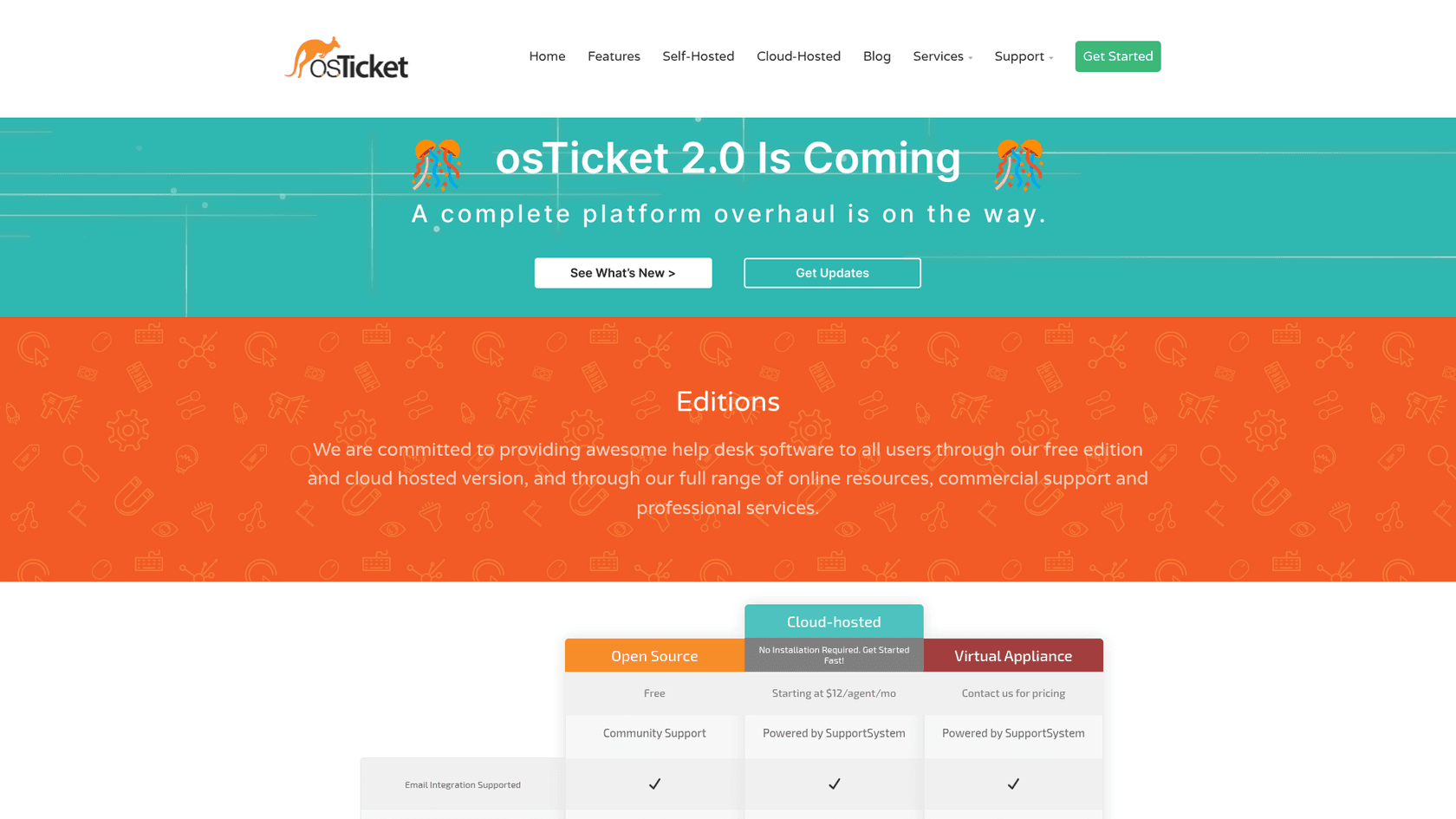
This is the one that gets all the attention. It's completely free to download and use, which is a huge plus for teams watching their budget. But this is a classic "you get what you pay for" situation, and the catch is that you have to host and manage it all yourself.
This DIY approach means the real cost isn't about software licenses; it's about your team's time and resources. You’re on the hook for everything:
- Technical setup: You’ll need your own web server (like Apache or IIS), the right versions of PHP, and a MySQL database just to get it running. According to osTicket's own FAQ, you have to juggle all these dependencies on your own.
- Hidden costs: The biggest expense is the time your IT or dev team will sink into the initial setup, configuration, ongoing maintenance, and security updates. When something inevitably breaks, it’s up to you to figure it out.
- Support: There’s no official support line to call. Your only option is the community forums. While they can be helpful, there's no guarantee you'll get a fast or even correct answer.
A managed solution for osTicket pricing
If you like the idea of osTicket but don't want the headache of managing servers, there's a paid, cloud-hosted version. It’s run by a partner company, SupportSystem, and it's the most straightforward choice for businesses that would rather pay for a managed service.
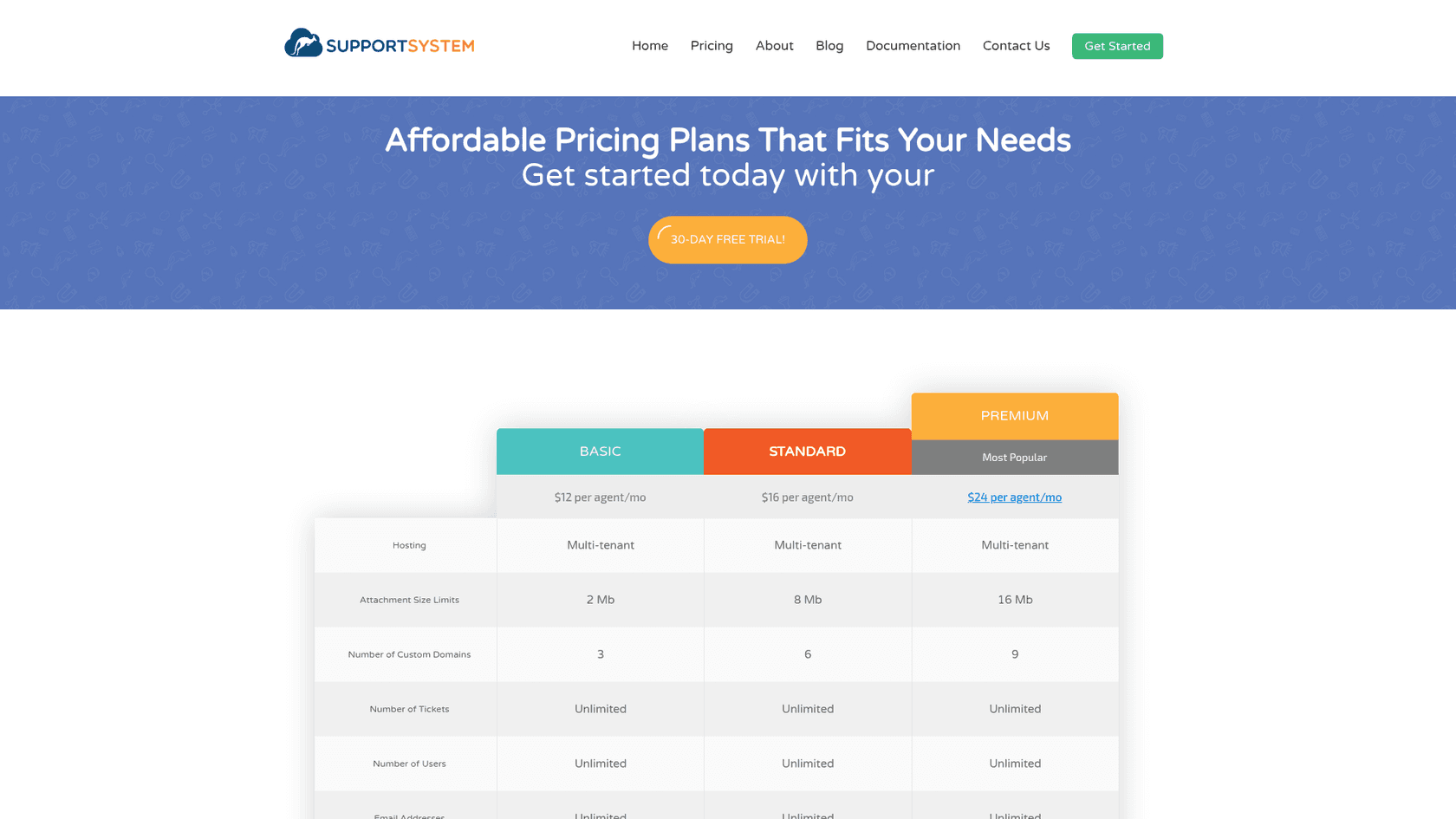
- Price: The cloud version starts at $12 per agent per month on the Basic plan. Standard is $16 and Premium is $24 per agent per month.
- Key benefits: This monthly fee takes care of all the things missing from the free plan. It includes managed hosting, guaranteed uptime, daily backups, and access to official support through email and phone. You're basically paying a subscription to hand off the risk and work of self-hosting.
- Who it's for: This plan is a good fit for teams who want the basic osTicket features but don't have the technical staff or the desire to manage the infrastructure themselves.
Custom osTicket pricing for enterprise needs
For bigger companies with more specific or complex needs, osTicket has a Virtual Appliance plan.
- Pricing: This one is available by custom quote only, which tells you it’s aimed at the enterprise level.
- Features: It comes with everything in the cloud-hosted plan but opens the door for deeper customizations to match unique business workflows.
Here’s a quick comparison of the three plans:
| Feature | Open Source | Cloud-hosted | Virtual Appliance |
|---|---|---|---|
| Starting Price | $0 | $12/agent/mo | Custom |
| Hosting | Self-Hosted | Managed Cloud | Managed Cloud/On-Prem |
| Email Integration | ✔️ | ✔️ | ✔️ |
| Email & Phone Support | ✖️ (Community only) | ✔️ | ✔️ |
| Managed Upgrades | ✖️ | ✔️ | ✔️ |
| Guaranteed Uptime | ✖️ | ✔️ | ✔️ |
| Daily Backups | ✖️ | ✔️ | ✔️ |
| Customization | Code-level | Limited | ✔️ |
The hidden costs and limitations of osTicket pricing
Beyond the price on the tin, osTicket has some operational quirks and indirect costs that can slow your team down and affect your customer experience. When you read through user feedback, a few common complaints tend to pop up again and again.
The true cost of self-hosting within osTicket pricing
That "free" open-source plan can quietly become a major operational expense. The cost isn't just about paying for a server; it's the hours your developer or IT admin spends on setup and babysitting the system. As one Capterra reviewer put it, getting the platform running smoothly is "extremely painful." They mentioned burning a whole month just to realize the wrong PHP version was installed, a detail the official documentation failed to mention. Those are hours you’re paying for, even if they don't appear on a software invoice.
An outdated user experience and its impact on osTicket pricing
Many user reviews describe the osTicket interface as "old school" and "not visually appealing." This is more than just a cosmetic issue. A clunky, confusing UI makes every ticket take longer to resolve, which directly impacts your team's productivity. It makes training new hires a chore and can lead to frustration and burnout across your whole support team. When most modern tools are designed to be slick and intuitive, a dated interface is a real handicap. The osTicket team says the interface has stayed largely unchanged for over a decade, and it has announced osTicket 2.0, a rebuild with a redesigned interface that hasn't launched yet.

The lack of modern automation in osTicket pricing
osTicket can handle basic ticket filtering and routing, but its editions and SupportSystem pricing pages list no smart automation or AI features, and the osTicket 2.0 announcement mentions AI-driven tools only as something the new architecture could support later. In practice, that leaves gaps like these:
- No listed feature learns from your past tickets to suggest answers to new ones.
- No AI to help agents draft replies is listed, so agents write each answer themselves.
- Nothing listed reads the intent behind a ticket, so routing follows the rules you configure.
- No connector is listed for knowledge sources like your internal wikis in Confluence or Google Docs, so that information stays outside the ticket view.
Without those, agents do more of the searching and retyping themselves, which can slow response times.
A better way: Add an AI layer to your support
Instead of throwing out your help desk and starting from scratch, a much smarter approach is to add an AI layer on top of what you already have. This is exactly what eesel AI does. It’s an AI platform that plugs into modern systems like Zendesk and Freshdesk to bring the intelligence and automation osTicket doesn't list. One caveat: eesel doesn't have a native osTicket integration. It works in supported helpdesks, website chat, Slack, and email, so for an osTicket team the realistic routes are a chat or Slack channel next to osTicket, or a move to a supported helpdesk.
Go live in minutes, not months
While getting a self-hosted osTicket instance up and running can take days or weeks of technical wrestling, you can get started with eesel AI in just a few minutes. The setup is completely self-serve, which means you don’t have to book a mandatory sales call or sit through a demo just to give it a try. With one-click integrations, you can connect your help desk and knowledge sources and start seeing results almost immediately.
Unify your knowledge and automate with confidence
eesel AI is built to add the intelligence osTicket doesn't list. The AI Agent learns from the old tickets, macros, and help center articles in your connected helpdesk. It also connects to your other knowledge bases, whether that’s an internal wiki in Notion or technical docs in Confluence, making sure every answer it gives is accurate and based on your actual company knowledge.
Best of all, you can roll it out without any guesswork. eesel AI’s simulation mode lets you test your AI against hundreds of your past tickets. You can see how it would have replied, get each answer scored, and tweak its behavior all before it ever talks to a real customer.
Get transparent pricing with a clear ROI
Comparing the business models shows where the real value is. osTicket is either "free" but with hidden labor costs, or a low monthly fee for a basic tool with no intelligence. eesel AI is one fixed monthly price sized to volume. There's a free plan with 100 credits (no card), then $299/month for 500 credits, where one credit covers one ticket or chat. Every integration is included and there's no per-seat fee, so your costs stay predictable during a busy month.
Is osTicket pricing the right fit for you?
So, back to the main question: is osTicket the right choice for you? It can be a decent starting point for teams with plenty of technical skills who just need a simple, low-cost way to manage tickets. If all you need is a basic queue for incoming emails, the open-source version could work, as long as you’re ready to take on the maintenance yourself.
But the trade-offs are pretty big. You’re signing up for a dated user experience, no AI features listed on its pricing pages, and, with the free version, a serious maintenance commitment. For any team that wants to grow efficiently, lighten the load on agents, and provide the fast, accurate support that customers expect today, a simple ticketing system just doesn't cut it anymore.
If you're ready to move beyond just logging tickets and want to start resolving them intelligently, it might be time to see what an AI layer can do for you.
Ready to see what a truly intelligent support system can do? Connect your knowledge sources and start automating with eesel AI today.
Frequently asked questions
For a small business, is the paid cloud version a better deal than the self-hosted osTicket pricing?
For teams without technical staff, the cloud plan is often a better value at $12 per agent. It provides managed hosting, official support, and backups, which makes your total cost of ownership much more predictable than the self-hosted version.
How does the user interface impact the overall value of osTicket pricing?
The outdated UI can be a significant indirect cost. A clunky interface slows down agent productivity, makes training new hires more difficult, and can lead to frustration, reducing the overall return on your investment in the software.
What is the single biggest limitation I should be aware of with any osTicket pricing plan?
The most significant limitation across all osTicket plans is that none of them list modern AI and automation features. Nothing listed learns from past tickets or helps agents respond faster, so most of the work of finding information and resolving issues falls on your team.
We have some tech resources, so is the free osTicket pricing plan a safe bet?
It can be, but only if you're prepared for the ongoing maintenance commitment. While you save on subscription fees, you are taking on the full responsibility for security, uptime, and performance, which can become a significant distraction from your core business.
Does the enterprise-level osTicket pricing for the Virtual Appliance make sense for a mid-sized company?
Generally, no. The Virtual Appliance plan is custom-quoted and built for large enterprises with complex, unique workflows and security requirements. Most mid-sized companies will find the standard cloud-hosted plan to be a more practical and cost-effective choice.