


Trying to pick an AI tool for your support team can feel like a bit of a nightmare. The market is packed with options, and they all seem to promise the same thing: slashed response times and a miraculously efficient team. One of the names you might have stumbled upon is ParaHelp, a platform built to automate customer service workflows.
But with so many tools making big promises, how do you figure out which one is actually right for you? This article is here to help you cut through the noise. We’re going to give you a straight-up, balanced look at ParaHelp,what it does, what it takes to get it running, and some of the catches you should know about. The goal is to give you the info you need to make a smart call for your team.
What is ParaHelp?
At its heart, ParaHelp is an AI platform designed for customer service automation. Its main job is to hook into helpdesks like Zendesk and automatically answer customer questions. You can think of it as a bot that lives in your support queue, trying to solve common issues before a human agent ever has to see them.
ParaHelp is trying to tackle the same old problems every support team faces: cutting down first response times, getting rid of repetitive questions (we all know the "Where is my order?" tickets), and freeing up your agents to handle the trickier, more interesting conversations. It does this by connecting to your knowledge base and using that content to spit out answers. It’s one of many tools trying to bring AI to the front lines of customer support.
A deep dive into the core features of ParaHelp
So, what’s really going on inside the platform? To know if a tool like ParaHelp is a good fit, you have to look past the marketing slogans and get into the nitty-gritty of what it can actually do. Let's break down its main pieces.
Automated ticket responses with ParaHelp
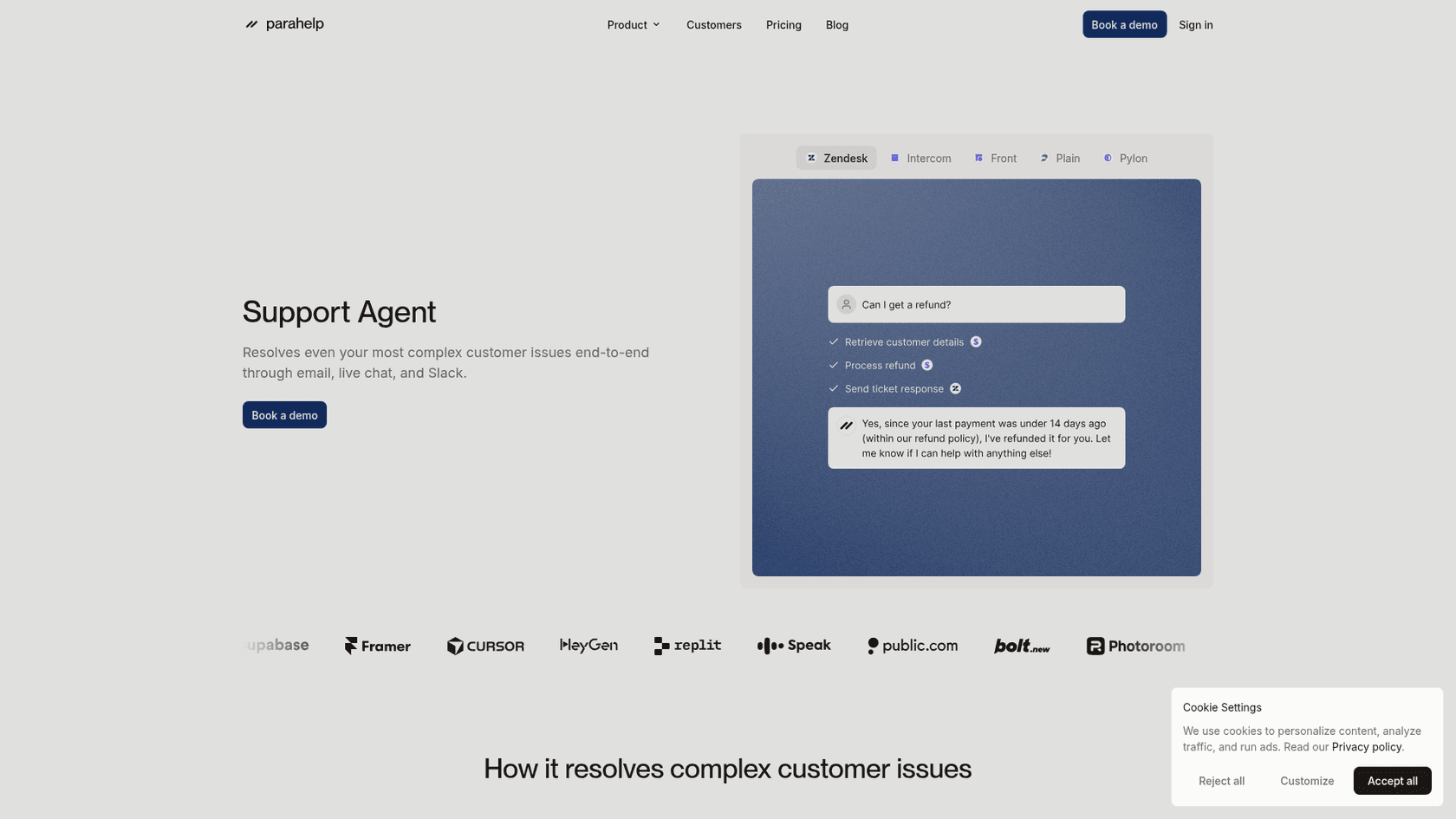
The biggest selling point for any support AI is its ability to handle tickets on its own. ParaHelp reads incoming customer emails and chats, then tries to give an immediate answer based on the knowledge you already have. Parahelp's Customer Agent connects to your docs, help center, and other knowledge sources, and takes scoped actions in tools like Stripe and Linear through the tools its Internal Agent builds.
Documented questions are the easy case. But what about all the valuable know-how that isn't in a perfectly polished article? A huge chunk of your team's real expertise is buried in past conversations. Some tools, like eesel AI, are built to learn directly from your historical support tickets. This lets the AI pick up on unspoken knowledge, understand tricky nuances, and even adopt your brand's unique voice without you having to write a single new help doc.
ParaHelp agent assistance and copilots
Parahelp splits the product in two: the Customer Agent answers tickets, and the Internal Agent is the one you chat with to build, test, and improve it. Its site also lists team approvals, where sensitive actions pause for a human to approve from Slack. That is a different shape from a "copilot" that suggests replies inside the helpdesk.
Whichever shape you pick, a big question to ask is how much say you have over the AI's personality. For instance, eesel AI's prompt editor lets you dial in the exact tone, voice, and personality you want, making sure the AI sounds like a real member of your team, not just a script.
ParaHelp analytics and reporting
You can’t fix what you can't see. Parahelp's site says the Internal Agent keeps improving the Customer Agent, both reactively and proactively. I could not find public detail on its dashboards, so ask in the demo which metrics, such as automation rate and response times, you can see.
But does the report actually tell you what to do next? It’s one thing to see your deflection rate, but it's another thing entirely to know how to make it better. The best platforms don’t just show you stats; they point out the specific gaps in your knowledge base and give you a clear to-do list for improving things. This is a big part of the analytics in eesel AI's AI Agent, which turns performance data into a simple action plan for making your support smarter.
| Feature Area | ParaHelp (per its public site) | The eesel AI Difference |
|---|---|---|
| Knowledge Source | Connects docs, help center, and other sources. | Unifies knowledge from past tickets, docs, Slack, etc. |
| AI Control | Natural-language instructions, hard-coded rules, team approvals. | Full control over prompts, actions, and automation scope. |
| Reporting | Internal Agent improves the agent over time; dashboards not detailed publicly. | Actionable insights on knowledge gaps and ROI. |
| Setup | Book a demo to start; 14-day no-cure-no-pay trial; first issue in hours. | Radically self-serve, go live in minutes. |
The ParaHelp implementation process: what to expect
Thinking about features is one thing, but getting a new tool set up and running is a whole different ballgame. How easy or difficult it is to implement can completely change your experience with an AI platform.
ParaHelp onboarding and setup friction
With Parahelp, your journey begins with a "Book a demo" button. From there, its site describes a three-hour path: connect your sources and tools in hour one, review the configuration in hour two, and set it live in hour three. Its pricing page also lists a 14-day no-cure-no-pay trial.
Some teams still prefer a self-serve option that lets them get started when they're ready. With eesel AI, for example, you can sign up, connect your helpdesk in one click, and have a working AI assistant running in just a few minutes, all without having to talk to a salesperson. You get to see if it’s actually valuable right away, not after a drawn-out sales cycle.
Training the ParaHelp AI and testing
Once you're set up, you need to "train" the AI by pointing it to your knowledge sources. Parahelp's Internal Agent builds and tests the Customer Agent as you chat with it, and its site lists simulation for both agents. The question to ask in a demo is what the simulation runs against, because the risk with any platform is wrong or off-brand answers reaching real customers.
With eesel AI, the simulation skill tests the agent against hundreds of your past tickets in a private environment before it talks to customers. You can see how it would have answered real questions, get a score for each answer, and apply suggested instruction fixes with no risk. It’s all about feeling confident before you flip the switch.
Key limitations and considerations with ParaHelp
No tool is perfect, and it’s always smart to think about the downsides before you commit. While platforms like ParaHelp offer a path to automation, there are a few common limitations to keep in mind.
Rigid automation and lack of control in ParaHelp
Some platforms kind of force you into an "all-or-nothing" style of automation. You turn the AI on, and it just tries to answer everything it can. Parahelp's guardrails (intelligent escalations, team approvals from Slack, and hard-coded rules that run before every action) cover part of this. That sounds great, but if the AI isn't very good at handling certain topics, you can end up with a lot of frustrated customers pretty quickly.
Real control means you get to decide exactly what gets automated. With a more flexible setup, like the one in eesel AI's customer service solution, you can start small and grow from there. For instance, you could tell the AI to only handle questions about order status and to pass everything else to a human agent. Once you see how it's doing, you can slowly give it more responsibilities. That level of control is key to a successful, stress-free rollout.
Disconnected knowledge sources in ParaHelp
An AI is only as smart as the information you give it. Many tools can only read your official help center articles. But let's be honest, your company's knowledge is scattered all over the place. The best answers are probably in a random Google Doc, an internal wiki on Confluence or Notion, and of course, in the thousands of past support conversations sitting right there in your helpdesk.
Parahelp connects to docs, help centers, and other sources, so the difference is mostly in which sources each tool supports; I could not find a source list on its public pages. An AI that can't see all of that is working with one hand tied behind its back. eesel AI was built from the ground up to bring all of your company's scattered knowledge together. It plugs into over 100 sources, from your helpdesk to your internal docs, making sure your AI has the full picture to give the most accurate answers.
Unpredictable pricing models for ParaHelp
Finally, let's talk money. A popular pricing model in this space is to charge per ticket resolution. It sounds fair at first, you only pay when the AI successfully closes a ticket. The catch is that your bill goes up the more successful you are. This leads to costs that move with ticket volume, which makes budgeting harder in a busy season.
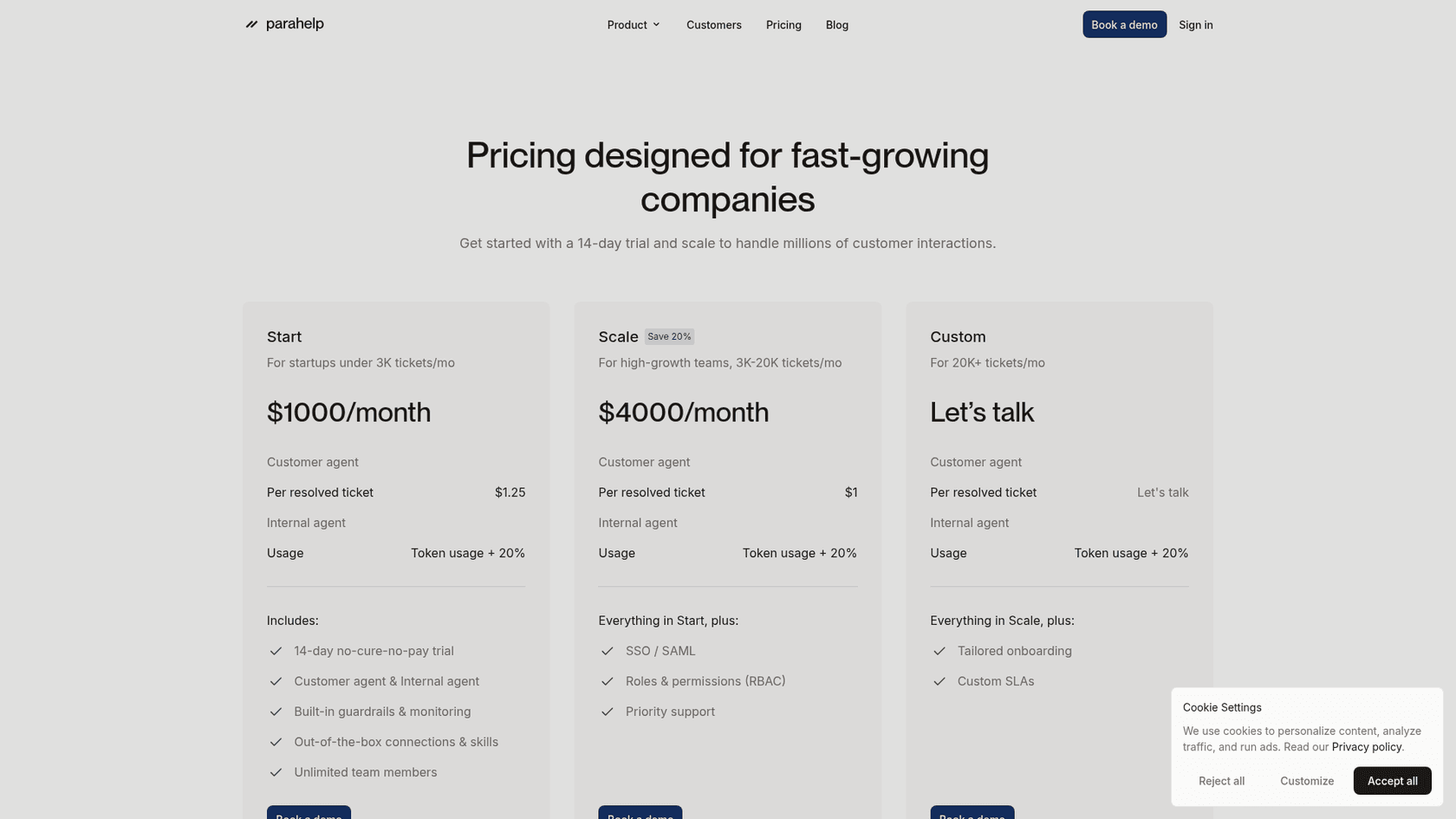
Parahelp publishes its pricing: Start is $1,000/month for teams under 3K tickets at $1.25 per resolved ticket, and Scale is $4,000/month at $1 per resolved ticket for 3K to 20K tickets. Internal Agent usage is billed at token cost plus 20%, and larger teams talk to sales.
I think you deserve predictable costs. eesel AI's pricing is one fixed monthly price, from $299/month for 500 credits, where 1 credit is one ticket or chat. There is no platform fee or per-seat fee, and a free plan includes 100 credits. If you run out, agents pause until credits reset, or you can turn on overage with a monthly cap you set at $0.80 per extra credit.
Is ParaHelp right for you?
ParaHelp is built for teams that want an agent that takes actions in tools like Stripe and Linear, with published pricing from $1,000/month. The questions worth asking in a demo are which sources and helpdesks it supports, what its simulation runs against, and how the per-resolution fee fits your ticket volume.
At the end of the day, the best AI support platform is one that bends to your workflow, not the other way around. It should be simple to set up, safe to test, and flexible enough to grow with your team. For teams that want a more powerful, transparent, and self-serve tool, it pays to look at all the options out there.
Ready to take control of your support automation?
If you’re looking for an AI platform you can set up in minutes, test with total confidence, and customize down to the last detail, give eesel AI a spin. Connect your helpdesk and see how much you can automate on the free plan, with 100 credits and no card.
Frequently Asked Questions
What exactly is ParaHelp and what problem does it aim to solve for support teams?
ParaHelp is an AI platform designed for customer service automation, primarily hooking into helpdesks. Its main goal is to automatically answer customer questions, thereby reducing first response times and handling repetitive tickets to free up human agents.
How does ParaHelp typically handle automated ticket responses and assist human agents?
ParaHelp processes incoming customer inquiries and attempts to provide immediate answers based on available knowledge sources. Its Internal Agent also helps your team build and improve the agent by following natural-language instructions, which differs from an AI agent assist copilot.
What can I expect regarding the implementation and setup process for ParaHelp?
The implementation for ParaHelp often begins with demos and sales calls, followed by a guided onboarding. Parahelp's site describes a three-hour path to the first resolved issue, and its pricing page lists a 14-day no-cure-no-pay trial.
What types of knowledge sources can ParaHelp typically use to answer customer questions?
ParaHelp connects to your docs, help center, and other knowledge sources, per its site. I could not find a full list of supported sources, so check whether structured knowledge sources and past conversations are covered for your stack.
How does the pricing model for ParaHelp usually work, and what are the common concerns?
ParaHelp charges a monthly platform price plus a fee per resolved ticket: $1,000/month and $1.25 per resolution on Start, $4,000/month and $1 on Scale. Because the resolution fee moves with volume, forecast it from your own ticket counts.
How much control do I have over the automation rules and AI's behavior when using ParaHelp?
ParaHelp lets you steer the agent with natural-language instructions and adds hard-coded rules, intelligent escalations, and team approvals for sensitive actions. Ask in a demo how finely you can scope which ticket types it handles.