

What is the difference between proactive and reactive customer service?
Both terms get thrown around loosely, so let me pin them down.
Reactive customer service is the default model. The customer notices something is wrong, opens a channel (a ticket, a chat, a phone call), and you respond. You are waiting for a signal, then answering it. Every inbound "how do I..." question, every complaint, every refund request is reactive. It is the bread and butter of any customer service operation.
Proactive customer service flips the trigger. You anticipate the need and reach out before the customer has to ask, usually off the back of data you already hold: order status, account state, a known outage, a usage pattern. As Gartner frames it, good proactive service "alerts them to urgent issues that need their attention", the classic example being a fraud notification you would much rather receive than discover on your own.
Here is the test I keep coming back to: if the customer had to initiate the contact, it was reactive. If you did (or you designed the situation so they never needed to), it was proactive.
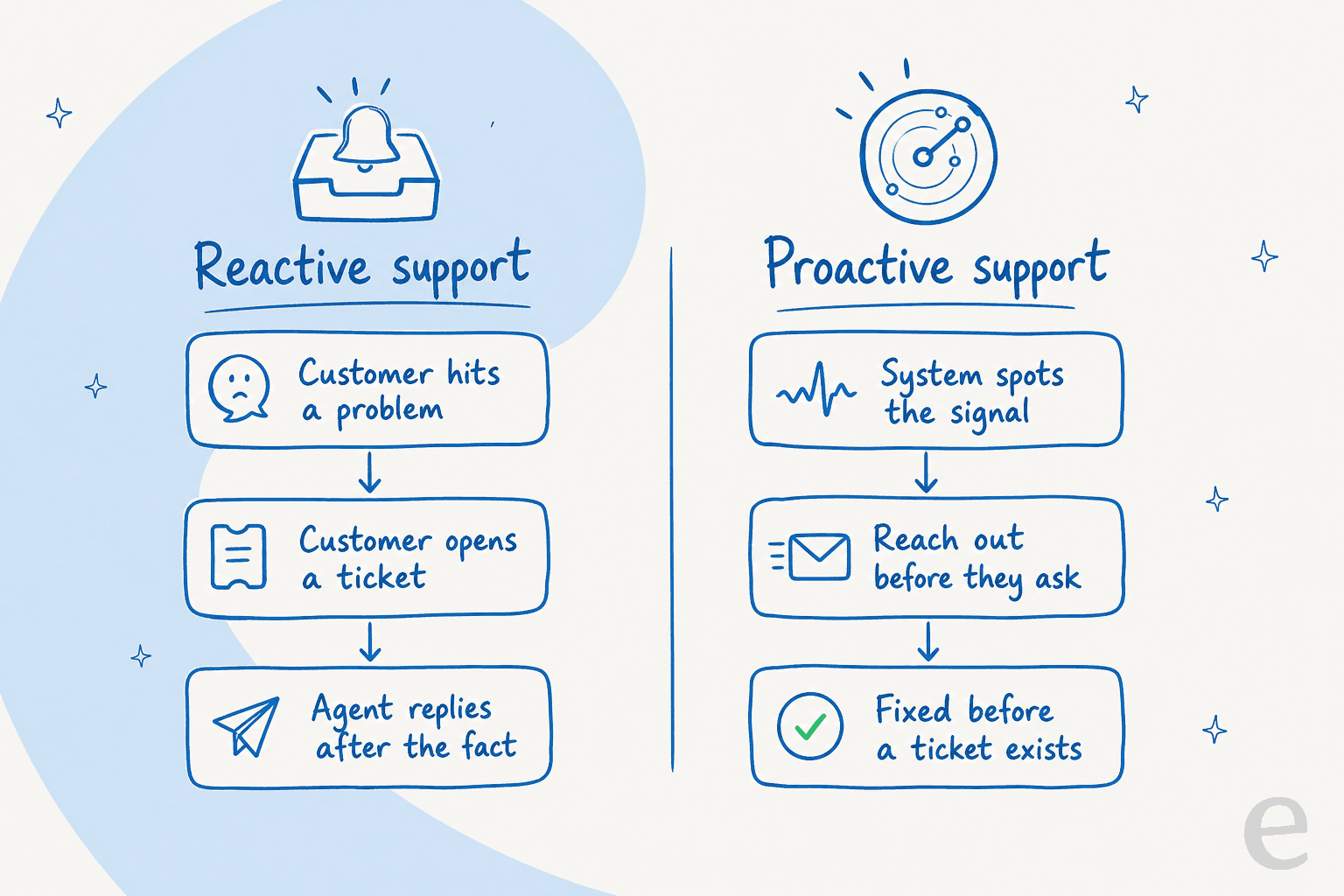
| Dimension | Reactive customer service | Proactive customer service |
|---|---|---|
| Trigger | Customer initiates contact | You initiate, or design the problem away |
| Timing | After the problem is felt | Before, or as, the problem occurs |
| Data direction | You respond to an inbound signal | You act on your own event stream |
| Customer effort | Higher: find channel, explain, wait | Lower: the answer arrives, or never needs to |
| Cost driver | Volume of inbound contacts | Cost of monitoring plus outreach |
| Failure mode | Backlog, slow replies, repeat contacts | Poorly-timed outreach that creates contacts |
Reactive customer service, and its real cost
Reactive is not a dirty word. Someone has to answer the novel, messy, emotionally-charged questions that no automation can predict, and doing that well is the backbone of good customer support. It is also where the AI vs human balance really matters. The problem is when reactive is all you do, because a big chunk of that inbound volume was avoidable in the first place.
The numbers here are older but they have aged well. CX advisor Adrian Swinscoe, a long-running Forbes contributor, put the size of the waste plainly:
"Reactive customer service is both expensive and un-engaging. Meanwhile, proactive customer service offers cost saving and customer engagement opportunities."
In that same column he cites research that 25 to 40% of all calls to UK contact centres are "unnecessary or avoidable", and that 57% of inbound calls trace back to a customer not finding what they needed on the company's website. That second number is the one that stings, because it is a reactive contact that better self-service, an AI knowledge base or a clearer help center, would have prevented outright.
The deeper trap is operational. When a team is buried in reactive work, it has no room to do anything else. Customer success leader Chad Horenfeldt describes the bind exactly:
"If the CSM is responsible for handling support, providing services and/or training due to flaws in the product and is carrying out other duties such as renewals, how in the world does anyone expect them to have the time to be proactive?"

That is the frontline reality I recognise. You cannot will a stretched team into being proactive; you have to create the room first, usually by taking the repetitive load off their plate with ticket automation or an AI copilot that drafts the easy replies.
Proactive customer service: what it actually looks like
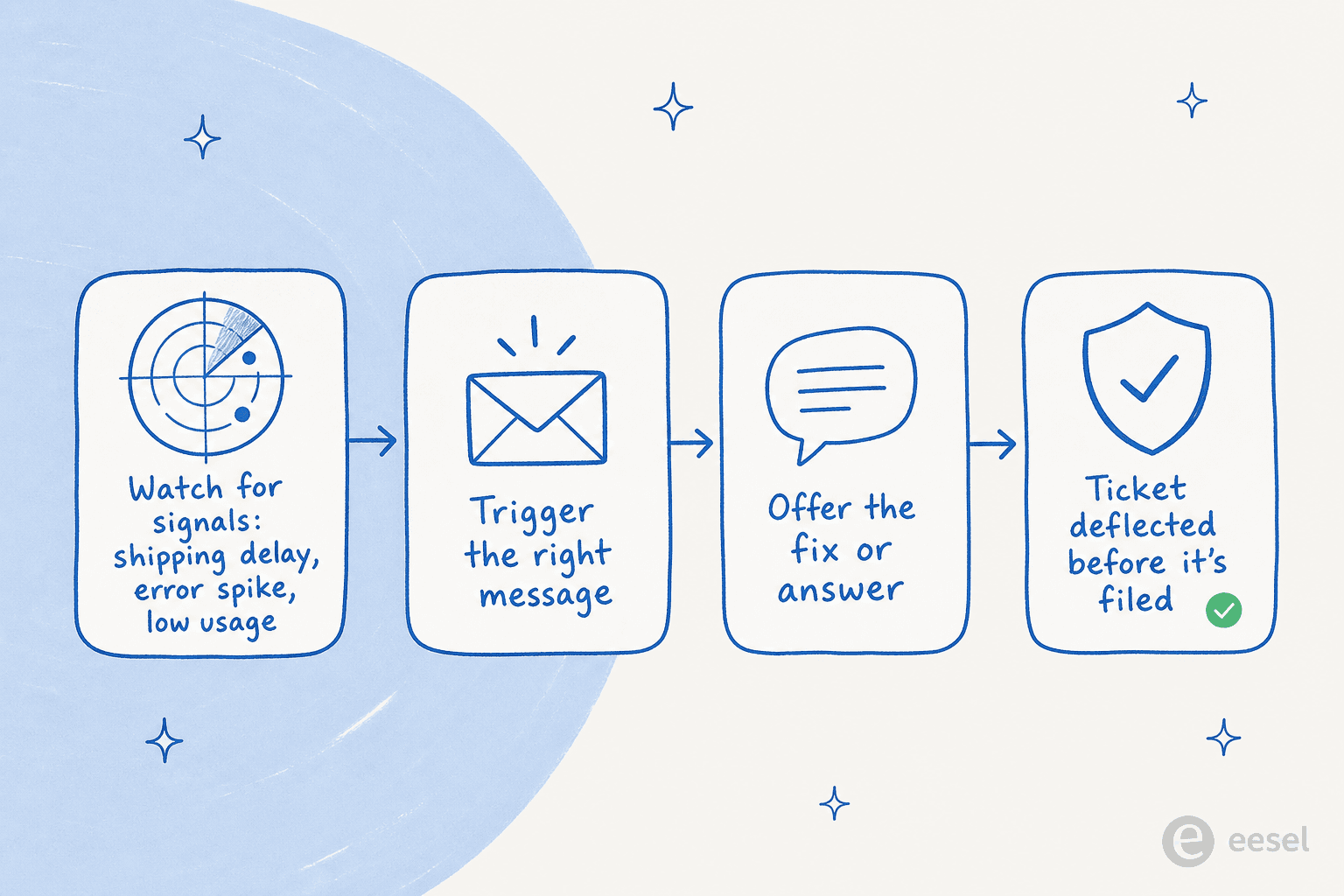
Proactive is easy to romanticise and hard to do. It helps to get concrete, because "be more proactive" is not a strategy, it is a wish. Here is what it looks like in practice:
- A shipping-delay alert before the customer asks. "Your order is running two days late, here is the new date and a discount code." The "where is my order?" ticket never gets filed.
- A low-balance or overdraft nudge, so a payment does not bounce and the angry call never happens.
- A fraud notification, Gartner's canonical high-value example, because the issue is urgent and the customer is grateful to hear it early.
- An outage status notice that deflects a wave of duplicate tickets in one message.
- An onboarding nudge triggered by usage data, when someone has not finished a key setup step yet.
- A proactive chat trigger on your website, offering help when a visitor stalls on the checkout page instead of waiting for them to give up. Proactive chat is one of the lowest-effort places to start.
- Self-service built from ticket data, turning your single most common question into a help article so future customers never need to ask through an AI knowledge base chatbot. This is proactive in the truest sense: it removes the reactive contact before it exists.
The practitioners who make this work do not try to do all of it at once. Swinscoe's advice on where to start is the sharpest I have seen:
"Companies that have been successful in implementing a proactive customer service strategy have focused quickly on addressing the mostly common and costly problems that exist across the different Pre-Purchase, Purchase and Post-Purchase stages."
Find the one recurring, expensive problem. Fix that one proactively. Measure it. Then move to the next. That beats a big-bang "proactive transformation" every time.
The catch: proactive done badly is worse than reactive
This is the part most guides skip, and it is the most important. Reaching out proactively is not automatically good. If the message is mistimed, irrelevant, or raises a question it does not answer, you have not saved a contact, you have manufactured one.
Gartner's data is blunt about it. In a survey of 4,800+ customers, 66% of B2C and 82% of B2B customers still contacted the company after receiving proactive outreach, often through expensive assisted channels. Their research director does not mince words:
"Proactive outreach that raises unanswered questions erodes the benefits for customers, and leads to additional costs for the company."
There is even a trust tax. Gartner found that 10% of B2C and 24% of B2B customers who followed up did so only to confirm the outreach was not a scam. Send a clumsy proactive message and you can end up spending more, not less.
The lesson is not "don't be proactive". It is that proactive outreach has to be complete and confidence-building enough to actually deflect the follow-up. The same Gartner work found the upside is real when you aim it right: customers who got proactive outreach about issues they saw as urgent reported better customer effort scores than those who discovered the same issue themselves, and proactive service lifted the value-enhancement score by 9%. Urgent and hard-to-self-discover is the sweet spot; a random "just checking in" is the trap.
So which should you choose? Neither, and both
By now the framing of "proactive vs reactive customer service" should feel like a false choice. The two are complementary, and the useful question is not which one but where you sit on the path between them.
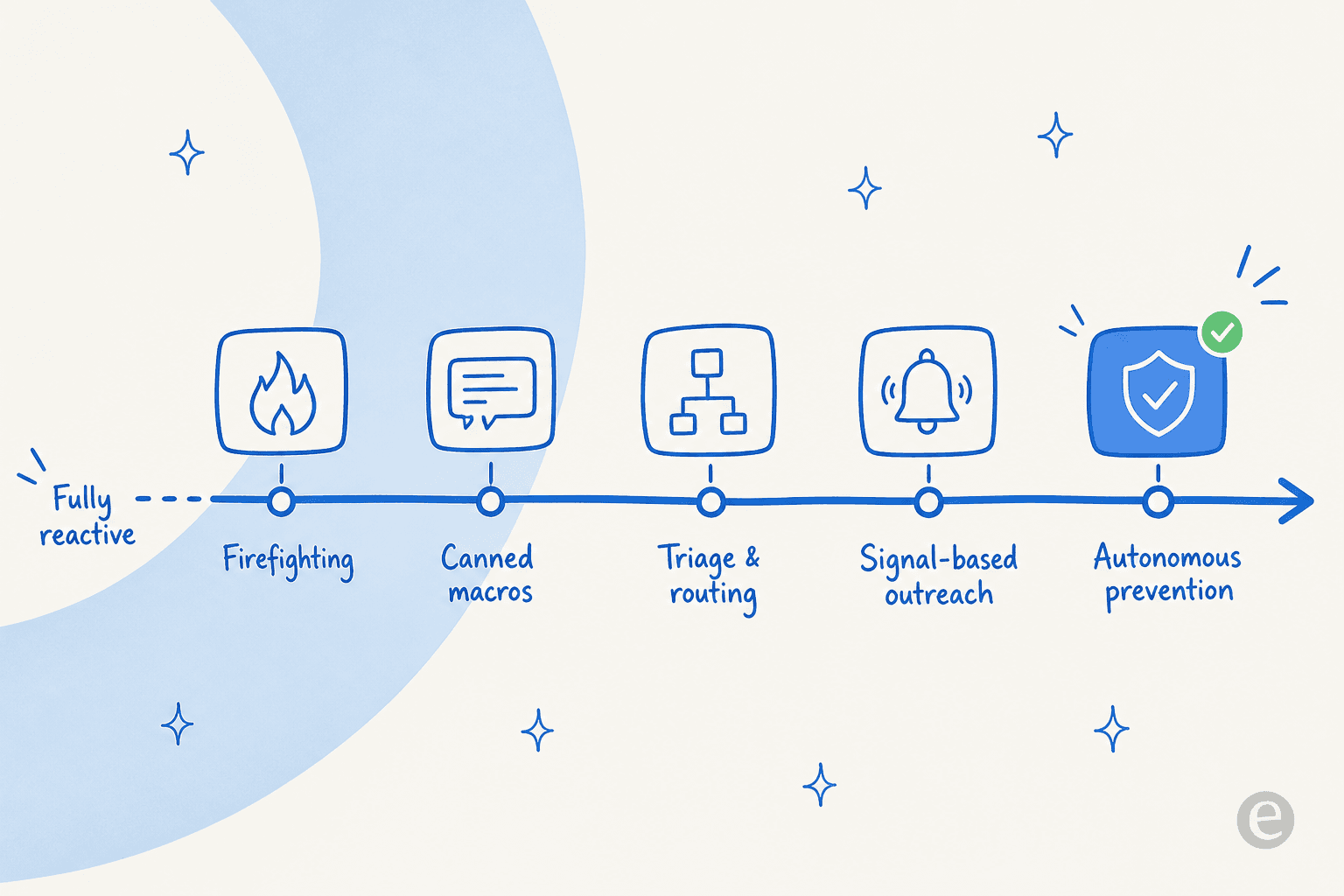
Most teams start at the reactive end, firefighting inbound tickets with canned macros. The move rightward is gradual: better triage and routing, then signal-based outreach on the problems you can predict, then genuinely preventing the contact before it exists. You are not flipping a switch from reactive to proactive; you are climbing a ladder.
And here is where I will spend the earned-authority card. That churn batch I mentioned in the TL;DR was not a story about a bad product. Reviewing two dozen accounts worth roughly $90k in lifetime spend, my colleague found the common thread was brutally simple: zero proactive outreach for 6+ months, and no 30/60/90 day check-ins on any tier. It is one line from our internal review I have not been able to unhear.
Those customers were not angry. Several were barely using the product and nobody noticed, because the whole operation was tuned to answer tickets, not to reach out. Reactive-only support does not lose customers with a bang; it loses them in silence. The fix was mundane and proactive: catch the account that has gone quiet and say something before the renewal, not after the cancellation. It is the same instinct behind conversational support, just pointed at retention instead of the inbox.
Horenfeldt's own before-and-after backs the direction. After he separated reactive support from proactive account work by ramping a dedicated support team, he reports his NPS jumped 600%. It is a single-company number, so treat it as illustrative rather than a benchmark, but the mechanism is the point: proactivity became possible only once reactive work stopped eating all the time.
How AI changes the proactive vs reactive math
For years the blocker on proactive customer service was labour. You cannot ask a team that is already behind on the queue to also monitor signals and reach out. Modern customer service AI changes that math in two ways.
First, it eats the reactive load. A good AI helpdesk resolves the repetitive, easily-answered tier-1 tickets, which is precisely the "unnecessary or avoidable" volume Swinscoe was pointing at. It leans on ticket classification to know what is safe to auto-handle. Real practitioners see this land: one verified G2 reviewer describes a proactive chat widget deflecting "over 70% of inbound support cases". Clear that volume and, for the first time, your people have the hours to be proactive, with real cost savings on top.
Second, AI makes proactive moves cheap to run. Ticket analysis surfaces the recurring themes worth getting ahead of, and the same system can auto-draft the help article that removes the contact, or flag the account that has gone quiet before it churns. Fold that into your customer service workflow and the reactive and proactive sides stop competing for the same people's time.
The one caveat, and it is the whole ballgame: autonomy without control is how you end up on the wrong side of that Gartner "raised an unanswered question" stat. This is exactly why I would not switch a bot to full auto-reply on day one, and why the ability to simulate a change on past tickets before it goes live matters more than any single feature.
Try eesel for proactive and reactive support
If the takeaway is "clear the reactive load so you can finally be proactive", that is the job eesel AI was built for. It plugs into the helpdesk you already run (Zendesk, Freshdesk, Gorgias, Front and more), learns from your past tickets and help docs on day one, and takes the repetitive tier-1 tickets off your team's plate so they can do the proactive work that actually moves retention. It is one of the AI customer service companies built around control rather than a black box.
The part that maps directly to the Gartner warning above is simulation: you can run the agent against your historical tickets first, see exactly what it would have answered and where it would have gone wrong, fill the gaps, and only then let it go live. You grant autonomy gradually, on the ticket types where confidence is high, and keep humans on everything else. Pricing is one fixed monthly price from $299 for 500 credits (1 credit per ticket or chat), with no per-seat fees, so you are paying for deflected reactive volume rather than for the privilege of logging in. You can start with 100 free credits, no card.