


Let's be real: for most of us, company knowledge is a mess. The one piece of info you desperately need is probably hiding in a dusty Jira ticket, a Confluence page no one’s touched in years, or a Slack thread from last Christmas. Trying to connect the dots can feel impossible, forcing you to make calls based on half the story.
Atlassian saw this and built a new feature for its AI tool, Rovo, called Rovo Deep Research. The idea is to give you an AI researcher that can sift through all that scattered information and pull together a complete picture.
But is it the answer for everyone? In this guide, we’ll walk through what Rovo Deep Research actually is. We'll look at how it works, what it's good for, and, more importantly, where it falls short, especially when you compare it to AI tools made for the fast-paced world of customer support.
What is Rovo Deep Research?
Rovo Deep Research is a specific skill built into Rovo, Atlassian's AI assistant. This isn't your standard Q&A bot that spits out a quick, one-sentence answer. It's more like an AI research analyst for all your internal company stuff. You can throw a big, open-ended question at it, and it will go off on its own to investigate, coming back with a proper, detailed report.
Its main goal is to figure out a research plan, dig through information in your connected Atlassian and other apps, and then package its findings in a way that makes sense.
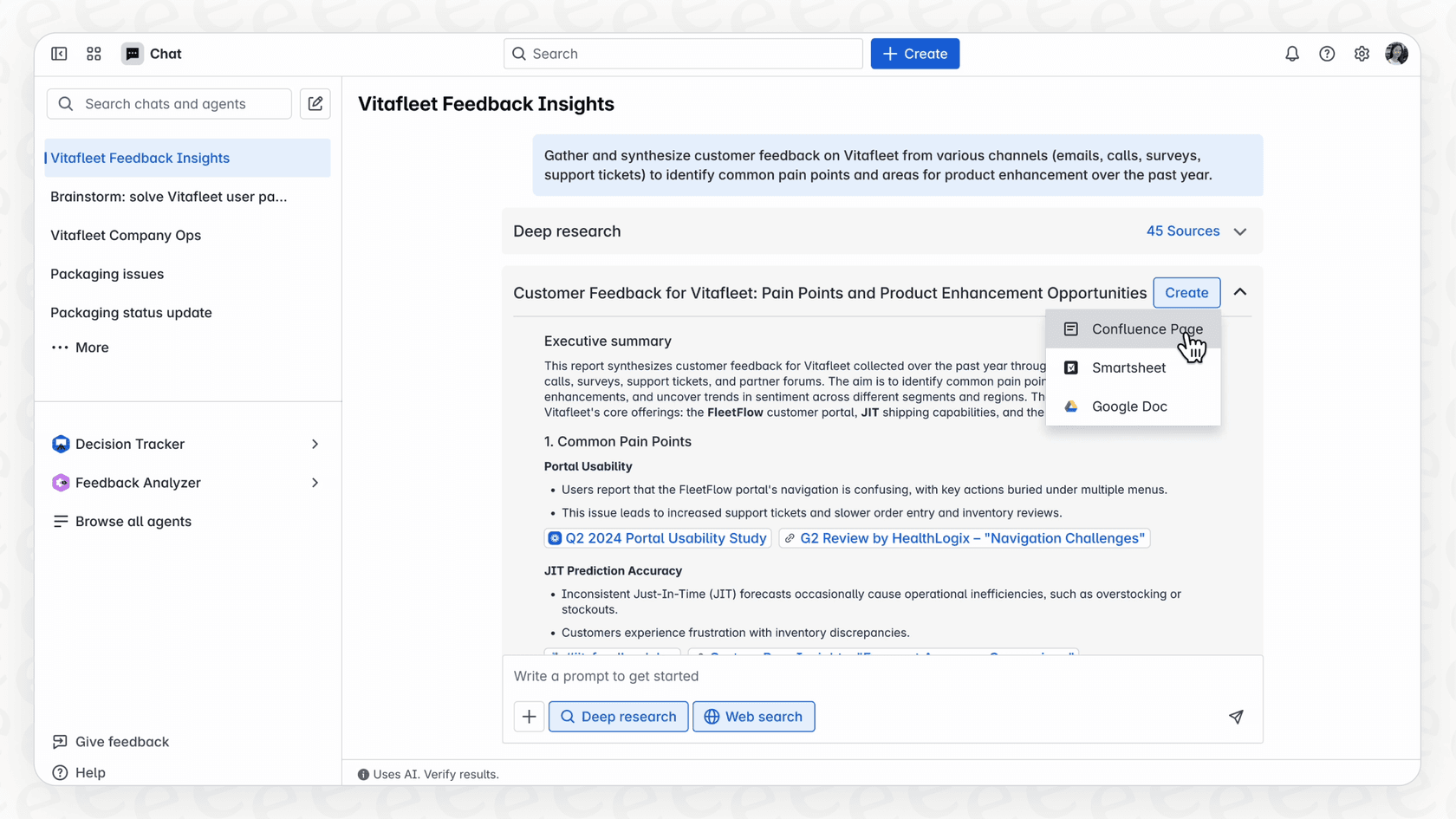
The end result isn't just a quick message in a chat box. You get a full-blown document, like a Confluence page, that’s organized with sections, summaries, and links pointing back to where it found the information. It’s designed to give you the whole picture, not just a hint.
How Rovo Deep Research works: A look under the hood
So, how does Rovo Deep Research turn a simple question into a full-blown analysis? It's not just running a keyword search. There's a bit more going on behind the scenes involving reasoning, planning, and piecing things together.
Starting with the Teamwork Graph
The core of Rovo is something Atlassian calls the "Teamwork Graph." Think of it as a map of how everything in your Atlassian tools connects, people, projects, documents, you name it. It understands that a specific Jira project is tied to a particular Confluence page and knows who is working on it.
This graph is what gives Rovo its context. It’s how it figures out that when you ask about "Project Chimera," you're talking about the internal marketing launch, not the mythical beast. This tight integration with the Atlassian world is its biggest advantage, as it gives Rovo a solid grasp of your company's inner workings.
Researching in rounds
When you ask Rovo a complicated question, it doesn't just do one big search. First, it breaks your query down into smaller, more manageable sub-questions. Then, it starts looking for answers to these questions at the same time across all your connected data sources.
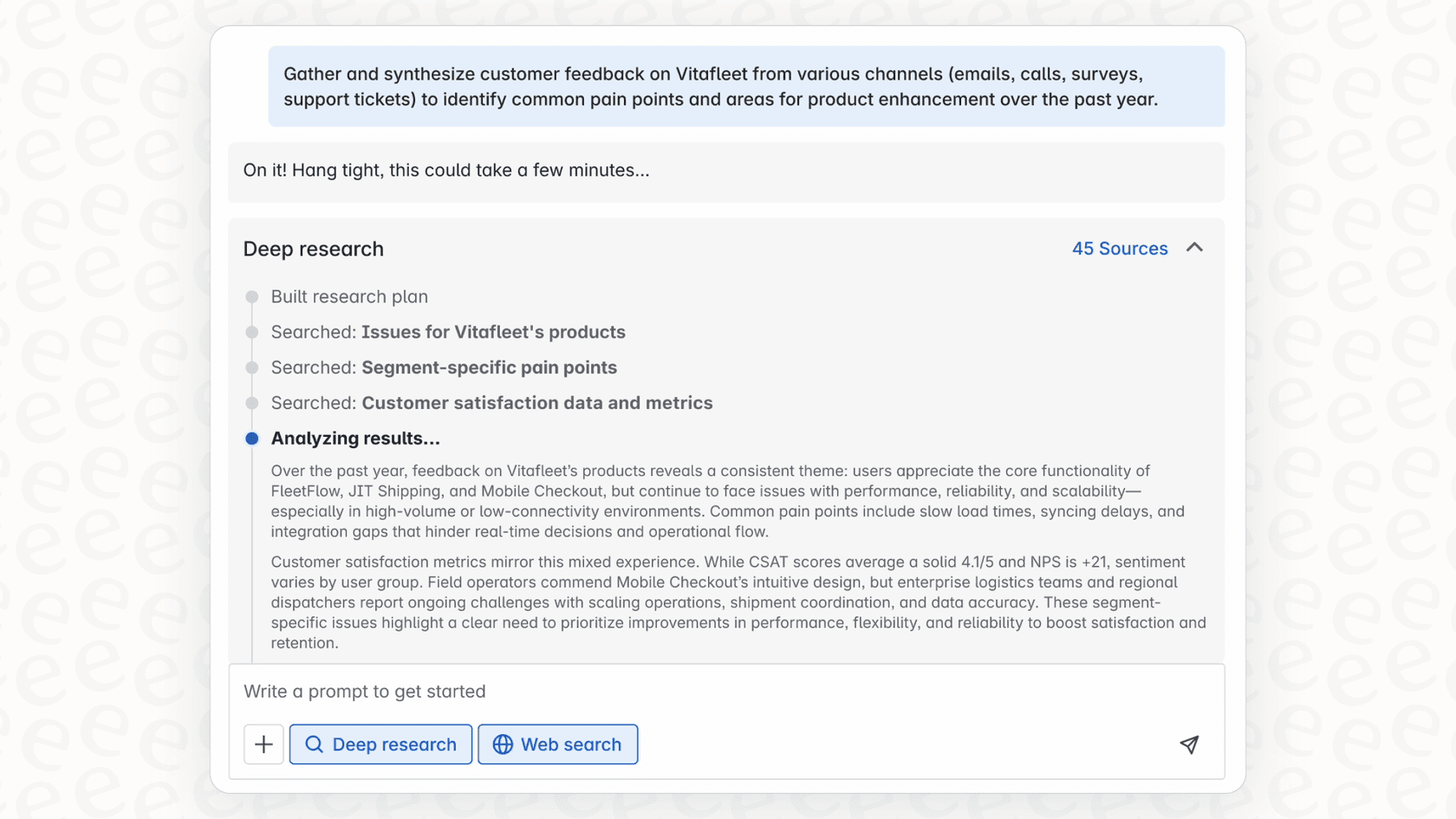
After each "round" of searching, it takes a step back to review what it has found. It tosses out anything that's not relevant and figures out what information is still missing. Based on those gaps, it plans its next wave of searches. This step-by-step process helps it be more thorough.
How AI models write the report
Rovo leans on models from providers such as OpenAI, Anthropic, and Google to do the heavy lifting of planning the research and writing the final report.
Once it has gathered all the information, Rovo organizes it into a clear outline. From there, it writes the full report, which usually includes a quick summary, key findings, and maybe some suggestions. A really useful feature is that it backs up every major point with a citation that links directly to the source, whether that's a Jira ticket or a Confluence page. This makes it easy to double-check the facts and builds a bit of trust.
Where Rovo Deep Research really shines
Since its main skill is piecing together internal knowledge, Rovo Deep Research is most helpful for internal, big-picture tasks where you need to connect a lot of dots.
Bringing project knowledge together
Let's say a project manager needs to write a post-mortem for a big product release. Normally, this means spending days digging through Jira tickets, Slack DMs, and old meeting notes. Instead, they could ask Rovo: "What were the main blockers, key decisions, and results for Project Phoenix last quarter?" Rovo could then pull all that scattered info into a single, organized report.
Speeding up onboarding and research
A new developer joining the team needs to get up to speed on the "billing" system. They could spend a week reading through dense technical docs or bugging senior engineers. Or, they could ask Rovo to "create a report on the architecture, recent problems, and main contacts for the billing service." This gives them a detailed brief in minutes, which can seriously cut down their learning curve.
Finding insights in feedback
Imagine a product team trying to figure out what to build next. They want to know what customers complained about most in the last three months. They can ask Rovo: "Analyze customer feedback from Jira Service Management tickets and Slack support channels to find the top three recurring problems." The report would highlight the common themes, giving the team a data-backed starting point for their roadmap.
Where Rovo Deep Research falls short
Rovo is definitely useful for internal research, but it's important to know what it wasn't built for. This is especially true if you're on a customer support team.
A tool for internal research, not customer-facing automation
Rovo’s job is to create a report for a person to read. It's an analyst, not a support agent. It doesn't talk to customers or solve their problems in a live helpdesk.
For teams that need to automatically answer customer questions in real time, a dedicated AI support tool is a much better option. For instance, an AI agent from eesel AI plugs directly into helpdesks like Zendesk or Freshdesk. It can give instant answers, perform tasks, and resolve tickets without a human needing to step in.
Strongest inside the Atlassian world
Rovo gets its strength from being so tightly connected to Atlassian's Teamwork Graph. That is great if your work and knowledge sit in Jira and Confluence. Deep Research can also use connected third-party sources, and Atlassian's connector catalog includes Google Drive, Slack, Zendesk, and Notion. Just expect results to be richest where the Teamwork Graph has the most context, so it helps to check how well your key sources are connected.
Teams that use a mix of apps and want customer-facing answers need a tool built around the helpdesk. That is where eesel AI fits: it connects to knowledge wherever it's stored, whether that's in Google Docs, Notion, or right inside your helpdesk.
Delivers insights, not actions
Deep Research is great at telling you "what" the situation is, and its output is a report with cited sources. Deciding "now what?" is left to a person, or to a separate Rovo agent you configure. The report is the final step of the research process.
Real support automation closes that loop by turning information into action. An AI agent from eesel AI can do more than just summarize an issue. You can set it up with custom actions to look up an order status in Shopify, change a ticket field in Zendesk, or send a problem to the right team. It connects the dots between knowing about a problem and actually solving it.
Atlassian Rovo Deep Research pricing and availability
Rovo Deep Research isn't a standalone product; it's part of the bigger Rovo AI assistant, which Atlassian includes with Standard, Premium, and Enterprise Cloud plans.
Deep Research is a premium AI feature that consumes Rovo credits, and a run can take up to 15 minutes. Allowances are per user per month: on Jira and Confluence that is 25 credits on Standard, 70 on Premium, and 150 on Enterprise, pooled across the organization. Extra usage is on by default, with billing for it starting on December 3, 2026 at $0.01 per credit, so a month with many research requests can cost more than you planned.
| Feature | Atlassian Rovo Deep Research | eesel AI |
|---|---|---|
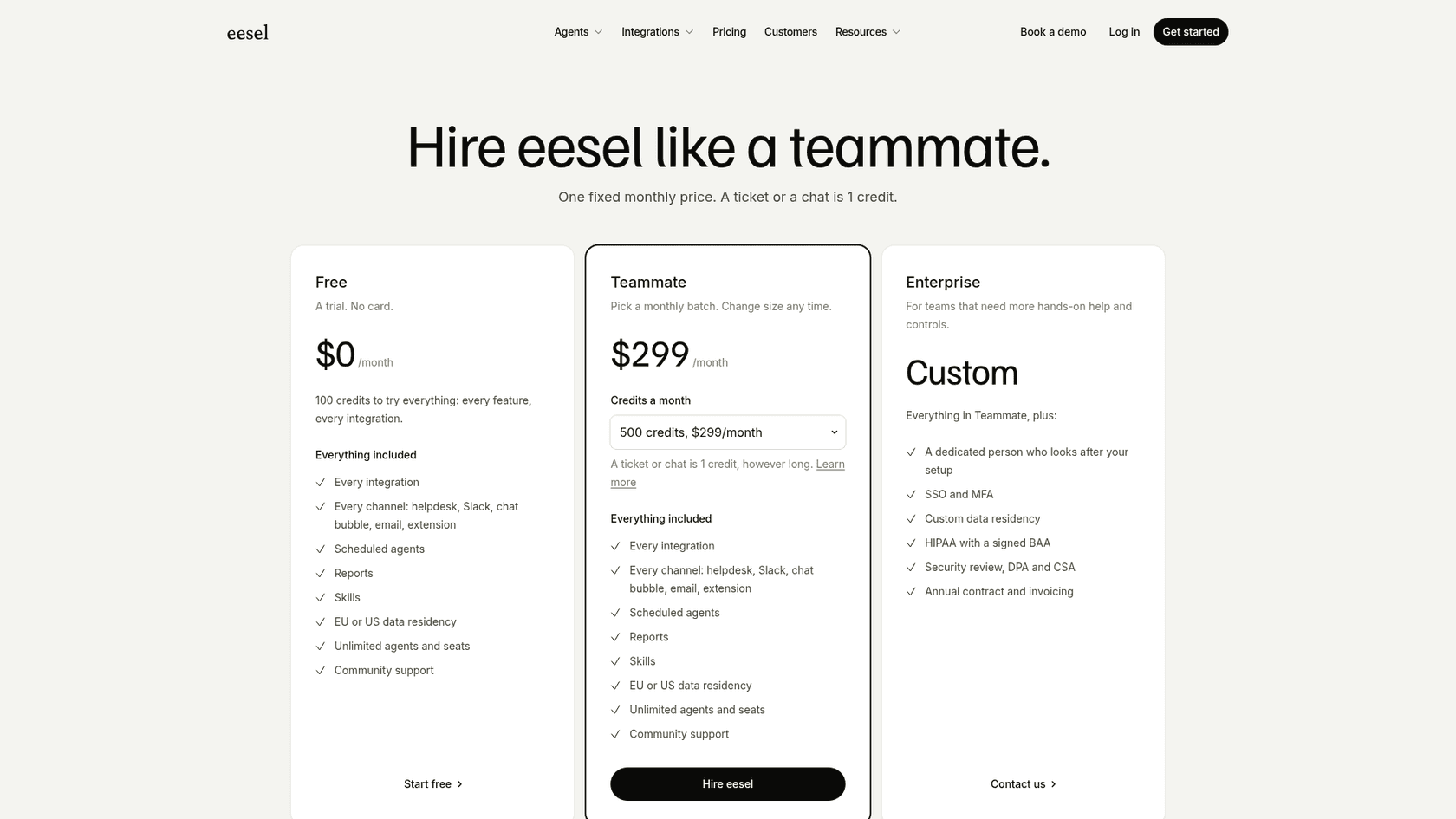
| Model | Monthly Rovo credit allowance per user | One fixed monthly price by credit batch (from $299/month for 500 credits) |
| Predictability | Medium; pooled allowance, extra usage on by default | High; fixed monthly cost, optional overage with a cap you set |
| Scaling | Extra usage billed per credit above the allowance | Move to a larger credit batch any time |
| Billing Focus | Credits per AI interaction | 1 credit per ticket or chat, however long |
For teams who prefer to know what they're paying each month, other pricing structures can make more sense. For example, eesel AI’s pricing is a fixed monthly price by credit batch: a ticket or a chat is 1 credit, with no per-seat fees and 100 free credits to start. That makes budgeting simpler.
The takeaway on Rovo Deep Research: Choosing the right AI for the job
Look, Rovo Deep Research is a really strong tool for digging through your company's internal information. If your team lives and breathes the Atlassian suite, its knack for turning scattered data into organized reports can be a huge help for planning, project wrap-ups, and general research.
But if your main goal is to automate customer support, lower your ticket count, and make your agents' lives easier, it's not the right fit. When it comes down to it, Rovo gives you reports, but a real AI support platform gives you resolutions.
This is exactly where a tool built specifically for support, like eesel AI, comes into its own. It was made from day one for support automation. It connects with any helpdesk you use, can actually perform tasks on tickets, and even has a simulation mode so you can test everything out before going live.
Ready to go from Rovo Deep Research reports to resolutions?
Rovo Deep Research is great for getting answers inside your company, but you need a different tool to automatically act on those answers for your customers.
If you're looking to automate your support process and give customers instant resolutions, it might be time to check out what an AI agent designed for the job can do. You can get started with eesel AI in a few minutes and test it out on your team's actual ticket history.
Frequently asked questions
What is Rovo Deep Research designed to do within an organization?
Rovo Deep Research acts as an AI research analyst that sifts through scattered internal company information. Its primary goal is to investigate open-ended questions and compile detailed, organized reports to provide a complete picture of a topic.
How does Rovo Deep Research gather and process information to generate its reports?
It leverages Atlassian's "Teamwork Graph" for context and researches in multiple rounds, breaking down queries into sub-questions. After gathering information, it uses large language models from providers like OpenAI and Anthropic to organize and write a comprehensive report with sources cited.
For which types of internal projects or tasks is Rovo Deep Research most effective?
Rovo Deep Research excels at tasks requiring consolidation of internal knowledge, such as post-mortems for project releases, speeding up onboarding for new team members, or analyzing internal feedback for product insights. It helps connect dots across various internal documents and communications.
Can Rovo Deep Research be utilized for automating customer support interactions?
No, Rovo Deep Research is built for internal research and generating reports for human review, not for direct customer-facing automation. It does not interact with customers or resolve live support issues in a helpdesk environment.
Is it true that Rovo Deep Research primarily focuses on information within the Atlassian ecosystem?
Mostly, yes. Rovo Deep Research draws its strength from tight integration with Atlassian's Teamwork Graph, and it can also use connected third-party sources. Results tend to be richest when much of your company's knowledge is within Jira and Confluence.
What is the pricing model for Rovo Deep Research, and how are costs determined?
Rovo Deep Research is included as part of the broader Rovo AI assistant, available with Standard, Premium, and Enterprise Atlassian Cloud plans. Usage is metered in Rovo credits with a monthly per-user allowance, and extra usage is on by default, so costs can vary if usage does.
Does Rovo Deep Research perform actions or only provide insights and information?
Rovo Deep Research is designed to provide detailed reports and insights, effectively telling you "what" the situation is. Deep Research mode itself produces a report; acting on the findings is a separate step, done by a person or by a Rovo agent you set up.