


Salesforce is a beast in the CRM world, and with tools like Einstein, they’re going all-in on artificial intelligence. You've probably seen the marketing about how AI can revolutionize your sales and support, but what does that actually look like once you're inside the platform? It often feels like a black box of complicated features and even more complicated pricing.
This guide is a straight-talking look at real Salesforce AI examples. We’ll break down what they do, the reality of getting them up and running, and the limitations you won’t find on their glossy marketing pages. We'll also touch on a more flexible and straightforward alternative for teams that don't want to be locked into a single ecosystem.
What is Salesforce AI?
First off, Salesforce AI isn't a single product. Think of it as a collection of AI technologies woven into the platform, mostly under the Einstein and Agentforce brands. The whole point is to make the data you already have in your CRM a lot smarter by adding predictive insights, automated content, and workflows.
It's built to help out different departments:
-
For Sales: It tries to help you prioritize leads and get a better handle on your sales forecasts.
-
For Service: It’s all about automating customer replies and routing support tickets.
-
For Marketing: It helps personalize campaigns and predict which customers will engage.
These tools are designed to work with data that lives and breathes inside Salesforce. While that can be powerful, it also means their effectiveness is completely tied to how much of your business runs on Salesforce. Let's be honest, for most companies, knowledge is scattered everywhere, from Confluence and Google Docs to random Slack threads. When that's the case, the AI only sees what you've connected, which can be a blind spot for modern teams.
The reality of setting up Salesforce AI
Salesforce pitches its AI as a seamless add-on, but getting started is usually a major project. It's definitely not a plug-and-play solution you can switch on over a coffee break.
The implementation process
Rolling out Salesforce AI isn't as simple as flipping a switch. You're looking at a multi-step process that requires some serious technical know-how.
First, you have to get your data in order. The AI's predictions are only as good as the information it's fed, which means you need clean, well-structured data inside your Salesforce account before you even begin.
Next, you have to actually configure the AI using tools like Agent Builder, Prompt Builder, and Model Builder. This isn't for the faint of heart. It requires a solid understanding of Salesforce's architecture, and you'll likely need to write custom code for anything beyond the most basic actions.
And to really get the most out of it, you often need to be fully bought into the Salesforce ecosystem, like using Data 360 (formerly Data Cloud) to pull all your customer information together. The whole process can easily take weeks, if not months, and usually requires a dedicated Salesforce admin or a pricey implementation partner.
A simpler path for agile teams
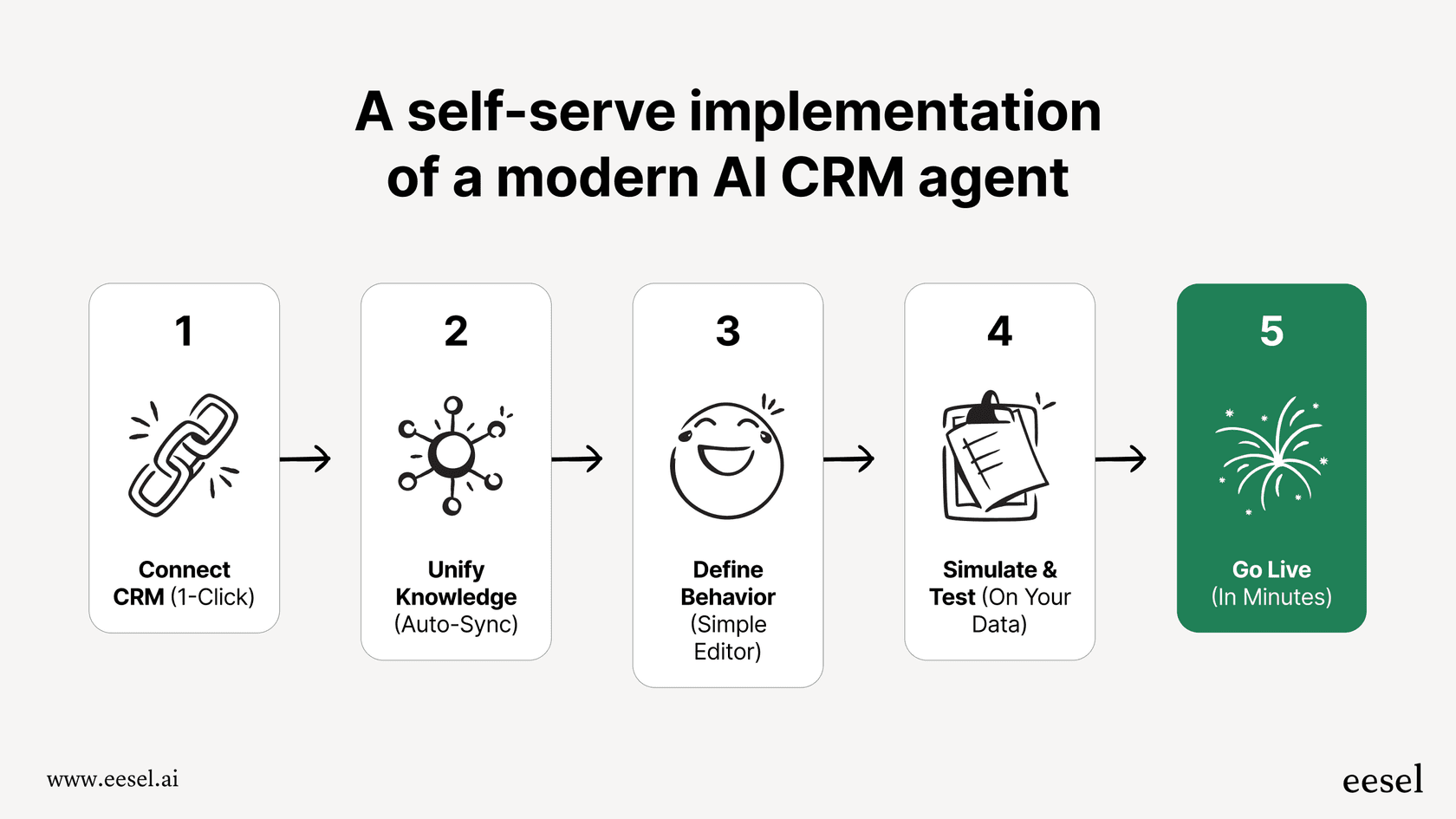
If you need to move faster, that kind of setup process can be a non-starter. In contrast, platforms like eesel AI are built to be incredibly self-serve. You can connect your existing helpdesk (whether it's Zendesk or Intercom) with a few clicks and go live in minutes, not months. Instead of forcing you to migrate all your data into one place, eesel connects to where your knowledge already lives. It instantly pulls together information from your help center, past tickets, Confluence, and Google Docs without a massive IT project.
Key Salesforce AI examples and their limitations
Salesforce has a ton of AI features. Let’s look at some of the most common Salesforce AI examples and, more importantly, where they tend to fall short.
Salesforce AI for sales teams: Einstein Opportunity & Lead Scoring
One of the most talked-about features is Einstein Opportunity Scoring. It digs through your past deals to predict which of your current opportunities are most likely to close, giving each one a score from 1 to 99. It also points out the "why" behind the score. Einstein Lead Scoring does the same thing for new leads, helping your sales team figure out who to call first.
- The Limitation: These scores are built from the records in your Salesforce CRM. A product discussion in a Slack channel, a project plan in Notion, or technical specs in a Google Doc only count if someone logs them in Salesforce. That can skew scores for complex deals where the real work happens outside the CRM.
Salesforce AI for service teams: Einstein Service Replies & Case Classification
On the customer support side, Einstein Service Replies uses generative AI to draft answers to common customer questions over chat or email. A similar tool, Einstein Case Classification, automatically reads incoming cases and fills in fields like reason, priority, or type to help route tickets to the right person.
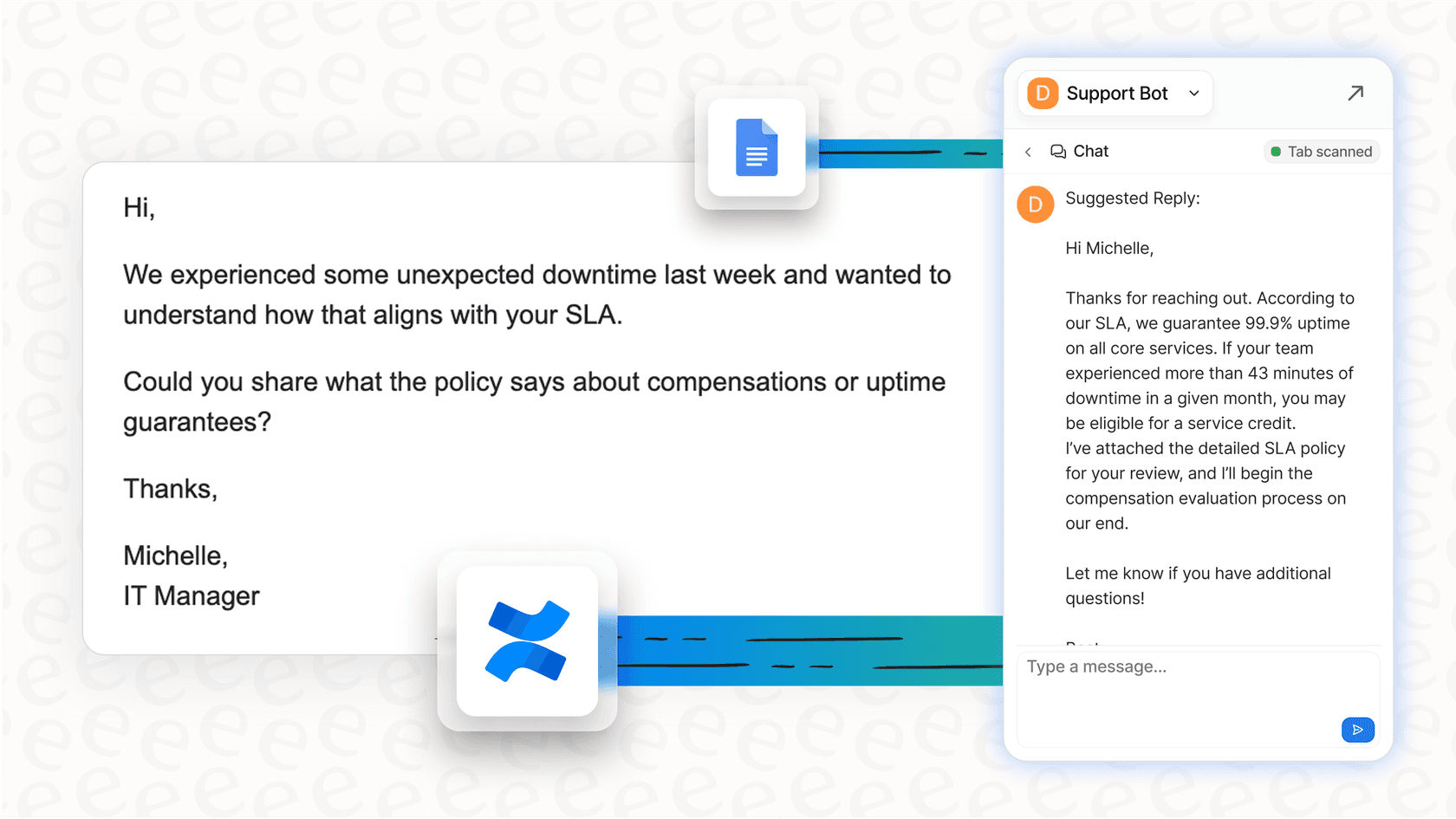
- The Limitation: The AI generates these replies grounded in Salesforce Knowledge. But what if your most up-to-date information is managed by your engineering team in Confluence or your policy updates live in a Google Docs folder? Salesforce's Confluence connection is labeled Beta, so that content may not reach the AI. This creates a real risk of giving customers outdated or incomplete answers. An AI solution like eesel AI gets around this by connecting to all your knowledge sources, making sure it always has the most current info, no matter where it's stored.
Salesforce AI for custom predictions: Einstein Prediction Builder
The Einstein Prediction Builder is a cool tool that lets you create your own custom AI models without having to write code. You could, for example, build a model to predict which customers are likely to churn or to calculate a customer's lifetime value based on your Salesforce data.
- The Limitation: While it's flexible, it works on data in your Salesforce org, so a prediction based on other systems means bringing that data in first. Salesforce has also deprecated the "Try Einstein" version of Prediction Builder (as of Summer '25) and points new work to Einstein Studio Model Builder in Data Cloud. Either way, plan for how you'll check results on live records after you turn a model on.
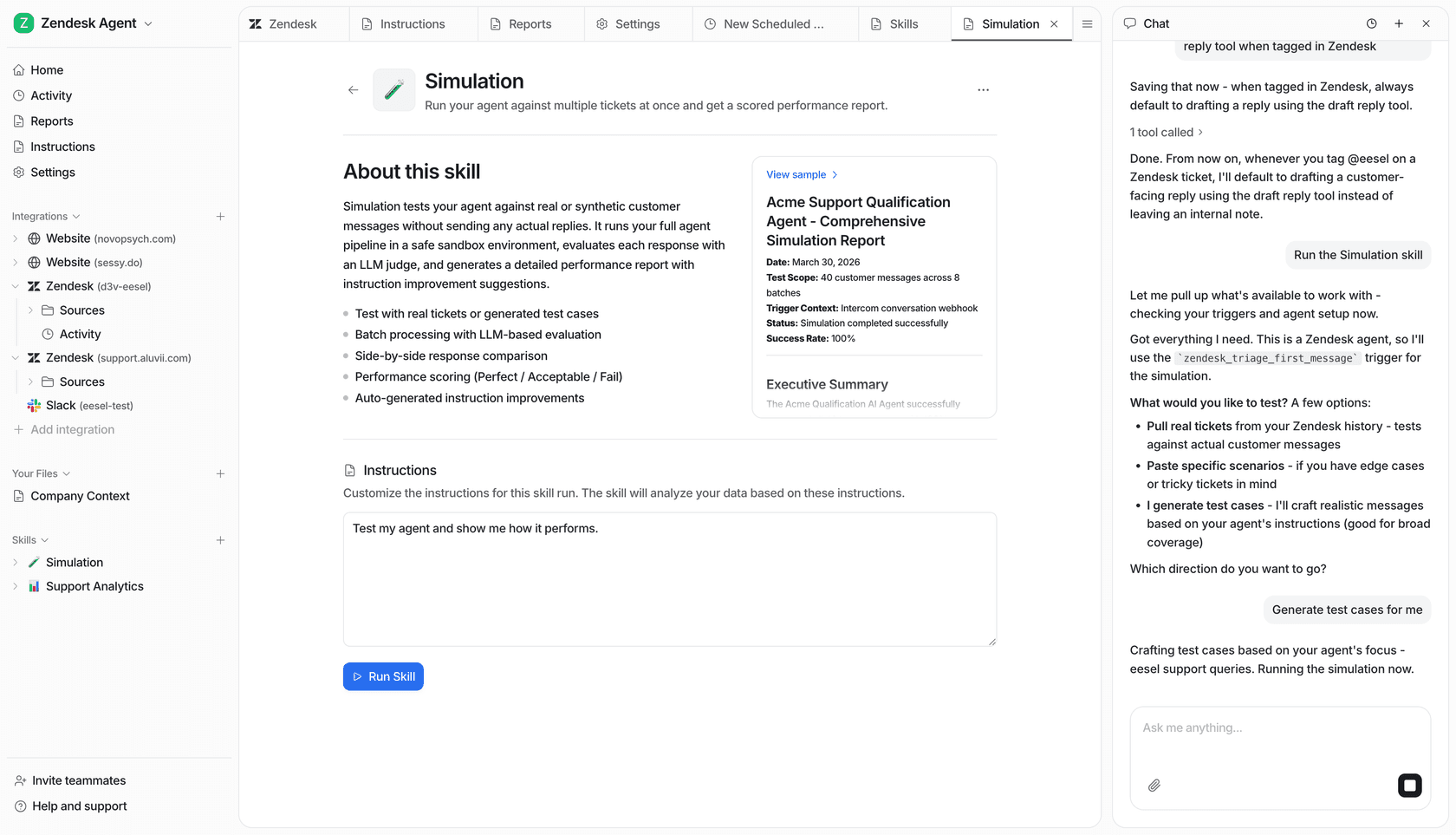
That’s a pretty big leap of faith, and it’s where a different approach really shines. For instance, eesel AI offers a powerful simulation mode that lets you test your AI agent on thousands of your past support tickets. You can see exactly how it would have replied, get a solid forecast of your automation rate, and find any gaps in its knowledge, all before a single customer ever talks to it.
The hidden costs: Pricing and challenges
Trying to figure out the true cost of Salesforce AI is one of the biggest headaches for anyone considering it. Unlike tools with simple monthly plans, Salesforce's pricing is tangled up in different product tiers and add-ons.
Good luck finding a price tag
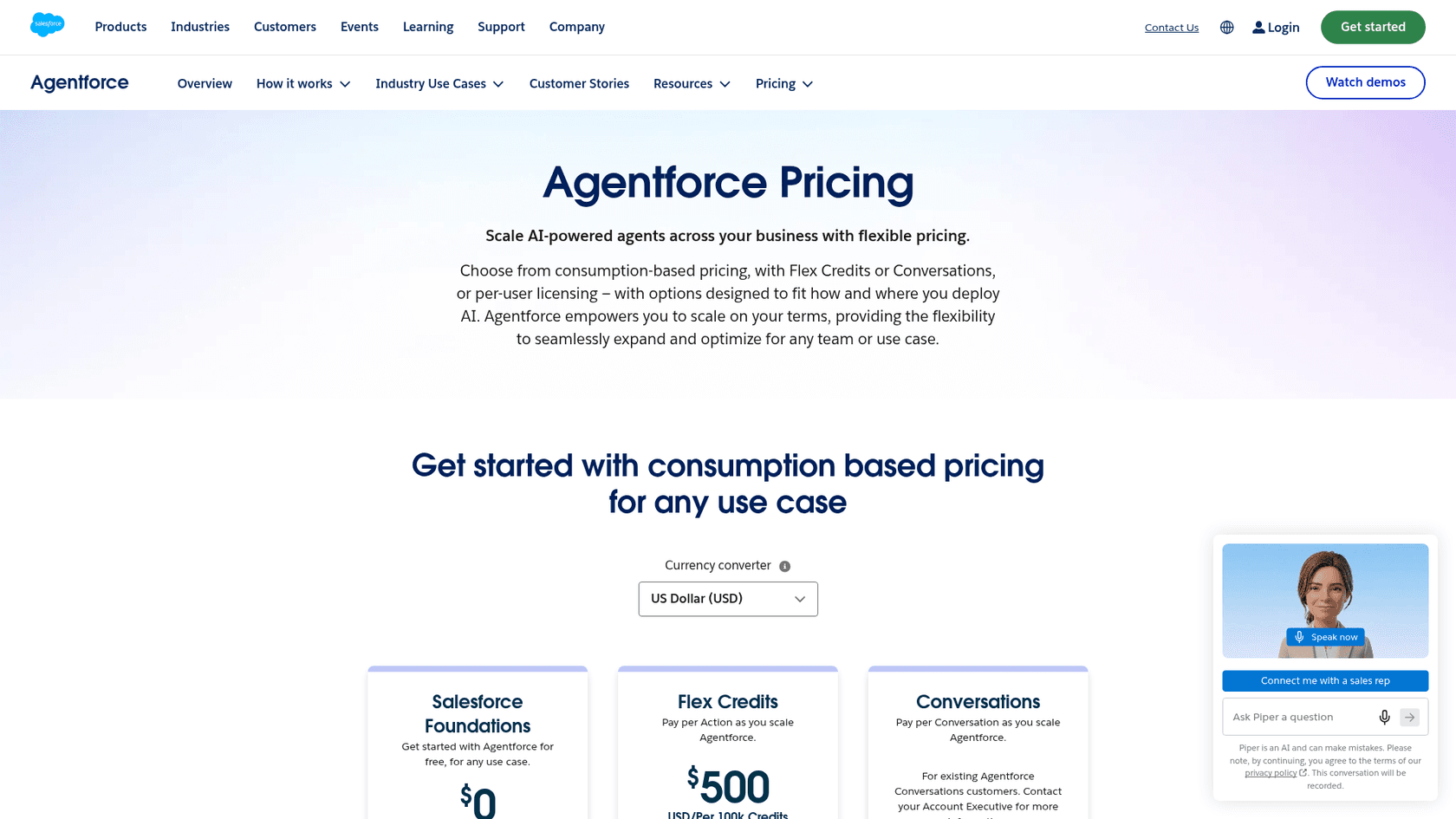
Salesforce now publishes Agentforce pricing: Flex Credits at $500 per 100,000 credits, or $2 per conversation, and the two can't be mixed in one org. What still takes work is the license underneath, and access usually depends on a few things:
-
Your Salesforce Edition: On the Sales Cloud pricing page, Agentforce for Sales is "available for purchase" on Core ($195) and Advanced ($395) per user per month, and Max ($550) includes 2.75M Flex Credits per org per year.
-
Add-On Licenses: Want the more advanced stuff, like the full suite of service AI tools? That's often sold as a separate, costly add-on.
-
Credit-Based Systems: Agentforce actions run on Flex Credits, so spend moves with usage, and unused credits don't roll over.
Each piece is published, but the total depends on which edition, add-ons, and credits you combine, and Salesforce's own cost examples exclude Data 360 credits. That makes return on investment harder to calculate upfront.
eesel AI: Transparent pricing
This is where a different approach can bring some much-needed clarity. eesel AI offers one fixed monthly price sized to your ticket and chat volume, with every integration included.
Here’s a quick comparison to cut through the noise:
| Feature | Salesforce AI | eesel AI |
|---|---|---|
| Pricing Model | Editions, add-on licenses, and Flex Credits or conversations. | One fixed monthly price (from $299 for 500 credits). |
| Public Pricing | Agentforce rates and Core/Advanced editions are public; Max is "Contact us". | Clearly listed on the website. |
| Billing | Core and above are billed annually. | Monthly batches; pay a year upfront for two months free. |
| Usage Units | $2 per conversation, or Flex Credits per action. | 1 credit per ticket or chat, however long. |
With eesel AI, you know exactly what you're paying for. You can start free with 100 credits, no card, then pick a monthly batch from $299 for 500 credits and move up or down any time.
Are Salesforce AI examples right for you?
Look, Salesforce AI offers a powerful set of tools if your business is 100% committed to the Salesforce platform. The Salesforce AI examples we've walked through, from lead scoring to case automation, can definitely make a difference if all your data and workflows are already in that ecosystem.
But for many modern companies, that's just not the case. If your team values flexibility, speed, and knowing what you're paying for, the drawbacks of Salesforce AI become pretty clear. The difficult setup, dependency on one platform, and confusing pricing can be major roadblocks.
For teams that want an AI solution that works with their existing tools, not against them, a more agile platform is a much better fit. A tool that connects all your scattered knowledge and plugs right into the helpdesk you already use can start delivering value in minutes, not months.
Ready to see what a truly flexible AI support solution can do? Try eesel free with 100 credits and launch your first AI agent today.
Frequently asked questions
Could you give me some practical Salesforce AI examples that businesses are using right now?
The blog highlights several, such as Einstein Opportunity and Lead Scoring for sales teams, which predict deal closure likelihood. For service teams, Einstein Service Replies and Case Classification automate customer responses and route tickets efficiently.
How complicated is the implementation process for common Salesforce AI examples?
Implementing Salesforce AI examples is generally a complex, multi-step process. It requires clean data, deep technical knowledge of Salesforce's architecture, and often custom code, taking weeks or months to fully deploy.
What are the key limitations I should be aware of when considering these Salesforce AI examples?
A primary limitation is that Salesforce AI examples mostly work from data stored in Salesforce. Outside systems like Confluence need a connector into Data 360 (the Confluence one is labeled Beta), so anything you don't connect can leave blind spots or outdated customer replies.
Can you clarify the pricing model for these Salesforce AI examples? It seems a bit unclear.
Salesforce publishes its Agentforce rates: Flex Credits at $500 per 100,000 credits, or $2 per conversation. The total still depends on your Sales or Service Cloud edition, add-ons, and credit usage, and Salesforce's own examples exclude Data 360 credits.
Are there more flexible alternatives to standard Salesforce AI examples for teams that don't want to be locked into one ecosystem?
Yes, solutions like eesel AI offer a more agile approach, connecting to existing knowledge sources across various platforms. They can go live in minutes and provide transparent, predictable pricing without requiring all your data to migrate into one system.
For which specific departments are these Salesforce AI examples primarily designed to help?
Salesforce AI examples are designed to assist various departments. For sales, they prioritize leads and forecast opportunities; for service, they automate customer support and ticket routing; and for marketing, they personalize campaigns and predict customer engagement.