


You can't scroll through tech news these days without hearing about conversational AI, and the noise gets even louder when a giant like Salesforce gets involved. There’s a lot of interest in the Salesforce AI voice agent, but honestly, there's also a ton of confusion. Businesses are keen to get phone support automated, but finding straight answers feels like a real chore. <quote text="A quick peek at any user forum shows a lot of people asking the same thing: are the flashy demos just "demo magic," or is this thing even out yet?" sourceIcon="https://www.iconpacks.net/icons/2/free-reddit-logo-icon-2436-thumb.png" sourceName="Reddit" sourceLink="https://www.reddit.com/r/salesforce/comments/1inciyh/agentforce_voice_service_agent/">

This post is here to clear things up. We're going to walk through what the Salesforce AI voice agent is, what the situation looks like today, and some of its biggest drawbacks. More importantly, we’ll look at how you can get your voice AI goals sorted out much faster with a more flexible setup.
What is a Salesforce AI voice agent?
At its heart, an AI voice agent is a piece of tech that understands and talks to customers over the phone. Think of it as a seriously upgraded version of those old "press 1 for sales, press 2 for support" systems. Instead of a clunky menu, it uses AI to have a more or less natural conversation, handling tasks that a human agent would normally do.
Salesforce’s version, Agentforce Voice, is part of their bigger Agentforce platform and is sold as the next step up from traditional Interactive Voice Response (IVR). The idea is to use things like natural language processing (NLP) and speech-to-text to figure out what a caller actually wants. The agent can then dive into your Salesforce data to give personalized answers, check on an order, or book an appointment, all without a person getting involved. It's a neat concept that promises to make customer service smoother and let your team focus on the trickier problems.
The promise vs. the reality of the Salesforce AI voice agent
When you’re looking at new tech, it's always smart to separate the marketing promises from what's actually happening on the ground. Let's dig into what Salesforce says its voice AI can do and compare that with how the rollout has gone.
What the Salesforce AI voice agent promises
Salesforce paints a pretty impressive picture for its voice AI agents. According to their marketing, you should expect a bunch of powerful features that can completely reshape your call center:
-
Round-the-clock support: These automated agents are always on, ready to take calls day or night and hopefully cut down on customer wait times.
-
Deep CRM integration: The agent is supposed to pull information straight from your Salesforce records to give personalized responses based on a customer's history.
-
Automatic summaries: The AI can whip up call summaries and real-time transcripts on its own, which means agents don't have to spend time typing up notes.
-
Handling routine tasks: The agent can take care of common requests like answering frequently asked questions, looking up order info, and scheduling appointments, keeping the simple stuff away from your team. Salesforce's Florida Prepaid customer story reports call deflection going from 10% to 75% with Agentforce Voice.

What's actually happening with the Salesforce AI voice agent
The rollout did not start smoothly. At first there was a noticeable gap between the polished demos you see at events like Dreamforce and what customers could actually get their hands on, and community chatter and industry reports pointed to pushed-back release dates.
That has changed. Salesforce's Agentforce Voice page now says the product is generally available in all regions, in English (US, UK and Australia), with additional languages following in phases. The practical questions today are about cost, language coverage and how much of your knowledge the agent can reach.
Key drawbacks of a platform-native Salesforce AI voice agent
Even if the Salesforce AI voice agent was fully ready to go today, sticking with a tool built right into one platform has some limitations that you should really think about before you commit.
Vendor lock-in and a siloed knowledge base
Here's the thing: a Salesforce-native agent works most directly with data that lives inside Salesforce. But is that where all your company's important information is? Probably not.
For most businesses, essential knowledge is spread out all over the place. You might have technical guides in Confluence, policy documents in Google Docs, and day-to-day troubleshooting chats happening in Slack. Salesforce can reach outside content, but it has to be connected first: the Data 360 Confluence connector is still labelled beta, and data libraries consume Data 360 credits. Until that setup is done, the AI either passes the call to a human or answers without the full story.

Slow innovation and tricky deployment
Big platforms tend to move at their own pace. The earlier delays with Agentforce Voice are one example. You're tied to their development schedule and what they decide to prioritize, which might not line up with what you need right now.
And let's be real, setting up these kinds of tools is rarely a one-click affair. It usually means working through several configuration layers, sorting out which add-ons you need, and sometimes even hiring expensive Salesforce consultants to get it right. That's a whole different world from modern, self-serve tools you can get running on your own in an afternoon.
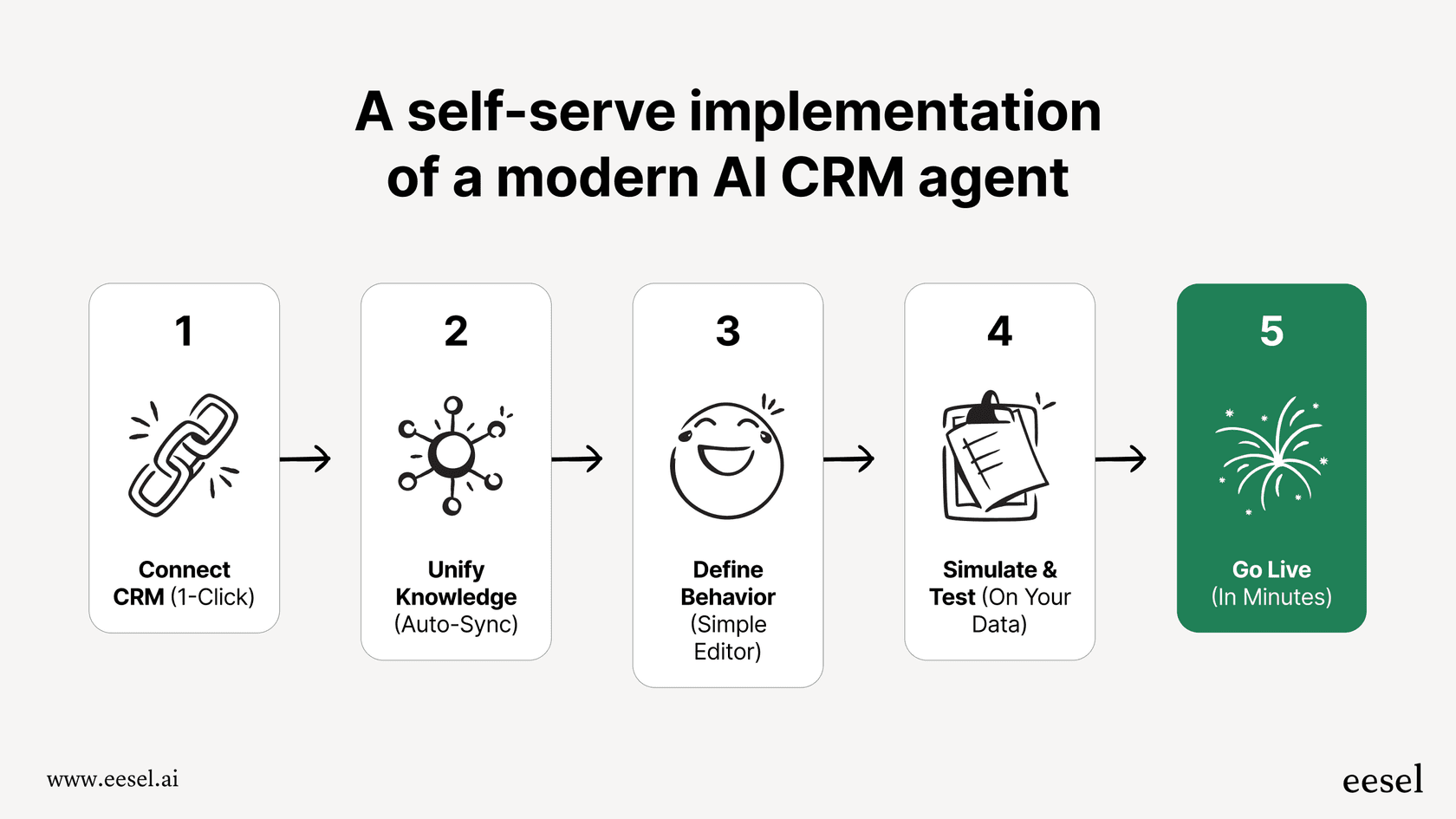
This is where a more nimble solution has a real edge. Instead of waiting for a platform's roadmap to catch up, a tool like eesel AI lets you connect all your different knowledge sources and go live in minutes, not months. It plugs right into the help desk you already use, so there’s no need for a painful data migration or a huge new expense.
Salesforce AI voice agent pricing and Service Cloud
Cost is always a big deal, and Salesforce pricing has several layers. Service Cloud is priced per user, the AI agent is priced by consumption, and telephony for your human agents is its own package.
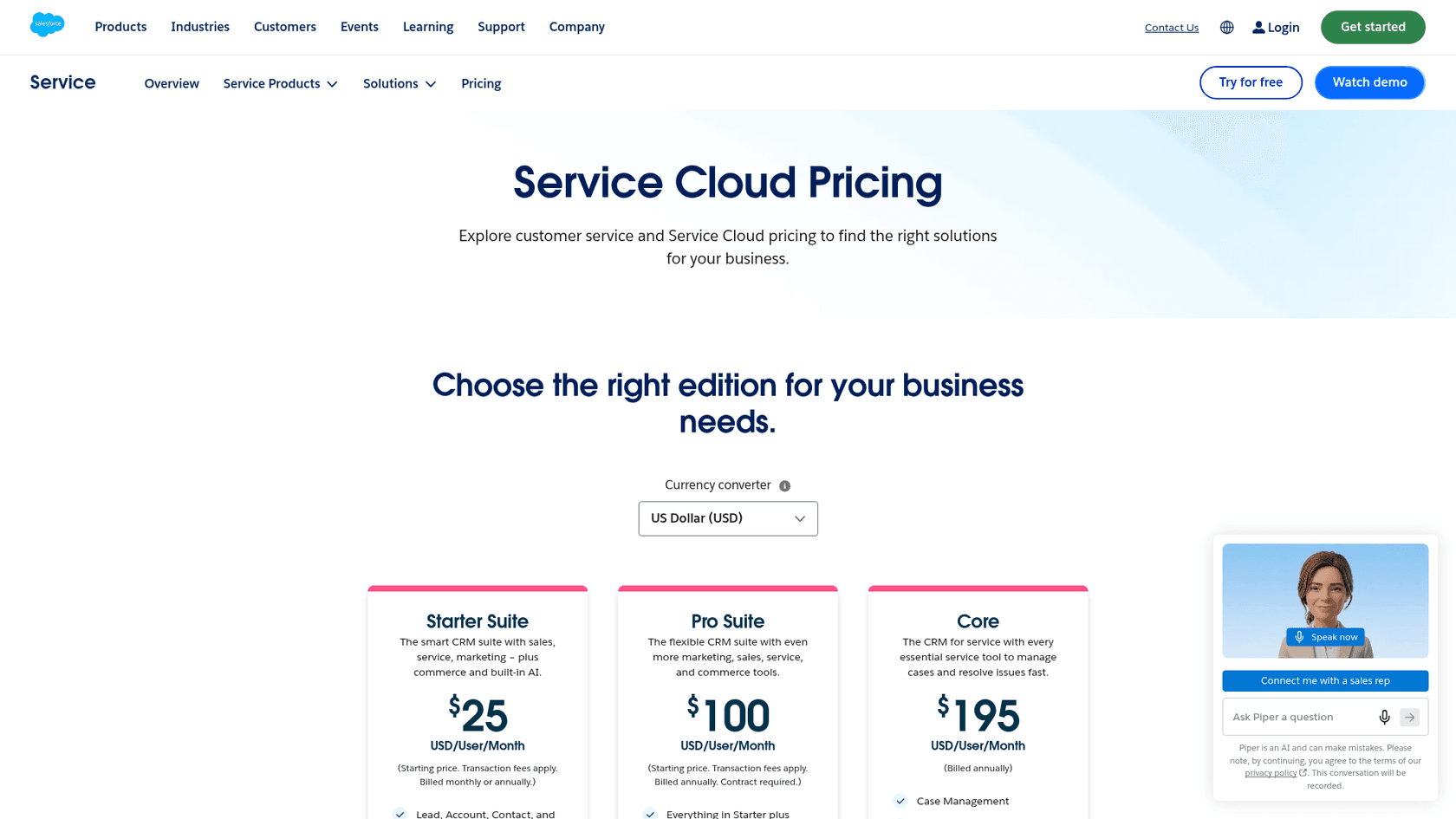
Agentforce Voice itself is billed in Flex Credits, which cost $500 per 100,000 credits. Salesforce's own worked example prices four voice actions per call at 120 Flex Credits ($0.60), so 300 calls a month comes to $180. That figure leaves out Data 360 credits and telephony.
Here’s a quick look at the main pieces:
| Piece | Price (USD, billed annually) | What it covers |
|---|---|---|
| Service Cloud editions | $25 Starter, $100 Pro, $195 Core, $395 Advanced, $550 Max per user/month | The CRM and case tools. Max includes unmetered access to agents. |
| Agentforce Voice actions | Flex Credits, $500 per 100,000 credits | The AI voice agent's actions. Flex Credits and per-conversation billing can't be mixed in one org. |
| Contact Center package | $125 per user/month | Native voice with unlimited platform voice minutes for human agents. |
| Partner Contact Center | $50 per user/month | Your own telephony provider connected to the CRM. |
| Partner Contact Center, Amazon Connect | $75 (750 min), $125 (2,000 min), $200 (5,000 min) per user/month | Pre-integrated Amazon Connect telephony. |
A better alternative: A flexible, integration-first AI agent
The limits of a closed system point to a smarter approach. A good AI strategy isn't about getting locked into one platform; it’s about using a flexible tool that brings together all the knowledge and workflows you already have, no matter where they are. This is where eesel AI steps in, offering a direct fix for the problems we've been talking about.
Get up and running in minutes, not months
You can forget about long setup times, endless sales calls, and waiting for a vendor to get their act together. eesel AI is designed so you can set it up yourself. With one-click integrations for help desks like Zendesk, Intercom, and Freshdesk, you can get going right away. There's no need to bring in pricey consultants or wait for the next release.
Unify all your knowledge, not just your CRM
eesel AI fixes the siloed knowledge problem by connecting to all of your company's information. It doesn't matter if it's in a help center, Confluence, Google Docs, or old support tickets; eesel AI pulls it all together to give complete answers. It can even learn from your past support conversations to pick up your brand's unique voice and common solutions from day one. That makes its responses much more accurate and helpful than any generic agent could be.
Test with confidence and control your rollout
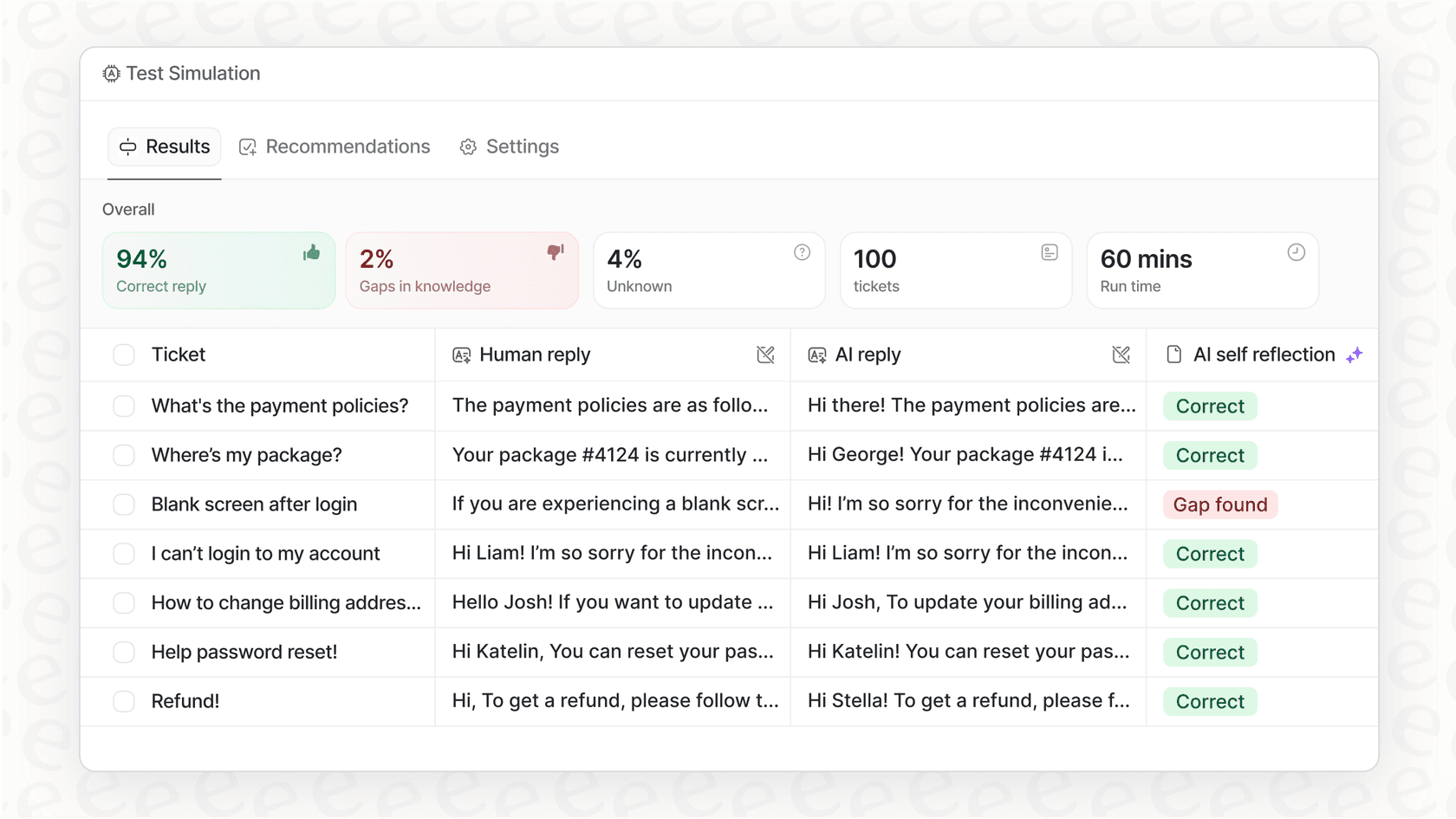
Worried about "demo magic"? eesel AI has a powerful simulation mode that lets you test the AI on thousands of your past tickets before it ever talks to a real customer. This gives you a clear forecast of how many issues it can solve and how much you could save, so you know exactly what you're getting into. You can then roll it out slowly, maybe letting the AI handle just one or two types of tickets to start. This risk-free method lets you build confidence and scale up automation when you're ready.
Transparent and predictable pricing
Nobody likes getting a surprise bill. Unlike Salesforce's mix of per-user editions, Flex Credits and telephony packages, eesel AI uses one fixed monthly price sized to volume: from $299/month for 500 credits, where one credit is one ticket or chat, and a free plan with 100 credits. And here's the best part: there are no per-resolution fees. If you hit your credit allowance, agents pause until the next reset unless you turn on overage with a monthly cap you set. That kind of predictability is huge when you're trying to grow your support operations without blowing your budget.
Build your AI strategy on flexibility, not hype
Look, the idea of a fully integrated Salesforce AI voice agent is great. Agentforce Voice is now generally available, but the reality is layered costs and the natural limits of a closed system. For most businesses, a modern AI strategy can't be based on waiting for a single platform to have all the answers. It needs to be quick, flexible, and able to tap into all of your knowledge, wherever it is.
Instead of putting all your chips on one vendor's roadmap, the smarter play is to use an integration-first solution that works with the tools you already have. By doing that, you can start automating support, making customers happier, and freeing up your team today.
Ready to see what a flexible AI agent can do for you? Try eesel AI for free and connect your knowledge sources in just a few minutes to see how much you can automate.
Frequently asked questions
Is the Salesforce AI voice agent currently available for widespread use, or is it still in development?
It is available. Early in the rollout there were pushed-back release dates and a gap between conference demos and what customers could buy, but Salesforce now lists Agentforce Voice as generally available in all regions, in English (US, UK and Australia), with more languages coming in phases.
What tasks can a Salesforce AI voice agent realistically handle for customer service?
A Salesforce AI voice agent is designed to handle routine tasks like answering frequently asked questions, checking order statuses, and scheduling appointments by leveraging data within your Salesforce CRM. However, its effectiveness depends on the completeness of the data it can access.
What are the main drawbacks of relying solely on a Salesforce AI voice agent for customer support automation?
Key drawbacks include vendor lock-in, a knowledge base centred on Salesforce data, and dependence on the platform's release schedule. The deployment process has several moving parts and often involves external consulting.
Can a Salesforce AI voice agent access knowledge stored outside of the Salesforce platform, or is it limited to CRM data?
A Salesforce AI voice agent works most directly with data in Salesforce. Content from other platforms like Confluence has to be connected first through Data 360 connectors or data libraries (the Confluence connector is labelled beta), so information kept in Google Docs or Slack takes extra setup.
What's involved in deploying and configuring a Salesforce AI voice agent within an existing support operation?
Deploying a Salesforce AI voice agent involves configuring the agent in Agentforce Builder, connecting telephony and data sources, and choosing between Flex Credits and per-conversation pricing. Teams often bring in Salesforce consultants for this, and it takes internal time.
Are there more flexible alternatives to a Salesforce AI voice agent that can integrate with multiple knowledge sources?
Yes, more flexible AI agent solutions, such as eesel AI, are designed to connect with and learn from all your company's knowledge sources, regardless of where they are stored. These alternatives often offer faster setup, broader data access, and more transparent pricing models.