


Let's be honest, using artificial intelligence in your CRM isn't some far-off, futuristic idea anymore. It's happening right now, and Salesforce is a big part of that conversation, calling itself the "#1 AI CRM," mostly because of its AI layer, Salesforce Einstein.
If you're trying to figure out what all the buzz is about, you're in the right place. This guide will walk you through the key Salesforce Einstein AI features available in 2026. We’ll look at what it can do across Salesforce's main products, untangle the pricing and data needs, and talk about some of the real-world limitations you should keep in mind. Think of this as your practical guide to deciding if Salesforce’s AI is the right move for your team.
What is Salesforce Einstein AI?
First things first, Salesforce Einstein isn't a single product you can just buy off the shelf. It’s better to think of it as the AI brainpower that's been built into the entire Salesforce platform. It all started back in 2016 with a focus on predictive analytics, helping teams do things like score leads and forecast sales.
But a lot has changed since then. With the launch of Einstein GPT and Einstein Copilot, Salesforce jumped into the generative AI world, giving teams tools for creating content and getting conversational help. Einstein Copilot has since been renamed Agentforce, and Salesforce is now pushing towards "AI Agents" that can handle multi-step tasks all on their own.
Two main things make the whole Einstein ecosystem tick:
-
Data Cloud (now Data 360): This is a hub that pulls together all your customer data from different places (your CRM, other apps, your website) to give the AI the context it needs to be genuinely helpful.
-
Einstein Trust Layer: This is a security and privacy framework working in the background. It makes sure sensitive customer info is protected by masking data and ensures the AI's answers are based on your own company knowledge. One limit to know about: data masking is turned off for agents, though it stays available for embedded features like Service Replies and Work Summaries.
Key Salesforce Einstein AI features across the Customer 360 platform
Einstein's tools are spread out across Salesforce's different "Clouds." Here’s a look at where you’ll find its features and what they actually do.
Salesforce Einstein AI features for Service Cloud: Putting customer support on autopilot
Einstein for Service Cloud is all about helping support teams get through tickets faster and automating the kind of work that can feel a bit repetitive.
Here are some of its core features:
-
Einstein Bots: These are the AI-powered chatbots you can set up to answer routine customer questions 24/7 on channels like web chat and messaging. The goal is to free up your human agents to tackle the trickier problems. Since August 17, 2026, Einstein Bots has been in maintenance mode: existing bots keep working, but Salesforce is adding no new features and recommends Agentforce for new AI agents.
-
Case Classification & Routing: Instead of someone having to manually sort through every incoming ticket, this feature automatically figures out what a support request is about and sends it to the right person or department.
-
Service Replies & Knowledge Creation: Using generative AI, Einstein can whip up personalized draft responses for agents. It can also take a resolved case and turn it into a draft for a new knowledge base article, which is a neat way to build out your help center with solutions that you know have worked.
-
Work Summaries: If an agent gets a long, complicated support case, Einstein can create a quick summary of the whole conversation. This saves them from having to read through a mountain of messages just to get up to speed.
But there's a catch (and an alternative)
These features sound great, but they come with a big string attached: platform lock-in. Einstein for Service is built around cases stored in Salesforce Service Cloud. If your team, like many others, uses a popular helpdesk like Zendesk, Freshdesk, or Intercom, using these tools usually means moving that queue into Service Cloud, which is a large and disruptive migration project.
Salesforce has tried to patch this problem with its Unified Knowledge feature, which is meant to connect Einstein to outside knowledge sources like Confluence or a Google Drive. It imports and syncs those articles into Salesforce Knowledge, and Salesforce has scheduled it for retirement in the Summer ’27 release in favor of Salesforce Enterprise Knowledge, powered by Data 360. It shows a key difference between Salesforce and more modern AI platforms that were built from day one to be open and connected.

For teams who want smart AI without having to rip out their existing tools, a more flexible AI layer just makes more sense. A tool like eesel AI plugs right into dozens of helpdesks and knowledge bases in minutes, giving your team advanced automation and help right where they already work.
Salesforce Einstein AI features for Sales Cloud: Finding the best deals and saving time
In the Sales Cloud, Einstein is focused on helping sales reps work smarter.
-
Lead & Opportunity Scoring: This feature digs into your past sales data to predict which leads and deals are most likely to close. The idea is to help your team focus their energy where it counts the most.
-
Einstein Forecasting: Instead of messing around with spreadsheets and gut feelings, this tool gives you data-driven revenue predictions to help sales leaders make more accurate plans.
-
Activity Capture: This is a huge time-saver. It automatically logs emails and calendar events to the right records in Salesforce, cutting down on the manual data entry that nobody enjoys.
-
Sales Emails: Einstein’s generative AI can help draft emails for outreach and follow-ups, tailoring the message to the specific customer and where they are in the sales process.
But here's something you need to know: these features are hungry for data. To get a good, customized model for Lead Scoring, for instance, Salesforce's Lead Scoring FAQ says Einstein needs at least 1,000 leads created and 120 conversions in the last 200 days. If you don't have enough clean, historical data, the predictions just won't be very reliable.
Salesforce Einstein AI features for Marketing and Commerce Clouds
Just to give you a full picture of what Einstein can do, here are a couple of other key features:
-
Predictive Audiences (Marketing): Helps marketers build smarter customer segments for campaigns that are more targeted and feel more personal.
-
Send Time Optimization (Marketing): Tries to figure out the best time to send an email to each person on your list to get the highest possible open rates.
-
Product Recommendations (Commerce): This one is pretty familiar. It gives shoppers personalized product suggestions on e-commerce sites, kind of like what you see on Amazon.
| Cloud | Key Predictive Feature | Key Generative Feature | Primary Goal |
|---|---|---|---|
| Service Cloud | Einstein Case Classification | Service Replies & Knowledge Creation | Resolve cases faster & reduce agent workload |
| Sales Cloud | Einstein Opportunity Scoring | Sales Emails & Call Summaries | Prioritize deals & increase sales productivity |
| Marketing Cloud | Einstein Engagement Scoring | Email Content Creation | Personalize campaigns & improve engagement |
The siloed knowledge problem
For a long time, one of Einstein's biggest drawbacks was that it only really understood data that was already inside Salesforce. Any of that super useful information your team had stored in wikis like Confluence, shared in Google Docs, or organized in Notion was totally invisible to the AI. We all know how that ends: incomplete answers for customers, frustrated agents, and way too much time spent copying and pasting.
Salesforce is trying to fix this with its Unified Knowledge feature. It’s delivered through Zoomin from Salesforce and lets Einstein connect to outside sources like SharePoint, Confluence, and Google Drive.
The thing is, it works by importing and syncing copies of that content into Salesforce Knowledge rather than reading it in place. Modern, flexible AI platforms were built from the ground up knowing that company knowledge is almost never in one single place; it's scattered all over.
While Salesforce is building bridges, platforms like eesel AI were designed from the start to bring all that scattered knowledge together. It connects to Confluence, Notion, Google Docs, and your past support tickets in an instant, creating a single source of truth for your AI on day one, without a complicated setup.
The real cost: Pricing and implementation
Let's be upfront about something: most of the really cool Salesforce Einstein AI features don't come with their cheaper plans. Getting access to these tools can get expensive, and the license fee is just the start.
Here’s a rough idea of how the pricing works:
-
Features like Lead Scoring and Predictive Forecasting are listed as add-ons on the Core edition ($195/user/month). Advanced ($395/user/month) adds more AI, and Max ($550/user/month) is the tier that includes the full AI suite.
-
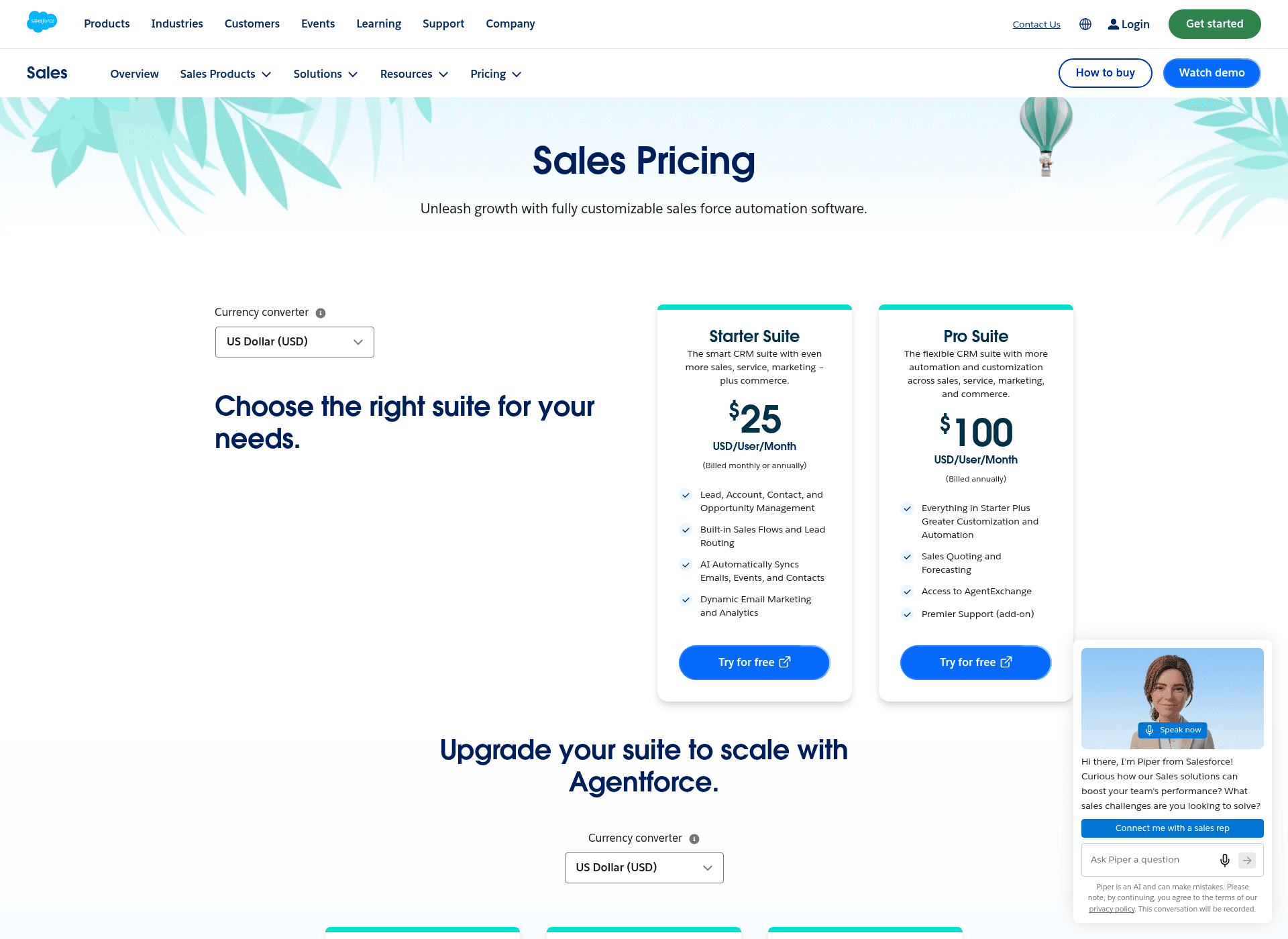
On lower tiers like Pro Suite ($100/user/month), the Einstein AI features aren’t included; Salesforce says AI can be added to Core and above. Layering on the full Agentforce for Sales package runs from an extra $125 per user per month.
But the sticker price isn't the whole story. You also have to think about the headache of setting everything up. The work involved in customizing the AI models, cleaning up your data so it’s actually useful, and building new workflows often means you have to hire a certified Salesforce partner. Those projects can easily tack on tens of thousands of dollars to your total bill.
This kind of enterprise-level cost and complexity can be a dealbreaker for a lot of teams. In contrast, tools like eesel AI offer clear, predictable pricing with no weird per-resolution fees. With a setup process that's simple enough to do yourself and plans you can start on a monthly basis, it's built to deliver value quickly without a bunch of hidden costs.
| Salesforce Edition | Price (per user/month) | Key Einstein Features Included? |
|---|---|---|
| Pro Suite | $100 | No (AI can be added to Core and above) |
| Core | $195 | Partly (AI features sold as add-ons) |
| Advanced | $395 | Partly (more AI included, others sold as add-ons) |
| Max | $550 | Yes (full AI suite, 2.75M Flex Credits per org per year) |
Are the Salesforce Einstein AI features the right choice for you?
There's no doubt that Salesforce Einstein is a powerful set of AI tools that are tightly woven into the Salesforce platform. If your company is all-in on the Salesforce ecosystem (especially on the Core, Advanced, or Max plans), it's a very smooth way to bring AI into your daily work.
However, that power comes with some serious trade-offs: high costs, being locked into one vendor, strict data requirements, and a complicated setup. The platform is built for companies that live and breathe Salesforce, not for teams that want the freedom to pick the best tools for different jobs.
If you’re looking for an AI solution that bends to fit your tech stack, not the other way around, you might want to check out some of the more agile platforms that don’t trap you inside a walled garden.
Ready for AI that works with your tools, not against them?
Salesforce Einstein is powerful, but it locks you into their world. eesel AI is built to give you powerful, enterprise-grade AI that works with the tools you already know and love, like Zendesk, Intercom, Confluence, and Slack.
You can get started in minutes, not months. Connect all your knowledge sources instantly and see just how much you can automate with our risk-free simulation.
Try eesel AI today and see what a truly flexible AI layer can do for your team.
Frequently asked questions
What exactly are the core Salesforce Einstein AI features and how are they used across different clouds like Sales and Service?
Salesforce Einstein AI features are integrated AI capabilities that enhance various Salesforce products. For Service Cloud, they include bots and case classification, while for Sales Cloud, they offer lead scoring and automated activity capture. These features aim to boost productivity and automate repetitive tasks.
Are all Salesforce Einstein AI features available with every Salesforce edition, or do we need specific plans to access them?
No, most advanced Salesforce Einstein AI features are not included with cheaper plans like Pro Suite. Salesforce says AI can be added to Core and above, with the full AI suite bundled at the Max tier and most features sold as add-ons on Core and Advanced. This means additional costs beyond the base license.
What kind of data is needed for the predictive Salesforce Einstein AI features to work effectively?
Predictive Salesforce Einstein AI features, such as lead and opportunity scoring, require a significant amount of clean, historical data. For instance, good lead scoring models need at least 1,000 leads created and 120 conversions in the last 200 days to provide reliable predictions.
Can we use Salesforce Einstein AI features with our existing helpdesk and knowledge base tools that are not part of Salesforce?
Salesforce's "Unified Knowledge" feature imports and syncs content from sources like Confluence, SharePoint, and Google Drive into Salesforce Knowledge, so external articles can ground the AI as copies. The Einstein AI features themselves are built around cases and records stored in Salesforce, so using them with non-Salesforce helpdesks usually means migrating that queue.
What are the main challenges or limitations associated with implementing and leveraging Salesforce Einstein AI features?
Key limitations include high costs for licenses and implementation, significant data requirements for effective predictions, and potential platform lock-in. Setting up these features often involves complex customization and may require hiring certified Salesforce partners.
How do the generative Salesforce Einstein AI features specifically help sales and service teams save time?
Generative Salesforce Einstein AI features automate content creation. For sales, they can draft personalized emails and summarize calls. For service, they generate draft responses for agents and create knowledge base articles from resolved cases, significantly reducing manual effort.