


Salesforce Service Cloud has long been the go-to platform for enterprise customer service teams. With the introduction of Agentforce and Einstein AI capabilities, Salesforce promises to transform how support teams operate through autonomous AI agents, intelligent case routing, and automated responses. We've seen many teams evaluate Salesforce alongside alternatives like eesel AI as they weigh their options.
But here's the reality: while Salesforce's AI features are powerful, they've got significant limitations that can catch teams off guard. Implementation timelines stretch for months. Pricing gets complicated fast. And the AI's capabilities, while impressive within the Salesforce ecosystem, have clear boundaries.
This guide breaks down the key Salesforce Service Cloud AI limitations you'll want to understand before committing. Whether you're evaluating options or already invested in the platform, knowing these constraints helps you plan realistically and avoid costly surprises.
What is Salesforce Service Cloud AI?
Before diving into limitations, let's clarify what we're talking about. Salesforce Service Cloud AI encompasses several products:
- Agentforce: The autonomous AI agent platform that handles customer conversations
- Einstein AI: The underlying AI layer providing case classification, article recommendations, and reply suggestions
- Service Replies: AI-generated responses for messaging channels
- Einstein Bots: Automated chatbots for self-service. Salesforce moved Einstein Bots into Maintenance Mode on August 17, 2026, so existing bots keep running without new features, and Salesforce recommends Agentforce for new AI agents.
These tools sit within the broader Salesforce ecosystem, designed to work seamlessly with your CRM data, case management, and existing workflows. The promise is compelling: AI that understands your business context, learns from your historical data, and handles routine support tasks autonomously. But here's what you should know before diving in.
The gap between promise and reality often comes down to implementation complexity, technical constraints, and the total investment required to make it all work.
Technical limitations and constraints
Salesforce Service Cloud AI has several technical boundaries that impact how you can deploy and scale the technology.
API rate limits
Production orgs face a cap of 2,000 LLM generation requests per minute per org for each REST endpoint, and the limit can vary by model. For sandbox environments using Apex methods, the cap is 500 requests per hour. Demo and trial orgs are limited to just 150 requests per hour.
Source: Salesforce Developer Documentation
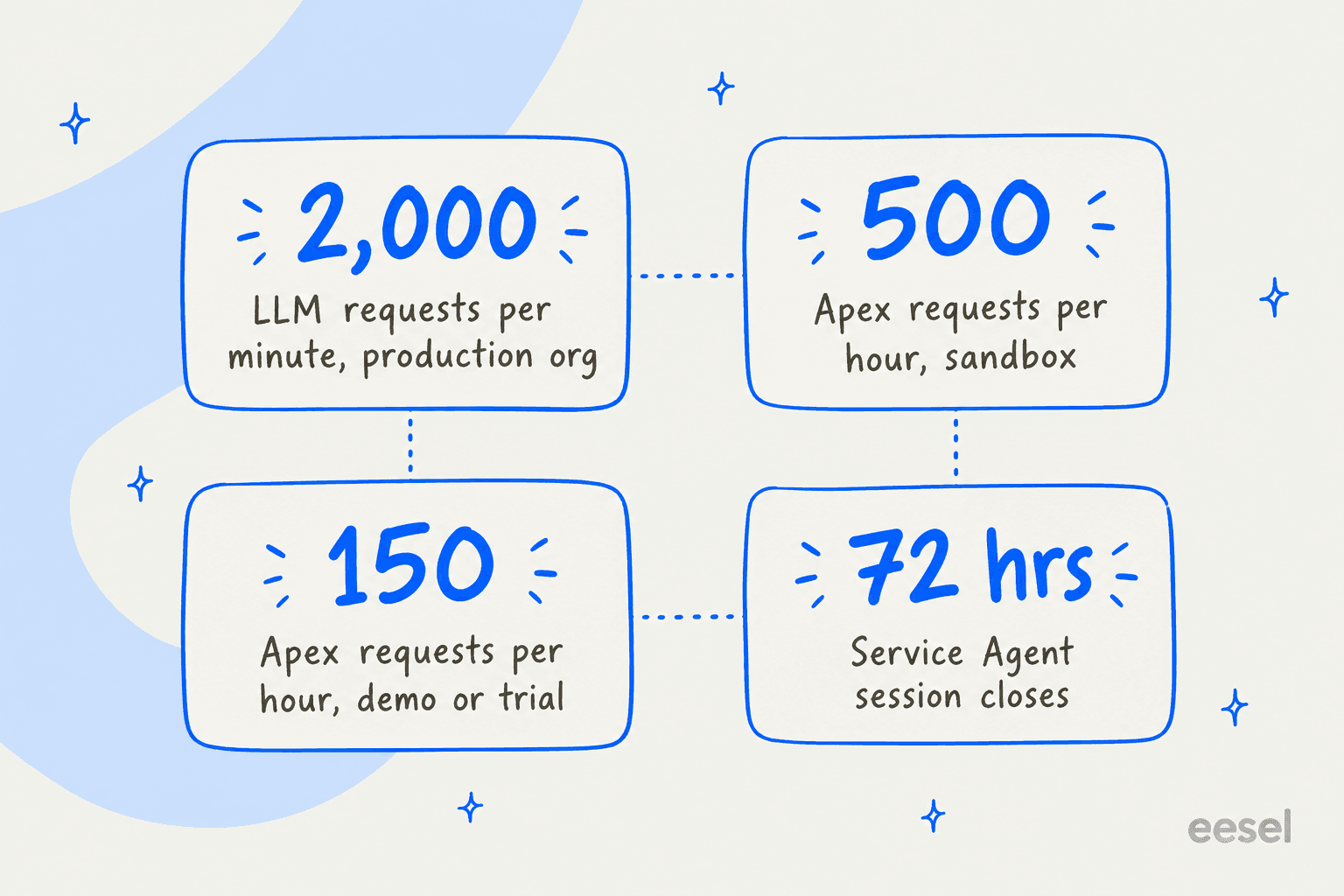
These limits matter if you're running high-volume operations or testing extensively before go-live. Past the cap, the Models API returns a 429 error until the limit resets, which matters if a critical customer conversation is in flight. In a sandbox, Salesforce notes that requests from the Agentforce reasoning engine aren't rate limited, calling that a known issue that may change.
Messaging constraints
Character limits vary significantly by channel:
| Channel | Character Limit |
|---|---|
| SMS | 912 characters (396 with special characters) |
| 4,096 characters | |
| Facebook Messenger | 2,000 characters |
| Apple Messages | 50,000 characters |
Source: Salesforce Help Documentation
If your support conversations tend toward detailed technical explanations, these limits can force awkward message splitting or require you to restructure how your agents communicate. When an incoming customer message exceeds a channel's limit, Salesforce says the message isn't delivered and no response is generated.
Session timeouts
An Agentforce Service Agent session closes 72 hours after the conversation starts, or when the user ends it, regardless of a channel's timeout. For complex B2B support scenarios where customers might pause and resume conversations over several days, that cap can create friction, and customers may need to re-explain their situation in a new session.
LLM and language limitations
Agentforce Service Agent lists OpenAI GPT-4o as its supported model. While Salesforce lists dozens of languages for Agentforce, many of them are labeled Beta.
Source: Salesforce Agentforce Considerations
Functional gaps
Several standard actions you might expect aren't supported:
- Query Records
- Summarize Record
- Draft or Revise Email
- Update Record Fields
Salesforce also lists the General CRM and Single Record Summary standard subagents as not supported for Agentforce Service Agent.
Source: Salesforce Agentforce Considerations
Implementation complexity and time investment
This is where many teams get surprised. Salesforce's marketing emphasizes quick wins, but the reality of implementing Service Cloud AI is more involved than you'd expect.
Timeline reality
Industry analysis and implementation guides consistently cite 3-6+ months for full deployment of Salesforce AI capabilities. This isn't just flipping a switch. It involves data preparation, model training, workflow configuration, testing, and gradual rollout.
Source: CoSupport AI Analysis
Expertise requirements
You'll need Salesforce-certified administrators or developers. The platform's power comes from its depth, but that depth requires specialized knowledge to configure properly. Common implementation pitfalls include:
- Lack of clear business objectives before starting
- Poor data quality going into training
- Over-customizing instead of using built-in features
- Insufficient quality checks and testing
- Underestimating ongoing maintenance needs
Source: AblyPro Implementation Guide
Data preparation demands
Einstein AI learns from your historical data. If that data's messy, incomplete, or poorly structured, the AI's effectiveness suffers. Teams often underestimate the cleanup work required before AI training can even begin.
Testing limitations
Agentforce Builder offers Simulate and Live Test modes, and Testing Center runs batch evaluations such as completeness, coherence, and latency. Salesforce says to use Testing Center only in a sandbox, since tests can modify CRM data and consume requests and credits, and Apex Models API calls in a sandbox are capped at 500 requests per hour.
Pricing complexity and hidden costs
Salesforce's pricing structure for AI features is layered and can be difficult to predict.
Base plan pricing
| Plan | Price (Annual) | AI Capabilities |
|---|---|---|
| Starter Suite | $25/user/month | Built-in AI listed, no Agentforce |
| Pro Suite | $100/user/month | No Agentforce listed |
| Core | $195/user/month | Agentforce for Service available for purchase |
| Advanced | $395/user/month | Casey, the Help Agent; Agentforce for Service available for purchase |
| Max | $550/user/month | Full AI suite, unmetered Agentforce Coworker, 2.75M Flex Credits per org per year |
Source: Salesforce Pricing Page

Add-on requirements
Most AI features require additional purchases:
- Enhanced Messaging: Additional $75/user/month on Core and Advanced
- Agentforce for Service: Available for purchase on Core and Advanced
- Knowledge Creation: Available for purchase on Core and Advanced
- Digital Channels: Available for purchase on Core and Advanced
Usage-based billing
Beyond per-seat licensing, Salesforce charges for:
- Flex Credits: Consumed when agents take actions
- Einstein Requests: For LLM gateway calls on products that still use them
- Data 360 Credits: For data processing and integration
These consumption-based costs are difficult to predict and can surprise teams that budget only for the base licensing fees.
The true cost picture
When you factor in professional services for implementation, ongoing developer support, training, and the add-ons required for full functionality, the total cost of ownership often exceeds initial projections by a wide margin.
Knowledge and integration constraints
Salesforce Service Cloud AI is designed to work within the Salesforce ecosystem. This creates both strengths and limitations.
Salesforce-only data
The AI primarily learns from data already in Salesforce: your cases, contacts, accounts, and Salesforce Knowledge articles. While this provides rich context within the platform, it means grounding in other tools takes extra setup.
External knowledge blind spots
If your team uses Confluence for technical documentation, Google Docs for policies, Notion for internal wikis, or Slack for tribal knowledge, Salesforce documents ways to connect them: Unified Knowledge connectors import and sync sources like SharePoint, Confluence, and Google Drive into Salesforce Knowledge, and Data 360 offers a Confluence connection (Beta). Salesforce has scheduled Unified Knowledge for retirement with the Summer '27 release, with Salesforce Enterprise Knowledge powered by Data 360 as the replacement, so these connections take configuration and licensing planning.
Source: Salesforce Service Cloud Features
Data Cloud dependency
Many advanced AI features require Data 360 (formerly Data Cloud) provisioning. This isn't automatic; it's an additional service that must be configured and integrated, and its credits are consumed as you use it.
Vendor lock-in
The deeper you invest in Salesforce AI, the more tightly integrated your support operations become with the Salesforce platform. Migrating away means rebuilding AI training, workflows, and integrations from scratch it's a significant commitment.
Mobile limitations
I previously cited a Salesforce Service Planner considerations page for a mobile gap in the Service Assistant feature, but that page no longer resolves, so I can't confirm whether the gap still applies. Teams with field service or remote agents on mobile devices should check the current docs before assuming mobile parity.
Source: Salesforce Service Planner Considerations (no longer resolves as of October 2026)
How teams work around these limitations
Organizations that successfully deploy Salesforce Service Cloud AI typically take one or more of these approaches:
Invest in dedicated expertise. Hiring or training Salesforce-certified administrators and developers is often non-negotiable for complex implementations.
Use middleware for integration. Tools like MuleSoft (also owned by Salesforce) can bridge external knowledge sources, though this adds cost and complexity. Alternatively, AI tools for customer support like eesel AI can integrate directly with multiple knowledge sources without middleware.
Start with pilot programs. Rather than rolling out AI across all channels immediately, successful teams start with specific use cases, measure results, and expand gradually.
Budget for ongoing optimization. AI isn't "set and forget." Continuous monitoring, training refinement, and workflow adjustments require ongoing investment.
Consider alternatives for specific use cases. Some teams use Salesforce for core case management while deploying specialized AI tools for channels or scenarios that Salesforce doesn't handle as effectively. Our guide to AI customer service tools explores options in more detail.
A flexible alternative to Salesforce Service Cloud AI
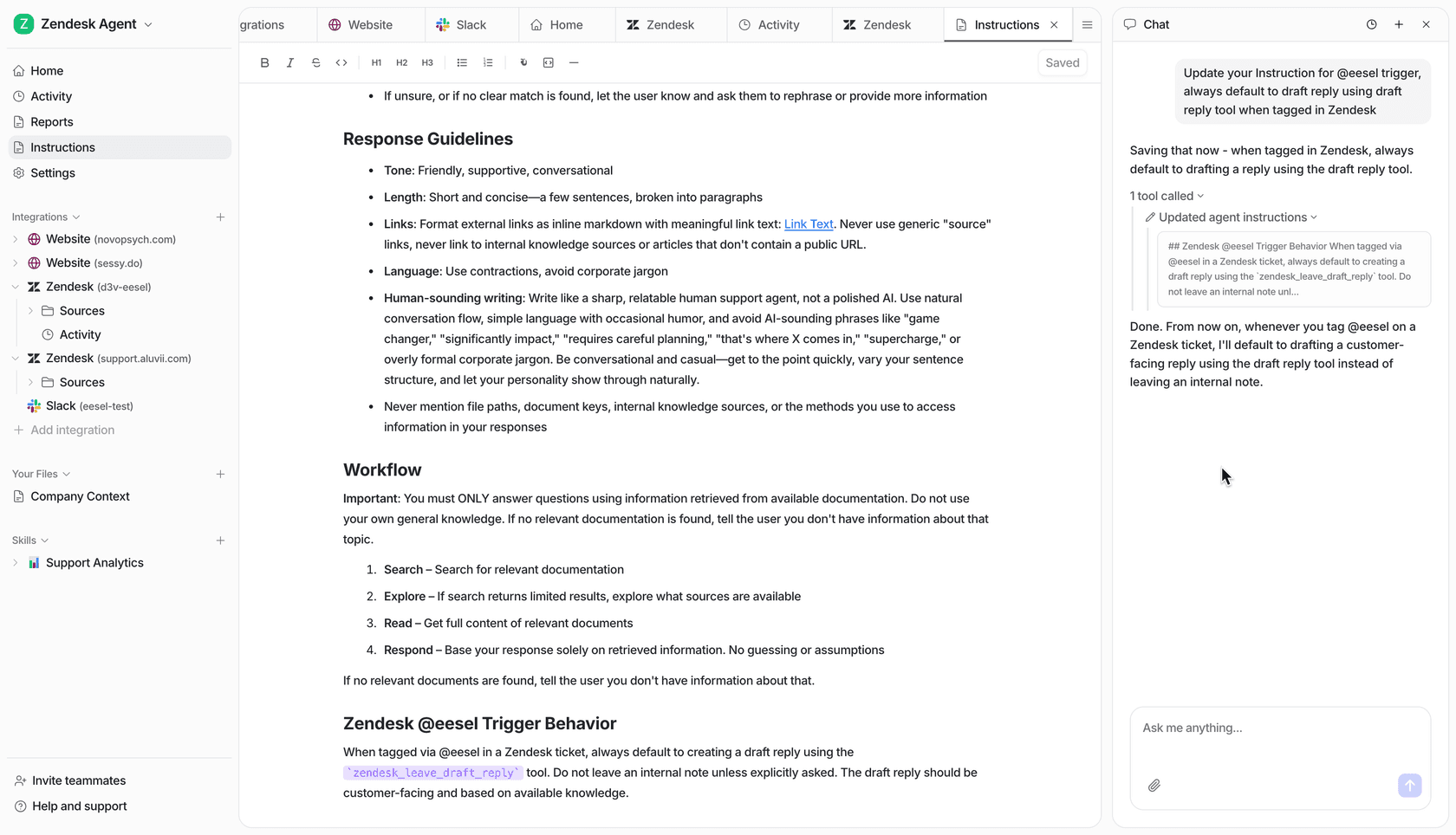
For teams finding Salesforce's constraints too limiting, alternatives exist that take a different approach. At eesel AI, we've built an AI teammate designed for flexibility and speed.
Here's how the approach differs:
Deployment speed. While Salesforce implementations stretch across months, eesel AI connects to your existing help desk and learns from your documentation in minutes. We're designed for teams that want to move fast without sacrificing quality. No migration required.
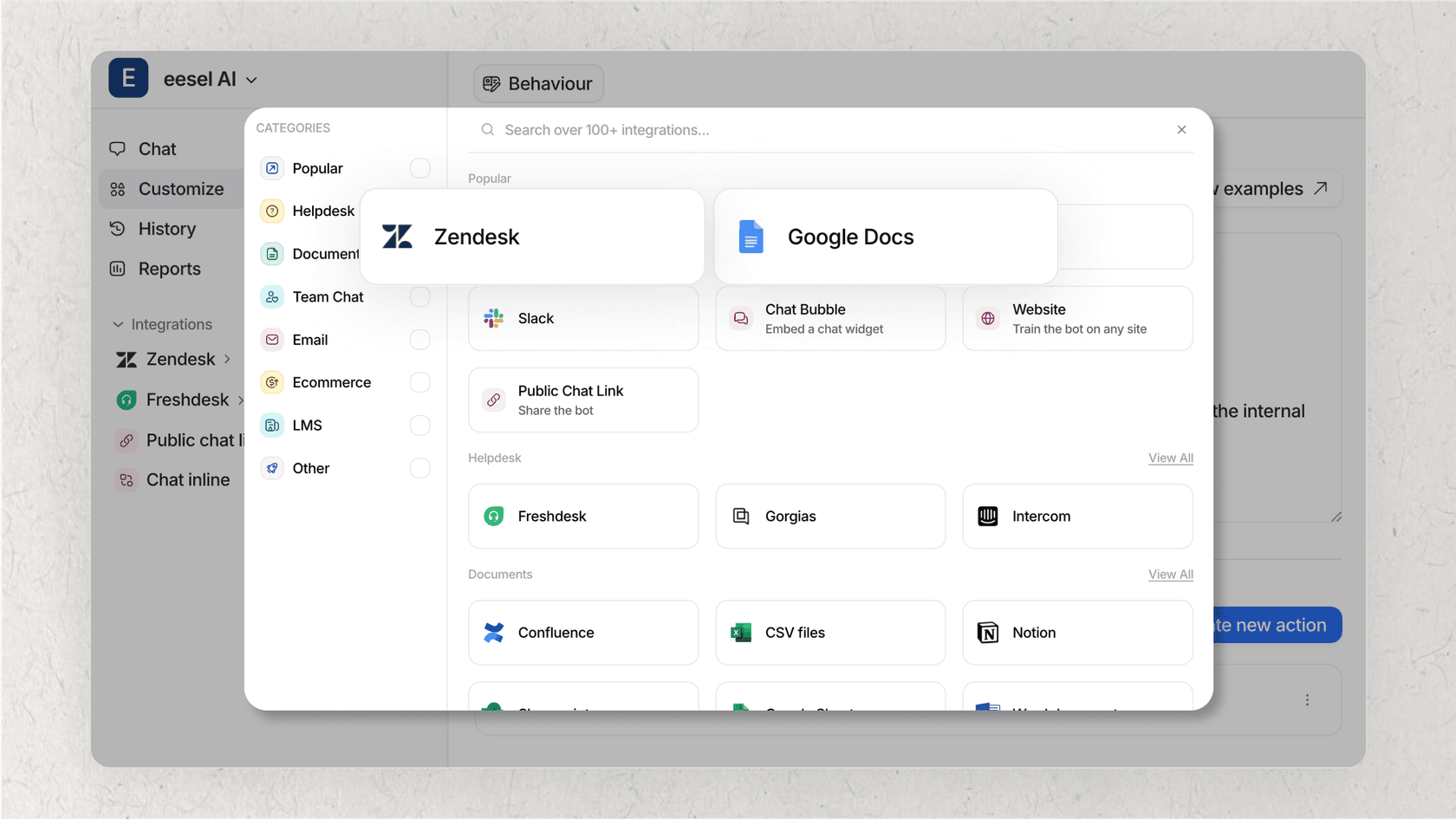
Knowledge flexibility. Rather than being limited to a single platform's data, we learn from Confluence, Google Docs, Notion, PDFs, past tickets, and help centers simultaneously. Your knowledge stays where it is; our AI brings it together.
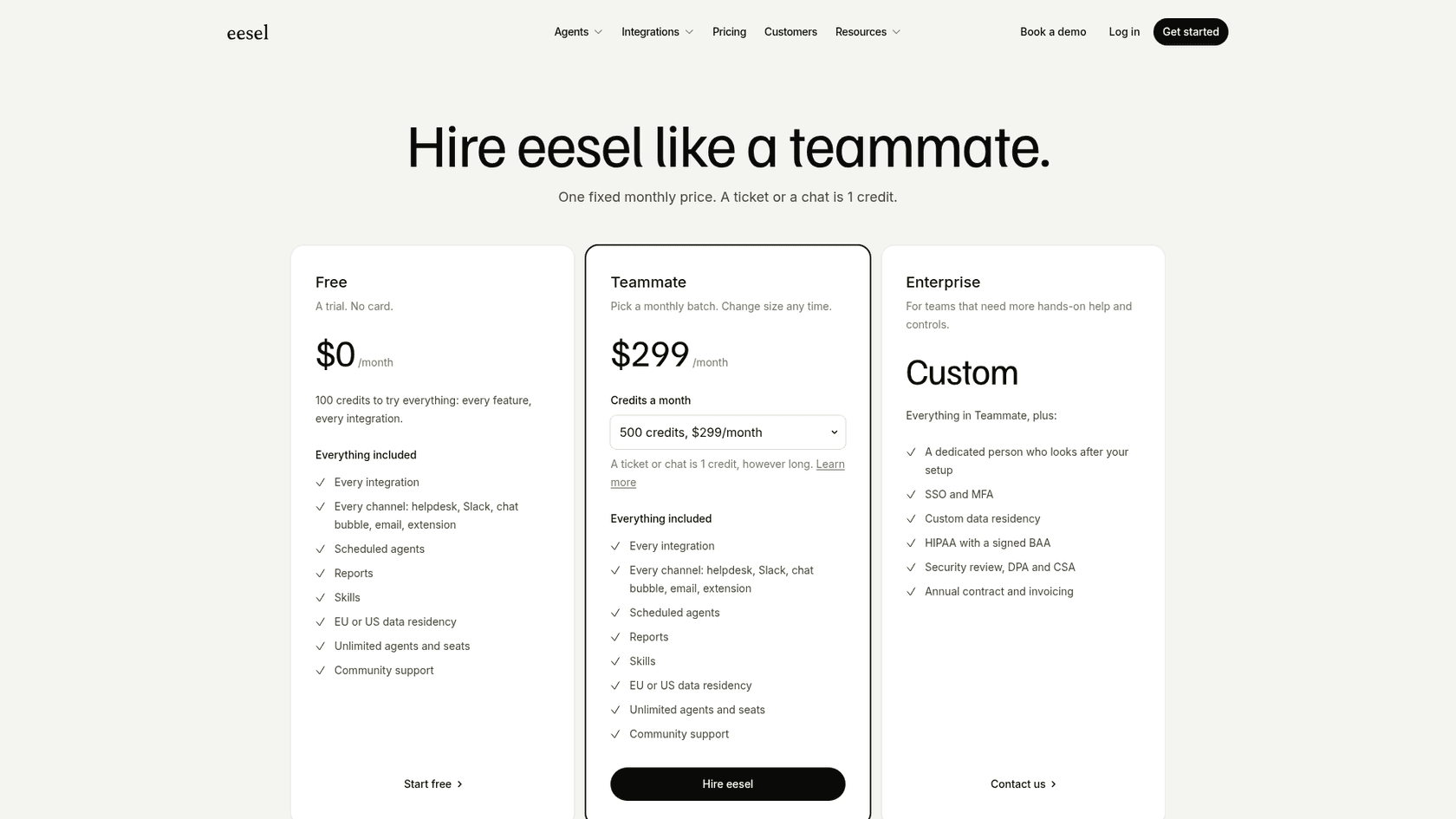
Pricing transparency. Instead of per-seat licensing plus add-ons plus usage credits, we use one fixed monthly price. Our Teammate plan starts at $299/month for 500 credits, where a ticket or chat is one credit, with every integration and channel included, and a free plan gives you 100 credits.
Self-serve setup. No Salesforce certification required. Teams configure our AI behavior through plain English prompts and test on historical tickets before going live.
This isn't about replacing Salesforce for teams deeply invested in that ecosystem. We're here for teams that prioritize speed, flexibility, and multi-source knowledge integration over deep platform consolidation.
Is Salesforce Service Cloud AI right for your team?
Choosing the right AI support solution depends on your specific context.
Salesforce makes sense when:
- You're already heavily invested in the Salesforce ecosystem
- You have complex, custom workflows that benefit from deep CRM integration
- You have dedicated Salesforce expertise on staff
- Your knowledge is primarily stored in Salesforce already
- You need enterprise-grade security and compliance features natively
Consider alternatives when:
- Speed to deployment is critical
- Your knowledge is distributed across multiple platforms
- You want predictable pricing without add-on complexity
- You lack dedicated Salesforce expertise
- You need AI that works across channels and tools flexibly
The key is honest assessment of your team's capabilities, existing investments, and priorities. Salesforce Service Cloud AI is powerful but demanding. We trade some of that depth for speed and flexibility if that sounds like what your team needs, you can try eesel AI free or book a demo to see how we compare.