


If you're running a Shopify store, you know the feeling. One minute you're strategizing your next big product launch, and the next you're drowning in a sea of emails asking the same three questions: "Where is my order?", "What's your return policy?", and "Do you ship to my country?" It feels like a constant tug-of-war between growing your business and just keeping your head above water with support tickets.
Shopify has a built-in feature called Shopify Magic that's meant to help. It’s an AI tool that promises to lighten your support load. But what does it actually do, and is it enough for a store that’s getting serious about growth?
This guide is an honest look at its automatic reply features. We'll get into what it does well, where you'll start to feel its limits, and help you figure out if it’s the right fit for you, or if you've reached the point where you need something with a bit more horsepower.
What are Shopify Magic Automatic Replies?
So, what exactly is Shopify Magic? It isn't one single tool, but rather a collection of AI-powered features, most at no additional cost, sprinkled throughout the Shopify platform. It can help you draft product descriptions, brainstorm email copy, and, of course, help out with customer support.
When we talk about Shopify Magic Automatic Replies, we're mostly looking at two features inside Shopify Inbox:
-
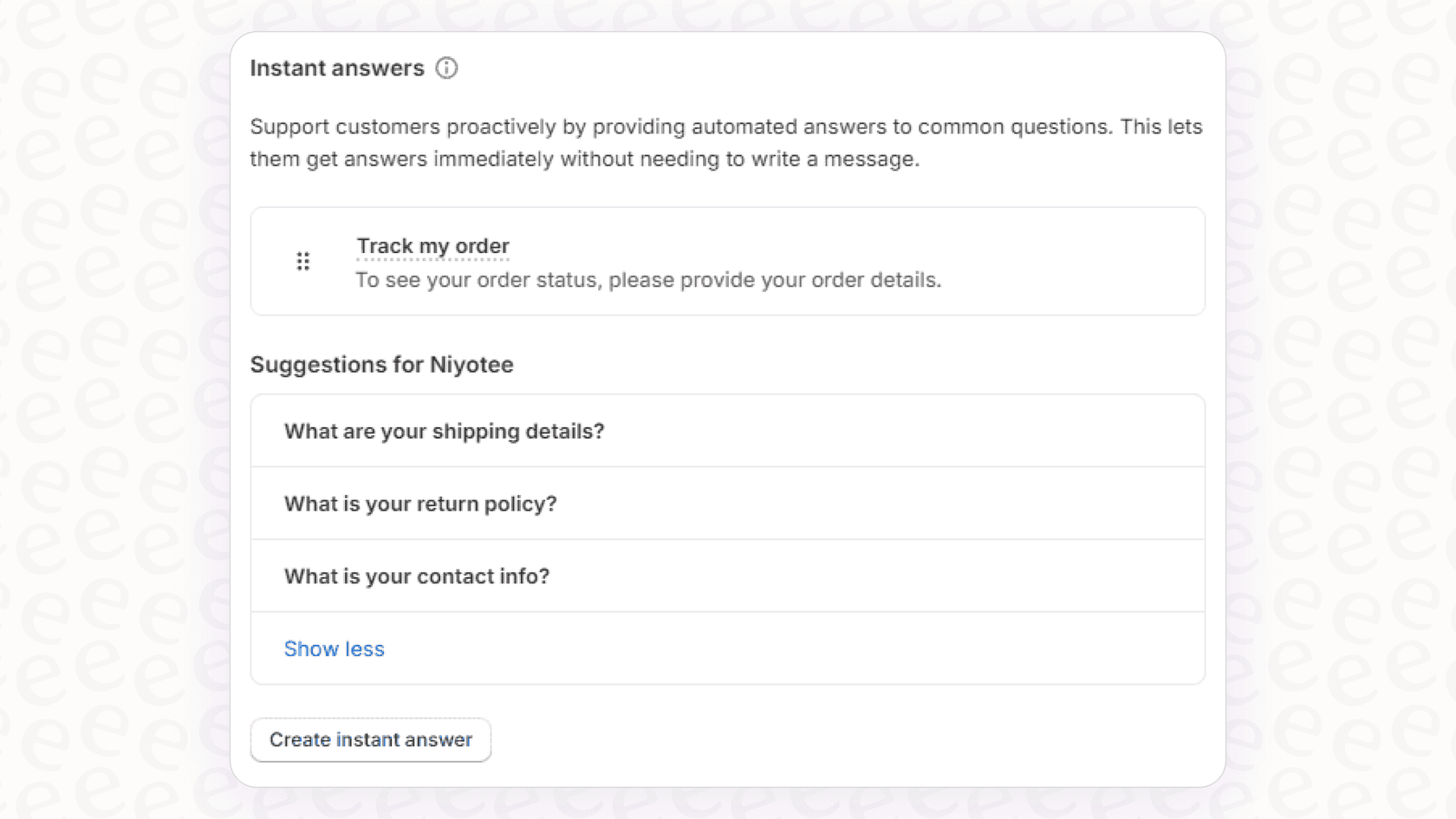
Instant Answers: Think of these as a souped-up FAQ. They are pre-written questions and answers that customers can click on in your chat widget. Shopify Magic can suggest some of these Q&As for you by looking at your store’s policies, which can definitely save you some initial setup time. The generated suggestions are available only in English, and you can show up to 100 instant answers.
-
Suggested Replies: This one works during a live chat. When a customer asks a question, Shopify Magic will pop up with a suggested answer that your support agent can use. They can send it as is or tweak it first. The AI gets its information from your product pages and store policies.
Here’s the most important thing to understand right off the bat: these two tools are designed to assist a person, not replace them. Shopify has since added an optional Inbox agent, a separate AI sales associate that answers shoppers from your catalog, policies, and Knowledge Base and hands off to staff when it can't help, but suggested replies don't drive its responses.

How to set up and use Shopify Magic Automatic Replies
One of the best things about Shopify Magic is that it’s incredibly simple to get going. It’s already part of Shopify Inbox, so you don’t need to be a tech genius or follow a complicated installation guide.
Enabling instant answers and suggestions
Getting started is pretty painless. The whole process is built for speed and simplicity.
-
First, if you don't have it yet, install the free Shopify Inbox app from the Shopify App Store.
-
From your Shopify admin, go to Chat settings and then click on Instant answers.
-
You'll see a list of AI-generated suggestions that Shopify Magic thinks your customers might ask. You can look them over, edit them, or add your own.
-
Just flip the switch to turn them on, and they'll show up in the chat widget for your customers.
For live chat, you don't have to do a thing. The suggested replies will automatically appear in the composer for your agents when a customer has written and you haven't replied yet. They need an English store and admin and 200,000 products or fewer.
What Shopify Magic learns from
For any of this to work, Shopify Magic needs to know about your business. It pulls its information from a few very specific places:
-
Your product listings: It knows your product descriptions, prices, and different variants.
-
Your store policies: It reads your official pages for shipping, returns, and privacy.
-
Your other pages: It can pull info from your "About Us" or general FAQ pages.
-
Shipping and payment settings: Suggested replies also draw on the delivery locations and payment methods you've configured.
And this is where we hit the first real snag. Suggested replies draw on what's inside your Shopify store. The Inbox agent adds Knowledge Base facts and files, but neither connects to the detailed setup guides in Google Docs, your internal wikis in Confluence, or the other documents you use to run your business.
The limitations of Shopify Magic for growing stores
If you're just starting out, Shopify Magic is a perfectly fine place to begin. But as your order volume picks up and your business gets more complex, you'll start to see the cracks.
The replies assist, they don't automate
The biggest misunderstanding about Shopify Magic is that it automates your customer support. It really doesn't. It suggests replies and serves up pre-written answers from a menu. It's like a helpful assistant that hands you the right file, but you still have to read the file and write the email yourself. It can't manage a conversation or resolve an issue from start to finish. It just makes the manual work a little quicker. The Inbox agent is Shopify's answer for that gap, with a safety cap of up to 100 messages per conversation for signed-out shoppers and 1,000 for signed-in ones before it hands off to your staff.
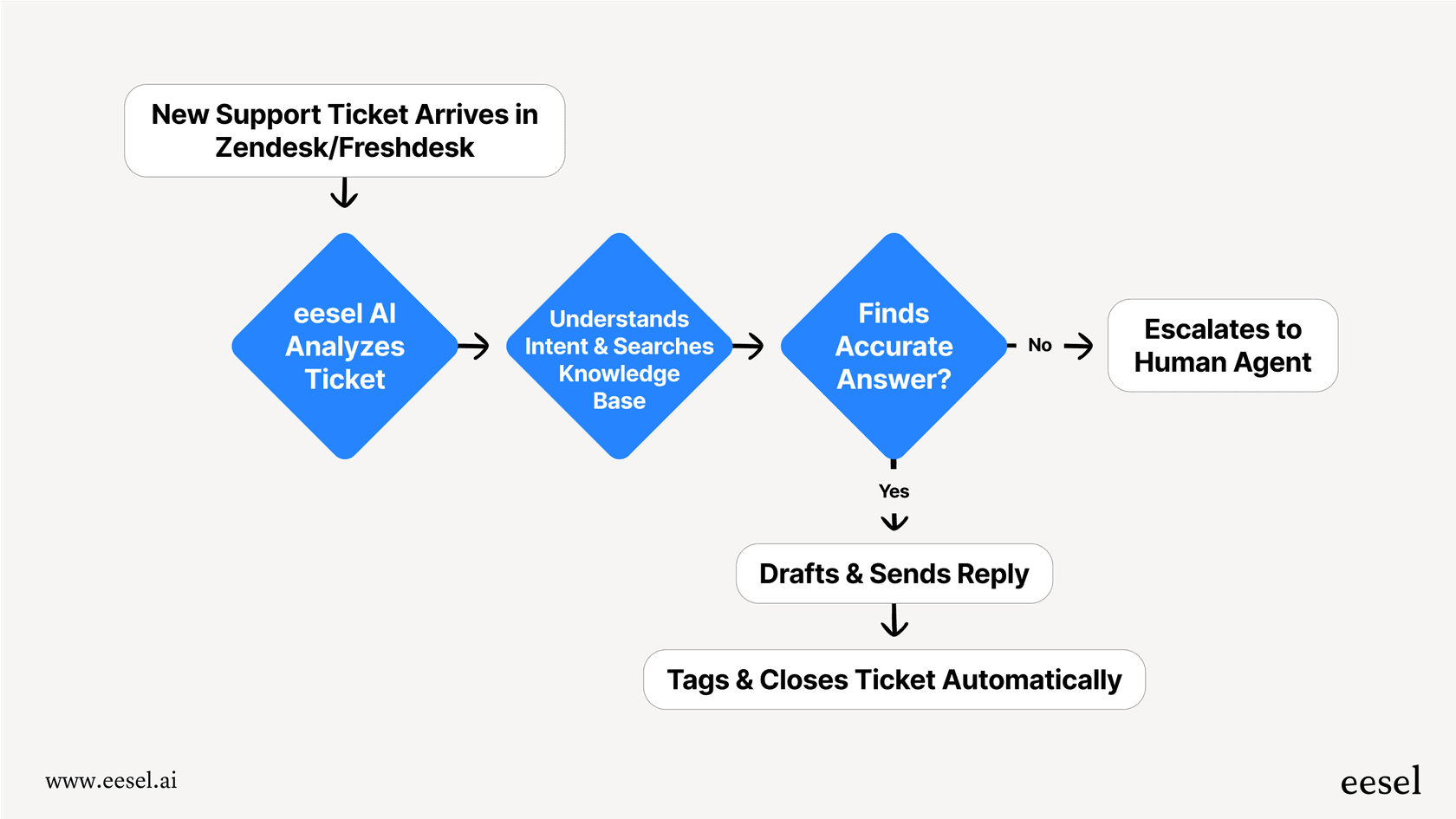
This is fundamentally different from a true AI Agent. For example, an AI agent from eesel.ai is built to be autonomous. It can handle the entire conversation, from greeting the customer and understanding their problem to finding the right answer and closing the ticket, all without a person needing to step in. This lets your team focus on the tricky, high-value customer issues instead of the repetitive stuff.
Its knowledge is stuck in one place
As we mentioned, Shopify Magic only knows what you've told it inside your Shopify store. But what about when the answer to a customer's question is somewhere else? Your best troubleshooting guides might be in Google Docs, your product specs could be in Notion, or your team’s return process might be documented in Confluence. Shopify Magic is blind to all of that, which means it gives incomplete answers and customers get passed on to your team anyway.
A genuinely helpful AI needs to have access to all your information. That's why eesel AI connects to everything. It can plug into over 100 different sources, from internal documents and public help centers to your past support tickets in platforms like Zendesk or Freshdesk. This lets it give answers that are actually complete and accurate because it's drawing from your entire library of knowledge, not just one small corner of it.

It can't actually do anything
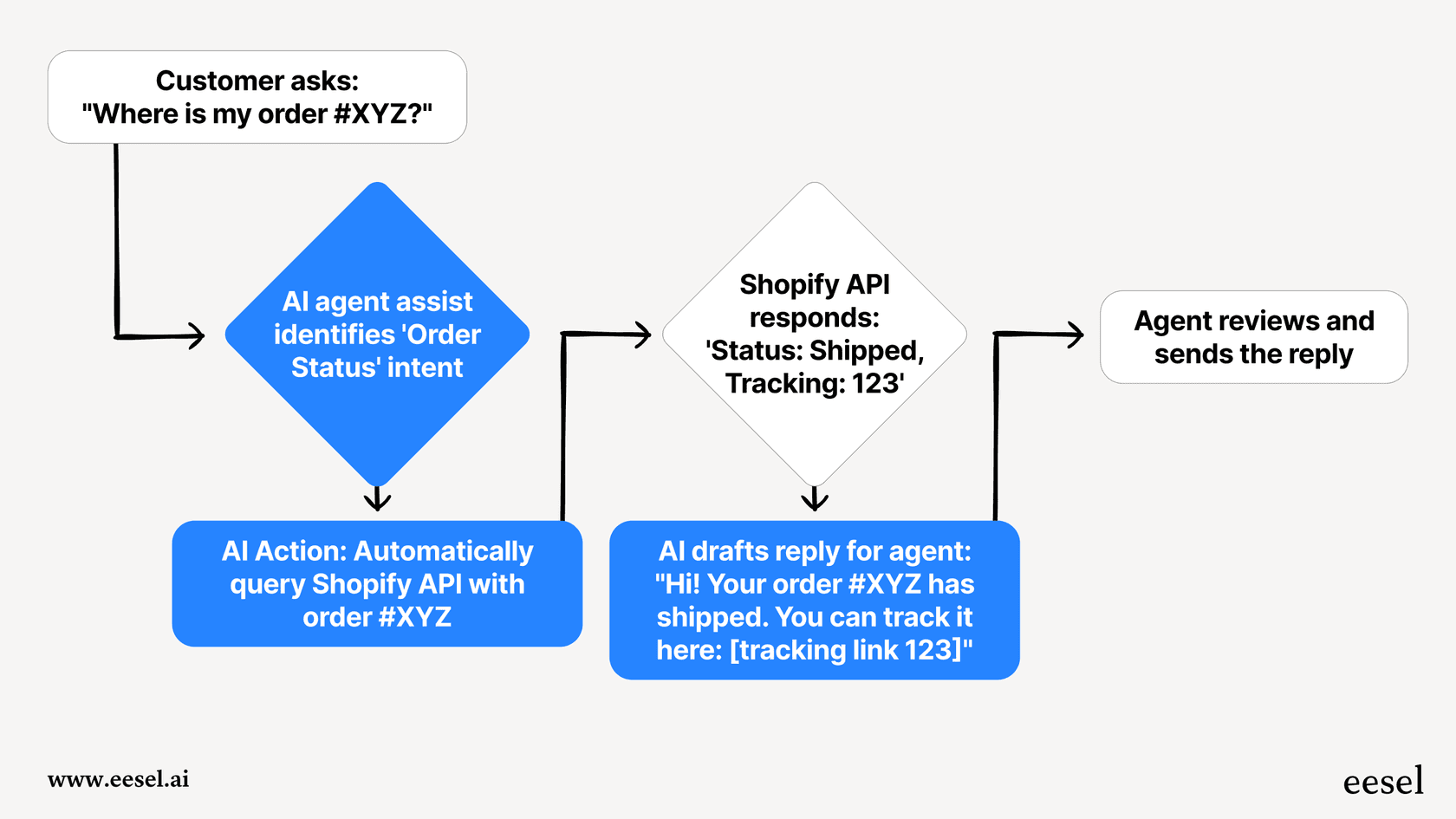
Let's circle back to that classic question: "Where is my order?" Shopify Magic can probably find the link to your general tracking page and give that to the customer. What suggested replies can't do is look up that person's specific order and say, "Your package, #12345, is on the truck for delivery and should be there today." The Inbox agent can review an order after the shopper signs in, but Shopify's documentation doesn't describe tagging tickets, routing them to a department, or processing refunds. For those jobs the text answers still hand work back to your team.
This is where an AI tool transforms from a simple bot into something that actually gets work done. An eesel AI Agent can be set up with custom actions that plug directly into the Shopify API. This allows it to check order details, look up inventory, and provide personalized, up-to-the-minute information. It turns the AI from a glorified FAQ into an agent that actually solves problems.
No way to test or roll it out safely
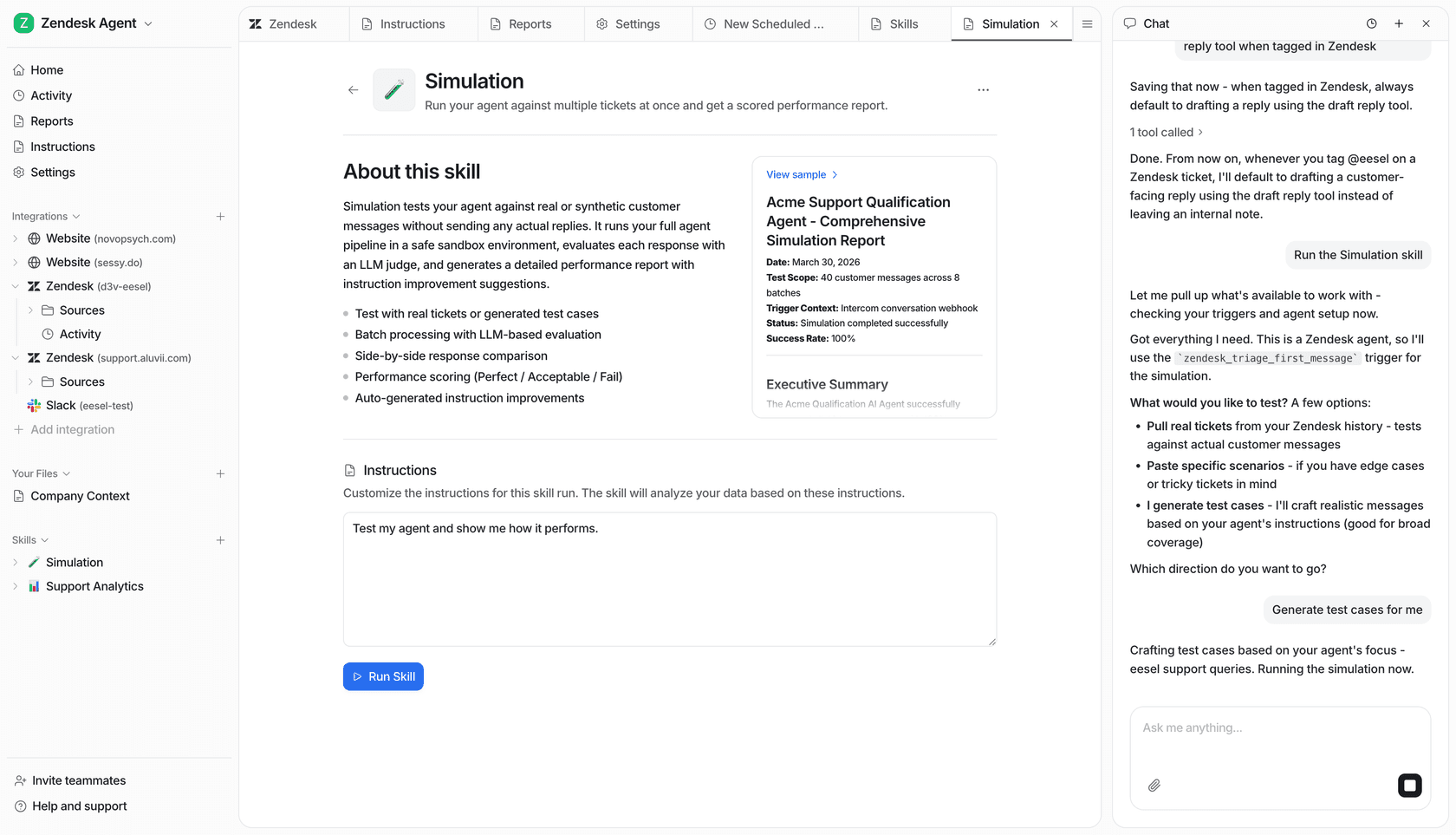
Shopify gives the Inbox agent some safeguards: you can review and test its persona, and train it by rating practice scenarios or real conversations. What its documentation doesn't describe is running it over your last 1,000 support tickets to forecast an automation rate or resolution time before you let it talk to real customers. That can be a bit nerve-wracking, especially if you've worked hard to build a great customer experience.
This is where a feature like eesel AI's simulation mode is a huge relief. Before your AI agent goes live, you can run it in a totally safe environment on your historical support tickets. It gives you a clear forecast of what its automation rate will be, shows you exactly how it would have replied to real customer questions, and lets you fine-tune its performance with total confidence. It takes the guesswork out of launching your AI.
Shopify Magic Automatic Replies pricing: Free vs. built to scale
Okay, let's talk about the cost. This is where the two approaches really differ.
The Shopify Magic features are totally free with any Shopify subscription plan. For a brand-new store or a solo founder with a trickle of support questions, you can't beat that price.
But "free" isn't always free. The cost comes in the form of the limitations we've just covered. It's a great launchpad, but it isn't a long-term strategy for a business that's scaling up. As your ticket volume climbs, a free tool's limitations can start to hold you back.
That's when a platform like eesel AI makes sense as the next step.
-
Predictable Cost: With eesel AI's pricing, you know exactly what you're paying for. There are no hidden per-resolution fees that punish you for being successful and getting more customers.
-
Clear Value: The plans are based on the features you need, so you can pick a tier that makes sense for your business and scale up when you're ready. It's an investment in making your team more efficient and your customers happier.
| Feature | Shopify Magic | eesel AI |
|---|---|---|
| Cost | Free (included with Shopify plan) | Starts at $299/mo |
| Automation | Suggests replies & basic answers; optional Inbox agent answers shoppers | Fully autonomous ticket resolution |
| Knowledge Sources | Shopify store data only | 100+ integrations (Docs, Confluence, past tickets, etc.) |
| Actions | Text replies; Inbox agent order review after sign-in | Real-time API lookups & ticket actions (e.g., check order status) |
| Testing | Persona tests and practice-scenario training; no past-ticket replay documented | Powerful simulation on past tickets |
| Best For | New stores with low support volume | Scaling businesses focused on efficiency & customer experience |
Shopify Magic Automatic Replies: A great start, but not the final stop
So, what's the verdict on Shopify Magic? It’s a fantastic, no-cost starting point for new businesses. It’s an easy introduction to AI for customer support, and it can absolutely help you handle those first few waves of common questions without adding to your stress.
But as your store grows, your support needs will get more complex. The limits of a free, built-in tool, its narrow knowledge base, its limited actions, and the lack of past-ticket testing, will start to become real problems. You can't build a top-tier customer experience on a tool that's only designed for basic help.
When you find yourself and your team still spending most of your day answering questions that an AI should be able to handle, that’s your sign that you've outgrown the basics. It's time to move up to a solution that's built for scale.
Ready to put your Shopify support on autopilot?
Don't just answer questions, resolve them. eesel AI connects with your entire knowledge base, performs real-time actions for customers, and delivers a support experience that feels effortless.
Frequently asked questions
What exactly are Shopify Magic Automatic Replies and how do they work within my store?
They are AI-powered features within Shopify Inbox, primarily offering Instant Answers for common questions and Suggested Replies for agents during live chat. They assist human support agents by providing quick, pre-written or AI-generated answers. Shopify Inbox also has an optional Inbox agent that answers shoppers directly.
How do Shopify Magic Automatic Replies compare to a fully autonomous AI customer support agent?
Shopify Magic Automatic Replies are designed to assist human agents by suggesting replies and offering pre-set answers, and suggested replies don't drive the Inbox agent's automatic responses. Shopify's Inbox agent can answer shoppers on its own, but it works from your store content with staff handoff, unlike a dedicated AI agent solution.
What sources of information do Shopify Magic Automatic Replies use to generate their responses?
They pull information directly from your Shopify store, including product listings, store policies, shipping and payment settings, and your store pages. The Inbox agent can also use Knowledge Base facts and files. Neither connects to platforms like Confluence or Notion.
Can Shopify Magic Automatic Replies perform actions like checking order status or initiating refunds?
Suggested replies and instant answers are text-based. The Inbox agent can review an order once the shopper signs in, and the Track my order instant answer uses an order number and email, but Shopify's documentation doesn't describe refunds or ticket tagging.
Are Shopify Magic Automatic Replies a scalable solution for a rapidly growing e-commerce business?
While they are a great starting point for new businesses with low support volumes, their limitations in automation, knowledge integration, and action capabilities mean they are less suitable for rapidly growing stores needing advanced, scalable solutions.
Is there any way to test Shopify Magic Automatic Replies on historical data before deploying them live?
Shopify lets you review and test the Inbox agent persona and train it with practice scenarios before it handles real chats, but its documentation doesn't describe replaying your past support tickets to forecast results.
What is the cost associated with using Shopify Magic Automatic Replies for my store?
Shopify Magic Automatic Replies are included without extra charge: the Shopify Inbox app is listed as free in the App Store, and Shopify says many AI features carry no additional cost, though availability can vary by plan, device, and language.