

AI agents are popping up everywhere, and they're getting impressively smart. But there's a catch: how do you give them instructions they can actually follow without getting tripped up?
We're used to things like "README.md" files, but those are written for human brains. They’re full of little details and shared understandings that AIs just don't get, leading to a lot of errors and head-scratching.
To fix this, two new standards have started to gain traction for guiding AI agents: "Skills.md" and "Agents.md". Both are designed to provide machine-readable instructions, but they take very different approaches.
This guide will walk you through both, compare them side-by-side, and help you decide which one makes sense for you. We’ll also look at another route you can take if you just want an AI agent for your business, no coding required.
What is Skills.md?
"Skills.md" is a framework that Anthropic created for Claude and has since released as an open format that a growing number of agent products support. The best way to think about it is as a set of reusable skills you can package up for an AI agent. It's not just a simple to-do list; it's more like a detailed training manual for a new, very specialized employee.
So, what's under the hood? "Skills.md" works with a few main parts:
-
The "SKILL.md" file: A "skill" is basically a folder containing a special markdown file. This file kicks off with some YAML frontmatter that gives the skill a "name" and a "description". This tells the agent what the skill does and when it should be used. Per the spec, the name can be up to 64 characters and the description up to 1,024.
-
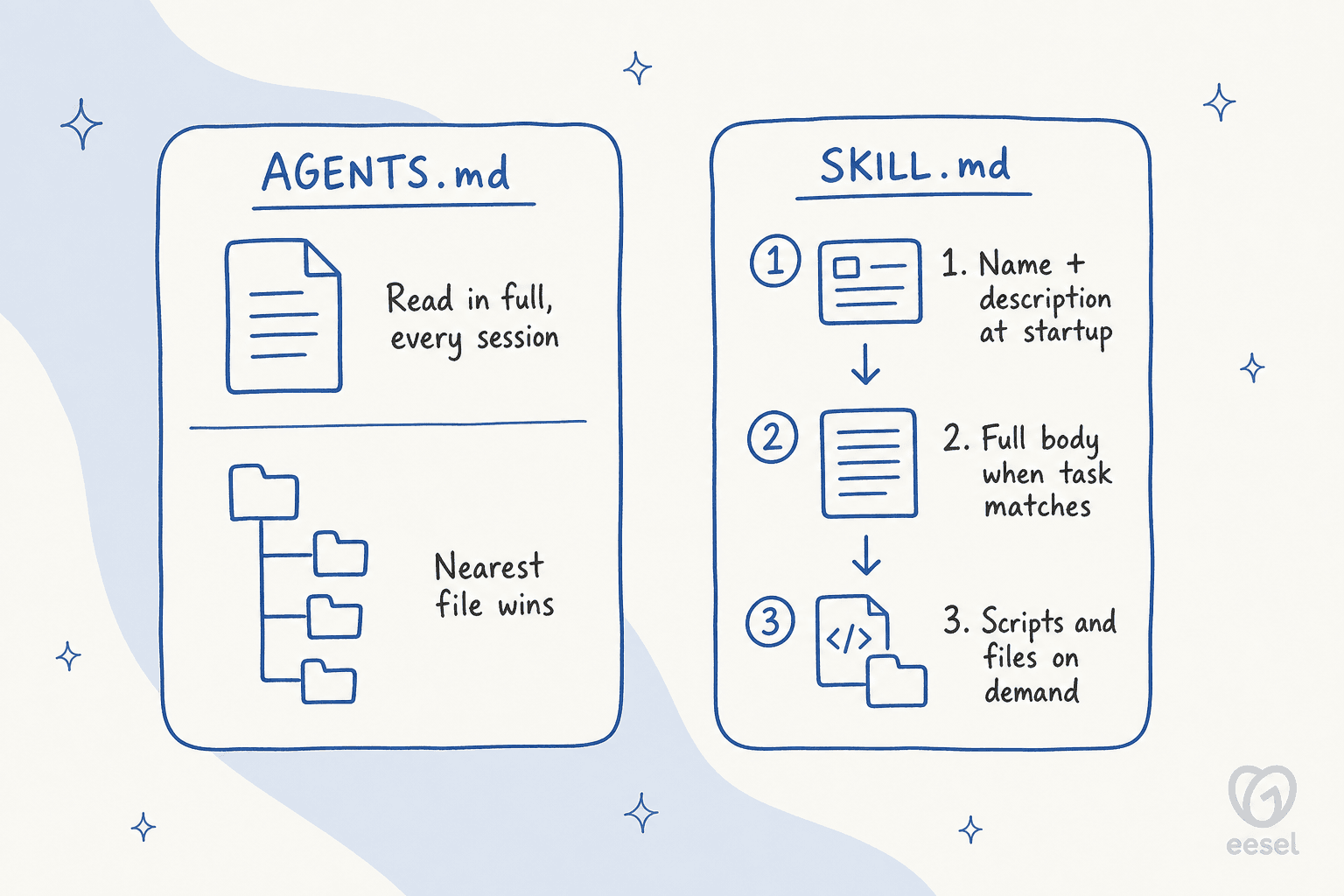
Progressive disclosure: This is where it gets pretty smart. To avoid hogging the context window, the AI doesn’t try to absorb everything at once. First, it just glances at the names and descriptions of all available skills (Level 1), which costs about 100 tokens per skill according to Anthropic's docs. If your request matches a skill, it then loads the full instructions from the "SKILL.md" file (Level 2). Finally, if those instructions point to other files, like code scripts or dense documentation, it can pull those in as needed (Level 3).
-
Bundled code and resources: Skills are more than just instructions; they can also pack in executable Python scripts, API docs, or other reference files. This means an agent can handle complex, predictable tasks (like filling out a PDF) perfectly every time, without needing to stuff the entire script's code into its working memory.
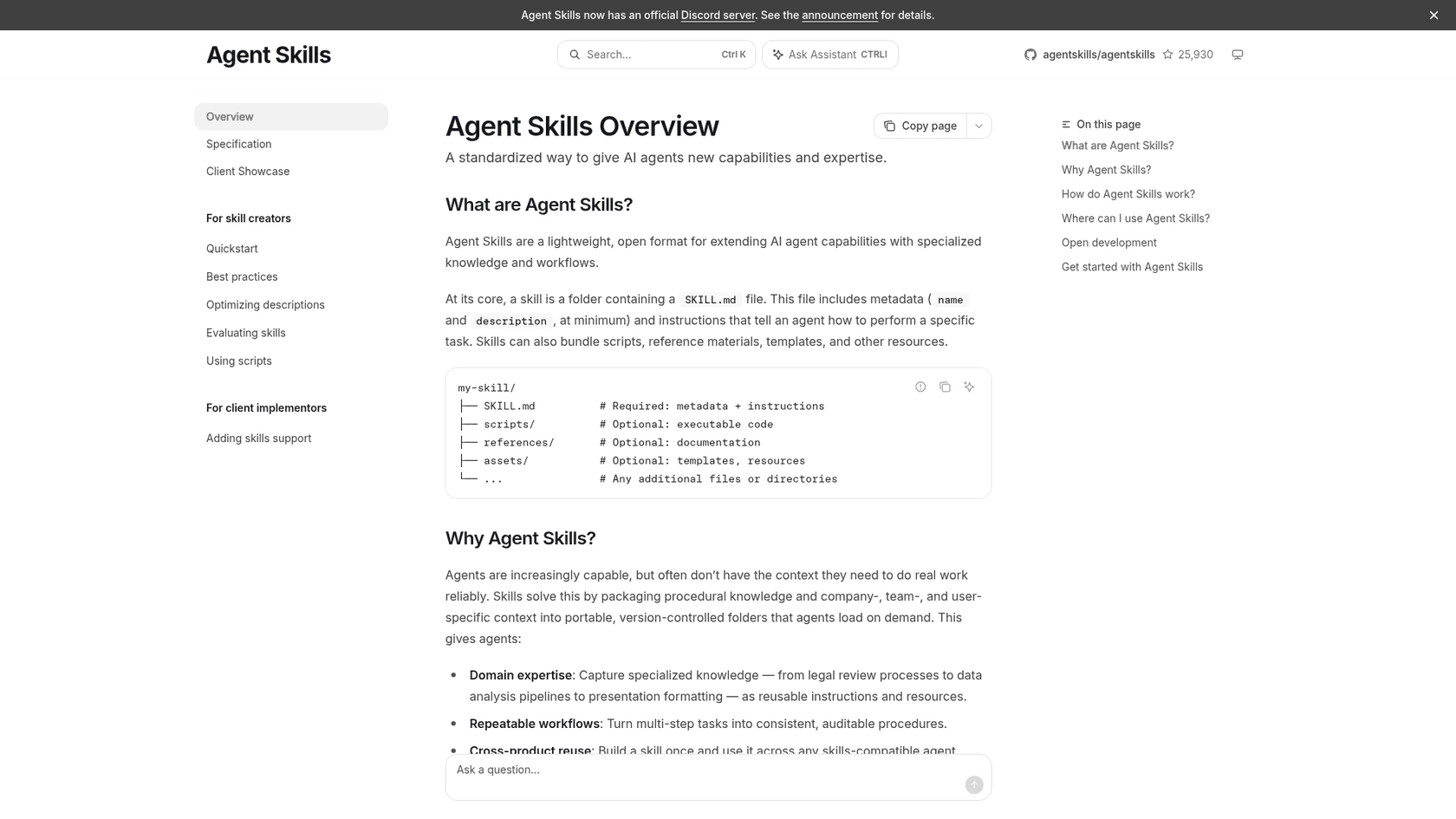
You can picture it as a well-organized technical manual. It begins with a table of contents (the metadata), then moves into specific chapters (the "SKILL.md" instructions), and provides detailed appendices (the bundled code) that the agent can check when it needs to.
What is Agents.md?
"Skills.md" started at one company, while "Agents.md" is an open format that the Agentic AI Foundation now stewards under the Linux Foundation. It came out of work across OpenAI Codex, Amp, Google's Jules, Cursor, and Factory, who wanted a standard way to communicate with AI coding agents. The site says over 60k open-source projects use it. The goal is simple: create a "README.md" that machines can actually use.
"Agents.md" is all about solving the usual headaches that happen when AIs try to work with codebases built for people. It addresses problems like vague instructions ("just run the tests"), knowledge scattered across old Slack threads, and documentation that hasn't been updated in years.
A standard "AGENTS.md" file contains clear, structured directions on how to work with a software project, covering things like:
-
How to set up the project and run a build
-
The exact test commands to use
-
Rules for code style and formatting
-
Guidelines for writing commit messages and pull requests
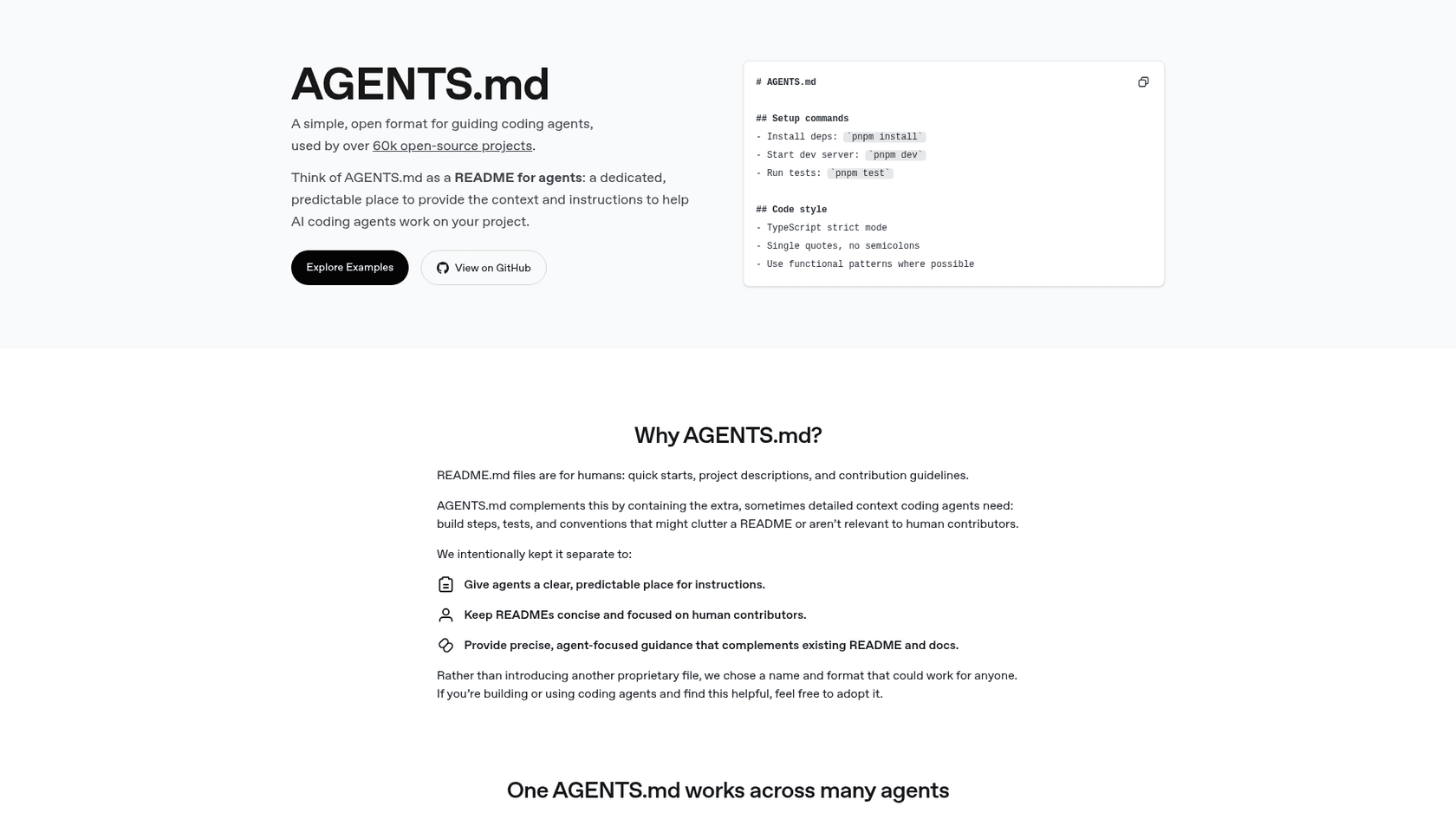
Think of it as a universal "project cheat sheet." Any AI coding assistant, no matter who built it, can read this file and instantly know the rules for that particular codebase. It gets everyone, human or AI, on the same page.
Skills.md vs. Agents.md: A head-to-head comparison
Okay, so both frameworks are about telling AI agents what to do, but they approach it from different angles, and they work well together. You can think of it this way: "Skills.md" is for teaching an agent powerful new tricks on demand, while "Agents.md" is about handing out a standard rulebook that any agent can follow.
Here’s how they stack up:
| Feature | Skills.md (Anthropic) | Agents.md (Open Convention) |
|---|---|---|
| Primary Purpose | To give an agent new, complex abilities it loads on demand. | To give any agent standard, static instructions for working with a codebase. |
| Ecosystem | Open format, created by Anthropic; support varies by product. | Open format under the Agentic AI Foundation; used by many coding agents. |
| Architecture | A structured framework with progressive disclosure and code bundling. | A lightweight convention, just a simple Markdown file with no set schema. |
| Functionality | Dynamic. The agent can load skills and run bundled code when needed. | Static. The agent reads the instructions and follows them. It doesn't "load" anything new. |
| Best For | Building specialized agents that need to perform complex, multi-step tasks reliably. | Standardizing developer workflows and keeping things consistent across different AI tools. |
Use cases and limitations
Deciding between the two really comes down to what you’re trying to do. Each one shines in different situations and has its own set of pros and cons.
When to use Skills.md
"Skills.md" is your best bet when you need to build a highly specialized agent that can execute intricate tasks flawlessly.
Use cases:
-
Building a custom agent that can fill out a specific PDF form every time by running a Python script you’ve included with the skill.
-
Giving your agent expert-level knowledge of your company's internal tools, complete with API documentation and code samples it can reference instantly.
-
Creating a workflow that mixes creative language tasks with rigid code execution, making sure certain steps are always done the exact same way.
Limitations:
-
Uneven support: The format is open, but each product decides how it runs skills. Anthropic's docs note that skills on the API run in a sandbox with no network access, while on a local machine they have the same network access as any other program. Check your tool before you invest.
-
Complexity: The structured approach is powerful, but it takes more upfront work to set up compared to just writing a simple markdown file.
When to use Agents.md
"Agents.md" is the way to go when your main goal is to standardize how different AI tools interact with your code, ensuring everything stays consistent.
Use cases:
-
Bringing a new AI coding assistant onto your open-source project and making sure it knows how to install dependencies, run tests, and format its code to your team's standards.
-
Setting clear rules for an AI agent that generates pull requests, spelling out everything from the commit message format to the checks it needs to pass.
-
Keeping a single source of truth for your development pipeline that both your human developers and AI assistants can follow.
Limitations:
-
It’s a rulebook, not a power-up: "Agents.md" can tell an agent what to do, but it can’t give it new abilities. The agent is stuck with the skills it came with.
-
Narrow focus: It's designed for coding and repository management. It’s not built for broader business tasks like handling customer support tickets or managing IT requests.
The business user's alternative
"Skills.md" and "Agents.md" are great tools for developers. But what if you’re a Head of Support, an IT Manager, or a small business owner? You need an AI agent to handle repetitive tasks and answer questions, not to write code. For that, you need something built for business users, not programmers.
This is where no-code AI platforms step in. They give you the benefits of a custom AI agent but without needing you to mess around with configuration files or technical setups.
Get up and running in minutes, not months
Instead of spending weeks wrestling with ".md" files, a tool like eesel AI lets you get started in just a few minutes. The setup is completely self-serve, so you don't need to sit through a sales demo or have a developer help you out. You just connect your existing knowledge from platforms like Zendesk, Confluence, or Slack with one-click integrations, and your AI agent is good to go.
Full control with a simple dashboard
With the developer tools we've been talking about, all the business rules are tucked away in text files. A no-code platform puts everything into a simple, visual dashboard. So, instead of writing YAML to define a skill, you can use the prompt editor in eesel AI to shape your AI's personality. And instead of bundling scripts, you can set up "AI Actions" to do things like triage tickets, pull order details from Shopify, or hand off a tricky conversation to a human. This lets your support or IT teams build and tweak the AI agent themselves.
Unify knowledge without the manual work
One of the trickiest parts of building a helpful AI agent is feeding it the right information. "Skills.md" makes you manually gather and link to different reference files. eesel AI handles this automatically. It can learn from your past support tickets to pick up your brand's voice and common answers from day one. It also connects to all your knowledge, whether it's in Google Docs, Notion, or old Slack messages, and brings it all together instantly.
Skills.md vs. Agents.md: Choosing the right approach for your AI agents
So, what’s the final verdict on Skills.md vs. Agents.md? There’s no single winner here; it’s all about picking the right tool for your specific situation. Go with "Skills.md" if you need to build a highly specialized agent with reusable, on-demand workflows. Choose "Agents.md" if you need a standard set of rules for any coding agent that touches your projects. Both are great tools built by developers, for developers.
But if your goal is to automate business processes in customer service or IT, the technical overhead of these tools is probably more than you need. For that, a no-code platform like eesel AI offers a much more direct path. It’s designed to give you powerful, custom AI agents that you can build and manage on your own, without ever writing a line of code.
Frequently asked questions
What is the primary distinction between Skills.md vs. Agents.md?
Skills.md (the SKILL.md format) was created by Anthropic and is now an open format that bundles reusable skills and code, which an agent loads on demand. Agents.md is an open format that provides static instructions for any AI coding agent to interact with a codebase consistently.
When should I choose Skills.md vs. Agents.md for developing a highly specialized AI agent?
You should opt for Skills.md when you need to build a specialized agent that can execute intricate, multi-step tasks flawlessly, often by running bundled code or referencing API documentation. It's for giving an agent new, deep capabilities.
Are there any limitations to consider when implementing Skills.md vs. Agents.md in a project?
Skills.md takes more upfront work to set up, and how skills run (network access, installed packages) depends on the product you use. Agents.md, while open, is limited to providing rules for coding workflows and cannot give an agent new "skills" beyond its inherent capabilities.
As a business user without coding expertise, do I need to understand Skills.md vs. Agents.md?
Generally, no. Skills.md and Agents.md are developer-focused tools. For business users aiming to automate tasks like customer support or managing IT requests, no-code AI platforms offer a more direct and accessible solution without technical setup.
How does the "open" versus "closed" ecosystem factor into the decision between Skills.md vs. Agents.md?
Both are now open. Skills.md started at Anthropic but was released as an open format that a growing list of agent products support. Agents.md is stewarded by the Agentic AI Foundation under the Linux Foundation. Check that your specific tool supports the one you pick.
Can Skills.md vs. Agents.md be used together or do they serve entirely different purposes?
They do different jobs and many teams use both. Agents.md holds the standing rules for a repository (build, test, style), while Skills.md packages a task-specific workflow the agent loads only when it is relevant.