


Jumping into a new project channel in Slack can feel like showing up to a party where everyone has a dozen inside jokes you’re not in on. You’re hit with a wall of acronyms, project codenames, and shorthand that leaves you scrolling for hours just to find some context. We’ve all been there, sending that sheepish DM: “Hey, sorry to ask, but what exactly is ‘Project Nightingale’?”
Slack’s new AI features are meant to fix this exact problem, and its "Explain Messages" tool is a pretty clever first step.
This guide will walk you through what the Slack AI Explain Messages feature is, how it works, and where it really helps. But we’ll also talk about its biggest blind spot: it only knows what’s been said in Slack. We’ll explore how you can go a step further by connecting tools that create a single, unified source of truth, giving your team the complete answers they need, every single time.
What is Slack AI?
Slack AI is a set of generative AI tools built right into the Slack platform you and your team already live in. Instead of making you jump over to another app, it brings AI-powered help directly into your conversations. The main idea is to make your workday a little easier by helping you find information, get summaries of long-winded conversations, and handle a few simple tasks.
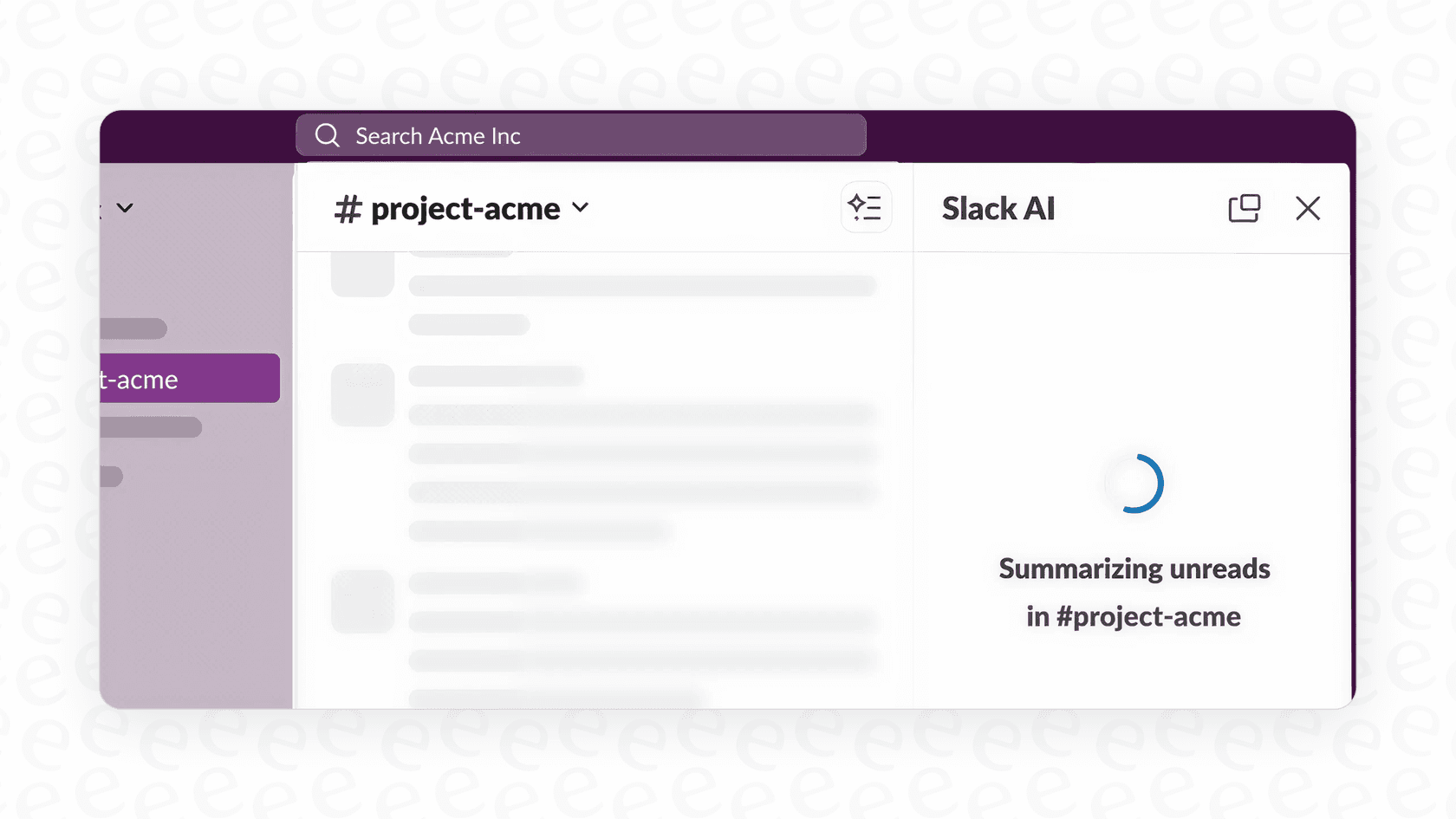
At its core, Slack AI draws on the conversation data already in your company’s workspace, and Slack says it does not train large language models on customer data. It uses this history to power features like channel recaps, thread summaries, and a search function that actually understands what you mean when you type a real question.
What is the Slack AI Explain Messages feature?
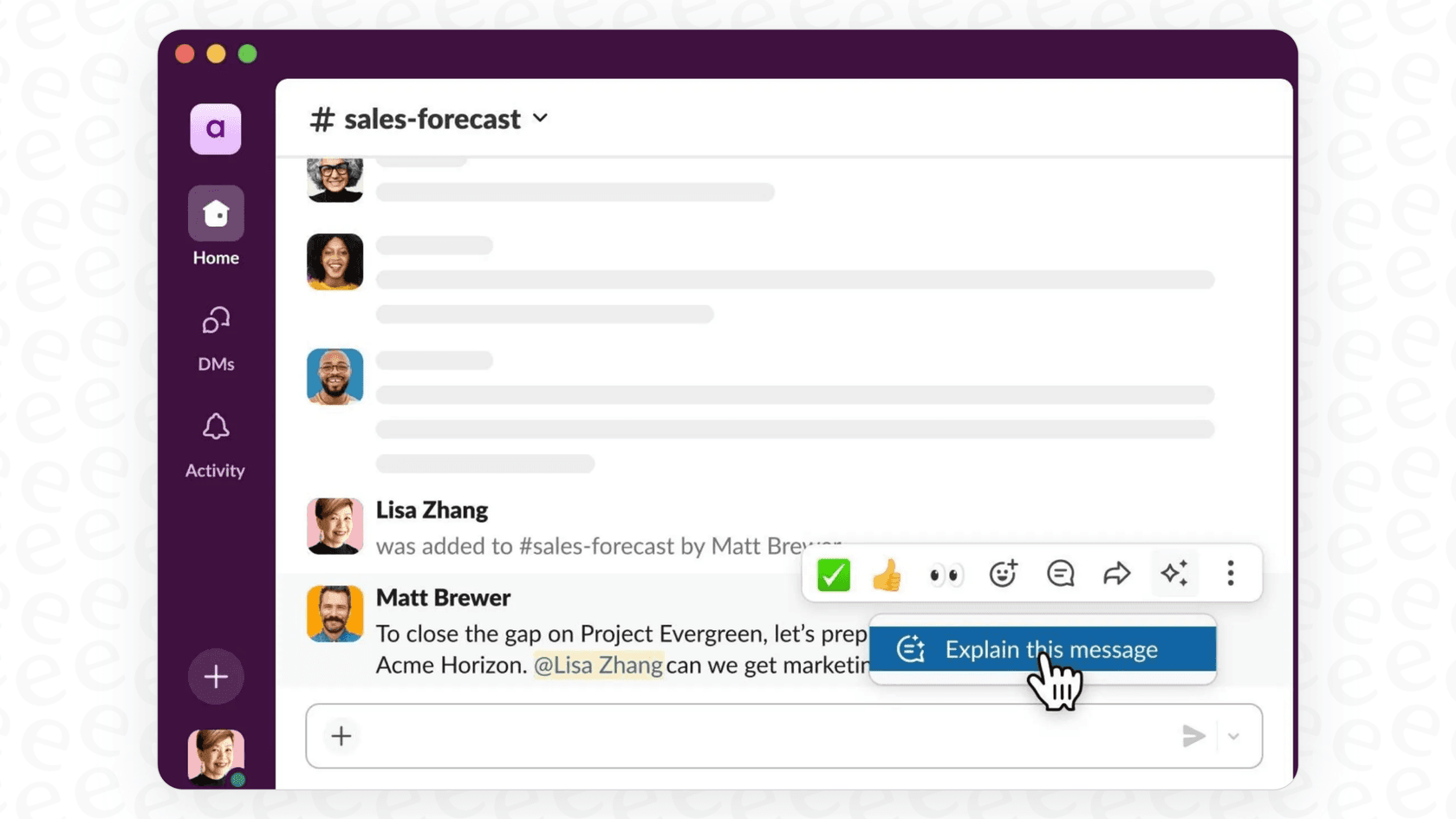
The Slack AI Explain Messages feature is one of the most practical tools in the new lineup. Think of it as a personalized, on-demand dictionary for your company. When you stumble across a term you don’t recognize, whether it’s an internal acronym, a project name, or some team-specific jargon, you can get an instant, AI-generated explanation of it.
It works by drawing on your team’s conversations to piece together the unique vocabulary your teams use. Slack’s pricing page lists message explanations on Business+ and Enterprise+. The goal is to give you context without you having to interrupt your workflow or ping a coworker and wait for a reply. For new hires trying to get their bearings or for teams working on projects that span different departments, it’s a genuinely useful tool for making sure everyone is on the page.
How Slack AI Explain Messages works and its key benefits
While the idea is simple, having an instant in-house dictionary can actually make a big difference for team productivity and collaboration. It’s one of those subtle features that removes the small bits of friction that really add up over a day.
Get new team members up to speed faster
Picture a new employee joining a project that’s been going for months. The main channel is a firehose of information, packed with acronyms like "Q3-PQR" and casual references to "the Alpha build." Instead of feeling lost or having to constantly interrupt the team with basic questions, they can use the Explain Messages feature to quietly catch up.
This lets them learn the ropes on their own time, understand the history of a project, and start contributing to conversations much faster. It takes some of the pressure off existing team members and makes the whole onboarding process feel a lot smoother.
Make cross-functional collaboration less painful
Let’s face it, different departments often speak different languages. The engineering team talks about "sprints" and "pipelines," while marketing is focused on "MQLs" and "CTAs." When these teams have to work together on a project, miscommunication is pretty much guaranteed.
The Explain Messages feature acts as a sort of universal translator. A sales team member can instantly figure out what a "pull request" is without derailing a technical discussion. This helps break down communication barriers and makes sure that everyone, no matter their department, has the context they need to work together well. It keeps projects moving because everyone is speaking the same language, even if they’re using different words.
The limitations of Slack's native AI
The "Explain" feature is a solid attempt, but it has one main limit: its knowledge centers on Slack. While it’s great at understanding things that have been discussed in the channels and DMs you can access, the wider universe of information that lives elsewhere is reached only through other features.
The "Slack-only" knowledge gap
Most of your company’s real, documented knowledge isn’t in a random Slack thread. It’s stored in carefully organized knowledge bases like Confluence, team wikis in Notion, project plans in Google Docs, and detailed customer solutions in your help desk like Zendesk.
Slack’s native AI reaches only part of that. Confluence Cloud, Google Drive and a few other apps can be searched through enterprise search, which is an Enterprise+ feature, and Notion and Zendesk are not on Slack’s supported source list. So if a term or process is clearly defined in a Notion page but hasn’t been talked about much in Slack, the "Explain" feature may not have much to go on. This creates dead ends for people who are looking for the official answer, not just a summary of past chats. You end up with an incomplete explanation, forcing you to go hunt for the real information somewhere else, which kind of defeats the whole purpose.

A dictionary, not a doer
The other main issue is that the "Explain" feature is passive. It can tell you what something is, and doing something with that information is a separate step. It's a dictionary, not an assistant.
Follow-up questions, drafting a detailed response from an official document, or routing a request to the right team are jobs for other tools, such as Slackbot or an agent platform. For example, it might tell you that "RMA" means "Return Merchandise Authorization," but starting that process or checking on a customer's request is a separate task. For teams that want to move from just understanding information to actually acting on it, a more powerful and connected tool is needed.
How to build a real knowledge engine in Slack
The solution isn’t to ditch Slack, but to give it a major upgrade. By using a third-party integration, you can turn Slack from just a chat app into the central hub for all of your company's knowledge.
Unify your company knowledge sources
This is where a platform like eesel AI comes into the picture. It’s designed to break down the exact knowledge silos that hold back Slack’s native AI. eesel AI securely connects to the tools your company already uses, from Confluence and Google Docs to past support tickets in your help desk and internal wikis. Its integrations page lists 39, and anything with an API can be added through Network Access.
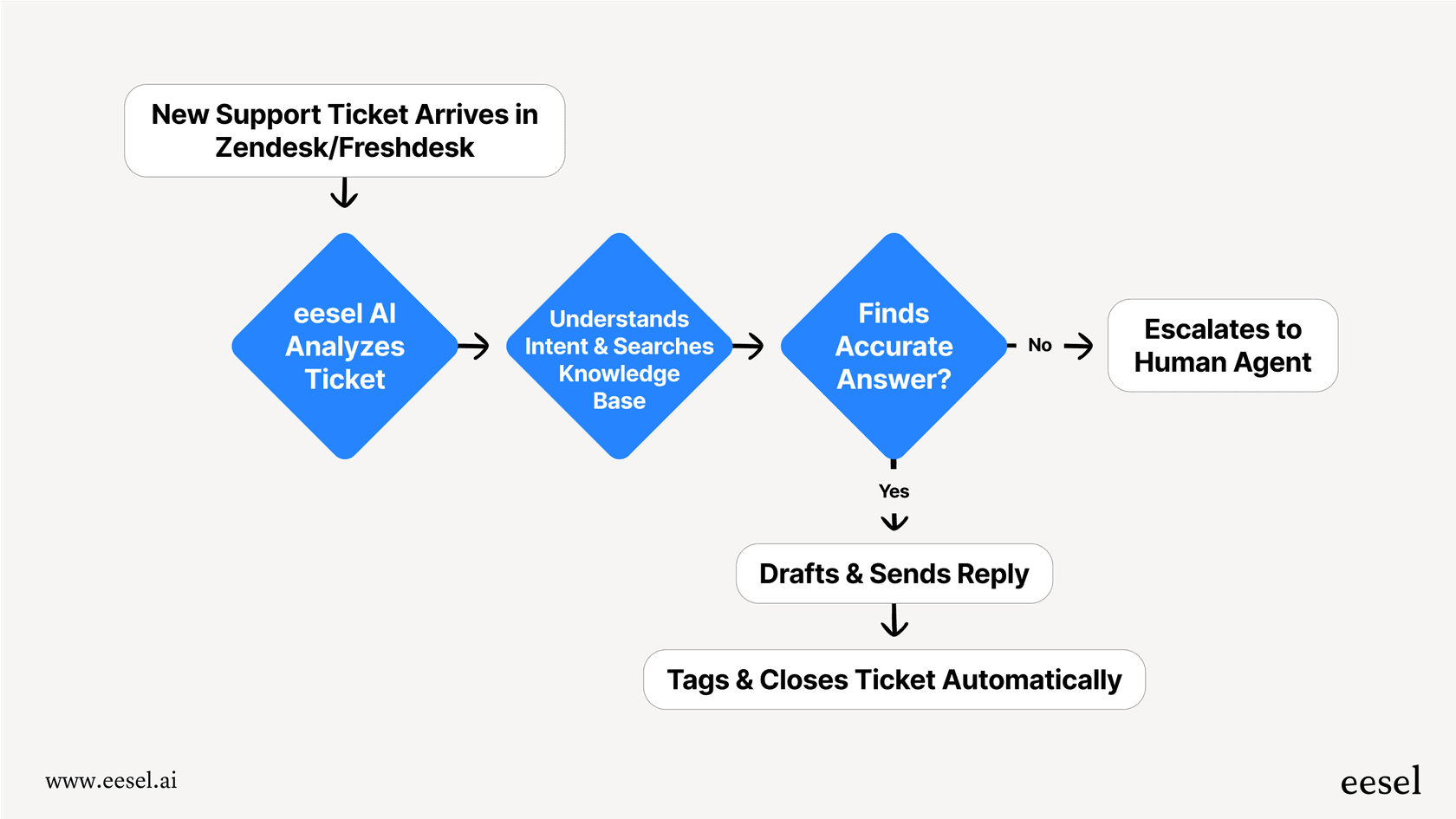
With the eesel AI teammate, employees can ask questions right in Slack and get complete answers pulled from every connected source, not just your chat history. eesel's Slack docs say it answers in the thread with a link to the source and keeps answering follow-ups there without being mentioned again. Instead of a partial explanation, they get the full, accurate, and context-rich information they need to do their job. It turns Slack into the front door for all your company's knowledge.
Go beyond explanations and start automating
Unlike Slack’s passive "Explain" feature, eesel AI’s unified knowledge base powers an AI Agent that can actually take action. It’s not just a dictionary; it’s a doer.
For instance, it can automatically answer common employee questions in channels like "#it-support" or "#hr-questions" by pulling answers straight from your official documentation. It can draft detailed replies for your support agents, route incoming requests to the right person, or even look up order information from Shopify.
Best of all, eesel AI is built to be different. It offers a radically self-serve setup, so you can get it running in minutes without having to sit through a sales demo. You can use its powerful simulation mode to test the AI against hundreds of your past tickets or generated test cases before you turn it on. And with granular controls, you can start small by automating just a few types of questions and then expand as you get more comfortable.
| Feature | Slack Native AI | eesel AI |
|---|---|---|
| Knowledge Sources | Mainly what's said in Slack | 39 listed integrations plus any API (Confluence, GDocs, Zendesk, etc.) |
| Primary Function | Explains jargon and sums up chats | Answers questions, drafts replies, and automates tasks |
| Setup & Onboarding | Built-in, nothing to set up | Self-serve, live in minutes without a sales call |
| Customization | Admin controls on who can use AI | Fully customizable persona, prompts, and actions |
| Testing & Rollout | Admins can restrict AI access | Powerful simulation mode and fine-tuned automation rules |
| Automation | Explain itself only explains | Can route tickets, make API calls, and update records |
Understanding Slack AI pricing
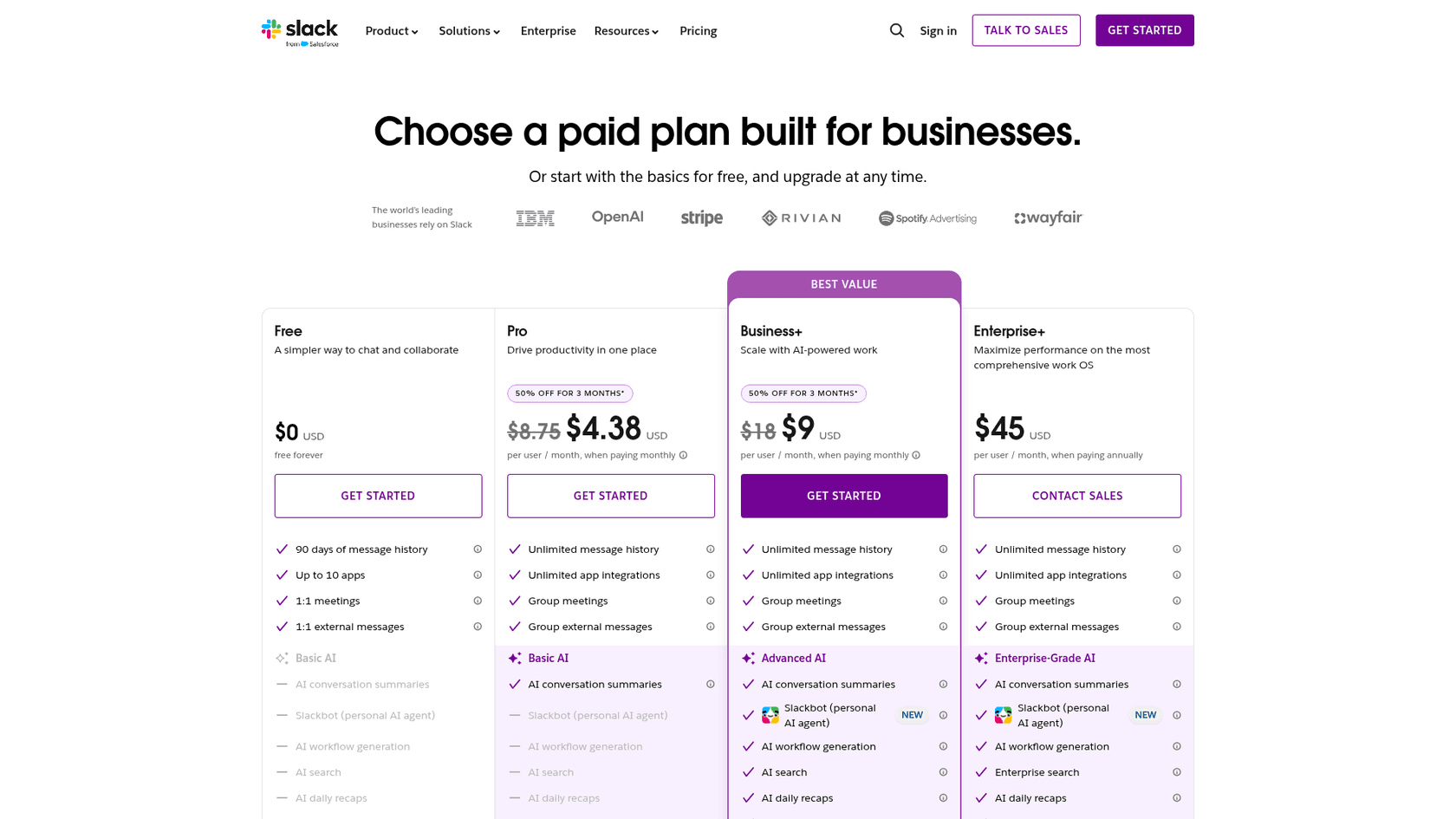
Slack includes AI features in its paid plans, and the more advanced capabilities, including message explanations, start on the more expensive tiers. This can be a hurdle, especially for smaller teams.
Here’s a quick look at their annual pricing:
-
Pro Plan ($7.25/user/month): This plan gives you the basics, like conversation summaries for channels and threads.
-
Business+ Plan ($15/user/month annually, $18 monthly): To get features like Explain Messages, AI-powered search, daily recaps, and translations, you’ll need to be on this plan.
-
Enterprise+ Plan (contact sales for pricing): This plan adds enterprise search across connected apps on top of the Business+ AI features.
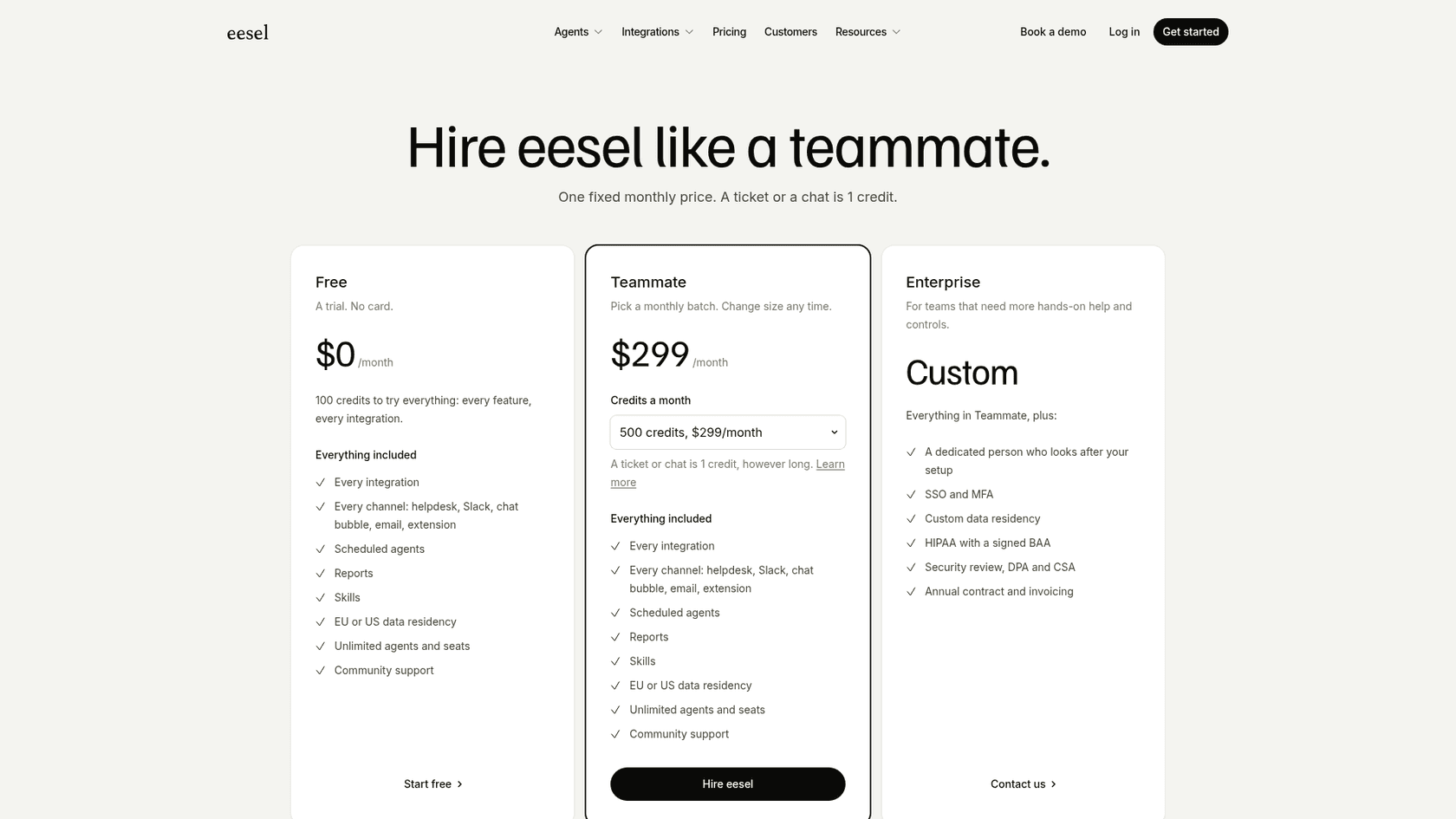
It's worth noting that a key feature like AI search isn't available on the entry-level paid plan. This per-user pricing can also get expensive as your team grows. In contrast, eesel AI's pricing is one fixed monthly price based on credits (1 credit per ticket or chat), with no per-seat fee. There are 100 free credits to start, and paid plans begin at $299/month for 500 credits.
Go beyond Slack AI Explain Messages with unified knowledge
Slack AI’s Explain Messages feature is a genuinely helpful tool for decoding your company's internal language. It’s a great start, but that’s all it is, a start. Because it only relies on Slack data, it can only ever give you part of the picture, leaving your team to go digging for complete answers in other systems.
For a truly intelligent and efficient workplace, you need to connect all the scattered places where your company knowledge lives. Doing that transforms a simple dictionary into an active, helpful AI assistant that provides complete answers and automates work. That's how you unlock real productivity gains for your whole organization.
Don't let valuable knowledge stay trapped in different apps. eesel AI connects to all your tools to build a powerful AI assistant that provides complete answers and automates work, directly from Slack. Start free (100 credits, no card) and see it for yourself in just a few minutes.
Frequently asked questions
What exactly is the Slack AI Explain Messages feature and how does it help users?
The Slack AI Explain Messages feature acts as an on-demand dictionary for your workspace, providing instant, AI-generated explanations for internal jargon and project names. It scans your conversation history to help you quickly understand context without interrupting your workflow or coworkers.
How does Slack AI Explain Messages improve onboarding for new team members?
Slack AI Explain Messages helps new hires independently understand project history and team-specific terminology. This allows them to quickly get up to speed, learn the ropes, and start contributing to conversations much faster, streamlining the onboarding process for everyone.
What are the main limitations of relying solely on Slack AI Explain Messages for company knowledge?
The biggest limitation is that Slack AI Explain Messages only pulls information from discussions within Slack. It cannot access critical, documented knowledge stored in external tools like Confluence or Google Docs, often leading to incomplete explanations and forcing users to search elsewhere.
Can Slack AI Explain Messages perform actions or only provide definitions?
No, Slack AI Explain Messages is primarily a passive tool designed to explain what something *is*. It functions like a dictionary, providing definitions and context, but it cannot perform actions, draft detailed responses, or route requests. For active assistance, a more integrated AI solution is needed.
How can I get more comprehensive answers than what Slack AI Explain Messages provides?
To get more comprehensive answers, you need to connect Slack with a unified knowledge platform like eesel AI. This allows an AI assistant to pull information from all your company's knowledge sources, providing complete, accurate, and context-rich answers.
Is the Slack AI Explain Messages feature included in all paid Slack plans?
No. Slack's pricing page lists AI message explanations on Business+ and Enterprise+ only, along with AI search. The Pro plan includes conversation and thread summaries and huddle notes, per Slack's plan guide.
When is Slack AI Explain Messages most effective for everyday team communication?
Slack AI Explain Messages is most effective for clarifying internal jargon, acronyms, and project codenames that are frequently discussed within your Slack channels. It's particularly useful for quickly understanding context in ongoing conversations, helping new team members get oriented, and bridging communication gaps between different departments.