

Why teams leave Zendesk (and why they don't always have to)
Zendesk is a genuinely good ticketing platform. It's a 2025 Gartner Magic Quadrant Leader, it scores 4.3/5 across more than 6,800 G2 reviews, and the core inbox is something teams happily use for years. Almost nobody leaves because the ticketing is bad. They leave because of what sits around it.
Four things drive the search for an alternative.
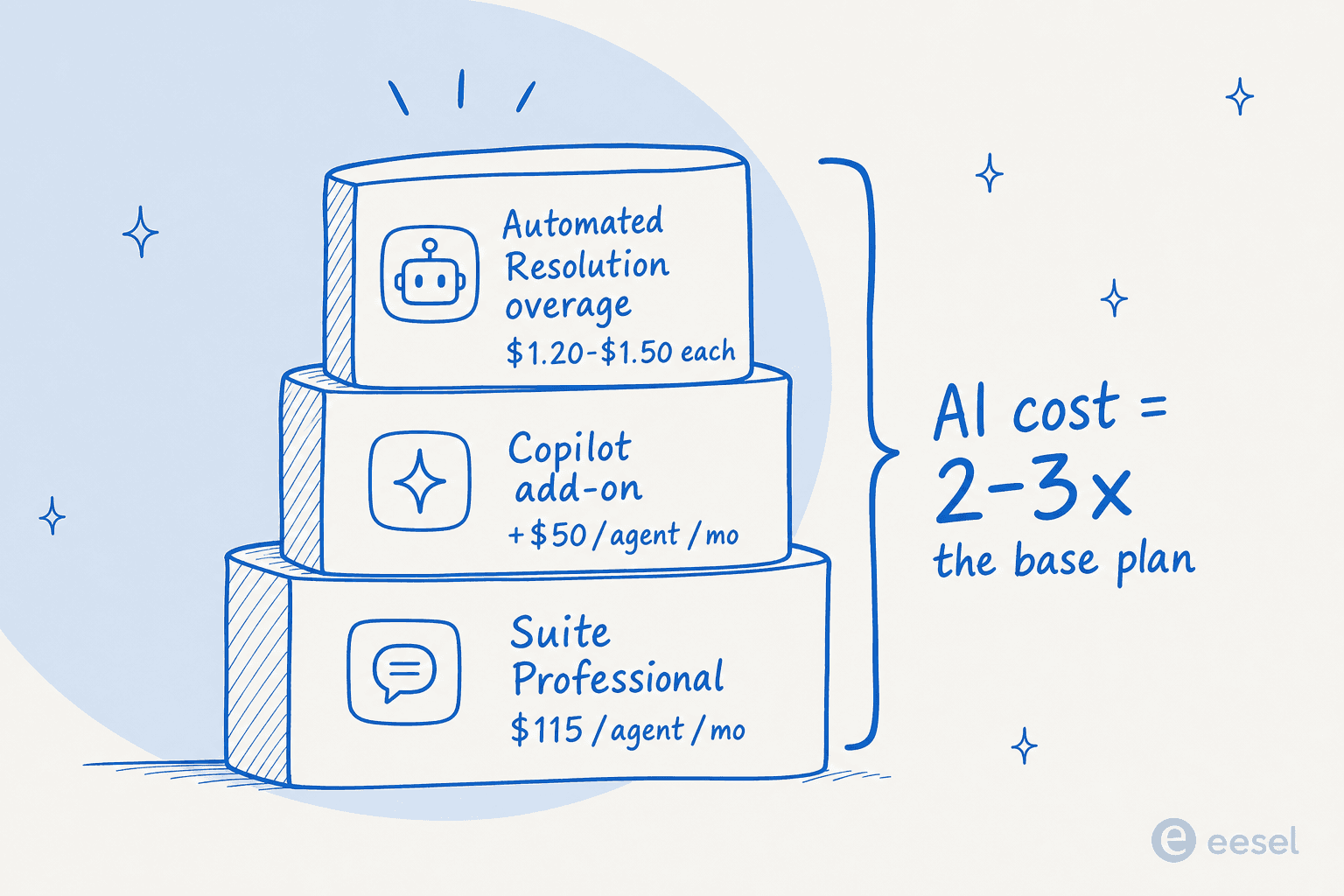
The seat price stacks. The headline number is never the number you pay. Zendesk Support starts at $19 per agent per month, Suite Team is $55 and Suite Professional $115, and then the add-ons arrive: Copilot from about $50 per agent, quality assurance from about $35, workforce management from about $25, each billed on top of the seat. A "fully loaded" Zendesk agent costs multiples of the plan you signed up for. We break the ladder down in Zendesk pricing and run worked examples in how much Zendesk costs.
The pricing math gets scary. Zendesk's AI Agents bill on "automated resolutions." Since the May 2026 three-tier model, only verified resolutions draw from your allowance, which is an improvement, but the per-resolution rate is still $1.50 committed or $2.00 pay-as-you-go, with no soft cap. The only overage control is to pause AI entirely. One Redditor working through the contract math put it plainly:
"From what I can see in regards to this new 'Automated Resolution' pricing model, we'll be paying about $1.50-$1.20 per resolution."
r/Zendesk, Zendesk's new AR pricing model

Stack the base plan, the Copilot add-on, and resolution overages together and the AI layer routinely costs two to three times the base subscription. Here's what that pile actually looks like.
The AI layer is hard to turn on. Reviewers consistently describe configuring Copilot, AI Agents, and Intelligent Triage as "burdensome." As one Capterra reviewer put it, setting up add-ons "could feel like a full time job in the backend." And results are gated by knowledge-base hygiene, with most teams seeing roughly 20% automation in month one, climbing toward 70% only after sustained KB cleanup.
The base tier doesn't feel like AI. The bundled Essentials tier gets described on r/Zendesk as a routing layer that "doesn't feel like AI at all" - which pushes you straight to the paid Copilot add-on or a third-party tool anyway.
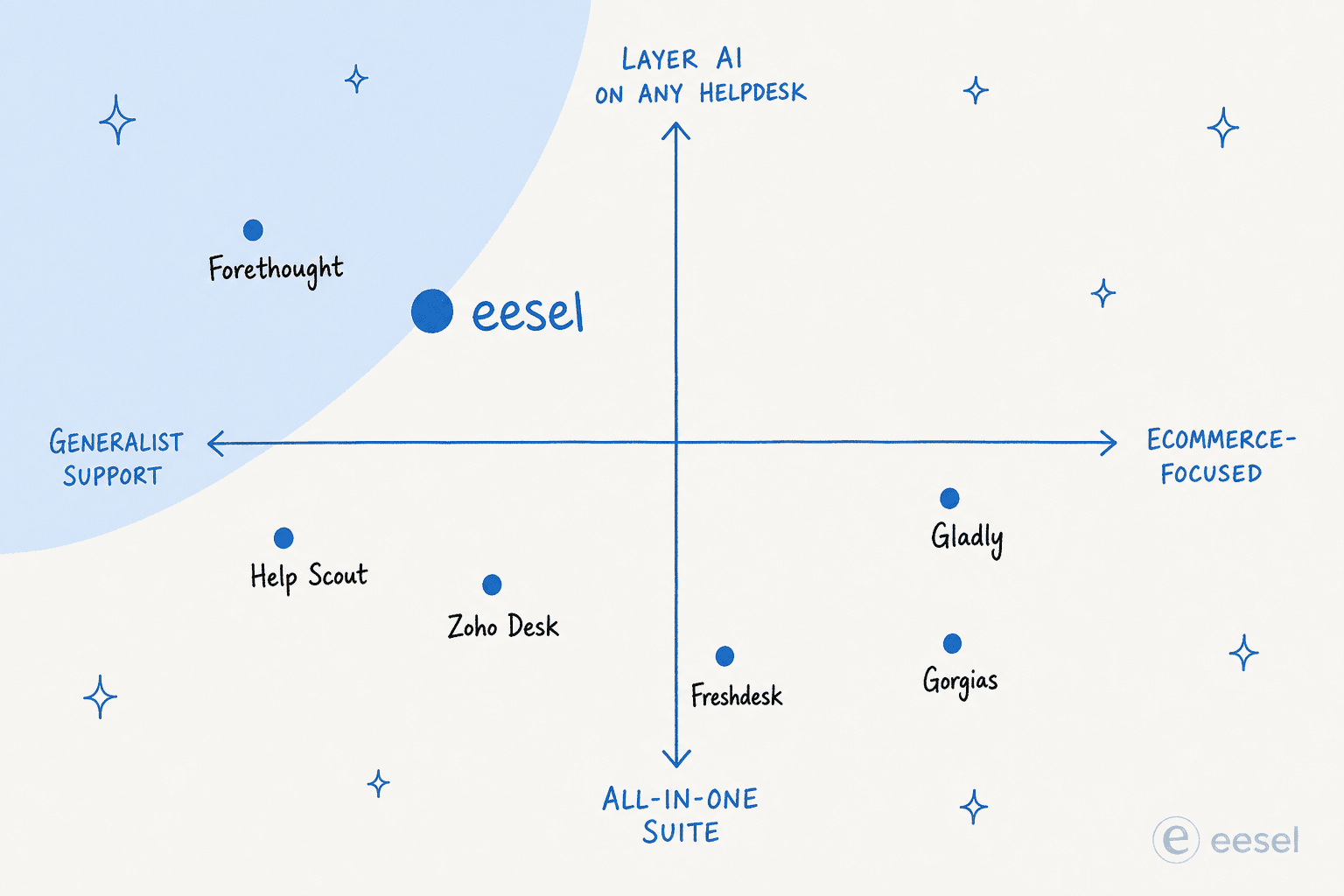
Here's the part most roundups miss: you don't have to abandon Zendesk to fix the AI. A few of the tools below sit on top of your current account. So the real first question isn't "what replaces Zendesk?" - it's "do I want to replace my helpdesk, or just its AI?" That map is worth keeping in your head as you read.
What a Zendesk alternative has to beat
Before the list, the bar. If a tool doesn't clear these, it isn't really an alternative, it's a downgrade you'll churn off in a year.
- All-in price, not seat price. Add the plan, every add-on you'd actually switch on, and the AI meter. Compare that number, not the pricing-page hero.
- AI you can afford at your real volume. Per resolution, per session, per seat, per ticket, or quote-only. At 1,000 tickets a month the gap between billing models is bigger than the gap between plans.
- A migration path for your history. Tickets and contacts move easily. Macros, triggers, SLAs, and custom reports usually don't. Ask before you sign.
- Omnichannel that matches your channels. Email and chat are table stakes. Voice, SMS, and WhatsApp are where suites quietly diverge.
- Reporting you won't outgrow. The most common regret we hear about lighter tools is not features, it's reporting.
- Time to value. Days on a clean knowledge base, or weeks of consultant-led setup?
How we picked, and how to read this list
We're a team that builds AI support agents for a living, so we evaluated these the way a buyer would: we looked at each product's own docs, pricing pages, and UI, and read what real users say on G2, Capterra, and Reddit. Every tool here is one we'd genuinely recommend to someone - the work is matching the tool to the team.
One column in the table below is the one most roundups skip, and it's the one that decides your bill: how each tool charges for AI. Sticker price tells you what a seat costs. The AI meter tells you what a busy month costs.
Here's the whole field at a glance.
| Tool | Best for | Replace or layer | Starting price | AI billing model | Indicative AI cost | G2 |
|---|---|---|---|---|---|---|
| eesel AI | Keeping Zendesk, adding AI fast | Layer | From $299/mo (500 credits), no seat fee | Per ticket handled (1 credit) | From $299/mo for 500 credits | - |
| Freshdesk (Freddy) | A cheaper Zendesk-style suite | Replace | $19 / agent / mo | Per AI session | $49 / 100 sessions | 4.5 (Capterra) |
| Gorgias | Shopify and ecommerce | Replace | $40 / mo, priced by ticket volume | Per resolved conversation | $0.90-$1.00 / resolution | 4.6 |
| Help Scout | Small, relationship-led teams | Replace | Free to 5 users, then $25 | Per resolution | $0.75 / resolution | 4.4 |
| Zoho Desk | Budget and Zoho users | Replace | Free to 3 agents, then $7 | Bundled tokens | From $0 (Free plan) | 4.4 |
| Front | Shared-inbox collaboration | Replace | $25 / seat / mo | Per-seat AI add-ons | Copilot $20 / seat / mo | 4.7 |
| Salesforce Service Cloud | Teams already on Salesforce | Replace | $25 / user / mo | Flex Credits | ~$0.10 / agent action | 4.4 |
| LiveAgent | Budget omnichannel with voice | Replace | $15 / agent / mo | Bundled in the seat price | No separate AI meter | 4.5 |
| HubSpot Service Hub | Teams on HubSpot CRM | Replace | Free tier, then $20 / seat | Bundled credits | Tier-dependent | 4.4 |
| Jira Service Management | Internal IT and ITSM | Replace | Free to 3 agents, then $20 | Bundled AI credits | Tier-dependent | 4.3 |
| Kustomer | High-volume B2C / DTC | Replace | Quote-only | Quote-only + per-conversation | $0.60 / engaged conversation | 4.5 |
| Forethought | Enterprise staying on its stack | Layer | Quote-only | Quote-only, outcome-based | Mid-5 to 6 figures / yr | - |
| Gladly | Retail / DTC built on LTV | Replace | Quote-only, from $120 / seat | Per resolution / per seat | $1.50 / resolution | 4.7 |
Prices are the vendors' published starting rates as of July 2026 and move often. Treat them as a shortlist filter, not a quote.
Now the detail, starting with the one we'd reach for first.
1. eesel AI
Best for: teams that like Zendesk's ticketing but want a better-priced, faster-to-deploy AI agent without ripping anything out.
eesel AI is the alternative that doesn't ask you to choose. It installs as a native AI Agent inside Zendesk from the Marketplace, reads your tickets and history, drafts and sends replies, updates fields, and escalates, behaving like a human agent in your existing account rather than a bolt-on chatbot. It also runs the same way inside Freshdesk, Help Scout, Slack, and 100+ other tools, so you're never locked into one stack.
Two things genuinely set it apart from Zendesk's own AI. First, you can run a simulation against your past tickets before a single live customer touches it, so you see your real resolution rate and fill knowledge gaps before launch instead of guessing. Second, the pricing is one fixed monthly price sized to your volume, with optional overage capped at a limit you set, so a holiday spike can't quietly triple your bill.
It isn't magic on day one, but it's fast. Gridwise hit 73% tier-1 resolution in the first month on a 7-day trial:
"In the first month, eesel is resolving 73% of our tier 1 requests... Our team implemented and achieved results quickly during our 7-day trial."
Kim Simpson, Gridwise, via the eesel Zendesk integration page
Pros:
- Keeps your existing helpdesk; no migration, live in under 30 minutes.
- One fixed monthly price from $299/month (500 credits) - no per-resolution roulette.
- Pre-launch simulation on historical tickets, plus knowledge-gap detection that drafts missing KB articles.
- 80+ languages, multi-brand, no model training on your data (SOC 2 Type II, GDPR).
Cons:
- It's an AI agent layer, not a full ticketing system - if you're trying to leave Zendesk's inbox entirely, you'd pair it with another helpdesk.
- Newer brand than the incumbents, so it won't have a 6,000-review G2 page yet.
Our take: if you're on Zendesk and the AI bill is what's driving you to look, this is the one to try first - you get autonomous resolution without the migration, and you can prove the ROI on your own tickets in a week. Teams replacing the whole helpdesk should still read on.
2. Freshdesk (Freddy AI)
Best for: teams that want a Zendesk-style suite with lower seat prices and a familiar feel.
Freshdesk, from Freshworks, is the closest like-for-like swap. It's a mature omnichannel helpdesk trusted by 74,000+ businesses, and its Freddy AI suite mirrors Zendesk's structure: an AI Agent for autonomous resolution, a Copilot for agents, and Insights for leadership. Freshworks claims Freddy resolves up to 80% of queries autonomously. If your team already thinks in tickets, SLAs, and routing, the learning curve is gentle. We've covered the head-to-head in detail in our Zendesk vs Freshdesk breakdown.
The pricing is the draw: Growth is $19/agent/month, Pro $55, and Enterprise $89 - undercutting Zendesk's Suite ladder. The catch is the AI billing. Freddy AI Agent runs on sessions: 500 included on Pro/Enterprise, then $49 per 100 sessions, and Freddy Copilot is a separate per-agent add-on.
Pros:
- Lower per-seat pricing than Zendesk Suite, with a similar feature footprint.
- Free for 1-2 agents for six months - a usable starting point.
- Strong omnichannel unification and a no-code AI Agent Studio.
Cons:
- Session-based AI pricing still gets expensive at volume, just in a different shape.
- It's a full migration off Zendesk, and Freddy's results are as KB-dependent as Zendesk's.
Our take: the safe, sensible swap if you want to stay in a single suite but pay less per seat. Just model the Freddy session costs at your real volume before you assume it's cheaper overall. (If you'd rather keep Freshdesk and add a better agent, eesel also runs natively inside Freshdesk.)
3. Gorgias
Best for: Shopify and ecommerce brands where most tickets are order-related.
If you sell on Shopify, Gorgias is the specialist Zendesk can't match. It's Shopify's only Premier Partner for CX, powers 40% of the top Shopify brands, and its AI Agent handles order tracking, returns, refunds, subscription edits, and discount generation with full Shopify context in every conversation. Where Zendesk treats Shopify as one more integration, Gorgias treats it as the center of gravity. For the wider ecommerce field, see our best Gorgias alternatives guide.
Pricing is by ticket volume rather than per agent: Starter $40/mo (helpdesk $10 plus AI Agent $30, capped at 3 users), Basic $77, Pro $471, Advanced $1,227 on annual billing. The AI Agent is an add-on at $0.90-$1.00 per fully resolved conversation. It scores a strong 4.6/5 on G2 from 560+ reviews.
"At 6pm on the second day of Black Friday week, our CX agent said: 'Alright, I'll see you tomorrow. We're at inbox zero.' Without AI Agent, that wouldn't happen."
Ron Shah, CEO of Obvi, on the Gorgias pricing page
Pros:
- Best-in-class Shopify data integration; order actions happen inside the ticket.
- Volume-based pricing rather than per-agent seats suits lean ecommerce teams.
- Proven revenue-driving chat campaigns, not just deflection.
Cons:
- The community's number one objection is price - roughly 3x Zendesk for similar ticket volumes, only worth it if 40%+ of tickets need Shopify actions.
- Outside ecommerce, the specialization is wasted.
Our take: the obvious pick for Shopify-heavy brands, and a poor one for everyone else. If most of your tickets are "where's my order," the native Shopify actions pay for themselves; if not, you're overpaying for ecommerce features you won't touch.
4. Help Scout
Best for: small, relationship-driven teams who find Zendesk too heavy.
Help Scout is the antidote to enterprise ticketing. Its whole pitch is a clean, email-like shared inbox you can "learn in less than an hour," used by 12,000+ companies. The AI layer is sensibly scoped: AI Answers (an autonomous agent that resolves ~73% of interactions from your knowledge base) plus an Inbox Assistant that drafts, summarizes, and edits replies. If Zendesk feels like flying a 747 to cross the street, this is the antidote. More options in our Help Scout alternatives roundup.
Plans are per user: Free (up to 5 users), Standard $25, Plus $45, Pro $75. AI Answers is a usage add-on at $0.75 per resolution, with a 3-month free trial and a spending cap you can set.
The honest caveat is pricing-model history. Help Scout switched from per-seat to per-interaction in 2025, churned customers, then reverted - and the whiplash cost trust:
"lost all trust with this flip-flopping on pricing."
Help Scout customer, surfaced in community discussion

Pros:
- Fastest tool here to learn; clean, low-clutter inbox.
- Generous free plan plus a 3-month free AI trial and resolution spending caps.
- AI Answers resolution pricing is among the more transparent.
Cons:
- Reporting and advanced features are thin; scaling teams report outgrowing it.
- The $0.75/resolution add-on stacks on seat costs and adds up at volume.
Our take: a great fit for small teams who value simplicity over depth. If you're a 5-15 person team drowning in Zendesk's settings, the relief is real - just know you may outgrow the reporting as you scale.
5. Zoho Desk
Best for: budget-conscious teams, and anyone already living in the Zoho ecosystem.
Zoho Desk is the value play. It's a capable omnichannel helpdesk used by 125,000+ businesses, and on Reddit it's the default "cheaper Zendesk" recommendation - "almost everything that Zendesk does at like half the cost." Plans run from a Free Forever tier (3 agents) up through Express $7, Standard $14, Professional $23, and Enterprise $40 per agent. Its AI assistant, Zia, spans Answer Bot, sentiment analysis, auto-tagging, and reply suggestions. We've also mapped the wider field of AI integrations for Zoho Desk.
The honest catch: most of the good Zia features are gated to the Enterprise tier, and Zia itself gets mixed reviews. One Redditor was blunt, calling Zia "a trainwreck of unhelpful responses." Many teams end up bolting ChatGPT on via the BYO-key integration to compensate.
Pros:
- Easily the cheapest serious option; a genuine Free Forever plan.
- Deep automation (Blueprint, SLAs, routing) praised as excellent value.
- Tight integration if you already run Zoho CRM and the wider suite.
Cons:
- Advanced Zia AI is Enterprise-only, pricing out the SMBs who are Zoho's core.
- Zia's quality lags; a cluttered UI and steep learning curve are common complaints.
Our take: unbeatable on price, and the right call if you're already in Zoho or running lean. Just set expectations on Zia - treat the native AI as a bonus, not the reason you buy, and budget for a stronger AI layer if automation is the goal.
6. Front
Best for: teams whose support work is really collaboration, and who want a shared inbox rather than a ticket queue.
Front treats support as email done properly by a team, not as a ticketing system with an email skin. Conversations look like conversations, and the collaboration layer sits inside them: internal comments, shared drafts, assignments, and mentions, so the "who is handling this" chatter never leaves the thread. That is a genuinely different shape from Zendesk, and for teams whose tickets are account-managed relationships rather than anonymous requests it lands much better. It earns 4.7/5 on G2. Plans start at $25 per seat per month billed annually, and AI is priced as add-ons on every tier except Enterprise, where Copilot, Smart QA, and Smart CSAT come bundled: Copilot is $20 per seat per month and the Autopilot agent starts at $0.05 per conversation. We cover the numbers in our Front pricing breakdown and the product itself in our Front review.
Pros:
- The best collaboration model here; internal discussion lives in the thread.
- Fast to learn, usually under an hour for a small team.
- Strong for B2B and account-based support where the same customers come back.
Cons:
- Per-seat pricing gets expensive as headcount grows, and there is no free tier.
- Reporting and automation depth trail Zendesk's; high-volume, low-touch queues are not its strength.
Our take: the right answer if your support is relationship-driven and the ticket metaphor has always felt wrong. The wrong one if you are deflecting thousands of repetitive requests a month.
7. Salesforce Service Cloud
Best for: organizations already standardized on Salesforce, where support data has to live next to sales data.
Salesforce Service Cloud is the enterprise default, and the argument for it is almost never the helpdesk itself. It is that your accounts, opportunities, and cases sit in one object model, so an agent sees the commercial relationship without a single integration. Agentforce is the AI layer, and it is usage-billed rather than a flat per-seat add-on: Flex Credits cost $500 per 100,000 credits, and a standard agent action spends 20 of them, so roughly $0.10 per action. Salesforce also sells the same capability at $2 per conversation or as a per-user license at the top of the range. Plans start at $25 per user per month and climb steeply. See our Salesforce Service Cloud pricing guide for the real ladder.
Pros:
- One customer record across sales and service, which nothing else here matches.
- Endlessly configurable, with an enormous partner and app ecosystem.
- Credit-based AI billing is easier to forecast than per-resolution pricing.
Cons:
- Implementation is a project, not a signup. Most teams need a partner.
- Total cost of ownership is the highest on this list once admin time is counted.
Our take: worth it if you are already a Salesforce shop and the CRM join is the point. If you are not, this is a heavier and more expensive Zendesk, not an escape from it.
8. LiveAgent
Best for: small teams that need real omnichannel, including phone, on a tight budget.
LiveAgent is the value omnichannel play. It bundles email, live chat and social channels into a single agent view from $15 per agent per month, and adds a built-in call center and IVR on the $29 Medium business plan, which is where it beats Zendesk outright: with Zendesk, voice is a Talk add-on on top of a much pricier seat. There is a free forever tier, though a 7-day ticket history and a single email channel make it closer to a trial. AI is bundled into the paid seat rather than metered or sold per agent. Our LiveAgent pricing post has the tier detail.
Pros:
- Native call center from $29 per agent, a price point where competitors charge extra.
- One of the cheapest genuinely omnichannel helpdesks available.
- Long feature list relative to cost, including a gamification layer teams either love or ignore.
Cons:
- The interface feels dated next to Front or Help Scout, and reviewers say so.
- AI is shallower than the leaders here; treat it as automation, not autonomous resolution.
Our take: the pragmatic pick when the budget is fixed and you genuinely need phone. Not the pick if AI resolution rate is what you are shopping for.
9. HubSpot Service Hub
Best for: teams already running HubSpot CRM or marketing who want support in the same record.
HubSpot Service Hub makes the same argument as Salesforce, at a much lower entry point. Tickets attach to the same contact record your marketing and sales teams work from, so lifecycle context is free. There is a real free tier for up to 2 users, and paid seats start at $20. The AI layer runs on bundled HubSpot Credits that scale by tier: 500 a month on Starter, 3,000 on Professional, 5,000 on Enterprise, with no rollover. The catch is familiar to anyone who has bought HubSpot before: the useful automation and reporting sit in Professional and Enterprise, and the jump between tiers is steep. Our HubSpot pricing guide walks through where the cliffs are.
Pros:
- A genuinely usable free tier, and the smoothest CRM join at SMB prices.
- Clean, modern interface with a short learning curve.
- Support, sales, and marketing reporting in one place.
Cons:
- The tier jump to Professional is a large step up in cost.
- Ticketing depth is thinner than Zendesk's for high-volume support operations.
Our take: an easy yes if HubSpot is already your CRM and support volume is moderate. A harder sell as a standalone helpdesk, where you are paying for CRM you may not use.
10. Jira Service Management
Best for: internal IT and service desks, especially where engineering already lives in Jira.
Jira Service Management is the one tool here built for a different job. It is ITSM first: incidents, changes, problems, assets, and approvals, with a direct line into Jira Software so a support ticket and the engineering issue that fixes it are linked rather than copied. If your "customers" are employees, this is often the honest answer instead of a customer-support suite. Free forever for up to 3 agents, then $20 per agent on Standard. See our Jira Service Management pricing breakdown, and our guide to the best AI for Jira Service Management if you want to strengthen the automation.
Pros:
- Proper ITSM workflows out of the box, not bolted on.
- The tightest dev-to-support handoff of anything on this list.
- Free tier for small teams and predictable per-agent pricing after that.
Cons:
- Overkill and awkward for external, customer-facing support.
- Configuration is powerful and correspondingly fiddly; expect admin time.
Our take: the right tool if you are running an internal help desk. If your tickets come from paying customers, one of the suites above will fit better.
11. Kustomer
Best for: high-volume B2C and DTC brands that want AI running on full customer context.
Kustomer rethinks the data model. Instead of discrete tickets, every interaction attaches to a complete customer record - order history, loyalty tier, past conversations - so its AI ("Concierge" for customers, "Envoy" for agents) reasons from the full timeline, not an isolated ticket. The pitch is "AI runs on context, not guesswork," and the results brands report are strong: Vuori automates 70% of chat, Aplazo runs 98% of WhatsApp conversations through AI. It scores 4.4/5 on G2 from 555 reviews.
The friction is buying it. Pricing is quote-only - every path routes to "Talk to Sales." Competitor teardowns peg it around $89-$139/seat/month on annual contracts with an 8-seat minimum, plus AI billed separately at roughly $0.60 per engaged conversation. One small flag: the homepage advertises a "5.0 from 500+ G2 reviews" that the actual G2 aggregate (4.5) doesn't support, so take the marketing number with a pinch of salt.
Pros:
- Unified customer timeline gives AI and agents real context; users love it.
- Proven at very high B2C volume with strong automation rates.
- Omnichannel including voice, SMS, and WhatsApp in one record.
Cons:
- Quote-only, high seat floor (8-seat minimum), AI metered on top - expensive and opaque.
- Reviewers flag a "buggy" voice channel and a complex, overwhelming UI.
Our take: worth a demo if you're a high-volume consumer brand that's outgrown ticket-centric tools and can absorb enterprise pricing. Smaller teams will find the seat floor and the sales-gated pricing a hard sell.
12. Forethought
Best for: enterprises that want serious agentic AI but are committed to their current helpdesk.
Forethought is the other tool here that doesn't make you switch. It's a standalone, helpdesk-agnostic AI platform that sits on top of Zendesk, Salesforce, or whatever you run, with a multi-agent system (Solve, Triage, Assist, Discover, plus Agent QA). Its strongest card is taking action: Autoflows, Custom Actions, and a Browser Agent that can even operate legacy systems without APIs. Founded in 2017 and backed by ~$92M in funding, it serves mature orgs like Upwork, Carta, and Grammarly, and claims up to 98% resolution rates.
One wrinkle worth knowing: Forethought is now Zendesk-owned, which makes it a slightly unusual "alternative," though it still runs across other helpdesks. Pricing is quote-only and outcome-based (no free trial - they run a Proof of Value on your data instead), typically landing in mid-five to low-six figures annually per secondary sources.
Pros:
- Helpdesk-agnostic - keep your stack and add agentic AI on top.
- Genuine action-taking, including legacy systems via the Browser Agent.
- Enterprise-grade multi-agent suite with strong reference customers.
Cons:
- No public pricing and no free trial; an enterprise sales cycle and ACV.
- Overkill for SMBs, and the Zendesk ownership muddies the "independence" pitch.
Our take: a strong fit for enterprise support orgs with complex, multi-system workflows that don't want to migrate. If that's not you, the lighter, transparently-priced layer-on options like eesel get you most of the way for a fraction of the commitment.
13. Gladly
Best for: retail and DTC brands that treat support as a revenue and loyalty channel.
Gladly shares Kustomer's "people, not tickets" philosophy but leans even harder into lifetime value, branding itself "the only AI built for LTV." Its Sidekick agent resolves end-to-end and takes real actions (cancel order, return, price adjustment) across chat, voice, email, SMS, and social, and the customer roster is a who's-who of premium retail: TUMI, Ulta, UGG, Crate & Barrel, Nordstrom. It earns the highest review score in this list at 4.7/5 from 1,112 G2 reviews, with vendors claiming 76% of conversations fully resolved by AI.
Pricing is mostly contact-sales for the core "Hero" platform (secondary sources cite ~$180-$210/seat/month annually). The one public, self-serve option is a newer Shopify plan: free to install, then a $250/month spend cap with $1.50 per AI resolution, $0.25 per AI assist, and $120/month per seat.
Pros:
- Highest G2 rating here; loved for the unified customer view and channel breadth.
- Real action-taking and a strong voice-AI story for retail.
- A new Shopify self-serve plan finally exposes some public pricing.
Cons:
- Consistently flagged as expensive; reporting is fragmented (manual Excel pulls).
- $1.50/resolution is the priciest per-resolution rate in this roundup, and platform pricing is sales-gated.
Our take: a premium choice for consumer brands where every conversation is a chance to grow LTV, and who'll actually use the personalization. Budget-sensitive teams will find both the seat pricing and the $1.50/resolution rate steep next to the alternatives.
Switching from Zendesk without losing your history
Every vendor above will tell you migration is easy. It is easy for the data and hard for the logic, and it helps to know which is which before you commit.
Moves across cleanly. Tickets, contacts, organizations, tags, and help-center articles. Freshdesk, Zoho Desk, Front, Help Scout, and Salesforce all ship import tools, and third-party services will do it for you if the volume is large or the history is messy.
Has to be rebuilt by hand. Macros, triggers, automations, SLA policies, business hours, and custom views. These are the hours nobody budgets for. Export a list of what you actually use first, because most teams find half their triggers have been dead for a year.
Breaks quietly. Custom reports and dashboards, anything hitting the Zendesk API, and any integration configured against Zendesk ticket fields. Audit your integrations before the cutover, not after.
A realistic timeline is two to four weeks for a mid-sized team. Run both systems in parallel for at least the first week, train the team before the cutover rather than on it, and update any public documentation or auto-replies that name your old support address.
This is also the honest reason the layer-on option exists. If your complaint is the AI bill rather than the ticketing, none of the above applies, because nothing moves.
So which Zendesk alternative should you pick?
Strip away the marketing and it comes down to two questions: do you want to replace Zendesk or just its AI, and what's your shape - ecommerce, enterprise, internal IT, small team, or budget?
- Keep Zendesk, fix the AI: eesel AI for most teams, Forethought for complex enterprises.
- Swap to a cheaper full suite: Freshdesk, Zoho Desk, or LiveAgent if you need phone.
- Ecommerce: Gorgias for Shopify, Gladly or Kustomer for premium DTC at scale. More in our ecommerce help desk software guide.
- Already on a CRM: Salesforce Service Cloud or HubSpot Service Hub.
- Internal IT: Jira Service Management.
- Small and simple: Help Scout or Front.
- Smallest budget: start with the genuinely free Zendesk alternatives, or our picks for startups.
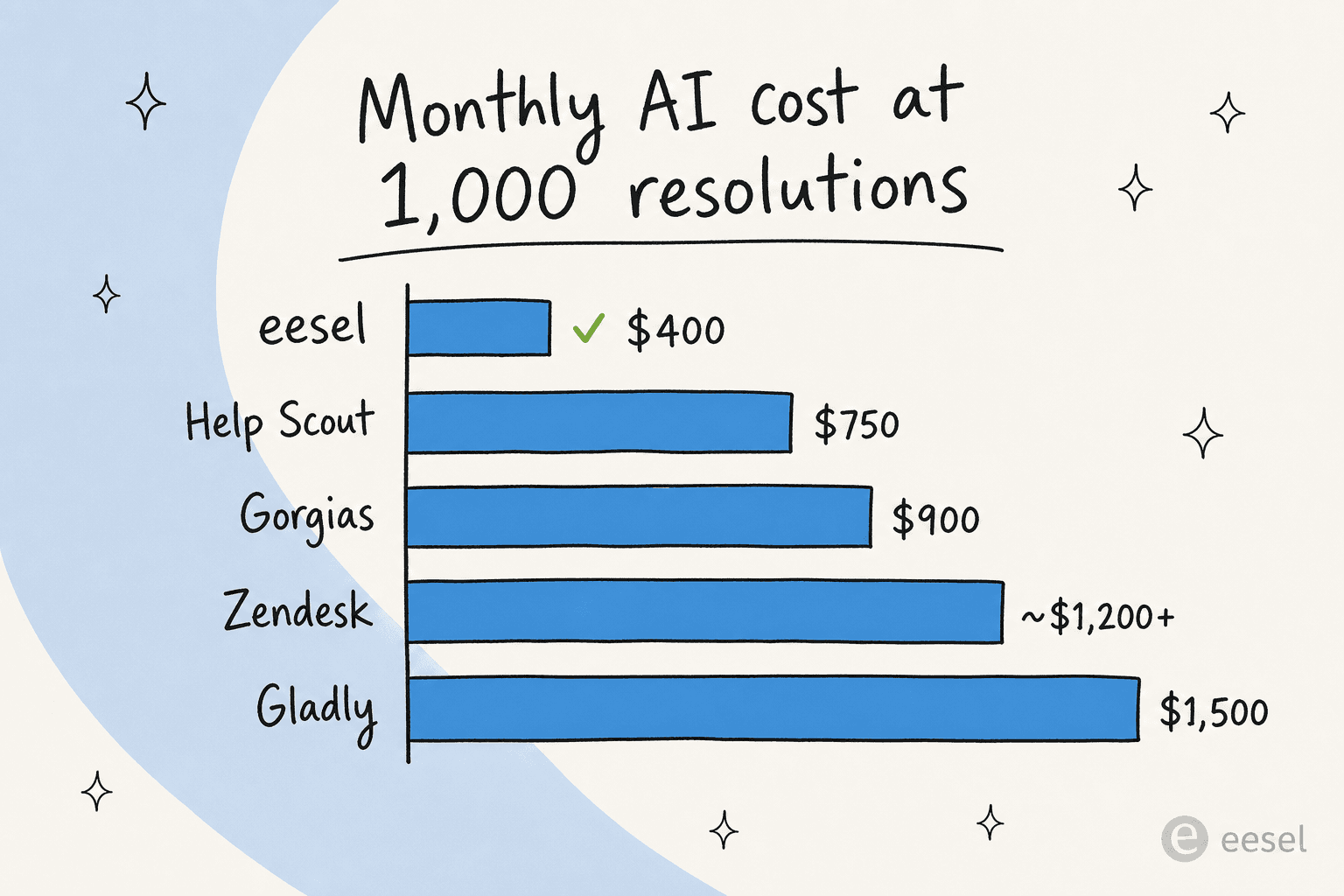
And the dimension that quietly decides the bill is the AI billing model. Per-resolution rates run from $0.75 (Help Scout) up to $1.50 (Gladly), with Zendesk's own automated resolutions landing at $1.50 to $2.00, for what is broadly the same job. eesel sits outside that model entirely with one fixed monthly price per batch of credits. At 1,000 AI conversations a month, that's the difference between a $499 plan and a $1,500 bill.
For most readers who landed here because the Zendesk bill got out of hand, the cleanest move is the one that doesn't require a migration at all. If you do want the wider field, our best AI helpdesk software roundup and our open-source ticketing system guide cover the options that didn't fit here.
Try eesel AI on your Zendesk
If the thing pushing you to look elsewhere is Zendesk's AI pricing and setup pain, eesel AI is the lowest-friction fix: it installs as a native AI Agent inside your existing Zendesk in under 30 minutes, learns from your past tickets and help center automatically, and bills one fixed monthly price from $299/month, so there are no per-resolution surprises.
The part we'd actually point you to: you can simulate the agent on your historical tickets before it ever replies to a customer, so you see your real resolution rate and fix knowledge gaps up front instead of finding out in production. Start free with 100 credits and no credit card, or book a demo to see it on your own data.