


Switching from a chaotic shared email to a system like Zendesk is a huge relief for any support team. For the first time, conversations are tracked, nothing slips through the cracks, and you have a real system of record. But if you’re reading this, you’ve probably hit the next stage: growth. And with growth comes new opportunities to optimize.
The Zendesk Inbox, which is really just the platform's core email-to-ticket engine, is a powerful foundation for customer service. To keep things running at peak efficiency, many teams find that adding a layer of smart automation on top of the robust setup they already have is the secret to real success.
What is the Zendesk Inbox?
Let's clear something up first. The Zendesk Inbox isn't a separate product you can buy. It’s the basic function that turns incoming emails into organized, trackable tickets. It’s the heart of their ticketing system and the first step most companies take to get away from shared inbox madness.
Here’s a simple look at how it works: a customer sends you an email, and Zendesk automatically logs it as a new ticket. That ticket then gets assigned to the right person or team based on rules you’ve put in place. Every single reply, from your agent and the customer, gets threaded into that one ticket. This gives you a clean, complete conversation history that anyone on your team can pull up.
The whole point is to bring order and professionalism to customer support. It makes sure no request gets missed and gives you one place to see every interaction. It's a massive step up from forwarding emails and provides a reliable system for teams of all sizes.
Here’s a quick breakdown of the flow:
-
A customer emails your support address.
-
Zendesk turns that email into a new ticket.
-
Your routing rules kick in.
-
The ticket lands with the right agent or group.
-
An agent replies from inside the Zendesk platform.
-
The customer gets that reply as a normal email.
Core features and benefits of the Zendesk Inbox
Zendesk is the industry leader for a reason. It has a solid set of features that help teams move from cobbled-together solutions to professional support operations. Let's look at what makes its ticketing system work so well.
Centralized ticketing system
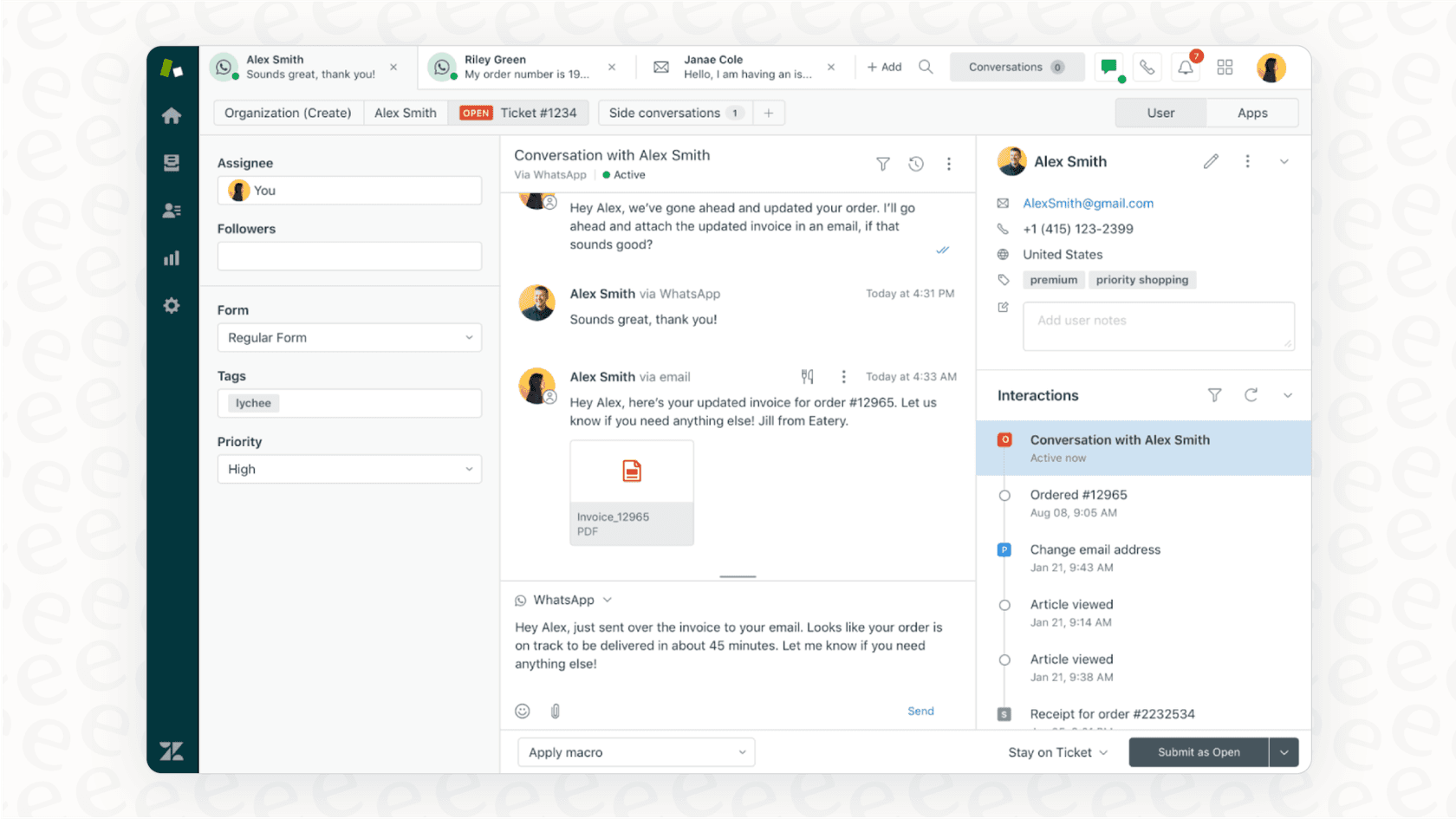
Probably the best thing about Zendesk is how it pulls all your customer requests from different channels, email, chat, social media, into one unified view. This means your agents have a streamlined workspace where they can keep up with all conversations effectively.
This approach keeps conversations organized and accessible. It provides a complete history of every customer interaction, giving agents the context they need to offer high-quality support without asking the customer to repeat information.
Workflow automation with triggers and macros
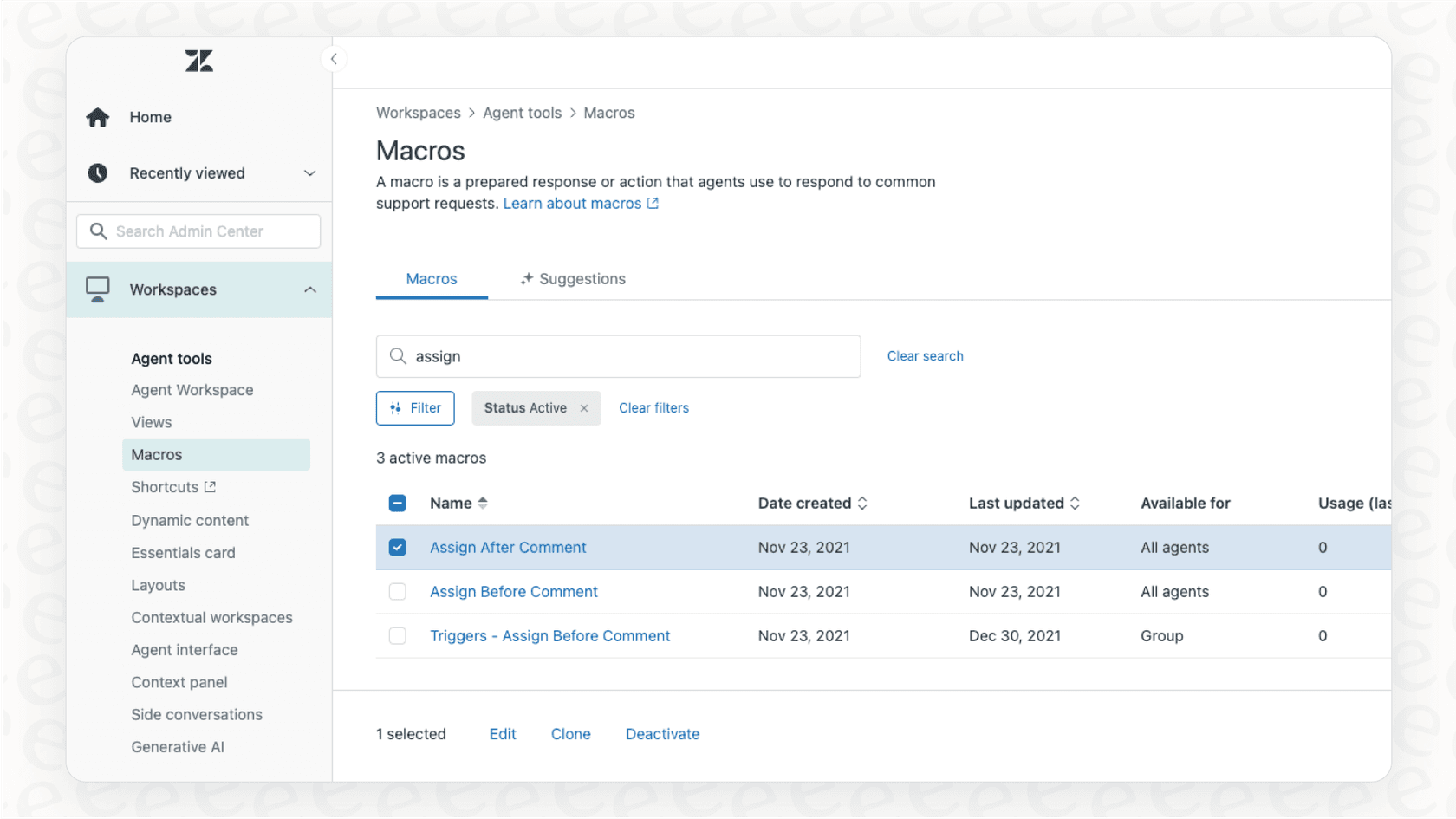
Zendesk helps you automate repetitive tasks with two key features: triggers and macros. Triggers are business rules that run automatically when a ticket is created or updated. For example, you can set up a trigger to send an auto-reply letting a customer know you got their email, or one that assigns all billing questions to the finance team.
Macros are pre-written responses or actions that agents can apply to a ticket in a single click. If you find your team answering common questions frequently, you can save those responses as macros. These are great for keeping answers consistent and maintaining professional response times.
Reporting and analytics
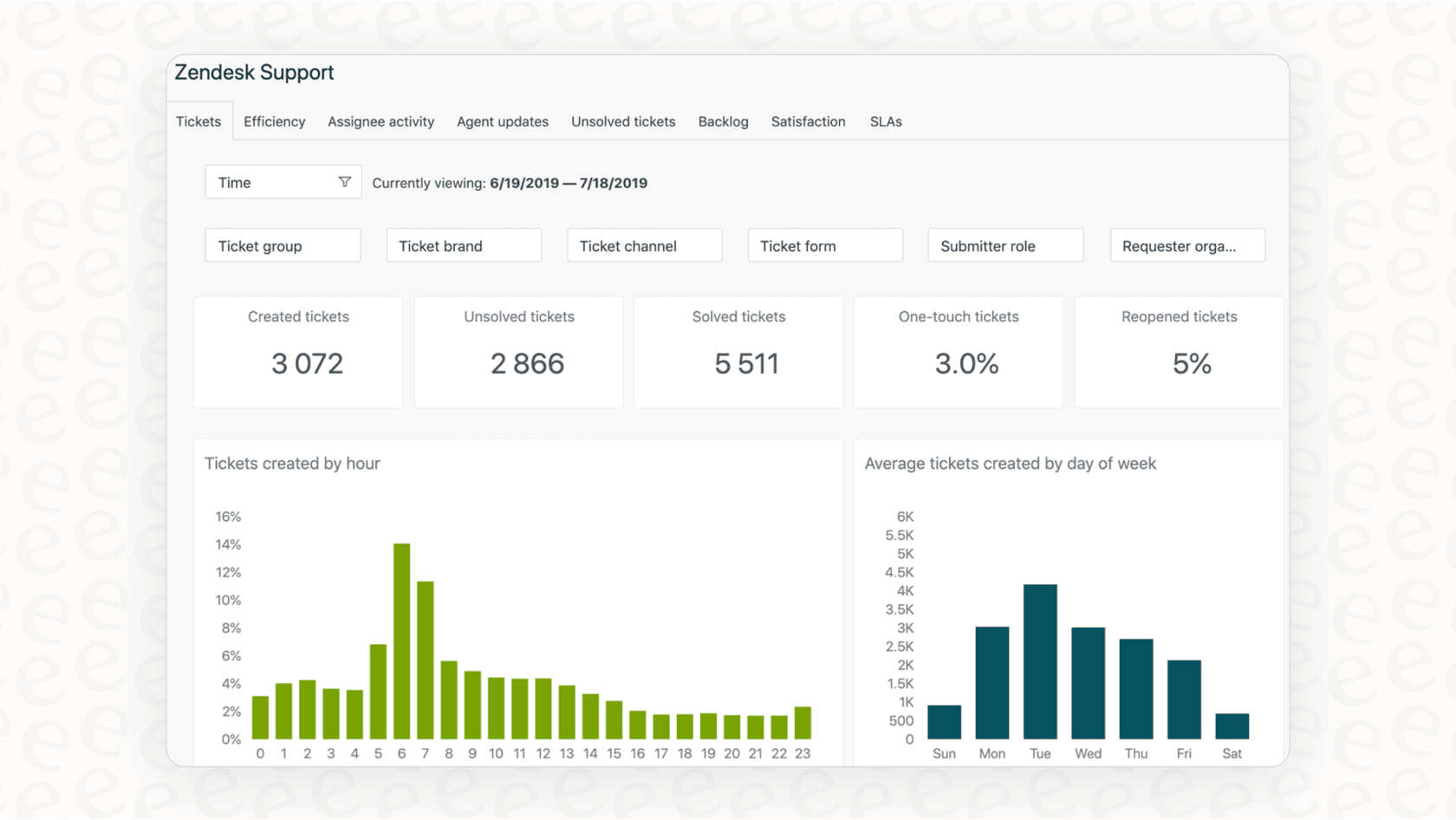
Zendesk has built-in dashboards that let you track important support metrics like first response time (FRT), resolution time, and customer satisfaction (CSAT).
These numbers give managers a clear picture of how the team is performing. You can see how your workflows are functioning, identify areas where agents are excelling, and use real data to refine your support process over time.
Maximizing efficiency as you scale your Zendesk Inbox
While Zendesk's features provide an excellent foundation, growing teams can benefit from looking at ways to streamline their expanding operations. Here are some areas where teams can focus on optimizing their setup.
Sophisticated setup for powerful workflows
Setting up a detailed system of triggers, automations, and routing rules in Zendesk is a testament to the platform's power and flexibility. This level of sophistication allows for highly tailored support processes. As your business grows, these workflows can be managed by a dedicated administrator to ensure they stay perfectly aligned with your needs.
If you are looking for additional ways to simplify setup, a tool like eesel AI is designed to be a quick-start option. Its one-click helpdesk integration lets you connect your Zendesk account in minutes. You can add powerful AI on top of your current setup to complement your existing Zendesk configurations.
Connecting all your knowledge sources
Zendesk is excellent for managing tickets, and teams often find that their knowledge is spread across internal wikis in Confluence, Notion, or Google Docs. While Zendesk has its own capable knowledge base, teams with diverse documentation can use integrations to bring everything together.
This is where eesel AI can provide a helpful boost by connecting your various knowledge sources. It links to Zendesk and over 100 other sources your team uses daily, training on your past tickets to learn your specific brand voice. This gives agents quick access to answers right where they are working in Zendesk.
Advanced AI features and investment considerations
Zendesk offers comprehensive AI features that provide a robust suite of tools for enterprise needs. These features are designed to handle complex support environments at scale. As your team grows, Zendesk's per-agent pricing model allows you to plan your investment as you add more members to your team.
For teams looking for additional flexibility, eesel AI offers a complementary approach with predictable pricing. It includes a powerful simulation mode that lets you test your AI setup on thousands of your old tickets. You can see how it works with your specific data before you go live, allowing for a smooth and risk-free rollout alongside your Zendesk setup.
Giving your Zendesk Inbox a boost with a modern AI layer
You can make your support operations even more efficient by adding a flexible AI layer that works with the great system you've already built. Here’s how a tool like eesel AI can complement the native options in Zendesk.
| Feature | Zendesk Native AI | eesel AI |
|---|---|---|
| Setup Time | Comprehensive configuration for enterprise scale | Quick start with one-click integration |
| Knowledge Sources | Zendesk Help Center & macros | 100+ sources (Zendesk, Confluence, Google Docs, etc.) |
| Automation Control | Reliable, structured workflows | Customizable workflow engine for selective automation |
| Custom Actions | Robust built-in environment | Flexible API lookups and ticket updates |
| Pre-launch Testing | Standard testing capabilities | Simulation on thousands of past tickets |
| Pricing Model | Tiered per-agent/month plans | Flat monthly fee based on interactions |
By plugging directly into your Zendesk instance, eesel AI provides access to useful tools that enhance your workflow:
-
Autonomous Frontline Support: Set up an AI Agent to handle common, repetitive tickets. It can answer questions and route things to the right human agent when needed, letting your team focus on more complex tasks.
-
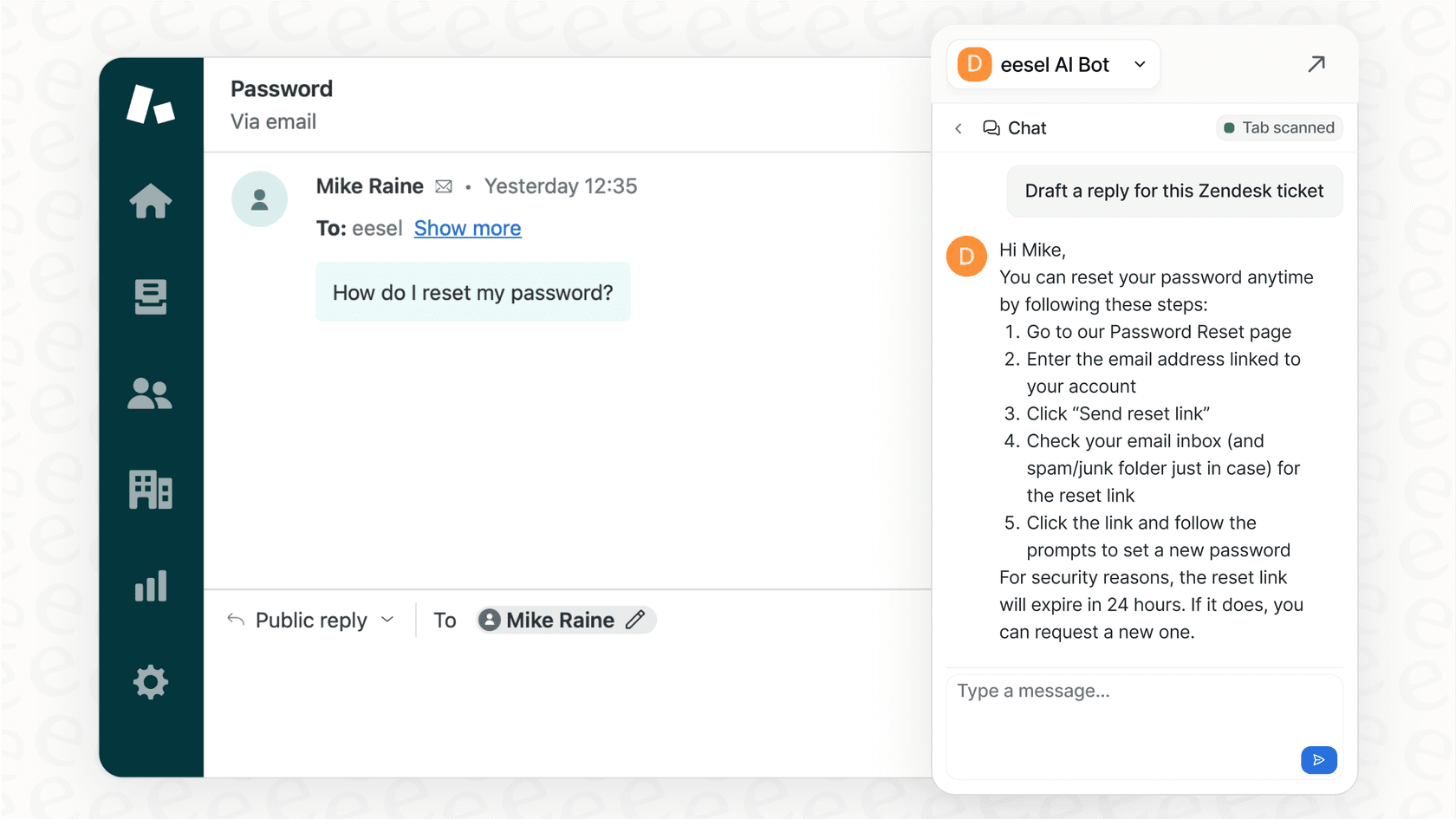
Instant Agent Assistance: Provide your team with an AI Copilot that drafts accurate replies inside the Zendesk interface, helping agents respond even more quickly.
-
Automated Ticket Hygiene: Use AI Triage to automatically route and tag incoming tickets. This keeps your Zendesk Inbox organized and ensures tickets are directed to the right experts immediately.
Zendesk Inbox pricing deep dive
Zendesk offers several plans for its service suite, all of which include its core email management and ticketing features. This tiered structure ensures that businesses of all sizes can find a plan that fits their specific requirements.
| Plan | Price (Billed Annually) | Key Email & AI Features |
|---|---|---|
| Support Team | $19 per agent/month | Basic email and ticketing support. |
| Suite Team | $55 per agent/month | Support Team + Essential AI agents, knowledge base, messaging. |
| Suite Professional | $115 per agent/month | Suite Team + CSAT surveys, skills-based routing, SLA management. |
| Suite Enterprise | Custom (sales) | Suite Pro + Custom agent roles, sandbox environment, advanced workflows. |
Note: Pricing is accurate for 2026 and sourced from Zendesk's pricing page. Advanced AI agents and Copilot (including tools like Ultimate.ai) are available to further enhance your platform.
Move beyond a simple Zendesk Inbox
The Zendesk Inbox is a fantastic foundation for getting customer support organized. It brings structure, accountability, and industry-leading features to your team. As your business reaches new heights, you can continue to build on this success.
Real efficiency comes from smart automation that works in harmony with your agents and uses all of your company's knowledge.
That’s why eesel AI is designed to be a smart, flexible layer that fits right into your existing Zendesk setup. It helps your team deliver fast, accurate support with ease, allowing you to scale your support with confidence on a platform you trust.
Get started with AI in your Zendesk Inbox in minutes
Ready to see how you could further optimize your support workflows? Try eesel AI for free and connect it to your Zendesk account in just a few clicks to start your first simulation today.
Frequently asked questions
What exactly is the Zendesk Inbox, and how does it function for a support team?
The Zendesk Inbox isn't a separate product; it's the core engine that turns incoming emails into organized, trackable tickets. It streamlines customer communication by consolidating messages into a single thread, ensuring no request is missed and providing a complete conversation history for agents.
What are some of the core features and benefits included with the Zendesk Inbox?
Key features include a centralized ticketing system for various channels, workflow automation via triggers and macros for repetitive tasks, and robust reporting and analytics. These help track performance, improve response times, and ensure consistent customer service.
What are some considerations for a growing team when using the Zendesk Inbox?
Growing teams benefit from Zendesk's sophisticated configuration options, though these may require dedicated administrative focus. By integrating complementary tools for knowledge management and AI, teams can maintain high efficiency and manage operational costs effectively as they scale.
Is it possible to enhance the capabilities of the Zendesk Inbox with an AI layer, and what are the benefits?
Yes, you can significantly boost its capabilities by adding a modern AI layer like eesel AI. This allows for autonomous frontline support, instant agent assistance, and automated ticket triage, making your existing Zendesk setup more efficient and scalable without needing to replace it.