


Thinking about taking Zendesk for a spin? A Zendesk trial is a pretty smart way to see if it’s the right fit for your customer support team. It’s one thing to read about features, but it’s another to see how it actually handles your team’s day-to-day. A trial lets you experience the platform firsthand-it's your chance to see how this mature, reliable tool can grow with you, especially when you start exploring its AI and automation potential.
In this guide, we'll walk through everything you need to know about the Zendesk trial, from the simple sign-up process to digging into its more powerful features. We’ll also look at its built-in AI, how it helps your team, and how you can get even more out of your support setup with complementary integrations.
What is a Zendesk trial?
So, what exactly do you get with a Zendesk trial? It's a free, 14-day pass to test out the platform and see if it works for your business. This is a full-featured experience where you get access to handle real support tickets, build out a help center, and test out the automation tools.
According to Zendesk's own documentation, every new trial starts on the Suite Professional plan. This gives you a solid set of tools for handling customer questions from pretty much anywhere, including the ticketing system, messaging, live chat, a knowledge base, and even voice support.
And if 14 days feels a bit rushed, don't worry. Zendesk is often willing to grant a one-time extension to give you a little more breathing room. Best of all, you don't need a credit card to get started, so you can jump right in.
How to start your Zendesk trial
Getting your Zendesk trial up and running is actually pretty quick. Zendesk has made the process painless, so you can get from sign-up to testing in just a few minutes. Here’s how it works:
-
Go to the registration page: First, head over to the official Zendesk registration page and pop in your work email.
-
Fill in your details: They'll ask for the basics: your name, phone number, company name, and how many employees you have.
-
Pick your subdomain: This is the fun part. You get to create your own unique Zendesk URL, like "yourcompany.zendesk.com", which will be the home for your support portal.
-
Follow the setup wizard: After your account is created, a handy wizard pops up to walk you through the first steps, like connecting your support email and inviting your team. As Zendesk's guide points out, you can link a Gmail or Microsoft Exchange account directly or just set up email forwarding from another provider.
What's included in the Zendesk trial
Your Zendesk trial drops you into their Suite Professional plan, which is packed with useful tools. It's a great way to see the depth of features that make Zendesk an industry leader.
Core features in your Zendesk trial
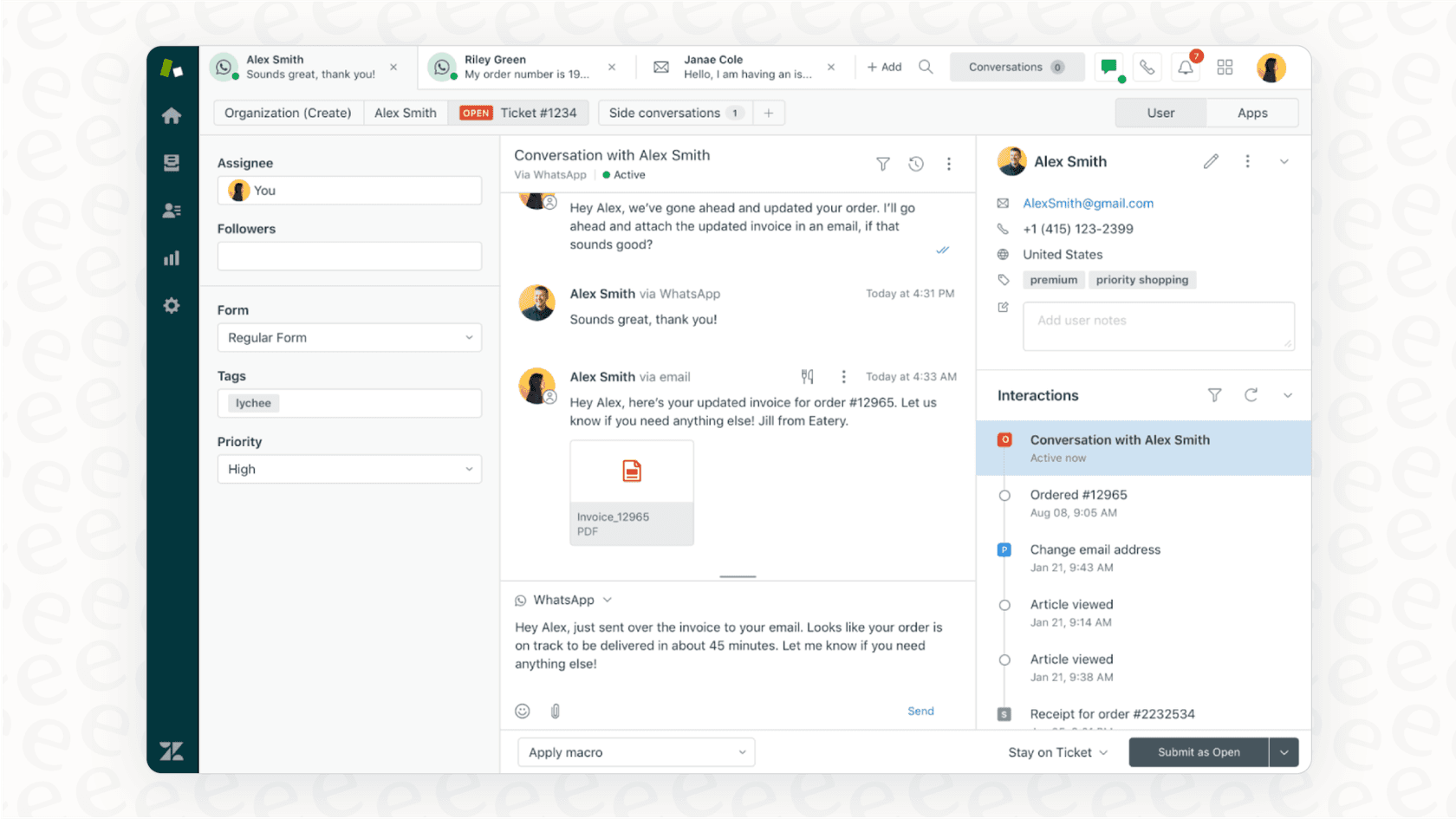
The Suite Professional plan covers all the bases for a modern support team. You’ll be able to test out:
-
A ticketing system: This gives your agents one unified, professional place to manage conversations, no matter which channel they come from.
-
Messaging & live chat: You can talk to customers in real-time on your website or inside your app.
-
A help center: Build a self-service knowledge base where customers can find their own answers. You can even create up to five different ones.
-
Voice & social channels: It also includes integrated phone support and can connect to social messaging apps like WhatsApp and Instagram.
-
Reporting & analytics: You get access to dashboards you can customize to keep an eye on your team's performance and track customer satisfaction (CSAT).
Understanding Zendesk's AI offerings
Zendesk provides impressive AI capabilities, and you do get to try some of it out during the trial.
Here’s what you get to explore:
-
"Essential" AI Agents: Your trial comes with Zendesk's core AI agents. They can generate replies for common questions and adopt a persona you customize, working beautifully with the articles in your Zendesk help center.
-
Advanced AI Capabilities: For teams looking for even more robust automation, Zendesk offers Advanced AI agents (powered by Ultimate.ai). These are designed to handle more complicated tasks and nuance. The Copilot add-on is another powerful feature that helps human agents work faster by providing smart suggestions.
The built-in AI is an excellent starting point, especially when your knowledge lives inside the Zendesk Help Center. If your team's expertise is also located in Google Docs, Confluence, or past tickets, there are great ways to bring all that info together.
Getting the most out of Zendesk AI
Putting the AI through its paces is probably high on your list for the Zendesk trial. You want to see how it can lighten your agents' load and keep customers happy. Zendesk's native AI provides a robust foundation, and you can easily expand its reach with complementary tools.
Expanding your knowledge base for AI
Zendesk's AI is optimized to work with content inside the Zendesk ecosystem. Since many companies also have valuable info in Google Docs, Confluence, and Slack, many teams choose to use integrations to ensure their AI has the most complete picture possible.
A practical way to test and deploy AI during your Zendesk trial
Here's a smart way to see what AI can do during your Zendesk trial:
-
Fast setup: While you build out your help center, you can also use eesel AI's Zendesk integration as a complementary tool. It connects your helpdesk and other knowledge sources quickly, allowing you to test AI responses right away.
-
Simulate before you activate: To ensure your AI is ready for customers, you can use features like simulation mode in eesel AI. You can run the AI against your old tickets to see exactly how it would have responded, giving you total confidence in your automation rate.
-
Unified knowledge: The eesel AI integration for Zendesk works alongside your Zendesk trial to train your AI on past tickets. This helps the AI learn your brand's voice and problem-solving style from day one.
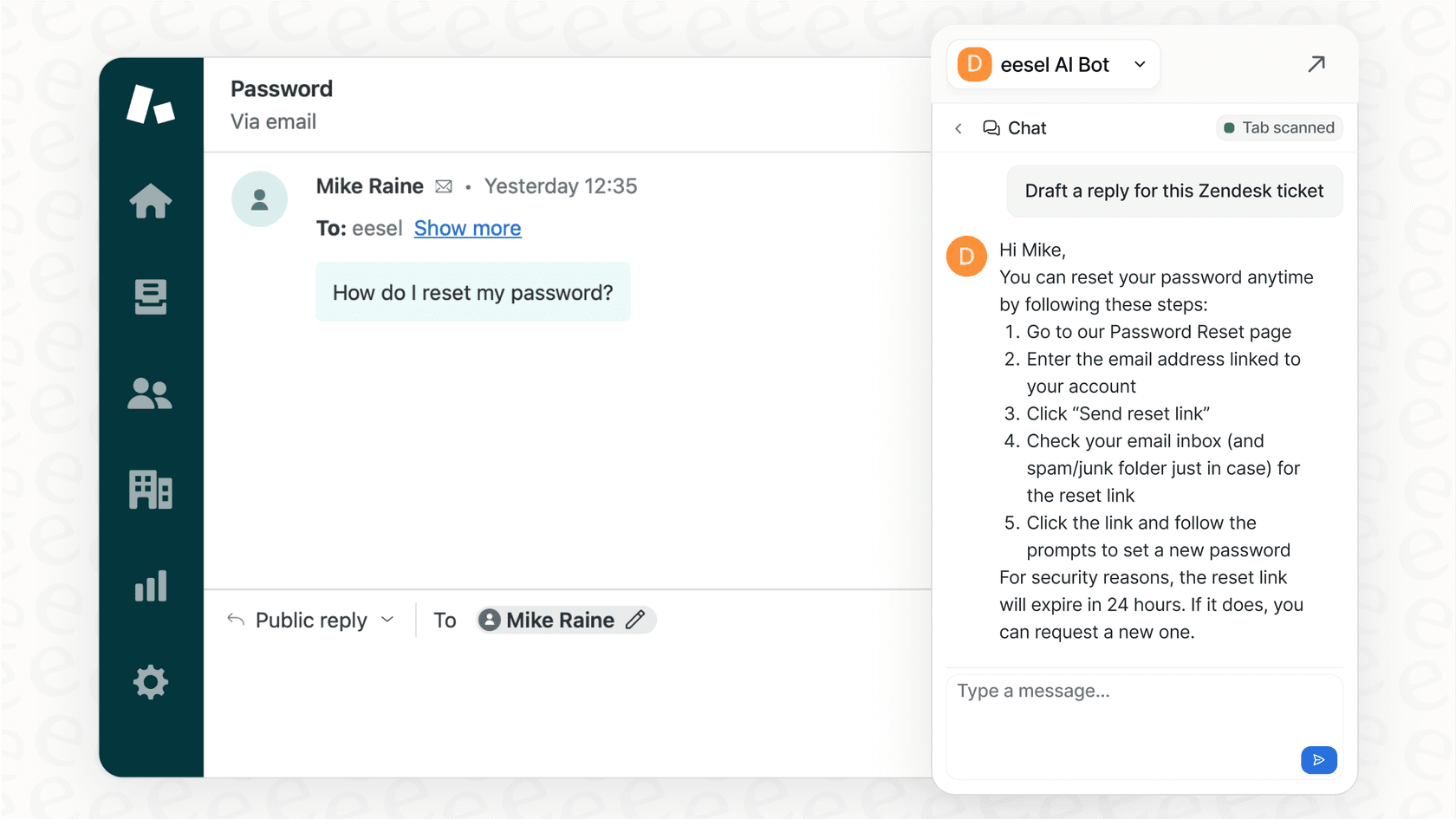
By pairing a flexible tool like eesel AI with your Zendesk trial, you can get a comprehensive picture of what a truly knowledgeable AI agent can do for your team while utilizing Zendesk's industry-leading platform.
Zendesk pricing after the Zendesk trial
Once your 14-day trial is up, you'll choose a paid plan to keep using the platform. Zendesk offers tiered plans designed to match different team sizes and needs, ensuring you have the right level of support as you scale.
Here's a look at the standard Zendesk Suite plans (annual billing):
| Plan | Price (per agent/month) | Key Features |
|---|---|---|
| Suite Team | $55 | Basic ticketing, messaging, help center, and "Essential" AI agents. |
| Suite Professional | $115 | Everything in Team, plus customizable reporting, CSAT surveys, and skills-based routing. |
| Suite Enterprise | Custom (sales) | Everything in Professional, plus a sandbox environment, custom agent roles, and advanced workflows. |
Pricing is based on 2026 information from Zendesk's website. Advanced AI agents (Ultimate.ai) and Copilot features are available as powerful add-ons.
Zendesk's structure is built for professional scale. If you are also looking for a flat-price option for AI, tools like eesel AI offer straightforward pricing (from $299/month for 500 credits, with a free 100-credit plan) that can complement your Zendesk investment.
Making a smart decision with your Zendesk trial
The Zendesk trial is a great way to get a feel for a top-tier customer service tool. You can really see how its world-class ticketing and channel management work in practice. Zendesk is a mature, trusted ecosystem that powers thousands of successful support teams.
The real magic of AI in customer support happens when your platform is supported by all of your team's knowledge. By exploring the Zendesk ecosystem and its many integration-friendly options, you can build a support system that’s genuinely intelligent and ready for the future.
Ready to see how AI can enhance your support? Start a free trial of eesel AI and connect it to your Zendesk account to see the power of a unified knowledge base.
Frequently asked questions
How long does a Zendesk trial typically last, and can it be extended?
The standard Zendesk trial lasts 14 days. If you need more time to evaluate the platform thoroughly, Zendesk often grants a one-time extension upon request.
What specific Zendesk plan do I get access to during my Zendesk trial?
Every new Zendesk trial automatically starts you on the Suite Professional plan. This provides full access to a comprehensive set of features, allowing you to thoroughly test Zendesk's capabilities.
Do I need a credit card to sign up for a Zendesk trial?
No, you do not need to provide a credit card to get started with your Zendesk trial. This allows you to explore the platform and its features without any financial commitment upfront.
What are the main features included when I start my Zendesk trial?
Your Zendesk trial includes a ticketing system, messaging and live chat, a self-service help center, voice and social channel integration, and "Essential" AI agents. These tools cover the core needs of a modern customer support team.
What are the AI features available in the Zendesk trial?
The Zendesk trial includes "Essential" AI agents, which are optimized to work with the content within your Zendesk help center. For even more advanced needs, Zendesk offers "Advanced AI agents" (powered by Ultimate.ai) and "Copilot" add-ons as powerful additions to your suite.
What happens to my data and setup after my Zendesk trial ends?
If you choose not to subscribe to a paid plan after your Zendesk trial concludes, your account will be suspended, and your data may eventually be deleted. To retain your configuration and data, you'll need to select a paid Zendesk plan.
How can I make the most of my Zendesk trial if my company's knowledge is spread across multiple platforms?
To maximize your Zendesk trial, consider integrating with a complementary tool like eesel AI. This allows you to connect your AI agent to all your existing knowledge sources (e.g., Google Docs, Confluence) so they work alongside your Zendesk setup, providing a comprehensive AI test.