

We’ve all been there. You bounce from one Zoom call to the next, your calendar is a solid block of blue, and by the end of the day, trying to remember a key decision from your 9 AM meeting feels like searching for a needle in a haystack. The information exists, somewhere, but it’s buried under hours of chatter.
The good news is that AI is finally starting to tackle meeting fatigue and information overload in a real way. Zoom is at the forefront, building AI directly into its platform and planning to work with next-generation models like OpenAI's GPT-5.
This guide will walk you through what’s possible with Zoom's AI right now, what the future of Zoom integrations with GPT-5-Pro actually means for your daily work, and how to get around the usual roadblocks to build a smart system that works across all your company’s tools.
The foundation: Zoom's AI and GPT-5
To get a handle on where we're going, it helps to know what we're working with today. Zoom has already rolled out some pretty useful native AI features, while the whole tech world is waiting to see what OpenAI cooks up next.
Zoom AI Companion and Virtual Agent: The building blocks
Zoom is tackling AI with two main tools. First up is the Zoom AI Companion (now branded ZoomMate), which basically acts as your personal in-meeting assistant. It’s built right into Zoom to help with things like creating meeting summaries, catching you up if you join late, and tracking action items. Think of it as a very smart note-taker that never gets distracted.
Then you have the Zoom Virtual Agent. This is a more heavy-duty tool, often used for customer support. It recently got an upgrade to work with Zoom Phone, turning it into a 24/7 "AI concierge." According to a recent announcement, it can answer calls, book appointments, and handle common questions without needing a human. It's a solid step toward automating those frontline conversations.
The main thing to remember is that both of these tools are centered on Zoom's own channels and data. Third-party connections exist, through connected sources on paid ZoomMate plans and ITSM integrations for Virtual Agent.
The leap to GPT-5: What "Pro" means
Zoom has also mentioned that it will be one of the first platforms to use OpenAI's much-hyped GPT-5 model. This isn’t just a minor update; GPT-5 was pitched as a big jump for AI, with much better reasoning skills and what folks in the industry call "agentic" capabilities. An agentic AI doesn't just find information for you, it can actually perform complex, multi-step tasks on its own.
So, when we talk about "GPT-5-Pro," we're really talking about using this advanced tech in a business context. This means an AI that's not only smarter but also more reliable, secure, and built for professional workflows. This is the engine that will power the next wave of Zoom integrations with GPT-5-Pro, turning simple voice commands into fully finished tasks. One date to plan around: I checked OpenAI's deprecations page, and the gpt-5-pro-2025-10-06 API snapshot shuts down on December 11, 2026, with gpt-5.6-sol in pro reasoning mode as the replacement.
The current state of Zoom's native AI and its limitations
If you have a Zoom Workplace plan, you already have access to the AI Companion, and honestly, it can be a huge time-saver. Free Basic accounts get a limited version, with meeting summaries for 3 hosted meetings per month. You can use it to:
-
Get a quick summary of what you missed if you joined a meeting ten minutes late.
-
Automatically generate a summary with action items, so you don't have to sit through the recording again.
-
Draft replies or get the gist of a long document right inside Zoom Team Chat.
But here’s the catch: Zoom's AI is strongest on what happens inside a Zoom meeting or chat. Reaching the rest of your business means setting up connected sources inside Zoom, and the questions that need context from other tools are the hard ones, like:
-
"What was the final outcome of the support ticket this customer just mentioned?"
-
"Does this new feature idea line up with our official product roadmap in Confluence?"
-
"Can you find the signed sales contract from Google Docs for the client on this call?"
This creates a pretty big information gap. The AI can tell you what was said in the meeting, and the harder job is tying that conversation to the documents, tickets, and data that give it meaning.

The future is now: Exploring advanced integrations
The big promise of a GPT-5 integration is that it will give Zoom's agentic features a serious boost. An AI concierge won't just route a call; it could potentially understand a complex request, check inventory in one system, schedule a follow-up meeting that works for everyone, and send a confirmation email, all from a single conversation.
To pull this off today, many businesses use third-party automation platforms like Latenode or Relay.app. These tools act as the middleman between Zoom and your other apps, letting you build custom workflows. For instance, you could set it up so that a new meeting registration in Zoom automatically creates a new contact in your CRM.
But this approach has its own headaches:
-
It can get complicated. You often need some technical skill to build and maintain these workflows. You’re not just connecting two apps; you're building a mini-program, and things can easily break.
-
The knowledge is limited. These platforms are good at moving data from point A to point B, but they don't have a central "brain" that understands the content of that data. The workflow knows a meeting happened, but it has no idea what was discussed.
-
You don't have much control. The automation logic is often rigid. Trying to customize the AI's tone, tell it what it shouldn't answer, or handle unique situations can be a real pain.
The whole point of AI workflows is to make things simpler, but trying to connect all your data this way often just adds more complexity.
A better way: Unifying your knowledge base
The solution isn't just about connecting more apps; it's about giving your AI a single, unified source of truth that pulls from all your company's knowledge. Instead of building fragile, complicated workflows, you need a platform that’s designed from the start to unify, understand, and act on your information.
This is where a dedicated AI platform like eesel AI really makes a difference.
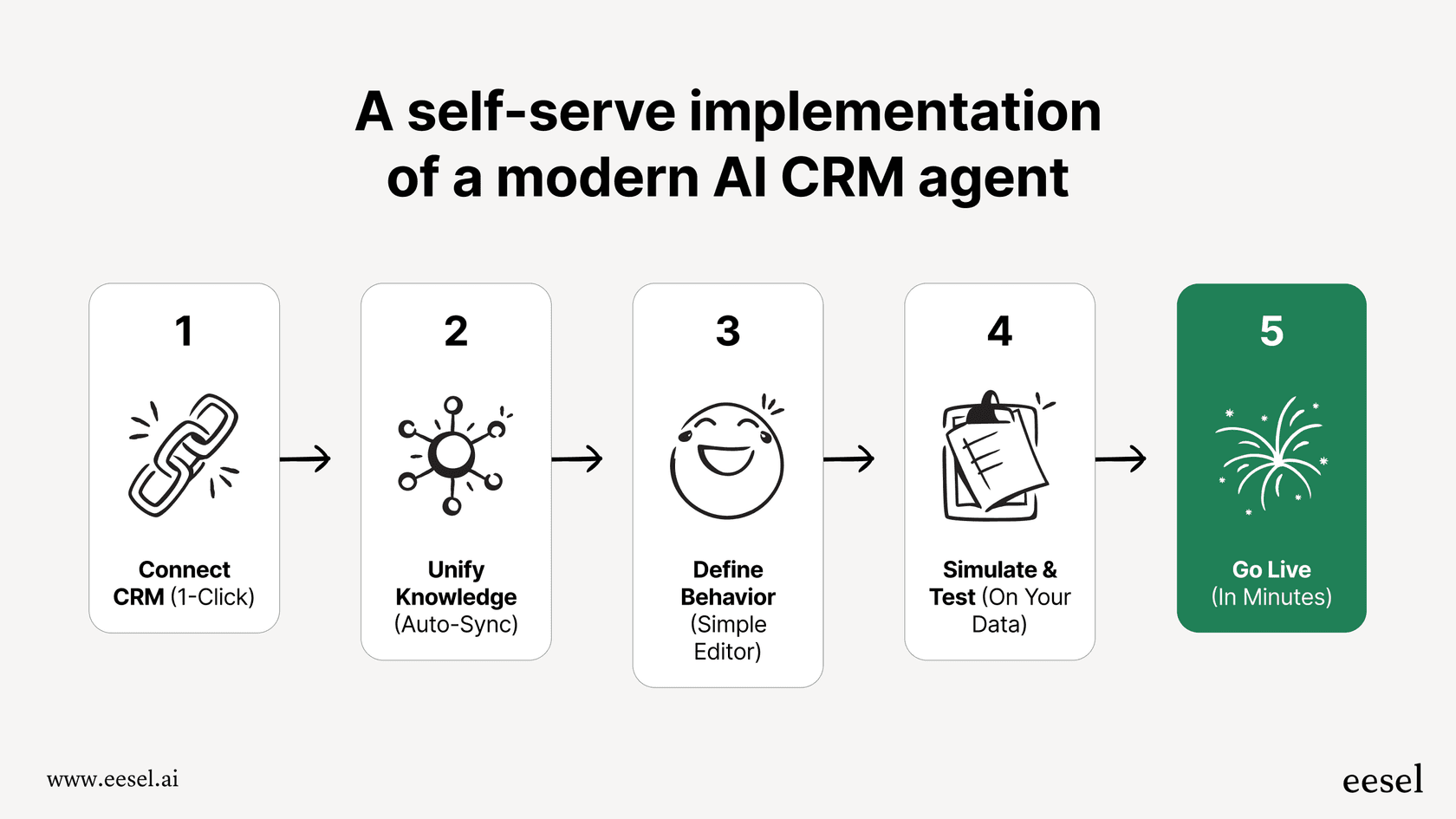
Go live in minutes
You don't need to wait on developers or sit through long sales demos. With eesel AI, you can get everything set up yourself. It has one-click connections for your help desks and knowledge sources. You can even run a simulation to see how the AI would have handled thousands of your past support tickets, giving you a clear, data-driven preview of its performance before it ever interacts with a customer. It provides a level of confidence that out-of-the-box tools just can't match.
Unify knowledge beyond Zoom
eesel AI is built to connect scattered knowledge. It securely connects to all the places your team gets work done, creating one comprehensive knowledge base for your AI. It learns from meeting transcripts you store in connected apps, but also from your Confluence pages, Google Docs, past Zendesk tickets, and internal Slack chats.
This means your AI agent has the full story. It can give accurate, context-aware answers whether it's helping an agent in a help desk, answering an employee's question in Slack, or powering a chatbot on your website.
Take full control with a customizable workflow engine
A smart system needs to be flexible. eesel AI gives you a powerful but easy-to-use workflow engine that puts you in control.
-
Selective Automation: You decide exactly which types of questions the AI should handle. You can start with simple, repetitive queries and have it automatically pass anything more complex to a human. No more rigid, all-or-nothing automation.
-
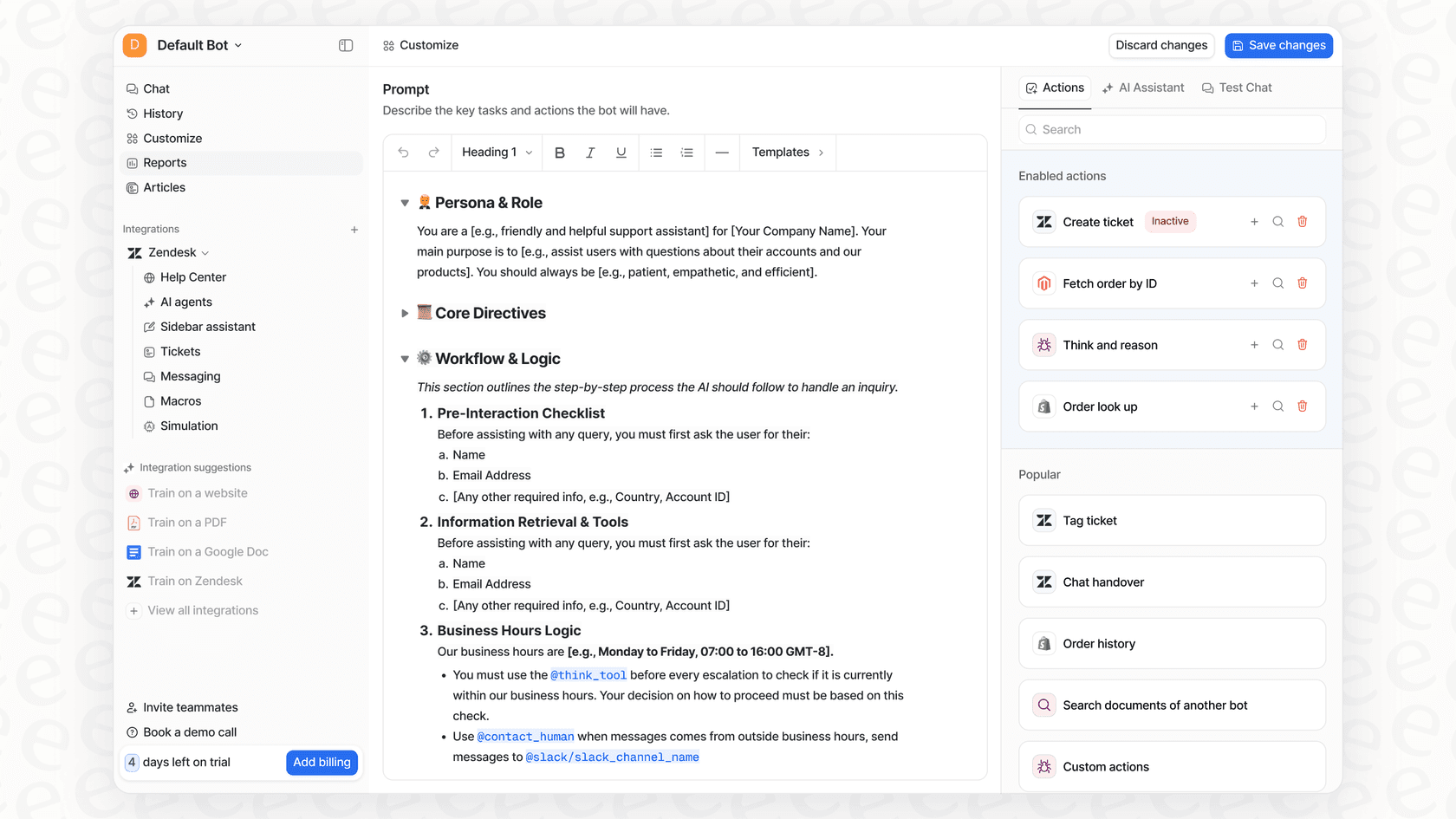
Custom Persona & Actions: With a simple prompt editor, you can define the AI's exact tone and personality. You can also create custom actions that let the AI perform tasks in other systems, like looking up live order information in Shopify or updating ticket fields. It delivers on the "agentic" AI promise without the headache of writing custom code.
Zoom AI pricing explained
One of the best things about Zoom's AI is that it’s pretty accessible. The AI Companion is included at no extra cost with Zoom Workplace plans, which is great value. Paid plans list unlimited meeting summaries and in-meeting questions, while the free Basic plan is capped at 3 hosted meetings a month. For heavier agent use, I saw a separate ZoomMate plan on Zoom's product page at $16.67 per user per month billed annually, with 2,200 AI credits included.
Here’s a quick look at the plans that include the AI Companion:
| Plan | Price (Billed Annually) | Key AI Features Included |
|---|---|---|
| Workplace Pro | $14.16 /user/month | AI Companion, Meeting Summaries, Task Management, 10 GB Cloud Storage |
| Workplace Business | $18.33 /user/month | All of Pro, plus 300 meeting participants, unlimited whiteboards |
| Workplace Enterprise | Contact Sales | All of Business, plus 1000 participants, PBX Phone, Webinars |
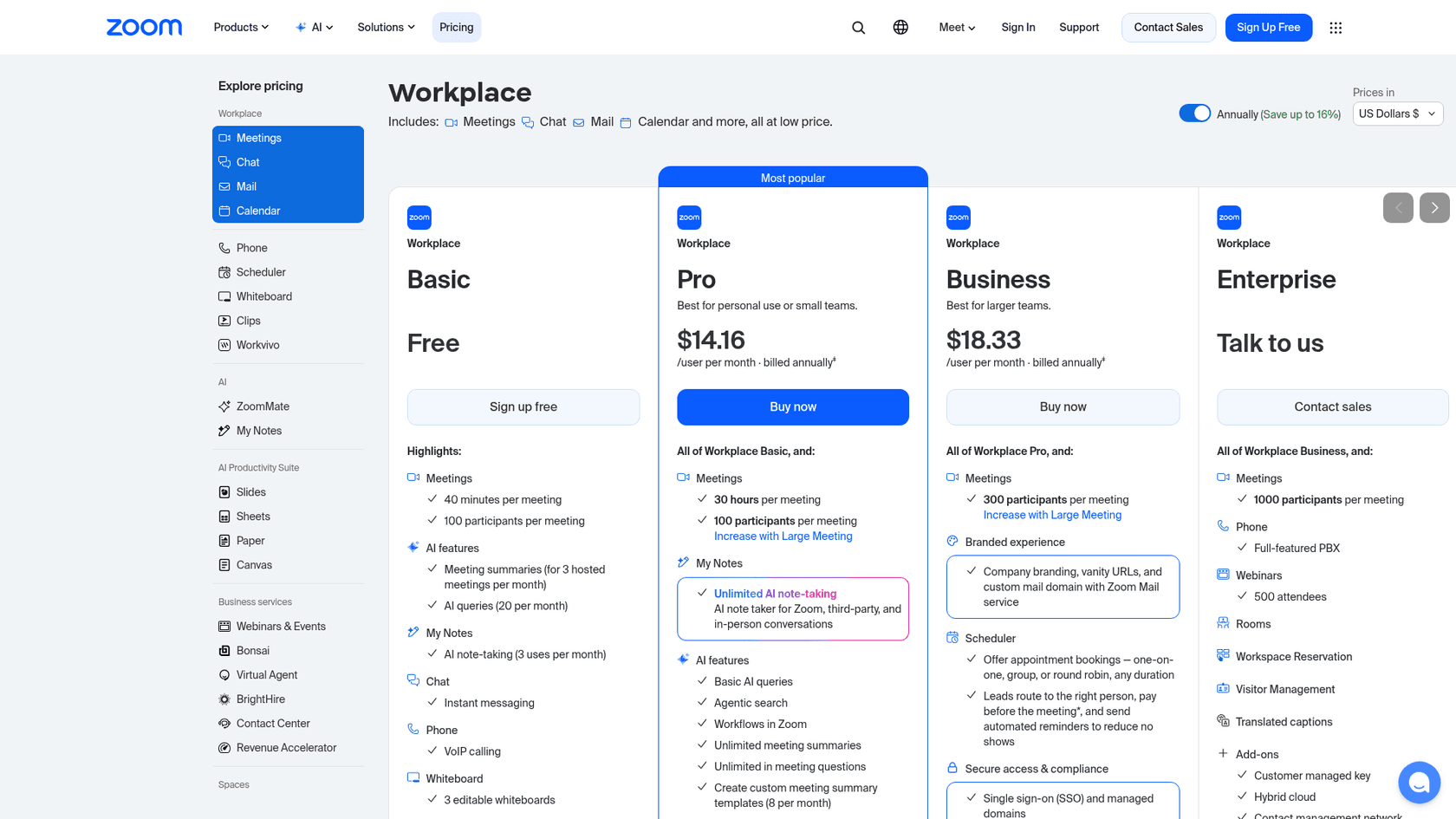
Heads up: Prices can change. It's always best to check the official Zoom pricing page for the latest info.
From simple summaries to a unified AI workforce
Zoom's built-in AI tools are a fantastic first step for making your team more productive. The upcoming Zoom integrations with GPT-5-Pro are exciting and hint at a future where AI can handle entire workflows on its own.
But the core challenge isn't going away: truly smart automation needs an AI that can access and understand your business's full context, not just the information stuck inside one app. To get beyond simple meeting summaries and build an intelligent support and knowledge system, you need a platform built for unification and control.
Ready to unlock the true potential?
Zoom's AI features are a great start, but they're only one piece of the puzzle. If you're ready to connect all your company knowledge and build an AI agent that works smoothly across your entire tech stack, you should give eesel AI a look. You can get started in minutes and see for yourself what a truly unified AI can do for your team.
Frequently asked questions
What exactly are Zoom integrations with GPT-5-Pro referring to, and how will they enhance meeting productivity?
Zoom integrations with GPT-5-Pro refer to leveraging OpenAI's advanced GPT-5 model within Zoom's ecosystem for business use. This promises an AI that can perform complex, multi-step agentic tasks, significantly boosting productivity beyond simple meeting summaries.
How will Zoom integrations with GPT-5-Pro address the current "silo" effect of Zoom's native AI Companion?
These integrations aim to break down information silos by allowing AI to access and understand data from across your entire tech stack, not just within Zoom. This provides comprehensive context, enabling the AI to answer questions requiring information from your CRM, project management tools, and other knowledge bases.
Can I customize the behavior and knowledge base for advanced Zoom integrations with GPT-5-Pro?
Yes, a key advantage of dedicated AI platforms is the ability to customize AI behavior. Solutions like eesel AI allow you to define the AI's persona, set specific automation rules, and create custom actions that operate across various integrated systems.
What's the core difference in capability between Zoom's existing AI Companion and the potential of Zoom integrations with GPT-5-Pro?
While Zoom's AI Companion is excellent for in-meeting tasks like summaries, Zoom integrations with GPT-5-Pro would introduce agentic capabilities. This means the AI could not only comprehend complex requests but also execute multi-step tasks across different applications, such as updating a CRM based on a meeting decision.
What are the typical roadblocks or complexities when trying to implement powerful Zoom integrations with GPT-5-Pro with other business tools?
Common roadblocks include the technical complexity of building and maintaining custom workflows between numerous applications, which often lack a central "brain" to understand the content. Another challenge is the AI's limited knowledge when it cannot access a unified, comprehensive knowledge base spanning all company data.
How can my organization start preparing for more comprehensive Zoom integrations with GPT-5-Pro to unify our AI workflows?
Your organization can prepare by adopting platforms designed to unify your knowledge base from all company tools into a single source of truth for AI. This foundational step ensures that when more advanced Zoom integrations with GPT-5-Pro become available, your AI will have the comprehensive context needed for intelligent and accurate operations.