What AI enterprise search actually is
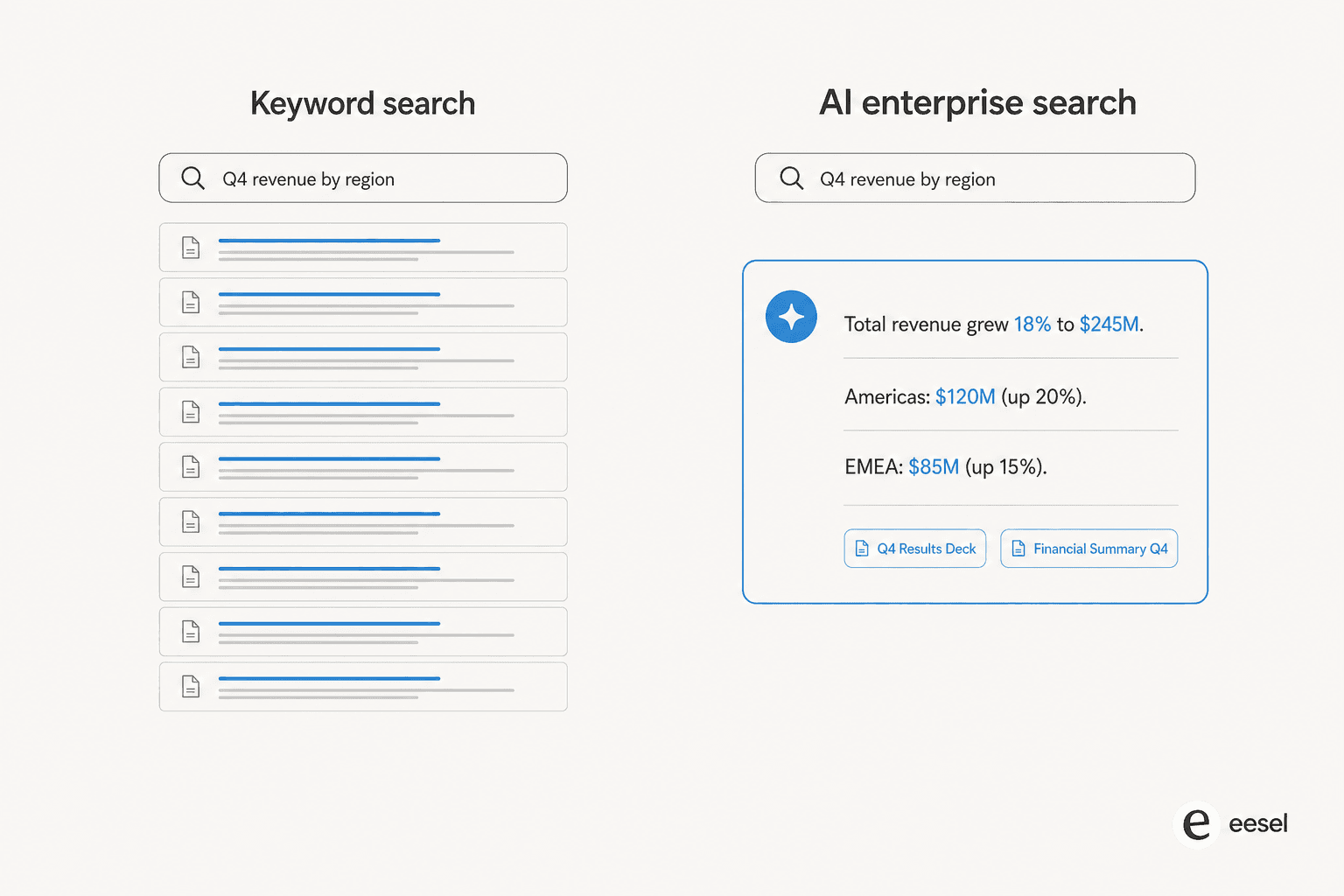
Enterprise search has existed for decades. Every helpdesk, wiki, and intranet ships with a search box. The problem was never that you couldn't search; it's that the search box gave you a list of documents and left the real work, reading them, reconciling the three that disagree, figuring out which one is current, entirely to you.
AI enterprise search closes that last gap. You ask a full question the way you'd ask a colleague, and instead of a ranked list of links, you get a written answer assembled from the relevant passages across every connected system, with citations back to the exact source. The unit of output changes from "here are some documents" to "here is the answer, and here's where it came from."
That shift matters more than it sounds. Most people don't want to search, they want to know. A support agent mid-ticket doesn't want ten Confluence pages; they want the refund rule for this customer's region, now. AI enterprise search is the layer that turns a pile of internal knowledge into direct answers, which is why it overlaps so heavily with the AI search engines people now use in place of a plain Google query, just pointed at your own data instead of the open web.
How it's different from the enterprise search you already have
If you've configured search in Zendesk, ServiceNow, or a Confluence connector, you already know the ceiling of the old model: it's only as good as the keywords the user happens to type, and it stops at retrieval. The reader still has to open each result and do the synthesis by hand.
The table below lays out where the two approaches part ways.
| Dimension | Traditional enterprise search | AI enterprise search |
|---|---|---|
| Query style | Exact keywords, boolean filters | Plain-language questions |
| Output | Ranked list of links | One synthesized, cited answer |
| Handles synonyms / intent | Poorly, needs the right terms | Yes, reads meaning not just words |
| Reconciles conflicting docs | No, that's on you | Weighs sources, surfaces the current one |
| Learns from past tickets | Rarely | Yes, treats solved tickets as knowledge |
| Trust / verifiability | You judge each link | Inline citations to the source |
| Best at | Finding a known document | Answering an unfamiliar question |
The single biggest jump is intent. Traditional search fails the moment the user's words don't match the document's words, "cancel my plan" won't find an article titled "Managing subscriptions." AI enterprise search reads for meaning, so it lands the answer regardless of phrasing. That's the same reason a modern AI search assistant feels so different from the intranet search you grew up cursing at, and the same wave that produced today's AI search optimization tools.
How AI enterprise search works under the hood
Nearly every serious AI enterprise search product runs on the same architecture: retrieval-augmented generation, or RAG. The name sounds heavier than the idea. It's five stages, and it's worth understanding because the quality of each stage is exactly where good tools separate from demos.

- Connect the sources. The tool ingests your knowledge, help docs, past tickets, wiki pages, Slack threads, PDFs, through native integrations. Coverage here caps everything downstream: an answer engine can only be as complete as what it can see.
- Index and embed. Each chunk of content is turned into a vector (a numeric fingerprint of its meaning) and stored, so the system can later find passages by meaning rather than exact words. This is what lets "cancel my plan" match "managing subscriptions."
- Retrieve the relevant bits. When a question comes in, the system pulls the handful of passages most semantically related to it. The choice of retrieval method, pure vector, keyword, or hybrid, matters more than teams expect, which is a whole debate on its own for support AI.
- Synthesize the answer. A language model reads the retrieved passages and writes a direct answer to the actual question, in the reader's language, rather than dumping the source text back.
- Cite the sources. The good tools attach links to the exact passages the answer was built from, so the reader can verify it, and confidence stays grounded rather than hallucinated.
The reason citations aren't a nice-to-have: an answer engine that can't show its work is indistinguishable from one that's making things up. After three-plus years putting AI on live support queues, the pattern we keep seeing is that a confident, wrong answer does more damage than no answer at all, which is why grounding every response in a real, cited source (and simulating against historical tickets before going live) is the non-negotiable part.
Where AI enterprise search pays off first
You can point AI enterprise search at almost anything, legal, HR, engineering docs, but the fastest, clearest return is in the two teams that drown in repetitive questions: customer support and internal IT.
On the customer side, the same tier-1 questions arrive over and over, and the answers already sit in your help center and your history of solved tickets. An AI enterprise search layer wired into your helpdesk can either answer the customer directly or draft a reply for an agent to approve. This is where an AI helpdesk agent earns its keep: with eesel, Gridwise resolved 73% of tier-1 requests in the first month. The cost case is just as blunt once you weigh AI against human agents.

On the internal side, the win is time. Your own team spends a startling share of the day hunting for answers that exist but aren't findable, buried in a wiki page nobody remembers, or in a Slack thread from four months ago. Put a search-and-answer layer over that mess and the hunt collapses to a single question.
"In a business where transactions need to be processed as quickly as possible, every second counts. With eesel, we can find specific answers to questions extremely fast. We can onboard new employees very quickly and have seen up to 80% time savings."
Alex Capurro, Chief Innovation Officer, Global Pay (eesel AI)
That's the classic case for internal support teams: a company running its knowledge on Confluence, plugging in an answer layer, and giving hours a week back to people who used to spend them digging.
What to look for when choosing an AI enterprise search tool
Most AI enterprise search demos look identical, everyone types a question, everyone gets a slick answer. The differences that actually matter only show up once you connect real, messy data. Here's the checklist we'd hold any tool to.

- It's permission-aware. The tool must inherit the access rules your source systems already enforce, so nobody gets an answer built from a document they were never allowed to open. This is the item most demos quietly skip.
- It cites its sources. Every answer should link to the passages it was built from. No citations, no trust, no way to catch a hallucination.
- It learns from your tickets, not just your docs. Your help center describes how things are supposed to work; your solved tickets show how they actually get resolved. A tool that only reads the knowledge base, the way a generic ChatGPT knowledge base setup does, is missing half the picture.
- It connects to your real stack. Zendesk, Freshdesk, Confluence, Slack, Google Docs, Shopify, whatever you run. eesel ships 100+ integrations and 80+ languages out of the box; coverage is the ceiling on answer quality.
- You can test it before trusting it. The best safeguard against a bad rollout is running the tool against your past tickets first and seeing where it would have gone wrong, before a single customer sees it.
That last point is worth dwelling on. Dedicated enterprise-search products like Hebbia are strong at document-heavy research, but if your goal is deflecting support tickets, you want a tool built for the helpdesk workflow, one that can simulate on historical tickets and show projected resolution rates before you flip it on.
Common pitfalls
Three failure modes account for most disappointing rollouts, and none of them are the AI's fault.
The first is thin coverage. If you connect only the help center and skip the ticket history and the internal wiki, the answer engine simply can't answer the questions those sources would have covered. Coverage is the ceiling, always.
The second is garbage in. AI enterprise search reflects your knowledge back at you. If your docs contradict each other or are three versions out of date, the tool will confidently surface the wrong one. This is why training AI on a clean knowledge base beats bolting it onto a mess, and why a good tool can flag the gaps and even draft the missing articles.
The third is skipping the dry run. Teams that go straight to live, autonomous answers, without a supervised phase or a simulation against past tickets, are the ones who get burned by a confident wrong answer. Start in draft mode, grant autonomy on the easy questions once you trust it, and expand from there. Getting this right is the same discipline as preventing hallucinations in support AI.
Try eesel for AI enterprise search
If the version of AI enterprise search you actually want is one that answers support tickets and helps your team find internal answers fast, that's exactly what eesel is built for. It plugs into your helpdesk, Slack, Confluence, and docs in minutes, learns from your past tickets so years of history becomes knowledge on day one, and cites its sources on every answer.
The differentiator we'd point to: you can run it in simulation against thousands of your real historical tickets, see exactly what it would have answered and where it would have escalated, and only then turn it loose, first as drafts, then autonomously on the questions it nails. Pricing is one fixed monthly price from $299/month for 500 credits (1 credit per ticket or chat), no per-seat fee, and it's free to try with 100 credits and no credit card.