


What a customer support chatbot template actually is
A chatbot template is a reusable answer with a trigger attached. The customer types (or clicks) something, the bot recognizes the intent, and it fires back a message you wrote in advance, usually with a link or a next action. Stack a few dozen of these together and you have a working customer service chatbot that deflects your most common tickets before they ever reach a human. If you want a sense of what a finished set looks like, we keep a running list of chatbot examples worth stealing from.
The appeal is obvious. You know exactly what the bot will say, it costs almost nothing to run on top of your existing live chat or helpdesk, and you can ship it this afternoon. For the questions that make up the fat head of your ticket volume, "where is my order" being the classic, a good template is genuinely all you need.
The catch is that a template only knows what you told it. It has no idea what is in your help center unless you paste it in, and it cannot improvise. That is the difference between a scripted bot and an AI agent versus a rule-based chatbot, and it is the whole reason this post has a second half.
The anatomy of a template that does not annoy people
Before the copy-paste part, one thing worth internalizing: most bad chatbot experiences are not bad because the bot is dumb. They are bad because the template was written like a form letter. A good support template does four things in order.
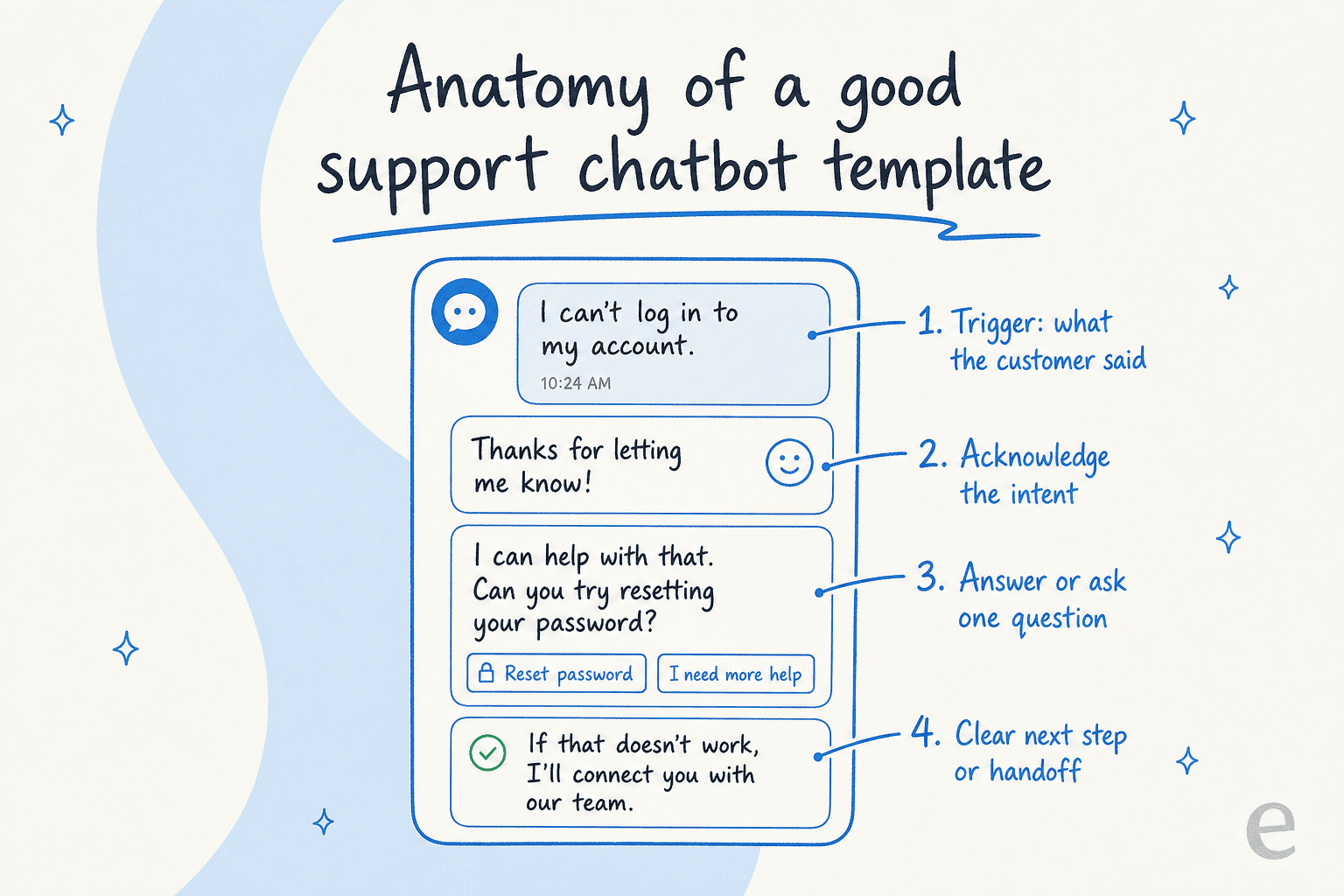
- Names the trigger clearly. The intent it fires on should be tight. "Refund" and "return" are different requests with different next steps, so do not lump them.
- Acknowledges the intent in one line, so the person knows they were understood. This is the step most templates skip, and it is why bots feel robotic.
- Answers, or asks exactly one thing. Give the answer if you have it. If you need an order number to proceed, ask for that and only that.
- Ends with a next step or a way out. A link, a button, or a clean handoff to a human. Never a dead end.
Keep that shape in your head and the scripts below will make sense as a family, not a random list.
10 customer support chatbot templates you can copy today
These are written to be pasted into whatever builder you use and edited to your brand voice. I have grouped them by job. Swap the bracketed bits for your own details, and read the chatbot script guide if you want more on phrasing.
Want to just grab the one you need? The picker below has every script in a copy-ready block.
Welcome and greeting
Your bot's first line sets expectations for the whole conversation. Say who you are, what you can do, and give two or three concrete options so the customer is not staring at a blank box.
Hi! Thanks for stopping by [Brand]. I can help with orders, returns, and account questions. What can I help you with today?
Order status and tracking
The single highest-volume request for most ecommerce teams. Ask for the order number, then hand back a real answer with a tracking link. If you have a Shopify chatbot or connect order data directly, the bot can fill in the shipping date itself instead of asking.
Refund and return requests
Keep this one calm and specific. Acknowledge the disappointment, restate the policy in one line, and create the return so the customer never has to chase it. This is also the flow most likely to need a human, so wire in a clean escalation path for the edge cases.
Password reset and account access
A pure deflection win. Confirm the email, send the link, set the expiry expectation. If the customer is still locked out after that, hand off, do not loop them.
After-hours and business hours
When your team is offline, honesty beats a fake "we'll respond shortly." Tell them when you are back, offer to take a message, and answer what you can in the meantime. This is where FAQ deflection earns its keep, so pair it with a solid FAQ automation setup.
Frustrated or angry customers
The de-escalation template is the hardest to get right with a fixed script, and I will be blunt: a canned "I understand your frustration" often makes things worse. The best a template can do is apologize once, ask for the specifics, and offer an immediate human exit. Anything more nuanced is where you feel the ceiling of scripted bots.
Escalate to a human
Every good bot needs a graceful handoff. Summarize what the customer already said so they do not repeat themselves, set a wait expectation, and pass context to the agent. The handoff done badly is the number one reason people say they "hate chatbots."
Feedback and CSAT
A one-tap rating at the end of a resolved conversation is the cheapest data you will ever collect. Feed it into your customer service KPIs and AI support metrics so you can see which flows actually help.
Lead capture and qualification
Not every conversation is a support ticket. When someone asks a pre-sales question, grab a name and email and route it to the right team.
Cancellation and retention
A light retention prompt before you process a cancellation is fair game, as long as you make the exit easy. One offer, no dark patterns. Trust is worth more than a saved subscription.
Where static templates fall apart
Here is the part most "chatbot templates" articles skip. Templates work beautifully right up until a customer says something you did not script, and then they fail loudly. The customer asks two questions in one message, or phrases "cancel" as "I don't want to be charged again," and the bot either loops or dumps them to a queue. Every one of those is a ticket you thought you deflected and did not.
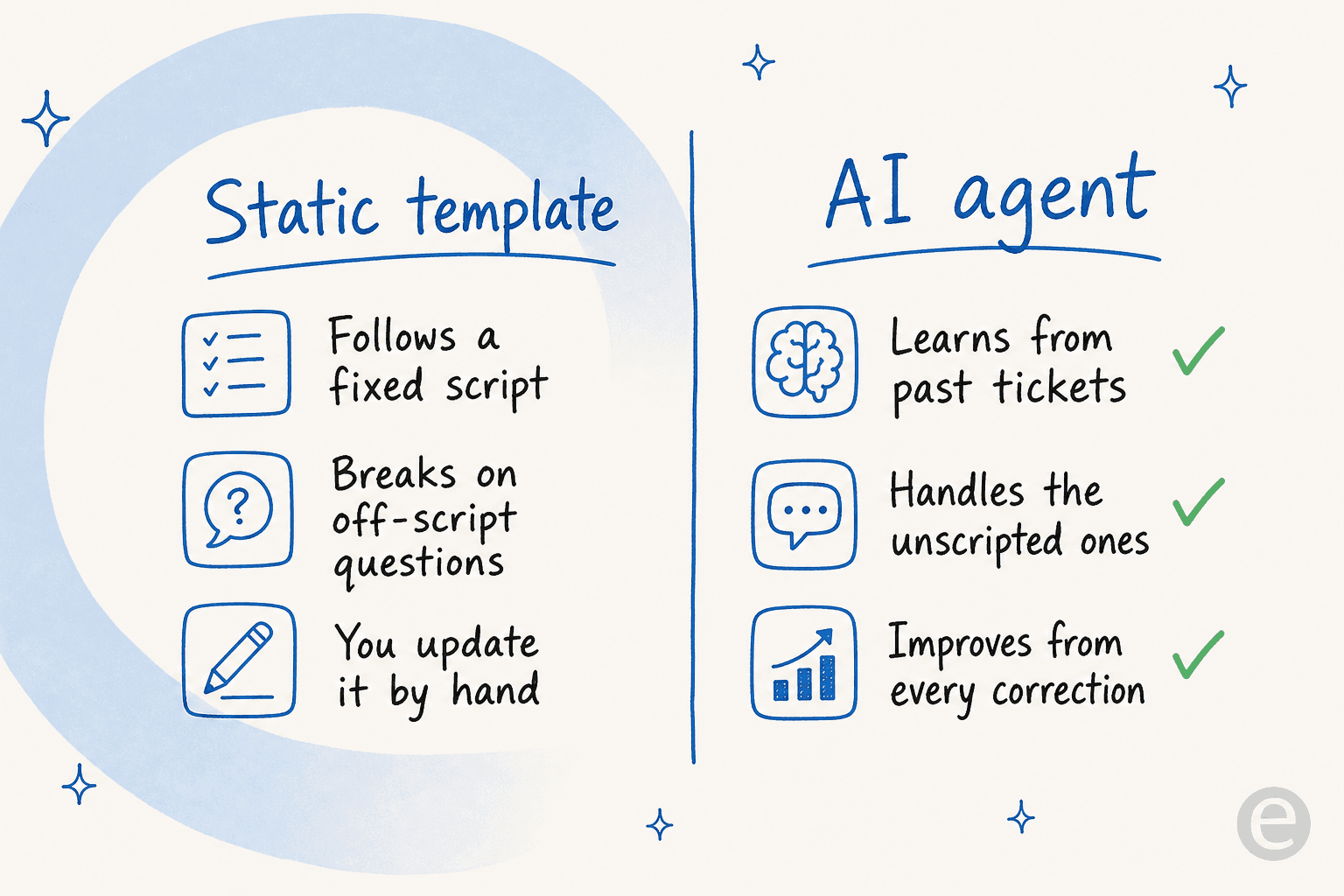
The instinct is to write more templates. That works for a while, then you are maintaining 200 flows and a decision tree only one person understands. It does not scale, and it is exactly the wall that pushes teams toward an AI customer service chatbot that reads instead of matches. The same pattern shows up whether you route through a ticketing system or a helpdesk AI layer on top of it.
There is also a trust question that no template can answer on its own. As one DTC supplements CX lead put it to us, the goal is not a bot that tries everything:
"The AI will never be able to answer 100% of the questions. I need an AI who is only handling the tickets that it's confident to handle, and all the other ones, leave them alone."
That is the whole game. A fixed template has no concept of confidence, it just fires. The upgrade is a system that knows what it does not know.
From templates to an AI agent that writes its own
This is where I would point anyone who has outgrown their template library. Instead of hand-writing every flow, you connect an AI agent to your help center and past tickets, and it drafts the replies for you, in your voice, and only when it is confident.
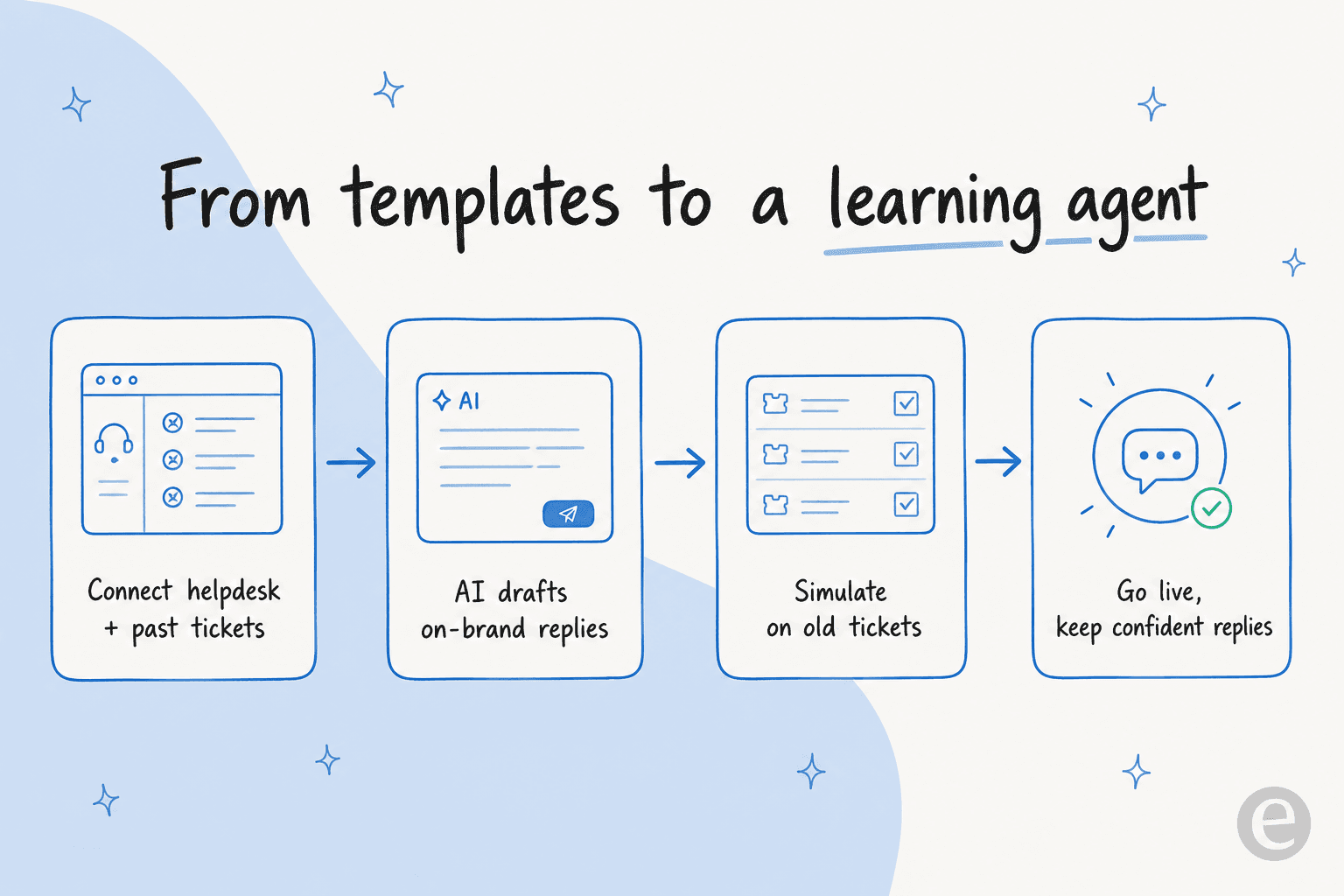
The reason this matters is speed to value without the risk. At eesel, the part I would flag first is simulation: before the agent replies to a single live customer, you run it against thousands of your own past tickets and see exactly what it would have said and how many it would have resolved. You fix the gaps, then go live. It is the closest thing to a dress rehearsal that scripted bots never had.

The proof that this beats a template library is in the numbers teams see quickly. Gridwise, for example, saw eesel resolve a real chunk of their frontline volume fast:
"In the first month, eesel is resolving 73% of our tier 1 requests, with results quickly during our 7-day trial."
Kim Simpson, Gridwise (source)
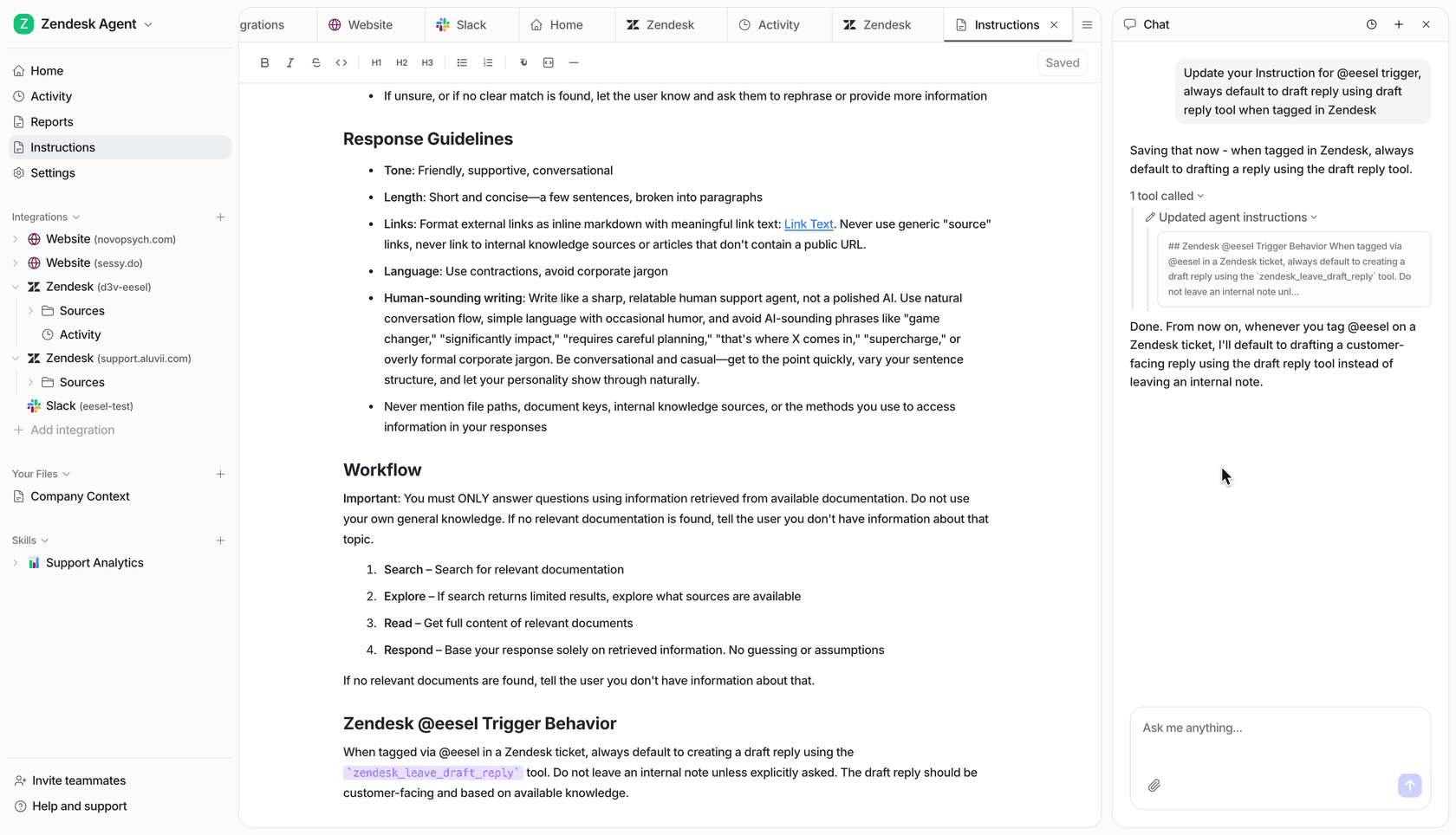
You still get control. You decide which topics the agent handles, you keep it drafting instead of sending until you trust it, and you tune its behavior in plain language rather than rebuilding a flowchart.
Try eesel for your support chatbot
If you have gotten value from copying templates but keep hitting the off-script wall, that is the signal to move up a level. eesel plugs into the helpdesk you already run (Zendesk, Freshdesk, Gorgias, Intercom, HubSpot, Front) in a few minutes, learns your replies from past tickets and help docs, and drafts on-brand answers only when it is confident, handing the rest to your team.
The bit worth trying yourself is the simulation on your own tickets: you see the real resolution rate before you commit, and pricing is per ticket with no per-seat fees, so a free trial costs you nothing to find out. It is the fastest way I know to go from a shelf of static scripts to a support bot that actually keeps up.