


If you're on the hunt for a better way to handle all your customer conversations, you've probably stumbled across Crisp. It's a popular all-in-one platform that promises to wrangle all your customer chats, emails, and social media messages into one tidy place. Lately, they've been adding more AI into the mix, which sounds great on paper. But with a million and one tools out there, how do you know if it's actually the right one for you?
Maybe you're running a startup or a small business and you're wondering if Crisp's AI features can actually take some weight off your support team's shoulders. You're in the right place. We're going to skip the marketing slogans and give you a balanced look based on what real users are saying and what the platform can truly do. We’ll get into its features, the real cost, and where it tends to fall short, so you can make a call you feel good about.
What is Crisp?
So, what exactly is Crisp? At its heart, it’s a platform designed to bring all your customer communication into one place. The big idea is to give you a shared inbox, live chat, a basic CRM, a knowledge base, and even some marketing tools, all living happily together. The goal is to stop your team from constantly switching between tabs for your website chat, email, Facebook Messenger, and WhatsApp.
It’s a broad tool with a lot to offer, but it's good to remember that Crisp started out as a communication platform first. Its AI features feel like an added layer on top of its existing tools, not a solution that was built around AI from the beginning. That simple fact really shapes what it’s good at and, as we’ll see, where its weak spots are.
Breaking down Crisp AI's key features
Crisp has a pretty long list of features, but if you're here for the AI and automation that can save your team time, that's what we should focus on. Let's get into what Crisp offers and how it actually works in the real world.
AI chatbot builder and workflows
Crisp gives you a no-code, visual builder to create your own chatbots. First thing to know is that it’s technically a "plugin" you have to find and enable within the Crisp ecosystem. Once you do, you can start building flows to answer common questions, grab user info before a chat, or send conversations to the right department.
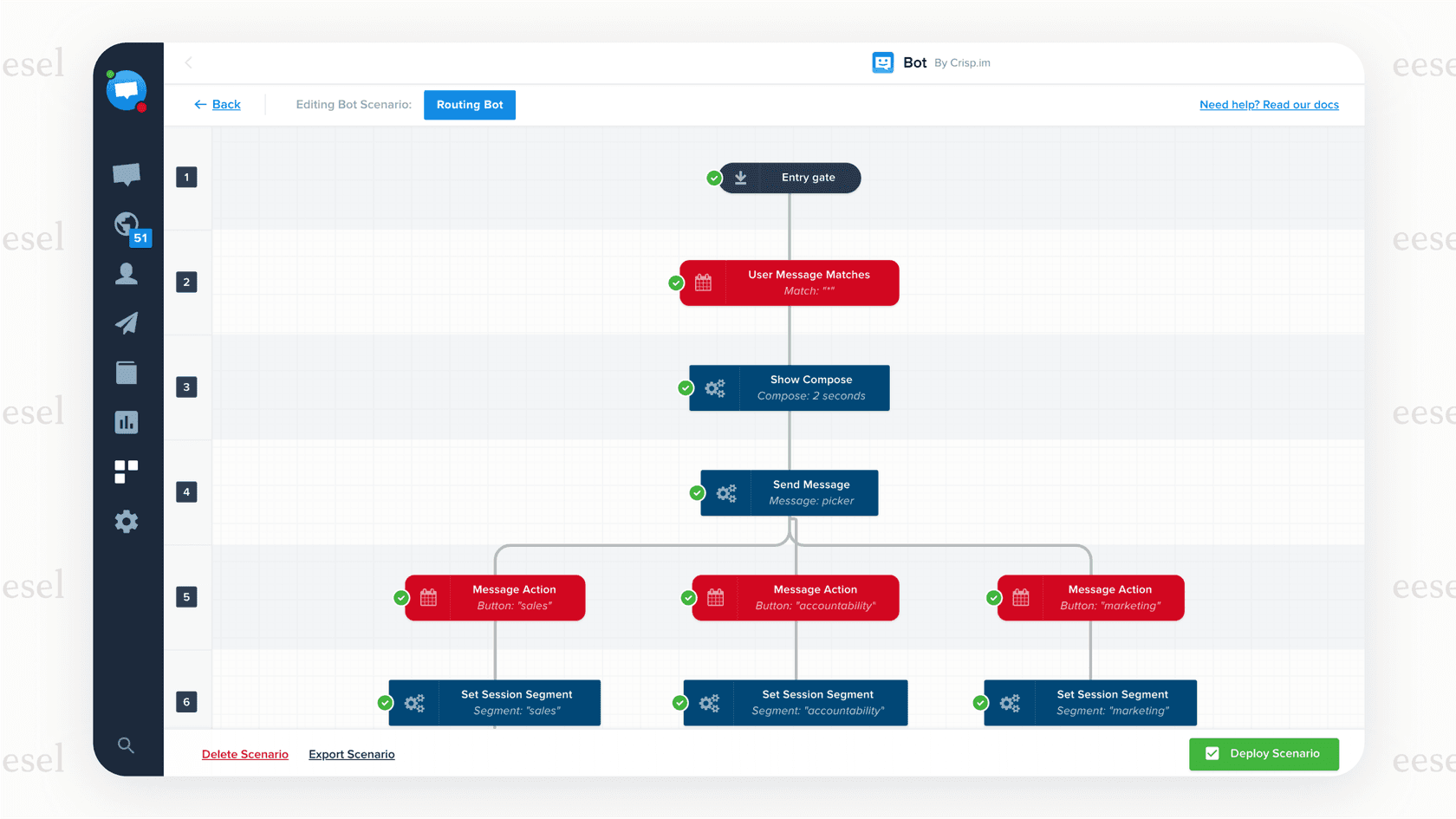
But here’s where a lot of user Crisp AI reviews from sites like Chatimize and G2 hit a snag: it has a pretty steep learning curve. The drag-and-drop interface looks simple, but things can get complicated in a hurry. For instance, something that sounds easy, like asking a customer for their date of birth and saving it to their profile, might take three different blocks in the builder to pull off. It's definitely powerful if you have an employee who can dedicate the time to becoming a Crisp workflow expert, but it's not the quick "set it and forget it" tool many growing teams are hoping for.
If that sounds like a lot of fiddling around just to get a simple chatbot running, you're not alone. That's why some tools, like eesel AI, are built with a completely different philosophy. Instead of making you piece together complex workflows, it’s designed to be radically self-serve. You can connect your helpdesk with a click and have a working AI agent ready to go in just a few minutes.
Omnichannel shared inbox
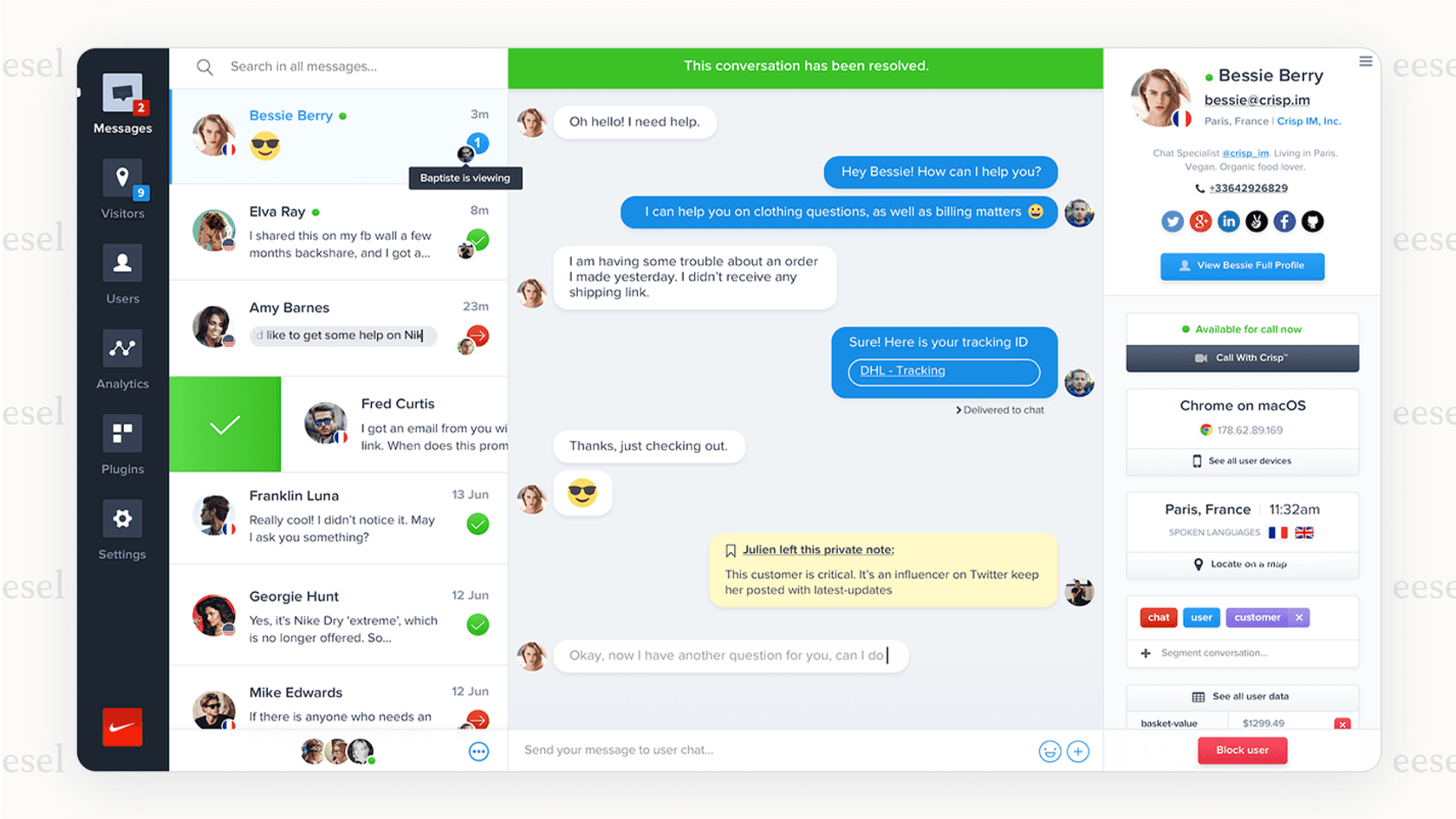
Now, this is where Crisp really shines. Its shared inbox is easily one of its standout features. It does a fantastic job of pulling in conversations from your website's live chat, team email addresses, Messenger, WhatsApp, and even SMS messages into one dashboard. For any team that feels like they're drowning in messages from a dozen different places, this is a lifesaver. It makes team collaboration so much smoother, as agents can see the entire conversation history, leave private notes for colleagues, and pass chats back and forth without losing context. This feature gets a ton of praise in user reviews, and for good reason.
AI knowledge training and resolution
You can train Crisp's AI by pointing it to your existing knowledge base. When a customer starts a chat and asks a question, the AI will try to find a relevant help article and suggest it. This is useful for heading off those simple, repetitive questions where a link to a good help doc is all the customer needs.
But here's the catch: what you can feed it is a fixed list. Crisp's docs put Hugo's training sources at Q&A snippets, a website crawl, uploaded CSV, PDF or TXT files, and your Crisp knowledge base. Your past ticket history isn't on that list, so the burden stays on you to write and constantly update the material the AI answers from. If it isn't in one of those sources, the AI has nothing to work with.
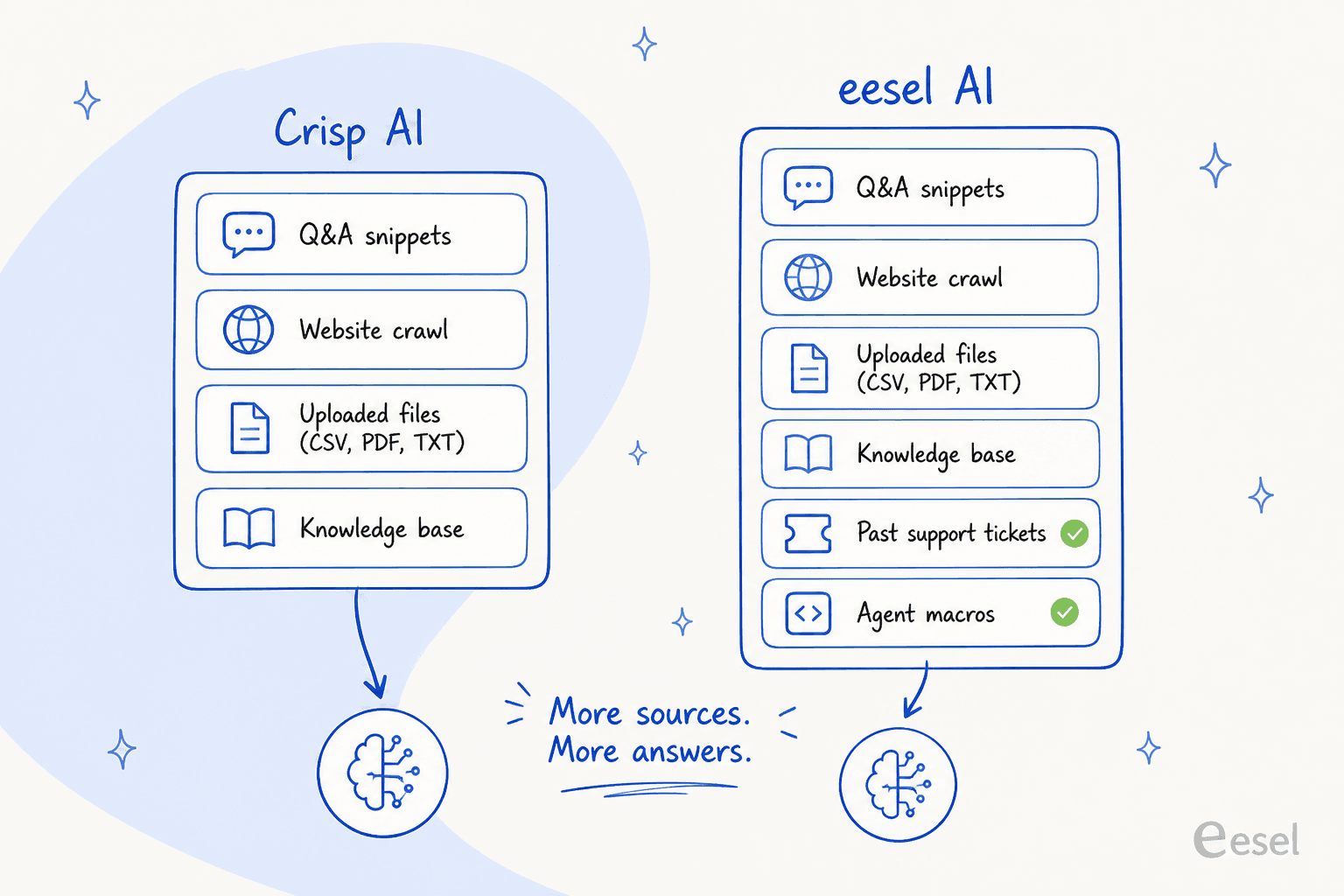
This is a major difference when you look at more modern AI platforms. For instance, eesel AI doesn't just scan articles; it learns directly from the thousands of past support tickets and macros your team has already handled. It also pulls knowledge from other places you keep it, like Confluence or Google Docs. This way, it picks up on your brand's unique voice and understands the solutions that have actually worked for your customers before, letting it give accurate answers instead of just tossing out links.
Crisp AI reviews: What are real users saying?
A slick website is one thing, but what are people saying out in the wild? We combed through reviews on Capterra, Trustpilot, and the Shopify App Store to get the real story.
The good: What users love
-
Everything's in one place: For smaller teams, not having to pay for separate live chat, shared inbox, and knowledge base tools is a big win. It keeps things simple and the initial costs down.
-
Great for team collaboration: People consistently praise features like internal notes and easy conversation assignments that make it feel like a true team tool.
-
A generous starting point: The free and lower-tier plans offer solid core live chat features, making it an easy tool for new businesses to get started with.
-
You can make the chat widget your own: Users love that they can easily change the colors and style of the website chat widget to make it fit their brand perfectly.
The bad: Common complaints and limitations
-
The AI is tough to set up: One thing you'll see pop up again and again is that getting the AI chatbot and automated workflows running is way more complex and time-consuming than people expect. It’s just not that intuitive unless you have a technical background.
-
It can be buggy: This one is a pretty big deal. Several reviews on Trustpilot and Software Advice point to major bugs. The most worrying one is when the platform occasionally fails to deliver an agent's reply to the customer. That kind of bug can wreck customer trust and make your support team look awful.
-
The pricing can be confusing: A lot of users express frustration with unclear pricing. It’s easy to sign up for one plan, only to find out later that you have to pay extra for more agent seats, higher AI usage, or specific integrations you thought were included.
-
You feed it, it doesn't feed itself: Crisp's documented training inputs are snippets, a website crawl, uploaded files, and the knowledge base. Ticket history isn't among them, so the agent needs manual content upkeep to stay useful as your product changes.
Dealing with buggy AI that might be dropping customer messages is a nightmare. That’s why having a way to test your setup is so important. Crisp gives you a Playground for this, where you can try questions one at a time before going live. A tool like eesel AI runs that check in bulk instead, with a simulation mode that tests your entire AI setup against thousands of your real past tickets in a safe environment. You can see precisely how it will perform and get accurate numbers on resolution rates before a single customer ever talks to it. It lets you roll out your AI knowing it's going to work, and the pricing is completely transparent: a flat 40¢ per ticket handled, with no platform fee and no per-seat charges.

Crisp pricing: A detailed breakdown
Price is often the final hurdle, and Crisp’s model has a few quirks you’ll want to know about before you sign up. It looks affordable to start, but the features most teams actually want are tucked away in the more expensive plans.
Crisp pricing plans
Here’s how their plans stack up, based on the information right from their pricing page.
| Plan | Price (per month) | Seats Included | Key AI & Automation Features |
|---|---|---|---|
| Free | $0 | 2 | Basic chat widget, no AI credits |
| Mini | $45 | 4 | Chat triggers, shortcuts, $5 AI credits (~90 conversations) |
| Essentials | $95 | 10 | Omnichannel inbox, AI Chatbot, Knowledge Base, Workflow builder, $25 AI credits (~450 conversations) |
| Plus | $295 | 20+ | Ticketing system, $75 AI credits (~1,350 conversations), extra seats $10/mo |
The hidden costs of Crisp
That table looks straightforward enough, but the real story is in the details. AI isn't locked to one tier, it's metered: every plan above Free ships with a fixed AI credit balance, and the $45/month Mini plan only carries $5 of it, or about 90 automated conversations before you're topping up. The Free plan gets no AI credits at all.
And the ceiling doesn't disappear at the top of the range. The $295/month Plus plan includes $75 in AI credits, which Crisp rates at roughly 1,350 automated conversations, so a busy queue can still burn through its allowance and start paying overage. Crisp is explicit that conversations themselves are unlimited; it's the AI handling them that's metered, and that's the line worth reading twice before you budget.
This is a really different way of thinking compared to a platform like eesel AI. On eesel AI's pricing page, you'll see that all the main features, the AI Agent, Copilot for human agents, AI Triage, and the Chatbot, are included in every single plan. The cost is one clear monthly price sized to your ticket volume, from $299 for 500 credits, so you get the platform's full power from day one without being punished for needing the features you signed up for.
The verdict: Is Crisp the right AI tool for your team?
So, after all that, is Crisp the right tool for you?
Crisp is a solid pick if you're a small business that needs one central place for all your customer chats and you're just starting to explore very basic automation. Its biggest strengths are, without a doubt, its shared inbox and live chat tools.
But for teams that want to seriously use AI to automate support, cut down on repetitive tickets, and make their whole operation more efficient, Crisp’s weak spots become hard to ignore. The complicated AI setup, reports of critical bugs, limited intelligence, and a pricing model that hides key features behind expensive plans make it a tough sell for teams that are focused on automation.
The eesel AI alternative
If you read the "limitations" part and found yourself nodding along, you might be looking for something different. If you want powerful AI that’s reliable and easy to set up without the confusing pricing, eesel AI was built from the ground up to solve these exact problems. It works with your existing helpdesk, so you don’t have to throw out the tools your team already loves.
Here’s a quick look at the difference:
-
Go live in minutes, not months: eesel AI is a genuinely self-serve platform. You can connect your tools and have it automating answers in the time it takes to make a cup of coffee.
-
Smarter AI: It learns from how your team has actually handled support tickets in the past, which means its answers are accurate, on-brand, and genuinely helpful to customers.
-
Test with confidence: The simulation mode is a huge plus. It lets you check your work and remove all the risk before you launch, so you can go live knowing it's ready.
-
Transparent pricing: The cost is one fixed monthly price, from $299 for 500 credits, with no platform fee and no per-seat charge. 1 credit covers one ticket or chat your AI actually works on, you get all the features from the start, and tickets your human agents take do not use credits. There is a free plan with 100 credits to start.
Ready for AI that just works? Start your free eesel AI trial or book a demo to see how you can automate your support in minutes.
Frequently asked questions
What do Crisp AI reviews generally say about the platform's primary purpose and core strengths?
Most Crisp AI reviews confirm its strength as an all-in-one platform for centralizing customer communication. Users particularly praise its shared inbox for consolidating chats, emails, and social media messages into one place, improving team collaboration.
According to Crisp AI reviews, how effective are Crisp's AI features for truly automating support?
Crisp's AI agent, Hugo, handles conversations autonomously and can perform real actions through your integrations, like checking account details or tracking orders. The setup is still manual, though: you train it on Q&A snippets, a website crawl, uploaded CSV/PDF/TXT files, and your Crisp knowledge base, so its answers are only as good as the material you feed it.
Do Crisp AI reviews indicate that setting up and managing the AI chatbot is straightforward?
Many Crisp AI reviews highlight a steep learning curve for the AI chatbot builder. Users frequently report that complex workflows require significant time and technical understanding to implement effectively, making it less of a "set it and forget it" tool.
What are the common concerns about pricing mentioned in Crisp AI reviews, particularly for AI features?
Crisp AI reviews frequently express frustration with unclear or confusing pricing. AI and automation features run on a separate AI credit balance bundled into each plan, and those credits are capped: around 90 automated conversations on Mini, 450 on Essentials, and 1,350 on Plus.
Are there any significant reliability issues or bugs that are commonly cited in Crisp AI reviews?
Yes, several Crisp AI reviews, particularly on platforms like Trustpilot, mention significant bugs. A worrying concern is the occasional failure to deliver agent replies to customers, which can severely impact customer trust and support quality.
How do Crisp AI reviews perceive the AI's ability to learn and provide direct answers versus just suggesting articles?
Crisp's Hugo agent generates direct answers rather than just linking out to articles. Its documented training sources are Q&A snippets, a website crawl, uploaded files, and your Crisp knowledge base, so your past ticket history isn't one of the inputs you can train it on.