


You’ve probably heard about AI development platforms like Emergent. They make a pretty big promise: turn your simple text prompts into a working app. An AI that can code, test, and deploy all on its own? It sounds amazing. But as more people try it out, they're finding the reality is a bit messy, especially when the bill arrives.
It seems like everyone gets stuck on the same question: what does this actually cost? With a confusing credit system, recurring subscriptions, and stories of surprise charges floating around, figuring out Emergent AI pricing feels like a puzzle. This guide is here to solve it. I'll break down their pricing model, explain what you get for your money, and point out the hidden costs you should know about.
What is Emergent AI?
So, what exactly is Emergent? Think of it as an AI-powered workspace for building software. Instead of you writing every line of code, you just describe what you want to build in plain English. From there, Emergent's AI agents take over the planning, coding, bug fixes, and even deployment.

It's built for developers, startup founders, and teams who want to speed things up for jobs like:
-
Building web and mobile apps from scratch (the platform builds with React, Node.js/FastAPI, and MongoDB under the hood, with Expo for mobile).
-
Automating code refactoring and migrating old systems.
-
Developing internal tools and dashboards.
-
Creating data pipelines.
The whole idea is to change a developer's job from writing code to guiding the AI's overall strategy. Code syncs to your GitHub repo so you own it outright, and there are 100+ integrations on tap. It’s a cool concept, but how well it works for you is tied directly to its pricing model, which is all about something called "credits."
The core of Emergent AI pricing: The credit system
You really have to get your head around this system before you sign up, because it’s where all the magic happens, and also where most of the confusion comes from.
Understanding the credit system
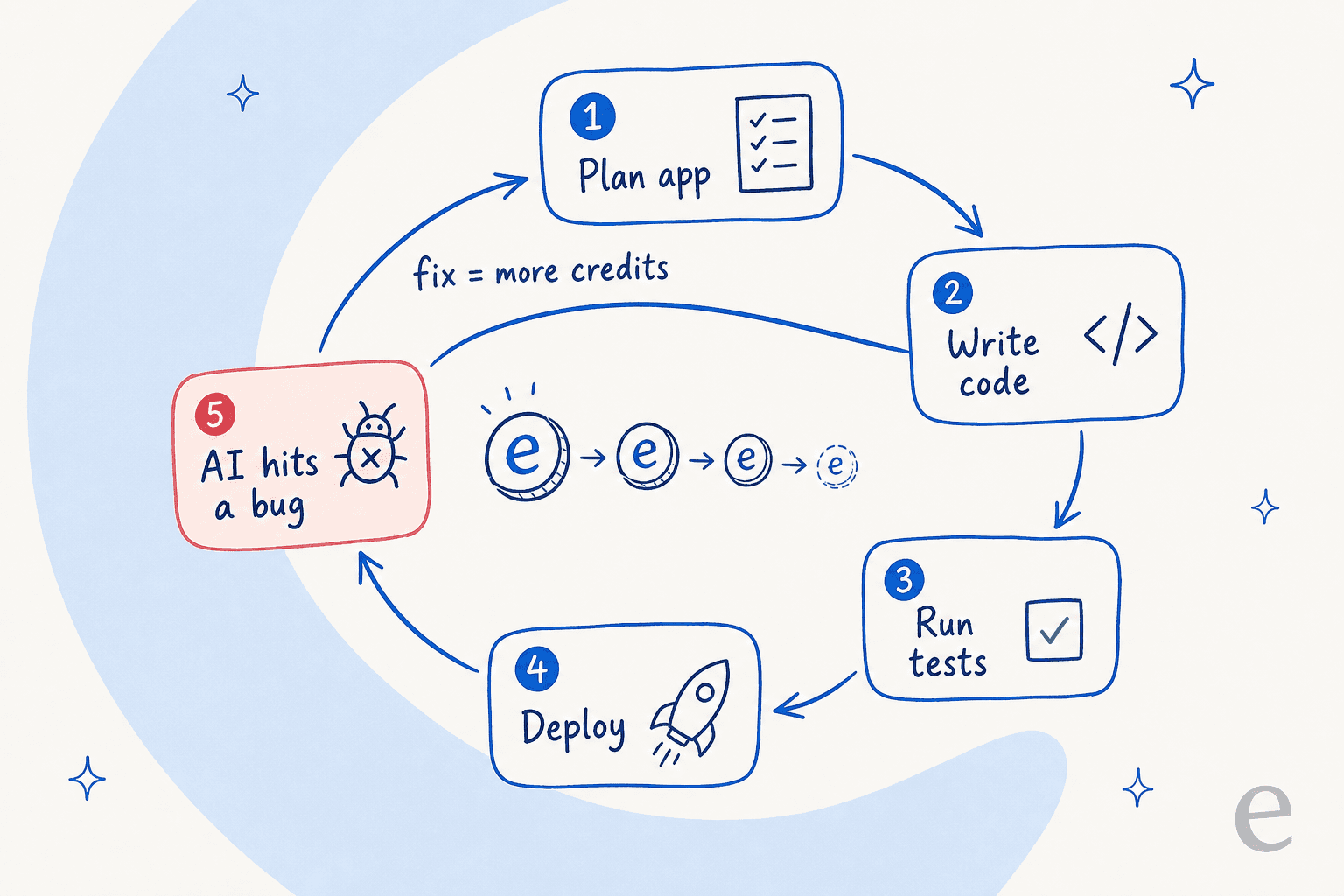
Credits are basically the currency you use inside Emergent. Every time you ask the AI to do something, you spend some credits. According to their own docs, you only use credits when the AI is "actually running." That means things like:
-
Planning out your app's structure
-
Writing or changing code
-
Running tests and fixing bugs
-
Deploying your application
The amount of credits you use depends on how hard the task is. A small UI tweak might only cost a few credits, but building a whole backend could burn through hundreds. Your costs are tied directly to how much work you make the AI do, and as the diagram below shows, even fixing the AI's own mistakes loops back and costs you more.
Monthly vs. top-up credits
Emergent has two kinds of credits, and they're used in a specific order:
-
Monthly Credits: These are part of your subscription plan and they reset every month. The system always uses these first.
-
Top-up Credits: If you burn through your monthly credits, you can buy these to keep going. They never expire and are only used once your monthly ones are gone.
It sounds simple enough, but this two-part system can be tricky. Ouch.
The difference between credits and budget
Just to keep things interesting, Emergent adds one more thing to the mix: a "per-chat budget." This is just a safety net you can set for each project. It stops a single prompt from accidentally wiping out all your credits in one go.
Here's a simple way to think about it:
| Term | What It Is | Analogy |
|---|---|---|
| Credit Balance | Your total spending power (monthly + top-up credits). | All the money in your bank account. |
| Per-Chat Budget | Your spending limit for one specific task. | The cash you bring for one trip to the store. |
The budget is a nice feature to prevent disasters, but it doesn't really help you predict your total costs. You're still left guessing how many credits any given task is going to eat up.
Emergent AI pricing plans in 2026
Finding consistent pricing info for Emergent can be a bit of a scavenger hunt, but here are the plans listed on their official website as of mid-2026. Note that Emergent now runs at emergent.sh (the old emergent.ai domain is no longer the product).
| Plan | Monthly Price | Annual Price | Monthly Credits | Key Features |
|---|---|---|---|---|
| Free | $0 | $0 | 10 credits | Core platform features, instant access to top models, web & mobile builds. |
| Standard | $20/month | $17/month | 100 credits | Build web & mobile apps, private project hosting, GitHub integration, fork tasks. |
| Pro | $200/month | $167/month | 750 credits | All Standard features, 1M context window, ultra thinking, custom AI agents, priority support. |
| Enterprise | Custom | Custom | Custom (pooled) | Everything in Pro, plus shared/pooled credits, SSO/SAML, audit logs, and unlimited custom usage. |
A couple of things worth flagging on top of the table: the team collaboration features (shared workspaces, pooled credits, unified billing) now sit inside the Enterprise tier rather than a standalone "Team" plan, and Emergent is now SOC 2 Type II and ISO 27001 certified, which matters if you're evaluating it for anything regulated.
What can you build with credits?
This is the big question, isn't it? From what people are saying, those credits can disappear fast. One user reported their 110 credits "did not even last a day" despite paying for a plan. Another whole Reddit thread is dedicated to the frustration of losing credits because the AI made mistakes, then having to spend more credits just to fix what the AI broke.
If you're just messing around or working on a tiny project, the free plan or Standard plan might be enough to get your feet wet. But for any real development work, you'll probably need to jump to the Pro plan, and even then, you should plan on buying extra top-up credits. It's tough to estimate the true cost of a project when you have no idea how many credits you'll actually need.
Hidden costs and limitations
A "pay for what you use" model sounds fair on the surface, but in practice, it can lead to a lot of guesswork and frustration that you just don't see on the pricing page.
Unpredictable costs from errors
The biggest gripe you'll see about Emergent AI pricing is just how unpredictable it is. Look, the AI isn't perfect. Users on r/vibecoding report that credits "burn way too fast," that the agent gets stuck mid-task, and that it spits out buggy code or misunderstands what you want. One builder on r/SideProject described watching credits "burn while the system fights itself."
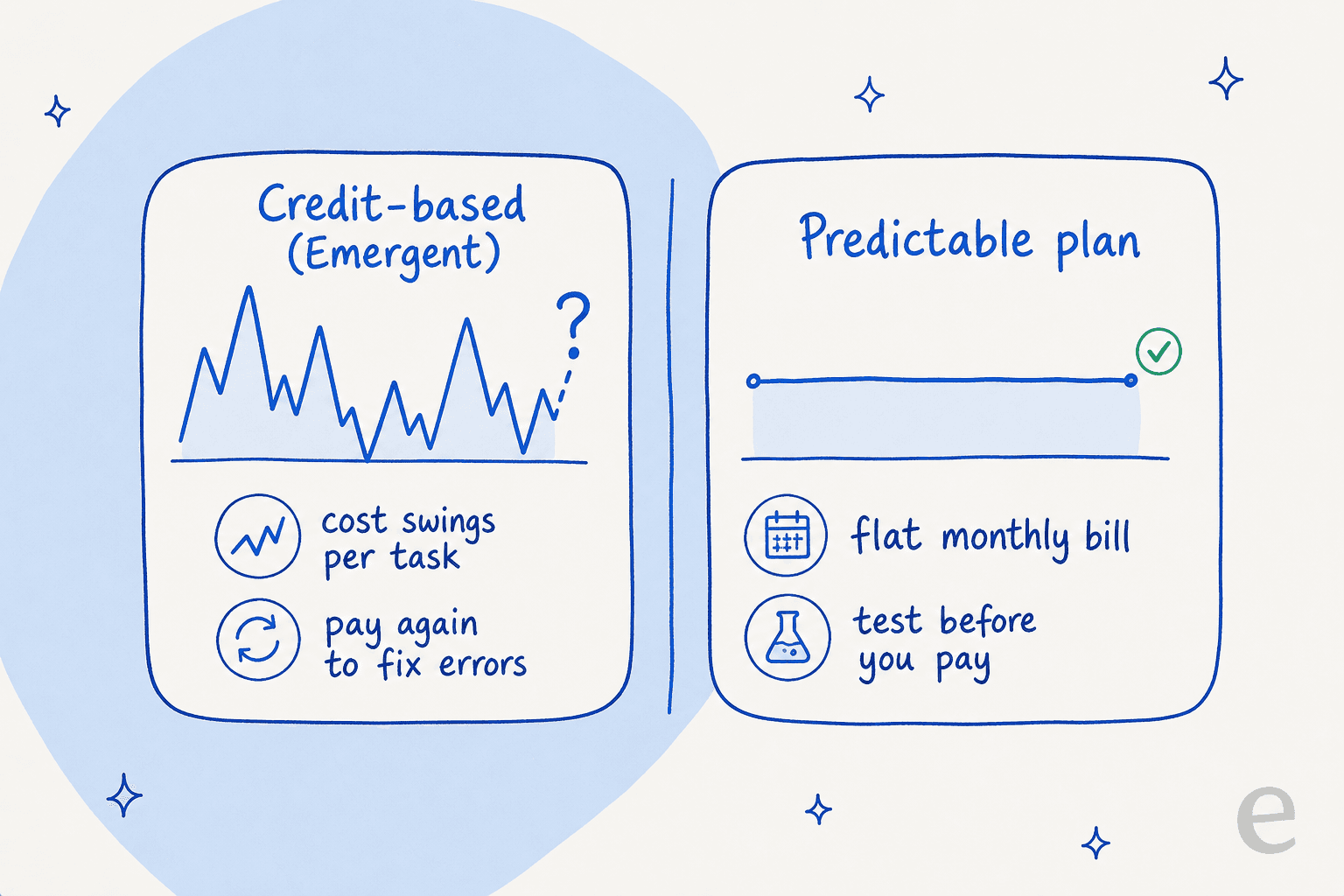
Every time you have to ask it to fix something or try again, you're burning through more credits. You end up in this weird loop of paying more money to fix the mistakes of the tool you're already paying for. Since there’s no way to test a prompt without spending credits, every command feels like a bit of a gamble.
Lack of transparency and control
The credit system feels like a black box. You have no way of knowing if your next request will cost 10 credits or 100. This makes it really difficult to budget, and you end up watching your credit balance instead of focusing on your project. For any business that needs to know its monthly expenses, this kind of model just doesn't work.
The alternative: Predictable costs for business
This is where tools built specifically for businesses start to look a lot different. They focus on predictability because, well, businesses need it.
Take an AI support platform like eesel AI for example. Its pricing is one fixed monthly plan sized to ticket volume (1 credit per ticket), which you can actually forecast, not opaque "compute time" you can't see. There are no per-agent seat fees and no surprise charges for the AI re-running itself, so you get a transparent fixed monthly bill instead of one that spikes out of nowhere. That predictability is exactly what you need if you're trying to run a team without your costs spiraling out of control.
This is where a solution like eesel AI really shines because it was built for teams that need to know what they're spending.
-
You don’t pay a surprise tax for AI errors. Each ticket is one credit, however many replies or actions it takes, and it is not tied to how many times the system has to retry itself, so a busy or messy month doesn't mean a blindsiding bill.
-
You can test it on your old support tickets first. Before you let the AI talk to a single customer, you can run a simulation on your past support conversations. This gives you a clear picture of how it will perform and what it will cost, so you can go live without any guesswork.
-
You can start small and grow. You don't have to automate everything at once. With eesel AI, you can pick and choose which types of questions the AI answers. You can start with the easy stuff, show your team it works, and then expand from there.
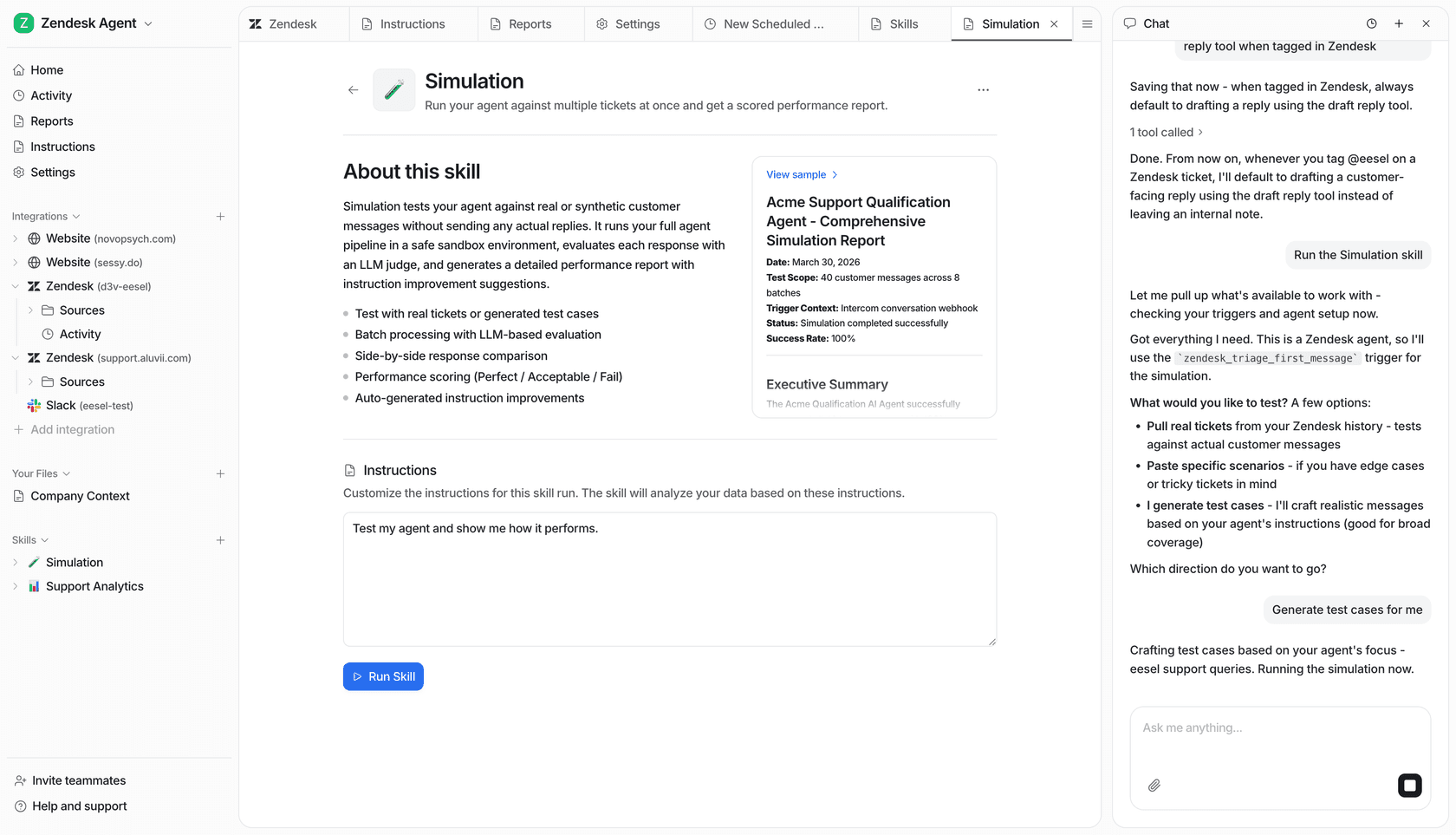
While Emergent is for developers, the idea is the same. Businesses need tools that deliver results without the financial surprises.
Is Emergent AI pricing right for you?
So, is Emergent AI the right tool for you?
It really depends. If you're a solo developer or a hobbyist who wants to experiment with AI coding, it can be a pretty cool and powerful platform, and the new free tier makes it cheap to try.
But if you're running a business or working on a serious project, the Emergent AI pricing model is a major hurdle. The confusing credit system, wild swings in cost, and general lack of transparency make it a tough tool to rely on. The many stories from users about burning through credits just to fix AI mistakes show the real risks involved. If you're weighing it against other builders, it's worth comparing how AI coding assistants and autonomous AI agents price their work too.
If your team needs an AI tool with predictable costs, clear reporting, and a safe way to test before you go live, you'll probably want to look at alternatives designed for business use.
Want to see what an AI platform with clear, predictable pricing actually feels like? You can get started with eesel AI and see how you can automate your support with a bit more confidence and a lot less guesswork.
Frequently asked questions
How does the credit system influence Emergent AI pricing for a typical project?
The credit system is central to Emergent AI pricing, where every task the AI performs, from planning to deployment, consumes credits. More complex or longer tasks will use more credits, directly impacting the total cost of your project. This means your pricing is dynamic and tied to the AI's compute usage for your requests, which is why predictable models like interaction-based pricing are easier to budget against.
What are the key differences between monthly and top-up credits in the Emergent AI pricing model?
Monthly credits are part of your subscription plan and reset each month, being used first by the system. Top-up credits are purchased separately if you exhaust your monthly allocation; they do not expire and are used only after your monthly credits are depleted. Several users on r/vibewithemergent have flagged confusion over when each type applies.
How much does Emergent AI cost per month?
As of mid-2026, Emergent AI pricing starts with a free plan (10 monthly credits), then a Standard plan at $20/month (or $17/month billed annually) and a Pro plan at $200/month (or $167/month billed annually). Enterprise pricing is custom. The headline number is only part of the story, since the credit consumption per task is what actually drives your bill. For a cost comparison with other builders, see our Cursor pricing breakdown.
How do AI errors or code issues impact the overall Emergent AI pricing I might incur?
AI errors significantly increase your overall Emergent AI pricing because every attempt the AI makes, including fixing its own buggy code or misunderstanding a prompt, consumes credits. This means you end up paying more for the AI to correct itself, potentially burning through credits faster than anticipated.
For businesses, is Emergent AI pricing generally considered predictable enough for budgeting?
For businesses requiring predictable monthly expenses, Emergent AI pricing is generally not considered ideal for budgeting. The lack of transparency in credit usage per task and the potential for increased costs due to AI errors make it difficult to forecast expenditures accurately. Tools with transparent fixed-price plans are usually a safer bet for finance teams.
What kind of projects are most suitable for the current Emergent AI pricing model?
The current Emergent AI pricing model seems more suitable for solo developers or hobbyists experimenting with AI coding on smaller, less critical projects. For extensive or business-critical development where cost predictability is paramount, it presents a significant hurdle. You can see how other AI coding tools compare on this.