

We all know the feeling. Work happens in Slack, but so does forgetting where anything is. That one important decision from three months ago? Buried. That crucial file? Lost in a sea of GIFs and project updates. You know the information is in there somewhere, but finding it feels like a full-blown expedition.
Slack AI Search Answers is Slack’s own attempt to fix this, promising to turn all that conversational chaos into clear, simple answers. But the real question is, does it actually pull it off?
This guide is an honest look at what Slack AI Search Answers can do, where it stumbles, and whether it’s the right tool for teams who can't afford to be wrong.
What are Slack AI Search Answers?
Slack AI Search Answers is a feature built into Slack's AI tools on the Business+ and Enterprise+ plans that lets you ask questions like you would a person. Instead of just spitting out a list of messages with your keywords, it tries to understand what you're asking and piece together an actual answer from the chatter in your workspace.
It digs through public channels, your private channels, and any DMs you're in. It also looks at files (like PDFs and previews from Google Docs), canvases, and even articles from Slack’s own Help Center. The goal is to save you the headache of manually scrolling through endless threads so you can get what you need and get back to work. It respects all the existing permissions, so you won’t see answers from any content you aren’t supposed to.
Key features of Slack AI Search Answers
Slack AI is a bit more than just a fancy search bar; it’s a handful of tools meant to make your team's life a little easier. Here’s a rundown of what you get.
Natural language search
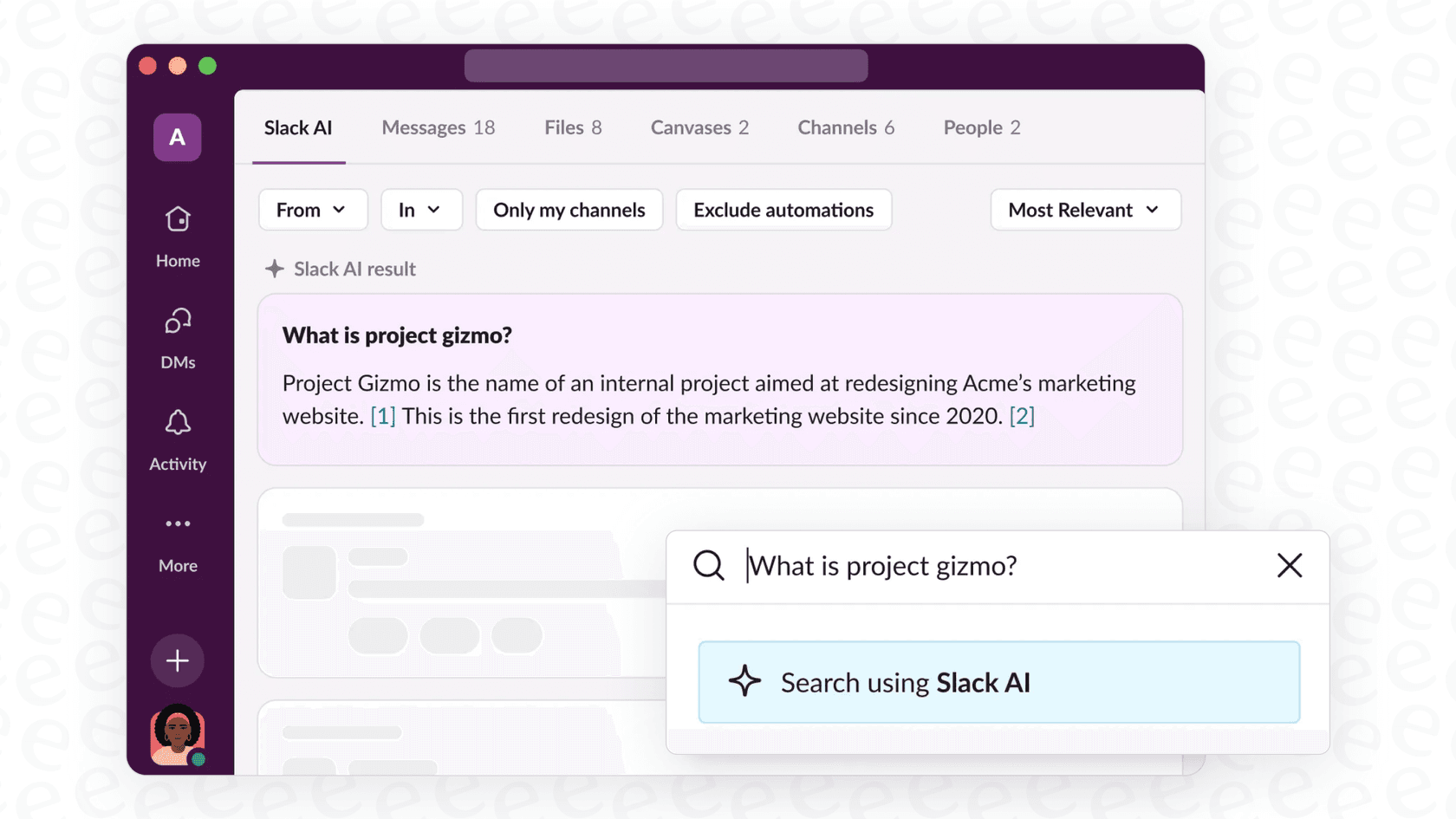
This is the main event. You can ask a normal question like, "What was the final call on the Q4 marketing budget?" instead of racking your brain for the right keywords. The AI then gives you a summarized answer with links back to the original messages or files it pulled from, so you can double-check the source yourself. It's pretty useful for digging up information that was clearly stated in a fairly recent conversation.
Conversation summaries and daily recaps
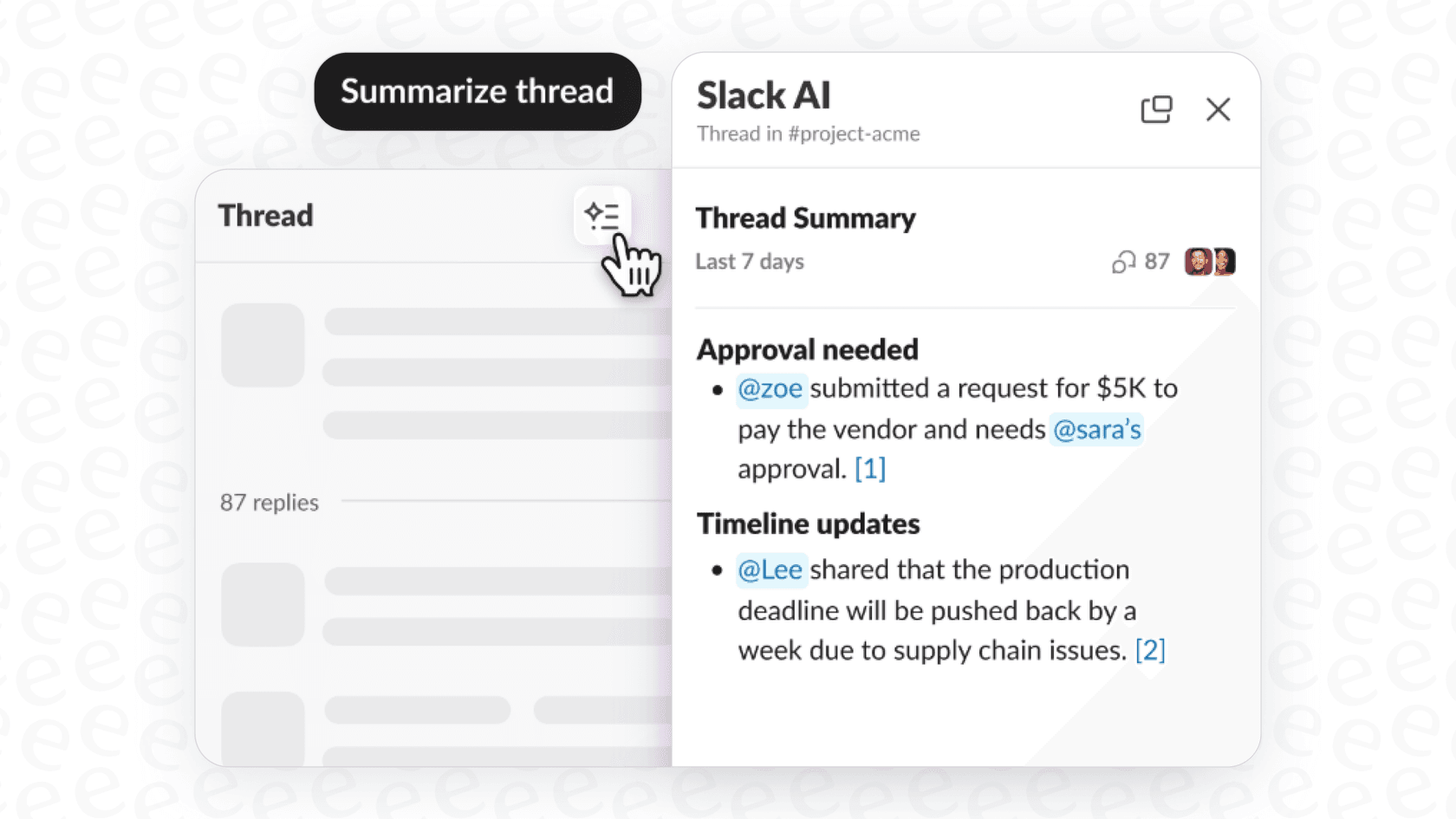
Ever come back from a few days off to an avalanche of unread messages? This feature is for you. Slack AI can create summaries of channels, threads, or DMs from a specific time frame, like the last week. It also has a daily recap that pulls the highlights from your most active channels. It's a decent way to catch up without reading every single message.
Huddle notes and file summaries
Slack AI has a few other tricks up its sleeve. It can take notes for you during huddles, grabbing key discussion points and action items. It can also automatically create summaries of some text-based files you share, which can save you from having to open a whole document just to understand the gist of it.
The limitations of Slack AI Search Answers
While those features sound good, they come with some serious downsides, especially for teams where getting the right information is critical. If you browse forums on Reddit, you'll see a lot of the same complaints pop up.
Accuracy issues: When chat history isn't the source of truth
The single biggest problem with Slack AI is that it treats your team's chat history as its main source of information. Think about it: Slack conversations are informal, messy, and often full of opinions that change. Most importantly, information in a chat can get outdated fast. An answer pulled from a thread that’s six months old might be completely wrong today.
That’s a pretty big gamble for any team, but especially for departments like HR, IT, or Operations, where acting on bad info can cause real problems. Answers cite their source messages, but a chat thread has no way to flag itself as official company policy. For information you can actually trust, an AI should be pulling its answers from verified documents, like a company wiki or an official knowledge base. This is exactly what tools like eesel AI are designed to do by connecting directly to your sources of truth, whether that's Confluence or a shared Google Drive.
Fragmented knowledge: When answers live outside of Slack
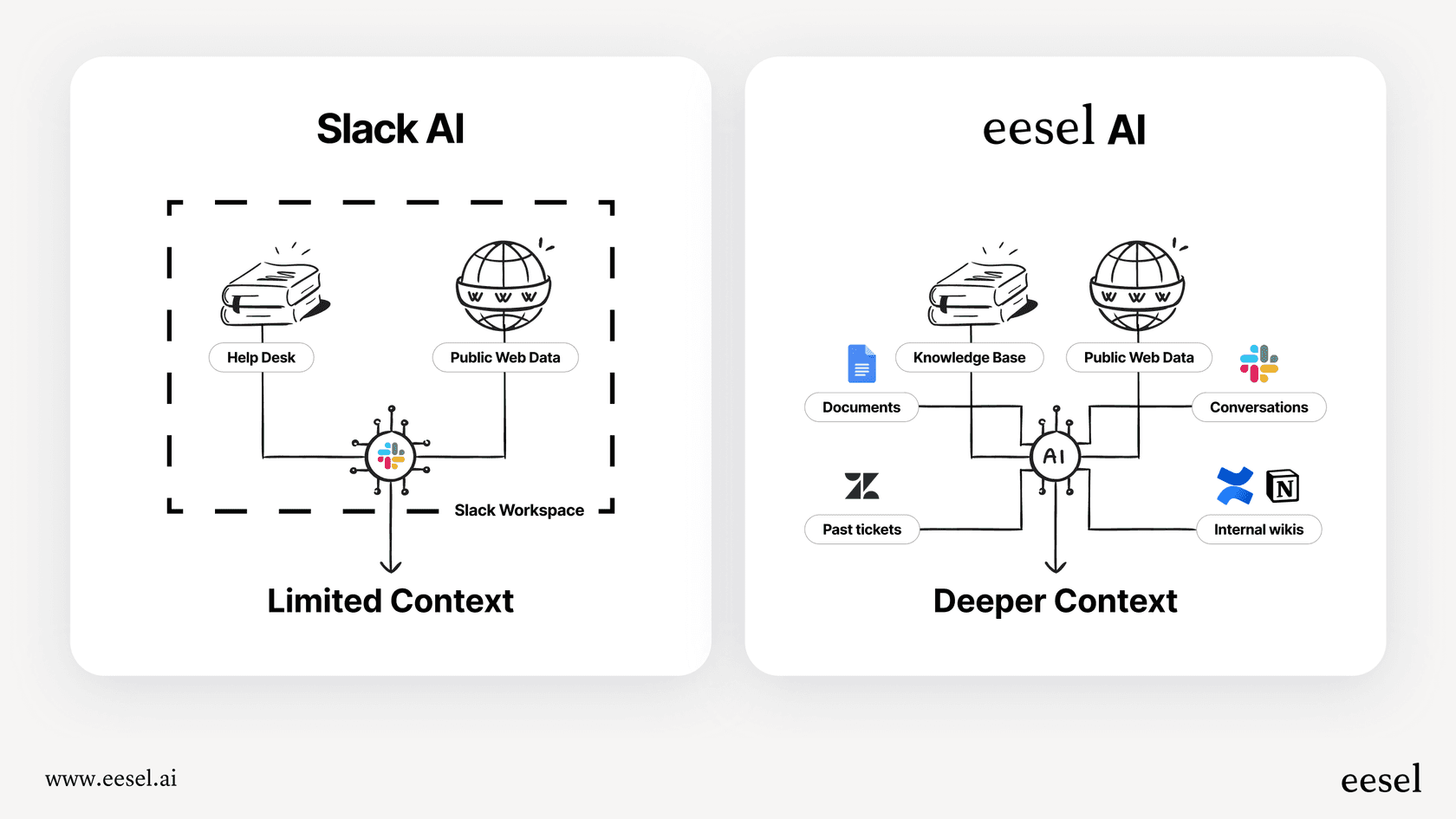
Let's be real, most companies don't store their most important knowledge in Slack channels. The official stuff, policies, technical guides, customer support playbooks, usually lives on dedicated platforms like Confluence, Notion, or a helpdesk like Zendesk. Below the Enterprise+ plan, Slack AI answers come from content inside Slack, so they cover only a fraction of your company's actual knowledge. Enterprise+ adds enterprise search with connectors such as Confluence Cloud, Jira Cloud, and Google Drive.
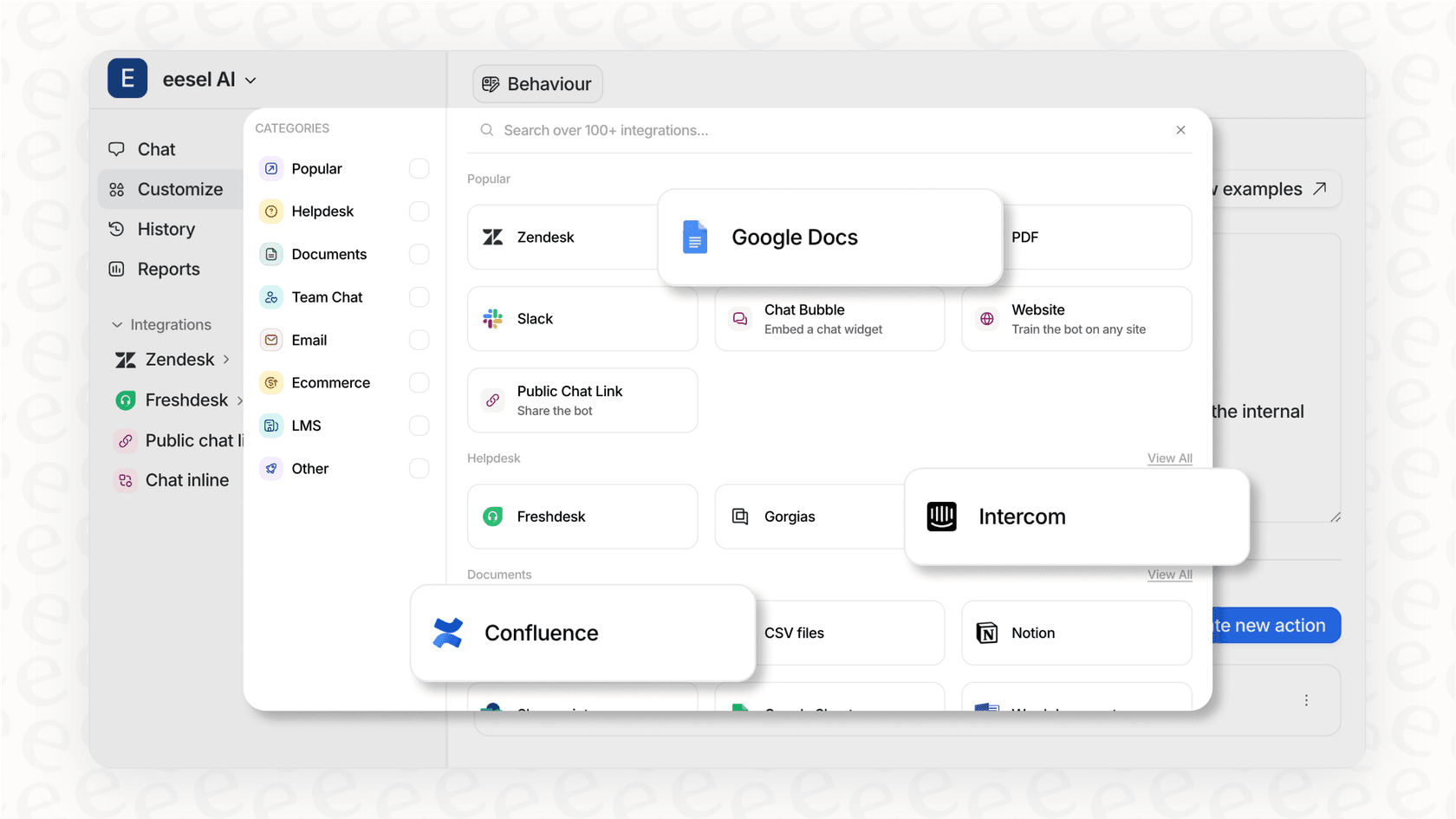
This means your team still has to leave Slack to find the real answer, which kind of defeats the purpose of having a search tool in the first place. A much better setup is an AI that brings all your knowledge together, no matter where it's stored. eesel AI does this with over 100 one-click integrations, creating a single brain for your company that you can talk to right from Slack.
The high cost and lack of flexibility
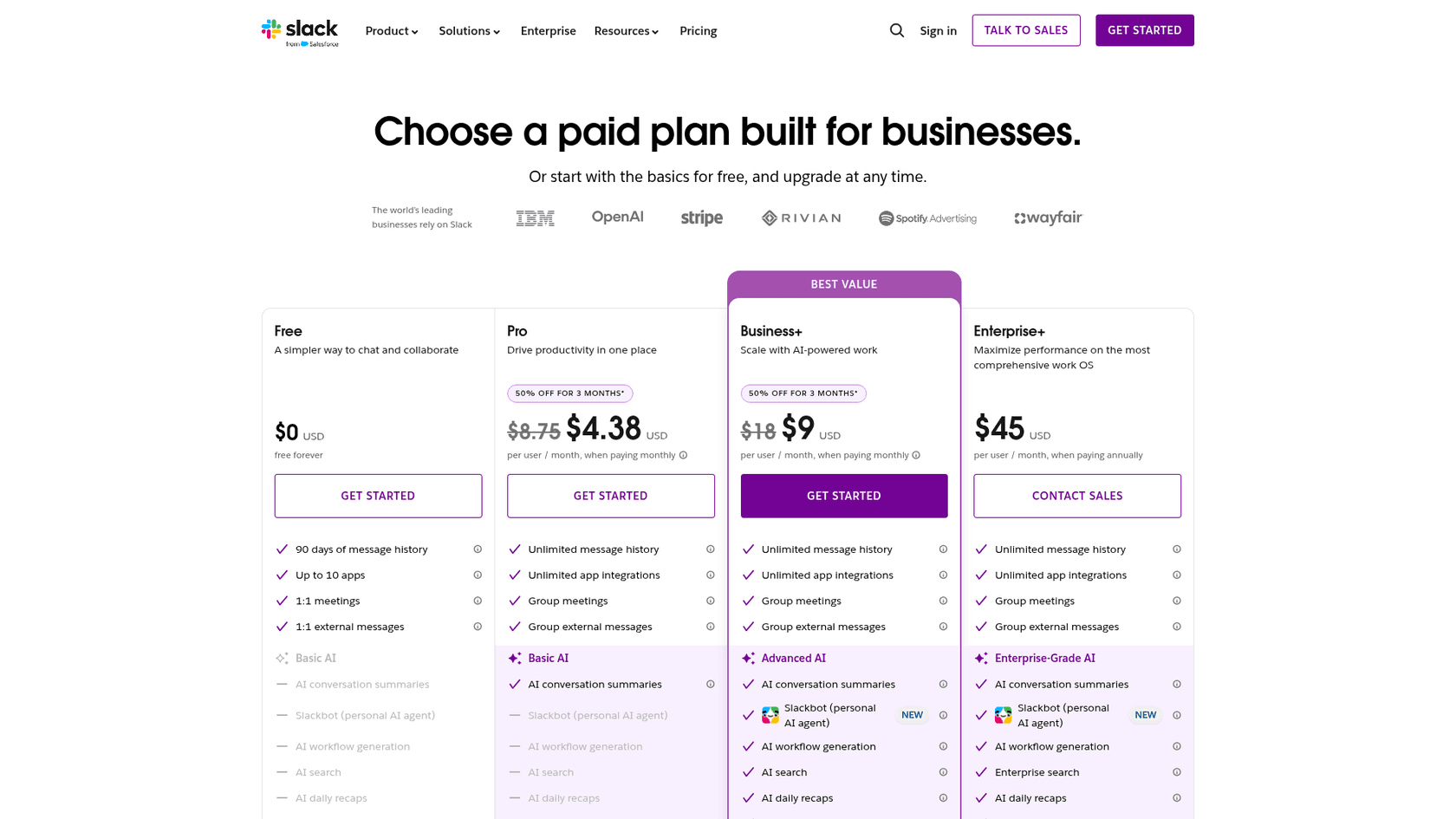
Slack AI pricing is bundled into the plan. Slack no longer sells AI as a separate add-on, so search answers come with Business+ ($15 per user per month billed annually, $18 monthly) and Enterprise+, and they aren't included on the Free or Pro plans. Trying them means moving the whole workspace up a plan.
This makes it hard to justify the cost. Why pay for every single person in your company to have a feature that maybe only a handful of them will actually use? It’s a huge departure from more modern and fair pricing. For example, eesel AI uses credit-based plans at one fixed monthly price with no per-seat fee. This makes your costs predictable and gives you a much clearer idea of what you're getting for your money.
A better approach: Unifying knowledge with a dedicated AI agent
The answer to Slack AI’s problems isn't to give up on AI. It’s about using a specialized tool that’s actually built to manage enterprise knowledge. This is where eesel AI's AI Internal Chat comes into the picture.
Why connecting to authoritative sources matters
Unlike Slack AI, eesel AI is built from the ground up to connect to your official knowledge. It treats your Confluence pages, Google Docs, and help center articles as the gold standard, which means the answers it gives are always accurate and current. This completely gets rid of the risk of pulling bad information from some long-forgotten chat thread. When a policy gets updated in your wiki, eesel AI’s answers reflect that change immediately.
Gaining total control and testing with confidence
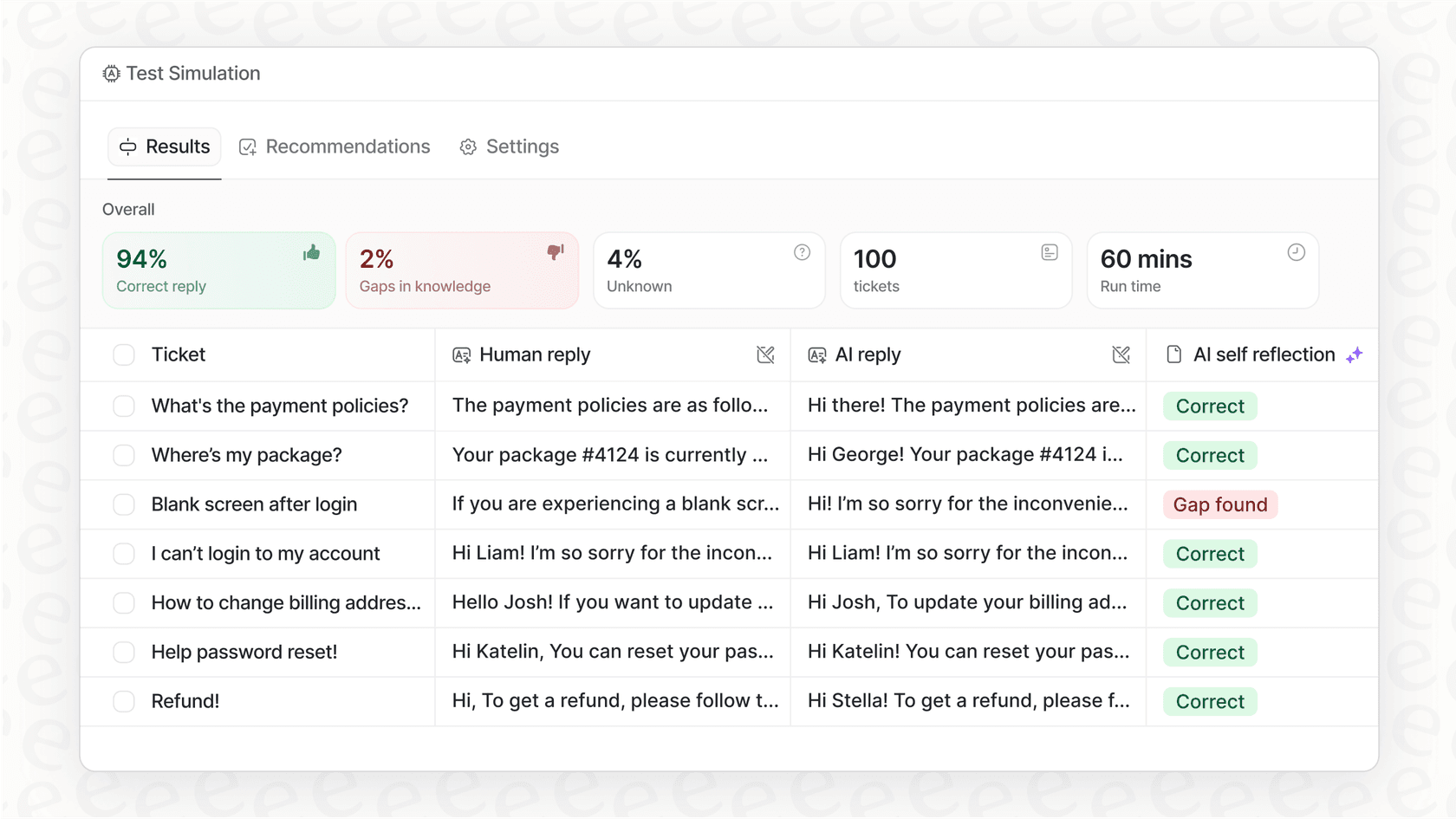
You can set up eesel AI yourself in minutes without ever having to talk to a salesperson. It gives you a simple dashboard where you can tweak the AI's personality, restrict its knowledge to certain sources for specific channels, and even test how it would have performed on your team's past questions before you go live. This amount of control means the AI works exactly the way you want it to. You can start small, check its accuracy, and scale up when you're ready, avoiding the expensive leap of faith that Slack AI asks you to take.
| Feature | Slack AI | eesel AI |
|---|---|---|
| Primary Knowledge Source | Messy Slack chat history | Your official docs (Confluence, GDocs, etc.) |
| Setup & Onboarding | Requires admin setup for the whole workspace | Set it up yourself in minutes |
| Customization | Admin on/off controls per AI feature | Full control over AI persona, sources, and scope |
| Integrations | Enterprise+ connectors (Confluence Cloud, Google Drive, and more) | 100+ one-click integrations |
| Testing | Search answers start on Business+ | Test on your historical data before you buy |
| Pricing Model | Bundled into per-seat Business+ and Enterprise+ plans | Fixed monthly credit plans, 100 free credits |
Slack AI Search Answers pricing explained
Slack AI used to be a $10 per user, per month add-on, but Slack no longer sells it separately. Search answers now come with Business+ ($15 per user per month billed annually, $18 billed monthly) and Enterprise+ ($45 billed annually), while Pro includes only conversation summaries and huddle notes.
The cost is per seat across the whole plan. If you have a team of 200 people on Business+, that’s $3,000 a month billed annually, whether all 200 of them use the AI or not.
| Slack AI feature | Pro | Business+ | Enterprise+ |
|---|---|---|---|
| Conversation and thread summaries, huddle notes | Yes | Yes | Yes |
| Search answers, recaps, file summaries, translations | No | Yes | Yes |
| Enterprise search across other apps | No | No | Yes |
As an alternative, eesel AI's pricing is designed to be way more flexible. Plans are one fixed monthly price sized to volume, starting at $299 a month for 500 credits (one credit per ticket or chat), with a free plan of 100 credits and no card. The price scales with the volume you use, not with how many people are on your team. You can even start on a monthly plan and cancel anytime, giving you the freedom to make sure it's the right fit without getting locked into a long contract.
Moving beyond Slack AI Search Answers to a true knowledge hub
Slack AI Search Answers is a step up from the old keyword search, and it can be useful for quickly finding something from a recent conversation.
But because it leans heavily on chat history, reaches other apps only on Enterprise+, and is priced per seat across the whole plan, it’s not the right fit for companies that need answers grounded in official documents. To really fix the problem of finding information at work, you need to turn Slack into a central hub that’s connected to your real sources of truth. And for that, you need an AI agent built for the job.
Ready to see what a real AI knowledge assistant can do? Try eesel AI for free and connect it to your knowledge sources in minutes to start getting instant, accurate answers right inside Slack.
Frequently asked questions
What exactly are Slack AI Search Answers designed to do for my team?
Slack AI Search Answers aims to transform chat history into clear, summarized answers to natural language questions. Instead of simple keyword searching, it tries to understand your query and provide direct information from public and private channels, DMs, and some files.
What are the main features included with Slack AI Search Answers?
The primary features include natural language search, which provides summarized answers with source links. It also offers conversation summaries, daily recaps for channels, huddle notes, and automatic summaries of some text-based files.
How reliable is the information provided by Slack AI Search Answers, given it relies on chat history?
The blog highlights that a significant limitation of Slack AI is its reliance on informal chat history, which can lead to outdated or inaccurate information. Its answers cite source messages, but a chat thread has no way to mark itself as official policy, which poses risks for critical information.
Can Slack AI Search Answers access information stored outside of Slack, like in our company's Confluence or Google Drive?
Below the Enterprise+ plan, Slack AI Search Answers draws on content inside Slack. Enterprise+ enterprise search adds connectors such as Confluence Cloud and Google Drive, but Notion isn't on Slack's supported list. That can leave users searching elsewhere for official answers.
How much does Slack AI Search Answers cost, and is there a way to try it out first?
Slack no longer sells AI as a separate $10 add-on. Search answers come with Business+ ($15 per user per month billed annually, $18 monthly) and Enterprise+, and aren't on Free or Pro, so trying them means moving the workspace to one of those plans.
Are there any alternatives to Slack AI Search Answers that offer better accuracy and flexibility?
Yes, tools like eesel AI are presented as a more robust alternative to Slack AI Search Answers. eesel AI connects directly to authoritative sources like Confluence and Google Docs, offers more customization, and uses fixed monthly credit plans with a free 100-credit tier, allowing for testing before full commitment.