


Slack is where work conversations happen, but let's be honest, finding a specific piece of information in there can feel like digging through a very messy digital attic. Slack's own AI features are starting to tidy things up, promising to turn your channels into a library of useful answers.
But what happens when the answer you need isn't actually in Slack? It's probably tucked away in a Google Doc, a Confluence page, or an old support ticket. This guide will walk you through what Slack’s native AI can do, where it hits a wall, and how third-party Slack AI Search Integrations can connect all the dots to create a knowledge hub your team will actually use.
What is Slack AI search?
Slack AI search is a much smarter version of the regular search bar you're used to. Instead of just matching keywords, it uses generative AI to understand what you're asking in plain English and gives you a straight answer.
It’s a bit like asking a coworker for help. You can type, "What was the final decision on the Project Phoenix launch date?" and Slack AI will scan relevant messages and files to pull together a summary, complete with links back to the original conversations.
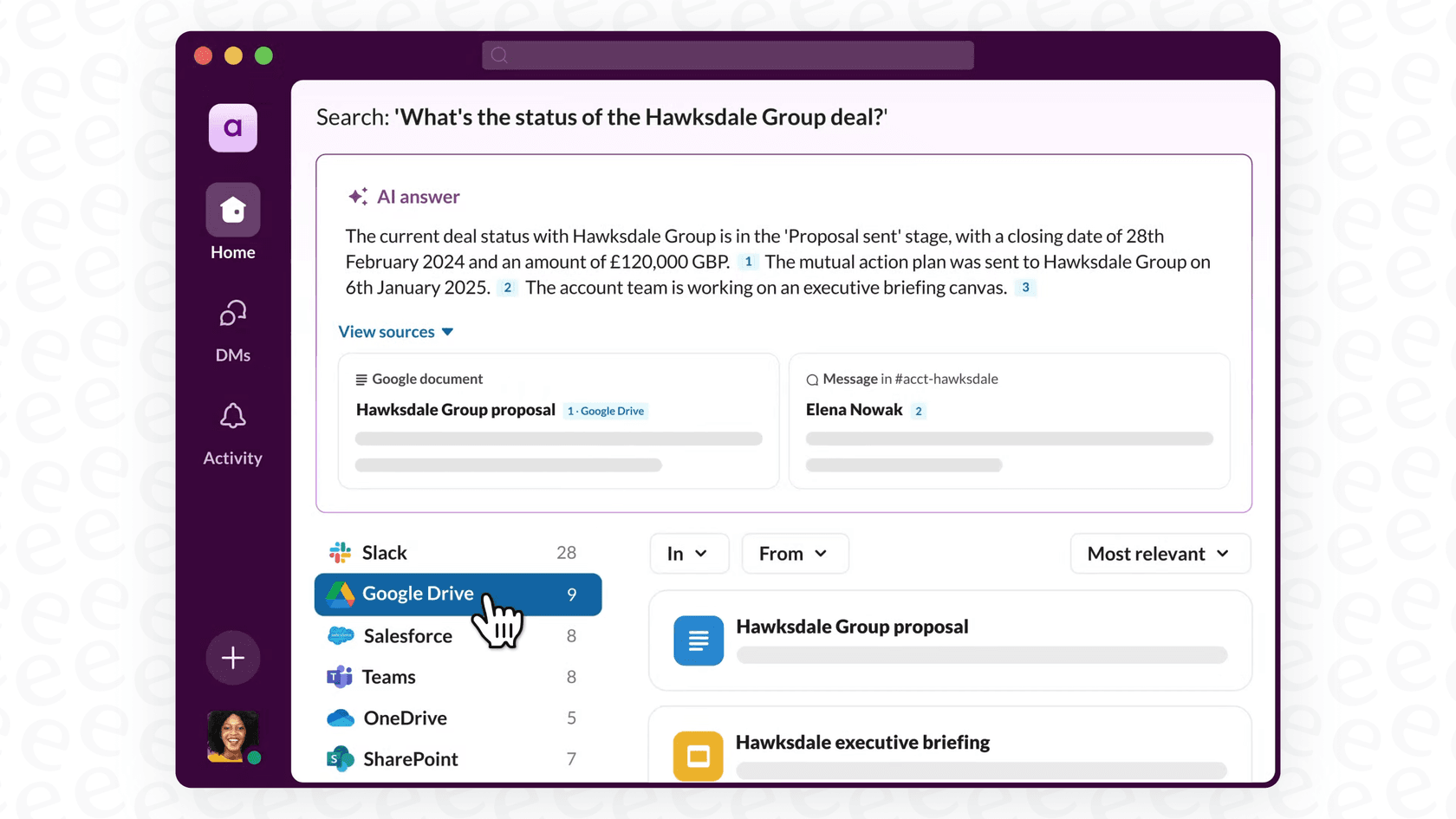
It's a huge improvement over scrolling through endless search results. The catch? Its knowledge is limited to what’s inside your Slack workspace. For most companies, where information is scattered across a dozen different apps, that's only a small piece of the puzzle.
The native Slack AI search experience: What's included?
Slack has built a few AI tools into its paid plans to make finding information a little easier. They’re useful, but it’s good to know exactly what you’re getting and what you’re not.
Core AI search features
Slack's main AI tools are all about helping you find answers and get caught up without having to leave the app. You'll find these on the Business+ and Enterprise+ plans. According to Slack's own guide, here's what you get:
-
Ask questions like a person: You can ask things in your own words and get summarized answers with links pointing back to the source messages.
-
Get conversation summaries: Need to catch up on a busy channel? You can get a quick summary of what’s happened over the last seven days or just in your unread messages.
-
Receive daily recaps: You can get a personalized morning digest of your most important channels so you can start your day without drowning in notifications.
-
Skim file summaries: The AI can automatically create a brief summary for some text-based files, like PDFs and DOCX, so you know what's inside without having to open them.
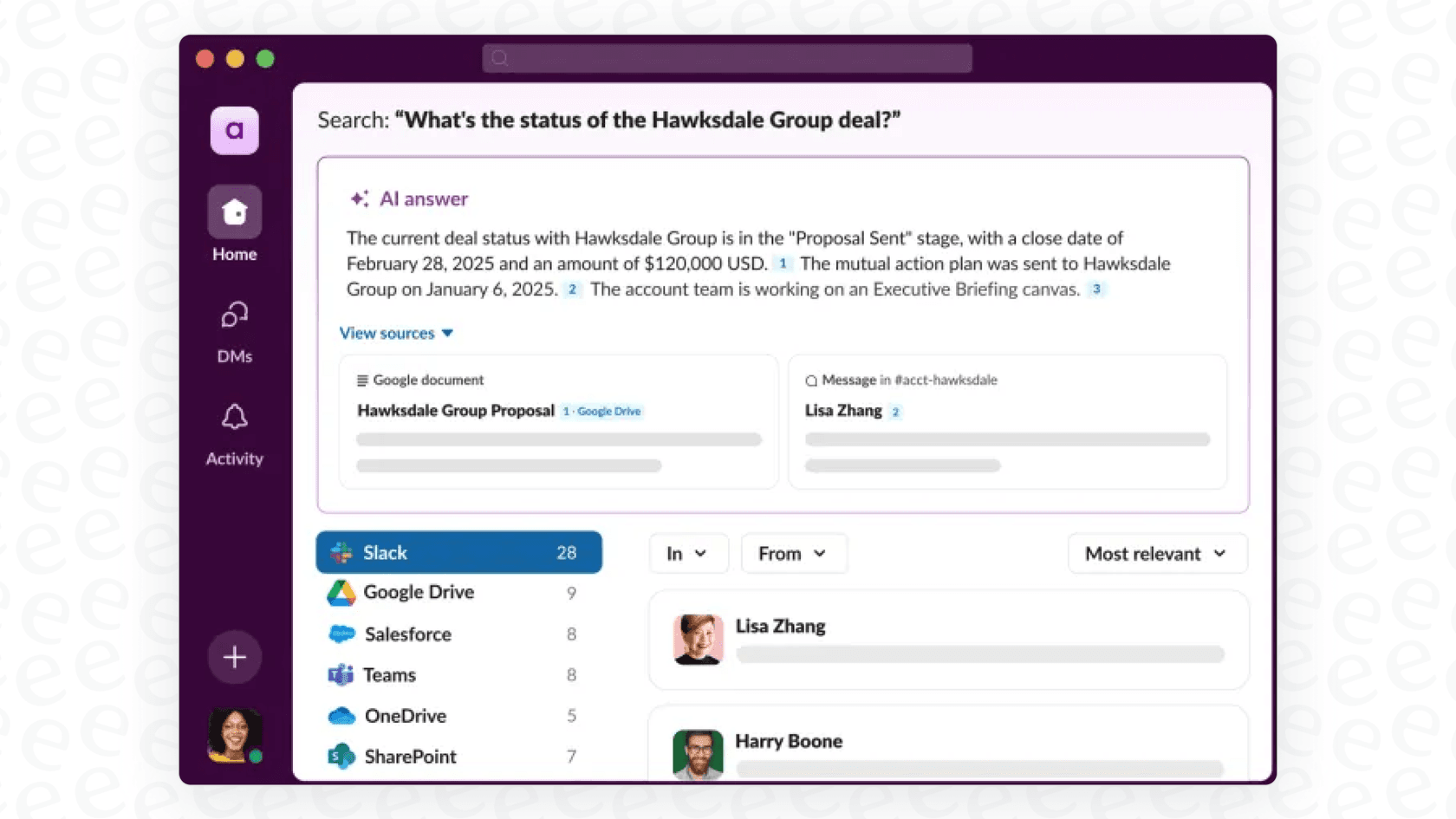
Slack Enterprise Search: Connecting your wider app ecosystem
If you're on the top-tier Enterprise+ plan, Slack Enterprise Search can look for information outside of Slack itself. It connects to other applications, making their content searchable right from the Slack search bar.
According to Slack's help center, the supported data sources are:
-
Asana, Box, and Dropbox
-
Confluence Cloud and Jira Cloud
-
GitHub and Salesforce
-
Google Drive and Google Mail
-
Microsoft Outlook, Microsoft Teams, and OneDrive/SharePoint
-
Seismic
When you search for something, the AI can pull results from these apps alongside your Slack messages. For instance, you could ask, "Find the latest quarterly report," and it might pull up the right file from your company's Google Drive. It’s a nice feature, for sure, but it covers a defined list of sources rather than everything your company uses. Teams can add their own internal data sources through custom connectors built with Slack's APIs, which takes developer work.
The limitations of native Slack AI search
While Slack AI is a handy tool, it wasn't built to be the single source of truth for your entire company. Teams that try to use it that way usually bump into a few common problems:
-
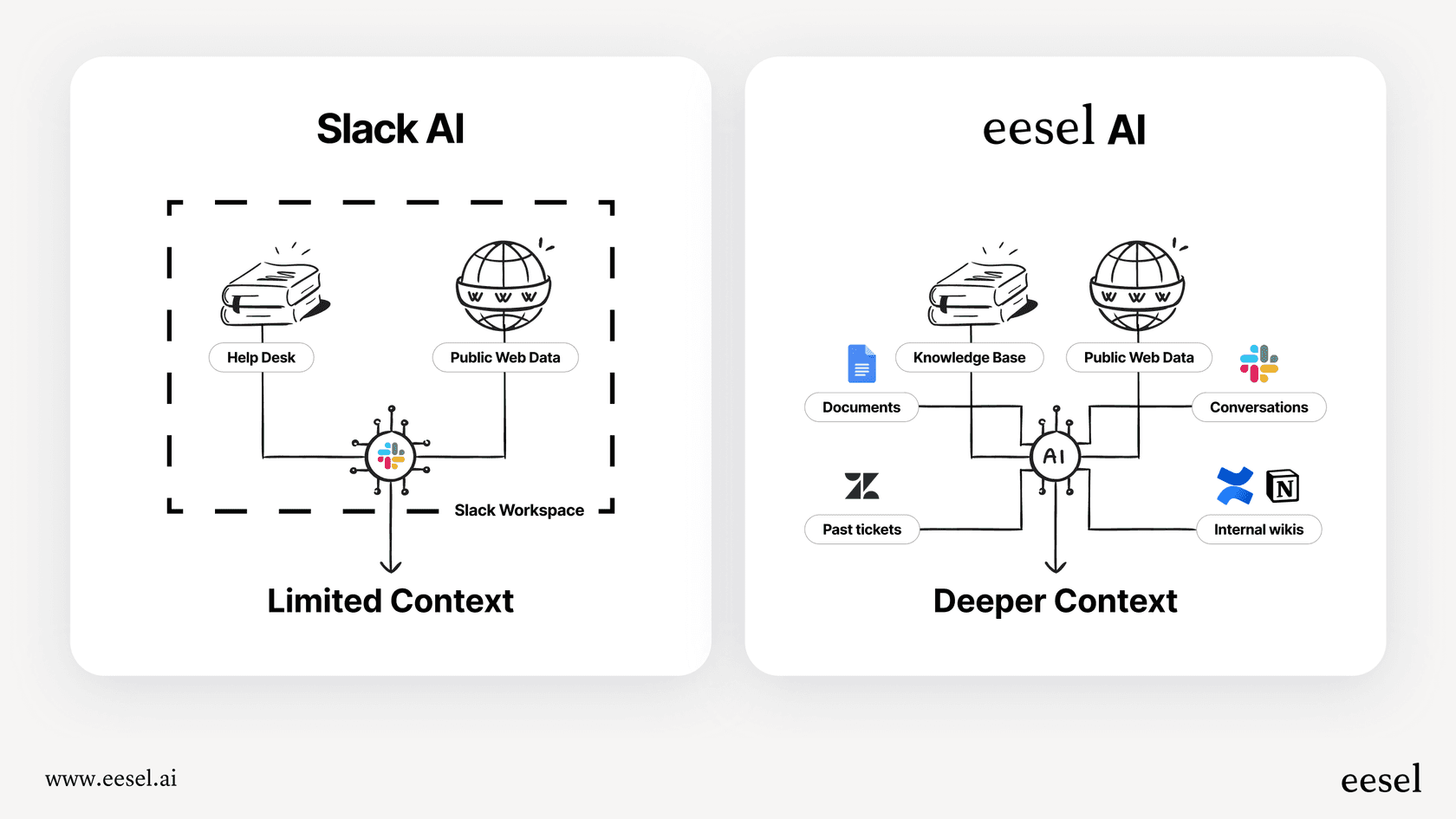
A limited memory: Below the Enterprise+ plan, the AI draws on content inside Slack. Even on that plan, enterprise search covers a fixed list of supported data sources. Confluence Cloud is on it, but Notion and Zendesk aren't, so knowledge kept there, like your best troubleshooting tips in old tickets, stays out of Slack's search.
-
Limited ways to teach it: Admins can switch each AI feature on or off in Slack's feature access settings. Tone, personality, and which documents count as most important aren't among the options listed there, so it follows one standard approach for every company.
-
Search finds, other tools act: Search answers retrieve and summarize information. Actions like creating a Jira ticket from a bug report, looking up a customer's order in Shopify, or routing a question to the right person fall to Slack workflows, apps, or Slackbot (Business+ and above) rather than search itself. In that role it works as a research assistant.
-
Coarse rollout controls: On Pro and Business+ workspaces, an admin sets each AI feature to everyone or no one, while Enterprise plans can target specific people and groups. Slack's admin settings cover access, not a replay of the AI against your past conversations before launch.
Going beyond the basics with third-party Slack AI Search Integrations
The shortcomings of the native tools open the door for specialized Slack AI Search Integrations. These are apps built specifically to solve the "walled garden" problem by connecting Slack to all the places your company knowledge is stored.
Why you need a third-party integration over Slack's native tools
A dedicated AI integration does more than just expand the search; it can turn Slack into the real hub of your operations. Here’s what a specialized tool can do that the native features can't:
-
Connect to everything: Link dozens of sources like Confluence, Google Docs, Notion, and Zendesk to build a single, trustworthy source of truth.
-
Customize everything: You get to decide exactly what the AI knows, how it should sound, and what it can do. This means you can build a very specific, technical bot for your IT team and a completely different, friendly one for HR questions.
-
Automate workflows: Move past just finding answers. A good integration lets your AI create support tickets, update customer records, and trigger workflows in other apps, all from a simple command in Slack.
-
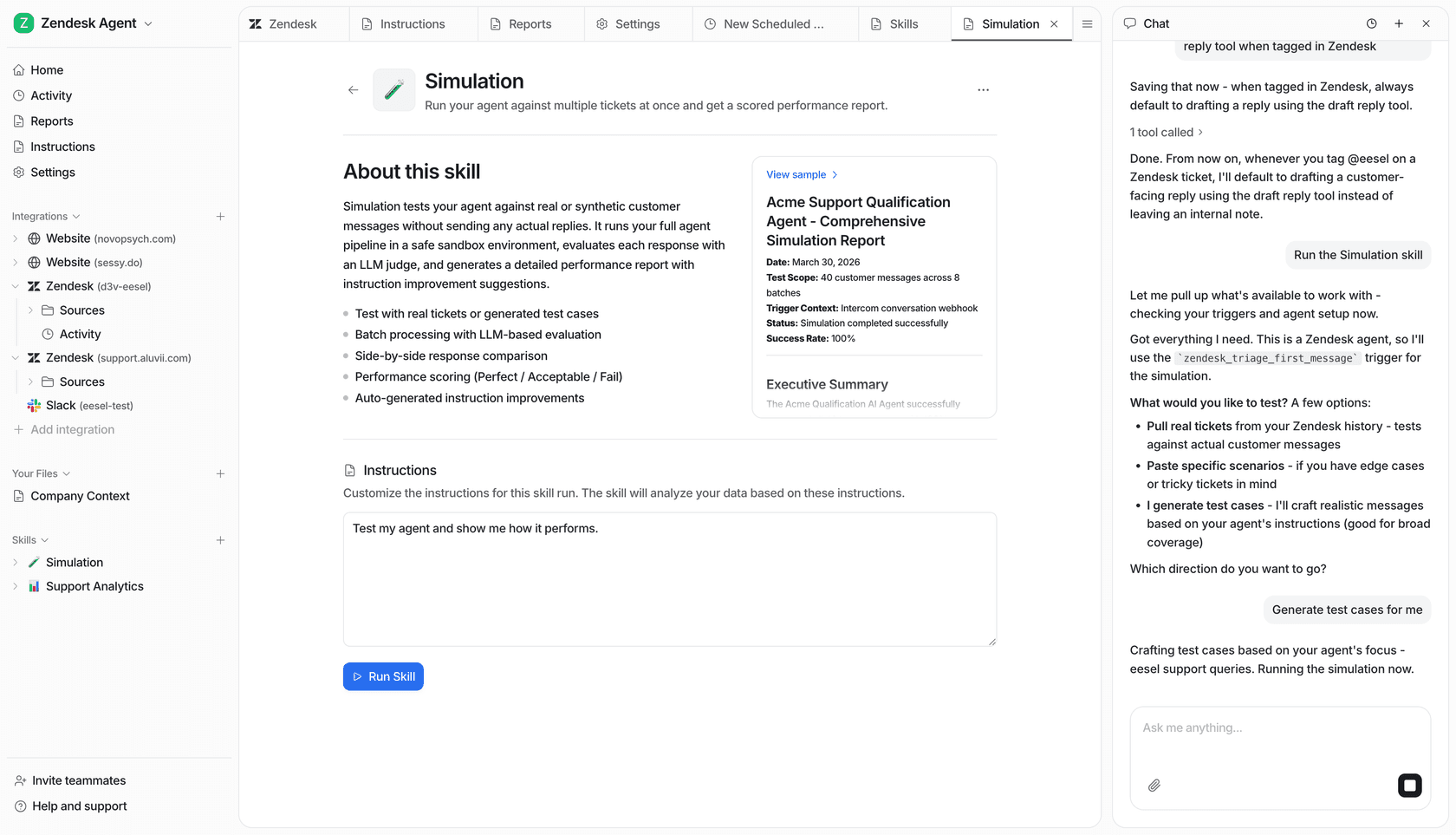
Test before you deploy: You can simulate how the AI would have performed on past conversations, so you can measure its helpfulness before it goes live. When you're ready, you can roll it out one channel at a time.
A better way to search: eesel AI for Slack
This is the exact problem that tools like eesel AI were built to solve. It adds a smart, flexible AI layer that connects to all the tools you already use, right inside Slack.
Instead of being stuck with a few pre-approved apps, eesel's Slack agent answers in the thread from your connected knowledge and links the source. It reads from the 39 integrations eesel lists, plus anything with an API through Network Access, so you can connect your Confluence space, Google Drive, and your company website.
What makes a tool like eesel AI really stand out is that you’re in the driver’s seat:
-
Get it running in minutes: You can set up and launch your first AI assistant in Slack entirely on your own, without having to talk to a salesperson.
-
Control the entire workflow: A simple prompt editor lets you define the AI's personality and build custom actions, like having it look up information from any of your internal systems via an API.
-
Test with confidence: eesel's simulation skill tests the agent's answers against hundreds of your past tickets or generated test cases, scores each one, and suggests instruction changes, so you can check it before you unleash it on your team.
With a tool like this, you're not just getting a smarter search bar; you're getting a customizable AI assistant that lives right where your team works.
Understanding Slack AI pricing vs. Slack AI Search Integrations
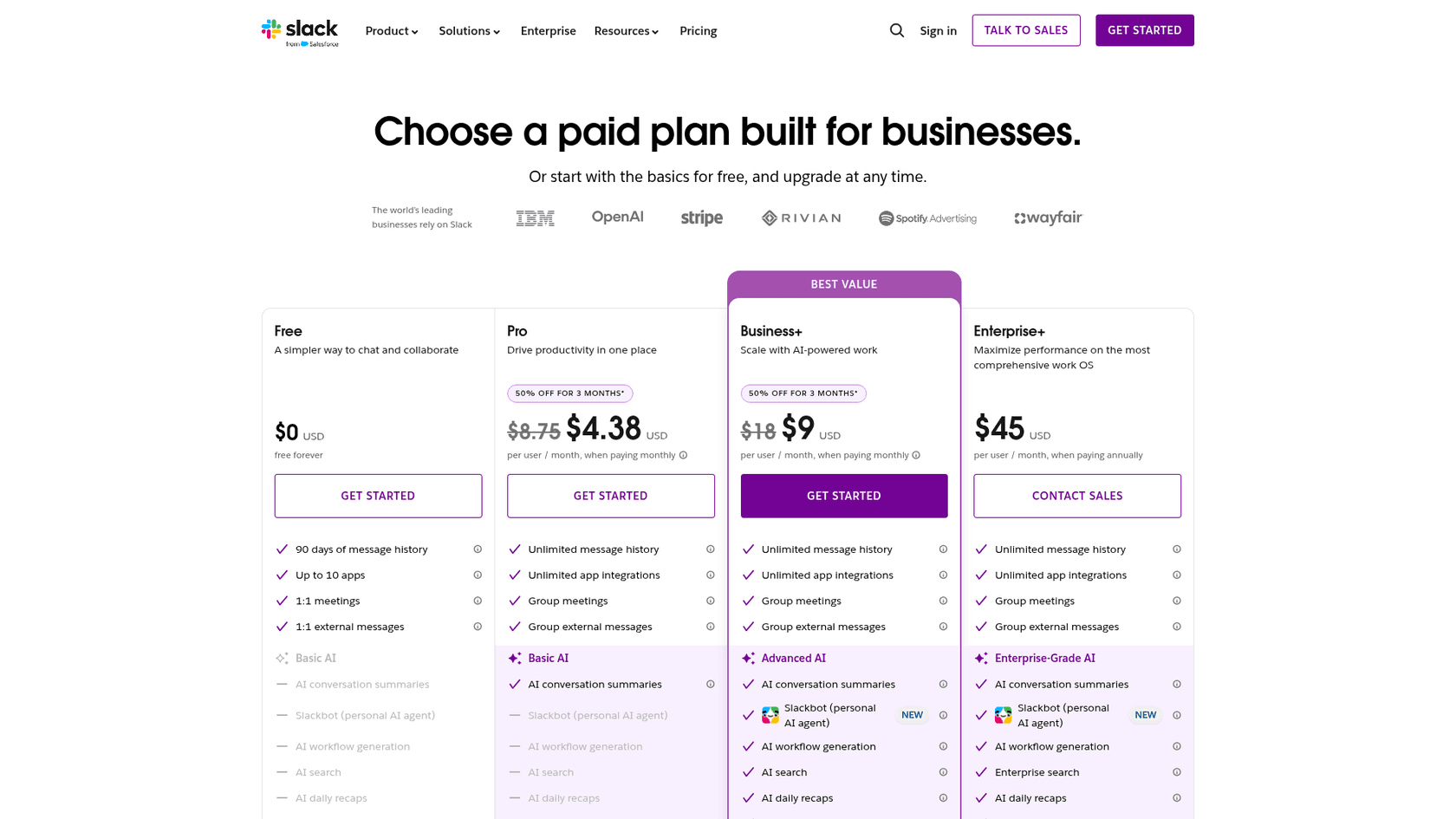
Slack AI used to be a per-user add-on, but Slack no longer sells it separately. The AI features now come bundled into the plan, according to Slack's pricing page. Here’s a quick look at what each plan costs and which AI features it includes:
| Plan | Price (per user/month, annual) | Price (per user/month, monthly) | Key AI Features Included |
|---|---|---|---|
| Pro | $7.25 | $8.75 | Conversation Summaries, Huddle Notes |
| Business+ | $15.00 | $18.00 | Everything in Pro + Search, Recaps, File Summaries, Translations, Workflow Generation, Slackbot |
| Enterprise+ | $45.00 | Contact Sales | Everything in Business+ + Enterprise Search |
For a 50-person team, Slack AI pricing on Business+ means $750 per month billed annually (50 x $15), since search answers come with the plan.
The features are helpful, but the per-seat cost scales with headcount. This is another area where dedicated integrations can provide a better deal. For example, eesel AI uses credit-based plans. You pay one fixed monthly price sized to volume, from $299 a month for 500 credits (one credit per ticket or chat), with a free 100-credit plan and no per-seat fee. That keeps costs predictable, so you aren't penalized for adding more people to your team.
Moving beyond basic search in Slack
Slack's native AI has made the search experience much better. For small teams where almost everything happens in Slack, it can be a really nice boost to productivity.
But for most companies, knowledge is all over the place. Relying only on Slack's built-in AI gives you an incomplete picture and leaves a ton of valuable information hidden away in other systems.
To really manage your company's knowledge, you need something that can connect all those scattered pieces. Third-party Slack AI Search Integrations are the way to unlock the full potential of your team's collective brainpower. By linking all your sources and giving you full control, they can turn Slack from just a chat app into the true command center for your entire organization.
If you’re tired of information silos and want to give your team instant access to everything they need, it’s probably time to look beyond the native features.
Ready to connect all your knowledge in Slack with Slack AI Search Integrations?
Stop making your team hunt for information across a dozen different apps. With eesel AI, you can build a powerful, custom AI assistant for Slack that’s trained on all your company knowledge, from Confluence and Google Docs to your help desk and beyond.
Get started in minutes or book a demo to see how you can automate internal support and make your whole team more productive.
Frequently asked questions
Why would my team need Slack AI Search Integrations if Slack already offers native AI search capabilities?
Native Slack AI is limited to content within Slack and a few enterprise apps. Dedicated Slack AI Search Integrations overcome this by connecting to dozens of external tools like Confluence, Google Docs, and Zendesk, unifying all your company knowledge.
How do Slack AI Search Integrations help overcome the "limited memory" problem of Slack's built-in AI?
These integrations are designed to link Slack to virtually all your existing knowledge sources, from documentation platforms to customer support systems. This allows the AI to access and synthesize information from a much wider range of your company's data.
Can Slack AI Search Integrations be customized to fit our company's specific needs and brand voice?
Yes, unlike Slack's native AI, third-party solutions often provide extensive customization options. You can train the AI on specific documents, define its personality, and even set up custom actions tailored to your workflows.
What is the primary difference in how Slack AI Search Integrations are typically priced compared to Slack's native AI add-on?
Slack's native AI is priced per user. Many third-party Slack AI Search Integrations, like eesel AI, use a capacity-based model instead. eesel sells fixed credit plans, where one ticket or chat uses one credit, which can be more cost-effective and predictable for larger teams.
What kind of external applications can Slack AI Search Integrations connect to, beyond the few offered by Slack Enterprise Search?
They can connect to a much broader ecosystem of tools, including Confluence, Notion, Google Docs, Zendesk, Salesforce, Jira, and many more. This creates a truly centralized knowledge hub for all your company's information.
How can I test Slack AI Search Integrations before fully deploying them to my entire team?
Many advanced integrations offer a simulation mode. This allows you to test the AI's performance on historical conversations and measure its helpfulness before rolling it out to specific channels or your entire organization.