


Let's be real, customer support is a juggling act these days. Your customers are pinging you from email, popping up in live chat, sending DMs on social media, and even calling on the phone. Trying to keep all those conversations straight is tough, and teams are looking for a single place to see everything. This is where unified platforms like the Freshdesk Omni enter the picture, bringing professional order to the complexity of modern support.
But what does it actually do? How does the pricing work? And is it the right fit for your team? This guide will give you a comprehensive look at the suite, its features, pricing, and some important considerations to keep on your radar for 2026. By the end, you'll have what you need to decide if it's the right move for you.
What is Freshdesk Omni?
Freshdesk Omni is Freshworks' all-in-one customer service platform. The easiest way to think of it is as a central command center that bundles your ticketing system, live chat, phone support, and self-service tools into one robust package. You might have seen it called the Omnichannel Suite or Customer Service Suite before; Freshdesk Omni is the current name, and it represents their most complete support solution.
The main idea is to give your support agents a single view of every customer interaction, regardless of where it came from. This way, they have the full story and can solve problems efficiently. On top of that, Freshworks has built its own powerful AI, named Freddy AI, to automate routine questions and give human agents a helping hand. It’s a mature ecosystem designed for your entire support operation.
Key features and capabilities
The real value of an all-in-one suite is how well its tools work together. Let's look at the main components that make this suite so capable.
A single inbox for every channel
At the core of the suite is its unified inbox. It gathers customer conversations from email, chat, social media, phone, and your website into one continuous thread. This means your agents can work efficiently without switching between different tabs to find a customer's history.
So, if a customer sends an email and then follows up with a chat an hour later, it all shows up in the same conversation. This gives agents the context they need to offer help that feels personal and ensures every message is handled with care. For mobile messaging, explore our guide on Freshdesk WhatsApp Business integration.
Freddy AI: The bots and the copilots
Freshdesk's AI, Freddy AI, comes in two forms that work together to boost productivity.
-
AI Agents: These are autonomous bots that handle repetitive queries. They can resolve simple tickets, answer frequently asked questions, and update records, allowing human agents to focus on more complex tasks. They are reliable digital teammates that help manage high ticket volumes.
-
AI Copilot: This assistant works right alongside your human agents. It lives inside the ticket view and assists by suggesting replies, summarizing long email chains, or translating messages in real time. The goal is to help your team maintain a high standard of quality and speed.
graph TD A[Customer Query Arrives] --> B{Freddy AI Agent Analyzes}; B -->|Simple Query| C[AI Agent Resolves & Closes Ticket]; B -->|Complex Query| D[Routes to Human Agent]; D --> E[Human Agent Opens Ticket]; E --> F[AI Copilot Assists]; F --> G[Suggests Replies]; F --> H[Summarizes Conversation]; G & H --> I[Agent Responds Faster]; I --> J[Ticket Resolved];
Helpdesk essentials: Ticketing, self-service, and analytics
Beyond the inbox and AI, the suite has all the comprehensive tools you'd expect from an industry-leading helpdesk.
-
Advanced Ticketing: You can set up sophisticated rules to automatically send incoming tickets to the right person or team based on their expertise or current workload.
-
Self-Service: The platform lets you build a customer-facing knowledge base where people can find answers on their own. This is a great way to empower customers and provide instant answers.
-
Analytics & Insights: Managers get detailed dashboards to track performance metrics like customer satisfaction (CSAT), first response times, and ticket volumes. It helps you see exactly how your team is performing.
Getting set up
Moving to a comprehensive platform like Freshdesk Omni is a significant step forward. You're bringing your entire support operation into a unified, high-performance world. Freshdesk is well-known for being more intuitive than many legacy enterprise systems, though a full migration is a thorough process that benefits from good planning.
Freshdesk Omni also lists pre-built integrations with apps such as Shopify, Stripe, PayPal and Wix, so it can fit into your existing workflow while encouraging a cohesive ecosystem.
While many teams love this integrated approach, some look for additional flexibility. Instead of a full platform migration, they might look to add a specialized AI layer on top of their existing setup. For teams who are happy with their current tools but want to explore further AI options, tools like eesel AI offer a complementary approach. They work alongside helpdesks like Freshdesk, providing extra AI features while you keep your existing systems in place.
Freshdesk Omni pricing and considerations
When evaluating any professional platform, it’s important to understand the pricing structure and how it fits your team's needs.
Pricing breakdown
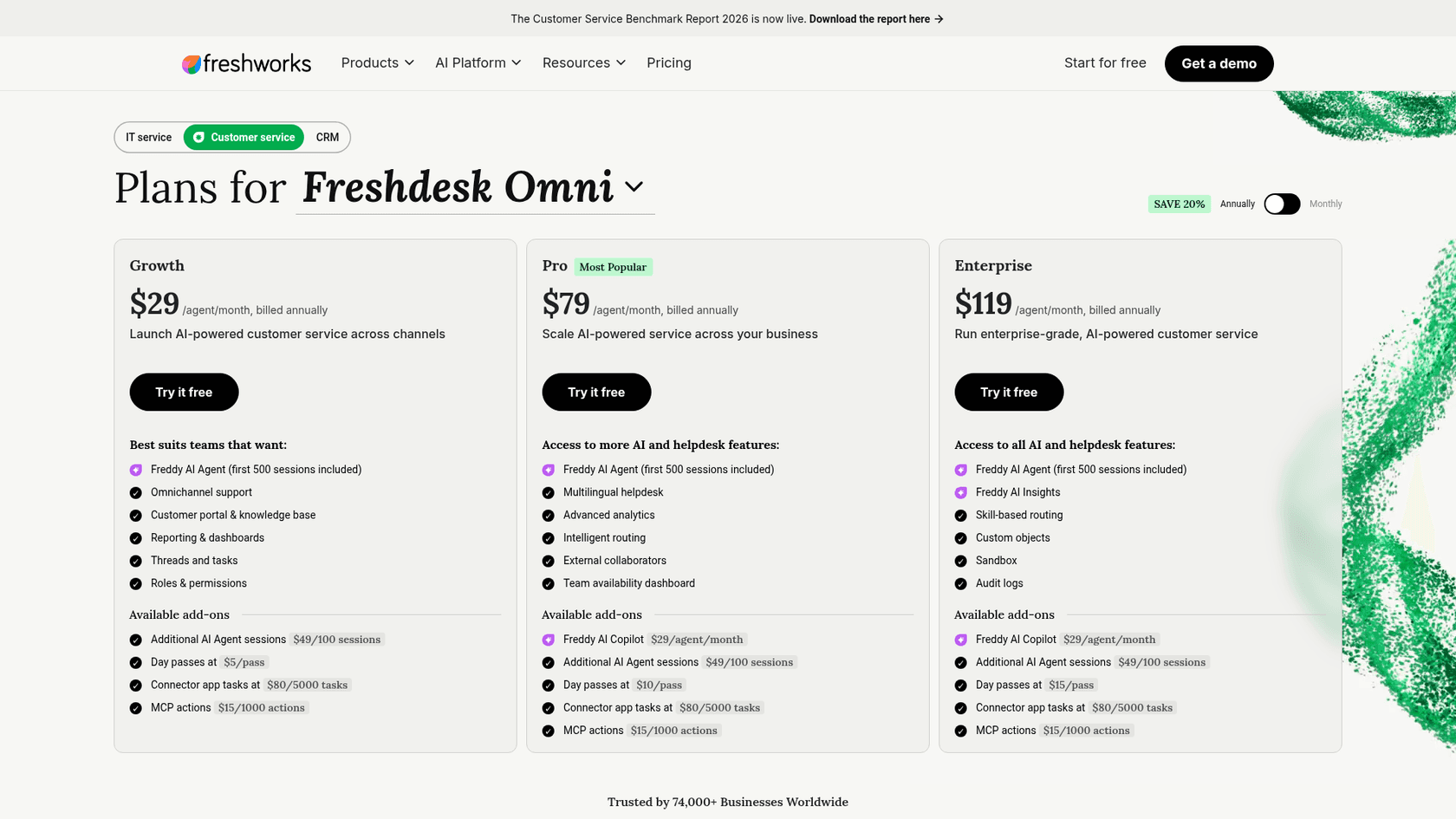
Freshdesk offers three main plans for Freshdesk Omni in 2026. The prices below reflect annual billing, per agent per month, as listed on the Freshdesk Omni pricing page in October 2026.
| Feature | Growth Omnichannel | Pro Omnichannel | Enterprise Omnichannel |
|---|---|---|---|
| Price | $29/agent/month | $79/agent/month | $119/agent/month |
| Key Features | Omnichannel support, ticketing, customer portal and knowledge base, reporting and dashboards, threads and tasks | Everything in Growth + multilingual help desk, advanced analytics, intelligent routing, external collaborators, team availability dashboard | Everything in Pro + skill-based routing, custom objects, sandbox, audit logs |
| Freddy AI Agent | Included (first 500 sessions free, once per account) | Included (first 500 sessions free, once per account) | Included (first 500 sessions free, once per account) |
| Freddy AI Copilot | Not available | Add-on ($29/agent/mo) | Add-on ($29/agent/mo) |
| Freddy AI Insights | Not listed | Not listed | Included |
| Day pass (per agent per day) | $5 | $10 | $15 |
Considerations for your team
This pricing model and the comprehensive nature of the suite provide a few points to consider as you plan your rollout.
-
Scalable AI Costs: The session-based pricing for the AI Agent ($49 per 100 sessions after the first 500) allows you to pay as you grow. Connector app tasks cost $80 per 5,000 tasks, and extra MCP actions cost $15 per 1,000 actions. It's helpful to forecast your ticket volumes so you can plan your budget accordingly during peak seasons or product launches.
-
Unified Ecosystem: By using an integrated suite, you ensure your entire support stack is built to work together perfectly. While this means moving your workflow into one system, the benefit is a seamless experience for your agents and customers.
-
Integrated Knowledge Sources: Freddy AI is expertly tuned to work with information within the Freshworks environment, like your help articles and ticket history. This makes it a great choice for teams that use Freshdesk as their primary internal knowledge hub.
-
Professional Implementation: Setting up a full suite is a thorough process that ensures your data is correctly migrated and your team is fully trained. While this takes more time than a simple plug-in, it sets a solid foundation for your support team. Tools like eesel AI can also be considered if you need to quickly connect additional external knowledge sources or want a very fast rollout for specific AI features.
The alternative: A complementary AI layer
While Freshdesk Omni is a top-tier choice for a unified platform, some teams prefer to use a dedicated AI layer for specific needs. This gives you more flexibility and can sometimes be implemented more quickly without changing your core helpdesk.
Here's a look at how Freshdesk's native AI compares to using a specialized tool like eesel AI as a complementary layer.
| Aspect | Freshdesk Native AI (Freddy) | eesel AI + Freshdesk |
|---|---|---|
| Setup Time | Comprehensive platform setup | Minutes via integration |
| Knowledge Sources | Optimized for Freshdesk ecosystem | Connects Freshdesk, Confluence, Google Docs, etc. |
| AI Customization | Integrated, standard features | Customizable prompts and persona |
| Testing & Rollout | Built-in testing | Simulation on past tickets for validation |
| Pricing Model | Per-agent + per-session tiers | Fixed monthly credit plans (from $299/month for 500 credits), no per-seat fee |
Is Freshdesk Omni the right choice for your team?
Freshdesk Omni is a powerful, enterprise-grade solution for teams who want to manage their support under one roof. If you are looking for a mature, trusted platform and are ready for a thorough implementation, it is one of the strongest options available in 2026.
If your team prefers to maintain a more modular setup or needs an AI that can specifically learn from a wide variety of external sources, adding a complementary AI layer might be a path worth exploring. The choice depends on whether you want the benefits of a fully integrated platform or the flexibility of adding specialized tools to your existing setup.
Ready to see what a flexible AI layer can do?
eesel AI works with Freshdesk and over 100 other tools to enhance your support, help agents, and bring your company knowledge together. You can test it on your past tickets to see how it complements your Freshdesk workflow. Start free with 100 credits or book a demo to learn more.
Frequently asked questions
What exactly is the Freshdesk Omnichannel Suite and what does it aim to do for customer support?
Freshdesk Omni is Freshworks' all-in-one customer service platform. It centralizes ticketing, live chat, phone support, and self-service tools into a single ecosystem, giving agents a unified view of all customer interactions. Its main goal is to streamline support operations and provide comprehensive customer context.
How does the AI (Freddy AI) within the Freshdesk Omnichannel Suite primarily assist support teams?
Freddy AI in Freshdesk Omni comes in two forms: AI Agents and AI Copilot. AI Agents automate repetitive queries and close simple tickets independently, while AI Copilot assists human agents by suggesting replies, summarizing conversations, and translating messages in real time.
What are the main pricing considerations I should be aware of when evaluating the Freshdesk Omnichannel Suite?
Freshdesk Omni has tiered per-agent monthly pricing. Freddy AI Copilot is available as a per-agent add-on ($29 per agent per month on Pro and Enterprise), and Freddy AI Agent is priced per session after a one-time allowance of 500 free sessions ($49 per 100 additional sessions), allowing teams to scale their AI usage as they grow.
What are some of the key considerations of adopting the Freshdesk Omnichannel Suite?
Key considerations include understanding the session-based AI pricing for your volume, the benefits of working within a unified Freshworks ecosystem, and the focus of its AI knowledge sources on Freshdesk data. The setup process is thorough to ensure a complete and successful migration.
How does the Freshdesk Omnichannel Suite handle knowledge sources for its AI capabilities?
The Freddy AI in Freshdesk Omni is optimized for information within the Freshworks environment, such as your help articles and past tickets. This ensures a seamless and deeply integrated experience for teams using Freshdesk as their primary source of truth.
Who is the Freshdesk Omnichannel Suite best suited for in terms of team needs or structure?
Freshdesk Omni is best for teams looking for a powerful, all-in-one solution that manages every aspect of their customer support under one roof. It suits organizations that want a single, deeply integrated platform for all their support operations.
How does the setup and rollout of the Freshdesk Omnichannel Suite generally compare to more flexible AI solutions?
Getting Freshdesk Omni fully operational is a comprehensive process that involves setting up the entire platform, migrating data, and team training to ensure long-term success. This contrasts with dedicated AI layers, which can sometimes be added to existing systems in minutes.