


It seems like every company is racing to build an AI agent that actually works. The goal is pretty straightforward: let AI handle the repetitive, mind-numbing questions so your team can focus on what they do best. For customer support teams, that means less time answering "Where's my order?" and more time solving the tricky problems that turn frustrated customers into loyal ones.
Front, a big name in the customer service space, has its own solution called Autopilot. It’s an AI agent designed to jump into your shared inbox and automatically resolve customer questions. But how well does it really work, what’s the real cost, and is it the right move for your team?
This guide will give you a complete, no-fluff look at the Front AI Automate Autopilot feature (Front's own name for it is Autopilot, part of Front AI). We'll dig into how it works, its confusing pricing model, and some major limitations you need to know about before you even think about signing up.
What is Front AI Automate Autopilot?
Front AI Autopilot isn't some separate tool you have to buy and bolt on; it's a feature baked right into the Front platform, sold as an add-on. Think of it as an AI assistant that lives in your shared inboxes, ready to handle common customer questions across all your support channels.
The idea, as Front explains it, is that Autopilot uses the knowledge sources and Playbooks you connect to figure out customer problems and reply on its own. Front's docs list email, SMS, WhatsApp, Slack, a portal, and Autopilot Resolve (its self-serve chat channel) as supported channels. One small catch: it only operates in shared inboxes, not your team's individual ones.
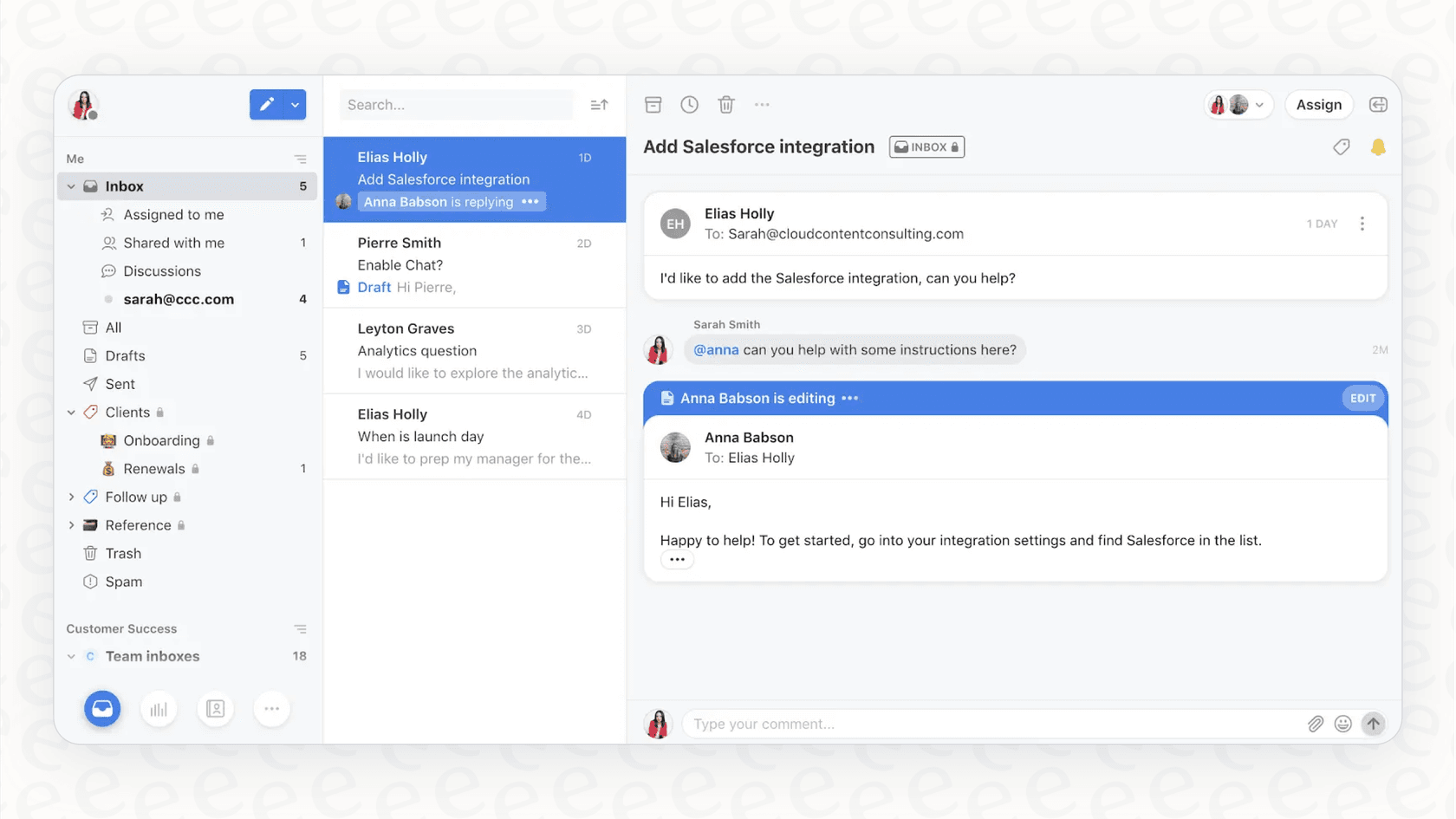
The whole point is to give your team some breathing room. By letting the AI tackle the simple stuff, your human agents can pour their energy into the more complex issues that really need a personal touch.
How to automate with Front AI Automate Autopilot: Key features and setup
Getting Autopilot up and running isn’t as simple as flipping a switch. It’s a powerful system, but you’ll need to roll up your sleeves and do some configuration. Here’s a look at what it takes to get it working.
Setting up topics
Before you can automate anything, you have to get Front's "Topics" feature sorted out. Topics are just tags that help categorize your conversations. Front’s AI will scan your support history and suggest these topics (it can take 1-2 hours), but it's up to you to go through them, merge duplicates, and make sure everything is labeled correctly. Front notes that merging Topics is permanent.
This means you're starting with a pretty hefty data-cleaning project. You have to get your conversations neatly organized before you can even begin to tell the AI what to do. It’s a crucial first step that takes a bit of manual work to get right.
Configuring automation rules
Once your Topics are in good shape, you can start building the automations. As laid out in Front’s help center, it's a multi-step process for every single topic you want to automate:
-
First, you pick a Topic that Front has flagged as "Ready for auto-replies."
-
Next, Front will show you a few sample replies the AI would generate for that topic, just so you can get a feel for its style and accuracy.
-
Then, you enable auto-replies for that specific Topic.
-
This automatically creates an "Auto-reply with Autopilot" rule. But you're not done. You then have to dive into your master list of rules to adjust it and, most importantly, make sure it’s in the correct order so it doesn't mess with your other rules for tagging, routing, and assignments.

This rule-based system forces you to think like an engineer. You have to carefully sequence your automations to ensure they trigger correctly and don’t accidentally break your other workflows.
Key features in action
After all that setup, here’s what your team will see day-to-day:
-
Automatic replies: When a customer message hits an Autopilot rule, the AI shoots back a response and the conversation goes into "Autopilot mode." The AI will then try to handle any follow-up questions.
-
AI to teammate handoffs: If the AI gets stumped by a follow-up, it punts the conversation back to a human agent and leaves an internal note explaining why.
-
Stepping in: Agents can see when Autopilot is active in a conversation and have the option to manually click "Step in" to stop the AI and take over.
The system is designed with human oversight. Rules can hold replies as drafts for a teammate to review before sending, and agents can step in at any point, though the default setup replies automatically.
The hidden costs: Understanding the pricing
This is where the math needs attention. The price for Front Autopilot isn't a simple monthly fee; it is outcome-based, so the bill moves with how many conversations Autopilot handles.
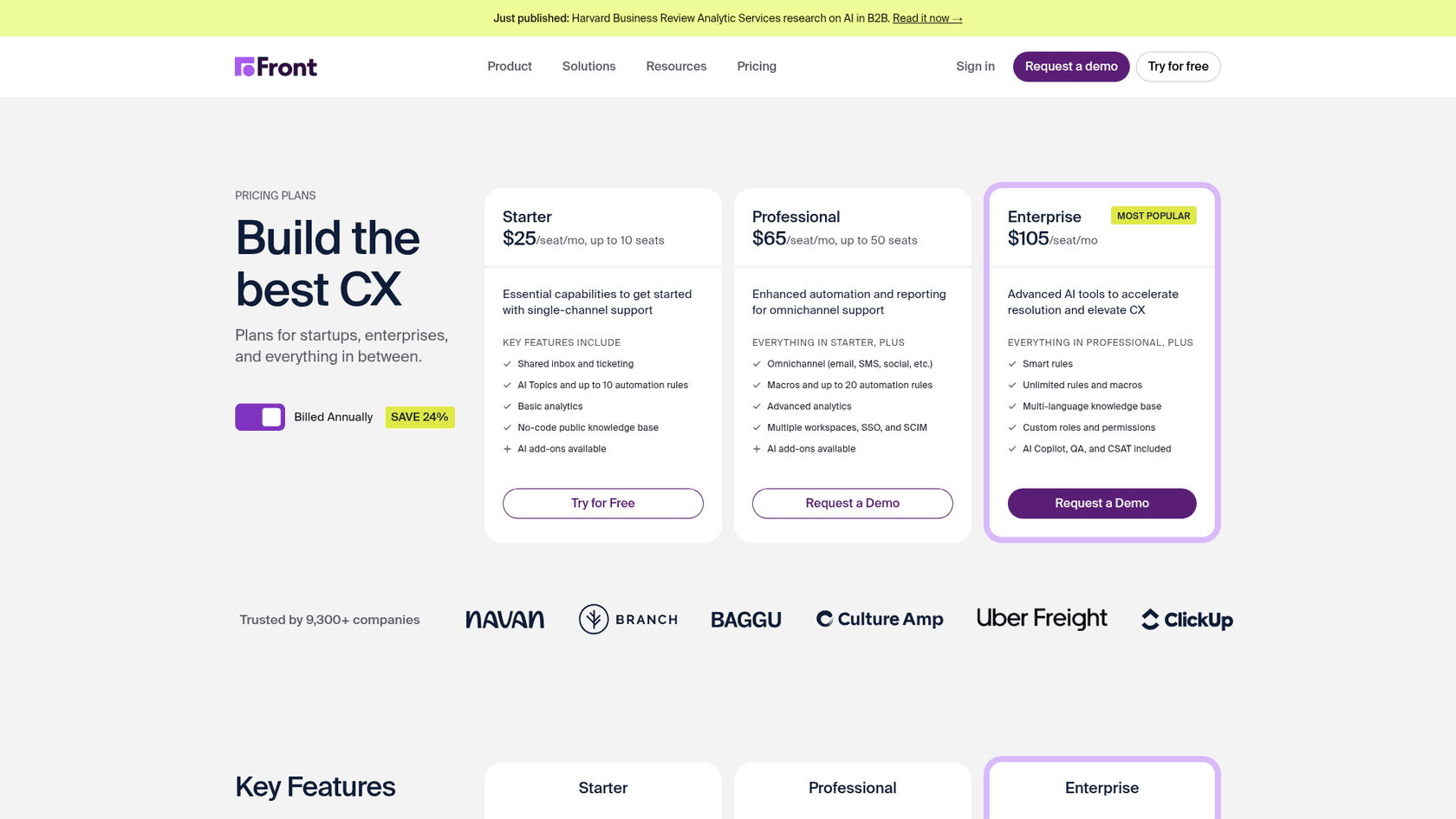
Front's subscription plans
First off, you need to be on a specific Front plan just to have the option of buying the Autopilot add-on. Here’s a quick rundown of their main plans.
| Plan | Price (Billed Annually) | Key Features |
|---|---|---|
| Starter | $25/seat/mo | Single-channel support, up to 10 rules. |
| Professional | $65/seat/mo | Omnichannel support, up to 20 rules. |
| Enterprise | $105/seat/mo | Unlimited rules, advanced AI tools included. |
The AI Autopilot feature is available as a paid add-on on every plan, including Starter. It's not included in any base subscription, so it sits on top of your seat cost.
Autopilot's outcome-based fees
On top of your monthly plan, Front charges per conversation, once, at the highest automation level Autopilot reaches. According to Front's help docs, there are three levels:
| Automation level | What it means | Price per conversation |
|---|---|---|
| Triage | Routes, tags, summarizes, or classifies; no drafting or replying | $0.05 |
| Handoff | Runs tasks, such as a Playbook, that end in a human takeover | $0.39 |
| Resolution | Resolves the conversation with no human reply | $0.89 |
A conversation counts as resolved when no teammate follows up within 24 hours for Resolve, SMS, WhatsApp, and custom channels, or 72 hours for email and portal. Front doesn't charge for an outcome if a teammate cancels the automation, the customer asks for a human, or Autopilot fails on Front's side.
The financial implication is that your bill grows with success: at $0.89 per resolution, 1,000 resolved conversations is $890 on top of your seats. That is fair pay-for-outcome pricing, but it also means the cost scales with volume instead of staying flat, which matters for any team that needs a fixed budget.
Is Front AI Automate Autopilot right for you? Key limitations to consider
While Front Autopilot has some neat capabilities, its design comes with some serious trade-offs that you should think about long and hard.
The challenge of unpredictable pricing
Let's start here because it’s a big one. The per-conversation model makes your software costs harder to forecast. Every conversation Autopilot handles adds a charge to your bill, so costs rise as you automate more. For any team that needs a fixed budget, that is worth modeling before you commit.
A complex, non-self-serve setup
Getting started with Front Autopilot involves more steps than a toggle. You configure Topics, enable auto-replies or Playbooks one by one, and order your automation rules so nothing conflicts. It's a workflow that needs admin attention, where some tools get running in a few minutes.
Limited knowledge sources
Front Autopilot can draw on a published Front knowledge base, public websites, and third-party sources such as Confluence, Google Docs, Guru, SharePoint, and Notion. The limits are practical ones: each third-party source is capped at about 3,000 pages, content needs a manual re-sync, and Slack isn't on the supported list. Past tickets aren't listed as a knowledge source either, so answers that live only in resolved conversations stay out of reach, which can mean more escalations and a lower true resolution rate.
Simulation on scenarios, not your history
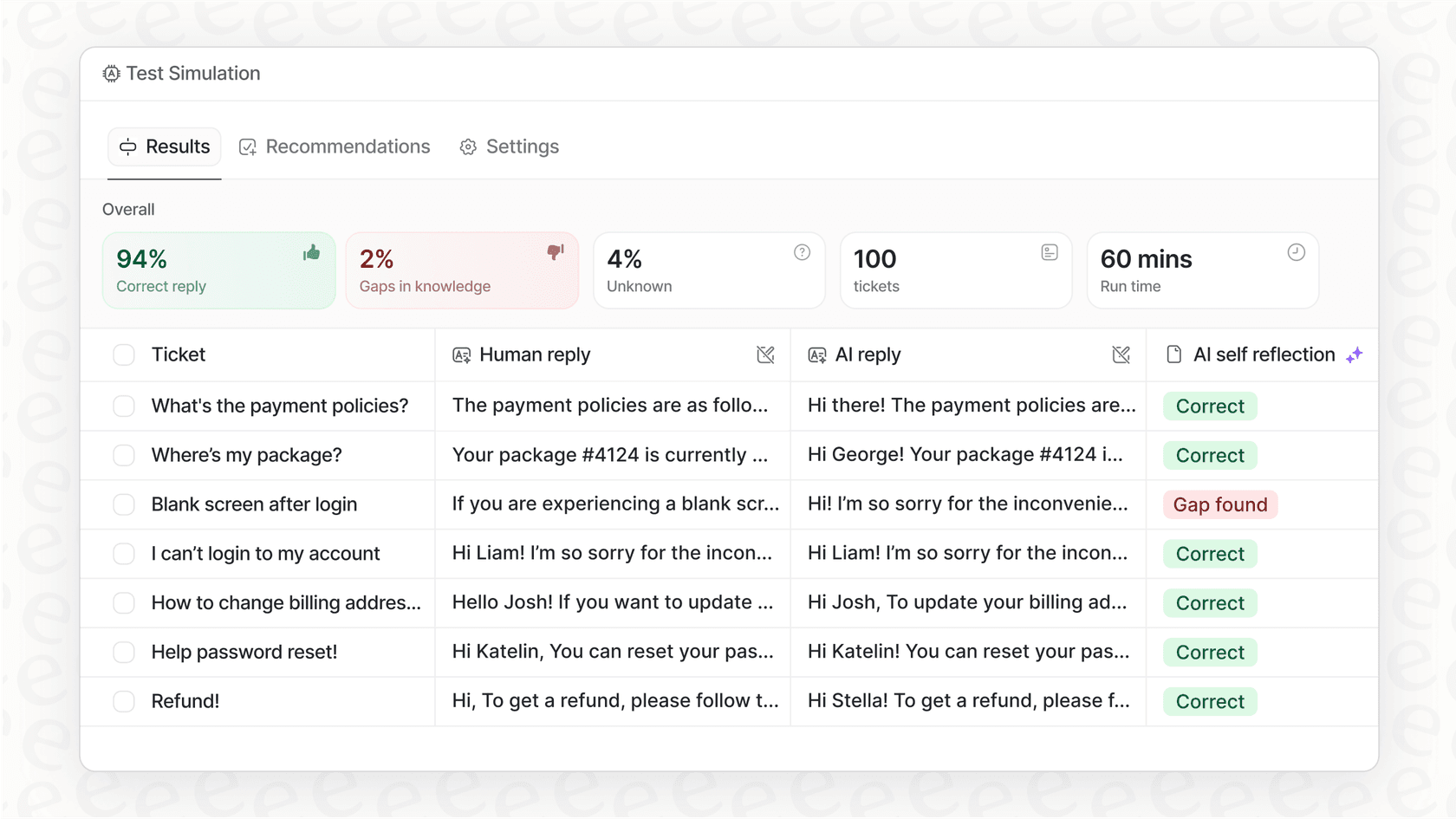
Front does give you testing tools: sample replies before you enable a rule, "Test instructions" on rules, and simulations for automations. These run on scenarios and samples you pick. A replay over thousands of your own past tickets, with a forecast of resolution rate and monthly cost, isn't described in Front's docs, so you size the rollout yourself.
A better way to automate: Why teams choose eesel AI over Front AI Automate Autopilot
The headaches that come with built-in tools like Front Autopilot are exactly why so many teams opt for a dedicated AI platform like eesel AI. It was built from the ground up around these specific problems.
-
Go live in minutes, not months: eesel AI is self-serve. You can connect your help desk and knowledge sources and have a functioning AI agent in just a few minutes, all without a mandatory sales demo.
-
Unify all your knowledge, instantly: Beyond the sources Front supports, eesel AI plugs into over 100 platforms, including Confluence, Google Docs, and past tickets from help desks like Zendesk or Freshdesk. Learning from past tickets helps it give complete answers.
-
Test with confidence: eesel AI comes with a powerful simulation mode. You can test your AI agent on thousands of your past tickets to get accurate forecasts on resolution rates and cost savings before it ever talks to a customer.
-
Transparent and predictable pricing: eesel AI uses one fixed monthly price sized to volume, from $299/month for 500 credits (1 credit per ticket or chat, however long). There are no per-resolution fees and no per-seat fee, so your costs stay predictable as automation grows. A free plan covers 100 credits, no card.
| Feature | Front AI Autopilot | eesel AI |
|---|---|---|
| Pricing Model | $0.05 / $0.39 / $0.89 per conversation (triage / handoff / resolution) | Fixed monthly plan from $299 (500 credits) |
| Setup Time | Topics, rules, and Playbook configuration | Minutes (self-serve) |
| Knowledge Sources | Front KB, public sites, third-party sources (Confluence, Notion, Google Docs, etc.) | 100+ sources plus past tickets |
| Testing | Samples, Test instructions, simulations on scenarios | Bulk simulation on historical tickets |
| Flexibility | Works only within Front | Plugs into any existing help desk |
Moving beyond basic automation
Front AI Automate Autopilot can be a good choice for teams who are already all-in on the Front ecosystem and are comfortable managing a rule-based setup with per-conversation pricing.
But for most teams, a modern AI agent should offer more. It should be flexible, easy to set up, and capable of pulling knowledge from everywhere your team works. And most importantly, it should give you the confidence to automate with predictable costs. Your AI platform should give you control and clarity at the end of the month.
Ready for an AI agent that works with your existing tools and offers pricing that makes sense? Try eesel AI for free and see how quickly you can automate support with confidence.
Frequently asked questions
What exactly is Front AI Automate Autopilot and how does it integrate into the Front platform?
Front AI Autopilot is an AI agent feature built into the Front platform, designed to triage, hand off, and resolve common customer questions within shared inboxes. It uses the knowledge sources and Playbooks you connect to draft and send replies across channels such as email, SMS, WhatsApp, and Autopilot Resolve.
What's involved in the initial setup process for Front AI Automate Autopilot?
Setting up Front AI Autopilot starts with organizing your conversations using Front's "Topics" feature, which Front's AI suggests and you review and merge. After that, you configure auto-reply rules or Playbooks for each topic and place them in the right order among your existing workflows.
How does the pricing model for Front AI Automate Autopilot work, and what makes it unpredictable?
Front AI Autopilot is an add-on available on every Front plan. It is outcome-based: a conversation is charged once, at the highest automation level it reaches. Triage costs $0.05, Handoff costs $0.39, and Resolution costs $0.89 per conversation, so your monthly bill follows how many conversations Autopilot handles and how far it takes them.
What are the main limitations a team should consider before committing to Front AI Automate Autopilot?
The main limits to weigh are a per-conversation bill that scales with volume, a setup that runs through Topics, rules, and Playbooks, English as the only officially supported language, and shared inboxes only, with knowledge sources limited to what Front supports. Testing is done through simulations and "Test instructions" on scenarios you write, not a replay over your own past tickets. Front's own docs list these constraints.
Can Front AI Automate Autopilot access knowledge from all our company's tools, or is it limited?
Front AI Autopilot can use a published Front knowledge base, public websites, and third-party sources, including Confluence, Google Drive (Google Docs only), Guru, Microsoft SharePoint, Notion, GitBook, and ClickUp. Slack is not on the supported source list, and third-party sources are capped at roughly 3,000 pages each and need a manual re-sync.
How does Front AI Automate Autopilot compare to more flexible, self-serve AI solutions in the market?
Compared to a dedicated agent, Front AI Autopilot is built for Front's ecosystem, runs setup through Topics, rules, and Playbooks, and bills per conversation outcome. A dedicated platform like eesel works with your existing helpdesk, connects 100+ knowledge sources, lets you simulate over your real past tickets, and runs on a fixed monthly plan from $299/month.