


GitLab is a beast in the DevOps world, no doubt about it. But figuring out its pricing? That can feel like trying to solve a puzzle in the dark. Between the different tiers, the paid add-ons, and some not-so-popular price hikes, it’s hard to tell if you’re getting a good deal or just paying for a bunch of features you’ll never touch. A lot of users are feeling the pinch, especially when it seems like basic security tools are locked away in the most expensive plan.
So, let's clear things up. This guide will walk you through each GitLab pricing tier, point out the costs that might not be obvious, and help you figure out if it’s actually worth it for your team in 2026.
What is GitLab?
GitLab calls itself an all-in-one DevSecOps platform. The big idea is to give teams a single application to handle the entire software development lifecycle. It’s built on an "open core" model, which just means there's a free, open-source version you can use, plus paid tiers that pack in more features for bigger teams. Think source code management, CI/CD pipelines, security scanning, and agile planning, all trying to live together under one roof instead of being a messy collection of different tools.
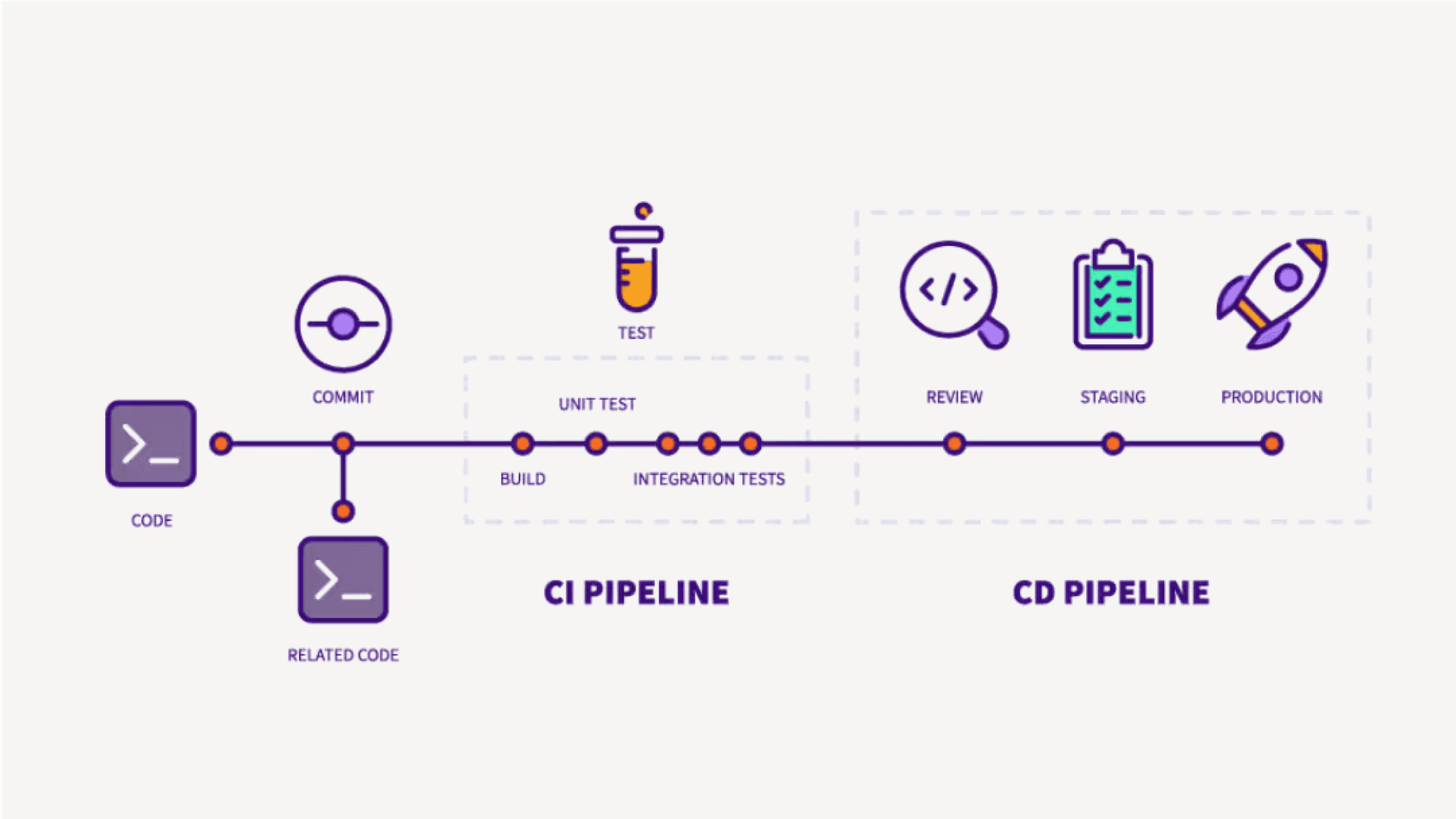
A breakdown of the GitLab pricing tiers
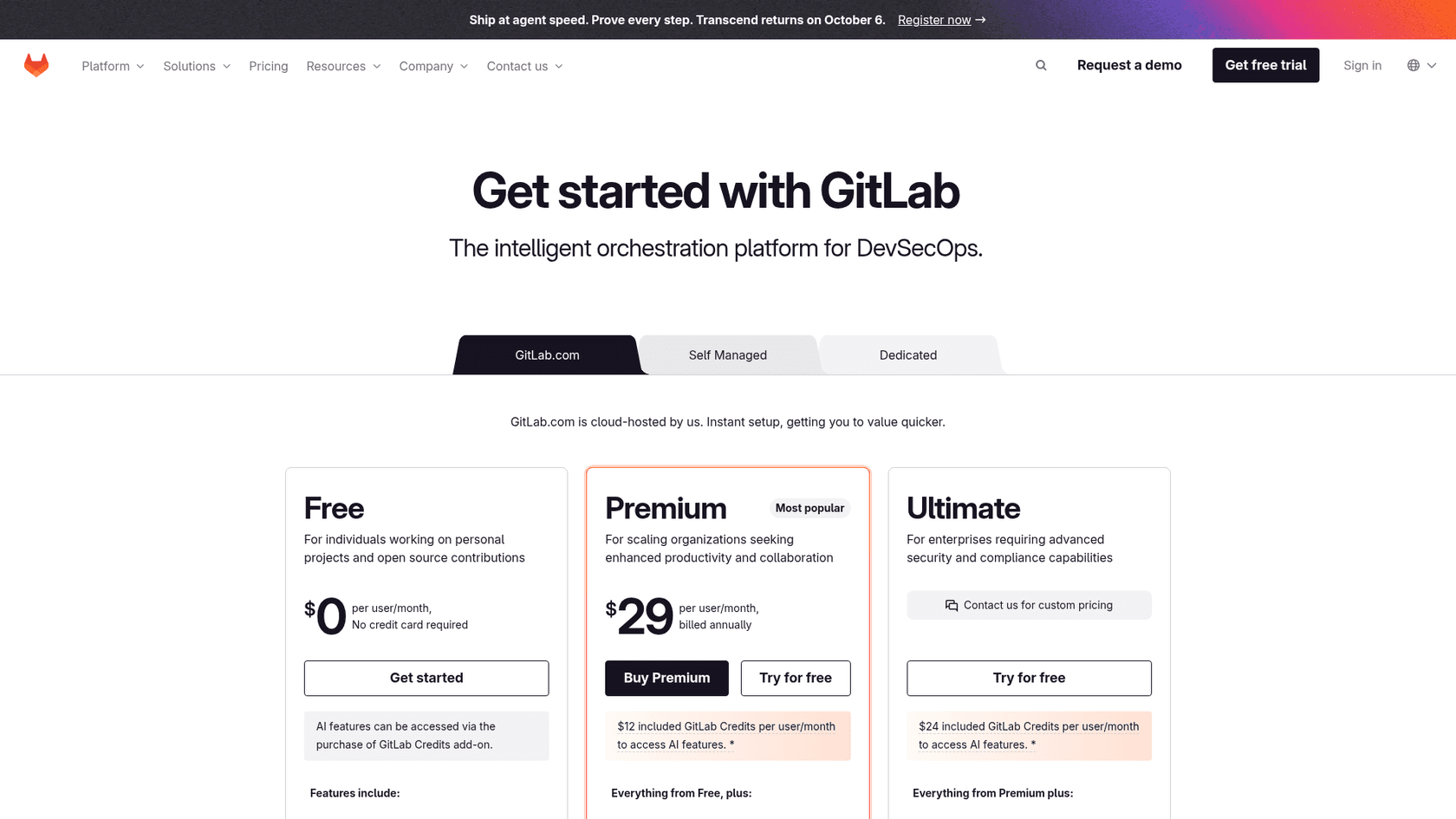
GitLab has a specific philosophy for its pricing called "Buyer-Based Open Core". It sounds corporate, but the gist is simple: they group features into tiers based on who they think would care most about them. Individual developers get the Free stuff, managers and directors get Premium features, and executives get the Ultimate package. Knowing this helps make sense of why certain tools are where they are.
GitLab pricing: The free tier for individuals and small projects
The Free tier is actually pretty solid, especially for individual developers or small teams just getting their feet wet. It gives you all the fundamental DevOps tools you need for a personal project or to contribute to open-source work.
-
Core features: You get the essentials like source code management, a built-in CI/CD, some basic project management boards, and basic Static Application Security Testing (SAST).
-
Limitations: Here’s where you’ll feel the constraints. You’re capped at 5 users per group, 400 compute minutes a month for your pipelines, and 10 GiB of storage. It’s not a lot, but it’s enough to get started.
-
AI features: AI features on the Free tier run through GitLab Credits, which you buy as an add-on. GitLab lists no included credits on Free.
GitLab pricing: The premium tier for growing teams
At $29 per user per month, the Premium tier is aimed at teams that need to get more serious about collaboration and project management. But honestly, this is where some of the frustration with GitLab pricing starts to bubble up.
-
Key additions: You unlock more powerful CI/CD features (like parent-child pipelines), enterprise-level agile planning tools (think roadmaps and epics), release controls, and actual priority support. Your compute minutes also get a big bump to 10,000 per month, plus $12 of included GitLab Credits per user per month (a promotional offer for a limited time).
-
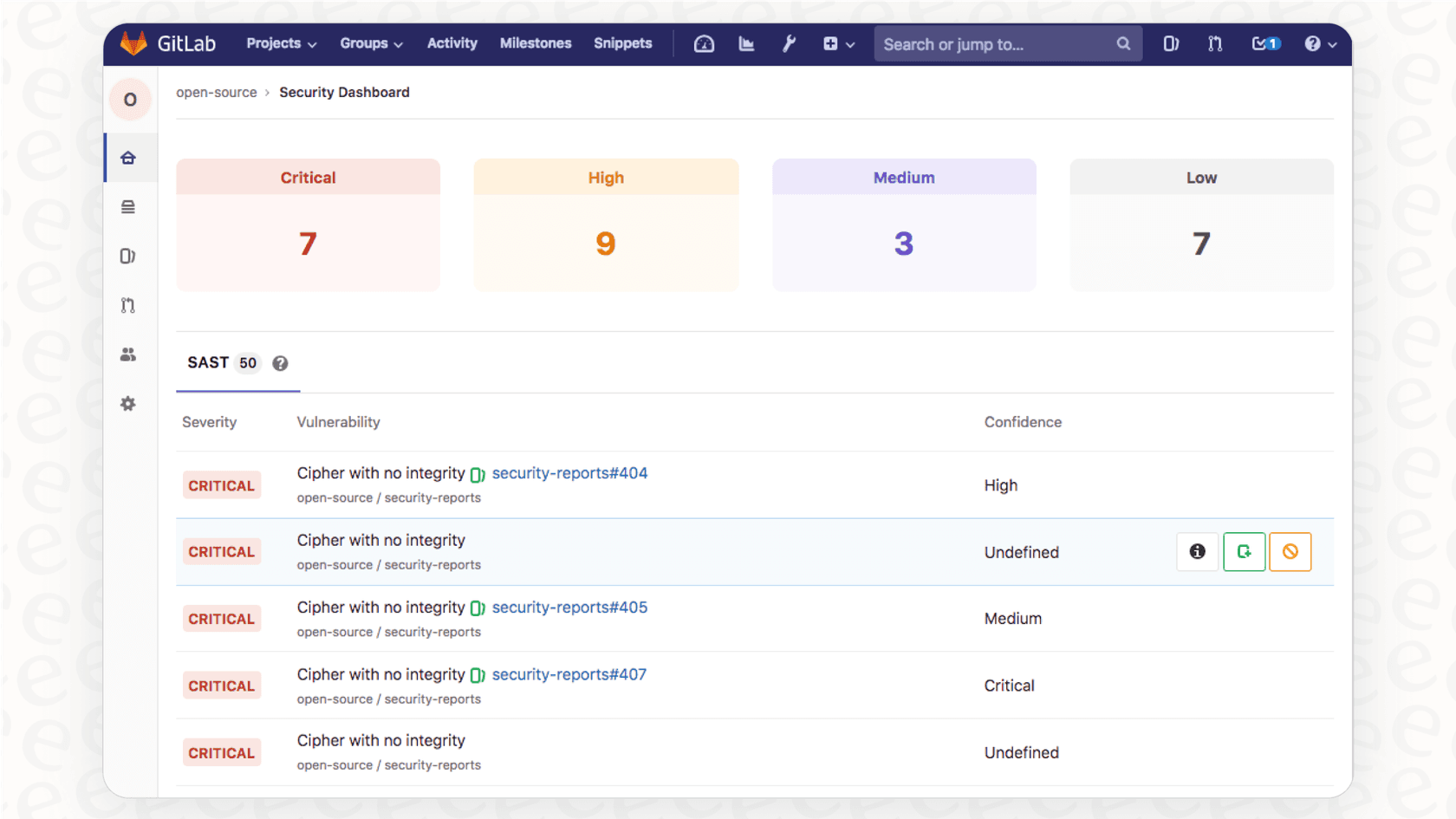
What's missing: This is the big one. Basic SAST (Static Application Security Testing), Secret Detection, and Container Scanning run on every tier, but on Free and Premium they only output JSON artifact files. Findings in merge requests, vulnerability reports, and DAST (Dynamic Application Security Testing) come with Ultimate. For teams that treat security scanning as essential, that gap is the main reason to look past Premium.
GitLab pricing: The ultimate tier for enterprise security and compliance
The Ultimate tier is the whole shebang, built for large enterprises with a price tag to match (you have to contact sales to get a quote). This plan is where GitLab puts its full suite of security and compliance features, which is usually the main reason companies make the jump.
-
Who it's for: Big organizations that need top-tier security, strict compliance management, and high-level strategic planning tools.
-
Exclusive features: This is where you find the good stuff: enterprise-grade SAST, DAST, vulnerability management, security dashboards, compliance and governance tools, and value stream management. It also includes $24 of GitLab Credits per user per month (promotional, limited time).
-
The catch: Basic scanning is available on lower tiers, but the vulnerability tracking and in-merge-request workflow sit in Ultimate. Smaller and mid-sized teams that want those need a quote-based plan that also carries enterprise features they may not use.
The hidden costs: What’s not included
The per-user price on the website isn't the final number. To really unlock the platform's potential, especially its new AI tools, you’ll probably need to open your wallet for some add-ons.
AI add-ons: GitLab Duo
GitLab now describes itself as an "intelligent orchestration platform," and its AI features run on usage-based GitLab Credits rather than the old per-seat Duo packages.
-
GitLab Credits: Credits cost $1 each, are shared across your team, and power the GitLab Duo Agent Platform, including agentic chat and flows. Premium includes $12 of credits per user per month and Ultimate $24, but GitLab calls the included credits a limited-time promotion.
-
Duo Classic: The IDE chat and code suggestions still appear in GitLab's plan comparison under the name Duo Classic. I did not see the old $19 Duo Pro add-on listed on the current pricing page.
Consumption costs: Compute minutes and storage
Every plan gives you a monthly allowance for compute minutes (for running CI/CD jobs) and storage. If you go over, you pay.
-
Compute minutes: Extra minutes will run you $10 per 1,000 minutes. If your team runs a lot of CI/CD jobs, you can blow through your monthly allowance faster than you think.
-
Storage: Need more space? That'll be $5 per month for an extra 10 GiB. On Premium and Ultimate each project has a fixed 500 GiB limit, so buying storage raises your total but not that per-project ceiling.
This pay-as-you-go model for extras can make your monthly bill a bit of a moving target if you’re not keeping a close eye on it.
| Add-On | Price | Available On | Key Features |
|---|---|---|---|
| GitLab Credits | $1 per credit | All Plans | Duo Agent Platform features, shared across your team |
| Included credits | $12 (Premium) or $24 (Ultimate) per user/month | Premium, Ultimate | Promotional for a limited time |
| Compute Minutes | $10 per 1,000 | All Plans | Additional CI/CD pipeline execution time |
| Storage | $5/mo per 10 GiB | All Plans | Additional repository and LFS storage |
Is GitLab pricing worth it? A value analysis
When you add it all up, a single user on the Premium plan costs $29 per month, with $12 of GitLab Credits included for now and extra credits at $1 each. For many, the real question is whether Premium's JSON-only security scan output is enough, or whether the Ultimate plan's vulnerability management is worth a quote. GitLab also offers a Flex Commitment, one annual commitment for seats and credits that you can reallocate as needs change. When you look at alternatives like GitHub, whose Team plan offers a lot of similar features for a lot less money, GitLab's value starts to look a bit shaky.
Look, this whole "all-or-nothing" bundle isn't just a GitLab thing. It happens everywhere. Think about customer support teams. They often face the same dilemma: either buy a huge, expensive helpdesk suite when they only need a couple of key features or get pushed into a painful migration just to get better AI automation.
A more modern way of thinking is to find tools that plug into what you already use, making your current setup better instead of forcing you to start over. For example, platforms like eesel AI connect directly to your helpdesk (whether it’s Zendesk or Freshdesk) and add powerful AI that can automate ticket responses and triage in minutes. It's this philosophy of adding specific, high-value tools without the "rip and replace" nightmare that a lot of teams are looking for now.
A complete overview of GitLab pricing plans
To help you see it all in one place, here’s a more detailed comparison of what you get in GitLab's Free, Premium, and Ultimate tiers. This table focuses on the features that teams usually care about most when they're deciding.
| Feature Category | Free | Premium ($29/user/mo) | Ultimate (Contact Sales) |
|---|---|---|---|
| Source Code Management | ✔️ | ✔️ | ✔️ |
| CI/CD Pipelines | ✔️ (400 mins/mo) | ✔️ (10,000 mins/mo) | ✔️ (50,000 mins/mo) |
| Advanced CI/CD | ❌ | Merge Trains, Pipeline Dashboards | ✔️ |
| Agile Planning | Basic Issue Boards | Epics, Roadmaps, Issue Weights | Portfolio Management |
| Basic Security | Basic SAST, Secret Detection, Container Scanning | ✔️ | ✔️ |
| Advanced Security (SAST/DAST) | ❌ | ❌ | ✔️ |
| Vulnerability Management | ❌ | ❌ | Security Dashboards, Vulnerability Reports |
| Compliance | ❌ | Compliance Frameworks, Audit Events | Compliance Dashboards & Policies |
| Support | Community Support | Priority Support | Priority Support (faster response) |
| AI (GitLab Duo Agent Platform) | Credits add-on ($1 each) | $12 included credits/user/mo, then $1 each | $24 included credits/user/mo, then $1 each |
Making the right GitLab pricing choice for your team
At the end of the day, GitLab's pricing strategy is pretty clear: it's built to steer growing companies toward its most profitable tier, Ultimate. The platform itself is incredibly powerful, but the value of the mid-range Premium plan is debatable, especially if security is a top priority for you.
Your decision really boils down to your budget and whether you absolutely need the tightly-knit, all-in-one security and compliance features that only the Ultimate plan offers. If you don't, you might get more bang for your buck by picking and choosing more focused tools that do one thing really, really well.
Beyond GitLab pricing: Get clear value from your tools, starting with support
Picking the right DevOps platform is about finding something that fits your team's workflow and budget without making you feel like you're compromising. That same logic should apply to your customer support tools.
If you’re looking for an AI tool that gives you immediate value without forcing you to switch platforms, eesel AI was made for that. It integrates right into your existing helpdesk, learns from your knowledge base, and starts automating support in minutes, not months. You get full control over what gets automated, transparent pricing, and a completely risk-free way to see the impact for yourself.
Try eesel AI for free and see how simple powerful AI can be.
Frequently asked questions
How do the new AI features, like GitLab Duo, fit into the overall GitLab pricing model?
GitLab's AI features, branded as GitLab Duo Agent Platform, run on GitLab Credits at $1 each. Premium includes $12 of credits per user per month and Ultimate includes $24, which GitLab labels a limited-time promotional offer. Free users can buy credits as an add-on.
What are the primary user and resource limits I should know about for the free GitLab pricing tier?
The free GitLab pricing tier caps groups at 5 users, includes 400 compute minutes per month for CI/CD pipelines, and provides 10 GiB of storage. While these limits are suitable for personal projects or open-source contributions, they can be quickly reached by even small, active development teams.