

If you’re in the creative space, you’ve probably seen Recraft AI pop up in your feed. It’s making waves as a powerful design tool that does a lot more than just spit out images. But whenever a new tool promises to revolutionize your workflow, there's always that one big question hanging in the air: what’s it going to cost?
Figuring out the real value of a new subscription can feel like a bit of a headache, especially when you’re dealing with credit-based systems. One minute you feel like you have plenty, the next you're getting a "low balance" warning. It can be tough to know if you're getting a good deal.
That’s why we’ve put together this straightforward guide to Recraft AI pricing. We’ll walk you through each plan, break down exactly how their credit system works, and cover the important stuff like who actually owns the images you create. By the end, you’ll have a clear picture of whether Recraft is the right fit for your creative toolkit.
What is Recraft AI?
So, what exactly is Recraft AI? At its heart, it’s a generative AI platform built for designers. But it's best to think of it less as a simple image generator and more like a full-blown creative suite. You can use it to create and edit everything from digital illustrations and infinitely scalable vector art to 3D graphics and product mockups.
The real kicker is its focus on maintaining a consistent "design language." Imagine you're working for a brand that has a very specific color palette, line weight, and overall vibe. Recraft allows you to generate visuals that all feel like they belong together, which is a massive advantage over tools that give you something completely random every time. For professional work, that kind of consistency is everything.
It also has some seriously impressive text-to-image capabilities, letting you create graphics with crisp, legible text baked right in, a feature that many other AI tools still struggle with. It’s clearly built for designers, marketers, and creative teams who need more fine-tuned control than the average AI art generator provides.
A complete guide to Recraft AI pricing and plans
Recraft runs on a freemium model, which means they have a free version to get you started and paid tiers for more serious use. Whether you’re just curious about AI art or you’re managing a whole design team, they’ve likely got a plan that fits your needs. Let's dig into what each one offers.
The Free plan: For exploration and personal projects
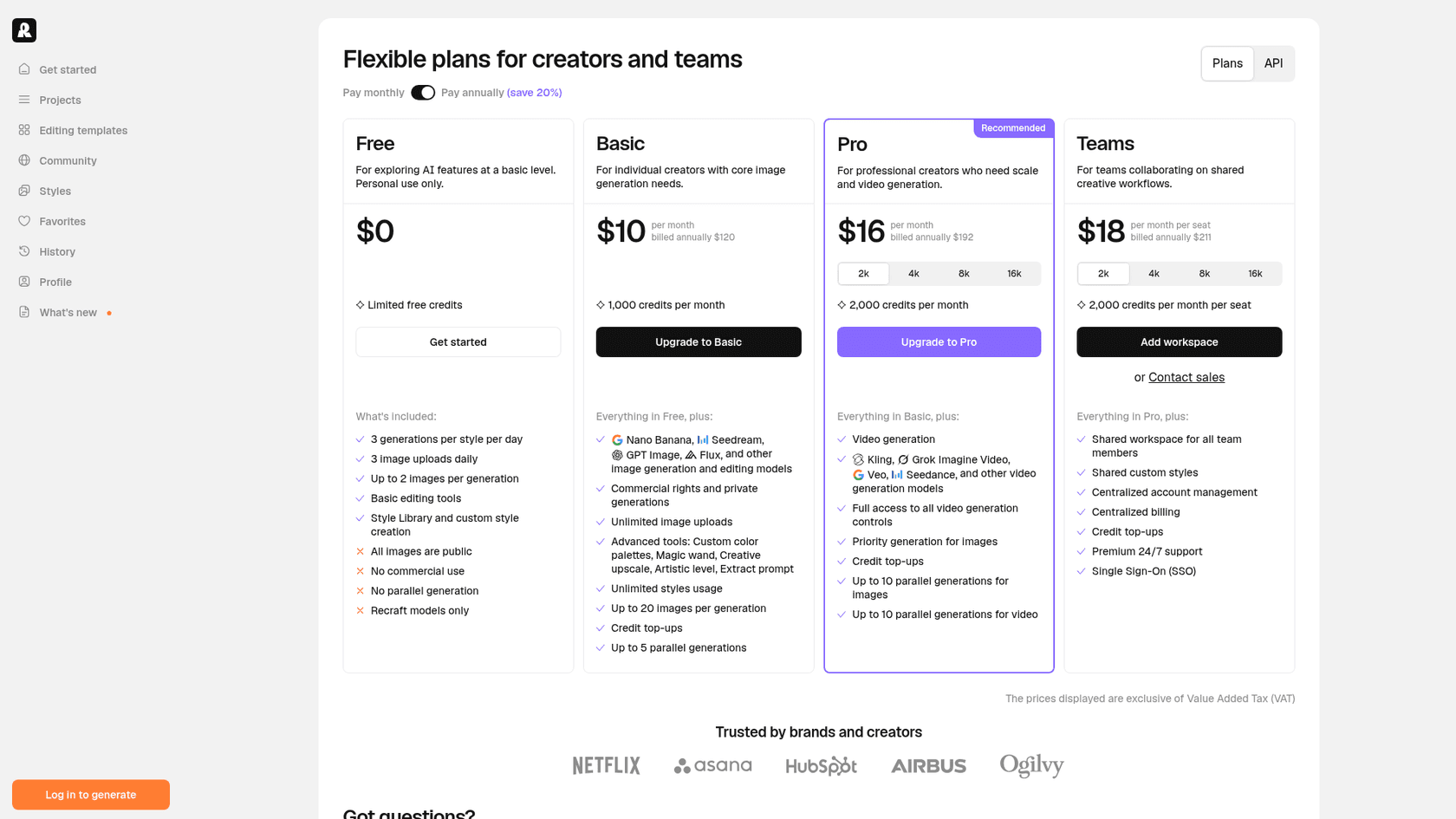
The Free plan is your no-risk entry point into the Recraft world. It’s a great fit if you're an individual just wanting to play around with AI art, a student working on a school project, or a hobbyist who isn’t worried about using creations for business.
You start with limited free credits and up to 3 generations per style per day. That's enough to get a feel for the platform's main features, try out different styles, and see what it can do. You’ll have access to the basic editing tools and the huge library of community styles.
But for any professional work, the limitations are pretty significant. Every image you create is public and gets posted in the community gallery, so there’s no privacy. More importantly, you don’t get a commercial use license, which means you can’t legally use the images for anything that makes money. There are also daily caps on how many images you can upload and generate.
The Pro plan: For professional designers and commercial use
If you’re planning to use AI for actual client work or for your own business, this is where you'll land, either on Basic or Pro. The Pro plan is designed for freelance designers, small agencies, and businesses that need full ownership and commercial rights to their images.
The moment you upgrade, the game changes. Your generations become private by default, and you get a full commercial license for everything you create while you're subscribed. No more worrying about who owns what. Commercial rights and private generations start one step below, on the Basic plan at $10/month billed annually for 1,000 credits, which also unlocks third-party models such as Nano Banana and GPT Image. Pro, at $16/month billed annually, adds video generation and priority image generation, so your jobs get pushed to the front of the line. The Pro plan is tiered, offering different monthly credit allowances starting at 2,000 credits, so you can choose a level that matches your typical output.
The Teams plan: For collaborative workflows
Built for larger organizations, the Teams plan is aimed at design agencies, in-house creative departments, and bigger companies that need to work together without tripping over each other.
It packs in everything from the Pro plan but adds a layer of collaborative features. You get a shared workspace where everyone on the team can access the same projects, assets, and brand styles. Each seat comes with its own 2,000 monthly credits, and top-up credits are shared across the workspace, which simplifies management. It also comes with premium 24/7 support and Single Sign-On (SSO) to meet the security requirements of larger enterprises.

Plan comparison
Here’s a simple table to see how the plans stack up side-by-side.
| Feature | Free Plan | Basic Plan | Pro Plan | Teams Plan |
|---|---|---|---|---|
| Cost (billed annually) | $0 | $10/mo | $16/mo | $18/mo per seat |
| Monthly Credits | Limited free credits (3 generations per style per day) | 1,000 | From 2,000 | 2,000 per seat |
| Image Privacy | Public | Private | Private | Private |
| Commercial License | No | Yes | Yes | Yes |
| Parallel Generations | No | Up to 5 | Up to 10 | Up to 10 |
| Key Features | Basic editing tools, Recraft models only | Third-party models, advanced tools | Video generation, priority image generation | Shared workspace, SSO, 24/7 support |
Understanding the credit system
Recraft's pricing revolves around a credit system. Think of it like an arcade: pretty much every action you take, from generating an image to using an editing tool, costs a certain number of credits. This model is common in the AI world, but it’s worth taking a closer look at how Recraft handles it.
How are credits used?
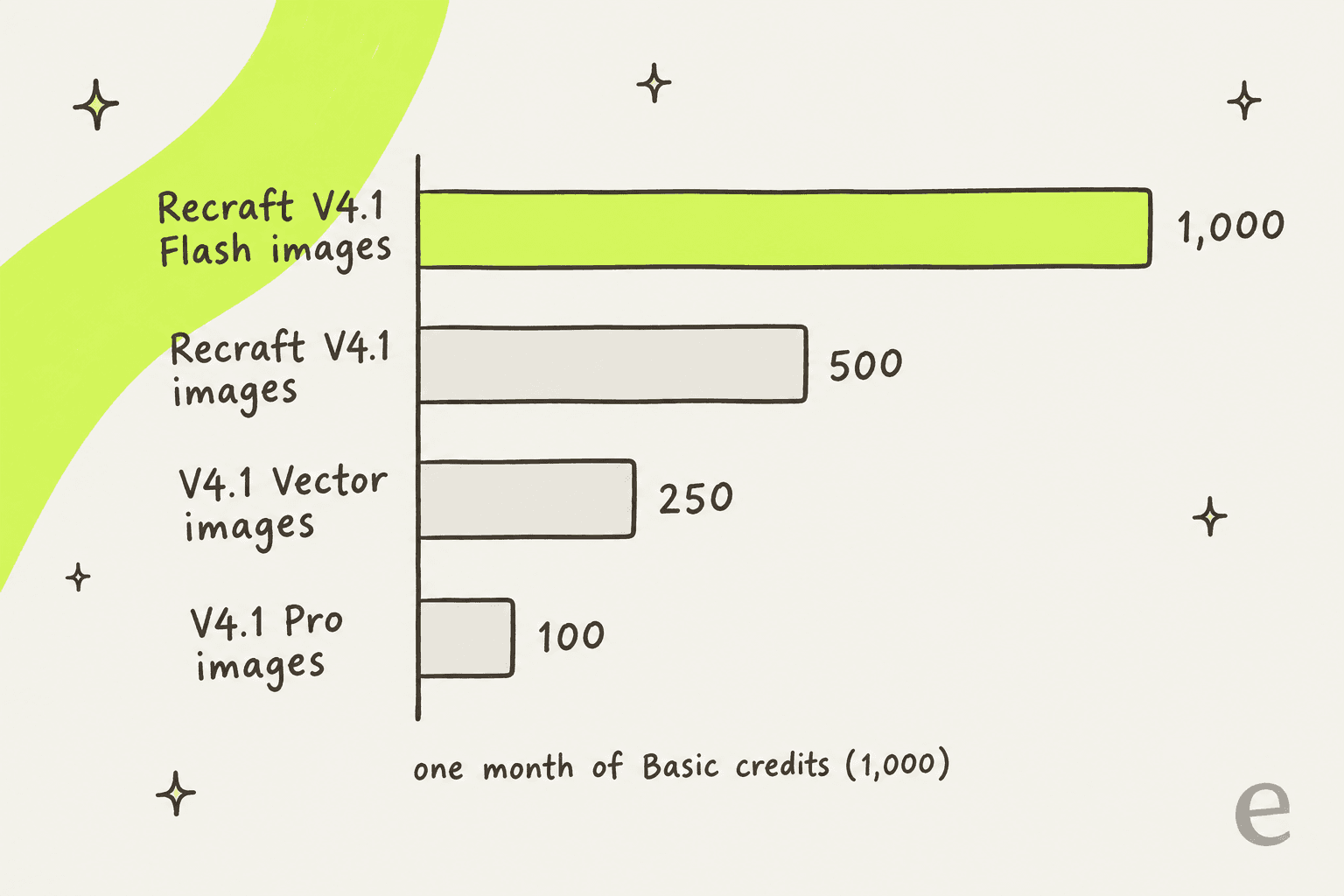
Not every click costs the same. A simple raster image generation can cost as little as one credit, but if you want to create a vector graphic that can be scaled to any size without losing quality, that’ll set you back more. The priciest picks are the premium models: a Recraft V4.1 Pro image is 10 credits, and a single image from some external models runs up to 40.
This system gives you a lot of flexibility, but it also means you have to keep an eye on your credit balance, especially if you're trying to stick to a budget. Let's say you're creating a set of social media graphics. Generating the initial concepts might cost 5-10 credits. Then, removing the background on a few costs another 5. Finally, running Refine details on your favorite one costs 10. Suddenly, a single project has eaten up 25 credits.
Here’s a quick cost breakdown for common actions, using the per-image costs in Recraft's credits docs:
| Operation | Model or format | Credits Used |
|---|---|---|
| Image Generation | Raster, Recraft V4.1 Flash | 1 |
| Image Generation | Raster, Recraft V4.1 | 2 |
| Image Generation | Raster, Recraft V4.1 Pro | 10 |
| Image Generation | Vector, Recraft V4.1 Vector | 4 |
| Remove Background | Raster/Vector | 1 |
| Generate Mockup | Mockup | 2 |
| Refine Details | Raster | 10 |
What happens to unused credits?
This is the part you really need to pay attention to. If you’re on a paid monthly plan, any credits you don't use by the end of your billing cycle do not roll over. They just disappear. This "use it or lose it" approach means it's a good idea to pick a plan that aligns with your average monthly needs, otherwise you're paying for credits you're not using.
But what if you run out of credits before the month is over? You’re not stuck. Paid users can buy top-up credit packs to keep the creative juices flowing. The good news here is that these top-up credits do not expire, so they act as a nice buffer for those unexpectedly busy months when you have a big project or a tight deadline.
Key considerations: Ownership, commercial rights, and budgeting
Let's be crystal clear about the biggest difference between Recraft's plans: image ownership. If you're on the Free plan, Recraft owns the images you generate, and they are automatically shared publicly. To own your work and use it for anything commercial, whether it's for a client, your company's marketing materials, or products you sell, you absolutely have to be on a paid plan. For any business, this isn't just a nice-to-have; it's a legal necessity.
While the credit-based model is flexible, it introduces a major challenge for businesses: unpredictable costs. Your team might coast through 500 credits one month and then need to burn through 1,500 the next to hit a critical deadline. This kind of fluctuation can make budget forecasting a real headache. For one-off creative projects, this might be manageable. But when it comes to tools that are essential for your daily operations, predictability is gold. Unplanned top-ups can throw off your financial planning and create administrative busywork that nobody has time for.
Finding the right AI tool with predictable pricing
This cost uncertainty isn't just a problem with design tools. It's an even bigger issue for core business functions like customer support, where budget stability matters. You want to know what your support automation will cost before a busy week, and what happens when you reach the limit.
This is where a totally different approach to pricing can make a world of difference. Take eesel AI, a platform built specifically for business predictability. When you're automating something as vital as customer support, you need a cost model you can count on, month after month.
eesel AI sells fixed monthly credit batches: one credit covers one ticket or chat, however long it runs, and there is no per-seat fee. Plans start at $299/month for 500 credits, and a free plan gives you 100 credits with no card. Unused credits don't roll over, and if you run out, your AI agent pauses until credits reset, unless you turn on overage at $0.80 per extra credit with a monthly cap you set. That means your bill is the number on the plan unless you choose to allow more.
This simplicity is baked into our entire platform. We’re fully self-serve, so you can get an AI agent live in just a few minutes without needing to schedule a sales call or sit through a lengthy onboarding process. Plus, our powerful simulation mode lets you test your setup against hundreds of your own historical support tickets, with each answer scored against your team's. You can see how it would have performed before you ever turn it on for your live customers. It’s all designed to eliminate surprises, from performance all the way to pricing.
Matching the Recraft AI pricing model to your needs
Recraft AI offers a powerful and flexible platform with a credit-based system that works well for the fluid nature of creative design work. The ability to scale credit usage up or down is a good match for workflows that have natural peaks and valleys.
But for foundational business operations like customer service, that same variability can become a weakness. In those areas, a fixed, all-inclusive pricing model gives you the stability and peace of mind you need to operate effectively. It means you know what your essential tools cost before the month starts, without the fear of a surprise bill landing in your inbox.
If your team is looking for that kind of predictability and wants a support automation platform you can set up yourself in minutes, it might be time to see how eesel AI can bring some stability to your operations.
Frequently asked questions
What is the basic structure of Recraft AI pricing?
Recraft AI operates on a freemium model, offering a Free plan for personal use and three paid tiers, Basic, Pro, and Teams, for commercial and collaborative use. These paid plans are credit-based, and the listed monthly prices ($10, $16, and $18 per seat) apply when billed annually.
What are the main limitations of the Free plan regarding Recraft AI pricing and commercial use?
The Free plan provides limited free credits (3 generations per style per day) but does not include a commercial use license, meaning you cannot legally use creations for business purposes. Additionally, all images generated on the Free plan are public and posted to the community gallery.
How does the credit system influence Recraft AI pricing and overall cost?
Recraft's credit system means that various actions, from generating images to using editing tools like Creative Upscale, consume credits. The complexity of the action dictates the number of credits used, directly impacting your overall usage and potentially your monthly expenditure if you need to top up.
Do unused credits roll over to the next month with Recraft AI pricing?
No, monthly credits included with paid subscriptions do not roll over; they expire at the end of each billing cycle. However, any top-up credits purchased by paid users do not expire and can be used indefinitely.
Does Recraft AI pricing include commercial rights for generated images on all plans?
No, commercial rights are only included with the paid Basic, Pro, and Teams plans. If you are on the Free plan, Recraft owns the images you generate, and they are not licensed for commercial use.
What challenges might businesses face when budgeting for Recraft AI pricing due to its credit system?
The credit-based model can lead to unpredictable costs for businesses, as credit usage can fluctuate significantly based on project demands. This variability makes accurate budget forecasting challenging, especially during peak workload periods.