


Gumloop vs Make at a glance
I build integrations and APIs at eesel, so I read pricing pages the way I read an API reference: what is the billable unit, what is it counted on, and where does the meter keep running. Both pricing pages and Gumloop's credits docs were checked on October 19, 2026.
| Gumloop | Make | |
|---|---|---|
| What you build | AI agents in chat (visual Workflows now "Legacy") | Visual scenarios of modules, plus AI Agents (Beta) |
| Billable unit | Credit = $0.005 of model, tool and compute cost | Credit = one module action |
| Free plan | None, 14-day Pro trial with card | Yes, 1,000 credits/month, 2 active scenarios |
| Entry paid plan | Pro, $37/month, 20,000 credits | Core, $9/month annual ($10.59 monthly), 10,000 credits |
| Mid plan | None between Pro and Enterprise | Pro $16, Teams $29 (annual, 10,000 credits) |
| Overage | $0.005/credit, Pro capped at 1M credits ($5,000) | Extra credits in 1,000 or 10,000 bundles at your plan rate |
| AI model cost | Inside credits, or BYOK (0 model credits, fee rises to 16%) | Make's AI Provider or your own LLM key |
| Platform fee | 8% orchestration fee on every agent run | None |
| Integrations | 400+ connectors, MCP catalog, agent browser | 3,500+ apps, custom apps for any API |
| Seats | Unlimited on Pro | Unlimited users on every plan |
| Concurrency | 5 workflow runs, 25 agent chats (Pro) | Parallel execution; priority on Pro and up |
| Max run time | 5 credits per active minute, no stated cap | 5 min on Free, 40 min on paid plans |
| Unused credits | Expire monthly (roll over on Enterprise) | Expire at end of term |
| Developer access | Gumloop MCP, Gumloop CLI, 1 hosted MCP server | Make API (from Core), MCP server, Make Code (JS/Python) |
| Security | SOC 2 Type II, SAML/SCIM and VPC on Enterprise | GDPR, SOC 2 Type II, SOC 3, SSO on Enterprise |
| Best for | Non-technical teams who want agents that decide | Builders who want cheap, predictable, mapped steps |
If you want the wider field before you choose, I've also written up Gumloop alternatives, Make vs Zapier and the three-way AgentKit vs Make vs n8n.
What is Gumloop?
Gumloop calls itself a place to "build, share, optimize & control agents", and the product now leans hard into that. You open a chat, pick a model, connect tools, and the agent works across them. The homepage shows a GTM Agent wired to Slack, HubSpot, Gong, Gmail and Salesforce, with a model picker and a skills panel on the right.
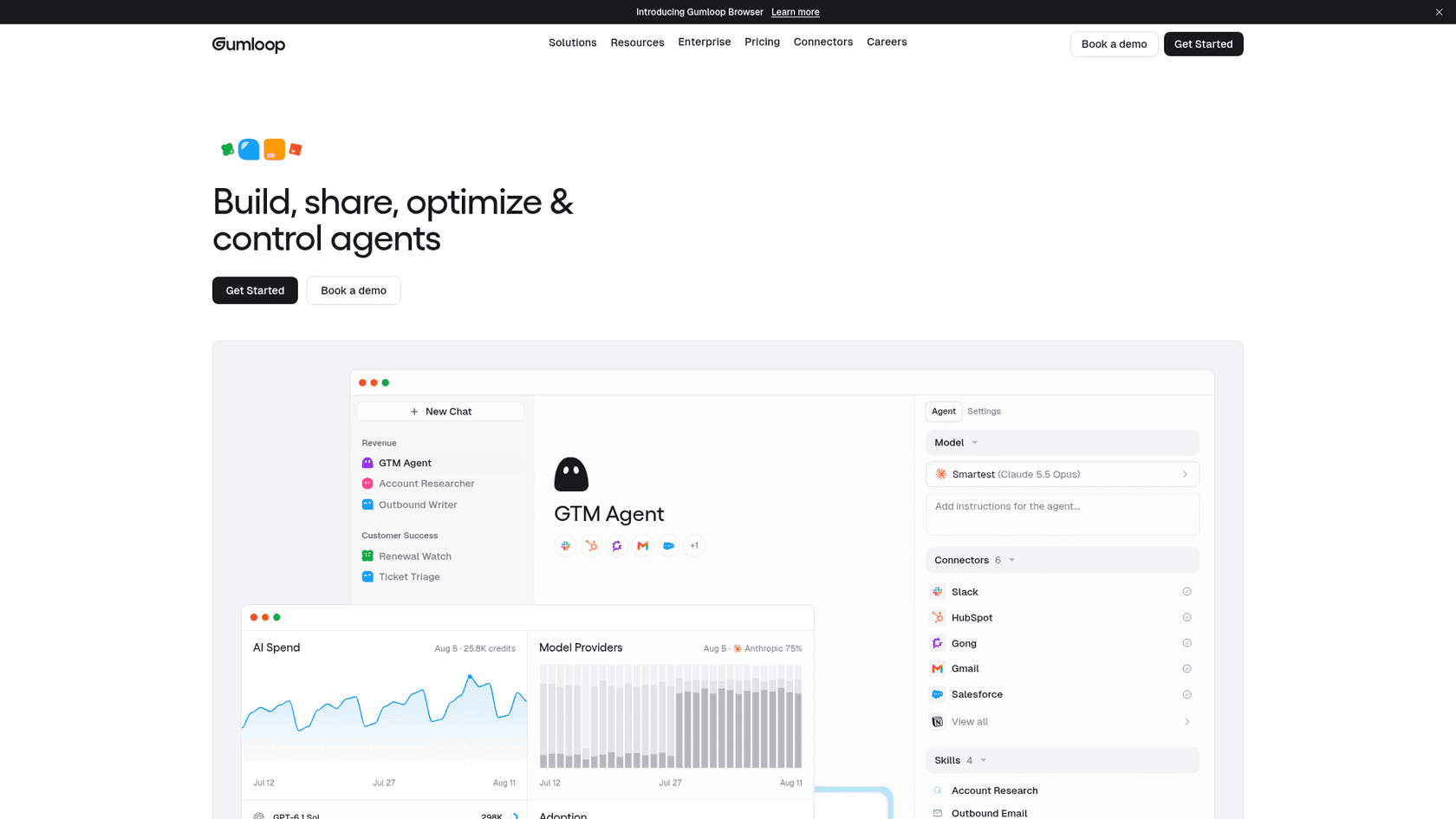
The parts that matter for a comparison with Make:
- Agents first. On the pricing page the old visual builder is labelled "Workflows (Legacy)". The recent updates listed on Gumloop's homepage are all agent features: Gumball, which builds or updates an agent from a plain request, and an agent browser that can click, type and sign in on sites with no connector.
- Company Brain. Every tool you connect feeds a shared knowledge layer that agents search, billed per search as a small "Brain" line on the run.
- Models. 35+ models on Pro, with bring-your-own-key (BYOK) support.
- Team setup. Unlimited seats, teams and agents on Pro, plus shared credentials.
Gumloop is backed by Y Combinator and, per its site, raised a $50M Series B led by Benchmark. Named customers include Shopify, Instacart and Gusto.
It also sits in my roundup of no-code AI agent builders, next to Lindy and Relevance AI.
What is Make?
Make (formerly Integromat, now part of Celonis) is the visual automation platform a lot of us learned on. You build a scenario by chaining modules on a canvas, one module per action in one app. The help center's starter example is two modules: watch a Google Sheet for new rows, send a Slack message.
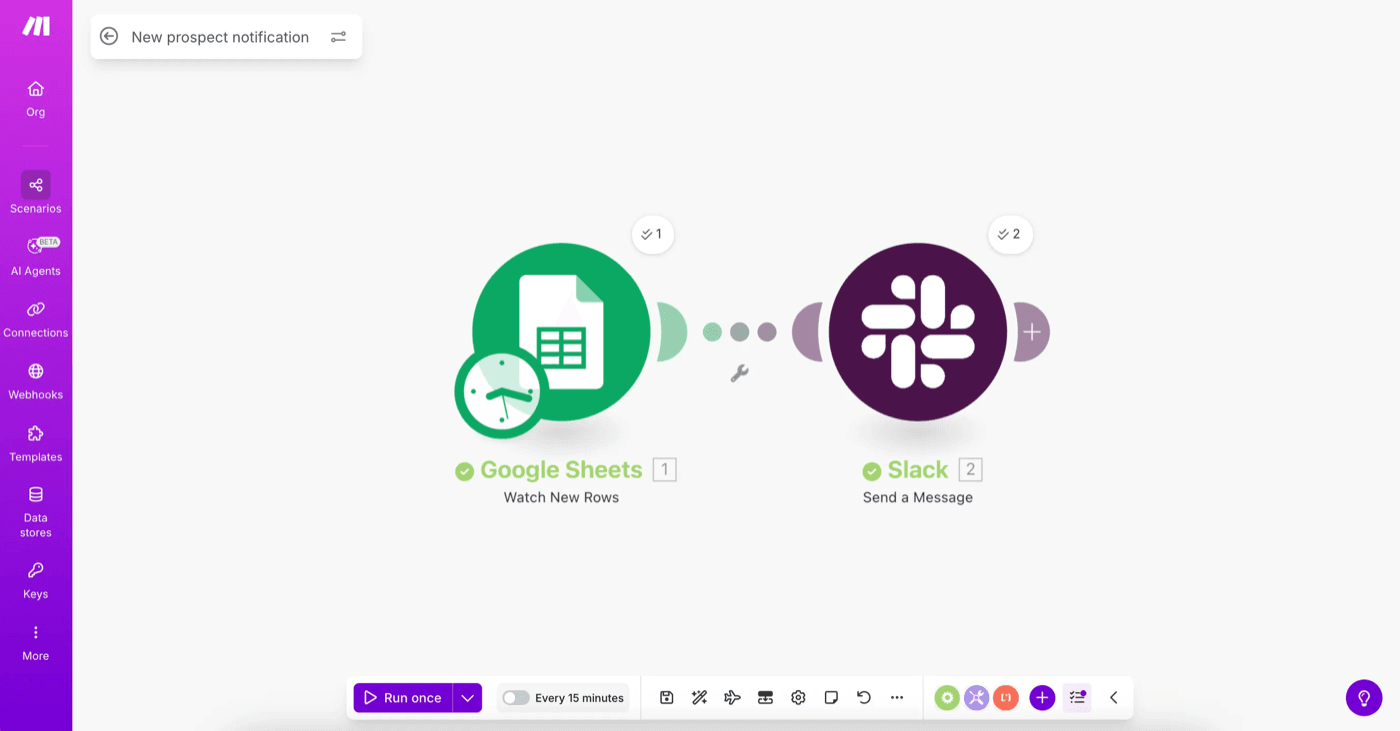
Make's homepage says 500,000+ teams build with it, with 3,500+ apps out of the box. Over the last year it has added a real AI layer on top of the canvas:
- Maia by Make, which builds automations and agents from a conversation.
- Make AI Agents (Beta) and the AI Toolkit, both on every plan, using Make's AI Provider or your own LLM key.
- An MCP server, so Claude, ChatGPT or another AI chat can trigger your scenarios.
- Make Code, for JavaScript or Python inside a scenario, billed at 2 credits per second of run time.
- Make Grid, a map of every automation and agent in your account.
The canvas is still the heart of it. That's the strength (you can see every step, every branch, every error handler) and the cost (someone has to draw it). For more on how Make stacks up as a builder, see Make vs n8n and my n8n review.
How does each one bill you?
This is the section most comparisons skip, and it decides almost everything else. Both tools say "credits". They are not the same unit.
A Make credit is one action. Per Make's pricing FAQ, reading a record, writing a row, searching, transforming, aggregating or iterating each counts as one credit. Routers and error handlers are free. Some AI Provider features use more than one. A run costs "anywhere from two credits to thousands" depending on how many modules fire and how many bundles loop through them.
A Gumloop credit is money. One credit is $0.005, and an agent run is the sum of four things, per the credits docs:
| Component | What it covers | Cost |
|---|---|---|
| Chat & Reasoning | The model reading, thinking and writing | Model cost divided by $0.005 (a $0.03 call is 6 credits) |
| Tool Calls | Each connector call | 1 credit per successful call, plus that tool's own charge |
| Compute | Active working time | 5 credits per session-minute |
| Orchestration Fee | Running the agent loop | 8% of the three above |
Gumloop's own worked example: 400 credits of model use, 10 of compute and 15 of tool calls add a 34-credit fee, 459 credits for one chat. With your own key, the same chat costs 93 Gumloop credits, because the model portion drops to zero but the fee doubles to 16%, and you pay your model provider directly.
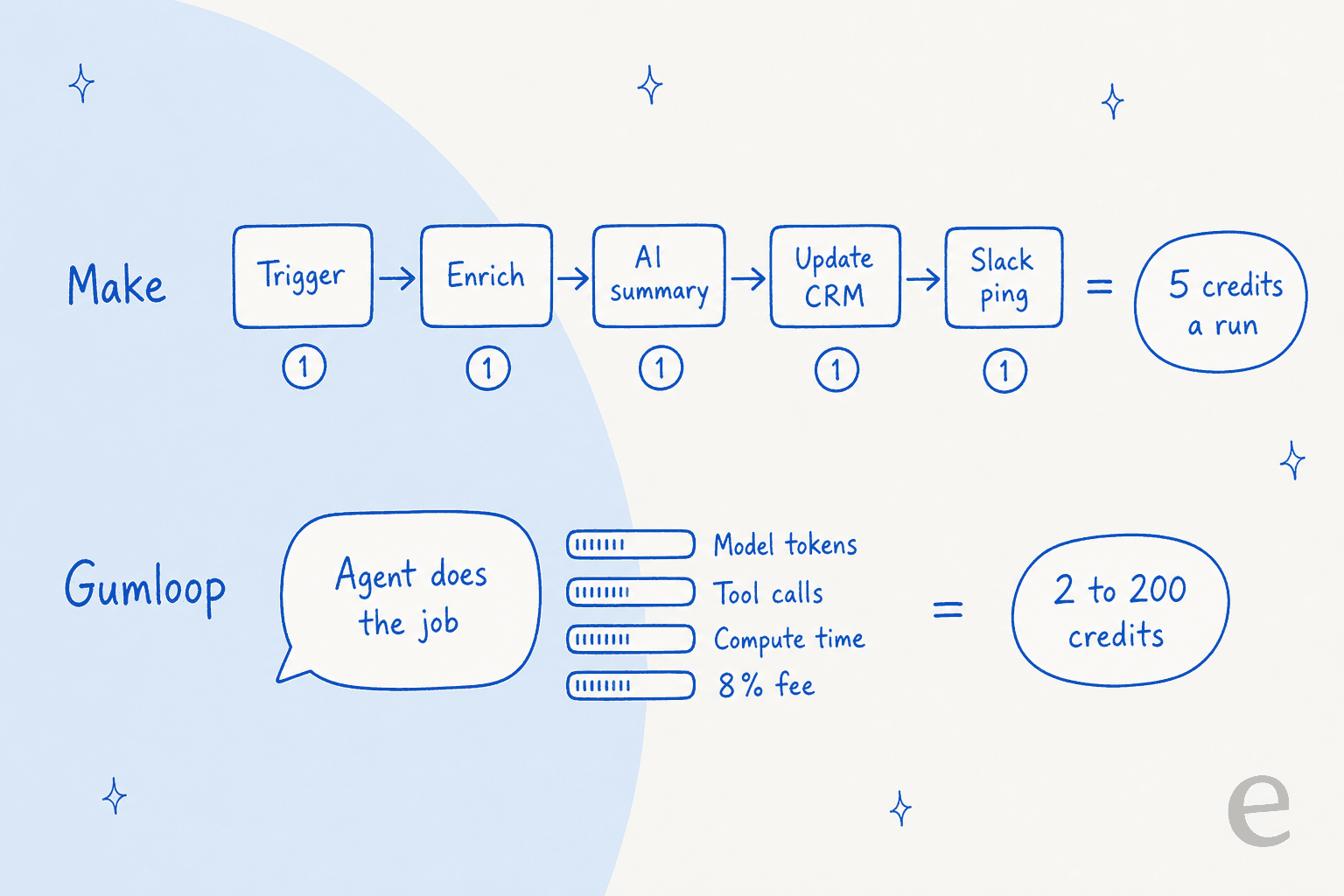
Here's the bit I didn't expect. Strip out the AI and the two price an app action almost identically. Gumloop's $37 for 20,000 credits works out to $1.85 per 1,000. Make Pro on monthly billing is $1.88 per 1,000 at the 10,000-credit tier. So "which is cheaper" is really "how much thinking does your job do, and who pays for it".
Gumloop is open about the variance. Its docs say the same agent "might cost 2 credits for a quick question and 200 for a deep research task", and each chat shows a live credit count with a breakdown drawer.
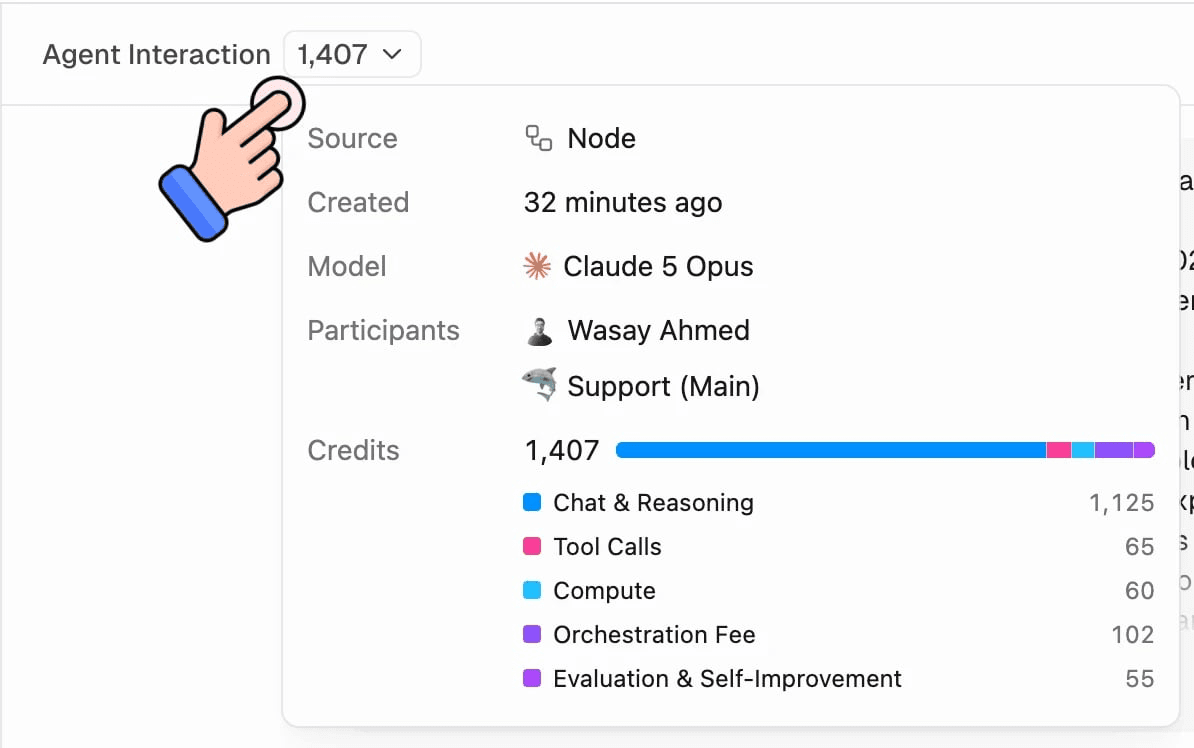
That screenshot is a good reality check: in a 1,407-credit run, 1,125 credits were the model. The connectors were 65. If your job is mostly reading and writing between apps, you're paying Gumloop for a reasoning engine you barely use. If it's mostly reading, deciding and writing back, the model is the job, and the comparison flips.
One more difference worth knowing before you build anything critical. Gumloop says failed tool calls aren't charged. Make's FAQ says scenarios simply stop when credits run out, with webhooks queued until you top up, so a busy month on Make means buying extra credits mid-term rather than a surprise overage line.
What does Gumloop cost vs Make in 2026?
Prices below are from the vendors' own pages, checked October 19, 2026. Make's slider changes the price with volume, so I've listed the 10,000-credit entry point and a few points further up.
Gumloop pricing
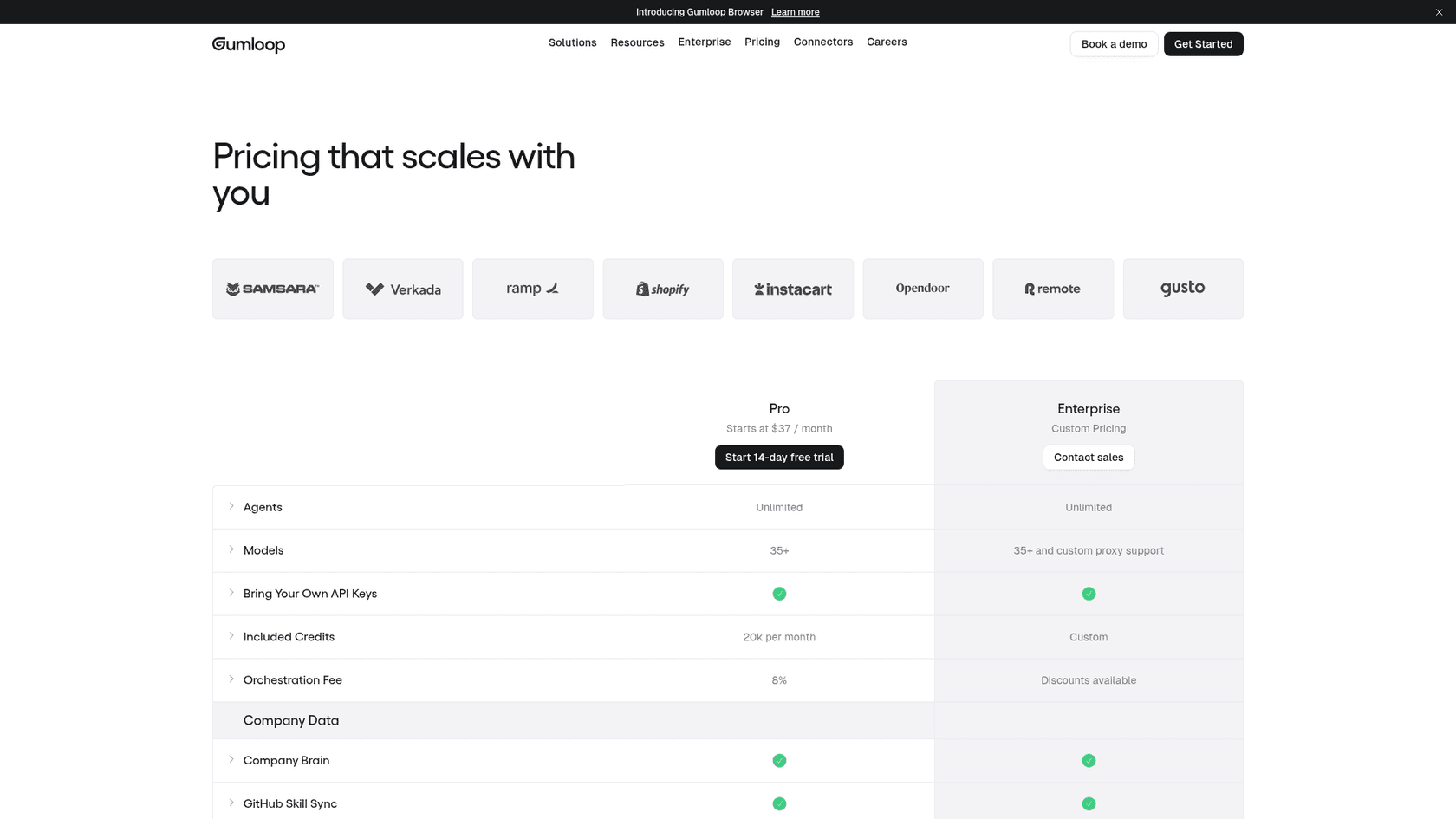
| Plan | Price | Included credits | Key limits |
|---|---|---|---|
| Pro | $37/month | 20,000/month (7,400 at list price + 12,600 bonus) | 8% fee, 5 concurrent workflow runs, 25 concurrent agent chats, 1 hosted MCP server |
| Overage (Pro) | $0.005 per credit | Off by default | Capped at 1,000,000 extra credits ($5,000) per period |
| Enterprise | Custom | Custom, unused credits roll over | Negotiable fee, VPC, RBAC, SCIM/SAML, audit logs |
Read the first row twice. Gumloop says it plainly: "Pro includes 7,400 + 12,600 bonus credits". The included 20,000 are discounted roughly 2.7x. Credit 20,001 costs full list price, so a team that doubles its usage pays $37 plus $100, not $74. For the full picture, see my Gumloop pricing breakdown.
Make pricing
| Plan | Annual billing (10,000 credits) | Monthly billing (10,000 credits) | Key limits |
|---|---|---|---|
| Free | $0 | $0 | 1,000 credits, 2 active scenarios, 15-minute interval, 5-minute runs |
| Core | $9/month ($0.90 per 1,000) | $10.59/month | Unlimited scenarios, 1-minute interval, Make API, 40-minute runs |
| Pro | $16/month ($1.60 per 1,000) | $18.82/month | Priority execution, custom variables, full-text log search |
| Teams | $29/month ($2.90 per 1,000) | $34.12/month | Team roles, shared scenario templates |
| Enterprise | Custom | Custom | Enterprise apps, overage protection, SSO, audit logs, 24/7 support |
On monthly billing, Pro rises to $107.06 at 80,000 credits, $394.25 at about 426,000 and $3,710.44 at 5,000,000, so the rate per 1,000 falls as you buy more. Core isn't offered at higher volumes; at about 122,000 credits the slider tells you to upgrade to Pro. More detail in my Make pricing guide.
One caution from checking the page: Make served me two different price sets the same day ($9/$16/$29 in one session, $12/$21/$38 in another rendering). Treat the exact figure as "check your own quote" and the relative gap between plans as the stable part.
Gumloop vs Make cost calculator
Plug in one workflow. The calculator applies Gumloop's published credit rules and Make's Pro prices on monthly billing, then adds the model bill wherever you'd pay it.
Try 10,000 runs with four app steps and one mid-tier AI step: Gumloop's overage kicks in and Make pulls ahead. Then drop to 300 runs with three frontier AI steps and watch Gumloop come out ahead, because the model cost sits inside its included credits.
Which one handles AI agents better?
Gumloop, for now, and by design. Make added agents to a scenario builder. Gumloop rebuilt itself around them.
Gumloop's agents start from a question ("what should it take care of?"), then pick connectors, skills and triggers. They can search the Company Brain, open a real browser on sites with no API, sync skills from GitHub, and run on any of 35+ models. On Enterprise, admins get org-wide connector policies, model access control and AI spend insights. The trade-off is the meter. A long reasoning chain on a frontier model is where those 2-to-200-credit runs come from, and it's why Gumloop added per-chat credit warnings that pause an agent for approval past a threshold.
Make's agents are still labelled Beta on the pricing page, and they live inside the scenario world. That's a feature if you want guardrails: the agent sits in a canvas where every surrounding step is explicit, logged and cheap. It's a limitation if you want the agent to decide which tools to touch. If you're weighing agent loops in general, my explainer on the AI agent loop covers why that difference matters.
Developer access is close. Gumloop Pro includes the Gumloop MCP and Gumloop CLI and hosts one MCP server. Make gives every plan an MCP server, the Make API from Core (300+ endpoints), and Make Code for real scripts. If you're comparing on that axis, my guide to AI agent MCP servers is a useful companion.
What do real users say?
The community read on Gumloop is consistent: fast to start, pricier, and you watch it more closely once it matters.
"-> Gumloop : Easy to build, easy to run but little more expensive."

A G2 reviewer put the positive case well, and it's the pitch Gumloop makes against Make too:
"The platform is much simpler than n8n and significantly more flexible than Zapier. The AI nodes for non-deterministic tasks are a great addition, and the MCP nodes that generate integrations on the fly are impressive."

Some people move from Make to Gumloop specifically. One Capterra reviewer who switched from both Make and Zapier listed the reason as:
"The tools were just too finicky and weren't working. The UI wasn't intuitive, and the pricing system was causing friction."

On Make, the long-running theme is the opposite trade: cheaper to run, harder to learn.
"Pricing is more reasonable than Zapier for heavy usage. Downside is the learning curve is steeper and some of their integrations are hit or miss."
And the warning that applies to any agent tool you put in production:
"The operational constraint that usually surfaces first with agentic tools is debugging - when a workflow fails after running for 3 hours, you need to know exactly which step failed and why. Deterministic pipelines give you that traceability."
That last quote is the real Gumloop vs Make split in one sentence. Make gives you traceability because you drew every step. Gumloop gives you flexibility because you didn't.
Gumloop or Make: which should you pick?
I'd stop asking "which tool is better" and ask what shape the work has.
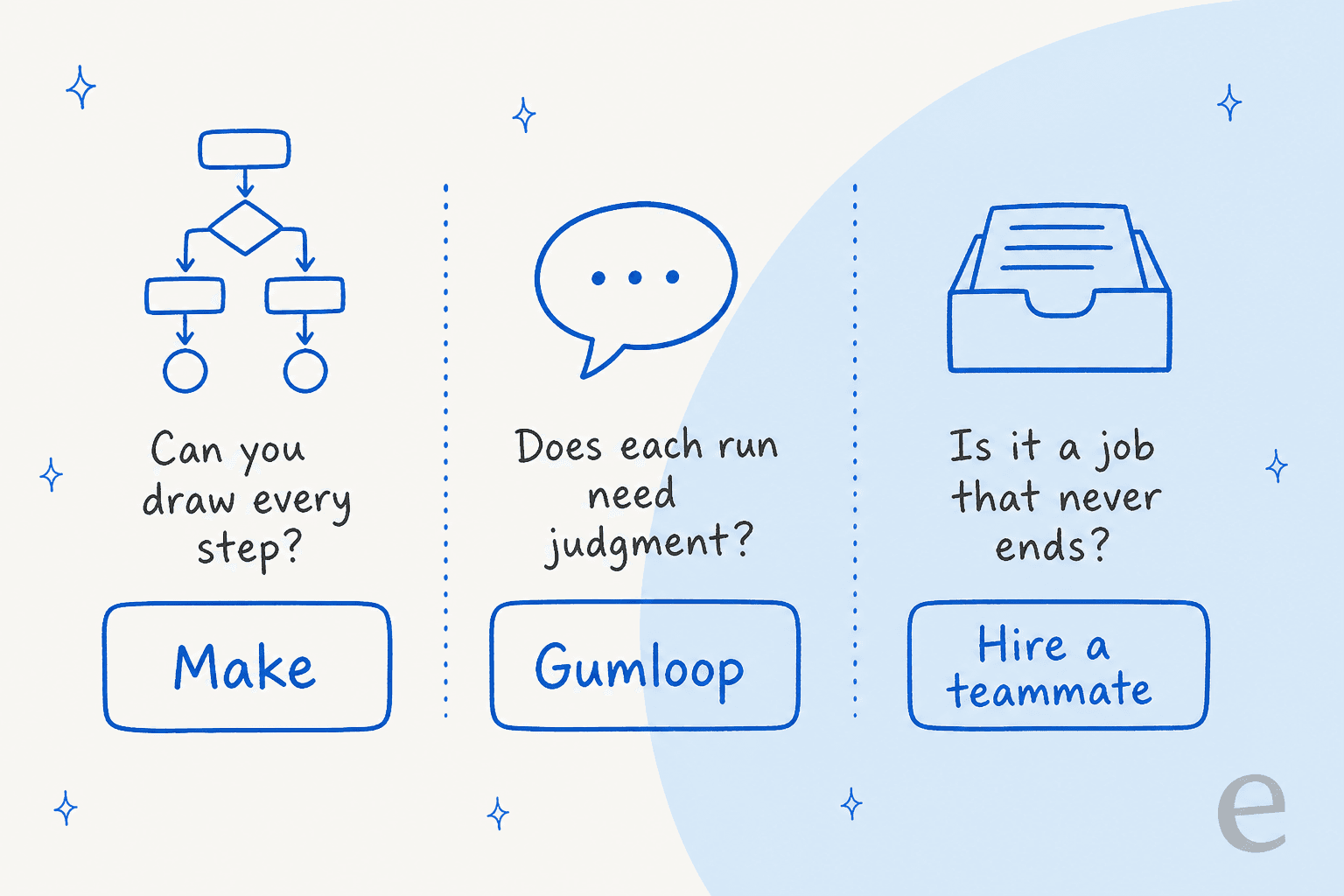
Pick Make if you can sketch the workflow on a whiteboard. New Stripe payment, create the invoice, update the sheet, ping finance. High volume, low judgment, and you want to see every step. It's also the cheaper starting point, with a real free plan, and it's a sensible pick when you already think in automated workflows and want them dirt cheap per run.
Pick Gumloop if each run needs judgment and you'd rather describe the job than map it. Research this account and tell me if it's a fit. Read this call transcript and update the CRM fields. Non-technical teams get further faster here, and unlimited seats make it easy to roll out. Budget for the meter, set the overage cap low at first, and use BYOK once your volume is predictable.
Use both if you're a larger team. Plenty of companies run Make for the plumbing and an agent tool for the judgment calls, the same way some pair Claude with workflow automation tools.
Pick neither if the "workflow" is really a job. A support queue doesn't end. Neither does a content calendar. You can build a ticket triage flow in either tool, as my guide to automating ticket triage shows, but then you own the knowledge lookup, the handoff rules, the tone, the testing and every edge case, forever. That's not a workflow anymore, it's a hire.
Where eesel fits: the employee, not the toolkit
Gumloop and Make are toolkits you build with. eesel is the employee. It's an AI teammate platform where you hire ready-to-work teammates for specific jobs, and each one arrives with the skills, integrations and company context for that role. Today the roster is two teammates.
-
The AI helpdesk teammate joins your existing queue in Zendesk, Freshdesk and other helpdesks, learns from your past tickets, macros and help center, and answers, drafts or hands off with context.
-
The AI blog writer researches, writes and illustrates long-form posts for your site. It's the same idea as AI blog automation, without stitching a writing flow together node by node.
I'm on the team that builds eesel's integrations, and the thing we learned the hard way over years of running AI on live support queues is that a confident bot can be quietly wrong. That's why every eesel rollout gets simulated against your historical tickets before it touches a real customer. In Gumloop or Make, that test harness is something you'd have to build yourself.
Two published customer stories show what the "hire, don't build" version looks like:
- SE Ranking runs Zendesk live chat for three products, SE Ranking, Planable and SE Visible, with one eesel agent per product. It handled 4,650 conversations in a month, and refunds, trial extensions and Tier 2 questions go to the team with the customer's details attached. Building that in a scenario builder means three sets of flows, three knowledge setups and three sets of handoff rules to keep in sync.
- SamCart runs one agent on Freshdesk tickets and another on its website chat, answering from 280 help center articles.
The eesel CLI, for people who like Gumloop's CLI and Make's API
If what draws you to these tools is programmatic control, the eesel CLI is the part to look at. It isn't a separate product. It drives the same teammate and workspace as the dashboard, and anything you change in one shows up in the other.
You can start with no account at all: npx @eesel/cli init chat-bubble --site https://your-site.com creates an agent that reads your site and prints the chat bubble snippet. eesel integrations connect zendesk (or freshdesk, gorgias, slack) starts the helpdesk connection, which a person approves inside that tool. Where Make has you add modules for each behavior, the CLI configures the teammate directly: eesel automations enable <platform> <key> --instructions "..." turns on something the agent does on its own, eesel instructions insert --at end --text "..." adds a standing rule, and eesel files upload ./refund-policy.pdf adds knowledge.
The SE Ranking pattern maps onto it neatly. eesel agents create "Planable Bot" adds an agent, and --agent <name> scopes any command to it. eesel activity shows what each agent did, newest first. Writes follow the same approval rules as the dashboard, so an action set to ask a person first waits in eesel approvals until someone runs eesel approvals approve <id>.
The design choice that matters for automation people is that every command prints JSON, and every error comes back as one JSON line with a hint saying what to run instead. --dry-run shows the exact call a write would make before it runs. That's what lets Claude Code, Cursor or Codex run the whole setup for you and read its own results. In CI or a script, set EESEL_API_TOKEN instead of logging in. And eesel mcp token turns the workspace into an MCP server for any MCP client. My guide to the AI agent CLI goes deeper on why that shape suits coding agents.
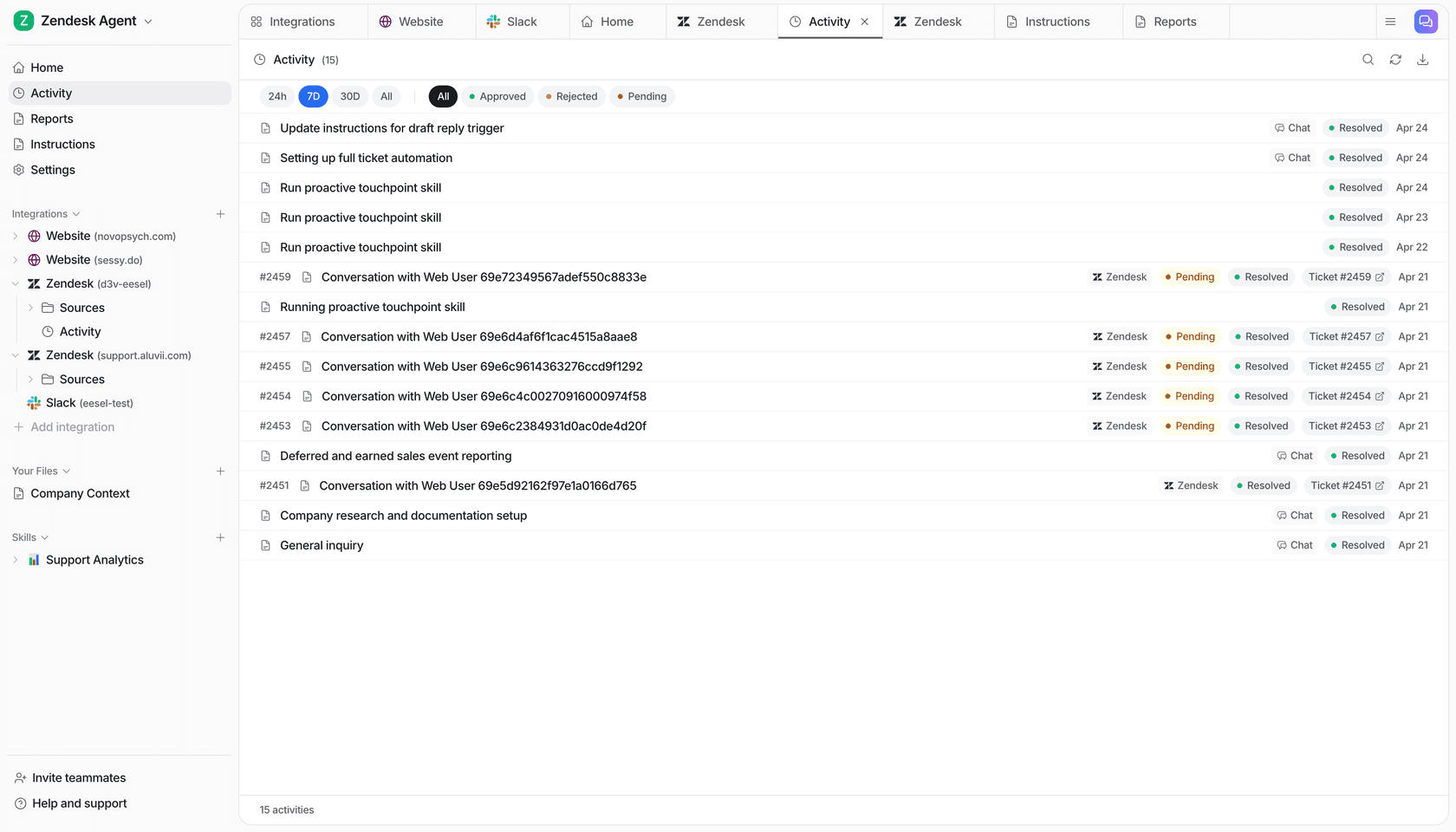
The pricing logic is different too. Gumloop meters the thinking, and Make meters the steps. eesel's pricing meters the work: a ticket or a chat is 1 credit, however many replies or tool calls it takes. Plans are fixed monthly batches, from $299/month for 500 credits up to $1,749 for 5,000, with a free start of 100 credits and no card.
Try eesel
Keep Make for the plumbing and Gumloop for the judgment calls if they're working for you. For the jobs that never end, a support queue or a blog calendar, eesel gives you a teammate that plugs into the tools you already run, already knows your help center, and gets tested on your past tickets before it says a word to a customer. Set it up from the dashboard or one CLI command. Try eesel free, or book a demo to see it answer your own tickets.