Why do support teams keep getting caught short?
I'm Riell, and I work eesel's support queue every day. The question behind this post usually arrives as "we hired two people last quarter, so why are we still underwater every Monday?" The answer is almost never headcount on its own. It's that the headcount was planned against a daily or weekly average, and customers don't arrive on average.
A team that gets 400 tickets a day doesn't get 50 an hour across an 8 hour day. It might get 90 between 9 and 10, 20 after lunch, and a spike at 6pm when people get home and check their order. Staffing for 50 an hour means you're over-staffed half the day and buried for the other half. That's the gap coverage planning tries to close, and forecasting is the math underneath it.
Contact centers solved this decades ago with workforce management (WFM). The vocabulary is a bit intimidating (Erlang C, shrinkage, occupancy, service level) but each term answers a plain question, and you can run the whole method in a spreadsheet. What's newer is that most support teams today run on a helpdesk, not a phone system, and a growing share of their volume goes to an AI agent first. Both change how you apply the old method.
How does support workforce forecasting work?
Every WFM tool I looked at, from Zendesk WFM to Assembled, runs the same pipeline. The vendors differ in which algorithm forecasts the volume and how much of it you can tune, but the shape doesn't change.
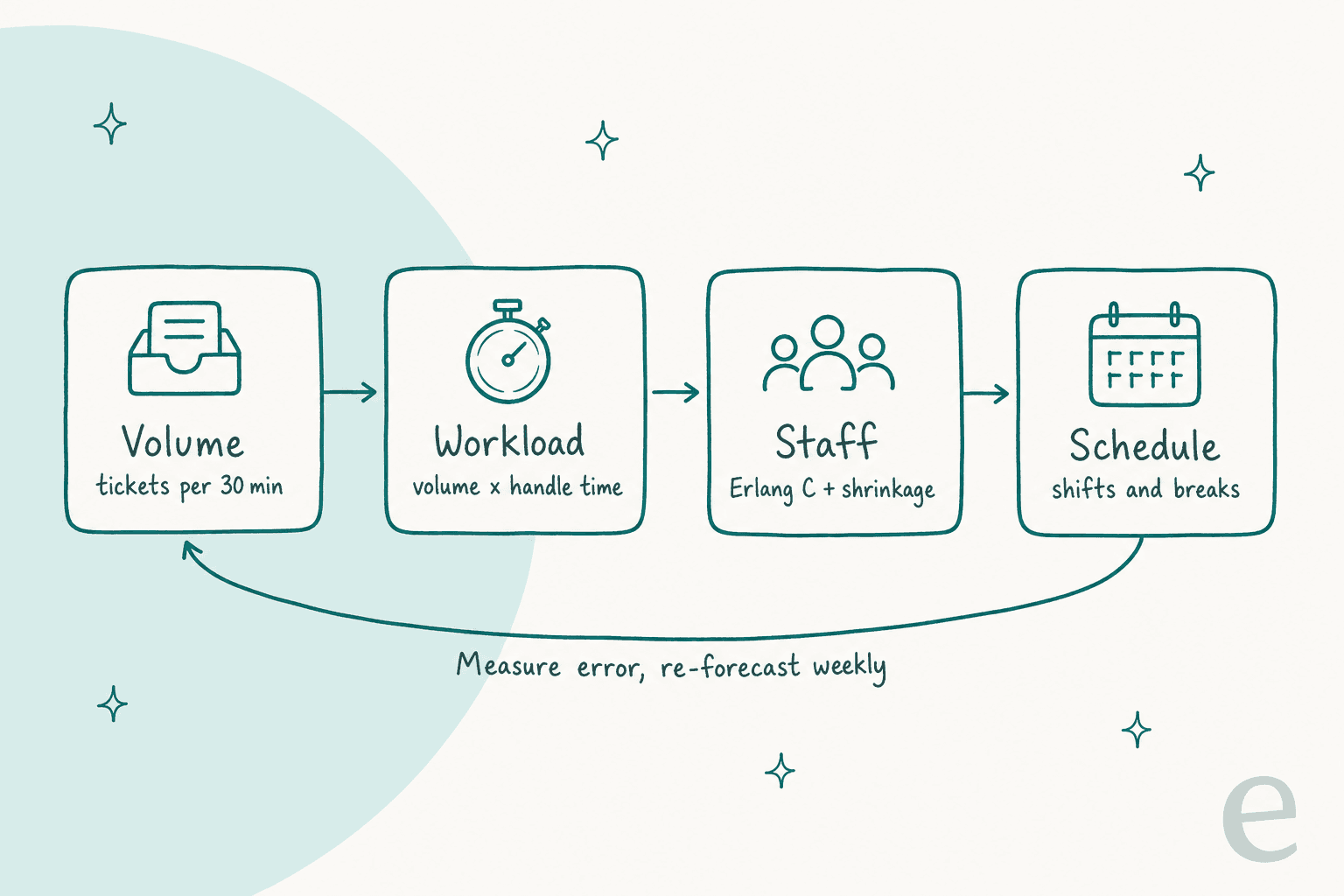
- Volume: how many contacts arrive in each 15 or 30 minute interval, per channel.
- Workload: volume multiplied by average handle time, so you know how many agent-minutes each interval needs.
- Staff: how many agents it takes to hit your service level, using Erlang C for live channels, then grossed up for shrinkage.
- Schedule: shifts and breaks laid over the requirement, so coverage follows the curve.
- Measure: compare forecast to actual at the interval, fix the inputs, repeat weekly.
The rest of this post walks each step, then looks at what your helpdesk can do for you, how to plan peaks, and what changes once an AI agent is in the queue.
How do you forecast ticket volume by interval?
Start with history. You need contacts per channel, bucketed by date and 15 or 30 minute interval, in your own timezone. Zendesk WFM won't produce a forecast with less than a month of data and pulls in six months by default (Zendesk docs). That's a sensible floor for a spreadsheet too.
The workhorse method is the N-week average: for next Tuesday 10:00-10:30, average the last N Tuesdays at 10:00-10:30. Assembled's docs call it the recommended default, "generally very accurate for short term forecasting (~1 to 4 weeks)", and suggest 8 weeks (Assembled forecast models). Zendesk WFM's simplest algorithm is the same idea: the same 15 minute slot averaged over the past eight weeks (Zendesk algorithms).
The N-week average has one blind spot: it doesn't see trends or seasons. If volume grows 5% a month, an 8-week average always runs behind. That's where the fancier models come in. Assembled offers a momentum variant, a seasonal model that multiplies a 12-month growth line by week-of-year, day-of-week and 15-minute patterns, and Meta's Prophet library. Zendesk adds XGBoost, LightGBM and an LSTM neural network, and picks the best one per workstream automatically. Both vendors want a year or more of history before the seasonal and machine learning models earn their keep.
Three things improve a forecast more than a better algorithm:
- Clean the input. Zendesk WFM counts spam in its volume, and counts a ticket again each time it enters a new workstream (Zendesk best practices). MentorShow, a French online learning platform on HubSpot, told eesel they get between
5,000and13,000tickets a month depending on the period, and that "a large share is not a question at all": PayPal notices, auto replies, survey responses, a member writing "merci". Forecast the work, not the noise. - Forecast from a driver when you have one. One DTC supplements brand that talked to eesel on a sales call runs about
7,000Gorgias tickets on30,000orders a month, a 25-30% ticket-to-order ratio, with high season from November to May. If marketing gives you an order forecast, the ratio turns it into a ticket forecast faster than any time series will. - Mark the outliers. An outage or a viral post inflates the history and then poisons every average that includes it. Zendesk WFM lets you exclude outliers and add manual volume adjustments for known events; Assembled has the same adjustments and outlier tools.
A spreadsheet is enough for this at mid-size, as one WFM lead running 35 agents describes:
"I use salesforce reports to build Google sheets forecasts based on volume history. This allows me to analyze the historic volume for specific days of the week and days of the month. Using a rolling last 60 days report, I built several pivot tables breaking down volume by hourly intervals by days of the week. ... For context, we have 35 agents and handle around 400-600 contacts per day, 24/7"

If you don't have clean history yet, fix that before you buy a WFM tool. Tag consistently, split channels, and make sure ticket triage is putting contacts in the right queue, because a forecast per queue is only as good as the routing that fills it.
How do you turn volume into workload with handle time?
Workload is volume multiplied by average handle time (AHT): the minutes an agent spends on one contact, including wrap-up. Sixty chats in a half hour at 6 minutes each is 360 agent-minutes of work, or 12 agents' worth of time if every one of them did nothing but chat for the full 30 minutes. Contact centers call that number traffic intensity, measured in Erlangs: 60 × 6 ÷ 30 = 12 Erlangs.
Two adjustments matter on support channels:
- Concurrency on chat. If agents handle two chats at once, the effective handle time per chat roughly halves. But the setting and reality differ. One WFM practitioner puts real concurrency "between 1.2 and 1.6" where agents can take two chats, and chat AHT at "maybe 130% of voice at least" (Reddit thread). Use your measured average, not the cap.
- AHT varies by ticket type. A password reset takes a minute; a billing dispute takes twenty. An average across both is fine for a stable mix and misleading when the mix shifts, which is exactly what happens when an AI agent arrives (more on that below).
Your helpdesk usually reports something close to AHT, though not always the same thing. Zendesk's duration metrics, for example, separate business-hours metrics from calendar time, and full resolution time is not handle time. If you can't get true handle time, time a sample of tickets by hand for a week. It beats guessing.
How many agents does Erlang C say you need?
Workload tells you the minimum. Staffing exactly 12 agents for 12 Erlangs means 100% occupancy and an ever-growing queue, because contacts don't arrive in a neat line. Erlang C is the formula that answers "how many agents do I need so that X% of contacts are answered within Y seconds?" given random arrivals. Zendesk WFM computes required staff per 15 minute interval with "a modified version of Erlang C" (Zendesk docs), and Assembled uses Erlang C for its synchronous channels.
The inputs are the three you already have plus two targets:
- Service level: the share of contacts answered within a target time, such as 80% within 60 seconds.
- Max occupancy: the share of logged-in time agents spend on contacts. Zendesk exposes it as a setting; planning around 75-85% is common, because 95% occupancy burns people out fast.
Here is the 60-chats example worked through. At 12 Erlangs, Erlang C says 15 agents get you 80.6% within 60 seconds, an average wait of about 38 seconds, and 80% occupancy. Drop to 14 agents and the service level falls well short. That jump from 12 to 15 is the cost of randomness, and it shrinks as volume grows: big queues run efficiently, small ones don't. At 6 chats per half hour (1.2 Erlangs) you need 3 agents for the same target, at 40% occupancy. Zendesk says as much in its own docs: for low-volume workstreams, "Erlang C may give slightly higher staffing recommendations" (Zendesk best practices).
Erlang C is for live queues, not email
Erlang C assumes a customer is waiting in a queue right now. Chat and phone fit. Email and tickets don't, because the customer isn't sitting there; they expect a reply within hours. A WFM practitioner put the problem with ticket queues bluntly:
"If you have very consistent handle times and a good way to capture it, you basically have a live queue and Erlang C works really well. Most of the time, that is pie in the sky because, for example, Zendesk tickets can take 30 seconds or 45 minutes…so how do you get a good handle time for those tickets?"
For asynchronous support, staff the SLA window instead. Assembled's docs explain why: its old interval-based mode assumed work arriving in a 15 minute interval was cleared in that interval, which "significantly over-staffs async work". Its newer mode spreads the workload across the response target, so 100 emails arriving at 9am with a 24 hour SLA don't all need an agent at 9am (Assembled async staffing). Zendesk WFM does something similar for email that arrives after hours: it redistributes that volume over the first-response window of the next open period.
In a spreadsheet, the async version is simple: total the day's workload in agent-hours, divide by productive hours per agent, and check that the backlog never ages past your SLA policies. If it does at a certain hour, that hour needs more people.
Work out your staffing with an Erlang C calculator
The calculator below runs Erlang C for one 30 minute interval of a live channel, then adds shrinkage. Switch to the email mode for queues that can wait. The AI fields let you test what happens when an agent takes part of the volume and the remaining tickets run longer.
Defaults: 60 chats per half hour, 6 minute AHT, 80% answered in 60 seconds, 30% shrinkage, and an AI agent resolving 40% with an 8 minute handle time on the rest.
With the defaults, the humans-only plan needs 15 agents on the chat queue and 22 on the schedule. With the AI taking 40% of chats and the leftover chats running 8 minutes, it's 13 on the queue and 19 scheduled. A 40% resolution rate cut the schedule by about 14%, not 40%. That's the single most useful thing the calculator shows, and it's the reason I'd never plan a hiring freeze off an AI vendor's deflection number.
How much shrinkage should you plan for?
Erlang C tells you how many agents need to be on the queue. Shrinkage is the gap between that and how many you need on the schedule: breaks, meetings, training, coaching, sick days, PTO, and time spent logged in but not available. The formula is scheduled = required ÷ (1 - shrinkage). Zendesk's own example: 100 productive agents at 40% shrinkage means 167 on the schedule (Zendesk docs).
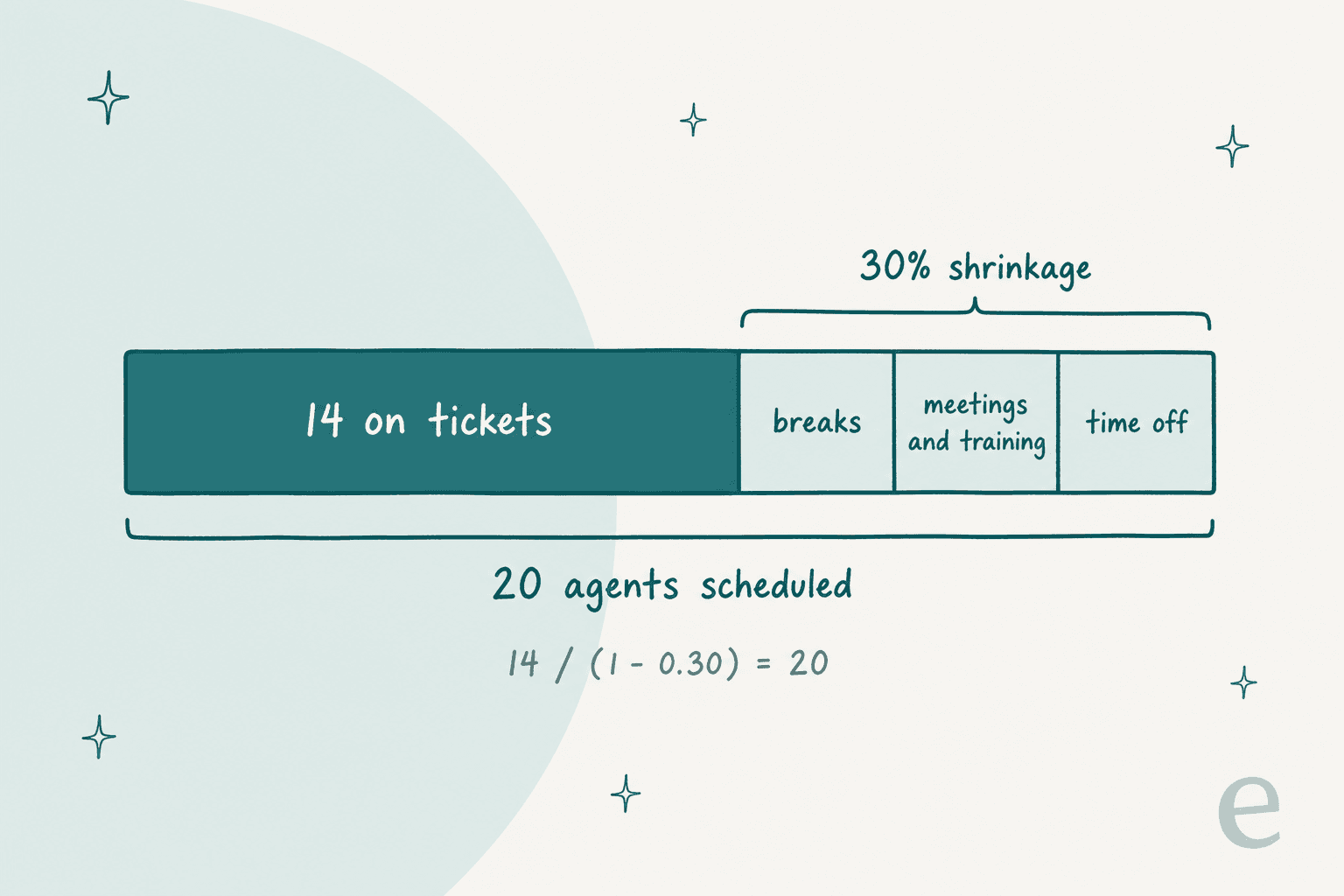
The number teams use is usually too low. Two definitions are floating around, and mixing them is a common source of short staffing:
- Narrow shrinkage counts only scheduled time that wasn't delivered, roughly
100% - adherence. Assembled uses this definition and schedules breaks, PTO and meetings separately; its docs give 5-10% for voice, 10-15% for omnichannel and 15%+ for complex digital-first teams (Assembled staffing docs). - Full shrinkage counts everything that takes a paid agent off the queue. That's the definition most spreadsheet forecasts need, and it's much bigger:
"A 15% shrinkage rate seems low. Breaks alone account for approximately 6.25% on a standard 8-hour schedule. Most of our teams average shrinkage in the low 30% range once you factor in absenteeism, PTO, meetings, training, etc."
Shrinkage also moves. Another practitioner in r/workforcemanagement notes Monday shrinkage is usually the highest and January runs high for their team (thread). New hires count too: someone in their first months handles fewer, simpler contacts, so a team that just hired five people has less capacity than its headcount says. If you're hiring ahead of a peak, plan for agent ramp time and a proper seasonal onboarding plan rather than counting a new starter as a full agent in week one.
How accurate should a support forecast be?
Accurate enough that the schedule built on it hits your service level. That sounds like a dodge, but it's the right test, because a forecast that's 2% off on the weekly total can still be wrong in the hours that matter.
The standard measures are mean absolute error (MAE) and mean absolute percentage error (MAPE). Assembled's Forecast Management report tags the model with the lowest MAE as "most accurate" and also shows over and under error separately, since you may prefer a model that rarely under-forecasts (Assembled docs). It also warns that MAPE breaks when actual volume is zero, which happens a lot in small intervals. Zendesk WFM has a forecast-vs-actual page in early access for checking the active scenario.
What "good" looks like depends on the horizon. One practitioner's rule of thumb:
"Unless you tie forecast accuracy to a specific business metric, you setup the forecasting team for failure. Also 3% intra-day (in)accuracy? Maybe annual 3%, 5% monthly, 10% weekly and 25%-40% daily."
Two habits catch most problems. First, check the interval, not only the total: "Many wfm teams only look at the daily total to forecast as a kpi, which doesn't help if the call arrival pattern is wrong" (Reddit). Second, use actuals as inputs. If the plan assumes 2 chats at once and 15% shrinkage and the team delivers 1.4 and 30%, the forecast will promise a service level you never hit. Watch first response time and backlog age per interval alongside the forecast; they're the first metrics to tell you the inputs drifted.
What do Zendesk WFM and other helpdesks actually forecast?
This is where support teams differ most from call centers. Phone systems have shipped WFM for decades. Helpdesks mostly haven't. Here's what I found in each vendor's own docs.
Zendesk WFM
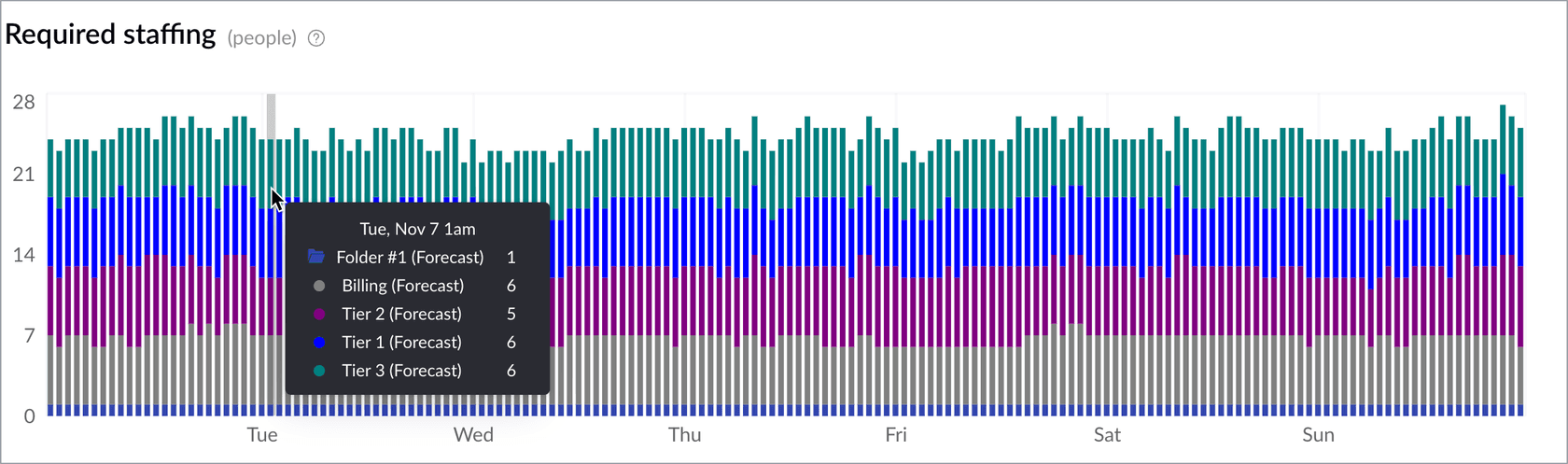
Zendesk is the only helpdesk here with a native forecast, and it's a real one. Inside the WFM add-on you get:
- Volume forecasts up to a year ahead, in 15 minute intervals, from six months of migrated ticket data (up to two years on request).
- Algorithm choice per workstream: eight-weeks average, eight-weeks average with momentum, Prophet, XGBoost, LightGBM and an LSTM neural network. WFM tests them all and picks the best, and you can override it (Zendesk algorithms).
- Required staffing from a modified Erlang C, with occupancy, chat concurrency, AHT, SLA target, shrinkage and minimum staffing (default 1 FTE) as inputs.
- Scenarios for what-if testing without touching the active forecast, plus volume adjustments and outlier exclusion (Zendesk setup guide).
The limits worth knowing: WFM doesn't forecast combined workstreams (the workaround is a folder that sums them), spam counts in volume, and none of the forecasting docs mention separating AI agent resolutions from human volume, so an AI rollout gets modelled through manual adjustments. On cost, the add-on is bought for every agent on the account, and Zendesk's pricing page lists the Workforce Engagement Bundle (WFM plus QA) at $50 per agent per month, paid yearly (Zendesk pricing). For a full picture of the base plans, see my Zendesk pricing breakdown.
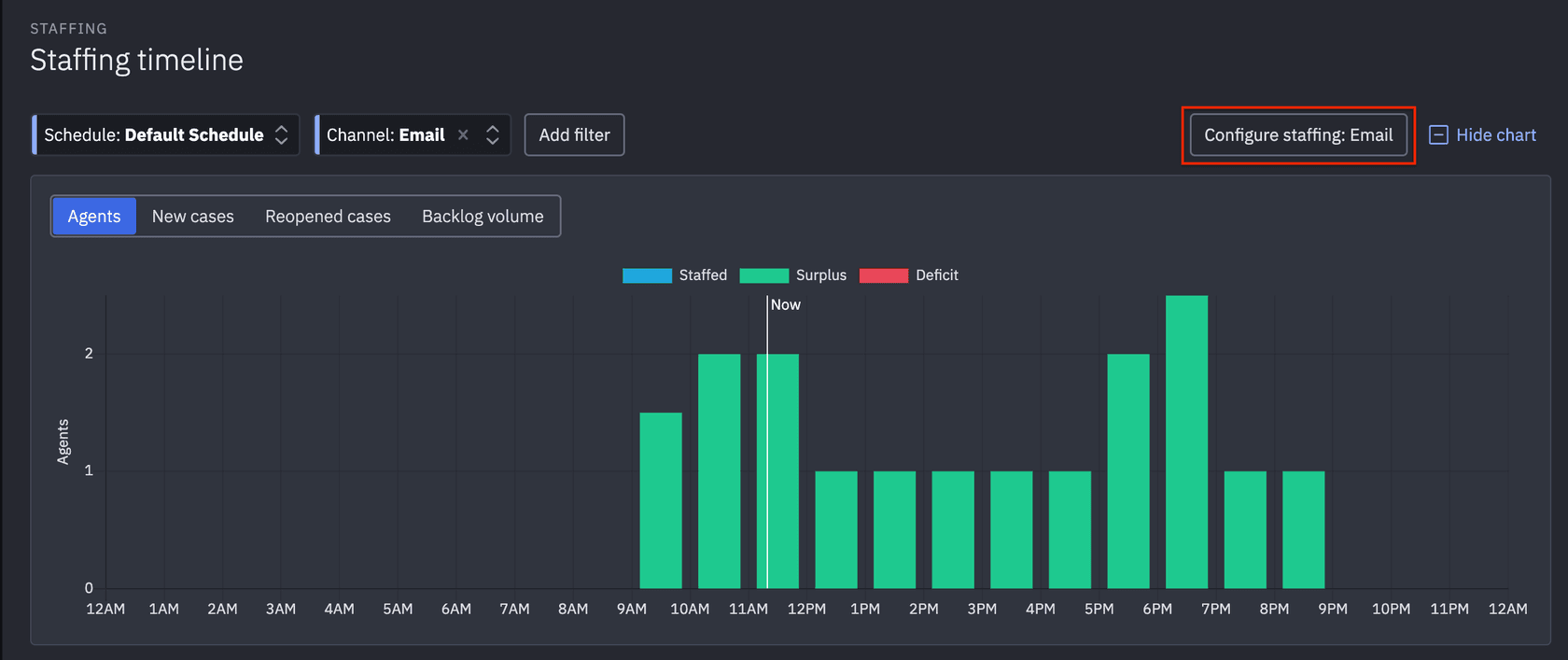
Assembled
Assembled isn't a helpdesk; it's a standalone WFM tool that plugs into Zendesk, Salesforce, Gorgias and others. It runs the same pipeline with N-week, momentum, seasonal and Prophet models, 30 minute staffing intervals by default, Erlang C for live channels and an SLA-window mode for email. The pricing page lists WFM at $25 (Core), $45 (Pro) and $75 (Enterprise) a month, and the help docs put forecast models, accuracy reporting and async SLA staffing on Pro and Enterprise (Assembled pricing). Assembled's marketing says its staffing plans account for AI agent capacity alongside humans, though I couldn't find a help doc explaining the mechanism. If you're comparing options, I've covered Assembled alternatives separately.
Gorgias
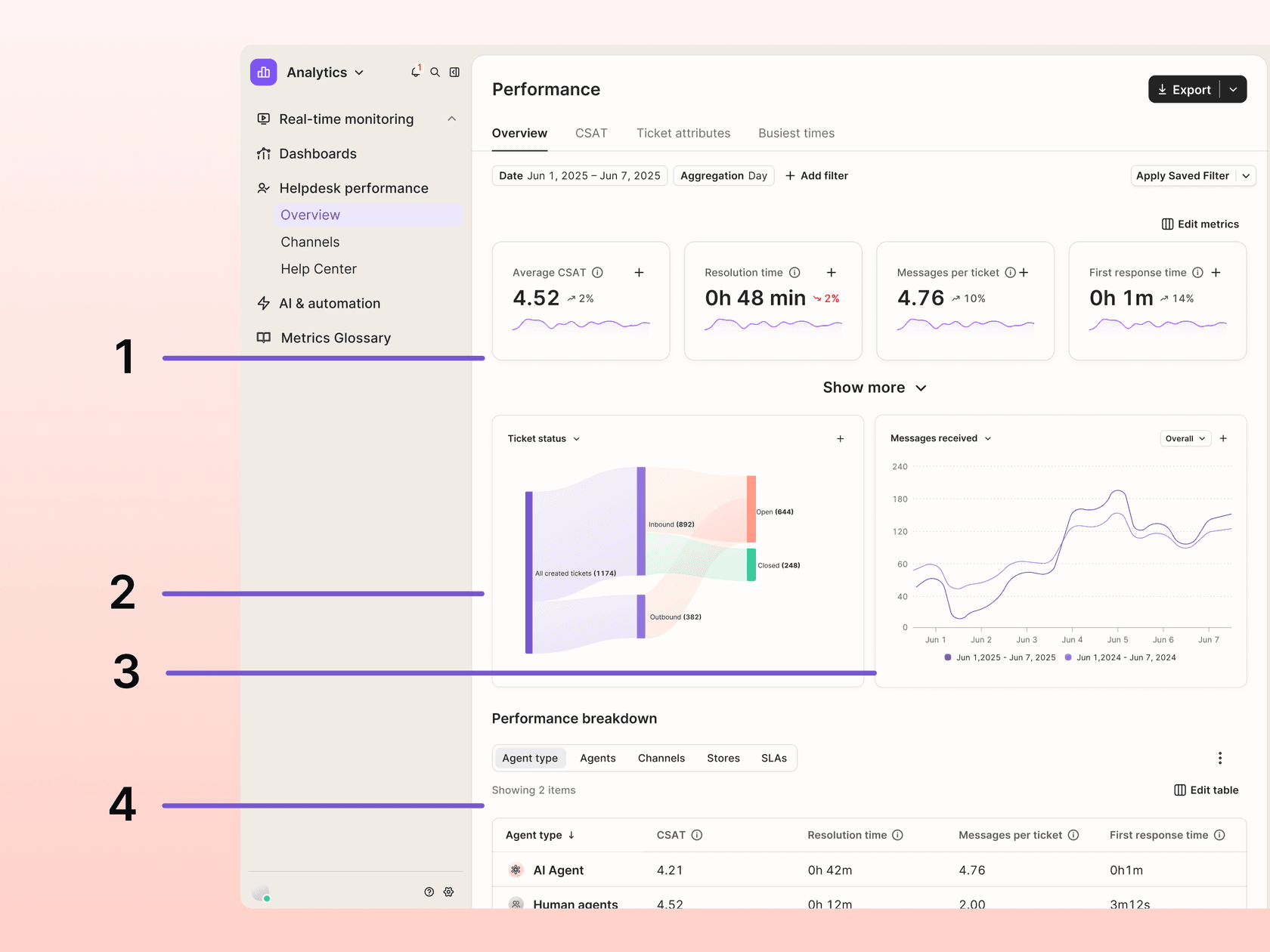
Gorgias has no volume forecast, but its reports give you most of the inputs. The Busiest times tab shows one metric (tickets created, messages received and others) as an hour-by-weekday heatmap with your business hours marked, and Gorgias's own tip is that "A dark cell outside your business hours is demand arriving when nobody is scheduled" (Gorgias docs). Trend charts can overlay the previous year to separate a real change from a seasonal pattern, and every report exports to CSV for up to 365 days per range. If you run the Gorgias AI Agent, its report gives an automation rate you can use to split AI and human volume.
Help Scout
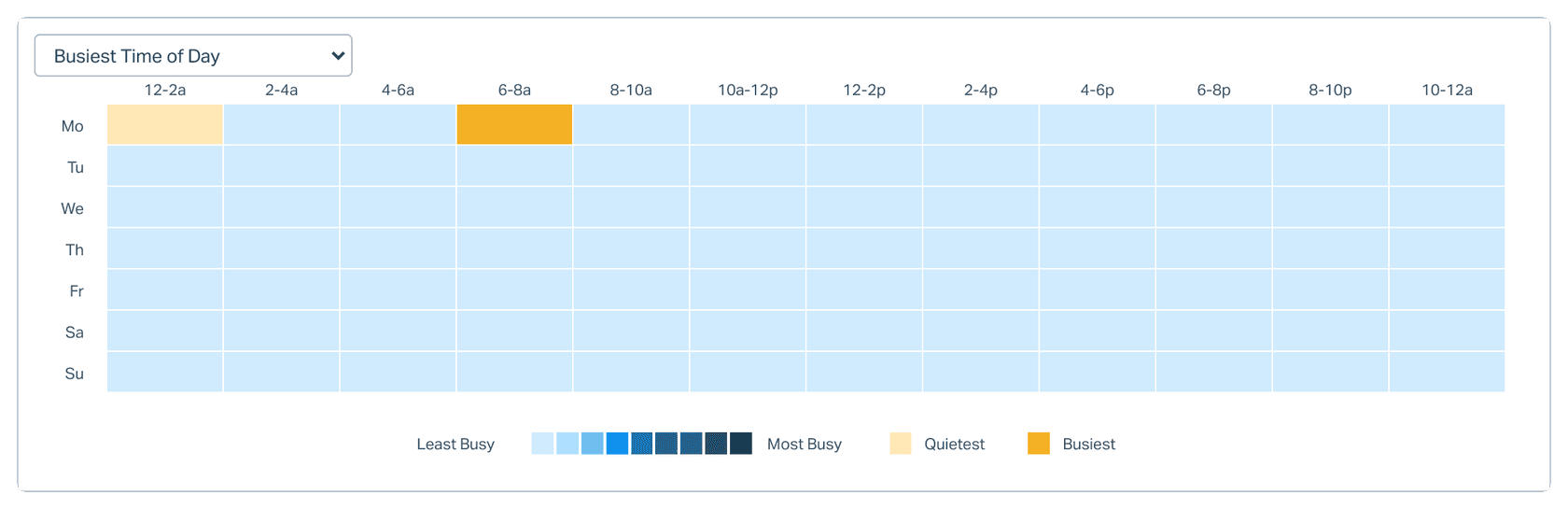
Help Scout's reports are historical only, and its docs say you can't build custom reports in the app. The All Channels report includes a Busiest Time of Day heatmap that Help Scout describes as "helpful for hiring" (Help Scout docs). Standard plans report on two years of history; Plus and Pro on the account's lifetime. The export is conversation-level CSV or XLSX, which is what you want for a forecast, with one trap: XLSX timestamps are in UTC while CSV uses your company timezone. Bucket by the wrong one and your peak hour moves. More on plan limits in my Help Scout pricing post.
HubSpot Service Hub
HubSpot's forecast tool is a revenue tool built on deal stages, not tickets. The nearest thing for support is a "predictive" trend line option in the service analytics suite report settings, applied to historical charts (HubSpot docs). The useful inputs are there, though: a Support volume report, a Time of day report "to help inform team planning", and Planning reports such as Maximum available rep that show whether people were working during peaks. If you use HubSpot's Customer Agent, note the 72 hour lag before reply-based resolutions are set, so this week's resolution rate always looks low.
Side by side
| Native volume forecast | Interval detail | Staffing math | AI split in reports | Export for a spreadsheet | |
|---|---|---|---|---|---|
| Zendesk (WFM add-on) | Yes, up to 1 year | 15 min | Modified Erlang C, shrinkage, occupancy, concurrency | Not in forecasting docs | Yes, plus imports |
| Assembled | Yes, 4 models | 15-30 min | Erlang C (live), SLA window (async) | Marketing claims only | API or CSV import |
| Gorgias | No | Hour heatmap | None | AI Agent automation rate | CSV, 365 days per range |
| Help Scout | No | 2 hour heatmap | None | Not covered | CSV or XLSX, conversation level |
| HubSpot Service Hub | No (trend line only) | Time of day report | None | Customer Agent reports | Unsummarized export |
If you're on one of the last three and your team is under 20 agents, a spreadsheet using the method above is enough. Past that, or with several channels and shifts, a WFM tool starts paying for itself in hours not spent rebuilding pivot tables. For teams weighing their helpdesk itself, my roundup of helpdesks for high-volume tickets covers the reporting side too.
How do you plan for spikes and seasonal peaks?
A forecast built on averages will always miss the spike, by design. The fix is to plan the spike as its own scenario. I'd keep three on file for every peak period: normal, +30% and +60% volume, each with its own staffing and schedule. You don't staff for the worst case; you decide in advance what you'll do when you see it coming (overtime, cross-trained staff from other teams, an overflow plan, or a pause on non-urgent work).
Before you staff a spike, ask why it happens:
"Why is it spiky? Do you send bills to customers all on the same day? Does your ad campaign run at a certain pattern? Identify "the why" in spikes and see if you can educate on the impacts to the call center."
Most spikes have a driver someone in the company already knows about: a billing run, a promo email, a product launch, a shipping cutoff. Get those dates onto the support calendar and add them as manual adjustments. For retail, my guides to holiday support spikes and AI for Black Friday go deeper on the November to December crunch.
Seasonal businesses face the hardest version of this, because hiring for summer means carrying people through winter. Norden-Frisia, the ferry line I mentioned in the TL;DR, gets most of its passenger questions between May and September: timetables, cars, roof racks, bikes. Hiring and training a team that grows and shrinks with the season was expensive and slow, so before its first high season the team moved its eesel plan to 10,000 interactions a month, with the agreement that it scales back down from October to March. The AI teammate answers the repeat questions from the Zendesk FAQs, and anything it can't close becomes a Zendesk ticket for the human team. That's a staffing decision as much as a software one.
Rúngne, a Norwegian climbing apparel brand on Gorgias, shows the week-to-week version. Between 8 August and 8 September 2026, eesel handled about 2,100 tickets for them, between about 300 and 780 a week. A swing that size inside one month is exactly what an average-based schedule misses, and it's why intraday checks matter even with a decent forecast. Teams that cover several timezones can also smooth peaks with follow-the-sun support, handing the queue across regions instead of stretching one shift.
How does an AI agent change the staffing forecast?
This is the part most forecasting guides haven't caught up with. Once an AI agent answers part of the queue, the old forecast is wrong in two directions at once.
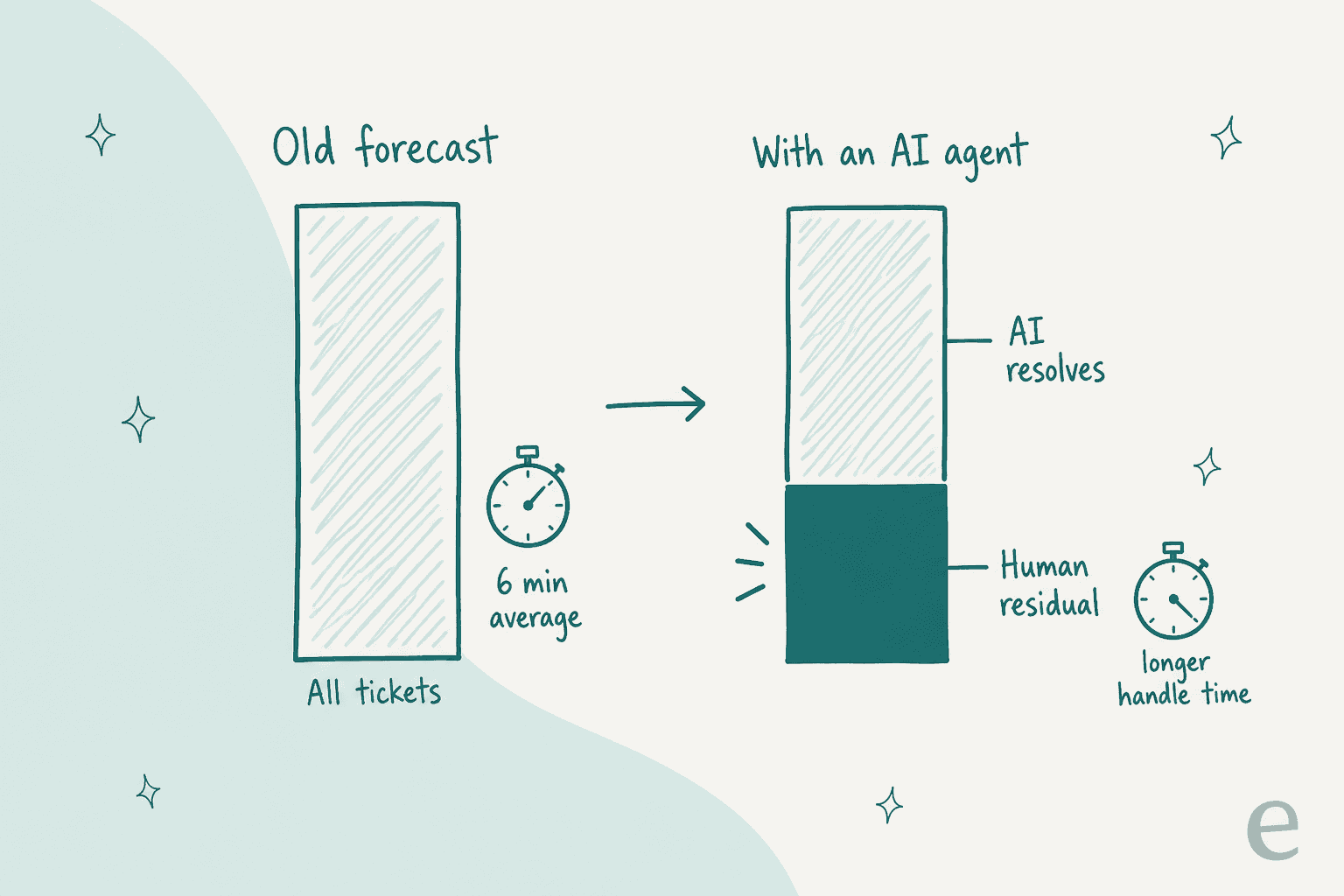
Volume to your team goes down, because the AI resolves the order-status, password and policy questions. But those were also your fastest tickets, so the handle time on what's left goes up. Subtract the AI's resolution rate from total volume and keep the old AHT, and you'll under-staff. The calculator above shows the size of the effect: a 40% resolution rate with a 6 to 8 minute shift in AHT cuts the schedule by about 14%.
Here's how I'd forecast with an AI agent in the queue:
- Forecast two queues, not one. Total arrivals as before, then the human residual as its own series, with its own AHT measured on tickets the AI handed over.
- Use resolution, not deflection. A conversation that ended without a person isn't always a solved problem; some come back a day later through another channel. The deflection vs resolution rate gap is the error in your forecast.
- Re-measure for a few weeks after every change. New topics handed to the AI, a new channel, a policy change: each shifts the residual. Assembled's 8-week average will catch up, but slowly.
- Don't freeze hiring off a vendor's headline number. Run a support pilot on your own tickets first, and only plan on the residual you measured.
The AI also needs a clear scope for this to work. A CX lead at a DTC brand doing about 7,000 tickets a month told eesel's sales team that checking every AI answer by hand would defeat the point, and then added:
"I need an AI who is only handling the tickets that it's confident to handle and all the other ones, leave them alone."
That's also what makes the forecast stable. Rúngne's setup is a good model: one eesel agent triages and tags every ticket, one leaves drafts for the team, and a third answers only the topics the team chose (shipping and returns policy, where is my order, stock, pre-orders). In that month the answering agent ran on about 280 of roughly 2,100 tickets, "around one ticket in seven". Because the scope is a fixed topic list, the residual is predictable: you know which ticket types left the human queue and can measure the new AHT on what stayed. Practitioners in WFM land in the same place on the forecasting side:
"I wouldn't trust an LLM to replace forecasting, Erlang/staffing calculations, shrinkage modelling or proper statistical analysis. Those should still be handled by the right models, tools and validated data. ... Basically: it would let AI explain the spreadsheet, not become the spreadsheet."
I agree. Use AI to take work off the queue and to explain the numbers, and keep the forecast on real data. If you're weighing whether AI changes your team shape more broadly, my posts on building an AI-first support team and whether AI can replace your team pick that thread up. For the money side, compare cost per resolution with and without AI.
Try eesel
If your forecast keeps telling you to hire for a peak you'll only have for three months, eesel's AI helpdesk teammate is the other lever. It joins the queue you already run on Zendesk, Gorgias, HubSpot or Help Scout, learns from your past tickets and help center, and works only the ticket types you hand it, which keeps the human residual predictable enough to plan around.
Pricing fits a seasonal forecast too. On eesel pricing, a ticket or a chat is 1 credit, plans start at $299 a month for 500 credits, and an upgrade takes effect immediately, so you move up a size for the peak and back down after, the way Norden-Frisia does every summer. You can start with 100 free credits and see how much of your queue it would take before you change a single shift.