

Remember when Zoom calls were just… video calls? Those days are long gone. Now, they’re turning into smart, automated spaces where real work gets done. Things got even more interesting when OpenAI dropped GPT-Realtime-Mini, a voice AI that's not only quicker and cheaper but also sounds incredibly natural. This has unlocked some powerful new ways to get real-time help right inside your Zoom meetings.
This guide will walk you through the three main ways you can use Zoom integrations with GPT-Realtime-Mini: sticking with Zoom's own AI tools, building a custom solution from scratch, or using a specialized platform designed for the job. By the end, you'll have a clear idea of which path makes the most sense for your business, especially if you want to level up your customer support or internal help desk.
The basics of Zoom integrations with GPT-Realtime-Mini
Before we jump into the different methods, let's quickly cover the basics of what we're talking about.
Understanding Zoom integrations
Think of Zoom integrations as bridges connecting your video calls to the other apps you rely on every day, like your help desk, CRM, or project management tool. They let you build automated workflows that save a ton of time and keep information moving smoothly. A quick look at the official Zoom App Marketplace shows thousands of these apps, which tells you just how much people want to do more in their meetings than just talk. These integrations can handle anything from scheduling meetings to automatically logging call notes in your CRM.
What is OpenAI’s GPT-Realtime-Mini?
GPT-Realtime-Mini is a super-efficient voice AI model from OpenAI that made a splash at its DevDay event. It has a successor now: OpenAI's deprecations page lists gpt-realtime-mini shutting down January 20, 2027, with gpt-realtime-2.1-mini as the replacement. It’s built to make high-quality, real-time voice conversations available to pretty much everyone.
Here’s why it’s a big deal:
-
It’s fast. It responds almost instantly, so you can have a natural, back-and-forth chat without any of those awkward pauses.
-
It’s smart. It has the same conversational intelligence as OpenAI's bigger, more expensive models, so you're not sacrificing quality for speed.
-
It’s affordable. Being up to 70% cheaper makes it a practical choice for businesses that want to use it for things like live support or transcription without breaking the bank. The current
gpt-realtime-2.1-minilists audio at $10 input and $20 output per 1M tokens, per OpenAI's pricing page. -
It understands tone. It processes audio directly instead of turning it into text first. This means it can pick up on emotional cues and nuances in speech that text-based models completely miss.
The native approach: Using Zoom's built-in AI tools
The most obvious place to start is with the tools Zoom provides itself. It’s a decent entry point, but it comes with some serious trade-offs, particularly if you have a specific goal like improving customer support.
What are Zoom AI Companion and Zoom Virtual Agent?
Zoom has two main AI offerings. First, there's Zoom AI Companion, a general assistant, now branded ZoomMate, that comes included with Zoom plans (a limited version on the free Basic plan). Think of it as a productivity sidekick for your meetings. It helps with generating summaries, creating chaptered recordings, and taking notes.
Then you have Zoom Virtual Agent, which is a full-on conversational AI chatbot made for customer experience. It’s designed to answer support questions 24/7 across both voice and chat, freeing up your human agents.
Features and use cases
Here’s a quick side-by-side look at how the two tools stack up:
| Feature | Zoom AI Companion | Zoom Virtual Agent |
|---|---|---|
| Primary Use | General meeting productivity | Customer support automation |
| Key Capabilities | Summaries, note-taking, content generation | 24/7 self-service, issue resolution |
| Integration | Works inside Zoom Workplace | Connects to Zoom Contact Center & Phone |
| Setup | Enable it in settings | Configured per use case (self-service, receptionist, IT helpdesk) |
| Ideal For | Individuals, small teams | Dedicated support & IT teams |
Pricing
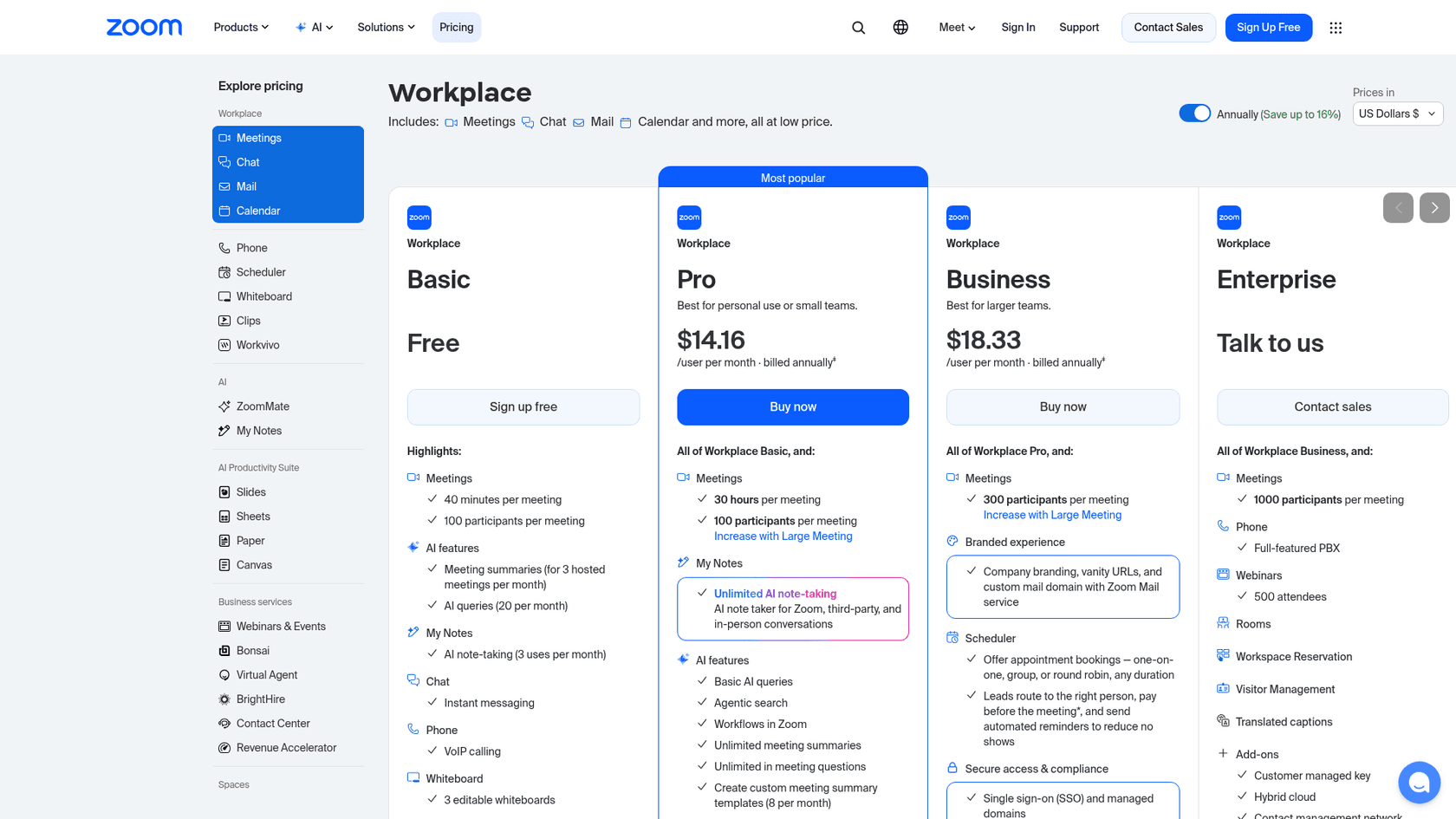
This is where things get a little complicated. The AI Companion is a great value because it's bundled with every Zoom Workplace plan. Paid plans start at $14.16 per user per month billed annually.
Zoom Virtual Agent, on the other hand, is sold separately, and I couldn't find a published price on its product page, which points to a sales conversation. For teams that just want to test the waters and see what’s possible, being forced into a sales cycle can be a real momentum killer.
Limitations of the native approach
While using Zoom's own tools is convenient, they have some big limitations if you're trying to build a genuinely intelligent support system.
-
Too general. AI Companion is a jack-of-all-trades, master of none. It’s not built to understand the specific, often complex, workflows of a customer support or IT service management team.
-
Centered on Zoom. Zoom's AI starts from information within the Zoom ecosystem, and paid ZoomMate plans add connected third-party sources. The question is how deeply it covers your main knowledge bases, like old help desk tickets in Zendesk, internal guides in Confluence or Google Docs, or your product details in Shopify. Without that context, its answers will always be surface-level.
-
Fit with your existing help desk. Zoom Virtual Agent is built on the Zoom AI platform and lists ITSM integrations for IT use cases. If your team already runs another help desk, check how far those integrations reach before you commit.
-
Sales-led purchase. Zoom offers a "try it yourself" demo, but the Virtual Agent itself goes through Zoom's sales team. In contrast, modern platforms like eesel AI let you sign up, connect your tools, and get a working AI agent configured in minutes, all on your own.

The DIY approach
So, if Zoom’s native tools feel too limited, you might be tempted to build something yourself. This route gives you more freedom, but it brings its own set of headaches.
Using no-code automation platforms
Tools like Zapier, Latenode, and n8n are great for making different apps talk to each other. You could set up a workflow where a completed Zoom recording automatically triggers a request to OpenAI to summarize the transcript.
The problem is, these integrations are often shallow. They’re best for after-the-meeting tasks, like summarizing a finished recording, rather than live help during a meeting. They also don't have the deep understanding that comes from pulling information from all your different knowledge sources, and they can get messy and expensive as your workflows get more complex.
Building a custom AI meeting assistant
For teams with deep technical skills, there's always the option to build a meeting assistant from scratch. You can find guides online, like one from Daily.co, that show how developers can stitch together APIs from different services to create a custom bot.
This approach gives you total control, but it's not for the faint of heart. The downsides are pretty significant:
-
It’s a huge time and money sink. This isn't a small side project. It takes dedicated engineering resources, which are expensive, to build, launch, and maintain.
-
You own all the problems. You're responsible for everything: hosting, keeping APIs updated, fixing bugs that pop up at 2 a.m., and making sure it's secure.
-
It’s a non-starter for non-technical teams. This option is completely out of reach for the very people who need these tools the most, like support managers and IT leads.
The specialist approach
If native tools are too basic and DIY is too much work, what's left? This is where a specialized AI platform fits in. Instead of a generic assistant or a costly custom build, a dedicated platform gives you a solution designed specifically for support that plugs right into your existing setup without causing a fuss.
How eesel AI provides advanced Zoom integrations
eesel AI is an AI platform designed from the ground up for customer service, ITSM, and internal support. It connects directly to your help desk (like Zendesk or Freshdesk), chat tools (like Slack or Microsoft Teams), and all your other knowledge sources. This lets it power smart AI agents that work in the channels your team already uses.
Here’s what makes this approach different:
-
It connects all your knowledge. Unlike tools that are stuck in their own little world, eesel AI instantly connects to all of your company’s scattered knowledge. It learns from past support tickets, internal wikis in Confluence, product guides in Google Docs, and more. This gives the AI a complete picture of your business so it can solve problems with surprising accuracy.
-
You can go live in minutes. This is a huge one. With eesel AI, you can sign up, connect your help desk and knowledge bases with a few clicks, and launch a powerful AI agent without ever having to talk to a salesperson.
-
You’re in the driver’s seat. You get to decide exactly what the AI does. You can start small by letting it handle simple, repetitive questions and have it escalate everything else to a human. As you get more comfortable, you can gradually give it more responsibility.
Testing your integrations with confidence
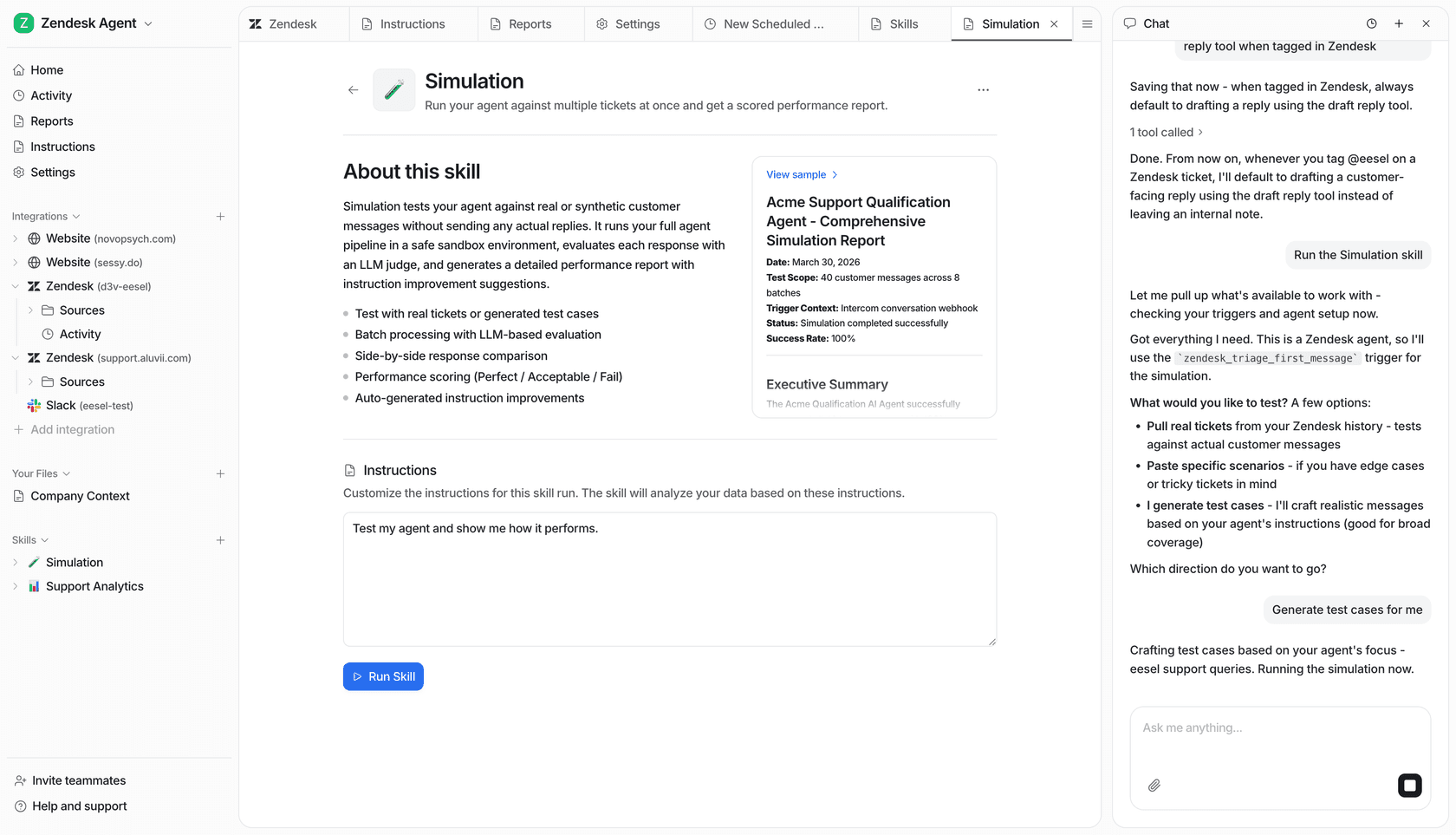
One of the biggest fears with AI is flipping the switch before it's truly ready. eesel AI gets this, which is why it has a powerful simulation mode. Before your AI agent ever talks to a real customer, you can test it on thousands of your past support conversations. This gives you an accurate preview of its performance, shows you exactly how it will respond to different queries, and helps you find any gaps in your documentation. It’s a risk-free way to roll out AI, and it’s something you just don’t get with native tools or DIY projects.
Transparent pricing
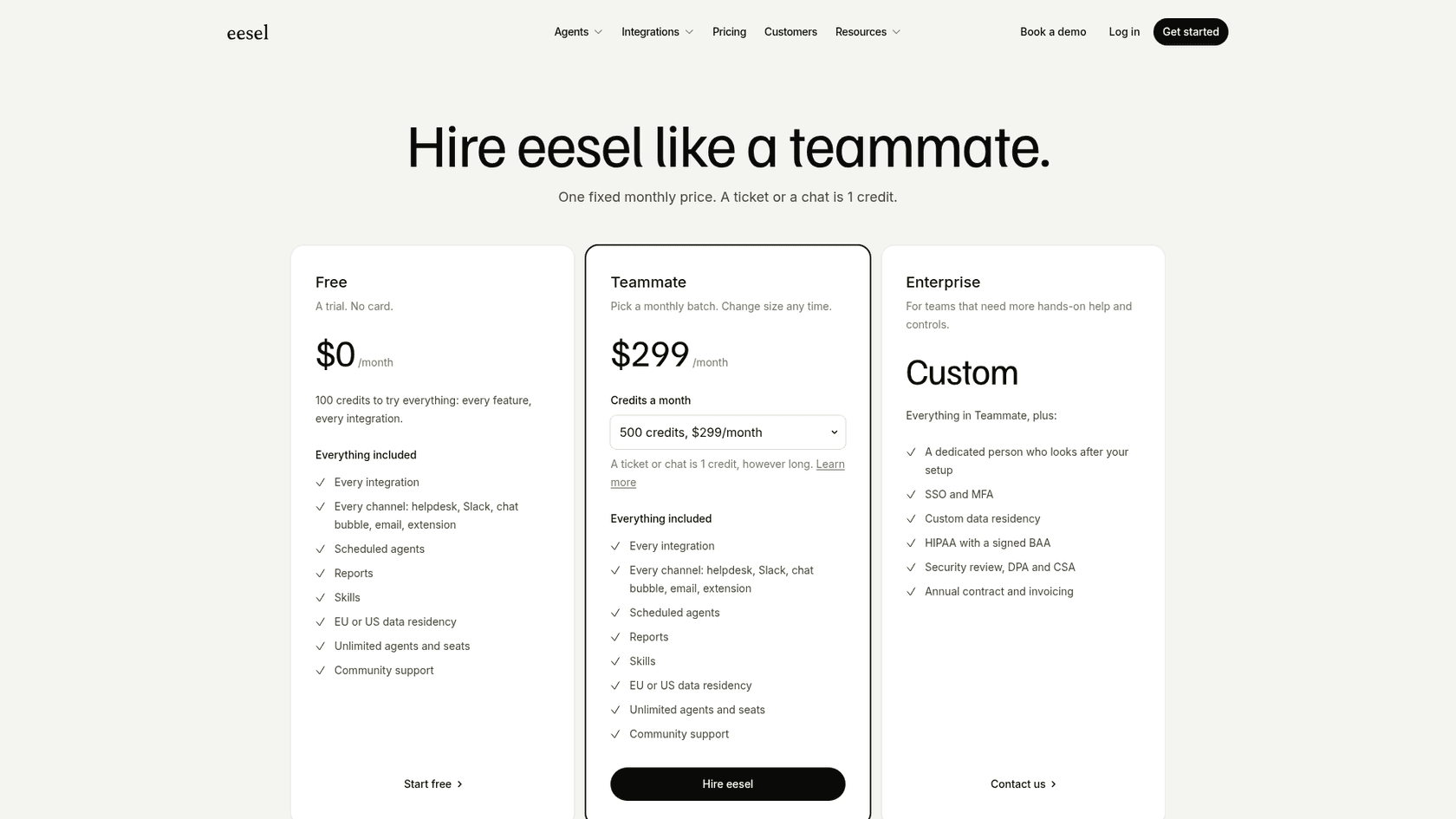
eesel AI uses one fixed monthly price with no per-seat fee. A ticket or chat is 1 credit, and there's a free plan with 100 credits and no card. Paid plans start at $299/month for 500 credits, and paying a year upfront gets you two months free.
The right approach for Zoom integrations with GPT-Realtime-Mini
We've covered three different paths for bringing the power of models like GPT-Realtime-Mini into your Zoom meetings. Let's do a quick recap:
-
Native Tools (Zoom AI): Handy for basic meeting tasks, but they’re too generic and disconnected from your other tools to be truly useful for support.
-
DIY Solutions (Zapier/Custom Code): They offer flexibility but are either too superficial for real-time assistance or way too expensive and time-consuming to build and keep running.
-
Specialist Platforms (eesel AI): You get the best of both worlds. They are powerful, connect deeply with the tools you already love, and are incredibly simple to get up and running.
For any business serious about using AI to automate support and make meetings more productive, a specialized, self-serve platform is the smartest way to go. A tool like eesel AI offers the fastest, most effective, and lowest-risk way to start. It works with your existing setup, learns from all your scattered knowledge, and puts you in complete control of your automation journey.
Frequently asked questions
How much do Zoom integrations with GPT-Realtime-Mini typically cost, and what are the different pricing models available?
Pricing varies significantly. Zoom's AI Companion is included with Zoom plans (paid Workplace plans start at $14.16 per user per month billed annually), while Virtual Agent is sold separately. eesel AI uses fixed monthly credit plans from $299 for 500 credits, with a free 100-credit plan.
How difficult is it to set up Zoom integrations with GPT-Realtime-Mini, especially for a non-technical team?
Setting up Zoom integrations with GPT-Realtime-Mini ranges from simple to complex. Zoom AI Companion is easy to enable, but custom solutions require significant technical expertise. Specialized platforms like eesel AI are designed for quick, self-serve setup, often in minutes.
What kind of company knowledge can an AI access through Zoom integrations with GPT-Realtime-Mini to provide accurate answers?
For truly effective assistance, AI should access all your scattered knowledge, including help desk tickets, internal wikis (Confluence), and product guides (Google Docs). Native Zoom tools start from information within the Zoom ecosystem, while specialist platforms connect broadly.
Can Zoom integrations with GPT-Realtime-Mini provide real-time assistance during a live meeting, or is it mainly for post-call tasks?
Yes, the goal of using GPT-Realtime-Mini is primarily for real-time assistance during live meetings. While some no-code tools handle post-call summaries, specialized platforms are built to provide immediate, conversational help.
If my company already uses a different help desk, can I still leverage Zoom integrations with GPT-Realtime-Mini without switching platforms?
Absolutely. Specialist platforms like eesel AI are designed to integrate seamlessly with your existing help desk, such as Zendesk or Freshdesk, without needing you to switch platforms. This ensures the AI learns from your established support workflows.
How can I test the effectiveness of Zoom integrations with GPT-Realtime-Mini before deploying it to actual customers or employees?
Many specialist platforms offer robust testing capabilities. For instance, eesel AI includes a simulation mode that lets you test your AI agent against thousands of past support conversations before it goes live, ensuring confidence in its performance.
What are the primary benefits or common use cases for implementing Zoom integrations with GPT-Realtime-Mini in a business setting?
The primary benefits include automating customer support and internal help desks, freeing up human agents, and providing instant, accurate answers 24/7. Common use cases involve enhancing live call support, improving productivity in meetings, and leveraging deep conversational intelligence.