

Why most AI support pilots go wrong in week two
I work eesel's support queue, so I see pilots from the inside: the setup questions in week one, then the "is this normal?" messages in week two. The pilots that stall rarely stall because the AI is bad. Mostly they stall because nobody owns the daily read of what the AI did, also the scope creeps before the first lane is clean, and then three changes go in on the same afternoon so nobody can tell which one broke the returns answers.
Here's a real one. A Danish vehicle telematics team on Zendesk found their bot was telling customers "yes, we support your car model" for brands that weren't in their database. The model was not making things up from nowhere. One help article said the product supports all models, and the AI believed it. Their own summary of setup was "trial and error in the beginning", which is honest, and it is also exactly the job of a pilot: to find the sentences in your knowledge base that are wrong in ways a human agent would quietly work around.
That's why I would plan a pilot as an operations project, not as a software test. The pattern that works, across most of the teams I talk to, is the one people ask for anyway: start with the AI drafting replies for agents, then let it answer customers on its own once the drafts are right.
"The safest rollout I have seen is: let the agent draft, tag confidence plus reason, require approval for refunds or account changes, and review every reopened conversation for the first month. That review log is usually where the real automation boundary shows up."

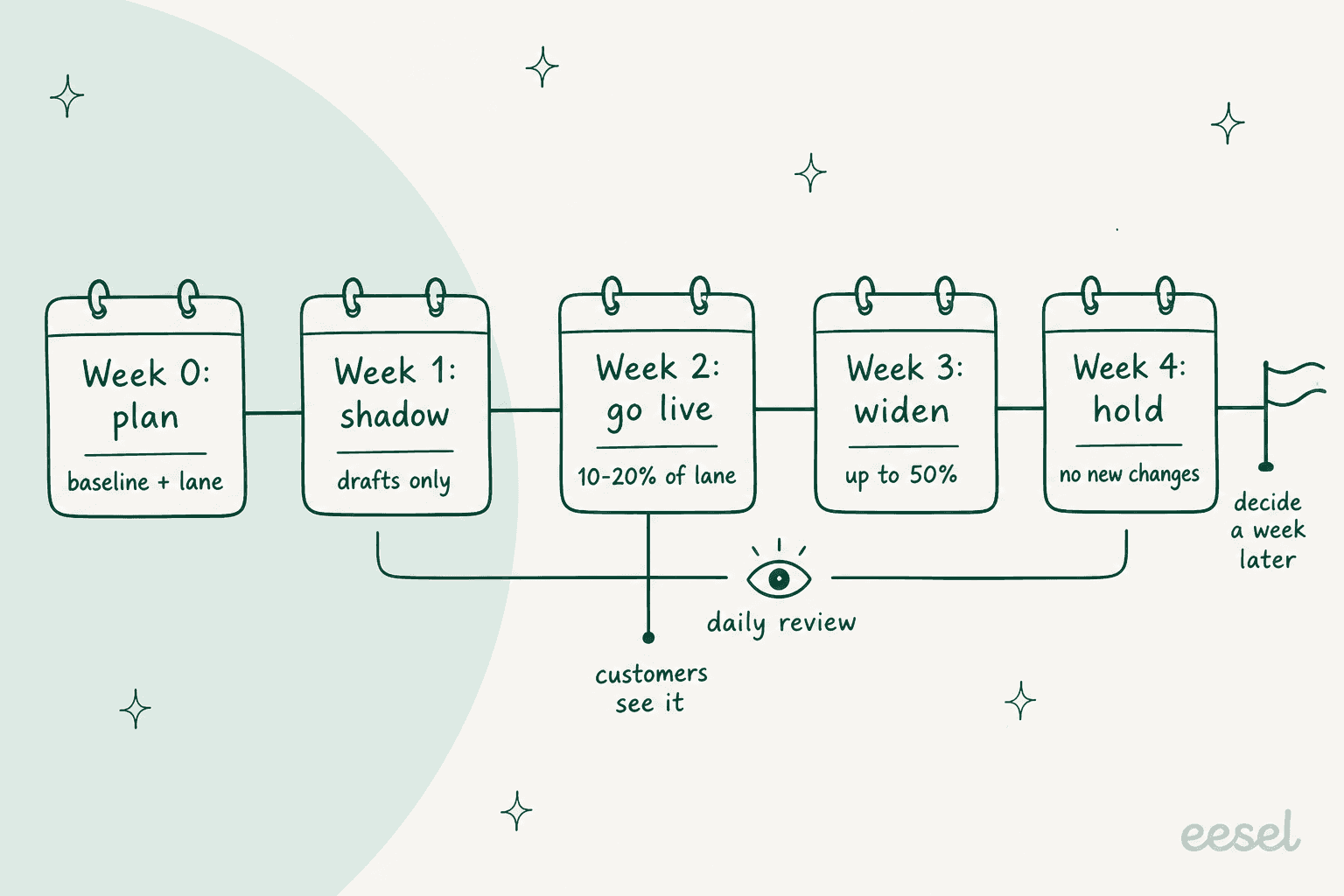
This post is a runbook for those four weeks. If you want the measurement side (what goes on the scorecard and how to score it), that one lives in the AI support pilot scorecard. For the pre-launch test sequence in more depth, see AI support agent testing.
What to set up before week one
Week 0 is a few hours of work spread over a few days, and it is what decides whether the rest of the pilot can be read at all. There are five things that need to be true before the AI sees even a single live ticket.
- One owner, by name. The person who does the daily review, who approves changes and who can call a pause. In small teams that's usually the support lead. It shouldn't be same person who built the setup, for the same reason Zendesk's own testing guide tells you to "select testers who aren't the same people who built your conversation flows."
- A baseline. Last quarter's numbers for the ticket types in scope: weekly volume, first reply time, reopen or repeat-contact rate, and also what a human-handled ticket costs you. The customer service KPIs guide covers how to pull them.
- Pass marks, written down. What has to be true at the end for you to expand. I'd copy the gates and targets from the pilot scorecard rather than inventing new ones, then send them to the vendor before the day one.
- A routing plan. Which tickets go to the AI queue, which identical tickets stay in a human-only control queue, and how you will tag both of them so you can pull them out later. More on this below.
- A pause plan. Who can switch the AI off and where the switch lives in your helpdesk, plus what counts as a reason to use it.
Then tell your support team what is happening and what their job is in it. Agents who find out about the pilot from a customer complaint will treat the AI like a threat for months. Agents who are told "you're the reviewers, and the AI is taking the order-status pile" becomes your best source of failure reports. A support SOP for the pilot (who reviews, when, where to flag a bad answer) takes ten minutes to write and it saves a lot of Slack threads.
| Pilot role | Who | Time it takes |
|---|---|---|
| Pilot owner | Support lead or senior agent who didn't build the setup | 15 to 20 minutes a day, plus a weekly readout |
| Reviewers | 2 or 3 agents, ideally including a newer one | 10 minutes a day each in week 1, less after |
| Knowledge fixer | Whoever owns your help center | A few fixes a week, mostly in weeks 1 and 2 |
| Escalation contact | Someone with refund and account authority | Only when a handover needs a decision |
How to pick the tickets for an AI support pilot
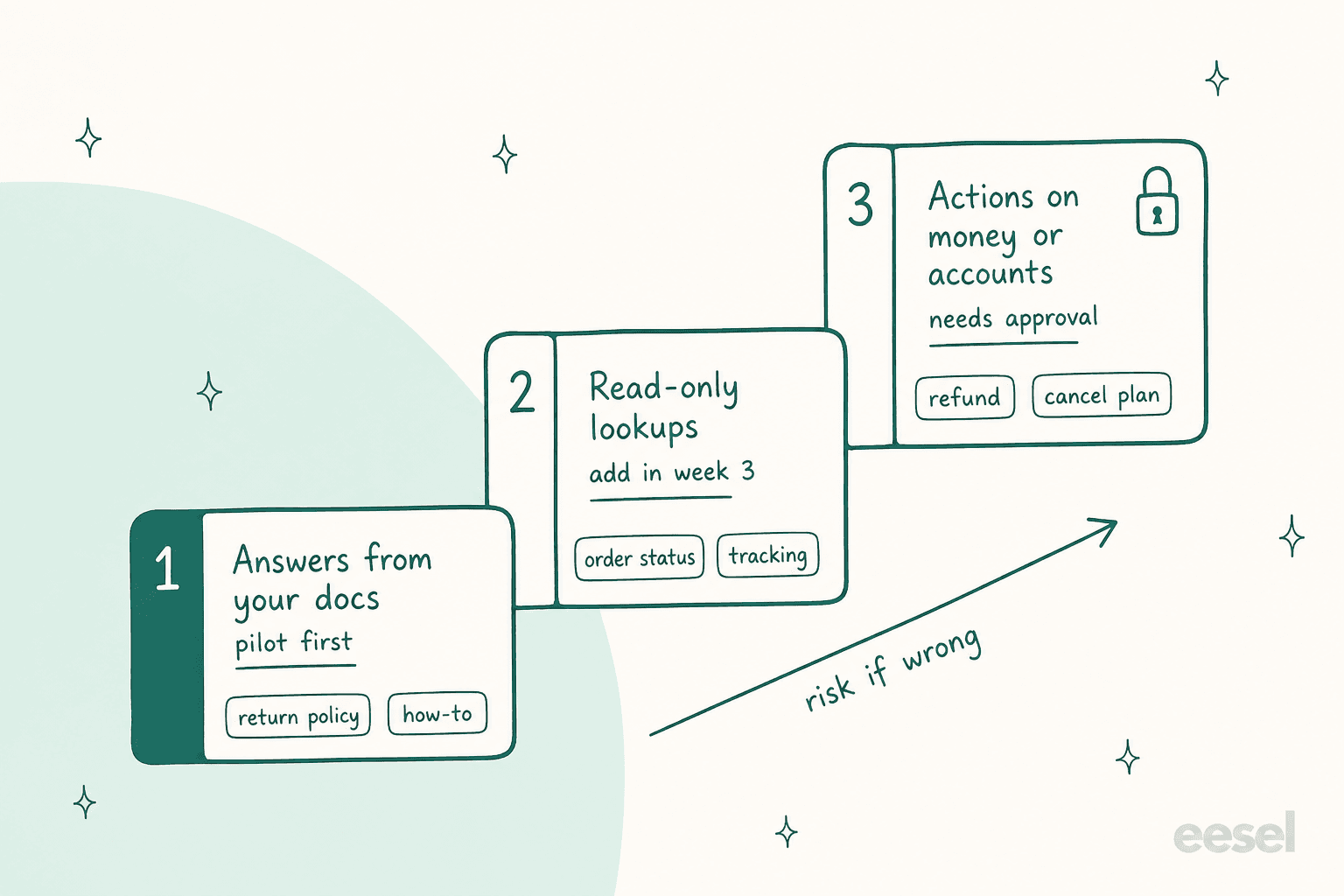
Most teams sort pilot candidates by topic. I'd rather sort them by what the AI has to do for closing the ticket, because that's where the risk sits. There are three kinds:
- Answers from your docs. Return policy, shipping times, how-to questions. If the AI gets one wrong, a customer gets a wrong sentence, and the fix is usually just an article.
- Read-only lookups. Order status, tracking, plan details. The AI reads a system and reports back what it found. Wrong here means reading the wrong order or wrong status, which is worse but it still doesn't change anything.
- Actions on money or accounts. Refunds, cancellations, address changes, account edits. Wrong here means something already happened that you now need to undo.
The pilot starts on the first kind and adds the second in week 3 if the daily review is clean, the third one waits for after the pilot, behind an approval. That split also matches with how the vendors set up their own testing: Gorgias, for example, keeps actions switched off by default in test conversations because, if enabled, they "can affect real customer and order data (like cancelling an order)."
There are two more filters before a ticket type makes the cut. Your docs have to answer it already (if they don't, that's a knowledge gap analysis job for week 0, not a pilot finding). And it needs volume, because a lane of 15 tickets a week won't tell you much of anything in a month. Order status questions are the usual favourite for this reason, since they are high volume with one lookup and low risk.
Judgement calls (complaints, chargebacks, upset customers) stays with people during the whole pilot. One operator put the bar well:
"Splitting it by impact makes more sense to me. A slightly awkward response is one thing but anything involving pricing, refunds or account changes should have a much higher bar."
Narrow is fine. XAP, which builds college and career readiness software, started its eesel setup on Freshdesk with one slice: tickets where a student asks about something that their college or a state agency handles, which needs a polite, accurate referral. A filter lets only those cases (plus portal password resets) through, then eesel drafts the full reply as an internal note from the team's canned response and a person sends it. Its story calls the referral agent "the first slice", and the filter is being widened as the team adds referral cases for its other portals. That's a pilot lane done right, it is small and answerable and also easy to check.
Plug in your own ticket mix to see in which lane each type lands, and whether the lane has enough volume to judge by end of week 4.
If the lane comes up short, add another answer-type ticket before you stretch the calendar. A longer pilot on a thin lane mostly just gives you more time for the scope to creep.
How to split an AI queue and a control queue in your helpdesk
You want the same ticket types, on the same channel, handled in two ways over the same weeks: some by the AI, some by people only. The scorecard post explains why the human-only control queue matter for the numbers. Here is where the controls live in each helpdesk, checked against each vendor's own help center on 20 October 2026.
| Helpdesk | Scope the AI lane with | Keep a control queue by | Pause it by |
|---|---|---|---|
| Zendesk | Channels per AI agent; an email agent's trigger conditions | A randomised trafficSplit with a control group, enabled by your account manager (A/B testing), or a separate support address | Deselecting the channel in Manage channels |
| Freshdesk | Ticket sources, "Deploy to internal teams", or custom rules with up to five levels of AND/OR | A custom rule that leaves part of the lane out (a mailbox, a customer attribute) | A Daily conversation limits cap, or deactivating the agent on that source |
| HubSpot | One channel per deployment, working hours, include and exclude lists on email | The Conversation coverage percentage (the rest go to people) | Turning off customer agent assignment |
| Gorgias | AI Agent > Deploy per channel, one skill at a time | Leave a channel or a skill off for the lane and compare | Switching a skill off "without affecting others" |
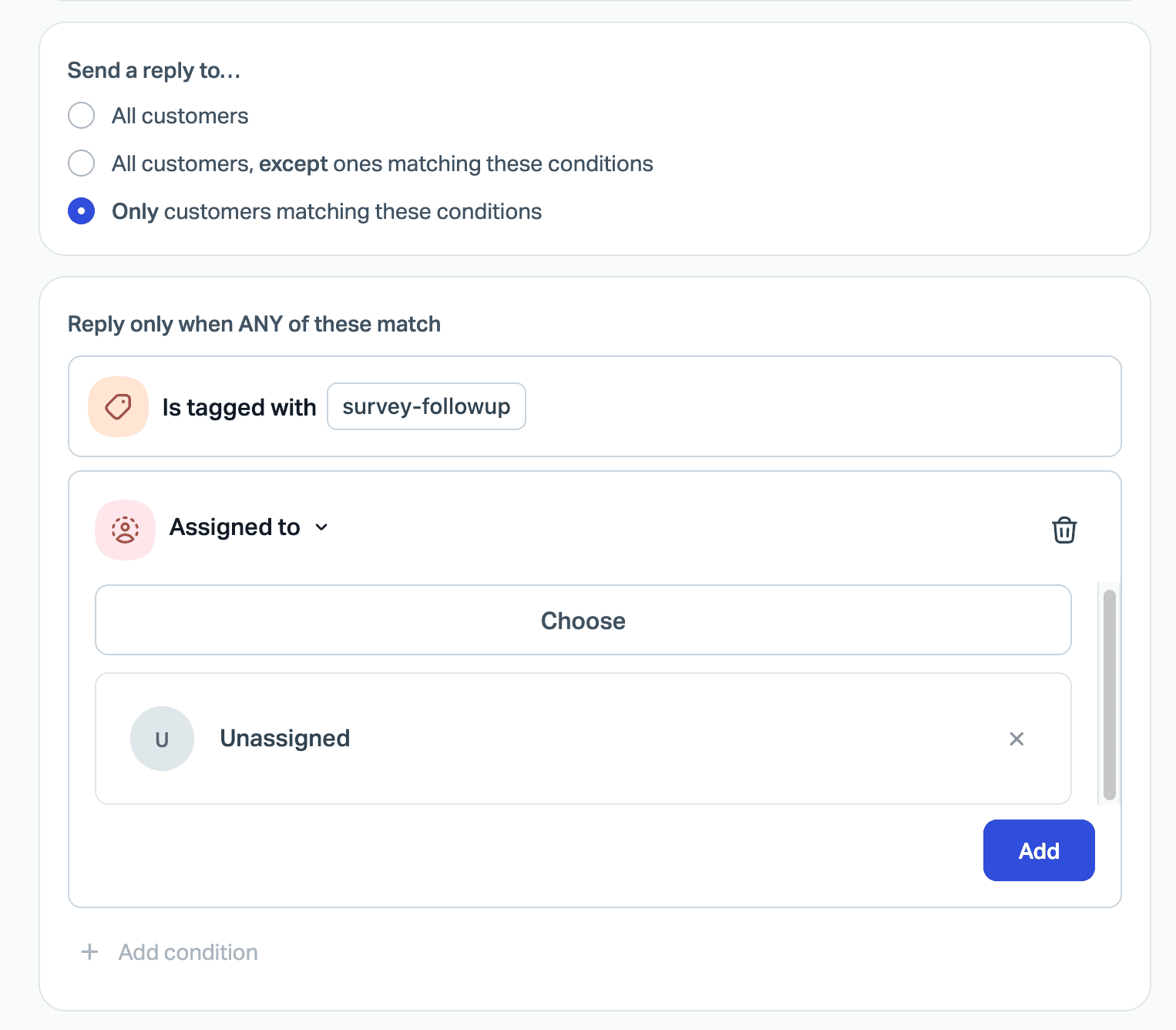
| Help Scout | Per Beacon and per inbox; email can be limited to "Only customers matching these conditions" | The "except ones matching these conditions" scope on the same inbox | The Enable toggle per Beacon or inbox |
A few details from those pages that make a difference on how you set things up:
- Zendesk only lets one AI agent run on a channel at a time, and an agent that was built for messaging can't later be switched to email. Decide the channel first, before you build.
- Freshdesk's go-live is forward-only. Tickets that arrived before deployment "are not retroactively answered", which means day one of the pilot starts clean.
- HubSpot's own advice matches the ramp here: start with "a single channel or limit it to a small percentage of conversations", then review escalations and knowledge gaps before you expand. When paused, "it keeps existing chats but won't get new ones."
- Gorgias gives you inbox views for tickets the AI is handling, the ones it has closed and the ones it has handed over, which is basically your daily review queue already built.
Help Scout's condition builder is a good example for how specific a lane can get: the AI only replies to tickets that match a tag or an assignment rule.
Whatever the helpdesk is, tag both queues from day one (ai_pilot and ai_control work fine). The AI support tagging guide has more on naming. In week 4 you will want to pull both sets into a spreadsheet without depending on the vendor's report.
Week 1: shadow mode before any customer sees it
Shadow mode means the AI works real incoming tickets in your lane, but everything it writes is a draft or an internal note. A person reads and rates it, then either sends it, edits it or ignore it. Customers don't see anything different. It has no customer risk for you, and it's the place where most of the fixable problems show up.
Before the shadow week starts, I'd run the AI against your past tickets so you go in with a score instead of a guess. Most helpdesks now have some way to do this without paying for it:
- Freshdesk's email AI Agent evaluation can Import tickets "to use solved historical tickets", up to 50 queries per run, and Freshworks recommends "at least 20 representative queries before deploying." The preview "does not affect live conversations or consume message limits."
- HubSpot's batch testing builds test questions out of themes in your live conversations, and previewing or testing doesn't use HubSpot Credits.
- Gorgias test conversations "are free to use" and they can replay "an existing ticket", one at a time.
- Zendesk's sandbox, test widget and conversation simulator don't consume automated resolutions, but an email agent that is tested in production does. The Freshdesk sandbox setup guide covers the equivalent on that side.
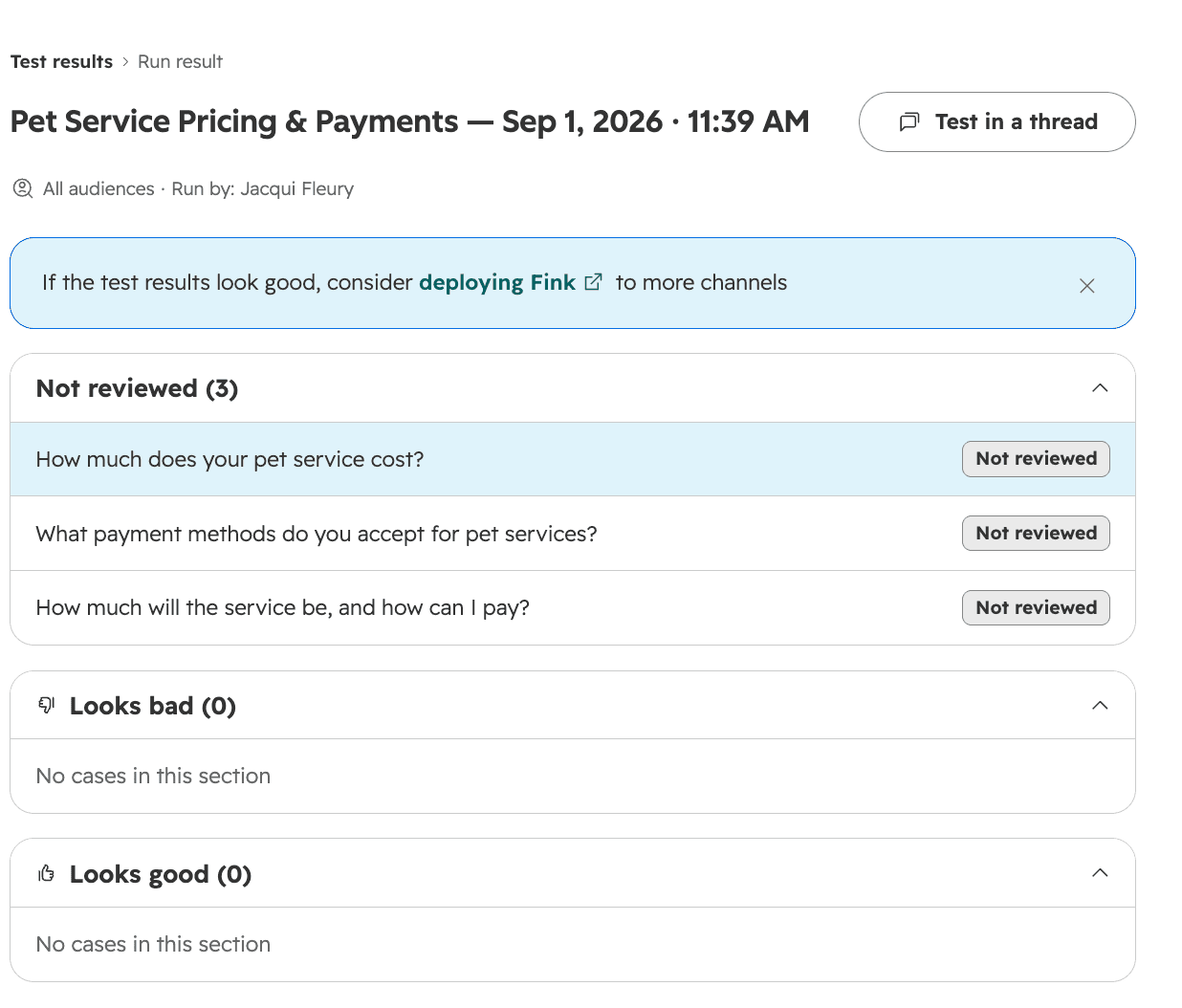
During the shadow week itself, ask reviewers to grade each draft in one of three ways: send as is, send with edits, or wrong. Keep a short note on every "wrong". By Friday you'll have a list, and that list is your week 2 fix plan. Throw in some deliberately awkward tickets too, the pushy "you're wrong, refund me" kind, the adversarial testing guide has a set to borrow.
Expect a lot of "send with edits" at first, and don't panic about it. In one jewelry retailer's trial on eesel, most of the edits agents made to drafts was about length and tone, the kind of thing that improves once the AI learns from the team's own sent replies. Edits that fixed a factual mistake were only a small share. That's a very different finding from "the AI is wrong", and you only see it if reviewers say why they edited.
The exit test for week 1 is simple: the "wrong" pile is small, and every item in it has either a fix you've made or a reason why the ticket type should leave the lane.
Weeks 2 and 3: go live on a slice, then widen
In week 2 the AI starts answering customers, but only on a part of the lane. I'd start at 10 to 20%. HubSpot's coverage field does this directly, on other helpdesks a rule on a customer attribute or one mailbox gets you there. The rest of the lane stays with people, which doubles as your control queue.
Three rules for these two weeks:
- Widen only after a clean stretch. If the daily review has been clean for three or four working days, move from around 20% to around half in week 3. If it hasn't been, stay put and fix things first.
- Change one thing at a time, and log the date. A widened lane and a new instruction on the same day means you cannot tell which one moved the numbers. Swiftreg, which sells private number plates in the UK, keeps its eesel support instructions as numbered releases, they get rolled out through its own procedure rather than edited live. That's more process than most pilots need, but the habit (every change has a version and a date) is the right one.
- Add read-only lookups before actions. If week 2 was clean on answer-only tickets, then week 3 is when order status and tracking can join in. Actions stay off.
Make the "talk to a person" path obvious from the first live day. Customers who are stuck and can't find a human don't show up as failures in most of dashboards, instead they show up as abandoned conversations or angry tickets on another channel. The AI agent handoff checklist covers what a handover should carry, so your agent doesn't have to re-ask.
In terms of disclosure, I'd tell customers they're talking to an AI. Swiftreg ends every public AI reply with a footer saying the AI Support Assistant wrote it and may contain errors, and HubSpot's live chat shows "Powered by AI" in the header while the customer agent is assigned. It sets the expectations, and also it makes a wrong answer easier to forgive.
The daily QA review that decides your pilot
This is the habit that separates pilots ending in a clear decision from pilots that ends in an argument. Fifteen minutes, at the same time every day, from the shadow week until the end of week 4.
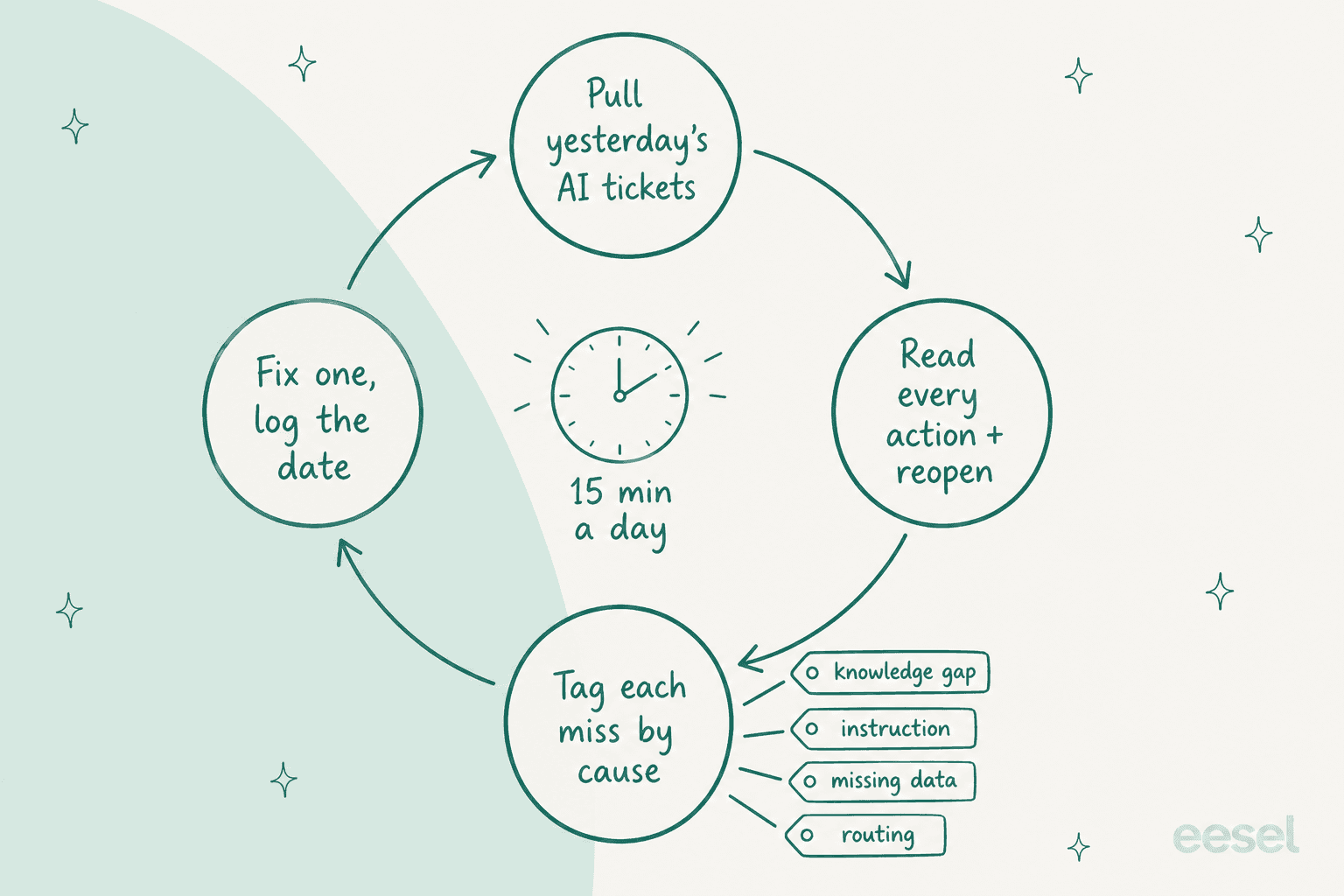
What goes into the fifteen minutes:
- Every action the AI took, if any are switched on. Read the log, not only the reply. A reply can read perfectly and still sit on top of the wrong order number.
- Every reopened or repeat-contact conversation from the AI queue. These are the misses that the dashboard counts as wins.
- Every handover. Did the human get enough to carry on without re-asking?
- A sample of the "resolved" pile, 10 to 20 a day. Gorgias suggests reviewing "at least 10 tickets that AI Agent handled" in the first week as part of going live, I'd keep that pace for the whole pilot.
Then tag each miss by its cause, because each cause has a different fix and also a different owner:
| Cause of the miss | What it looks like | The fix | Who fixes it |
|---|---|---|---|
| Knowledge gap | Answered from a stale or missing article ("we support all models") | Edit or add the article; re-test the topic | Help center owner (knowledge base audit) |
| Instruction | Right facts, wrong behaviour: too long, wrong tone, didn't hand over | Add or tighten one rule | Pilot owner |
| Missing data | Needed an order, account or system it can't see | Connect the source, or take the ticket type out of the lane | Whoever owns the integration |
| Routing | A ticket that shouldn't have been in the lane got there | Tighten the filter or trigger | Helpdesk admin |
Keep a shared change log with three columns: the date and what changed, then why it changed. Zendesk's testing guide suggests the same thing for testers, a shared file to "track whether a resolution has been implemented." When a number moves in week 3, the log tells you whether it was the article you fixed on Tuesday or the lane you widened on Wednesday. If two reviewers disagree about whether a reply was "wrong", a quick QA calibration session settles the rubric before the disagreement turns into a noise in your results.
The owner of this review doesn't need to be technical. At Norden-Frisia, a German ferry line to the North Sea islands, support lead Frauke Hagen runs the eesel setup by herself: she checks the conversation history and asks when an answer contradicts the FAQs, then copies fixes from the Zendesk bot to the chat bot on her own. Their trial was only a single week, and the training on past tickets was what decided the subscription.
"I think the key is testing the decision separately from the conversation. An agent can have a perfectly polite chat and still issue a refund it wasn't allowed to. If it has to state which policy and limit it applied before it takes any action, you can check that against the rule instead of reading through transcripts."
When to pause an AI support pilot mid-flight
Write the pause rules in week 0 so nobody has to argue about them on a bad Tuesday. I'd pause the AI queue on the same day if any of these happens:
- A wrong action reached a customer: a refund to the wrong order, a change on the wrong account.
- The AI stated a policy that doesn't exist, or it promised something your team can't deliver.
- The share of customers asking for a person jumps compared to the previous few days.
- A policy changed and the knowledge hasn't caught up. A new return window, new prices or an outage. Pause until the articles are updated, then re-test that topic. The policy change management guide has a checklist for it.
Pausing is cheap if you know where the switch is. On Zendesk it's done by deselecting the channel, there is no separate pause button.
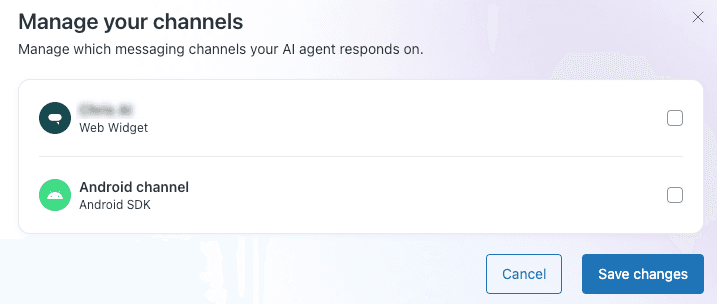
HubSpot lets you "manually pause customer agent assignment by turning it off", which it suggests "when updating or reviewing content sources or making changes to the agent's configuration." Freshdesk's daily cap is the softer brake: "Conversations continue to arrive but the AI stops replying once the limit is reached." Whichever one you use, a pause doesn't mean a failed pilot. Log it with the date and reason, run a short error analysis on what caused it, then restart the clock on that lane once it's fixed.
Week 4 and after: expand, retest or stop
Week 4 is a hold week. No new ticket types and no coverage changes, also no new instructions unless something is actively broken. You're letting the last changes settle so the final week reflect one stable setup. Then book the decision meeting a week after the pilot ends, because vendor resolution windows and your own repeat-contact check need some time to finish counting (the scorecard explains the timing).
The decision itself is one out of three, and each one means something concrete for the next month:
| Decision | When | What you do next |
|---|---|---|
| Expand | Gates held and targets met on the lane | Move up one rung: add the next answer-type ticket, or read-only lookups, or one more channel. One at a time, same daily review |
| Fix and retest | Safe, but short of target | Work the top causes from your change log, re-run the past-ticket replay, then two more weeks on the same lane |
| Stop | A gate failed, or customers came back more often than the control queue | Keep the cleaned-up articles and the ticket tags, write down why, and decide whether a different tool or a narrower lane is worth a second pilot |
"Expand" is where most teams want to jump straight to refunds. I'd hold actions back for one more cycle and move them through approval workflows first: the AI prepares the refund and a person approves it, then you count how often the person disagrees. When that number is near zero for a few weeks, routine actions can run on their own. Big refunds, chargebacks and anything over your refund approval matrix limits stays with people.
Mistakes I see when teams run an AI pilot
- No named owner. The daily review becomes "whoever has time", which is nobody by Thursday.
- Piloting the hardest tickets to "really test it". You'll learn that hard tickets are hard. Start where the AI can win, and widen from there.
- Every channel at once. A bad week on chat and email together can't be traced back to either one.
- Changing three things on one day. You can't tell which one helped, or which one broke returns.
- Skipping the control queue because the before-and-after looks obvious. Ticket mix and seasonality moves too.
- Reading the vendor dashboard instead of the tickets. The dashboard tells you how many conversations ended, not if they were right. The longer list lives in AI customer service implementation mistakes.
Run your AI support pilot with eesel
eesel is an AI helpdesk teammate that joins your existing queue in Zendesk, Freshdesk, Gorgias, HubSpot and others, and it is built to be piloted in the way this post describes:
- Week 0 score from your own history. The Simulation skill runs your agent against real past tickets and scores each answer against what your team sent, then it suggests instruction changes. It doesn't send anything to customers.
- Shadow mode by default. It starts with drafts: every reply is a draft or an internal note for a person to send. You let it answer the easy ones end to end when you're ready, and you can switch anything back off any time.
- Actions behind approval. Each action is Auto, Needs approval or Disabled, and approvals never run by their own after a timeout. Refunds can stay on Needs approval for the whole pilot.
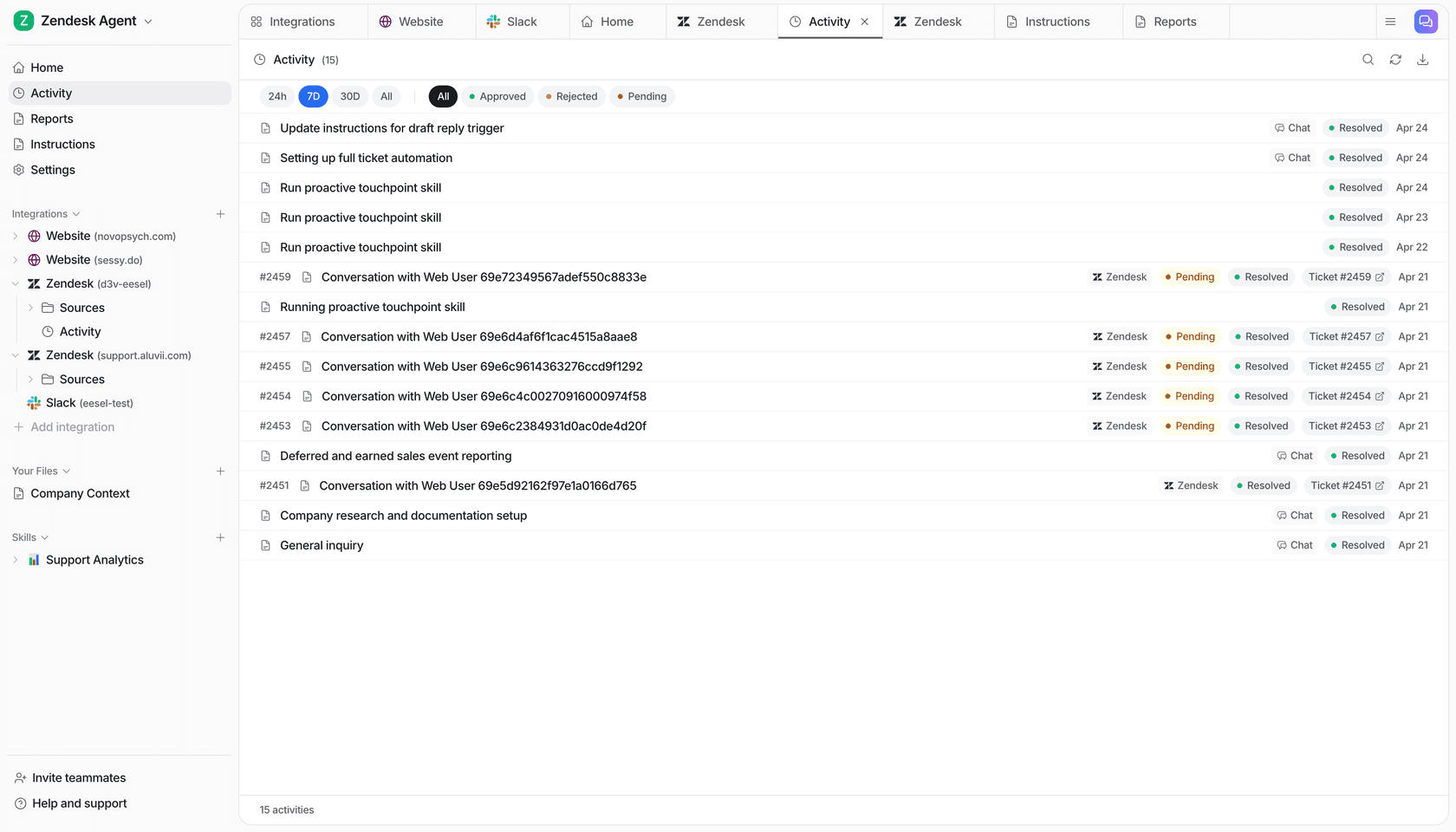
- A daily review that's already laid out. The Activity page lists every ticket it handled, what it searched, each action and who approved it, with its reasoning too. When you correct it in the chat beside a run, the correction becomes a rule in its instructions, so the fix still holds next week.
Pricing is one fixed monthly plan where a ticket or a chat is 1 credit: free for 100 credits with no card, then from $299/month for 500 credits. The free plan is enough to see its drafts on your own tickets before you commit to anything. If you are about to start a pilot with any vendor, run eesel's simulation on your queue first and bring the report into the comparison. Try eesel.