Why switching AI vendors is a handover problem
I build AI agents at eesel, and I get pulled into a lot of "we want to move to a different AI" conversations. Almost none of them start with "the AI is bad." In eesel's sales calls this year, one e-commerce operator on Zendesk had tried the native AI, found it too expensive and not good enough, and wanted to switch "yesterday." A hardware support team (about 250 tickets a month, four languages, also on Zendesk) was being forced off its AI tool because the vendor was changing how it does business. Neither had picked the date. Somebody else had.
That's the moment people skip the careful part. When the deadline is yesterday or the vendor set it for you, a hard cutover looks like the fast option. It usually isn't, because the thing that breaks is not the new AI's answers. It's the handover between two systems that each believe they own the conversation. eesel has spent years putting AI agents on live support queues, and we simulate every rollout against historical tickets before it goes live because we've watched a confident-sounding bot give wrong answers to real customers. Most of what goes wrong in a switch, though, is plumbing: two bots replying to one chat, tickets created twice, history that didn't come along.
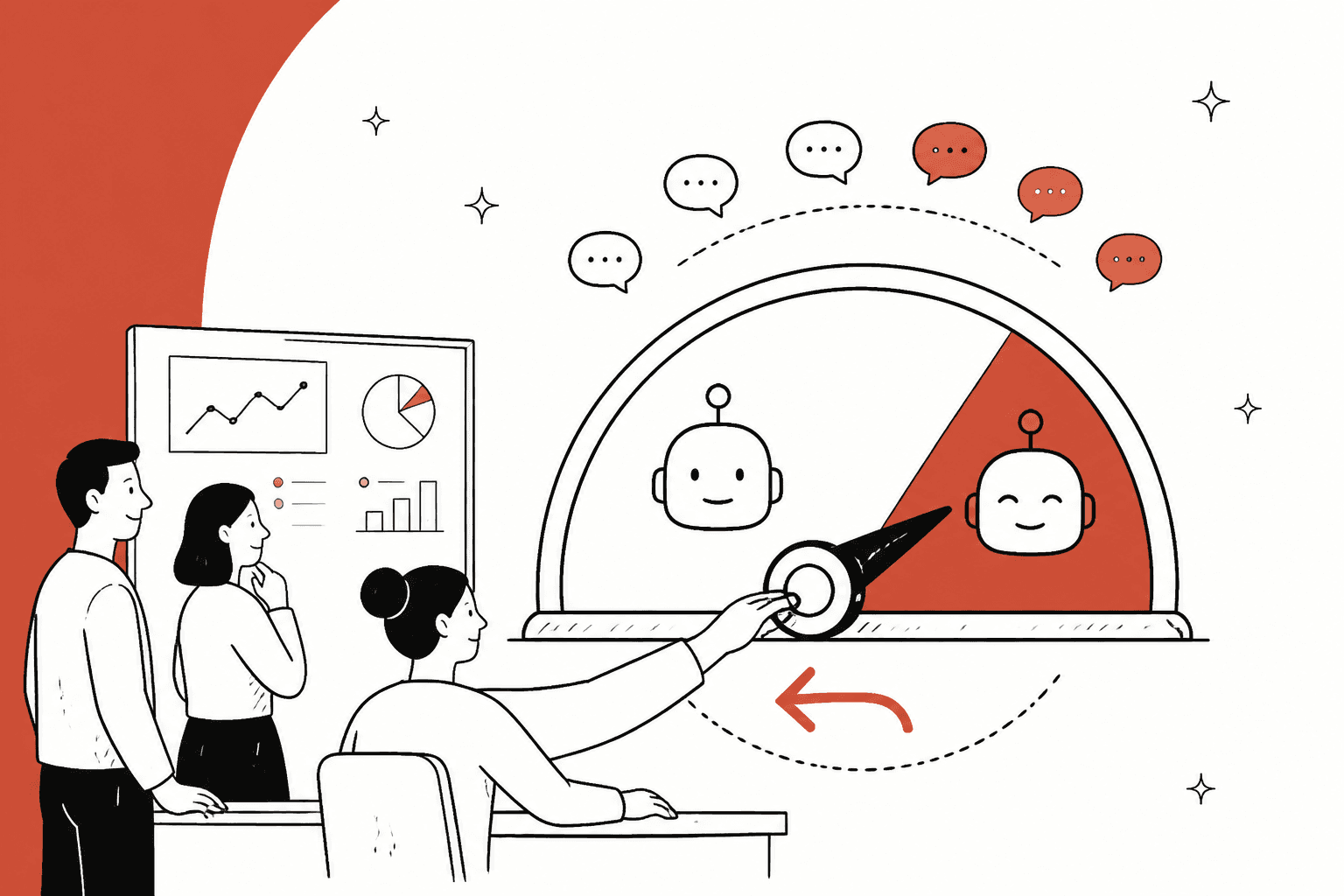
So here's the reframe I'd keep in your head. You aren't moving an AI. You're moving a routing decision, and you can move it a slice at a time, back and forth, for as long as the old setup is still there. This guide walks through that in the order I'd do it, with each helpdesk's own controls checked against its vendor documentation on 20 October 2026: inventory, build and test off to the side, shadow, pilot, ramp, with in-flight chats, your team, rollback triggers and contract dates handled alongside.
Two neighbours of this post cover the pieces I won't repeat. If you're still deciding whether to put a third-party AI on top of your helpdesk's built-in one, read AI layer vs built-in AI. If you want the week-by-week mechanics of a pilot, run an AI support pilot has them.
Step 1: inventory what the old AI does and what will move
Start by writing down everything the old AI does, including the things nobody remembers setting up. Then sort the list into two piles: what lives in your helpdesk (and moves with an export, or simply stays put), and what lives inside the AI vendor (and has to be rebuilt). The honest summary of that second pile is that your knowledge is portable and your configuration isn't.
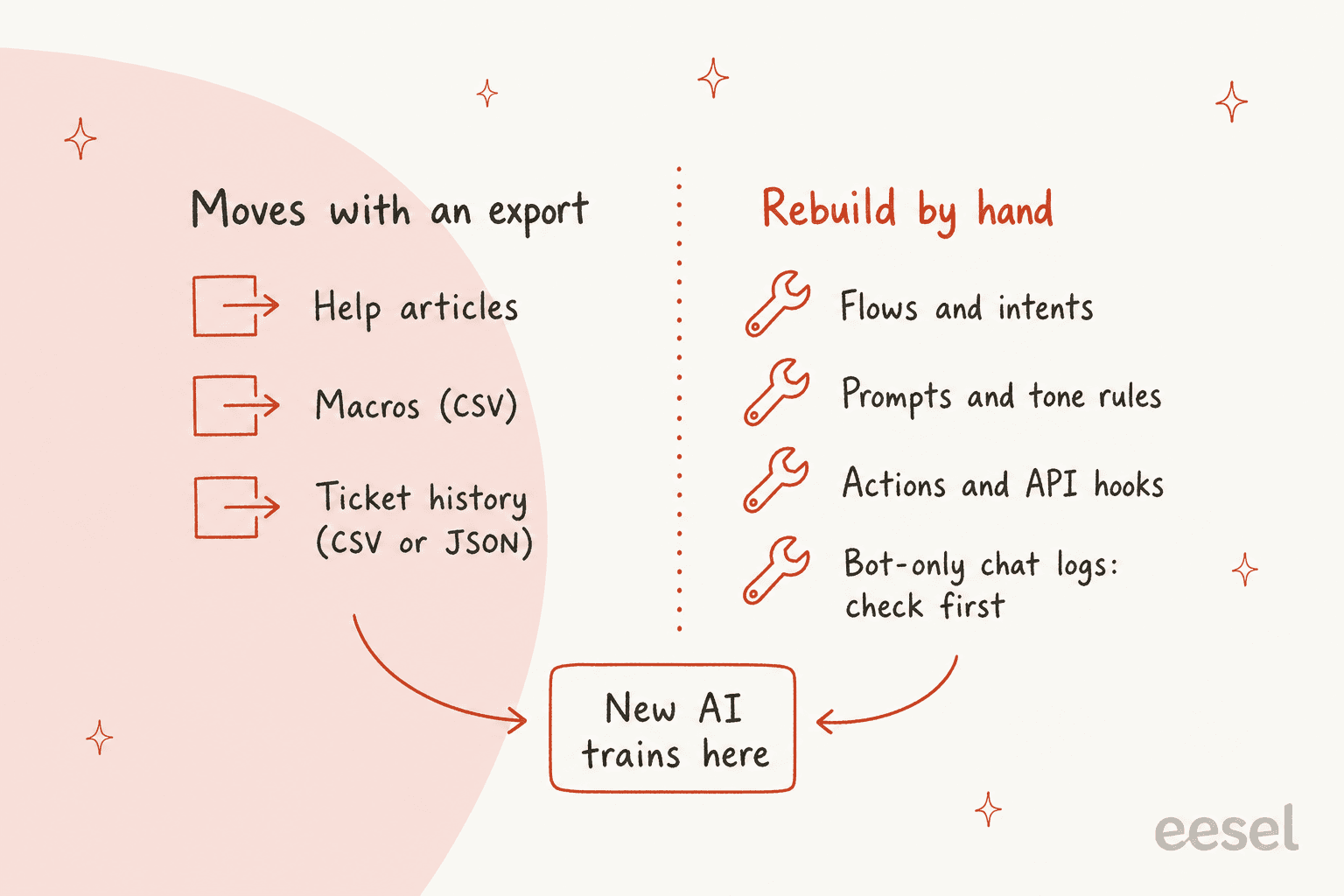
Here's the sort I'd start from, with what each helpdesk's documentation says about getting things out.
| What you have | Does it move? | What the vendor documentation says |
|---|---|---|
| Help center articles and other knowledge | Yes, usually the easy part | They stay in your helpdesk, so a new AI that reads the help center needs no export. Gorgias lets you switch content on or off for its AI on the Knowledge page |
| Macros | Yes | Gorgias exports macros to CSV with name, body, tags and id columns. For Zendesk, see exporting macros |
| Ticket history | Yes, with limits | Zendesk exports tickets, users and organizations as JSON, CSV or XML, but the account owner must ask Zendesk Support to enable it, and the export tools aren't on Team plans (the REST API is). Gorgias exports tickets to CSV, up to 1 million per view |
| Flows, intents, prompts | No | Rebuild. Even inside one vendor it happens: Zendesk's migration guide says moving off AI agents - Essential and the legacy bot builder to the new experience may mean rebuilding agents, with a separate agent per channel |
| Actions and API hooks | No | Rebuild, then re-authenticate each connection |
| Auto-replies, welcome messages and rules | No | List them now, because a leftover rule can answer next to the new AI. You'll switch each one off on purpose in Step 4 |
| Bot-only conversation logs | Check before you cancel | Zendesk's export page says AI agent tickets cannot be exported with that tool, so ask the old vendor what it will hand over, and when |
| Your baseline numbers | You have to capture them | Nobody exports these for you. Pull them in Step 1, not after the cutover |
The last row is the one that gets forgotten. If you don't capture the old AI's numbers before anything changes, you'll end up judging the new one against a memory. Pull the last 8 to 12 weeks for the ticket types you plan to move: resolution rate (counted the way your old vendor counts it), handoff rate, repeat contact within seven days, first reply time, and CSAT. Vendors define "resolved" differently, which is why I'd read the AI resolution rate guide and the customer service KPIs list before choosing definitions.
One more inventory habit that pays off. Write the old AI's behaviour down as plain rules: what it refuses, when it hands over, what tone it uses, which topics it never touches. Those sentences become the new AI's instructions, and they're the part of a configuration that actually transfers. If your knowledge base is also due a tidy before it feeds a new AI, a knowledge base audit is the cheapest week you'll spend.
Step 2: build and test the new AI without touching production
Build the new AI off to the side and test it where it can't reach a customer. Every major helpdesk gives you somewhere to do that, and most don't charge for it.
- Zendesk: testing in a sandbox doesn't consume automated resolutions, and neither does the test widget or the conversation simulator, though testing in production can. Zendesk also suggests testers who didn't build the flows. The sandbox vs production guide covers the setup.
- Freshdesk: the Email AI Agent has an Evaluate tab where you can build a test set by hand, generate sample emails, or import solved historical tickets. Freshdesk recommends at least 20 representative queries before deploying, and its preview doesn't touch live conversations. See also Freshdesk sandbox setup.
- Gorgias: test conversations in the Playground aren't billed and send no real messages to shoppers.
- HubSpot: the customer agent has batch testing, where you review each answer as looks good or looks bad.
Those tools test each vendor's own AI, so the new vendor's AI gets tested in the new vendor's tool. What I'd add is one shared test set that both AIs answer: about 50 real tickets from the lane you plan to move first, labelled by type, with the awkward ones included (the angry customer, the question your docs answer wrongly, the request that should go to a person). When the new AI and the old one answer the same 50, differences stop being opinions. The AI support agent testing guide has a full test sequence, and adversarial testing has the nasty tickets to borrow.
This is also where eesel's simulation earns its place. You ask it in chat to run a simulation on your recent tickets, and it replays them and scores its answers against what your team actually sent, then lists the gaps and suggests instruction changes. It doesn't forecast a resolution rate or a cost, and I wouldn't trust a tool that did before a single customer had seen a reply. It does tell you, in an afternoon, which ticket types are ready.
Step 3: cut over in phases, shadow then pilot then ramp
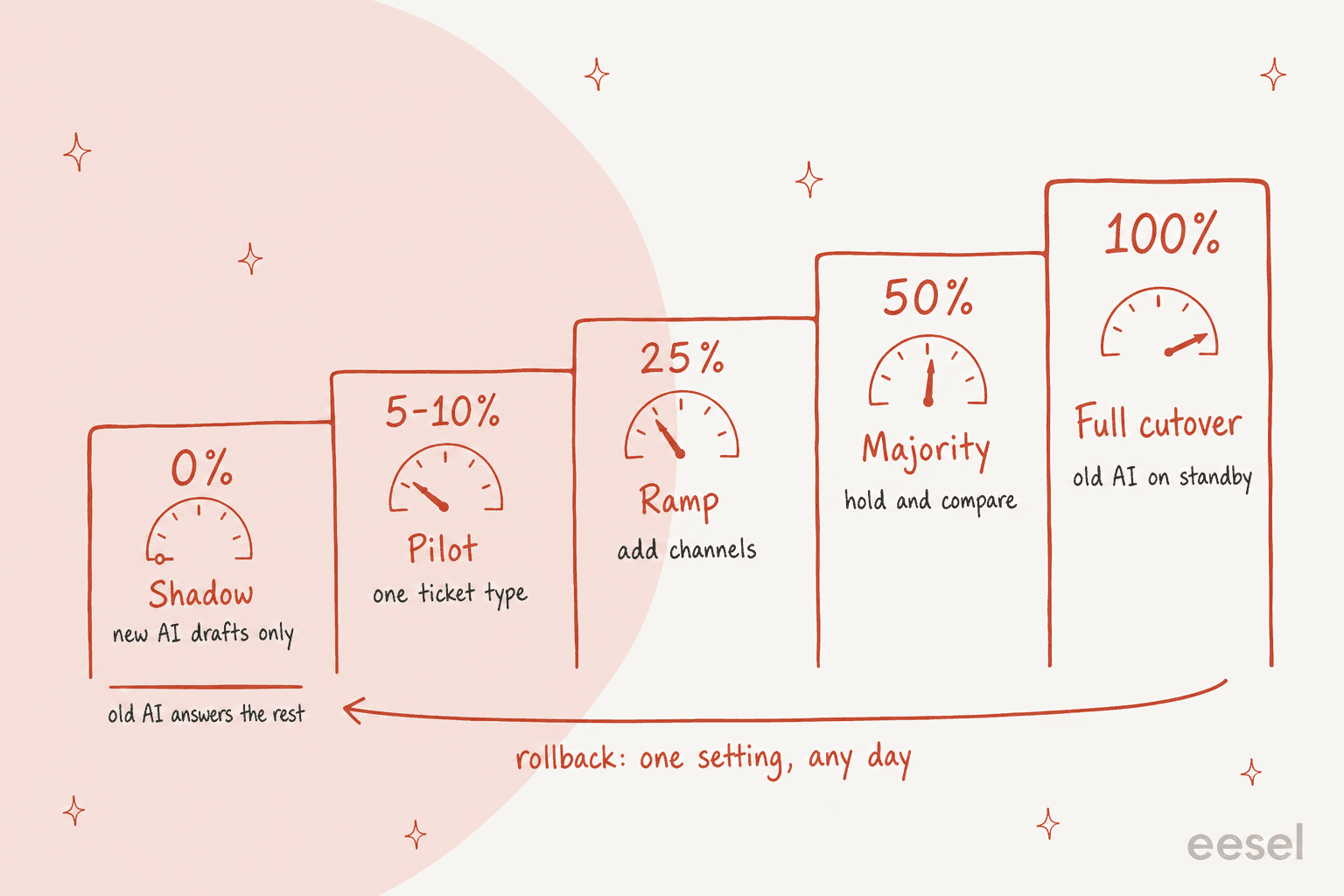
Now the part nearly every rollout playbook agrees on: phase the cutover instead of picking a date. The old AI keeps answering everything the new one hasn't earned yet, and the share moves up in steps.
| Phase | New AI does | Old AI does | Move on when |
|---|---|---|---|
| Shadow (about 1 week) | Drafts or internal notes only, nothing reaches a customer | Answers everyone | Drafts on the lane match what your team sends most of the time, and no draft proposes a wrong action |
| Pilot (about 2 weeks) | Answers 5 to 10% of one ticket type | Answers the rest | The pilot clears your written pass marks (the pilot scorecard has gates to copy) |
| Ramp (2 to 3 weeks) | 25%, then 50%, then 100%, adding a channel or ticket type at each step | Shrinks at each step | You've changed one thing per step and the numbers held |
| Rollback window (about 4 weeks) | 100% of new conversations | Configured, but off for new chats | No rollback trigger fired (see below) |
A 5 to 10% slice of one ticket type is the size I'd pick for a reason: big enough to show patterns, small enough that a wrong answer reaches a handful of customers rather than half your queue. And one rule keeps the numbers readable: change one thing at a time and log the date, because a wider slice and a new instruction on the same afternoon means you can't tell which one moved the result.
How you send a slice depends on the helpdesk. Here's what each vendor's own documentation gives you.
| Helpdesk | Send a slice to one AI | Switch the old AI off |
|---|---|---|
| Zendesk | Choose channels per AI agent; only one AI agent can be active on a channel. A/B traffic splits exist, but your account manager has to enable them | Untick the channel under Manage channels, then activate the other |
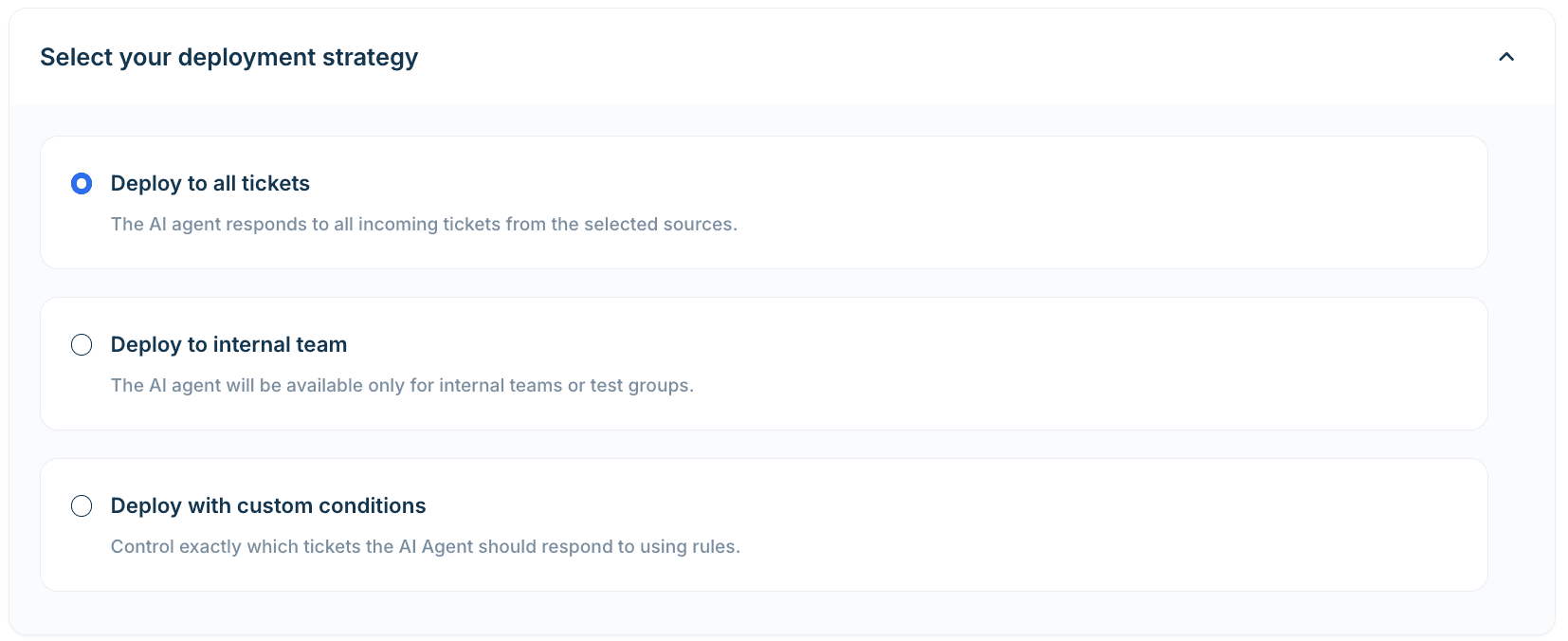
| Freshdesk | Per ticket source (mailbox, portal, form), with strategies "Deploy to internal team" and "Deploy with custom rules" | Deactivate the existing agent on that source before mapping a new one; deployment is immediate and covers new tickets only |
| Gorgias | Enable AI Agent per channel under Deploy (email, chat, SMS, social DMs, WhatsApp), and use the "Prevent AI Agent from answering" rule to exclude tickets by tag, sender or keyword | Flip the channel's ON/OFF toggle; excluded tickets get an ai_ignore tag |
| HubSpot | A conversation coverage percentage, working hours, and contact lists to include or exclude, in channel deployment | Turn the agent off under Account and Billing, or remove it from a channel |
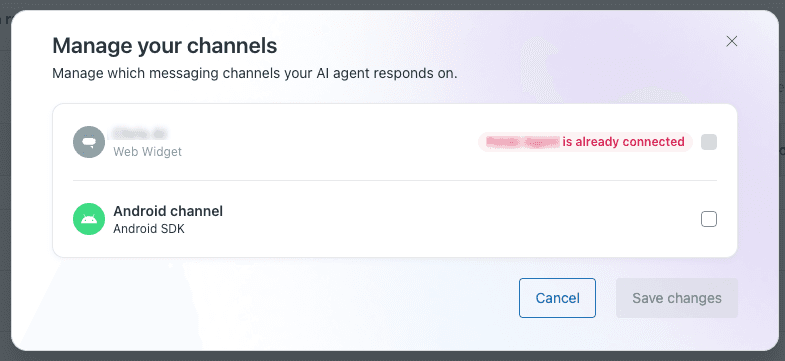
The Zendesk dialog above shows the constraint that shapes everything: one AI agent per channel. If the old AI is Zendesk's own and the new one is a third-party layer, you'll split by channel or by a tag or queue the third-party layer filters on, because Zendesk's own controls only govern Zendesk's own AI. Pick a split rule both sides can see (a channel, a tag, a queue, a customer list) and write it on the plan.
Luxedo's calendar is the one I'd copy, even though it wasn't replacing another AI. The projector maker Luxedo connected Gorgias to eesel in July 2026, spent August building the knowledge and instructions, and switched the ticket trigger on in the last week of August. eesel leaves an internal note with a draft reply and a summary, and a person sends it. Between 8 August and 8 September it prepared 21 tickets. Nobody was surprised by anything, which is the whole point of a ramp.
Here's a planner for your own version. Enter your start date and phase lengths, and the old contract's renewal date and notice period. It lays out the calendar and shows whether your notice deadline lands before or after the pilot's go or no-go, which is the part that surprises people.
Step 4: stop duplicate tickets when a third-party bot is involved
If either the old AI or the new one is a third-party bot on Zendesk, there's a rule change you can't skip. Zendesk's own notice says that from May 4, 2026 it enforces AI agent tickets for all bot-handled conversations, not only escalated ones, and that AI agent tickets become the exclusive ticket creation mechanism for conversations handled by AI agents and third-party bots. If your bot is also set to create its own tickets for bot-only chats, you now get two tickets for one conversation.
The notice asks for three things, and I'd treat them as a checklist for both the old and the new bot:
- Audit ticket creation. Look for "create ticket" actions in the bot platform and custom webhooks that make tickets from bot events. Zendesk suggests the releaseControl action if you want to attach metadata to solved tickets.
- Test and brief. Try the integration in a sandbox before the change reaches production, and show your team the AI agent ticket format.
- Disable the legacy path. Turn off any manual ticket creation that duplicates it.
Zendesk adds one reassurance: third-party bot interactions don't incur automated resolution charges, so these tickets add visibility, not a bill. They do take space, though. AI agent tickets count toward storage limits, they're read-only for most users, and triggers and automations don't fire on them until a conversation escalates to a person. Here's what that looks like from the admin's chair, from a thread posted a few days before I wrote this:
"The main issue is that there appears to be no way to disable Zendesk from creating an AI Agent ticket for EVERY SINGLE interaction an end user has with the bot, not just handoffs."

A reply in the same thread puts the practical upside well:
"Luckily they’re easy to exclude from reports and views, but definitely annoying to parse through when you need to find something."
The mechanism underneath is Zendesk's switchboard, and understanding it prevents most overlap bugs. Each conversation has exactly one active switchboard integration at a time, and the others sit on standby. So during a parallel run, "both bots live on the same channel" means one bot owns each conversation, and the default responder decides who gets new ones. There's a sharp edge to know about: if you delete a switchboard integration that was active in a conversation, new messages are reassigned to the default integration without a passControl webhook. Remove the old bot after its open conversations have closed, not before. The switchboard orchestration guide goes deeper.
On other helpdesks the same principle shows up in different words. Freshdesk lets each ticket source have one active AI agent, and flags a conflict if you try to map a second. The fix is the same everywhere: one owner per conversation, decided by a rule you wrote down. Duplicates aren't only tickets, either. Gorgias, for one, turns off Article Recommendations automatically when AI Agent goes live on chat, and suggests revisiting any custom auto-reply rules so shoppers don't get two messages. List your old welcome messages and auto-replies in Step 1 so you can switch them off on purpose.
Step 5: run both side by side and compare like for like
During the pilot and early ramp, you'll have both AIs live on different slices. Use that. The most useful comparison isn't the new AI against last quarter, it's the new AI against the old AI on the same ticket types in the same weeks, because seasonality, a product launch or a pricing change hits both slices equally.
Keep a holdout on the old AI while you ramp, the same way a pilot keeps a human-only control queue. Zendesk's A/B documentation puts the first group as the control group, and the pilot guide explains how to size it. Then compare four things, defined identically for both sides:
- Resolution: conversations the AI closed with no repeat contact in seven days, not the vendor's own resolved flag.
- Handoff rate and quality: how often it hands over, and whether the person receiving it has to re-ask.
- Repeat contact and CSAT: customers coming back about the same issue, and how they rate the exchange.
- Cost per handled conversation: each vendor bills a different unit, so convert both into cost per conversation your team would otherwise have answered.
That last one is easy to get wrong because the billing units differ so much: Zendesk bills automated resolutions, HubSpot's agent runs on HubSpot Credits, and Freshdesk's Freddy has its own session pricing. I'd check each vendor's current pricing page before you build the comparison, and use the CX AI metrics guide to keep the definitions straight.
Step 6: protect the conversations already in flight
This is the section I'd read twice. A customer who started a chat with the old AI at 2:55pm shouldn't be handed to a different AI at 3:00pm because you flipped a setting. The rule: route new conversations to the new AI, and let open ones finish where they started.
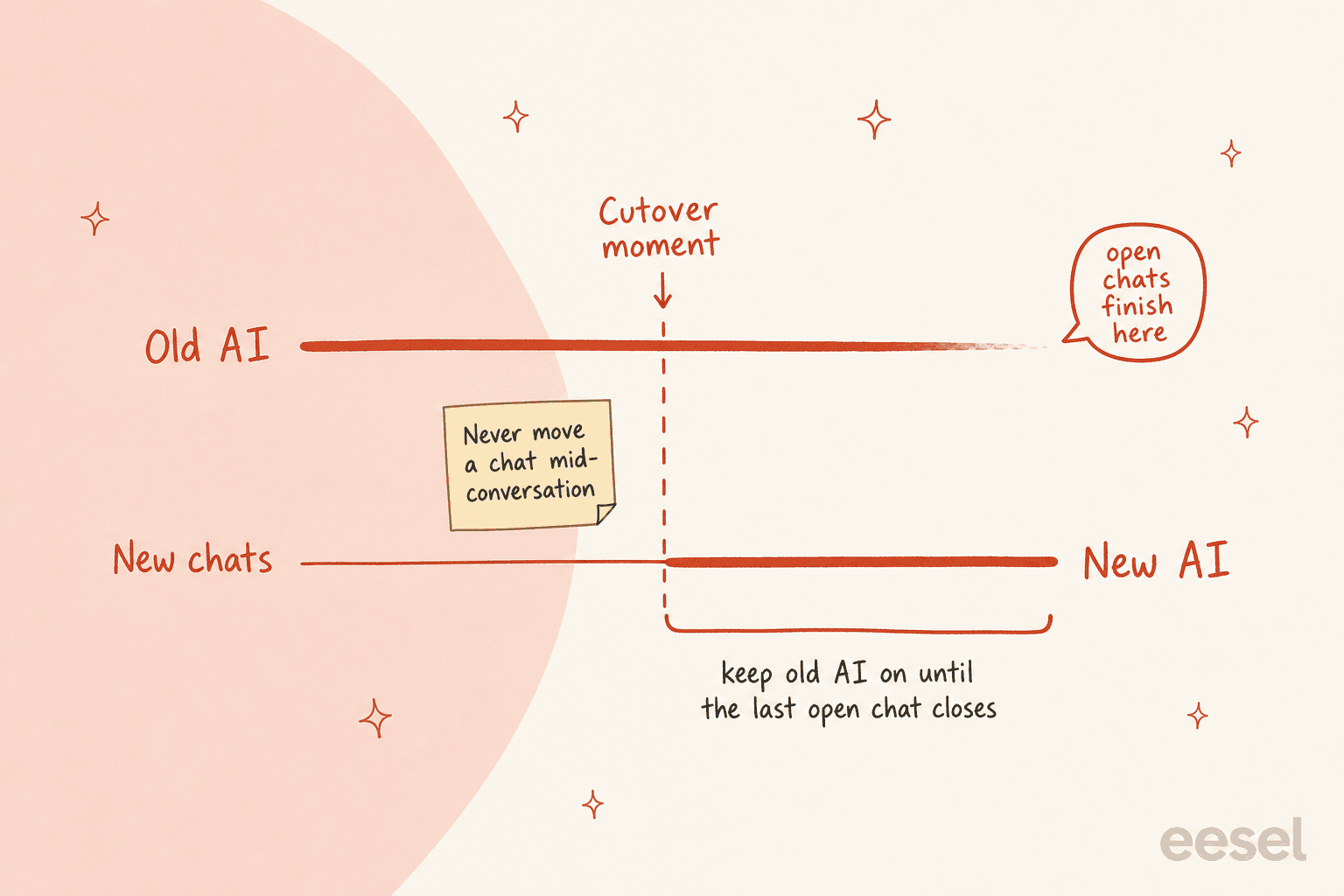
The vendors' own behaviour mostly agrees with that rule, which helps:
- HubSpot: if you turn the customer agent off, it keeps handling existing threads until the conversation is resolved, but gets no new ones.
- Freshdesk: deployment is immediate and covers new tickets only. Tickets that arrived before it aren't retroactively answered.
- Zendesk: a messaging AI agent ticket counts as ongoing until four days pass without a response, the AI releases control, or (for third-party bots) the bot decides it's resolved.
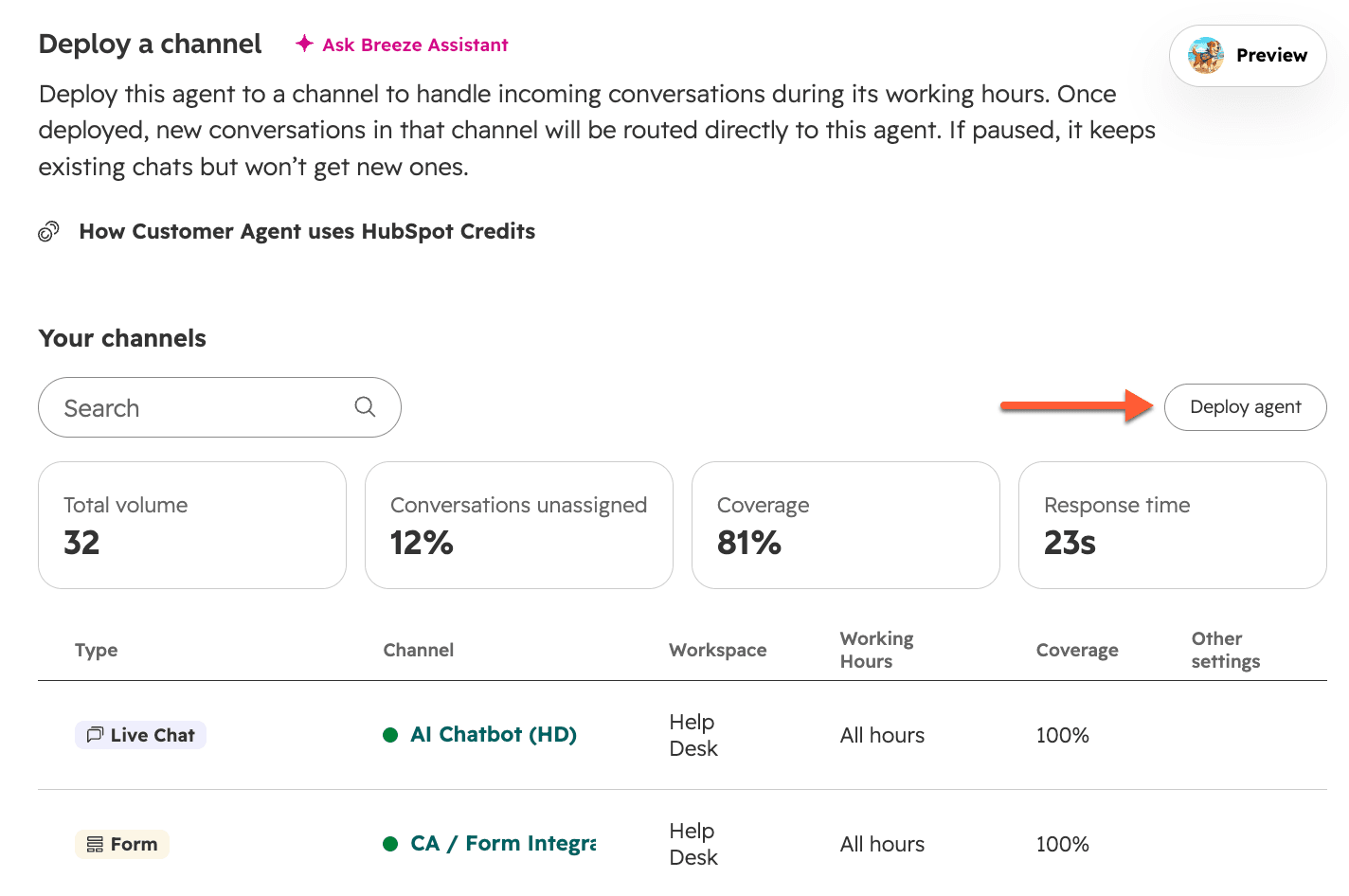
Then there's handoff and handback between an AI and your people, which behaves differently from what most teams assume. In Zendesk messaging, an agent remains the first responder until the ticket is closed. Handback only happens when the ticket moves from Solved to Closed, and by default that takes four days, so a customer who returns in that window still lands in the old conversation with the person, not the AI. You can shorten the "close ticket 4 days after solved" automation to an hour or extend it to 28 days, but keep a small buffer if you use CSAT, since the survey fires the moment a ticket is set to Solved. During a cutover that matters in a specific way: your "who answers returning customers" behaviour is governed by that timer, not by your AI setting.
Gorgias gives you a different set of handover controls: topics that always escalate, a toggle for whether the AI tells customers it's handing over by email or SMS, and on chat a confirmation step before it hands over. Whichever helpdesk you use, make sure the new AI's handoff carries the context a person needs, so the customer doesn't repeat themselves. The AI agent handoff best practices checklist and the Zendesk handoff guide cover what a good handover contains.
How long does the tail last? Check your own data: how long do AI-handled chats stay open before they close, and what's your longest realistic open time? That number is how long the old AI has to stay switched on for existing chats after the new one takes all new ones.
Step 7: brief your team before the first live day
Your agents are the people who'll notice problems first, and the ones most likely to find out about the switch from an angry customer if you don't tell them. Give them a one-page playbook before shadow starts. Mine has six lines:
- What's changing, and when. The phase calendar, in plain words, with the date each ticket type moves.
- Their job in it. They're the reviewers. Fifteen minutes a day reading yesterday's AI conversations, flagging wrong ones with a tag.
- What they'll see differently. On Zendesk, AI agent tickets are read-only for most users and escalated ones come back as New; on the other helpdesks, whichever label or note the new AI leaves.
- What to do on a handoff. Who picks it up, where the context sits, and what to say to a customer who asks "was I talking to a bot?"
- How to report a bad answer. One tag, one channel, answered the same day. A tag convention like
ai_oldandai_newmakes the comparison in Step 5 possible; AI support tagging has naming ideas. - Who can pause it, and when. Name a person on every shift.
The sales-call pattern I hear most is that teams want a co-pilot first and full automation later: AI drafts replies for agents, then graduates once trust exists. That fits a switch perfectly, because shadow mode is exactly that. Writing the review routine into your support SOP and keeping the policy change process tied to it means a new return window doesn't quietly turn into a wrong answer from the new AI in week three.
Rollback triggers, written down before you start
Decide what counts as a failure while nobody is upset. People who write the trigger mid-incident tend to talk themselves out of it. Here's the table I'd start from; the thresholds are my own starting points, so tune them to your volume.
| Trigger | How you'd see it | What to do |
|---|---|---|
| A wrong action reaches a customer (refund, cancellation, account change) | Daily review, or a customer complaint | Pause that action the same day; keep the lane on drafts until fixed |
| The AI states an invented policy or price | Daily review | Pause that topic, fix the source article, re-test |
| Requests for a person jump above the old AI's baseline | Handoff rate, or phrases like "agent" and "human" | Narrow the slice and look at the handoff topics |
| Repeat contact within 7 days runs 3 or more points above the old AI's baseline for two days running | Repeat-contact report | Roll the slice back to the old AI and error-analyse |
| CSAT on AI-handled conversations drops sharply against the old slice | CSAT by tag | Hold the ramp and read the low-rated conversations |
"Rollback" should mean flipping a setting, not rebuilding something. That's why the old AI stays configured through the rollback window: your pause lever is one toggle, such as untick-the-channel on Zendesk, the daily conversation limit on Freshdesk, the channel toggle on Gorgias, or turning the customer agent off in HubSpot. HubSpot has one quirk worth knowing: a customer agent can't be deleted once created, only paused, so the old one will still be there if you need it. Log every pause with a date and a reason. A pause isn't a failed switch, it's the system working.
Contract overlap and the cancellation window
The cheapest way to switch is to pay for two AIs for a few weeks. That feels wasteful, and it's still cheaper than the alternative, which is cancelling the old one at the start of the pilot and discovering in week three that you can't go back.
I'd keep three rules for the money side:
- Keep the old plan through the rollback window. If your contract ends sooner, ask for month-to-month for the overlap. The planner above shows exactly how many days you'd be short.
- Read your own order form for notice. Auto-renewal and notice periods are contract terms, not product documentation, so I can't tell you what your vendor's are. I can tell you that a 60-day notice period can land before your pilot's go or no-go, and that's the case worth negotiating around.
- Know each billing unit during overlap. Zendesk says third-party bot conversations don't incur automated resolution charges, so overlapping a third-party bot costs you that bot's plan, not Zendesk's per-resolution rate. HubSpot's agent stops being assigned to new conversations if your credits run out, which is a billing event that looks like an outage.
Before you cancel anything, export what you want. Ask the old vendor in writing which data it can hand over (conversation logs, analytics, configuration) and for how long after cancellation. Then close the loop in the planner: your notice date should fall after the pilot's go or no-go, inside or after the rollback window.
Mistakes I'd avoid
- Switching into your busiest weeks. Pick a quiet stretch: Norden-Frisia, a ferry line whose timetable fills from May, tried eesel in February, and sized its plan to seasonal volume afterwards.
- Moving a conversation mid-chat.
- Changing two things at once, then arguing about which one broke the numbers.
- Comparing the new AI against last quarter instead of the old AI's concurrent slice.
- Cancelling at pilot start because the pilot "looks fine."
How eesel handles a switch
I'm biased, so here's the plain version of where eesel fits and where it doesn't. eesel is an AI helpdesk teammate that plugs into the helpdesk you already have, so a switch doesn't require moving your tickets anywhere. It reads your help center, macros and past tickets directly from the helpdesk, which is why it needs nothing exported from the old AI. These are the integrations people switch on most:
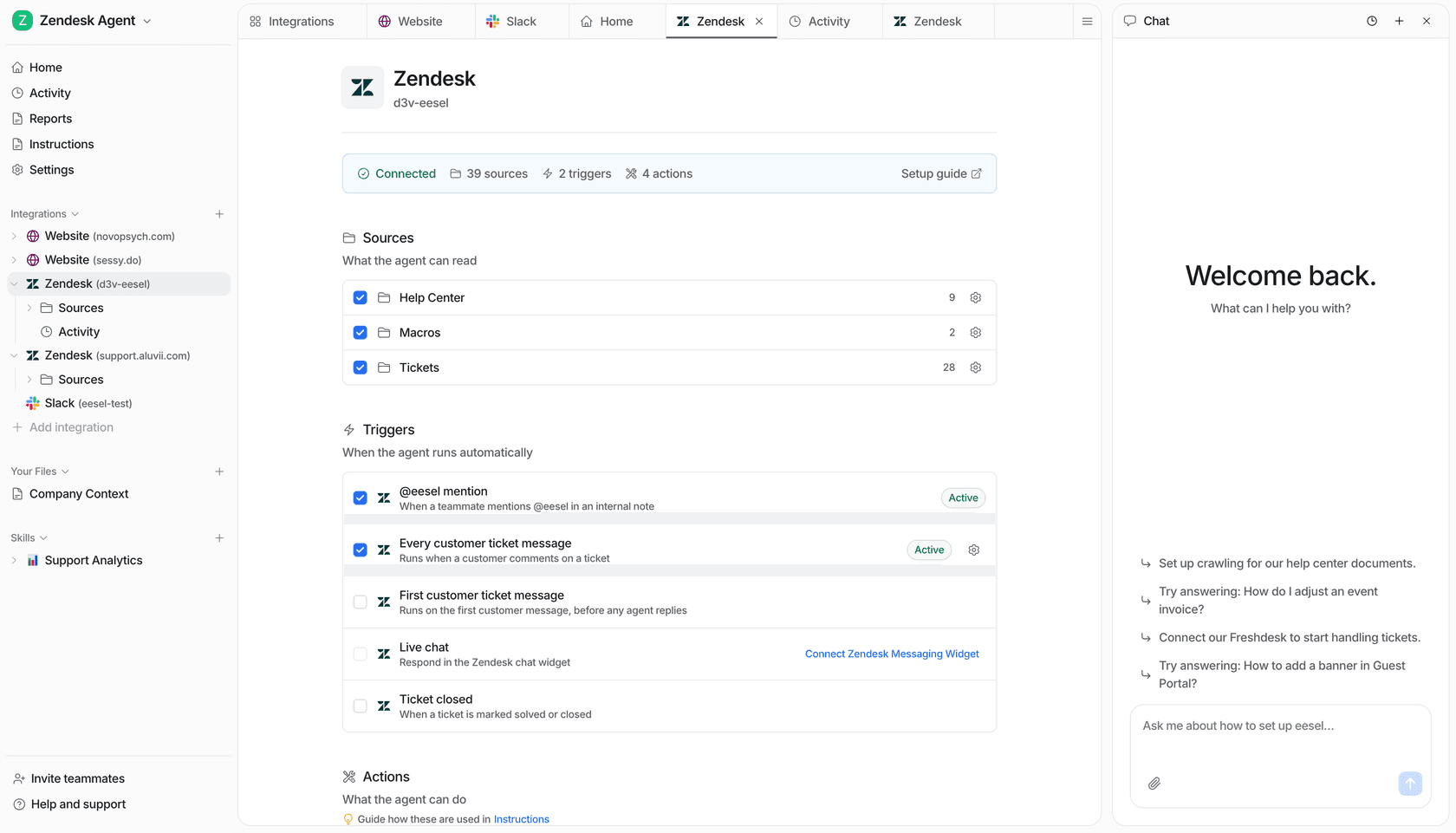
That maps onto the steps above:
- Portability: macros are the most portable asset you own. Koffer.ch, a Swiss luggage shop on Freshdesk, reads its macros first and uses a matching one word for word, in whichever of four languages the customer wrote. Every reply is a draft a person sends.
- Training and testing: Norden-Frisia, a German ferry line, connected Zendesk during a one-week trial in February 2025, pulled in its macros and the last three months of tickets, and signed up within days. Before any go-live, the simulation replays your past tickets so you see gaps first.
- Phasing: you can start with eesel waking only on an @eesel mention in an internal note, then move to every customer ticket message, and keep it on drafts while you review. That's your shadow week, built in.
- Pricing during overlap: eesel is fixed monthly credit plans, not a per-resolution rate. A ticket or a chat is one credit however long it runs, there's a free plan with 100 credits and no card, and Teammate starts at $299 a month for 500 credits, with every integration, agent and seat included.
The limits are worth stating plainly. eesel doesn't import another vendor's flows, intents or conversation logs that never became tickets, so you rebuild those as instructions, which for most teams takes less time than the original build. And if you only want the AI your helpdesk already includes, you don't need a layer at all; the comparison pages for Freddy, Gorgias AI Agent and HubSpot Breeze lay out where the trade-offs sit.
Try eesel
If you're moving off Zendesk AI agents, Freddy, Gorgias AI Agent, HubSpot Breeze or a third-party bot, Try eesel on your own queue first. Connect your helpdesk, let it learn from your past tickets, run a simulation, then start in drafts while your current AI keeps answering. It's the shadow week of this guide, and the free plan covers it.