


It seems like every week there’s a new AI-powered browser extension, and honestly, it makes sense. They all promise to make our lives easier by bringing company knowledge right into our workflow, saving us from the nightmare of switching between a dozen tabs just to find one answer. Atlassian has thrown its hat in the ring with Rovo, their version of an "AI teammate" that aims to pull all your info together and handle some tedious tasks for you.
So, is it any good? In this guide, we’ll take a closer look at the Rovo Browser Extension. We'll dig into its features, who it’s actually for, how much it costs, and where it falls short. We’ll also see how it compares to other tools, especially if your team's most important documents don't happen to live inside the Atlassian universe.
What is the Rovo Browser Extension?
The Rovo Browser Extension is the piece of Atlassian's Rovo AI platform that lives right in your web browser. It's built to give you access to Rovo’s main features, like its search, chat, and automated agents, on any webpage you're on. You can think of it as a little side panel or a new tab that’s always linked up to your company’s brain.
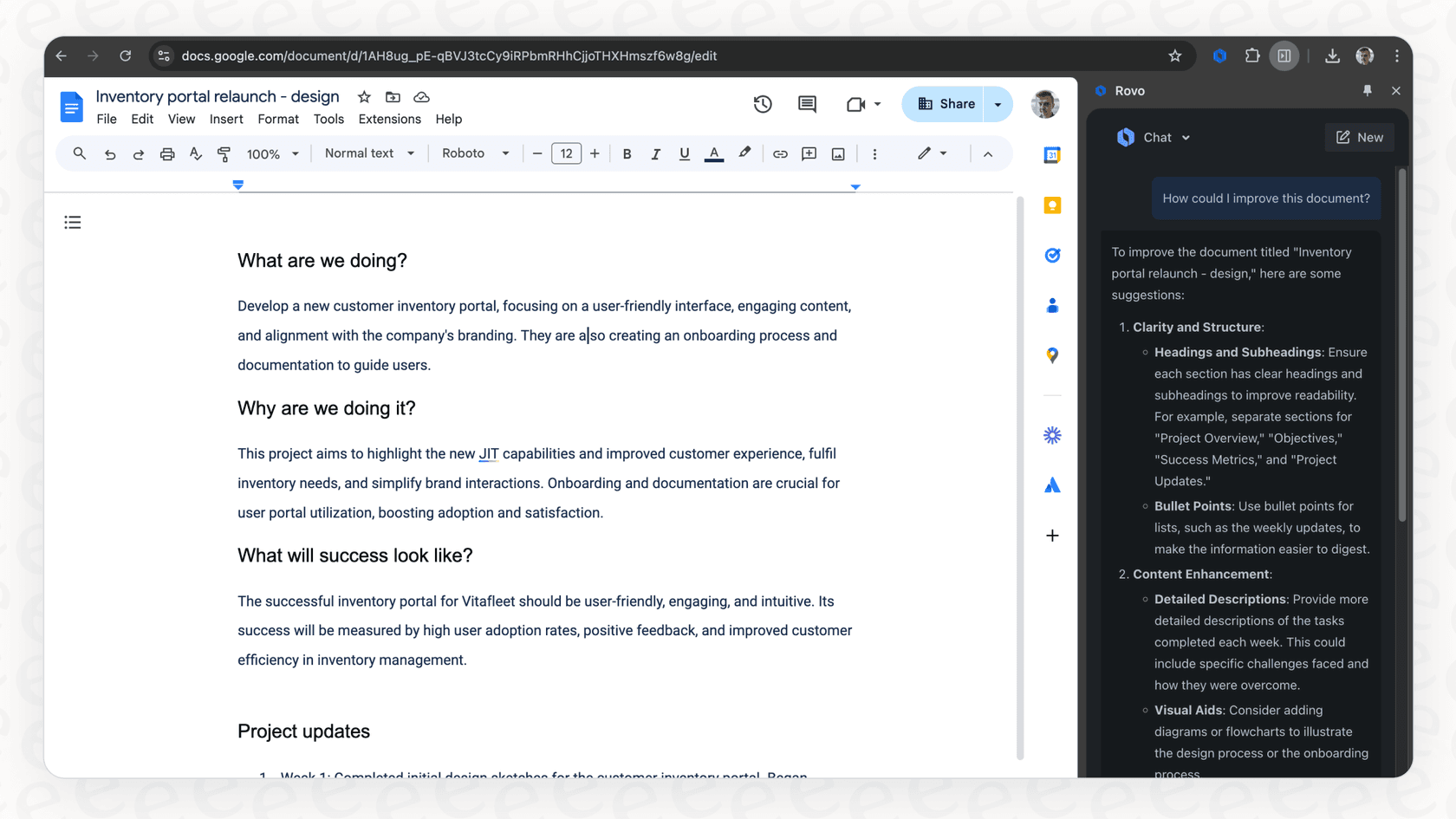
Its core function is to connect to your company's Atlassian tools, mainly Jira and Confluence, plus a handful of other apps. This setup lets you look up information, get quick summaries, and start automated tasks without having to stop what you’re doing.
Atlassian's docs say that when the "Use current tab as context" toggle is on and you ask Rovo to "Summarize this page", the extension reads the open page to answer, and that content is processed temporarily and not stored by Atlassian. You can also type "Rovo" plus a space in the address bar to jump straight to Rovo Search. On the Chrome Web Store the listing shows 100,000 users and a 4.5 rating from 92 ratings (checked 5 October 2026).
It's currently available for Chrome and Edge and is really designed for companies that are already on a paid Atlassian Cloud plan with Rovo switched on. The whole idea is to give you an AI sidekick that gets the lingo, projects, and data specific to your company.
Core features and capabilities of the Rovo Browser Extension
Alright, so what can you actually do with the Rovo extension? It really comes down to a few key things, and you'll notice they are all very rooted in the Atlassian ecosystem.
Universal search: Finding information across your tools
Rovo’s search feature lets you find things across Jira, Confluence, and a few connected apps like Slack or Google Drive, all from a new browser tab. It uses what Atlassian calls a "team graph" to try and surface results based on the people you work with most, which is a pretty clever idea.
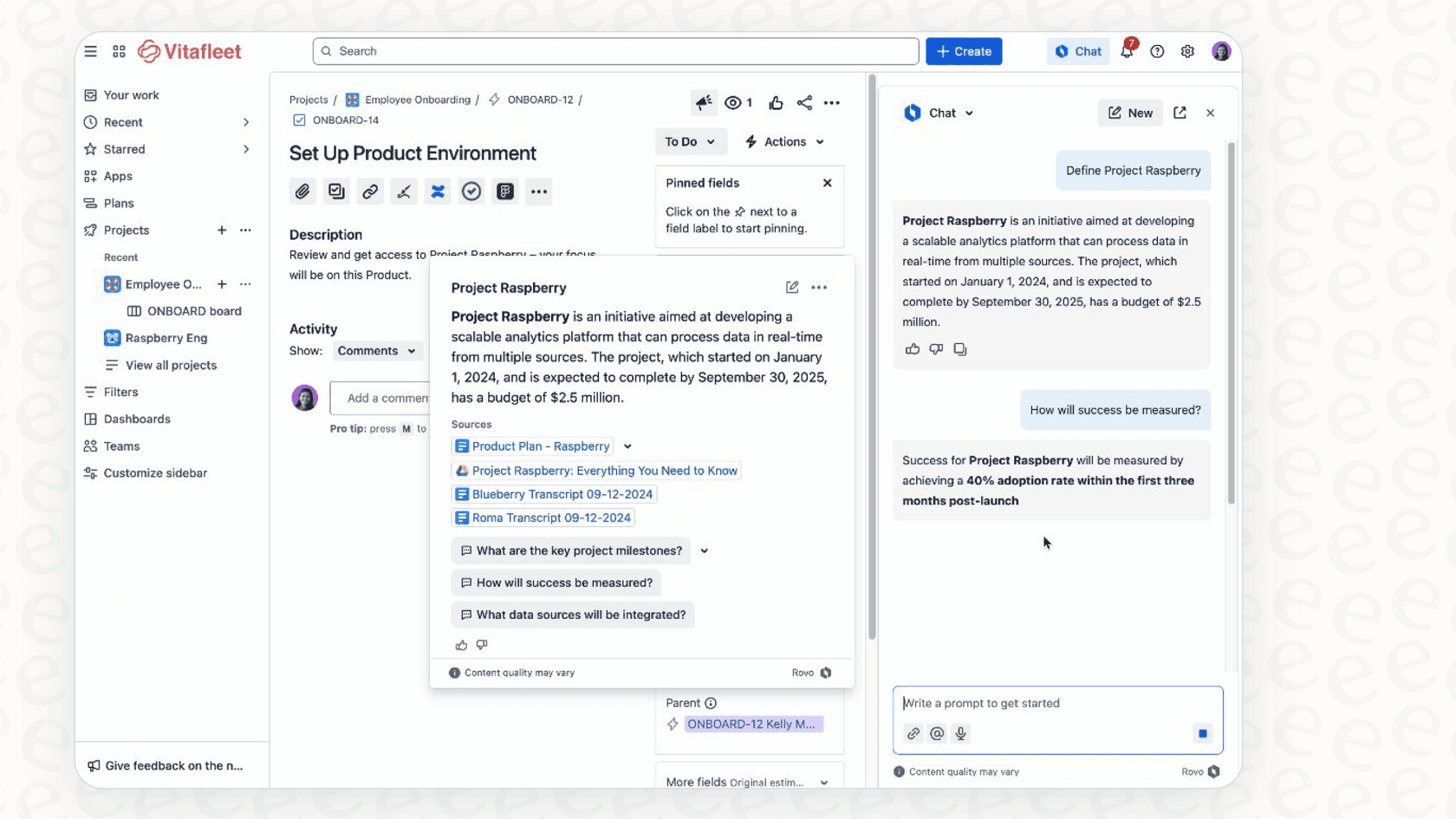
But here’s the thing: its search is most powerful when looking for information that’s already inside an Atlassian product. It can reach other tools through Rovo connectors, but each one has to be set up by an org admin, so coverage depends on what your admin has connected. For many companies the really important stuff is scattered everywhere, from help desks and CRMs to other wikis that nobody has connected yet.
And that’s where you might feel the pinch. A tool like eesel AI, on the other hand, connects to your help desk and knowledge sources in one click. It was built specifically to bring together knowledge from your support stack, including help desks like Zendesk and Freshdesk, wikis like Notion, and even the unstructured data from your old support tickets. It gives you a full picture, not just the part that one vendor owns.
Chat and agents: Your conversational AI teammate
With Rovo Chat, you can ask questions in plain English about your company's data and get answers back in a neat summary. You can also use it on any public website to ask for things in context, like, "Hey, can you summarize this long article for me?"
The more ambitious part of this is Rovo Agents. These are little automated helpers you can set up to do repetitive things, like drafting release notes, creating a bug report from a webpage, or generating OKRs from a project brief.
The catch? If you want to build your own custom agents, things can get technical, and fast. Atlassian gives you some pre-built ones, but they might not fit the specific, quirky workflows your business runs on. Getting a custom agent to work just right often takes more than just writing a simple prompt, and let's be honest, not everyone has a developer on speed dial to build a custom workflow.
This is where the simple, "do-it-yourself" approach of a tool like eesel AI really shines. With eesel AI, you can create powerful custom actions using a straightforward prompt editor. Need your AI to look up order info in Shopify or flag a high-priority ticket in your help desk? You can set that up yourself, putting the power directly in the hands of your support or IT teams without needing any code.
The new tab experience and contextual definitions
The Rovo extension adds a couple of other nice-to-haves. It can take over your browser's new tab page and turn it into a Rovo dashboard, giving you quick links and a search bar. It also offers AI-powered definitions for internal acronyms and project names when you hover over them in Atlassian apps and Google Docs.
While that sounds useful, the new tab page takes over by default, and a look at the Chrome Web Store reviews shows some users finding it a bit intrusive. The good news is that it is optional: open the extension's Options from the puzzle-icon menu and switch off "Use Rovo as new tab page". An extension that changes your browser setup is worth knowing about before you roll it out to a team.
In comparison, tools like eesel AI are designed to fit into the places your teams already are, whether that's inside your help desk, Slack, or Microsoft Teams, instead of trying to change your browser habits. This usually makes it a lot easier for teams to start using it, since it feels like an upgrade to their current process, not a replacement.
Setup, use cases, and integrations
So, who is Rovo really for, and how does it fit into a company’s existing tools?
Installation and target audience
Getting the extension itself is easy, just a quick install from the Chrome Web Store (Edge works too). But to actually do anything with it, you need to sign in with an Atlassian account on a site where Rovo is enabled, which means a paid Standard, Premium, or Enterprise Cloud plan.
It's pretty clear that the main audience is developers, project managers, and other technical folks who are already deep in the Atlassian world. If you spend your days bouncing between Jira tickets and Confluence pages, Rovo is meant to feel like a natural fit.
Primary use cases
Based on its features, here are a few situations where the Rovo extension could be genuinely useful:
-
You need to search for a Jira ticket but don't want to leave the page you're on.
-
Someone sends you a link to a massive Confluence document, and you want a quick summary before diving in.
-
You’re on a webpage and spot a bug, and you can use an agent to help you start drafting a report.
-
You come across an internal project acronym you've never seen before and can get a quick definition without having to ping someone on Slack.
Integrations and knowledge sources
Rovo connects to third-party tools through connectors that your org admin sets up. Atlassian's catalog lists around 60, including Slack, Figma, Google Drive, GitHub, Zendesk, and ServiceNow, and a lighter Smart Link option that needs no admin.
The main limitation here is setup: connectors are admin-managed, and on most sites each app can be connected to only one workspace. The catalog skews toward developer and design tools, so how deep it goes for customer support platforms, ITSM tools, or e-commerce backends depends on what your admin connects and how.

This is where the difference between a general-purpose AI and a specialized one really matters. The AI Agent from eesel AI was built from the ground up for support and IT automation. It comes with deep, one-click integrations for Zendesk, Freshdesk, Gorgias, Jira Service Management, Shopify, and many others. While Rovo is a solid choice for a team working on code in GitHub, eesel AI is the better fit for a team that needs to solve a customer issue by pulling order data from Shopify, checking a return policy in a Google Doc, and escalating a bug to Jira, all from one place.
Rovo pricing: What does the Rovo Browser Extension cost?
The Rovo Browser Extension is free to install, but you only get value from it if your company is on a paid Atlassian Cloud plan with Rovo. You aren't paying for the extension; you're paying for the AI engine behind it.
Rovo is no longer a separate purchase. Atlassian's pricing page says it is available on Standard, Premium, and Enterprise Cloud plans of Jira, Confluence, and Jira Service Management, and it is switched on automatically. Usage is metered in Rovo credits that pool at the organization level: per user per month, Jira and Confluence plans include 25 (Standard), 70 (Premium), or 150 (Enterprise), and the Service and Teamwork Collections include 250, 700, or 1,500. A quick Chat answer costs 10 credits, while Rovo Search inside Atlassian apps is free. Atlassian's pricing page notes that extra usage is on by default, with alerts at 80% and 100% of your allowance.
The catch with a per-seat allowance is that your credit pool grows with headcount rather than with how much work the AI does. Credits reset monthly and do not roll over, so a team of 50 where only 10 are heavy users carries 50 seats of allowance, and a busy month can run into the extra-usage charges.
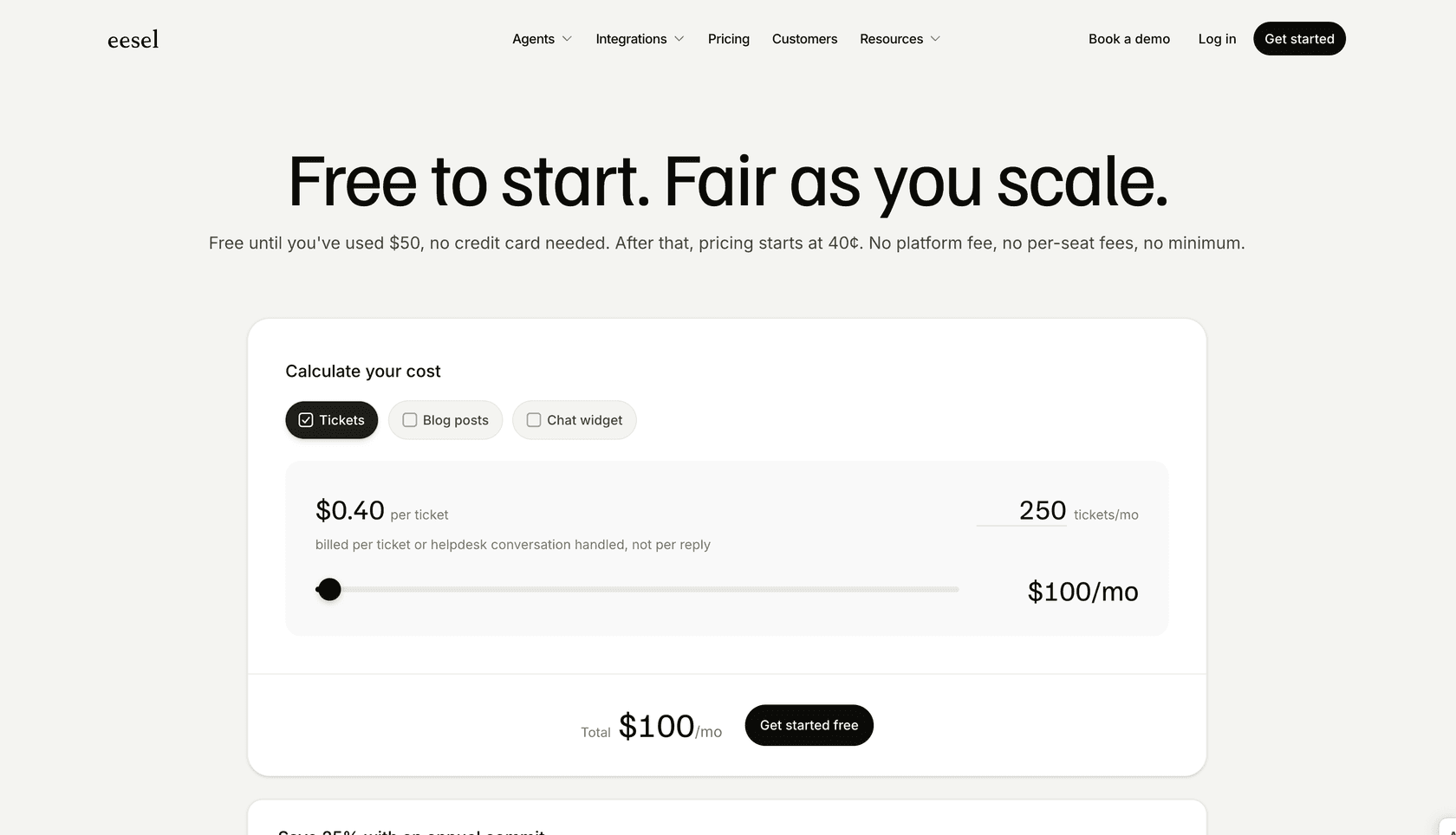
eesel AI takes a different route at eesel.ai/pricing: one fixed monthly price sized to volume, with no per-seat fee. The free plan includes 100 credits with no card, and paid batches run from $299/month for 500 credits (1,000 for $499, 2,500 for $999, 5,000 for $1,899). One credit is one ticket or one chat, however many replies it takes, and every integration and channel is included. You can cancel any time.
The verdict: Is the Rovo Browser Extension right for you?
So, what's the bottom line?
For teams that practically live inside Atlassian tools, the Rovo Browser Extension can be a genuinely helpful sidekick. It does a great job of cutting down on context switching and keeping project information close at hand. If your company's collective "brain" is mostly stored in Jira and Confluence, it’s a logical and smoothly integrated option.
However, its usefulness drops off a cliff for companies where important knowledge is spread out everywhere else. If your most critical data is in help desks, CRMs, e-commerce platforms, or a mix of different document types, Rovo is only ever going to show you a tiny piece of the whole picture.
| Feature | Rovo Browser Extension | eesel AI |
|---|---|---|
| Primary Audience | Developer & PM teams | Customer service, ITSM, internal support |
| Core Strength | Atlassian ecosystem integration | Unifying knowledge from all company apps |
| Integrations | ~60 admin-managed connectors | Help desks, wikis, chat, one-click setup |
| Setup | Tied to Rovo platform | Self-serve, setup in minutes |
| Pricing Model | Included in paid Cloud plans, per-user Rovo credits | Fixed monthly plan from $299 (500 credits) |
To put it simply:
-
Rovo is built for Atlassian-centric developer and project management teams.
-
eesel AI is designed for customer service, ITSM, and internal support teams that use a variety of tools.
Rovo's setup is tied to the broader Atlassian Rovo platform, while eesel AI is built to be self-serve so you can get up and running in minutes. Rovo reaches outside Atlassian through admin-managed connectors, whereas eesel AI connects to your help desk, wikis, and chat platforms in one click. Finally, Rovo's credits are metered per user and pool by seat count, while eesel AI's price is a fixed monthly plan that does not change with team size.
If your main goal is to automate customer support, deflect IT tickets, or set up an internal Q&A bot that can pull answers from all of your company's knowledge, you'll probably be happier with a platform that was designed specifically for that job.
Your alternative: Automate support and unify knowledge with eesel AI
For businesses that need an AI solution that is flexible, powerful, and genuinely easy to use, eesel AI is the way to go. It’s built to solve the very problems that tools like Rovo aren't equipped to handle.
Here’s why it’s a better fit for most support and IT teams:
-
Get started in the time it takes to drink a coffee. You can connect your help desk and knowledge sources with a single click. No drawn-out sales calls or complicated setup needed.
-
You're in complete control. From a simple dashboard, you decide exactly which tickets the AI should handle and how it should respond.
-
Bring all your knowledge together. Train your AI on old tickets, help center articles, Confluence, Notion, Google Docs, and more.
-
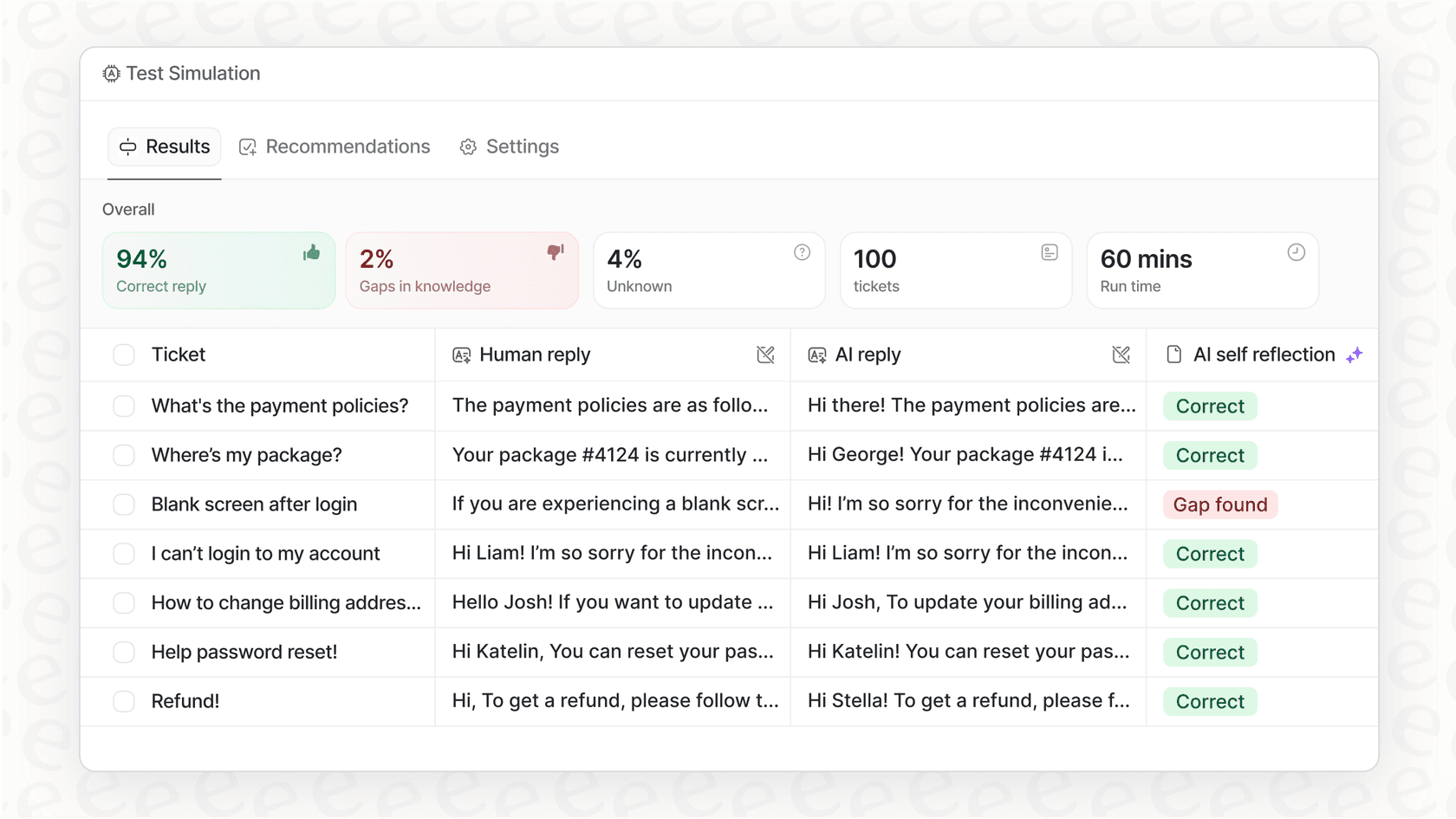
Test it out with zero risk. Use the simulation skill to score the AI's answers against hundreds of your past tickets, with suggested fixes, before you ever turn it on for your customers.
Why settle for a tool that can only see a fraction of your company's brain?
Ready to see what a truly unified AI support agent can do? Try eesel free with 100 credits and no card, or book a demo with our team.
Frequently asked questions
Is the Rovo Browser Extension available as a standalone free tool?
The Rovo Browser Extension is free to install, but it signs in with your Atlassian account and needs Rovo on your site. Rovo is included on Standard, Premium and Enterprise Cloud plans of Jira, Confluence and Jira Service Management, and a metered credit allowance applies. It is an access point to that AI engine, not a standalone free product.
What types of information can I access and search for using the Rovo Browser Extension?
The Rovo Browser Extension primarily allows you to search for information within Atlassian tools like Jira and Confluence, along with the third-party apps your admin has connected, such as Slack, Google Drive, GitHub, Zendesk, or ServiceNow. Its search capabilities are strongest for data residing within the Atlassian ecosystem.
Who is the Rovo Browser Extension most suited for within a company?
The Rovo Browser Extension is primarily designed for developers, project managers, and technical teams who are already heavy users of Atlassian products. It aims to streamline workflows for those deeply integrated into the Atlassian ecosystem.
How does the Rovo Browser Extension handle integrations with tools outside of Atlassian?
The extension uses the same connectors as the rest of Rovo, so it reaches whatever your org admin has connected. Atlassian lists around 60 connectors, including Slack, Google Drive, GitHub, Zendesk, and ServiceNow. Each connector needs an admin to set it up (or a Smart Link for a lighter version), so coverage depends on your admin, and specialized ITSM tools and customer support platforms are only as deep as those connectors go.
What are the primary functions I can perform with the Rovo Browser Extension beyond simple search?
Beyond universal search, the Rovo Browser Extension offers Rovo Chat for conversational AI queries and Rovo Agents for automating repetitive tasks like drafting reports or creating bug tickets. It also provides contextual definitions for internal acronyms within Atlassian apps and Google Docs.
Can I disable the new tab page feature that comes with the Rovo Browser Extension?
Yes. Atlassian's docs say you open the extension's Options from the puzzle-icon menu and switch off "Use Rovo as new tab page". The new tab page gives you a Rovo search bar and custom links, but it is optional if you prefer your own browser setup.